Where do AI assistants get your prices, and how do you make pricing questions in AI answers come out right? When ChatGPT, Gemini, Perplexity or Google's AI Overviews answer "how much does it cost," they use whatever price they can read: on your website, your Google Business Profile, Yelp, or a directory listing you forgot about. If you never published a price, a range or what drives the cost, AI either skips you or quotes something stale that belongs to someone else. The fix is to publish your pricing once, clearly and with a date, and then make outside listings match it.
This guide covers one of the most overlooked parts of AEO (answer engine optimization), the work of getting named accurately in AI-generated answers. You may also see it called GEO, generative engine optimization; both terms describe the same goal. Many small businesses keep prices off their site on purpose: "call us for a quote." In classic search that was a choice. In AI answers, the gap gets filled by someone else. If you want to see what your site tells AI today, the free AI visibility analysis checks whether your services are clearly described and whether you have an FAQ section that answers common questions.
Why pricing questions in AI answers matter so much
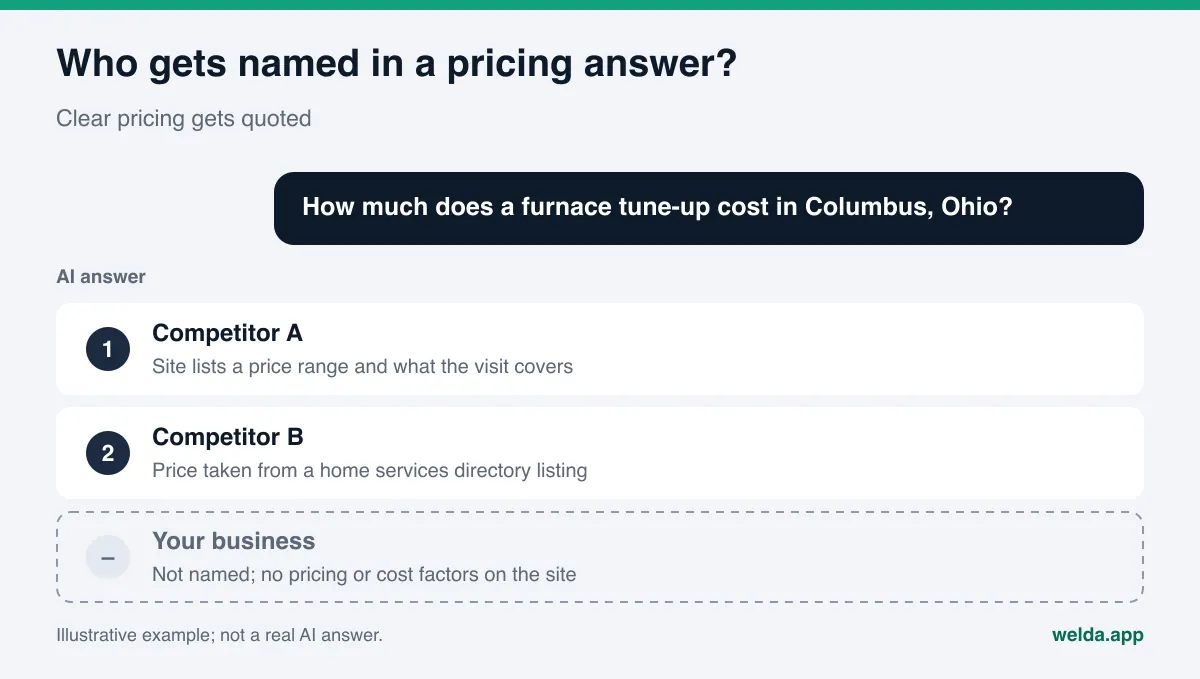
When someone asks an AI assistant "how much does a furnace tune-up cost in Columbus" or "boutique hotels in Charleston with breakfast included, price per night," they do not get a page of links. They get a paragraph. That paragraph usually names two or three businesses and gives some sense of price. For many people, it becomes the shortlist.
Pricing questions sit closer to a purchase than almost any other question. Someone asking "best HVAC company near me" is still browsing. Someone asking "what does a tune-up cost" is budgeting. If your name is missing from that answer, you are missing at the moment the decision gets made.
The risk is not only invisibility. Your pricing can also appear wrong. When an AI assistant cannot find a price for you, it tends to do one of three things:
- Leave you out and name a competitor who publishes pricing.
- Quote a price from a directory, an old menu photo or a forum thread. That number may be two years old.
- Give a generic industry figure and mention you next to it. The customer then calls expecting that figure.
The last two lead to phone calls that start with "that price is out of date." Customers do not blame you for the AI's number, but they carry the disappointment into the conversation. We cover the general process of correcting AI mistakes in what to do when ChatGPT has wrong information about your business; pricing is the most common and fastest-aging version of that problem.
How customers ask AI about price
Pricing questions come in several shapes, and each shape is answered by different information. Separating them tells you what to put on your site. The table below lists common types and what AI tends to look at. The example questions were written for this article and are illustrative.
| Question type | Illustrative example | What AI looks at |
|---|---|---|
| Direct price | "How much is brunch at a cafe in Austin's South Congress area?" | Menus, price lists, the menu on Google Business Profile |
| Price range | "What does a boutique hotel in Savannah cost per night?" | Room pages, booking sites, seasonal notes |
| Affordable option | "Affordable hair salon in Brooklyn with good reviews?" | Posted prices, review language about value |
| What is included | "Does the room rate include parking and resort fees?" | Package descriptions, FAQ, fee disclosures |
| Comparison | "Which is cheaper, A or B?" | Published prices of both, directory listings |
| Cost drivers | "What affects the cost of a roof replacement?" | Explanations on service pages, expert content |
Notice that in four of the six types, your own page can be the main source. When AI finds a clear answer on your site, it tends to use it. When it does not, it looks elsewhere.
The "affordable" question needs extra care. Here AI reads not only numbers but the language in reviews: "great value," "a bit pricey but worth it." So pricing visibility also depends on how you reply to reviews. A calm, factual reply to a price comment on Yelp or Google puts accurate pricing information on the record one more time.
The share of pricing questions differs by business. For a restaurant, menu prices come up daily. For a contractor, the question usually arrives as "what affects the cost." When you start tracking, look at which shape dominates in your category; the format you publish should follow it.
Where AI gets pricing information
AI engines do not pull prices from one place. Assistants that can search the web read the pages they find at the moment of the question; answers without a live search may rely on older training data. In practice, pricing comes from these sources:
- Your website. Service pages, menus, room pages, price lists and FAQ. This is the only source you fully control.
- Google Business Profile. You can add a price to each service, and food and drink businesses also get a menu editor. Google's help page on managing services asks you to put the price in the price field, not in the service name.
- Review and directory sites. Yelp, Tripadvisor, Angi, menu aggregators and booking sites. These often hold listings you have not touched in years.
- User content. Reviews, Reddit threads, community forums. A sentence like "I paid this much last spring" can surface as a price in an answer.
- News and list articles. "Best brunch spots and what they cost" roundups. They keep getting read long after the prices change.
Two of these you manage directly: your site and your Google Business Profile. The rest are either listings you could update but have forgotten, or content you cannot touch at all. The way to reduce the weight of content you cannot change is to make your own sources clearer, newer and more consistent. To understand which page an AI answer relies on, see our guide on how to get cited by AI.
There is also structured data. In the LocalBusiness markup on your site, the priceRange property describes your general price level as text, such as "$$." It is not a price list, but it tells machines plainly whether you are budget, mid-range or premium. The real prices should still live in the readable text of the page.
What to publish if you do not want to list prices
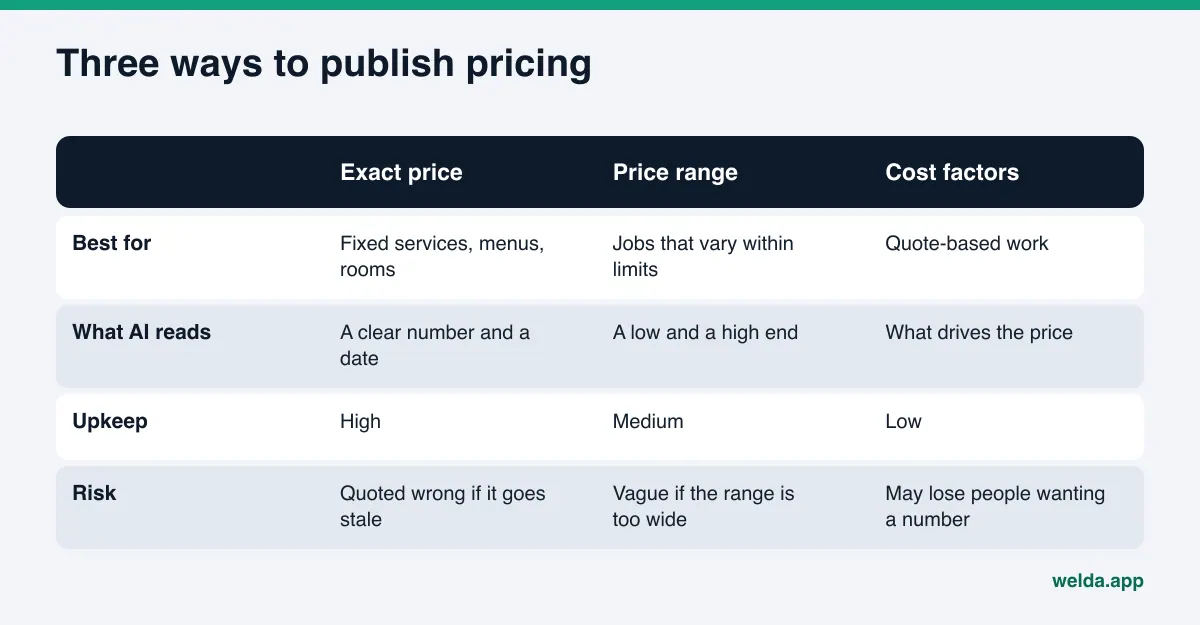
Not every business can post a number. Remodeling, legal work, custom design or anything that needs a site visit gets priced after you see the job. That does not mean you have to sit out pricing questions. There are three formats AI can read.
Exact price. If you sell menu items, rooms, packages or fixed services, this is the clearest route. Put what is included next to the number, and a last-updated date. The date tells both AI and customers how fresh the information is.
Price range. If the price varies but within known limits, publish the low and high end and a sentence or two on what moves it. "Rates vary by room type and season; the lowest rates are usually in these months" says far more than a page with no numbers at all.
Cost factors. If you cannot give a number, explain what drives the price: square footage, materials, time, crew size, travel. Then describe how quoting works: when the site visit happens, how fast the quote arrives, and whether the visit is free. On a "what affects the cost" question, AI can cite this page and name you as the business that explains the process clearly.
Saying nothing looks like a fourth option, but it simply hands the gap to someone else. A competitor's "what affects the cost" page gets read far more than your silence. To see which question a competitor wins and which source it relies on, see AI competitor analysis.
What a pricing page needs, by business type
The right pricing format depends on the kind of business. The table below lists the minimum information a site should carry for common business types and the mistake we see most often. Treat it as a general frame and adapt it.
| Business type | Minimum on your site | Common mistake |
|---|---|---|
| Restaurant, cafe | Menu with prices as text, plus a date | Menu only available as a photo or PDF |
| Hotel, inn | Rate range by room type and season, mandatory fees, taxes and what is included | Rates only visible on booking sites |
| Salon, spa | Starting price per service, how length or time changes it | Promo pricing left up after the promotion ends |
| Home services (HVAC, plumbing, roofing) | Cost factors, how estimates work, whether there is a trip or diagnostic fee | Only "call for a quote" |
| Online store | Product price, shipping cost and the free shipping threshold | Shipping and fees only appear at checkout |
The mistakes share one pattern: the information exists, just not where AI can read it. A menu in a photo is readable to a person, but harder to quote than a menu written as text. The rate on a booking site is correct, but when your own site does not carry it, AI cites the booking site and sends the customer there.
How to fix pricing in AI answers, step by step
The sequence below is built to make pricing consistent on your site and in outside sources. Each step uses the output of the one before.
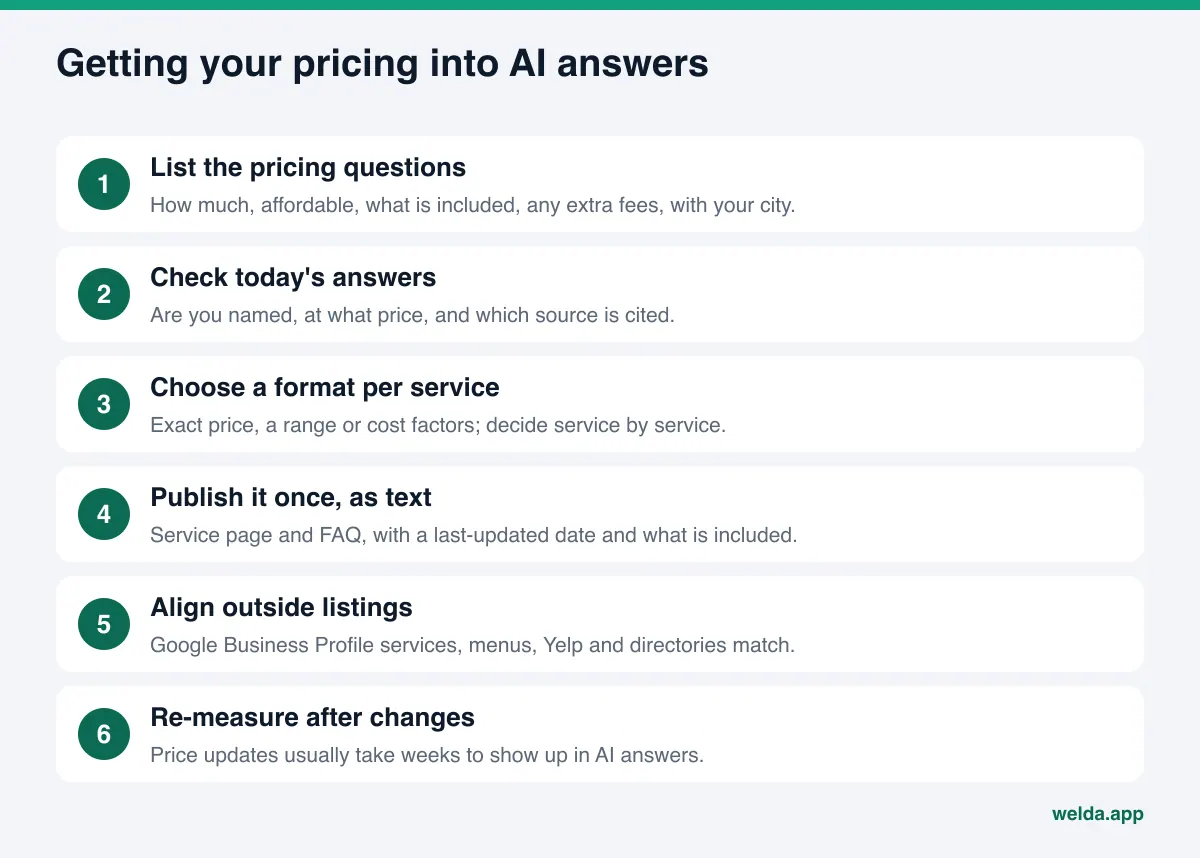
- List your pricing questions. Write down the price questions customers ask by phone, text and in person. Look for "how much," "affordable," "is it included," "any extra fees." Add your city or neighborhood to turn them into the questions people type into AI.
- Check today's answers. Ask a few AI assistants. Are you named? At what price, and based on which source? A one-off test points the way, but answers change from question to question and from run to run, so regular measurement is more reliable.
- Pick a format for each service. Exact price, range or cost factors. Different services can use different formats.
- Publish it once, as text, where people can see it. Do not bury prices in an image of a menu. Write them on the service page, in a pricing section and in the FAQ. Use the same number and the same date everywhere.
- Spell out what is included. Taxes, service charges, breakfast, parking, materials, travel. "Is it included" questions make up a large part of pricing questions and are the easiest to misread.
- Align outside listings. Google Business Profile services and menu, Yelp, Tripadvisor, Angi, booking sites. Every listing with an old price sends AI a conflicting signal.
- Repeat when prices change. Put price updates on a calendar. When the date on your site changes, check outside listings the same day.
- Measure again. New information usually takes weeks to show up in AI answers. Not seeing a change after a week or two does not mean the work was done wrong.
A price change behaves a lot like a move or a rebrand: the old information keeps circulating for a while. The same logic from updating AI answers after a rebrand or move applies here: your own sources first, then the most-read outside listings.
Pricing rules to keep in mind
Pricing is a consumer protection matter, not just marketing. In the US, the FTC's Rule on Unfair or Deceptive Fees took effect on May 12, 2025, and covers businesses that offer or advertise live-event tickets or short-term lodging, including hotels and vacation rentals. According to the FTC's FAQ on the rule, a business that shows a price must disclose the total price up front, including mandatory fees it knows about; government charges, shipping and optional add-ons can be left out of that total but must be disclosed before payment.
That rule is about how you advertise prices, not about AI. But the logic overlaps with AEO: the price a customer sees should be the price they pay. A hotel that lists a nightly rate on its site without the mandatory resort fee creates both a compliance question and an inconsistency that AI may repeat.
Other industries have their own limits. Healthcare, legal services and licensed trades may face state rules on advertising prices or discounts. Check the rule with your licensing board or counsel before you write a pricing page. This article is general information, not legal advice.
Then there is language. "Lowest price in town," "guaranteed best rate" and similar phrases carry comparative advertising risk, and they give AI nothing concrete to rely on. AI can read a number and a list of what is included. It usually cannot verify a superiority claim.
How Welda handles pricing questions in AI answers
Welda is software that measures where a business appears in AI answers and fills in the missing information on the business's behalf. For pricing, three parts of it do most of the work.
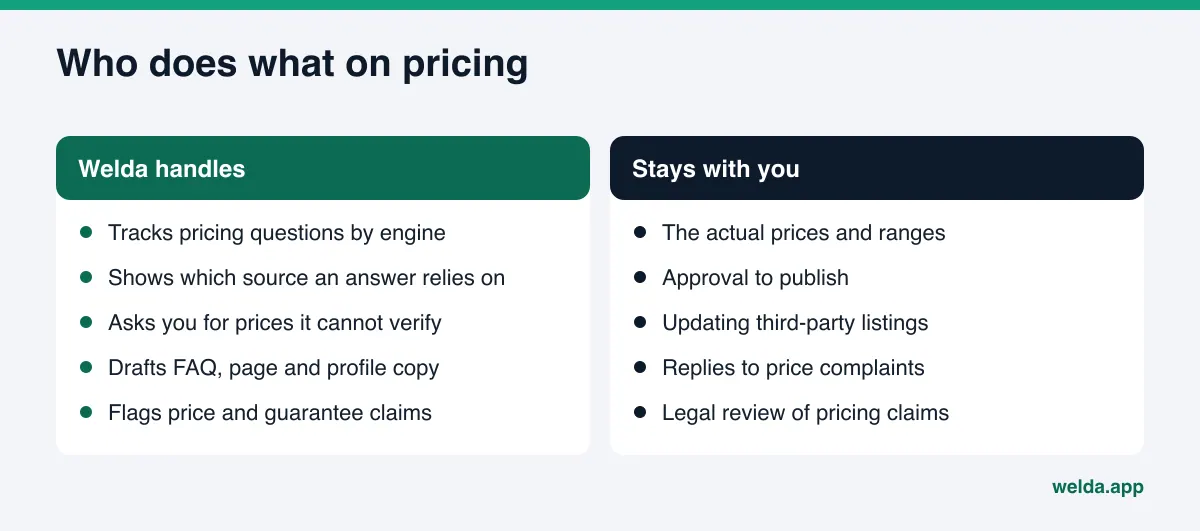
1. Tracking pricing questions separately. On the questions screen in the Welda dashboard, every customer question is asked three times each on ChatGPT, Gemini, Perplexity and Google AI, and the screen shows question by question where your name appears and in what position. When you add pricing questions to that list, two things become visible: whether you drop out on price questions while showing up on general ones, and which source the competitor who wins the price question is relying on. The sources screen lists the sites AI draws from and where you are missing; that is where you can tell a stale price is coming from an old directory listing. For example, an inn might see that it gets named on "is breakfast included" but that only booking sites show up on "price per night." The decision follows: add a rate range and seasonal note to the room pages.
2. A to-do list that does not invent prices. Prices are among the first things Welda cannot reliably read from a site. Welda does not guess. It leaves the field empty and asks you in the "information we need from you" section of the to-do list. Once you enter a price or range, it flows into the page copy, FAQ answers and profile text Welda drafts. If your Google Business Profile is connected, the profile copy goes through that connection; if not, the task shows up as a manual item with the text ready to paste. Updating third-party listings like Yelp stays with you, but Welda tells you which listing to fix and what to write.
3. A compliance check before anything goes live. Welda's compliance check flags patterns like prices, guarantees and superiority claims before publishing. If a sentence like "best price guaranteed" ends up in a draft, it arrives flagged on the approval screen. The check is not legal advice and has not been reviewed by legal counsel, but it gives you a second look at every pricing sentence. Approval to publish always stays with you. On WordPress sites, content opens as a draft and goes live when you approve it, and it always lives on your own site.
The part anyone can use today is the free AI visibility analysis. It works in English and checks whether your services are clearly written, whether you have an FAQ, and suggests ready-to-use FAQ copy for your homepage. Adding one pricing question there is a short first step for most businesses.
A note on availability: the Welda dashboard is in early access and is opening first to businesses in Turkey. Regular four-engine tracking is being added during early access, and the example screens in the dashboard use representative data. The free analysis is the part available to everyone now. Pricing for Welda is discussed in an early access conversation.
Limits: what Welda does not do
Fixing your pricing does not mean AI will name you on every price question. It is worth being clear about that.
- Welda does not guarantee rankings or placement in ChatGPT. Answers vary by engine and over time.
- Welda does not make up prices. If it does not know a price, it asks you. It does not present an industry average as your rate.
- Welda does not log in to your Yelp, Tripadvisor or booking accounts. Updating those listings stays with you; Welda gives you the list and the text.
- Welda does not write fake reviews. "Great value" reviews have to come from real customers.
- Final replies to negative reviews, including price complaints, and any press work stay with you. Welda can draft a reply; sending it is your decision.
- In healthcare, nothing is published automatically; every piece of content comes to you for approval.
The free analysis has limits too. It does not measure rankings. It asks five customer-style questions once to an AI assistant that can search the web and checks whether your name appears. That is a single snapshot; tracking how pricing questions change over time takes regular measurement.
Decision guide and pricing checklist
The hardest decision is how open to be about pricing. The chart below helps you decide service by service.
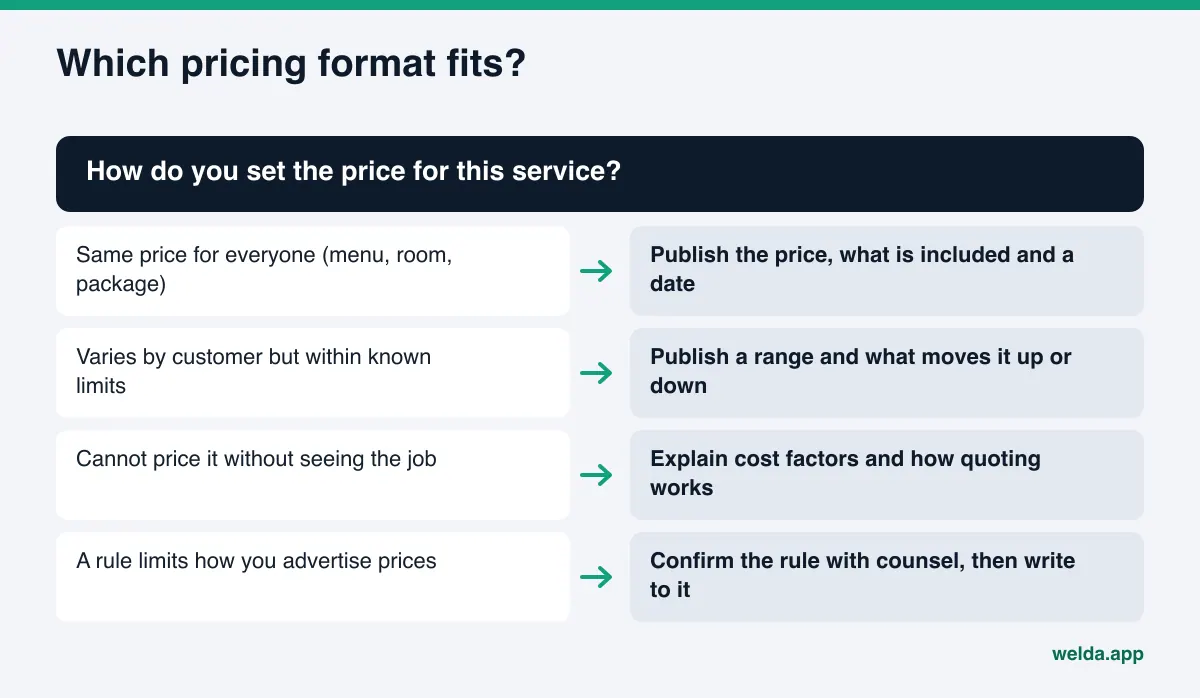
Once you have decided, run through the checklist below. It is built to check whether your site and outside listings tell the same pricing story.
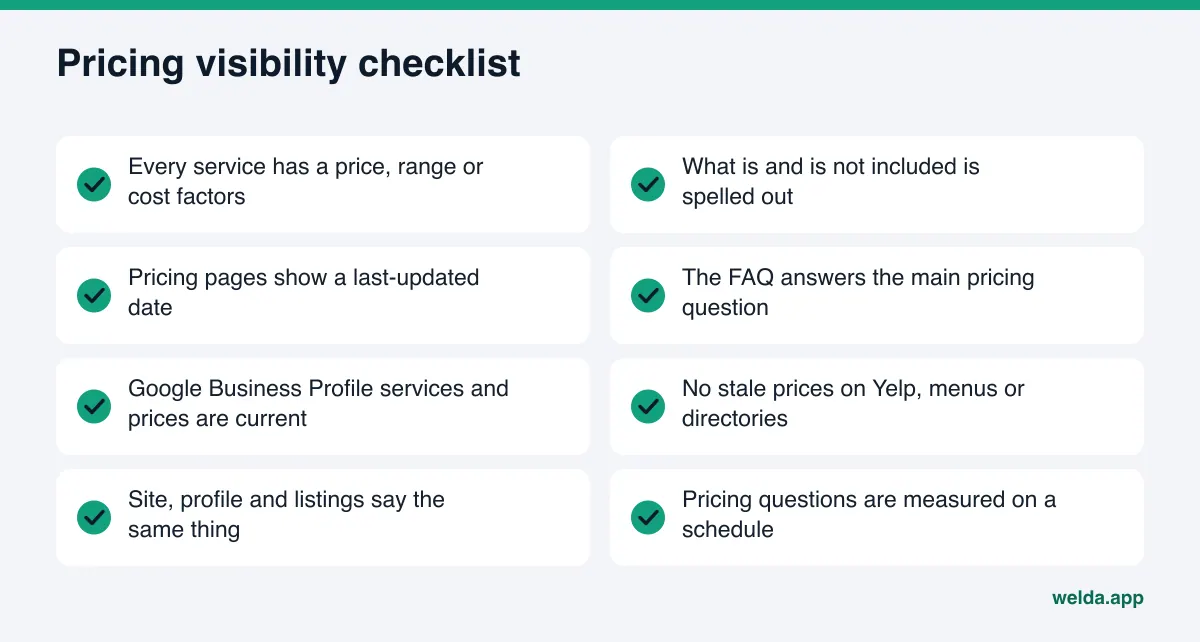
While you work through it, ask three more questions. When did your prices last change, and which listings did you update that day? Is your menu or price list on your site as text, or only as an image? Does your FAQ answer "what is included in the price"? The answers say a lot about where your pricing visibility stands today. For a broader list, see our AEO checklist.
Frequently asked questions
If my site has no prices, where does AI find them?
Usually from outside sources: directories, booking sites, Google Business Profile, old menu photos and reviews. That information can be outdated or incomplete. If AI finds nothing, it may leave you out or give a generic industry figure.
Do I have to publish exact prices?
No. A price range or a clear explanation of cost factors also gives AI something to read. What matters is not staying silent and keeping what you publish current.
I changed my prices, but AI still quotes the old ones. What now?
First make sure the old price is gone from every page on your site. Then update Google Business Profile and your most-read listings. New information usually takes weeks to show up in AI answers, so keep measuring during that time.
Is adding priceRange markup enough?
No. priceRange states your general price level; it does not list individual services. The real prices belong in the readable page text and in your FAQ.
Will Welda write my prices for me?
Welda does not invent prices. If it cannot read them from your site, it asks you; once you enter them, they flow into the page and profile copy it drafts. You approve everything before it goes live.
Does Welda guarantee I will show up on pricing questions?
No. Welda does not guarantee rankings or visibility. It measures where you stand on pricing questions, drafts what you need to fill the gaps and tracks the change over time.
See where you stand on pricing questions
Accurate pricing in AI answers starts with the most concrete information on your own site. When your prices, ranges or cost factors are written clearly, AI has no reason to guess on your behalf. To start, run the free AI visibility analysis: it shows how clearly your services are described, whether your FAQ is doing its job, and how to fix each gap it finds.