Does YouTube actually help your AI visibility? It can, but mostly through the text around the video rather than the footage itself. Answer engines read the title, the description, the captions, the chapter names and the page where the video is embedded. When that text answers a real customer question and clearly ties the video to your business, YouTube becomes a source that helps ChatGPT, Gemini, Perplexity and Google's AI Overviews name you.
This guide walks through YouTube for AI visibility step by step: what an answer engine can read from a video, which videos to make first, which fields to fill in before you publish, how to bring the video onto your own website, and how to tell whether any of it worked. The discipline is usually called AEO, short for answer engine optimization; you will also see it called GEO (generative engine optimization), which describes the same goal. If you want to know how your website reads to AI before you build video pages on it, start with a free AI visibility analysis. It lists the gaps it finds on your site and how to fix each one.
Why YouTube matters for AI search visibility
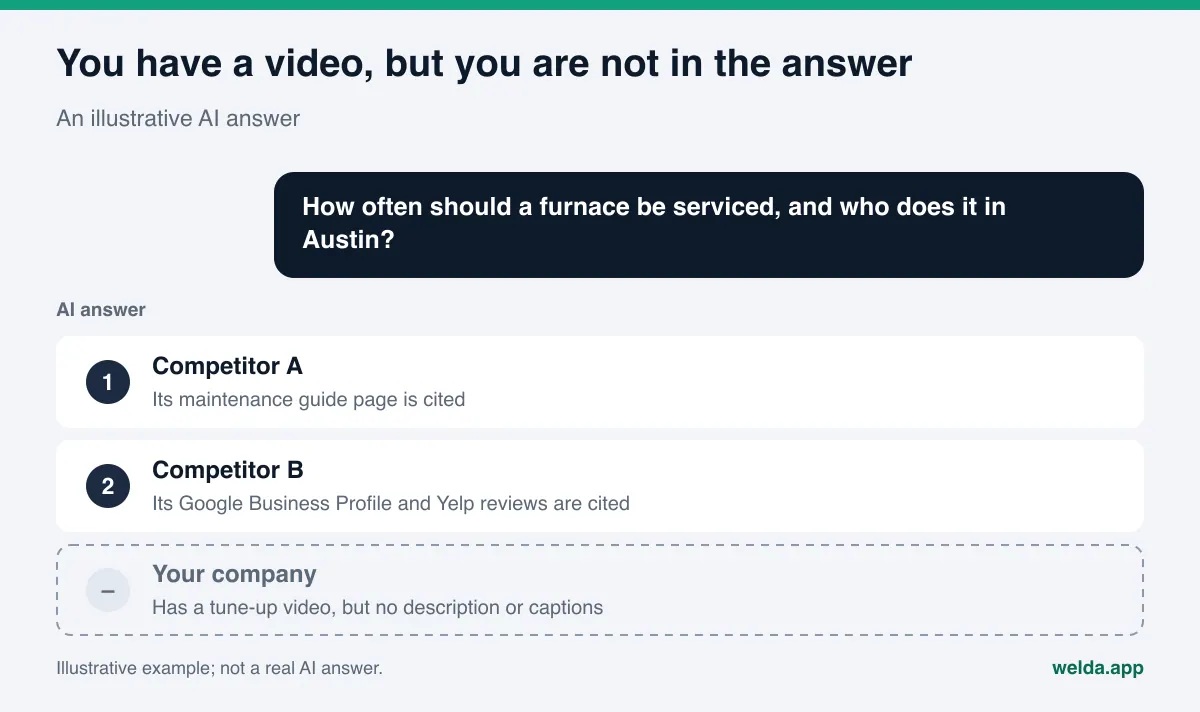
When a customer asks an AI assistant "how often should a furnace be serviced" or "how long does Invisalign take," the answer is assembled from sources. Those sources can include business websites, Google Business Profile, Yelp and other review sites, Angi and similar directories, the BBB, forums such as Reddit, and video platforms. YouTube holds a special place on that list. It is a huge archive of how-to content, and it is owned by Google, so it is no surprise that video results sometimes show up alongside AI Overviews and AI Mode answers.
There is a common misconception, though. Shooting a video, uploading it and waiting is not an AEO strategy. Before an answer engine can use a video in an answer, it needs to find three things:
- Which question does this video answer? If the title is "Video 3" or just your company name, the question is unclear.
- What is actually said in it? If there are no captions, or the automatic captions mangle your company name, your city and your technical terms, the content is unreadable or misread.
- Who published it, and where is that business? If the description has no business name, service area or website link, nothing connects the video to you.
That is why it helps to treat YouTube as a writing project as much as a video project. The video is the part that earns the viewer's trust and shows the work. The text is the part that lets an answer engine understand the video and attribute it to the right business.
Who should care most?
Businesses whose service is hard to explain in words: HVAC and plumbing contractors, remodelers, dental and medical practices, med spas, schools and training providers, restaurants and hotels, and online stores that sell technical products. Wherever customers ask "how does it work," "how long does it take" or "what should I watch out for," a short, accurate video is evidence that backs up your written answer.
What AI can read from a YouTube video
Think of a video as five layers. Each layer is a separate chance for an answer engine to understand it, and each missing layer is a separate loss.
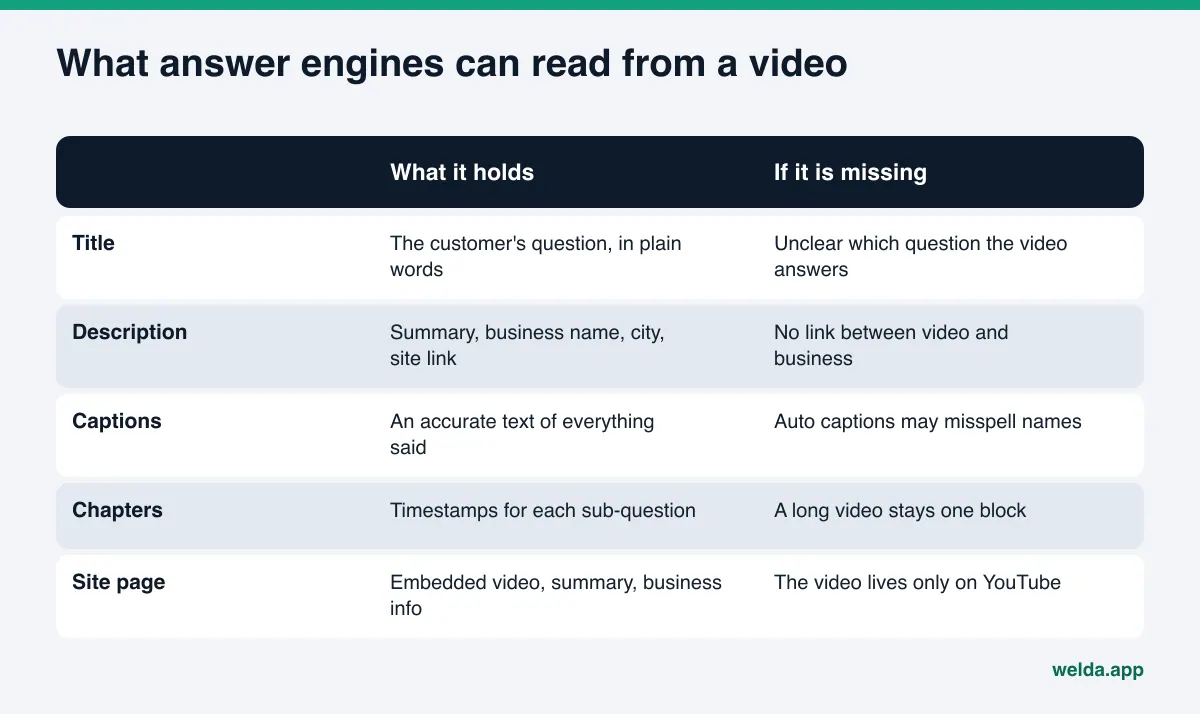
Title. It should carry the customer's question in the customer's words. "How Often Should You Service a Furnace? Tune-Up Steps Explained" says plainly which question is being answered. A title that is only a brand name or a promo line does not.
Description. The first two or three sentences should give the short answer, followed by your business name, the city or area you serve and a link to the matching page on your website. The description is the written summary of the video, and often the easiest text for a machine to read.
Captions and transcript. This is the text of everything said in the video. YouTube creates automatic captions, but they can get proper names, neighborhoods and technical terms wrong. In YouTube Studio you can upload your own transcript and let YouTube sync the timing; YouTube Help explains how to add subtitles and captions.
Chapters. If a long video answers several sub-questions, adding timestamped chapters to the description marks each one as its own segment. Per YouTube's rules, the first timestamp must be 00:00, you need at least three chapters, and each must be at least 10 seconds long (YouTube Help on video chapters).
The page on your site. Embedding the video on the matching service page, with a summary or transcript next to it, means the video lives not only on YouTube but also on a source you control. When an answer engine reads your site, it learns from the text what the video covers.
Which YouTube videos to make for AEO
For AI search visibility, the most valuable videos are the ones that directly answer questions customers ask AI. A brand film, a promo announcement or a music-only montage can look great, but because it answers no question, its chances of feeding an answer are low. The table below lists video types that work for most businesses and the question each one covers.
| Video type | Question it answers | What to put in writing |
|---|---|---|
| Process walkthrough | "How is this done, and how long does it take?" | Steps, timing, what the customer needs to prepare |
| Frequent question | "What should I know before I hire someone for this?" | Short answer, three or four things to check |
| Comparison | "Option A or option B, which fits me?" | The difference, and who each option suits |
| Team and location | "Is this business legit, and where is it?" | Address, hours, the team's areas of expertise |
| Care and maintenance | "How do I use or maintain what I bought?" | Steps, common mistakes |
Price questions come up often too. But stating an exact price on camera means the old number can keep circulating in AI answers after you change it. A safer approach is to explain what drives the price and keep the current figure on a page you can update. That is the video side of content freshness for AI search.
How to prepare a YouTube video for AI visibility, step by step
The sequence below covers one video from start to finish. It takes some time the first time around and becomes routine after that.
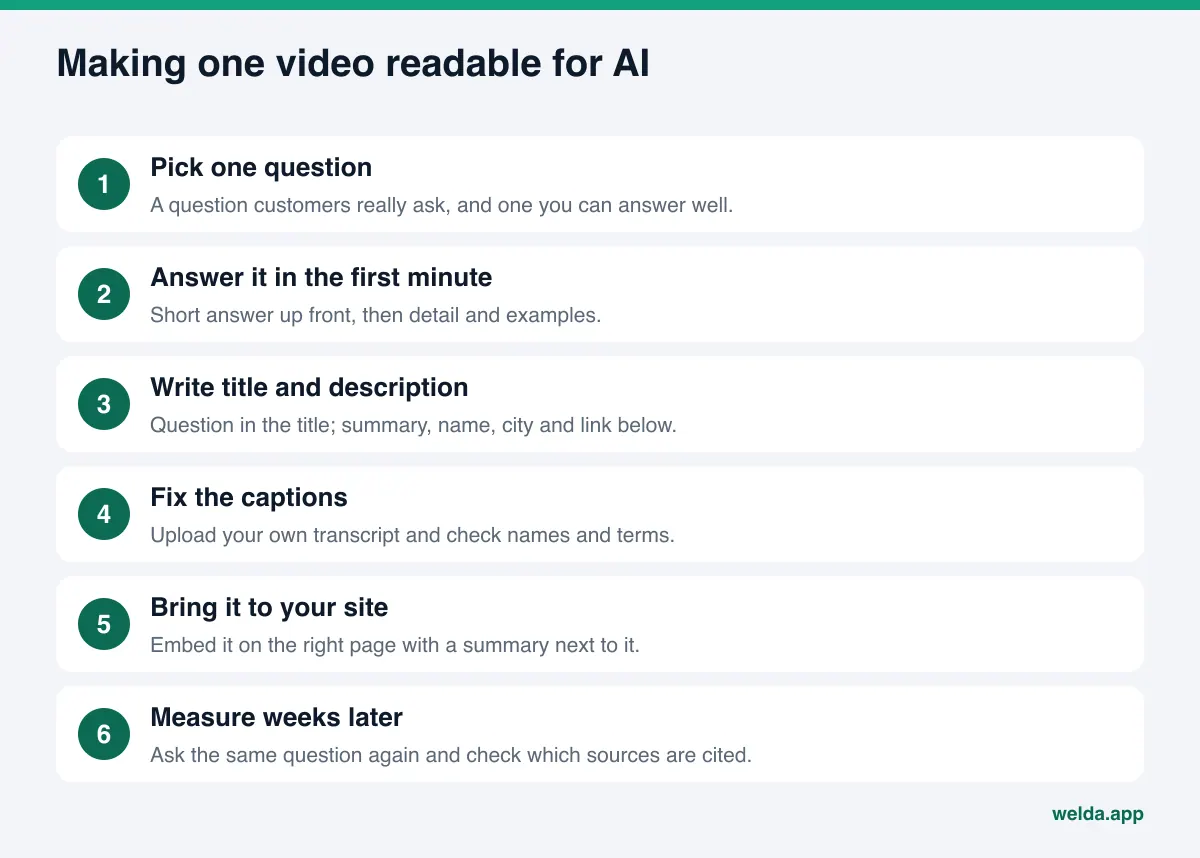
- Pick the question. Write down what customers ask most often by phone, text or in person. Choose one you can answer accurately and show on camera. One video, one question.
- Lead with the answer. Say the short answer in the first minute. Detail, examples and caveats come after. That is clearer for viewers and for anything reading the transcript.
- Say who you are. Mention your business name and service area in a natural sentence. That way it lands correctly in the captions too.
- Write the title as the question. Keep it close to how a customer would phrase it. Add the city if it helps.
- Fill in the description. First paragraph: the short answer. Second paragraph: business name, address or service area, and a link to the matching page on your site. Add the chapter list here for longer videos.
- Fix the captions. Read the automatic captions end to end, or upload your own transcript. Check your business name, product names and place names.
- Embed the video on your site. Put it on the relevant service page or on a dedicated question page, with a short summary, a transcript where useful and one or two FAQs.
- Link channel and site both ways. Your website belongs in the channel description and links; your channel belongs in your site footer and in your business structured data.
- Keep details consistent. The business name, address and phone number on your channel should match your Google Business Profile, Yelp listing and website exactly.
- Measure weeks later. New content usually takes weeks to show up in AI answers. Ask the same question again on the same engines and check whether you are named. If you track Perplexity in particular, Perplexity rank tracking covers how to read those results.
How to publish the video on your own website
A video on YouTube lives on YouTube's page. A page on your own site is your own source, and you decide what text it carries. For important videos, a matching page on your site is worth as much for AI visibility as the video itself.
A good video page has a title that states the question, a two or three sentence answer, the embedded video, a summary or full transcript, and the related service and contact details. A page that is nothing but a video player gives an answer engine almost nothing to read.
Two technical points stand out. First, mark up the video with structured data. Google recommends describing a video's name, thumbnail and upload date with VideoObject markup; the required fields and how to mark key moments are in Google Search Central's video structured data guide. Second, make sure the page content does not load only through JavaScript. Some themes and plugins load the video and its text after the page opens, and crawlers may then see an empty page. We cover that in JavaScript rendering and AI crawlers.
If you already have a back catalog of videos, you do not need to reshoot them. Fixing titles, descriptions and captions and adding a matching site page is often enough to start. It is the video version of updating old content for AI search.
Example: building one video page
The scenario below is illustrative and does not describe a real business. Picture an HVAC contractor in Austin. Customers keep calling with two questions: "how often should a furnace be serviced" and "what gets checked during a tune-up." The company decides to answer both in one video.
The video. A seven or eight minute walkthrough. In the first minute a technician gives the short answer: when service is due and which warning signs call for an earlier visit. Then they show each part that gets checked. At the start and the end, they say the company name and the areas they serve.
On YouTube. The title carries the question. The first paragraph of the description gives the short answer; the second gives the business name, service area and a link to the furnace tune-up page on the site. Below that are four chapters: the short answer, how often, what gets checked, what homeowners can do themselves. The automatic captions have been checked and the brand and neighborhood names corrected.
On the site. The furnace tune-up page opens with the question as a heading and a two sentence answer right under it. The video is embedded with a five point summary below it. The page ends with three FAQs and contact details. The page has video structured data, and the site footer links to the YouTube channel.
Measurement. After publishing, the company waits a few weeks and asks the same two questions on the AI engines again. The point is not view count. The point is whether the business is named and whether the video or the video page appears among the cited sources. Whatever the result, it decides which question the next video tackles.
Notice that more than half the work happens after the camera is off. Shooting may take an afternoon; the title, description, captions, page and measurement are a separate task list. Businesses that skip that list often end up saying "we made videos and nothing changed."
Common mistakes
- Touching on five different questions in one video, so none gets a clear answer.
- Filling the description with hashtags and social links only.
- Using a channel name that differs from the business name on your site.
- Embedding the video on your site with no text around it.
- Leaving a video with an old price or expired offer online for years.
How Welda handles this
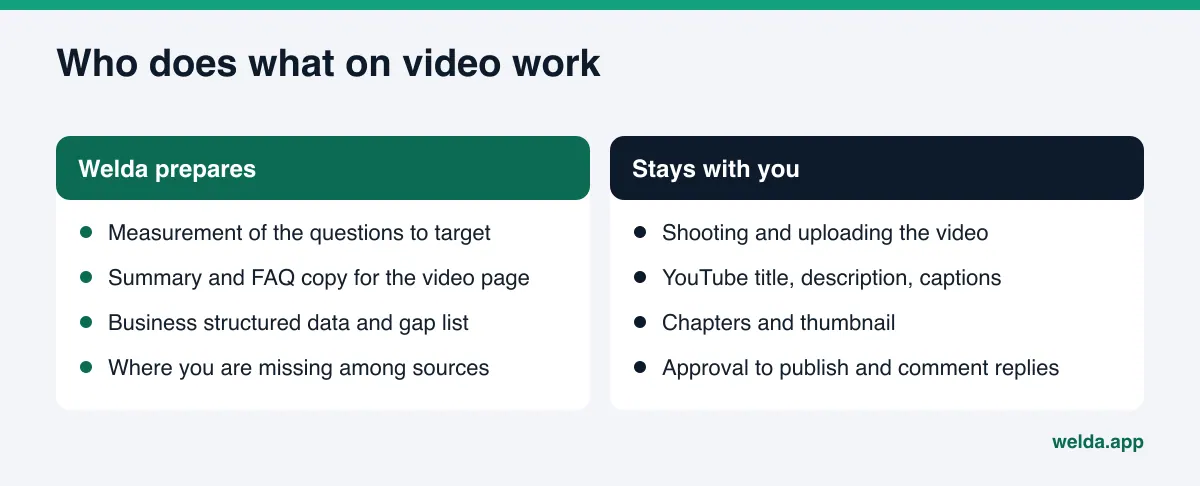
Welda is not a video tool. It does not shoot or edit video, it does not connect to your YouTube account, and it does not upload anything to your channel. Its job here is to show which questions your videos should answer, draft the written content the video page needs, and measure the effect afterward. Three parts are directly relevant.
The Sources screen: is YouTube in play for you?
In the Welda panel, the Sources screen lists the sites AI engines rely on when they answer your customers' questions. Next to each source you see how often it was cited, its share, your status there and a suggested action. A side chart breaks citations down by source type: your own site, directories, social accounts, forums and others. If YouTube shows up as a source for your questions, you have a concrete reason to invest in video. If it does not, your first job may be a missing page on your site or an incomplete directory profile instead. The decision stays with you; the screen shows where you are missing.
The Questions screen: which question should the video answer?
On the Questions screen, each question your customers might ask is put to ChatGPT, Gemini, Perplexity and Google AI three times, and one row shows where you are named and in which position. Click a question and you see a summary of the answer and the sources it cited. The list of questions where a competitor is named and you are not is, in practice, a shot list. Weeks after a video goes live, you come back to the same row and check whether you are now named and whether your video or video page is among the cited sources.
Ready copy for the video page
Welda drafts content: the short answer, the summary and the FAQ section of a video page fall into that scope. It does not invent what it does not know; if a detail such as duration, scope or method is missing, it asks you. On WordPress sites the content opens as a draft and goes live once you approve it; for other platforms Welda hands over a ready package and you add it. The YouTube title, description, captions and chapters appear on the to-do list as manual tasks, because Welda does not connect to YouTube.
Separately, the free site analysis checks your business structured data (Schema) and whether your social profiles are linked from your site, and a link to your YouTube channel is part of that check. Its fix package includes ready business structured data to add to your site.
Limits: what Welda does not do
The relationship between YouTube and AI answers is changing quickly, so it is worth setting expectations clearly.
- No guarantees. Welda does not guarantee that a video will appear in an AI answer or that you will be named in a given position. No video or tool can honestly promise that.
- No video production. Welda does not shoot, narrate, edit or upload video. Channel management stays with you or whoever you choose.
- No view metrics. Welda does not track views, subscribers or search inside YouTube. What it measures is whether AI answers name you.
- It takes time. New content usually takes weeks to show up in AI answers. Measuring the day after upload is misleading.
- No fake engagement. Welda does not produce fake reviews, likes or views. Replying to comments under your videos is your job.
And the product's current status: the free site analysis works in English and German today, and anyone can run it. The full Welda panel is in early access and is opening first in Turkey. Regular measurement across the four engines is being added during early access, and panel screens are shown with representative data. Pricing is discussed in the early access conversation.
YouTube AEO checklist and priorities
Check off each item below before you publish a video. The same list works for reviewing older videos.
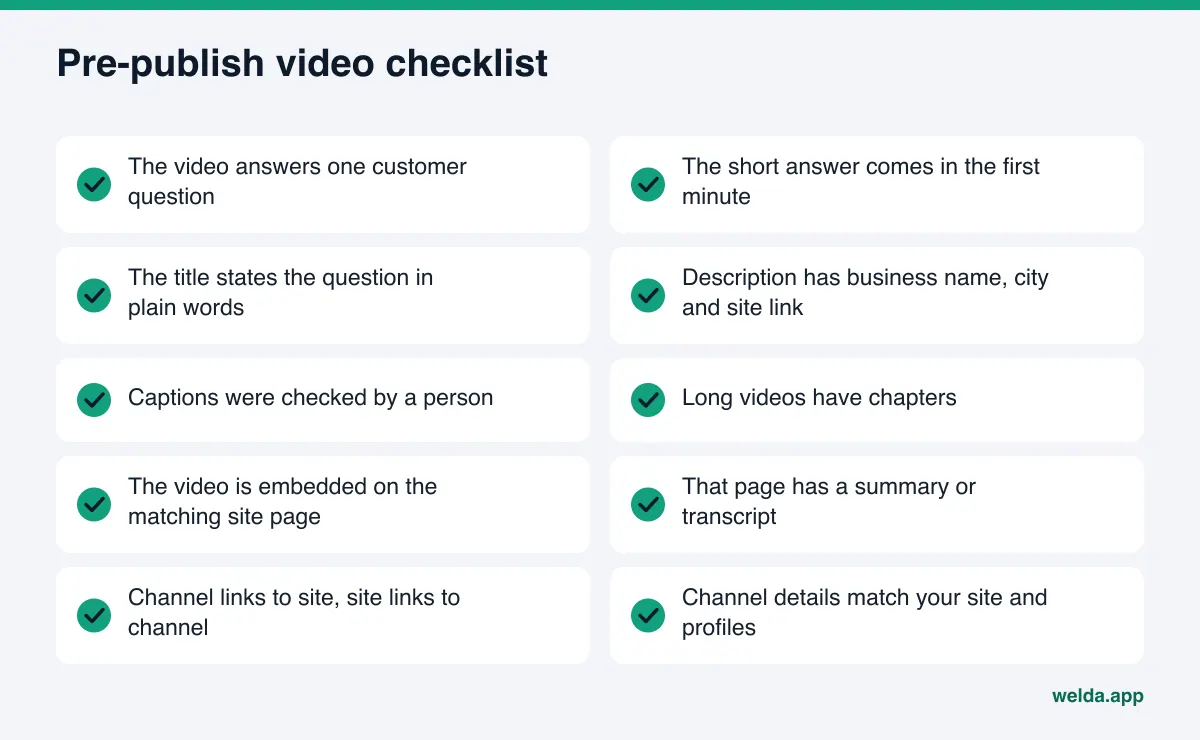
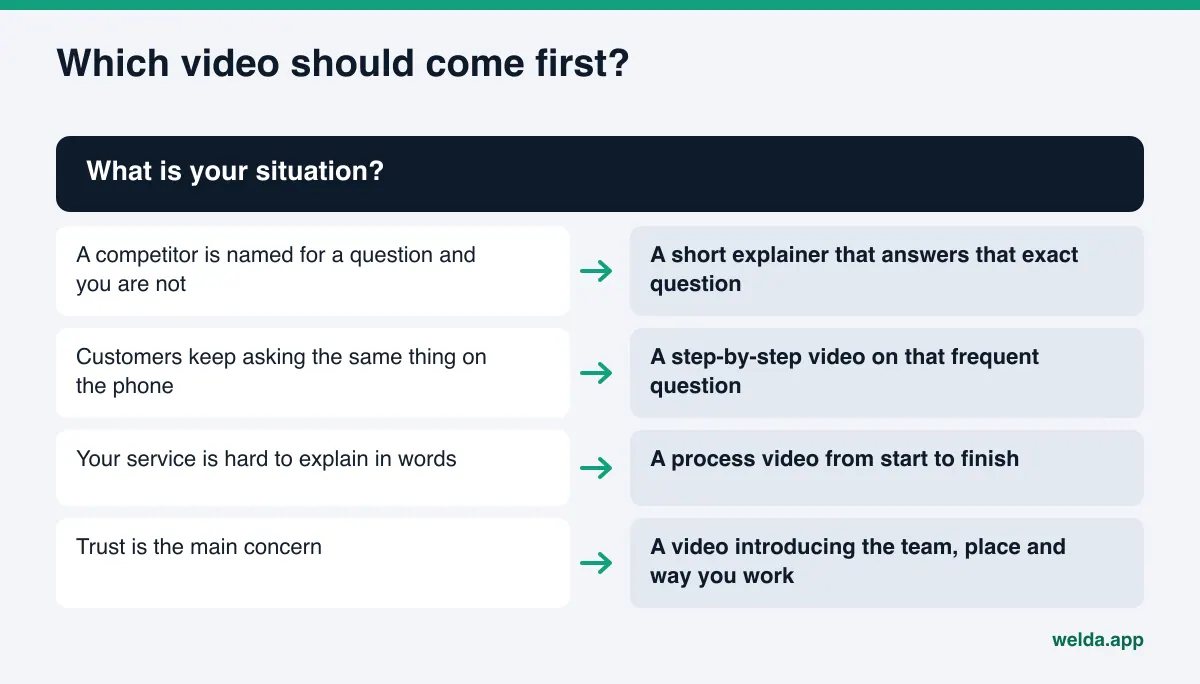
To decide which videos come first, a simple rule of thumb helps:
| Situation | Priority | Why |
|---|---|---|
| A competitor is named for a question and you are not | High | The answer exists; your source is what is missing |
| A question customers ask on every call | High | Proven interest, and you know the answer |
| Older video with empty description and captions | Medium | Can be fixed without reshooting |
| Brand film or promo video | Low | Does not answer a specific question |
Video does not replace the trust signals on your website; it supports them. A video showing your team and location means more next to a well-written about page, and about page trust signals for AI explains what that page needs.
Frequently asked questions
Can I have AI visibility without a YouTube channel?
Yes. For most businesses the first job is a complete website and Google Business Profile. YouTube is a valuable addition when it shows up as a source for your questions or when your service is easier to show than to describe.
Does AI watch the video, or only read the text?
Engines work differently and this area is changing. What is certain is that the title, description, captions and the text on your site can be read in every case. Preparing a written version of everything you say is a sturdier approach than relying on the footage.
Do YouTube Shorts help?
Shorts carry little description and little spoken text, so on their own they rarely answer a question fully. It is more realistic to treat them as pieces that support and point to a longer explainer.
Are automatic captions good enough?
They usually get the general meaning right but can misspell your business name, place names and technical terms. Those errors make it harder for AI to identify you. At a minimum, check and correct those names after publishing.
Does Welda analyze my YouTube channel?
No. Welda does not connect to YouTube or track channel statistics. The free analysis reads your website and checks whether your channel is linked from it; the panel shows whether AI answers name you and which sources they use.
Should the video go on a service page or its own page?
If the video explains a service, adding it to that service page is usually enough. If it answers one specific question that does not fit any service page, a separate page with the question as its heading is clearer. Either way, put a written summary next to the video.
How long until I see results?
New content usually takes weeks to show up in AI answers, and it is never guaranteed. Measuring a few weeks after publishing, on the same questions, gives the fairest comparison.
Next step: start with your website
A video is only as strong as the site it connects to. To learn whether AI crawlers can access your site, whether your business structured data and social profile links are in place and whether your services are clearly described, run the free AI visibility analysis. The report explains what it found for each gap, why it matters and how to fix it, which makes it easier to decide which page your first video should live on.