What does Squarespace AEO actually involve? It starts with one setting: whether your site asks AI crawlers to stay away. Once that is a deliberate choice, the work is about content: page titles that say what you do, services and policies written as plain text, consistent business details, and one block of structured data. Squarespace gives you the fields. The sentences an answer engine quotes have to come from you.
Squarespace is a natural home for small businesses that care how they look: photographers, studios, salons, restaurants, consultants, boutique retailers. The templates are polished, the hosting is handled, and the site tends to rank well enough on Google for the business name. But a growing share of customers now ask ChatGPT, Gemini, Perplexity or Google's AI Overviews and AI Mode for a recommendation, and those answers often name other businesses. Squarespace AEO, short for answer engine optimization, is the work of making your Squarespace site something these engines can read, trust and cite. This guide walks through the Squarespace-specific settings, the content steps that matter most, and how Welda prepares the fixes for a site it cannot connect to directly. If you want to see where you stand first, the free AI visibility analysis reads your home page and a few inner pages the way an AI engine would and lists what is missing.
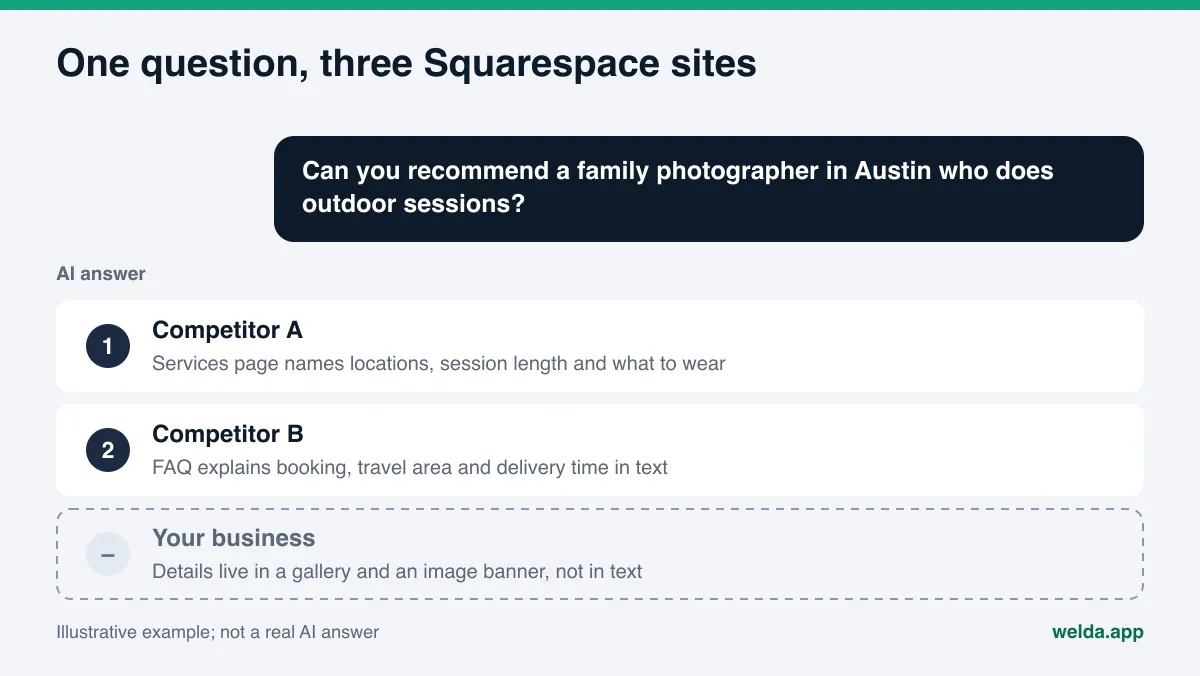
Why Squarespace AEO is its own topic
The core rules of AI search visibility are the same on every platform: crawlers need access, the text has to be readable, business details must be consistent, and what you offer has to be stated clearly. You may also see the term GEO, generative engine optimization, used for the same work; in the US, AEO is the more common label. Squarespace deserves its own guide because of how these rules tend to break on Squarespace sites specifically.
Squarespace sites are rarely broken in a technical sense. The platform handles hosting, sitemaps and mobile layouts. The gaps are almost always in how the content is built:
- Design-first pages. Templates invite large images, short taglines and galleries. A home page can look finished with fewer than fifty words of actual text on it. An answer engine cannot recommend a business it cannot describe.
- Information inside images. Pricing graphics, menus as images, "Now booking fall sessions" banners. People read them; crawlers mostly see a file name.
- One page for everything. Many service businesses list every offer on a single "Services" page with a sentence each. When a customer asks about one specific service, there is no page that answers it in depth.
- Untouched SEO fields. Page titles chosen for the navigation, such as "Home" or "Work", often end up as the only title a page has. They say nothing about the business.
- A crawler setting few owners have looked at. Squarespace has a checkbox that asks known AI crawlers not to crawl your site. Some owners checked it after headlines about AI training, without thinking about what it means for being recommended.
None of these is a flaw in Squarespace. Every one of them can be fixed from the panel, usually without code.
How answer engines read a Squarespace site
When ChatGPT, Gemini, Perplexity or Google's AI features answer a question, they pull from the web, either with their own crawlers or through a search index. OpenAI's crawler documentation states that sites that opt out of OAI-SearchBot will not be shown in ChatGPT search answers. Google's guidance on AI features says there are no additional requirements or special optimizations needed to appear in AI Overviews or AI Mode; a page needs to be indexed and eligible to show in Search with a snippet.
Put together, that means two things. Access is a precondition. And once a crawler is on your page, what it reads is the text, not the design. A Squarespace page is useful to an answer engine to the degree it answers three questions:
- What does this business do, and for whom? Do the SEO title, description, main headline and first paragraph say it?
- Where is it, and how do I reach it? Are the address, service area, phone number and hours written as text, and described in structured data?
- Does the site answer the customer's actual question? Are there dedicated service pages, a pricing approach, an FAQ, and trust signals such as reviews?
Before you write anything, it helps to know which questions you want to show up for. We cover how to build that list in find the questions customers ask AI.
The AI crawler setting: a decision, not a default
According to Squarespace's help article on AI crawlers, you will find the option under Settings, then Crawlers, labeled "Block known artificial intelligence crawlers." Checking it adds rules to your robots.txt file asking a list of crawlers not to crawl your site. As of November 2026, that list includes GPTBot, Google-Extended, Applebot-Extended, Amazonbot, CCBot and others. Squarespace notes that crawlers are not required to comply, that the setting does not remove content already collected, and that blocking may reduce traffic from those sources.
Two details are worth knowing. First, the list on that page does not include OAI-SearchBot, the crawler OpenAI uses for ChatGPT search results, as of November 2026. Second, the checkbox is all or nothing for the crawlers on that list. So the practical question is simple: does keeping your work out of AI training matter more to you than the chance of being cited in AI answers? A photographer protecting a portfolio may answer differently from a plumber who wants calls. Either answer is legitimate. What matters is that someone made the choice on purpose.
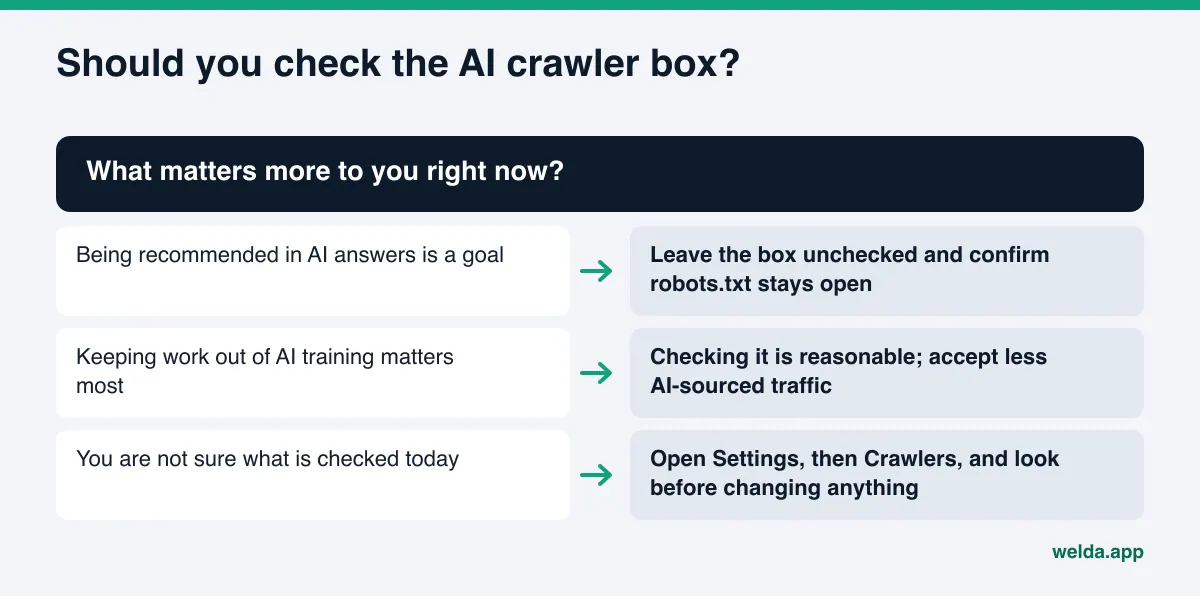
To see what your site currently tells crawlers, open yoursite.com/robots.txt in a browser. If you want to understand what each crawler name means before deciding, our guide to robots.txt for AI crawlers walks through the main ones.
Squarespace AEO step by step
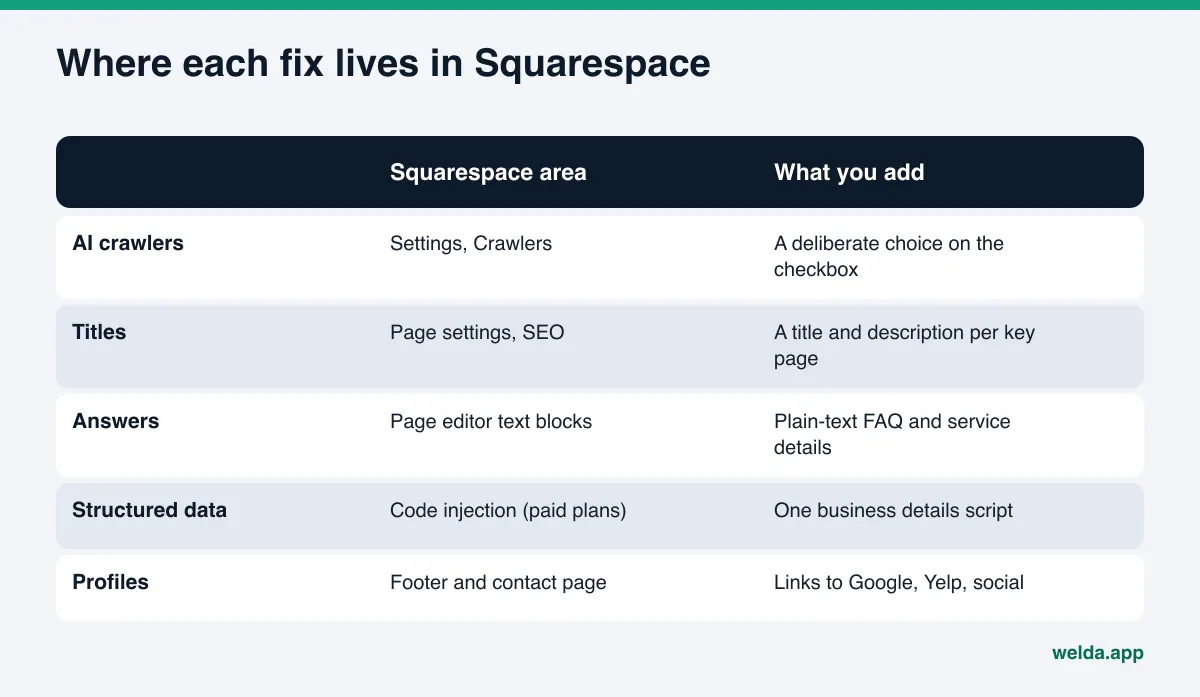
The order below puts the highest-impact, lowest-effort work first. The first step is about access; the rest are about content. Menu names in Squarespace change from time to time, so treat the paths as a guide and confirm them in your own panel.
- Make the crawler decision. Open Settings, then Crawlers, and confirm the AI crawler box reflects what you want.
- Write a real SEO title and description for the home page. In the Pages panel, click the gear icon next to the page and open the SEO tab. The title should name what you do and where: "Outdoor Family Photographer in Austin, TX" says more than "Home". The description should add who you serve and one concrete detail, such as service area or how booking works.
- Add an opening paragraph to the home page. Under the hero image, add a text block of three or four sentences that describes the business in plain language. This is often the single most quoted passage on a small business site.
- Give each core service its own page. One page per service, with what it includes, who it suits, how long it takes, where you offer it, and how to book. Squarespace makes adding a page simple; the effort is in the writing.
- Move key facts out of images. Prices or price ranges, hours, service areas, policies and menus should exist as text. Keep the graphic if you like it, and add the text next to it.
- Write an FAQ in plain text. Take the questions customers actually email or call about and answer each in two to four sentences. Accordion blocks are fine as long as the answers are real text on the page. See FAQ pages for AEO for how to choose and phrase the questions.
- Put your business details on the contact page as text. Business name, street address or service area, phone number, email and hours, written the same way they appear on Google Business Profile, Yelp and any other listing.
- Link your profiles. Link to your Google Business Profile, Yelp page and social accounts from the footer or contact page, and make sure those profiles link back to your site.
- Add one block of structured data. Structured data describes your business in a format machines read directly. Squarespace's code injection feature lets you add code to the header of every page or to a single page; as of November 2026, Squarespace lists it on its Core, Plus and Advanced plans. Add the business details script once, and make sure the details in it match your site exactly.
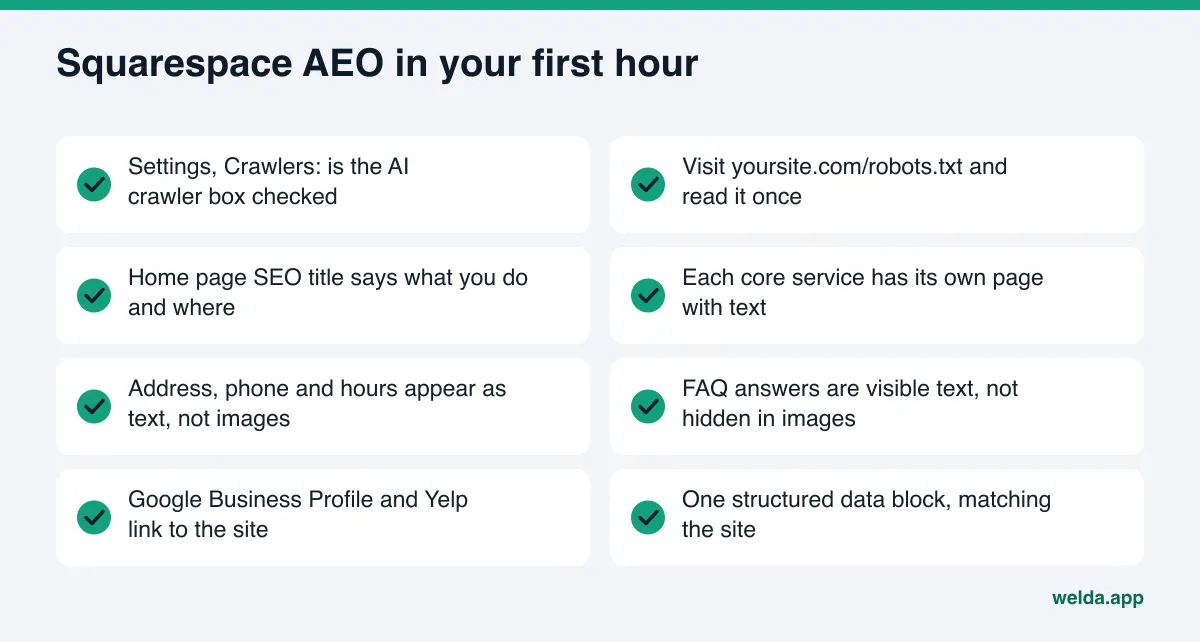
Where each fix lives in Squarespace
Squarespace AEO is less about tools and more about knowing which part of the panel holds which fix. The table below maps each task to its place, and notes what typically goes wrong.
| Task | Where in Squarespace | Common gap |
|---|---|---|
| AI crawler choice | Settings, Crawlers | Checked by accident or never reviewed |
| SEO title and description | Page settings, SEO tab | Left empty or set to "Home" |
| Opening paragraph | Text block on the home page | Hero image with a five-word tagline only |
| Service details | A dedicated page per service | All services on one page, one line each |
| FAQ | Text or accordion block | Missing, or answers that just say "contact us" |
| Business details | Contact page and footer | Only a form, no address or phone in text |
| Structured data | Code injection | Missing, duplicated, or out of date |
The same logic applies on other site builders, with different menus. If you also manage a site on another platform, our Wix AEO guide covers the equivalent steps there.
How Welda handles Squarespace AEO
Welda does two things: it measures where a business shows up in AI answers, and it prepares the fixes for the gaps it finds. On a Squarespace site, one fact shapes how that works. Among website platforms, Welda connects directly only to WordPress today. On Squarespace, Welda does not log in or publish anything. It gives you a ready-made fix pack, and you or whoever manages the site applies it. Here is what that looks like in practice, through the two parts that matter most for a Squarespace owner.
The free analysis and its fix pack
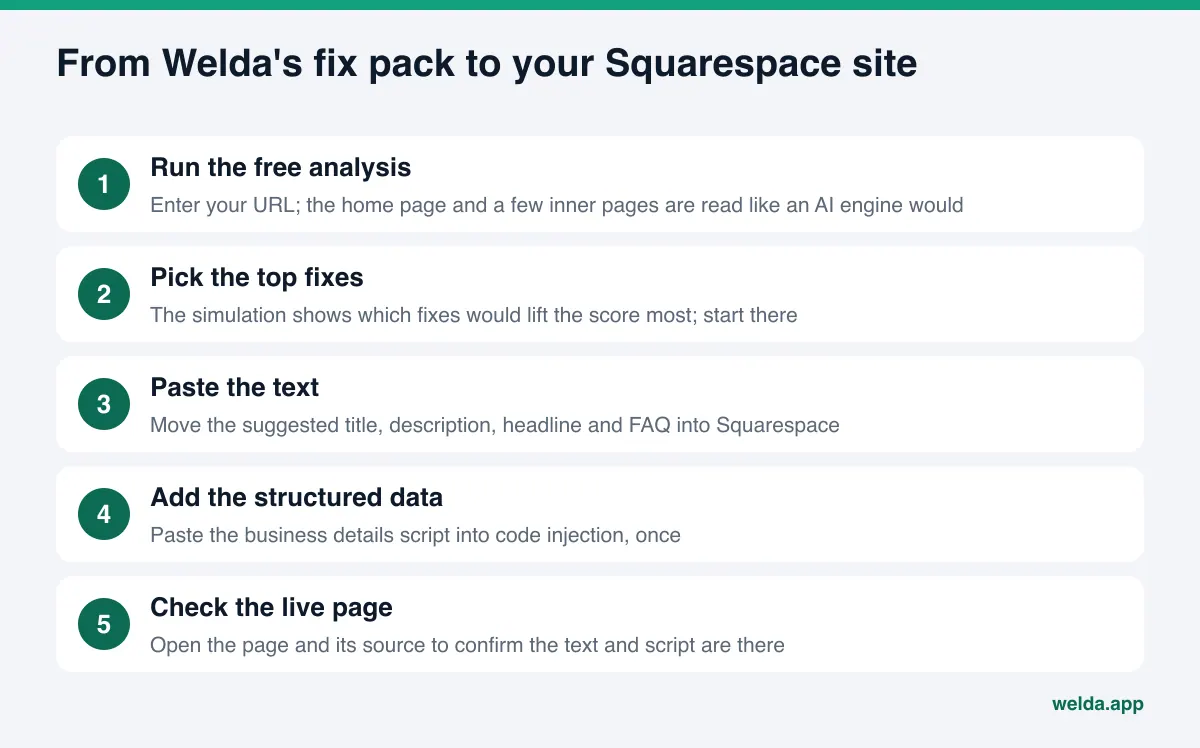
The free analysis is available to anyone today, in English. It reads your home page and a few inner pages, such as services, pricing, about and contact, and checks what an AI engine would check: whether AI crawlers can get in through robots.txt, your page title and description, main headline, structured data, address, phone and location details, whether your social and map profiles are linked, whether there is an FAQ, reviews and trust signals, how clearly your services are described, and page speed.
For each gap you get three things: what was found, why it matters, and how to fix it. For a typical Squarespace site, the most useful part is the ready-to-paste text for the home page: a suggested SEO title, description, main headline, opening paragraph and FAQ. You copy them into the SEO tab and text blocks. The fix pack also includes a structured data script for your business details, ready for code injection.
Because most owners cannot do everything in one afternoon, the analysis includes a simulation that shows how much each fix would move the score. Start with the top two or three. The report also compares you with competitors, and it asks five questions your customers might ask to an AI assistant that can search the web, then checks whether your business name appears in the answers. That is a one-time check, not ongoing tracking. Each site can be analyzed once for free; your email and phone number are verified, and the results link arrives by email and stays open for 14 days. You can download a PDF and a shareable score card.
The Welda panel: early access
The full Welda panel is in early access and is opening first in Türkiye. Regular measurement across ChatGPT, Gemini, Perplexity and Google AI is being added during early access, and the sample screens in the panel use representative data. For a site without a direct connection, such as Squarespace, the panel's to-do list holds each task as a manual item with the prepared text beside it: a service page draft, an FAQ answer, a Google Business Profile description. Facts Welda cannot find on your site, such as your service area or booking policy, are left blank and asked of you, never guessed. Before anything is marked ready, a compliance check flags patterns such as price claims, guarantees and superiority claims. It is not legal advice and has not been reviewed by legal counsel. Pricing is discussed in an early access call; it is not published.
Limits, and what Welda does not do
Setting the right expectations matters, especially on a platform where you do the final step yourself.
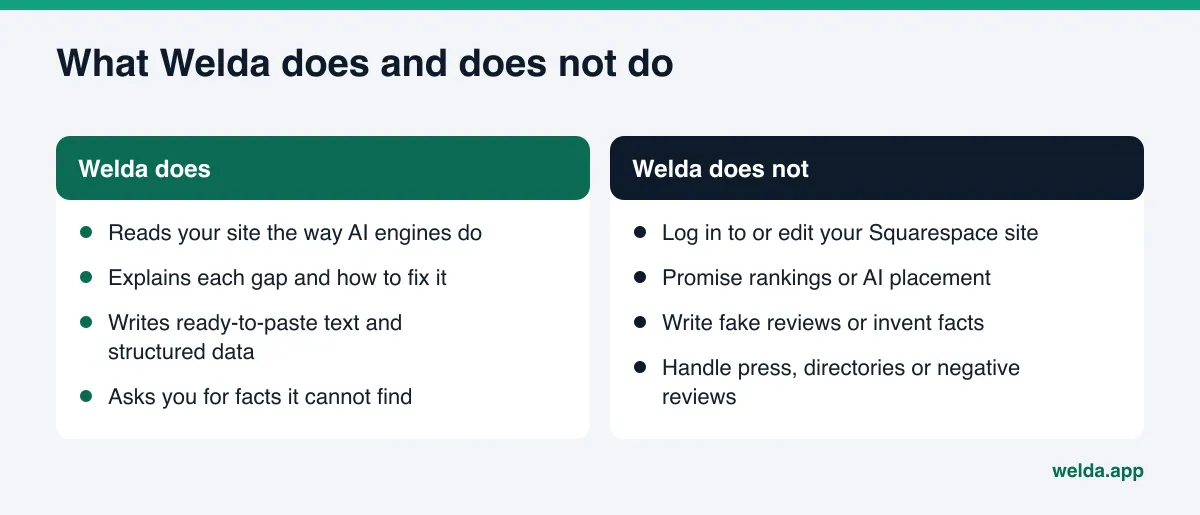
- No Squarespace login. Welda prepares the text and code; it does not edit your site.
- No ranking or placement promises. AI answers change constantly and no software controls them. The free analysis does not measure rankings either.
- No invented facts. If Welda does not know your hours, service area or policies, it asks.
- No fake reviews. Reviews and trust signals have to come from real customers.
- Some work stays with you. Responding to negative reviews, directory listings and press outreach remain your job. Welda can show which sources you are missing from; our guide to business directories for AI visibility explains why those sources matter.
- No hosting. All content stays on your own Squarespace site.
Timing matters too. New content usually takes weeks to show up in AI answers. A new service page written today will not appear in ChatGPT tomorrow.
Squarespace AEO checklist
Open your Squarespace panel and go through the list. Every "no" is a place where an answer engine runs into a gap when someone asks about a business like yours.
- The AI crawler setting reflects a decision I made on purpose.
- The home page SEO title says what I do and where, not just my business name.
- The home page has an opening paragraph in plain text.
- Each core service has its own page with real detail.
- Prices or price ranges, hours and policies are written as text.
- There is an FAQ with the questions customers actually ask.
- My business name, address or service area, and phone match Google Business Profile and Yelp exactly.
- My profiles link to the site, and the site links to them.
- There is exactly one structured data block, and it matches the site.
Most of these items are one-time work. The ongoing part is adding answers to new questions as customers start asking them.
Frequently asked questions
Does Squarespace do AEO for me automatically?
Squarespace handles the technical base: hosting, sitemaps, mobile layouts and SEO fields. What an answer engine needs to recommend you, a clear description of what you do, where, for whom and on what terms, comes from the text you write.
Should I check "Block known artificial intelligence crawlers"?
It depends on your priorities. If being cited in AI answers is a goal, leaving it unchecked keeps the door open. If protecting your work from AI training matters more, checking it is a reasonable choice, and Squarespace notes it may reduce traffic from those sources.
Can Welda connect to my Squarespace site?
No. Among website platforms, Welda connects directly only to WordPress. On Squarespace, Welda provides ready-to-paste text and structured data, and the changes are applied by hand.
Do I need code injection for Squarespace AEO?
Only for structured data. Every other step, including titles, text, FAQ and business details, works on any Squarespace site. As of November 2026, Squarespace lists code injection on its Core, Plus and Advanced plans.
How long until changes show up in AI answers?
Usually weeks. Crawlers have to revisit the page, and answer engines refresh their sources on their own schedule. Nobody can promise a date.
What does Welda cost?
The free analysis is free once per site. The full Welda panel is in early access and pricing is not published; it is discussed in an early access call.
See how your Squarespace site reads to AI
Squarespace AEO is not about a plugin or a trick. It is about putting the right sentences on a well-built site. Instead of guessing where to start, look first: the free AI visibility analysis reads your Squarespace site the way an answer engine does, ranks the gaps, and gives you ready-to-paste text and structured data for the fixes that matter most.