What does AI visibility software for sporting goods stores actually do? Shoppers now ask ChatGPT, Gemini, Perplexity and Google's AI Overviews questions like "where can I get fitted for running shoes near me" or "what tent should I buy for my first camping trip." AI visibility software checks whether your store gets named in those answers, shows what information is missing, and helps you fill the gaps.
This guide is for stores that sell sports equipment: an independent running shop, an outdoor and camping store, a bike shop with a service bench, or a multi-location sporting goods retailer that also sells online. We start with the problem, walk through the work step by step, then explain how Welda handles it and where it stops.
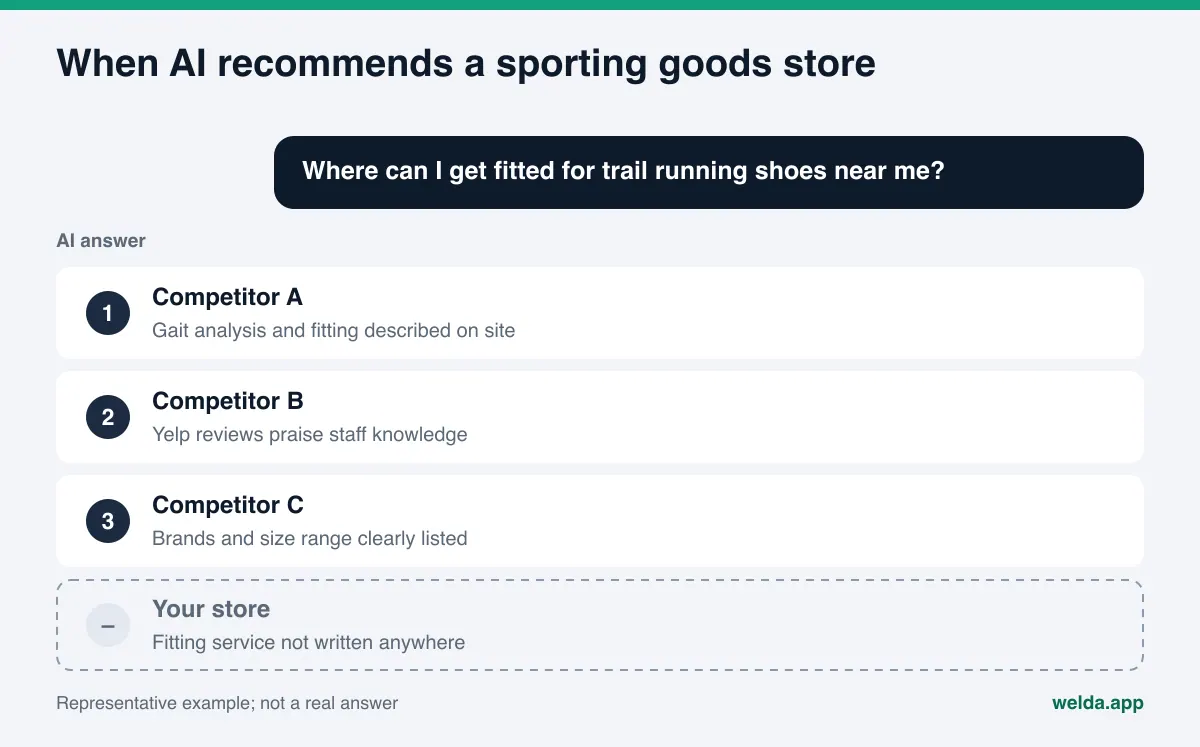
What are sporting goods shoppers asking AI?
Buying sports gear starts with a need, not a product name. Nobody types "cheapest shoe." They think "I overpronate and I'm training for a half marathon, what should I get?" AI assistants are good at exactly these long, personal questions. That is why questions to AI about sporting goods usually fall into four groups:
- Need questions: "What ski setup is right for a beginner," "what do I wear for winter running," "what size bike does a six-year-old need."
- Location questions: "Where can I get a tennis racket restrung in Austin," "camping store near me open Sunday," "bike shop that does same-week tune-ups."
- Service questions: "Running store that does gait analysis," "where can I rent skis for the weekend," "store with buy online, pick up in store."
- Trust questions: "Is their return policy easy," "do they exchange sizes," "do they sell authentic gear."
For need questions, AI usually explains the gear first and then often suggests where to buy. For location and service questions, it names stores directly. That is where visibility matters. The store named in the answer makes the shopper's short list. The store that is not named drops out of that conversation, however good it is.
This work is usually called AEO (answer engine optimization), or simply AI search visibility. You may also see the term GEO, short for generative engine optimization; it means the same thing, but AEO is the term most US marketers use.
Why AI visibility matters for a sporting goods store
Sports gear is a category where people research hard before buying. Choosing running shoes, a tent or a bike means weighing technical detail, fit, use case and price. An AI assistant pulls that research into a single conversation. The shopper asks a few follow-ups, the options narrow, and in the end one or two store names are left.
The information AI uses comes from sources you control and sources you do not. Your website, your Google Business Profile, your Yelp page, BBB complaints, Reddit threads in running, cycling and hiking communities, gear blogs and local "best of" lists. AI can read all of them, but it trusts the clearest and most consistent source more easily.
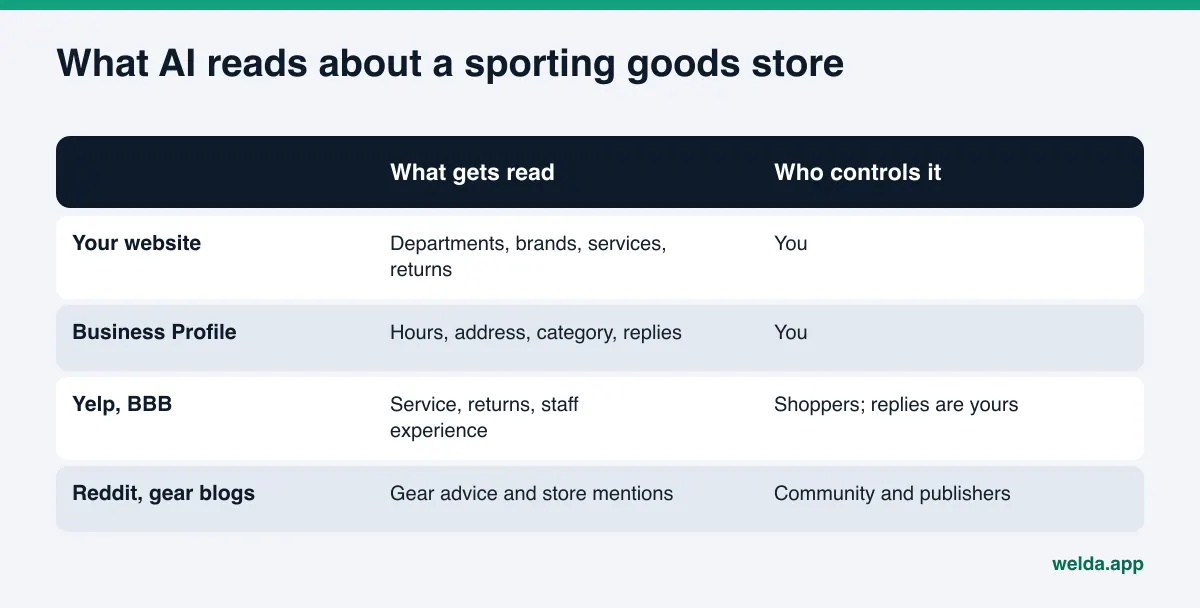
The most common problem we see is a site built like a product catalog. There are hundreds of product pages, but no plain text that answers "who is this store, which sports does it know best, what services does it offer, which neighborhood is it in." AI cannot infer what you are good at from a product grid. If you offer gait analysis but it only appears on a sign by the register, AI has no way to know.
The second problem is inconsistency. One set of hours on your site, another on your Business Profile, an old phone number on a directory listing. With several locations, this gets worse fast. We cover how wrong details travel into AI answers in our piece on wrong addresses and phone numbers in AI answers.
To see where your store stands today, start with the free site analysis. It reads your site the way Google and AI systems do and lists the gaps one by one.
What should AI visibility software for sporting goods stores measure?
Tools in this space take different approaches. For a sporting goods store, the key question is whether a tool asks the questions your shoppers actually ask. Generic brand tracking is less useful than measurement built on sport-specific and location-specific prompts. We cover the broader feature list in what to look for in AEO tool features. For a sporting goods store, look for answers to these questions:
| Question | Why it matters | What to check |
|---|---|---|
| Which prompts are tracked? | Runners, campers, cyclists and skiers are different audiences | Can you organize the prompt list by sport |
| Which engines? | Each engine draws on different sources | Are ChatGPT, Gemini, Perplexity and Google AI shown separately |
| How often is each prompt asked? | AI answers shift a little every time | A single answer, or repeated runs |
| Where are you named? | Being named first is not the same as being named fifth | Only yes or no, or position too |
| Where is a competitor ahead? | Knowing which sport a rival wins sets priorities | Are the winning prompts and sources visible |
| Who fixes the gaps? | A report alone changes nothing | Ready-to-use copy, profile text, page suggestions |
Measurement should never rest on one prompt. A realistic prompt list for a sporting goods store covers need, location and service questions for each sport you sell. Our guide to prompts to track for AI visibility shows how to build one.
AEO for your store, step by step
You can follow these steps with or without a tool. The order matters: understand the shopper's question first, then write the page that answers it.
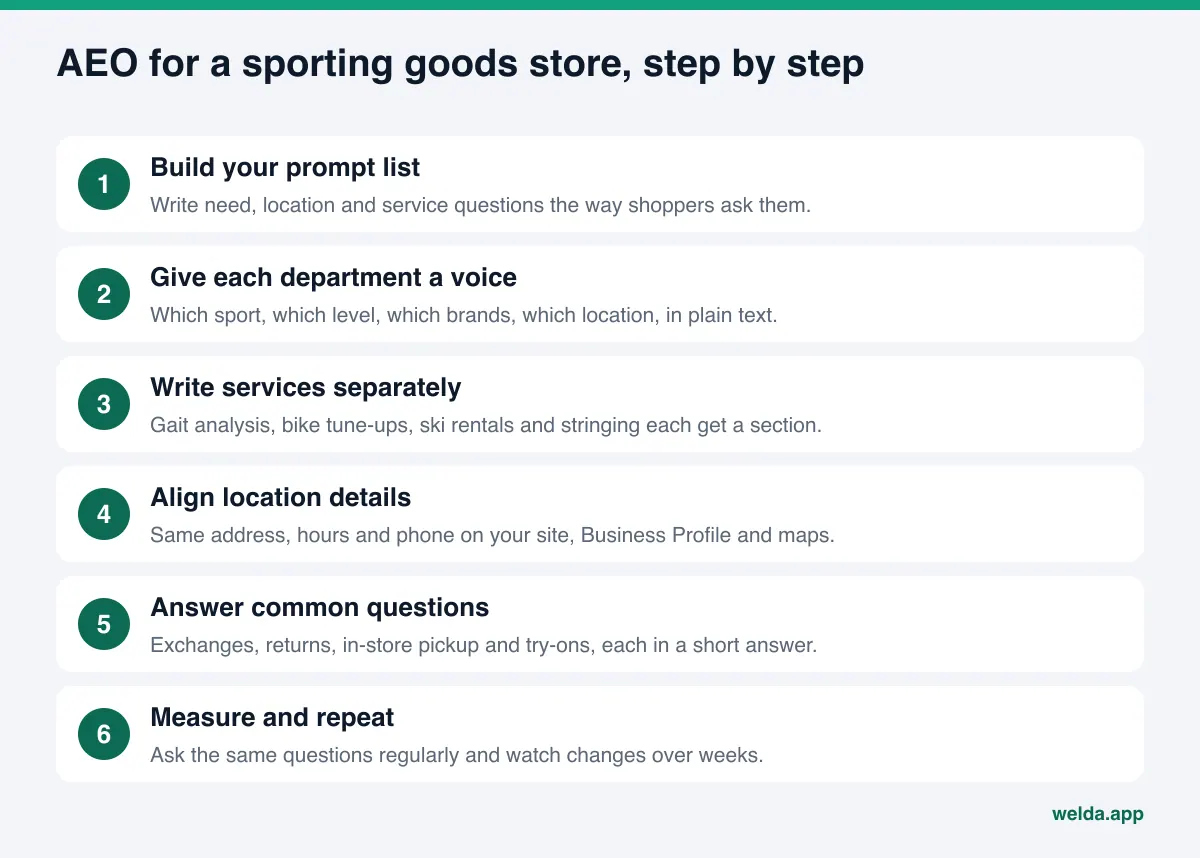
- Build your prompt list. For each sport you sell, write five to ten questions in the shopper's words. Examples: "bike shop in Denver that assembles kids' bikes," "where can I try waterproof trail shoes before buying." Ask your floor staff which questions they hear most. That is your best source.
- Give each department page a voice. Add two or three paragraphs at the top of every main department page: what is in this department, for what level, which brands, which location stocks it. A short but specific intro above the product grid tells AI what your store knows.
- Write services separately. Gait analysis, racket stringing, bike assembly and tune-ups, ski waxing and binding adjustment, rentals, team and school orders. For each one, describe what happens, how long it takes and whether an appointment is needed. Whether to publish prices is your call; we explain how price questions play out in pricing questions in AI answers.
- Align location details. Give each store its own page: address, map, hours, phone, the sports and services available there. Repeat the same details exactly on each Google Business Profile. Mark up business details with Schema.
- Make product data machine-readable. On product pages, keep size, material and intended use in plain text. Google describes product markup for pages where shoppers can buy from you in its Search Central documentation, and shipping, returns and sizing can be part of that markup.
- Answer common questions. Size exchanges, return windows, in-store pickup, try-ons, warranty handling. Give each one a clear two or three sentence answer.
- Reply to reviews. Write calm, specific replies on Google and Yelp. Your reply is a public record of how the store solves problems.
- Make sure AI crawlers can get in. Your robots.txt may be blocking AI crawlers by accident. OpenAI, for example, explains on its official crawler page that it uses a crawler called OAI-SearchBot to surface sites in ChatGPT search, and that each of its crawlers is controlled separately in robots.txt.
If you also sell online, keep the two sides apart. Product and department pages answer gear questions; location pages answer "near me" and service questions. We walk through a similar setup for another retail category in AI visibility software for electronics retailers; the logic is much the same for any store selling technical products.
What to write for each sport: running, camping, cycling, snow
A sporting goods store does not sell to one audience. Runners, campers, cyclists and skiers ask different questions and trust different details. So the information AI looks for on each department page is different too. Here is what each department page should cover.
| Sport | Typical shopper question | What the page should say |
|---|---|---|
| Running | "Where can I get fitted for running shoes if I overpronate?" | Whether you do gait analysis, try-on options, size range, which shoe groups suit road or trail |
| Camping and hiking | "Where do I buy a tent and sleeping bag for my first trip?" | Beginner versus advanced gear, seasonal ranges, rental terms if you rent |
| Cycling | "Bike shop near me that does tune-ups" | Service and assembly, appointments, turnaround, kids' bike sizing |
| Snow sports | "Where can I rent skis for the weekend?" | Season dates, rentals and tuning, boot fitting, which location carries it |
| Racket sports | "Who restrings tennis rackets nearby?" | Stringing service, turnaround, demo rackets |
Here is a sample intro for a department page. It is only an example; fill it with your own store's real details:
Our running department carries shoes, apparel and accessories for road, trail and track. At our downtown location we offer gait analysis, and you can try shoes on the in-store treadmill afterward. Lighter, cushioned models for new runners sit on one wall; longer-distance models for half marathon training and up sit on another. Size exchanges are done in store as long as tags and the box are intact.
It is short, but it carries four things AI needs: what gear is here, what service is offered, at which location, and which rule applies. It is clear enough to be quoted in an answer.
Seasons matter as well. Spring brings bike tune-up and running questions, summer brings camping and water sports, fall brings school and team sports, and winter brings skiing and cold-weather running. Updating the relevant department copy and FAQs a few weeks before a season gives AI time to pick up the new information. Remove last season's promotion copy, too; left on the page, it can turn into a wrong detail in an answer.
How Welda handles AI visibility for a sporting goods store
Welda is software that measures where a business shows up in AI answers and helps fill the gaps. Three parts matter most for a sporting goods store.
Prompt tracking: which sports are you named in?
In the Welda dashboard, the questions your shoppers are likely to ask are run three times each on ChatGPT, Gemini, Perplexity and Google AI. On the prompts screen, each row is a question and each column is an engine. For a sporting goods store, that might show you are named second on two engines for running shoe questions, but not at all for any camping question. The table puts numbers to what your floor staff already sense, and tells you where to start.
Open a single prompt and you see which sources that answer cited. If the camping answer leans on a hiking forum and a competitor's department page, the reason your camping department is invisible is usually right there.
Competitors: which sport is a rival winning, and from where?
The competitors screen puts your share of answers next to your rivals'. More usefully, it shows which cluster of prompts a competitor wins and which source it wins from. An example scenario: Competitor A leads on cycling questions because it describes its tune-up service on its own page and shoppers mention that service often in Google reviews. Your store does tune-ups too, but the site does not say so anywhere. The decision is clear: write a service page and add tune-ups to the services list on your Business Profile.
Score and to-do list
The Welda score is not a black box. The formula is published, and you can trace every number in the dashboard.
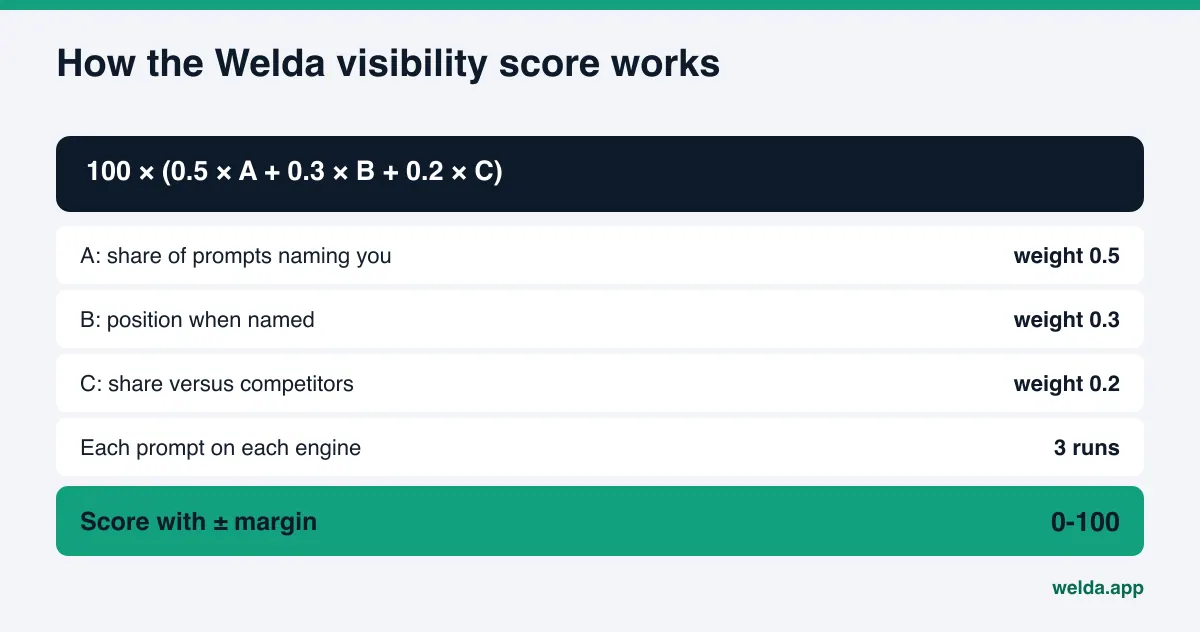
The share of prompts that name you drives half the score. Your position and your share versus competitors make up the rest. Because each prompt runs three times per engine, the spread between runs is shown as a margin of error, so you do not mistake noise for real change.
After measurement, Welda gathers the gaps into one to-do list: "no page for the gait analysis service," "downtown hours differ between site and profile," "no intro copy on the snow sports department." Each item comes with draft copy beside it. Welda does not write what it does not know. If it does not know how long your gait analysis takes, it asks you.
For WordPress sites, Welda connects through a separate Editor user and an application password you create for it, with no code to install. Drafts open on your site as drafts and go live only when you approve them. On other platforms, Welda hands you a ready-made package and the change is applied by hand. Your content always lives on your own site.
What is available today
To be direct: the Welda dashboard is in early access and opening in stages, starting in Turkey. Regular four-engine tracking is being added during early access, and the sample dashboard screens use representative data. The part anyone can use today is the free site analysis, which works in English. Pricing is discussed in an early access call.
The free analysis reads your home page and a few inner pages such as services, about and contact. It gives separate technical and content scores out of 100. For each gap it explains what it found, why it matters and how to fix it. It suggests a title, description, main heading, intro paragraph and FAQs for your home page, shows how much each fix could raise the score, compares you with competitors, and gives you a fix package that includes business details markup. It also asks five shopper-style questions to an AI assistant that can search the web and checks whether your name appears. That is a one-time measurement.
Limits: what Welda does not do
Setting realistic expectations matters. Welda does not:
- Guarantee rankings or "getting into ChatGPT." AI answers are each engine's own decision.
- Make up facts. It asks you which brands you carry and which services you offer.
- Write fake reviews. It drafts review replies, never the reviews themselves.
- Publish without your approval. The final call always stays with the store.
- Handle negative review disputes, directory accounts or press outreach. Those stay with you.
- Measure rankings in the free analysis.
Timing matters too. New department copy or a new service page usually takes weeks to show up in AI answers. Seeing no change in week one is normal. That is why regular tracking tells you more than a single check. If you are weighing the two, read one-time AEO audit vs ongoing tracking. The short version: a store selling seasonal gear faces different summer and winter questions, so regular tracking says more.
Decision and checklist for your store
Before you pick a tool, use this list to check where your store stands. Most items take an afternoon.
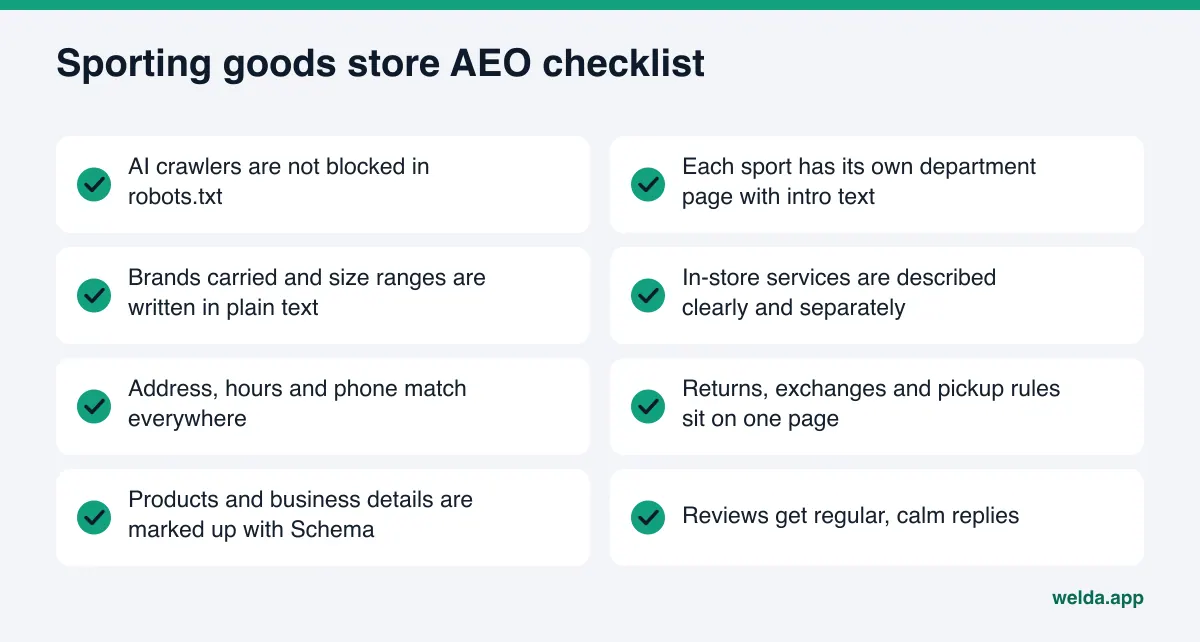
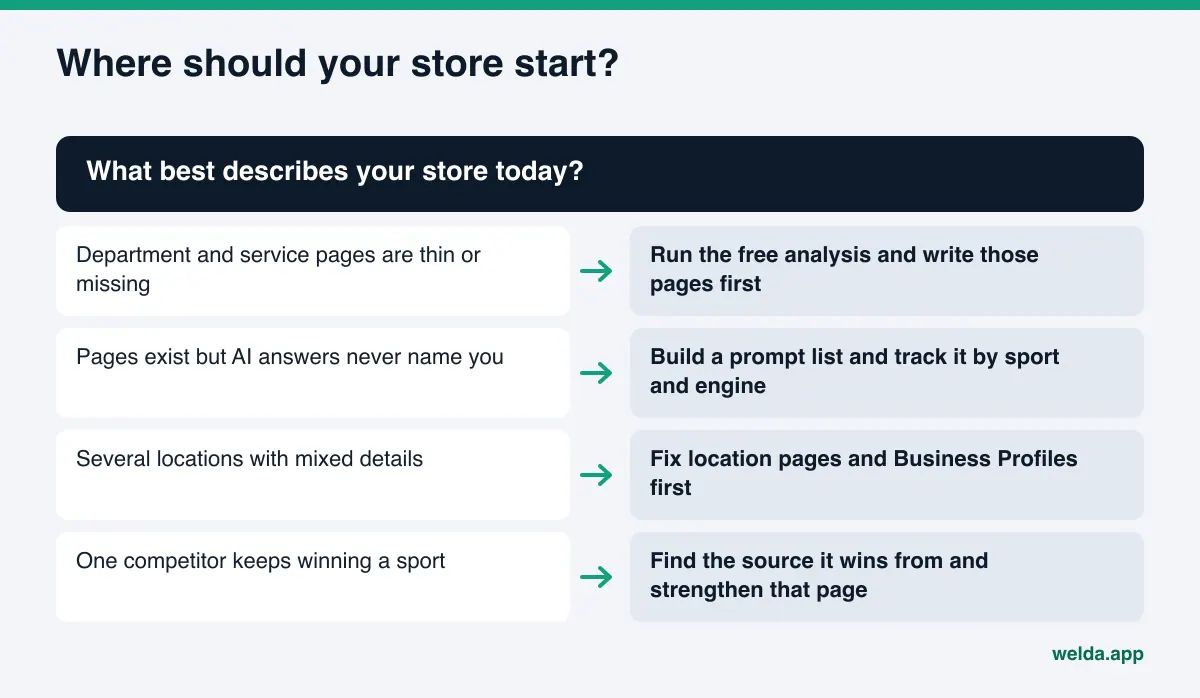
Then use your current situation to pick the first move.
Frequently asked questions
How do I know if ChatGPT recommends my sporting goods store?
You can ask ChatGPT a few shopper questions yourself, but answers change each time. For a reliable picture, the same prompts need to run on several engines, several times. The free analysis asks five questions once; the Welda dashboard does it regularly with repeated runs.
I only have a physical store, no online sales. Do I still need AEO?
Yes. Questions like "bike shop near me that does tune-ups" or "where to try running shoes downtown" point straight to physical stores. Location details, service pages and reviews decide those answers.
Do I need unique copy for every product?
No. Department pages, service pages and location pages come first. That is where AI learns what your store does well. Plain-text size, material and intended use on product pages is a good start.
Will Welda publish my department copy by itself?
Welda drafts it and you approve it. With a WordPress connection, the content opens as a draft on your site and goes live on your approval. Without one, you or your web person add the ready-made package.
How long until I see results?
New content usually takes weeks to appear in AI answers. No exact timeline or outcome can be promised, which is why before-and-after comparisons and regular tracking matter.
Is Welda available for US stores?
The free site analysis works in English and anyone can use it today. The full dashboard is in early access and is opening first in Turkey. Pricing is discussed in an early access call.
See where your store stands today
Before choosing AI visibility software for sporting goods stores, see how AI systems read your site right now. Run the free site analysis: you will see whether AI crawlers can reach your site, whether business details are missing, whether your services are spelled out, and whether your name comes up in five shopper questions. The results link arrives by email and stays open for 14 days.