Why doesn't ChatGPT recommend my vacation rental, and where does AI search optimization for vacation rentals start? AI assistants recommend rentals whose key facts they can read in plain text: how many it sleeps, the pool, pets, location, total price and house rules. If those facts live only in photos or inside a platform listing, and your own website has no clear page for each property, your name rarely makes the answer. This guide walks through AI search optimization for vacation rentals step by step and shows which parts of the work Welda handles for you.
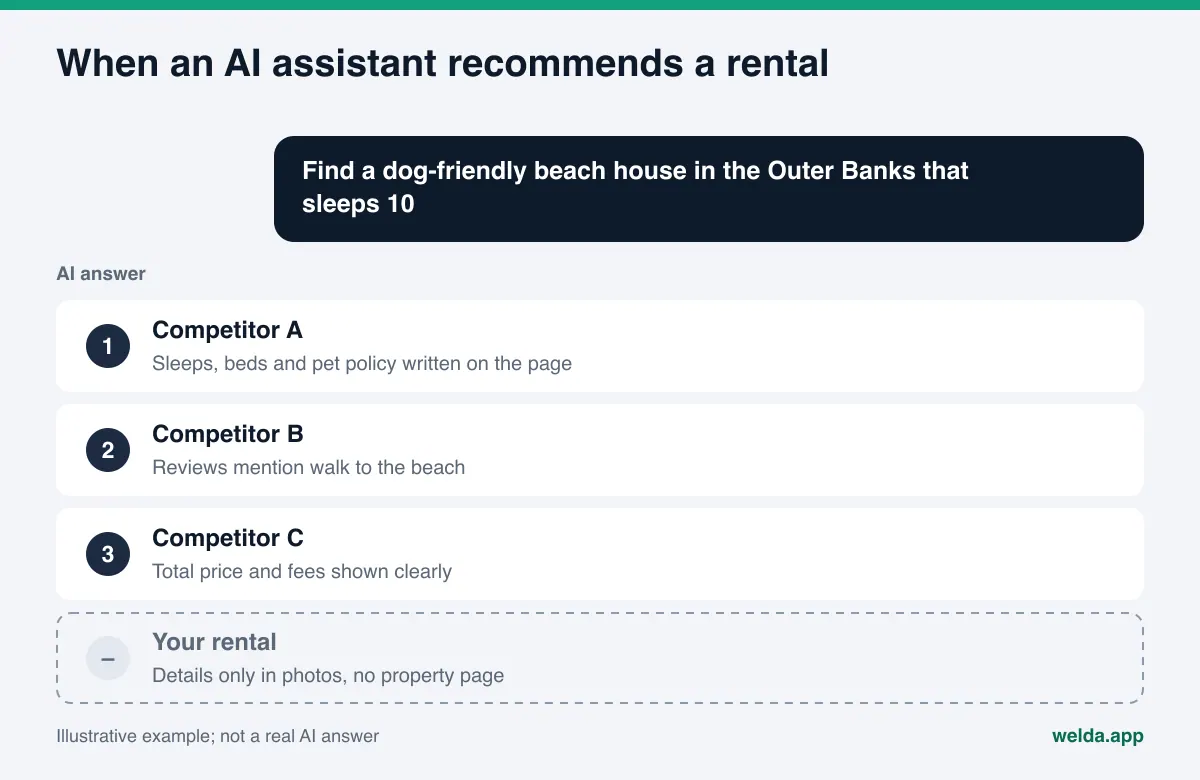
What is AI search optimization for vacation rentals, and why is it different?
AI search optimization, usually called AEO (answer engine optimization), is the work of getting your business named in answers from ChatGPT, Gemini, Perplexity and Google's AI Overviews and AI Mode. You will also see the term GEO (generative engine optimization) used for the same idea. In classic search, a guest scans a page of links and opens tabs. In an AI answer, the guest often sees three or four options with a sentence of reasoning for each. If you are not on that short list, the guest decides without ever seeing you.
Vacation rentals feel this shift more sharply than hotels. A hotel is one property with one address and one star rating. A vacation rental business often manages several very different homes: a four-bedroom house two blocks from the beach, a cabin with a hot tub on the lake, a one-bedroom condo for couples. Guest questions are just as specific. Nobody asks for "a vacation rental." They ask for "a dog-friendly beach house in the Outer Banks that sleeps 10" or "a cabin near Lake Tahoe with a hot tub and fast Wi-Fi for remote work." The AI assistant answers by looking for places where those exact facts are written down.
There is a second difference. Most rental information sits on booking platforms. Those platforms are frequent sources in AI answers, but there your property is a listing ID, and your business name rarely stands out. If your own site is thin, AI sends the guest to the platform and never mentions you. Small lodging operators with a similar setup face the same problem; we covered it in how glamping sites and cabin rentals get recommended by ChatGPT.
The fastest way to know where you stand is to measure your site today. Welda's free AI visibility audit reads your homepage and a few inner pages the way Google and AI assistants do, then lists each gap.
What do guests ask AI assistants about vacation rentals?
Rental questions usually fall into four groups. Knowing which group you are weak in tells you which facts to write first. The questions below are examples; adapt them to your market and your properties.
- Capacity and who it suits: "a 4-bedroom rental in Gulf Shores for two families," "a romantic cabin for two in the Smokies," "a beach house with a fenced pool for toddlers."
- Pool, hot tub and privacy: "a private pool home in Scottsdale," "a heated pool rental available in March," "a lake house with a hot tub and no shared walls."
- Location and access: "walk to the beach," "near the ski lift," "close to the airport," "no car needed."
- Rules and trust: "pet-friendly rental with no pet fee surprises," "clear cancellation policy," "is this rental licensed by the city."
Each question can be answered by one fact: how many it sleeps, whether the pool is fenced, the distance to the beach, the pet policy. If that fact is on your site as text, an AI assistant can find it and use it. If it is only in a photo or a PDF brochure, it probably will not be read.
Where does AI read vacation rental information?
AI assistants do not rely on one source. They read your website, your Google Business Profile, booking platform listings, and destination guides and forums together. When those sources agree, trust goes up. When they conflict, the assistant either skips you or repeats the wrong detail.
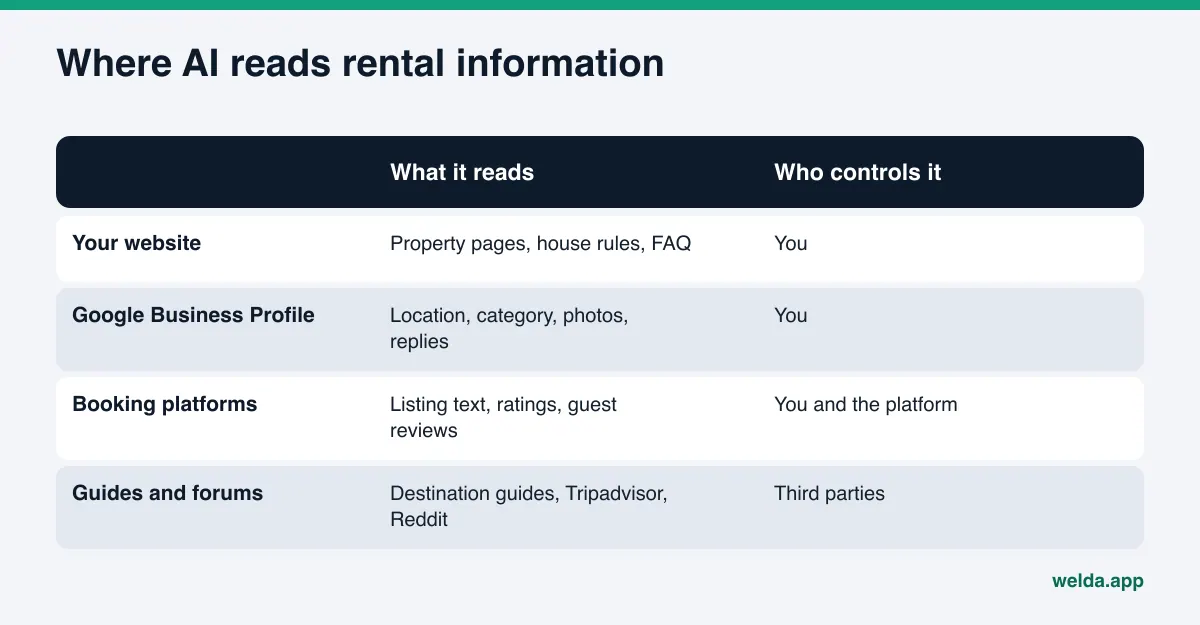
You fully control two of these: your website and your Google Business Profile. You write your platform listings, but the platform decides their structure. Destination guides, Tripadvisor forum threads and Reddit discussions belong to third parties; you can take part only through honest, signed replies. The first job is to make your two owned sources complete and consistent with each other.
A common mistake: the business shows up in Google Business Profile under one name and one pin, while the website shows six different homes on a single gallery page. When an assistant looks for "a rental that sleeps 10," it finds no capacity in the profile, and it cannot tell from the mixed gallery which home sleeps 10. The simplest fix is to give each home its own page and to state clearly in the profile that you manage vacation rentals and in which areas.
AI search optimization for vacation rentals: step by step
The order below starts with the most basic blocker and moves toward detail. Skipping a step weakens the ones after it.
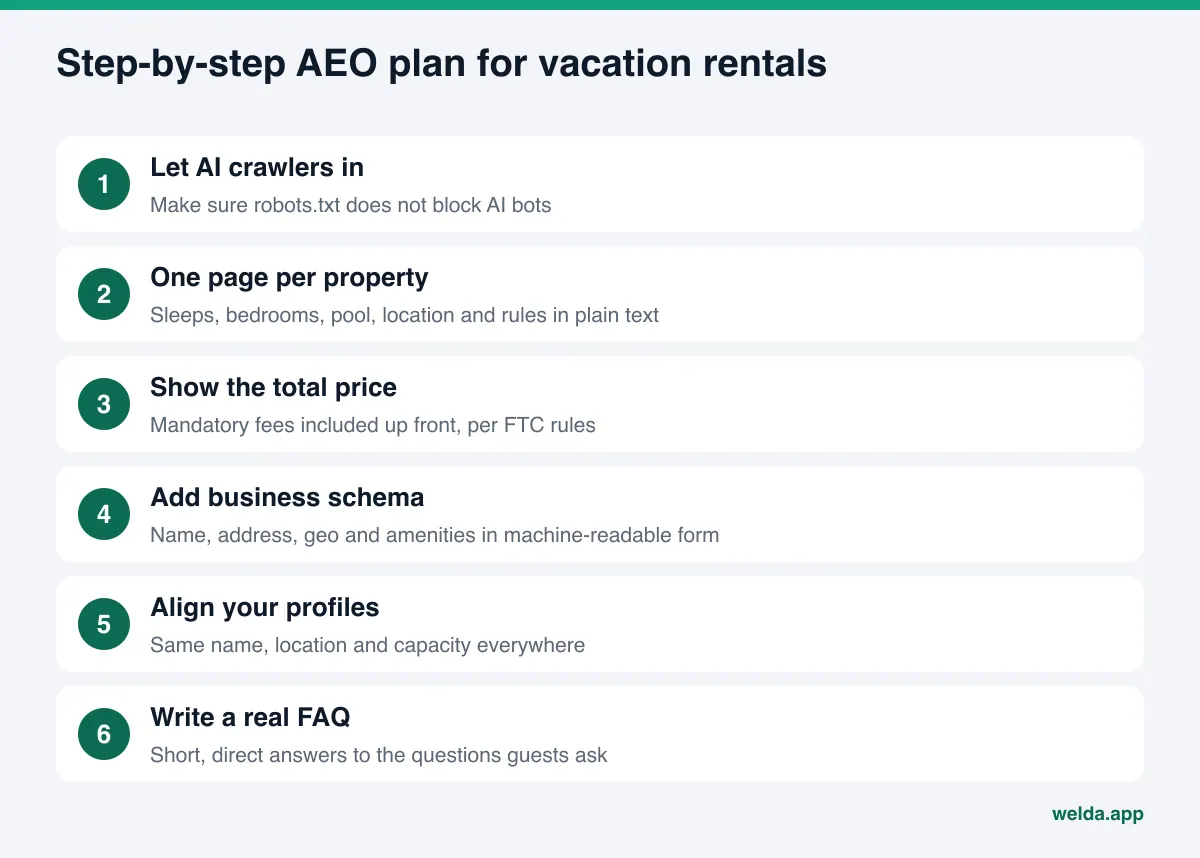
- Make sure AI crawlers can reach your site. If robots.txt blocks AI bots, nothing on your site gets read. Some themes, booking plugins and security tools block them without you noticing. The free audit checks this first.
- Create one page per property. The URL and the main heading should carry the property name and the area. Sleeps, bedrooms, bed types, baths, pool, hot tub, view and distances belong in plain text. A single gallery of all your homes makes it hard for AI to tell which home has which feature.
- Show the total price the way the FTC expects. The FTC's Rule on Unfair or Deceptive Fees covers short-term lodging, and the FTC's guidance names vacation rentals among the covered types. If you advertise a price, the total price including mandatory fees has to be shown up front. Writing your cleaning fee and other mandatory charges clearly also gives AI a consistent price fact to repeat. This is not legal advice; check your obligations with counsel.
- Write your house rules as text. Check-in and check-out times, deposit, cancellation policy, minimum stay, pets, smoking, parties and quiet hours should each have a short heading. These are the questions guests ask most. If your city requires a short-term rental permit or registration number, show it on the page as well.
- Add business schema. Schema.org has a VacationRental type for single properties rented for limited periods. It sits under LodgingBusiness and carries fields such as name, address, geo, amenities, check-in time and pet policy. Google's vacation rental structured data page says its rich listing display is limited to sites that meet certain eligibility criteria. So the markup will not unlock a special Google display on its own, but it does present your facts in a form machines read reliably.
- Align your profiles. Your business name, phone, location and the capacity of each home should match across Google Business Profile, booking platforms and your site. If one says "sleeps 8" and another says "sleeps 10," the assistant cannot tell which to trust.
- Write a real FAQ. Add the questions guests actually ask, with short, direct answers, to each property page or to one FAQ page. We explain how in FAQ pages for AEO.
- Reply to reviews. Short, specific replies on Google and on platforms confirm the facts about your homes one more time.
What belongs on a vacation rental property page?
Think of a property page as a fact sheet, not a brochure. The table shows which guest question each field answers.
| Field | How to write it | Guest question it answers |
|---|---|---|
| Capacity | Sleeps, bedrooms, bed types, baths | "Rental that sleeps 10," "for two families" |
| Pool and hot tub | Size, heating, fencing, private or shared | "Private pool home," "fenced pool for toddlers" |
| Location | Neighborhood, distance to beach, town, airport, ski lift | "Walk to the beach rental" |
| Amenities | Wi-Fi speed, workspace, kitchen, parking, EV charger, grill | "Rental good for remote work" |
| House rules | Check-in, check-out, minimum stay, pets, events | "Pet-friendly beach house" |
| Price and policies | Total price with mandatory fees, deposit, cancellation | "Rental with flexible cancellation" |
| Permit | Local short-term rental permit or registration, if required | "Is this rental licensed" |
Here is an example. An example rental business manages three homes in two beach towns. Its website has a single "Our Homes" page with photos and a tagline for each. The first job is to give each home its own page that fills the fields in this table, then link those pages from the homepage. Next, the Google Business Profile should say clearly that the business manages vacation rentals and list the areas it serves. If you run a larger property with shared amenities and many units, the setup is different; see AI search optimization for resorts.
How Welda handles AI search optimization for vacation rentals
Welda is software that measures where your business appears in AI answers and fills the gaps for you. For a vacation rental business, three parts matter most: the free audit that shows whether your property pages can be read, the question-by-question measurement in the dashboard, and the competitor view that shows who wins and why.
The free audit: can AI read your property pages? The audit reads your homepage and a few inner pages such as services, pricing, about and contact. For rental businesses, the gaps that come up most often are a robots.txt that blocks AI bots, homes shown only as images, missing or incomplete business schema, location and phone details that differ between pages, and no FAQ section. For each gap you see what was found, why it matters and how to fix it. You also get ready-to-use homepage copy (title, description, main heading, intro and FAQ), a simulation of how much each fix could raise your score, a competitor comparison, and a fix pack that includes the schema code. On top of that, the audit asks five questions your guests might ask to an AI assistant that can search the web, and checks whether your business name appears in the answers. That is a one-time check. The free audit works in English. A walkthrough of every section is in how to read your AI visibility report.
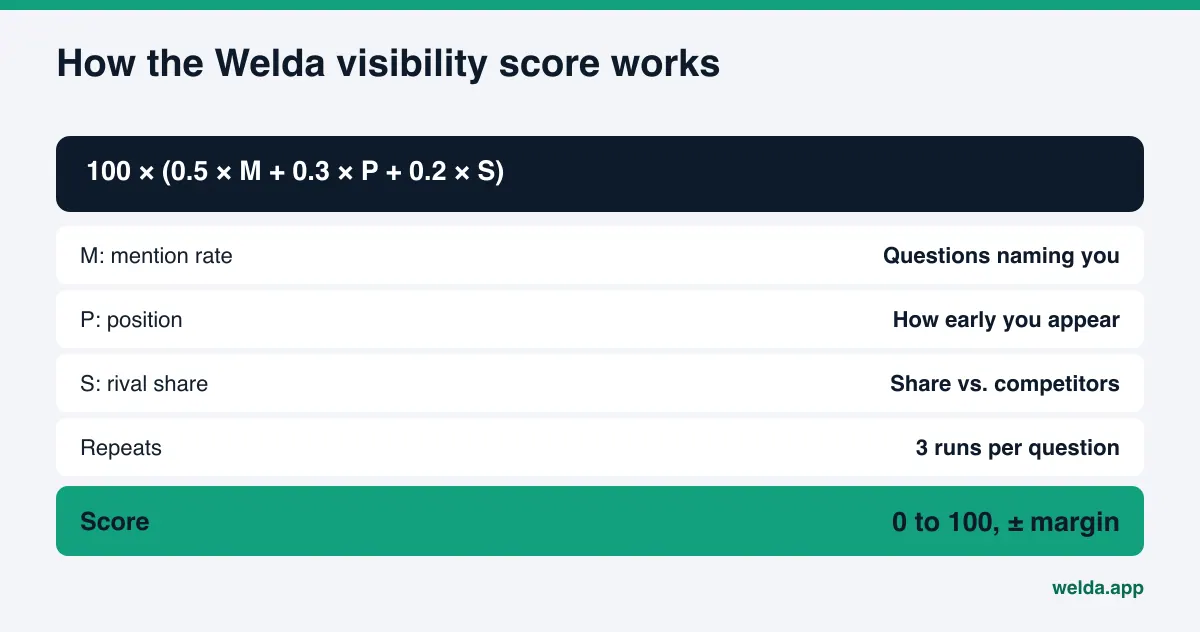
The dashboard: which guest questions name you? In the Welda dashboard, the questions your guests would ask are put to ChatGPT, Gemini, Perplexity and Google AI three times each. The questions view shows each question as a row, with whether you are named on each engine and in what position. For a rental business, this separates the problems clearly: if you show up for "private pool rental" but never for "pet-friendly rental," the missing fact is obvious. The score behind it uses an open formula, shown below.
Competitors and sources: why does another rental win? The competitors view shows on which topic and through which source a competing rental is ahead of you. The sources view lists the sites AI assistants lean on, often booking platforms, map listings and destination guides, and where your presence is missing. Updating a platform listing stays with you; Welda gives you the ready-made text to use. You can go deeper on this in AI competitor analysis.
Fixes are drafted, approval stays with you. Welda drafts property page copy, FAQ answers, profile text and review replies. It does not invent facts; it asks you for the pool size or the pet fee. On WordPress sites, Welda connects through a separate Editor user and an application password, with no code to install; drafts open on your site as drafts and go live when you approve them. For other systems, Welda provides a ready-made pack and you apply it yourself. Content always stays on your own site.
Early access, plainly: the Welda dashboard is in early access and opening in stages, starting in Turkey. Regular four-engine measurement is being added during early access, and dashboard screens are shown with sample data. What anyone can use today, in English, is the free audit. Pricing is discussed in an early access call.
Limits: what Welda does not do
AI visibility is not something anyone can guarantee. Neither Welda nor anyone else can promise that your rental will appear in ChatGPT. Here is what Welda does not do, and what stays with you:
- No ranking guarantee and no promise of "showing up in ChatGPT." Welda measures, points out gaps and drafts fixes.
- It does not write facts it does not know. Capacity, pool details, permits and house rules come from you.
- It does not publish sensitive content without your approval.
- It does not create fake reviews. Handling negative reviews, managing platform and directory accounts, and press outreach stay with you.
- Permits, rental agreements, taxes and FTC compliance are your responsibility. Welda's compliance check flags patterns such as price, guarantee and superiority claims before publishing, but it is not legal advice.
Timing matters too. New content usually takes weeks to show up in AI answers. Work started the week before peak season may not pay off in that season's first weeks, so building your property pages in the off-season is the better plan.
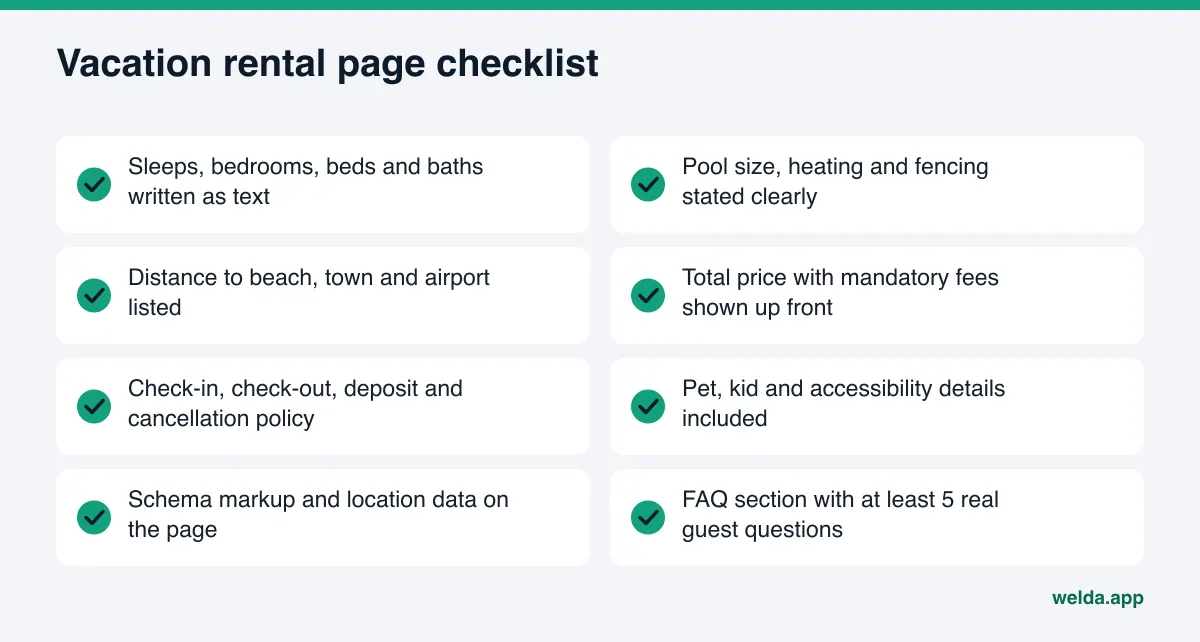
Checklist: is your vacation rental ready for AI answers?
The list below collects the basics a property page needs to be read and used in an AI answer. Check each item on your own site.
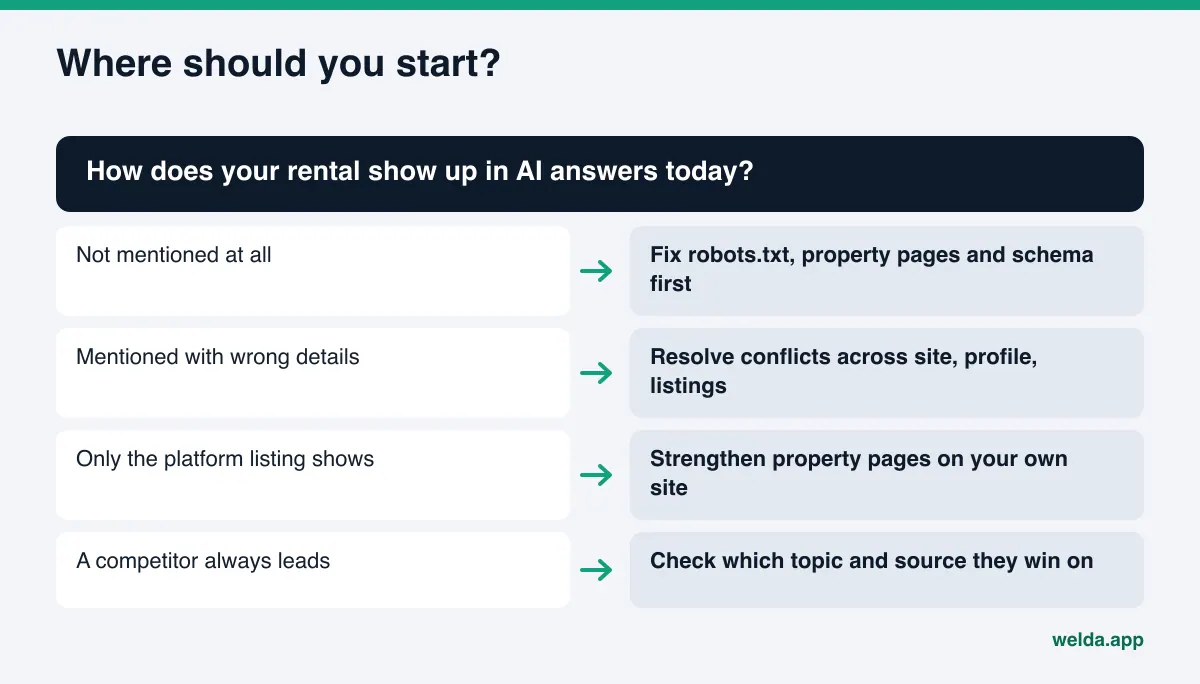
If items are missing, where you start depends on how your rental shows up today. Not mentioned at all: start with basic readability. Mentioned with wrong details: resolve the conflicts. A competitor always leads: find out which topic and source they win on.
Frequently asked questions
How is AEO for vacation rentals different from regular SEO?
Regular SEO is about where your pages rank in search results. AEO is about whether your business is named in an AI answer. They overlap: readable pages, clear headings and accurate business data help both. But AEO depends on having the precise fact a guest asks about written clearly and consistently.
Can my rental show up in AI answers if it is only listed on booking platforms?
Your platform listing may appear, but then the guest goes to the platform and your business name stays in the background. To be named yourself, your own site and Google Business Profile need complete rental facts.
Do I really need a separate page for each property?
It is not required, but it helps a lot. When homes with different capacity, pools and locations share one page, AI may not be able to tell which feature belongs to which home. A separate page lets each home answer its own questions.
Does the FTC fee rule matter for AI visibility?
The rule is a pricing disclosure requirement, not an AI rule. But showing the total price with mandatory fees up front also gives AI assistants one consistent price fact instead of conflicting numbers. Check your obligations with counsel.
What does the free audit show a vacation rental business?
It shows whether AI can read your homepage and a few inner pages, the state of your business schema, and gaps in FAQ and location data. You get a score out of 100, a fix for each gap, a competitor comparison and a ready-made fix pack. It is free once per site.
How long until changes show up?
New content usually takes weeks to be reflected in AI answers. No one can give an exact timeline, which is why off-season is the right time to start.
See where your rentals stand today
AI search optimization for vacation rentals starts with writing each property's facts clearly, consistently and in a form AI can read. First find out how your site looks to AI: run the free AI visibility audit and see, in one report, which fixes would raise your score most and what your property pages are missing.