Why doesn't ChatGPT mention your private school or daycare when parents ask? Parents now type full questions like "half-day preschool for a 3-year-old near me" or "private K-8 with a bus route in our neighborhood" straight into AI assistants. If your school is missing from the answer, the usual reason is that the details an AI can quote (ages, programs, hours, location, enrollment steps) are not written down clearly anywhere it reads. This guide shows how to fix that and what Welda does in the process.
AI search optimization for private schools and daycares is the work of making sure your school is named, accurately, when parents ask AI tools for recommendations. In the US this is usually called AEO (answer engine optimization); you will also see the term GEO, short for generative engine optimization, which means the same thing. It is not an ad channel. It is the job of stating who your program is for, what it offers, and where it is, both on your own website and on the outside sources parents and AI systems both check. To see where you stand today, you can run your site through the free AI visibility analysis, which reads your pages the way an AI system would and lists every gap it finds.
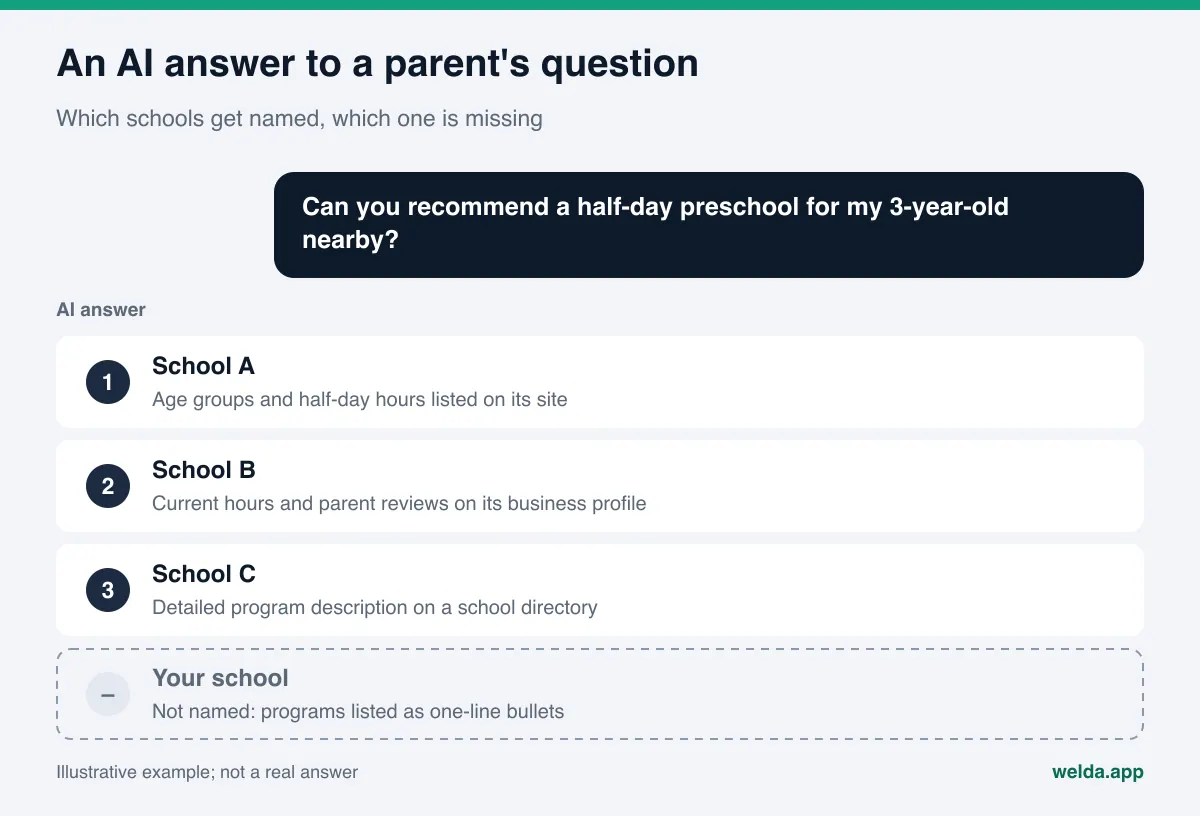
What AI search optimization for private schools and daycares actually means
A parent looking for child care rarely types a single word. The question is a need: the child's age, the neighborhood, drop-off and pickup times, the language of instruction, meals, transportation, whether there is a waitlist. AI assistants take that sentence, search the web, and return a short list of schools with a reason next to each one. The reason is often a single line: "offers a half-day program for 2-year-olds", "bilingual Spanish and English classrooms", "bus service covers the east side".
For an AI to write that line, it has to have read the fact somewhere. If your homepage says "Where little minds grow" and shows a photo gallery, there is no sentence for the AI to cite. If the preschool down the street lists each age group, its hours, and its enrollment steps on separate pages, that school gets named instead of yours.
Parent questions tend to fall into a handful of patterns. The table below lists each pattern and where the answer should live. The questions are examples; rewrite them using the words parents in your area actually use.
| Question type | Example parent question | Where the answer should live |
|---|---|---|
| Age and program | "Half-day preschool for a 3-year-old" | Age group pages with hours and a daily schedule |
| Location and transport | "Private elementary school with bus service near Riverside" | Address, bus routes, or the neighborhoods you serve |
| Philosophy | "Montessori preschool with outdoor time" | A page that explains how the approach works in the classroom |
| Language | "Spanish immersion daycare" | Weekly language schedule and the role of each teacher |
| Practical details | "Daycare that provides lunch and snacks" | Meals, nap, allergy, and sick-day policies |
| Enrollment | "When does fall enrollment open for pre-K" | Enrollment steps, tours, open house, application form |
Why parents' shortlists now start in AI answers
Choosing a school or daycare is a long decision. Parents ask around, compare, read reviews, and visit. That research used to run through search results, parent Facebook groups, and word of mouth. Today the same parent can get a first shortlist from an AI assistant in seconds. Google's AI Overviews and AI Mode show a similar summary above regular search results.
Not being on that shortlist does not mean a parent will never hear of you. It means you are not in the first round of comparison. Daycare and preschool enrollment is highly local, so your real competitive set is small, and moving from absent to named in a handful of answers can matter a lot.
There is a second risk: an AI tool can name you with outdated information. Old hours from a cached page, a closed location, or a program you stopped offering can end up in the answer. For a school, that means the first contact with a family starts with a correction. AEO for schools is about being found, but just as much about being described correctly.
AI search optimization for private schools and daycares, step by step
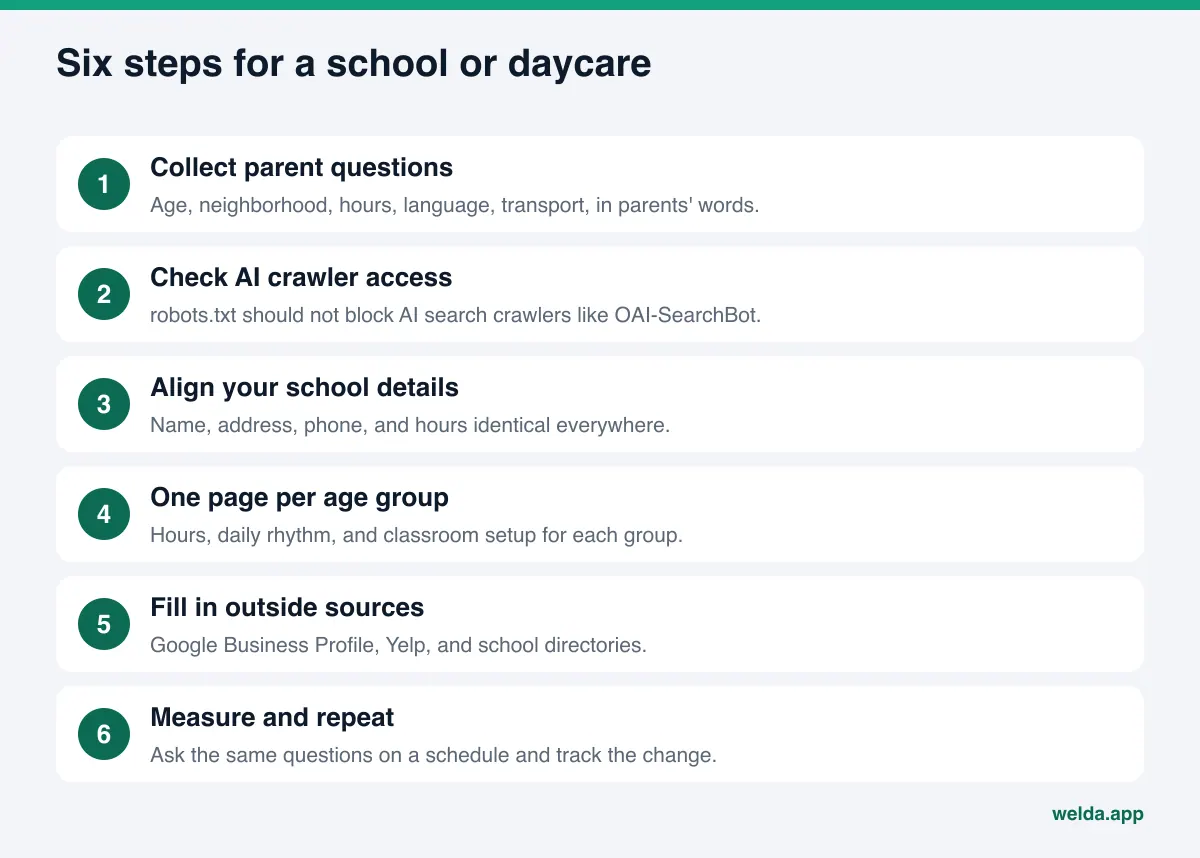
The order below is built for a small team. The first two steps are about measurement and technical access; the rest is content and outside sources.
- Collect parent questions. Write down the 15 to 20 questions you hear most often on tours, on the phone, and by email. Keep the parents' own wording: "half-day", "potty training", "before and after care", "summer camp".
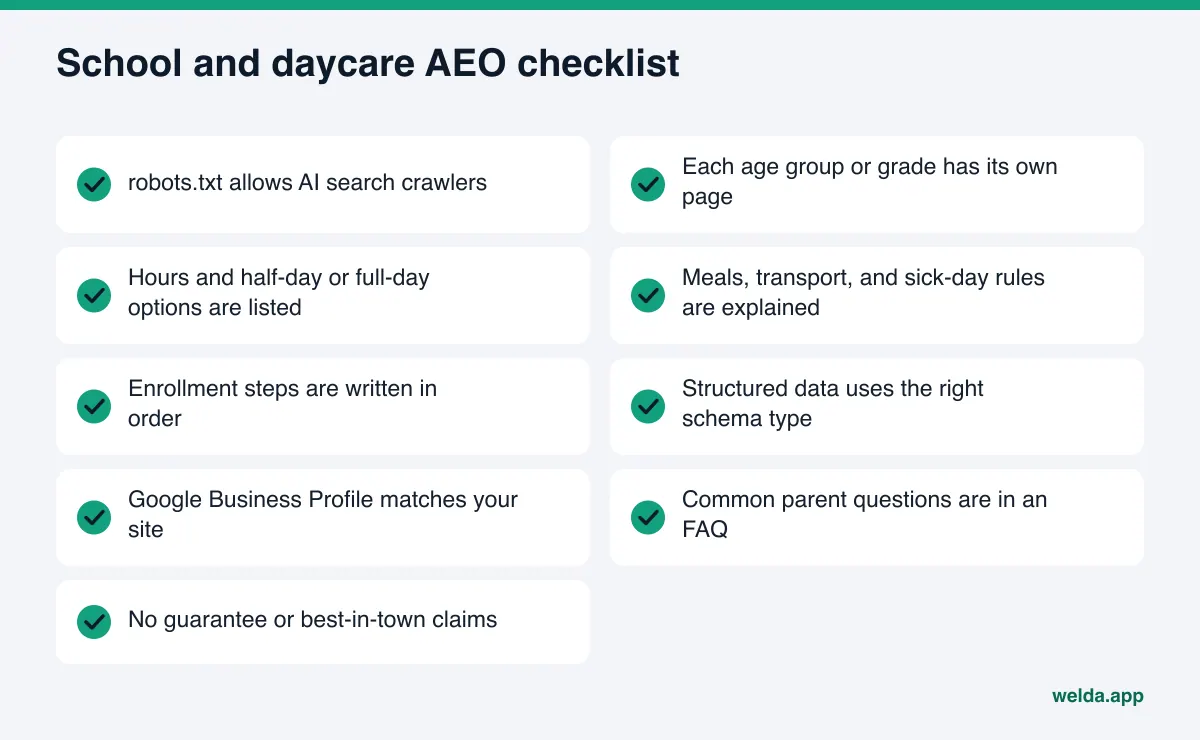
- Make sure AI crawlers can reach your site. If your robots.txt blocks search crawlers, your pages will not be read no matter how good they are. OpenAI states in its documentation that sites that opt out of OAI-SearchBot will not be shown in ChatGPT search answers.
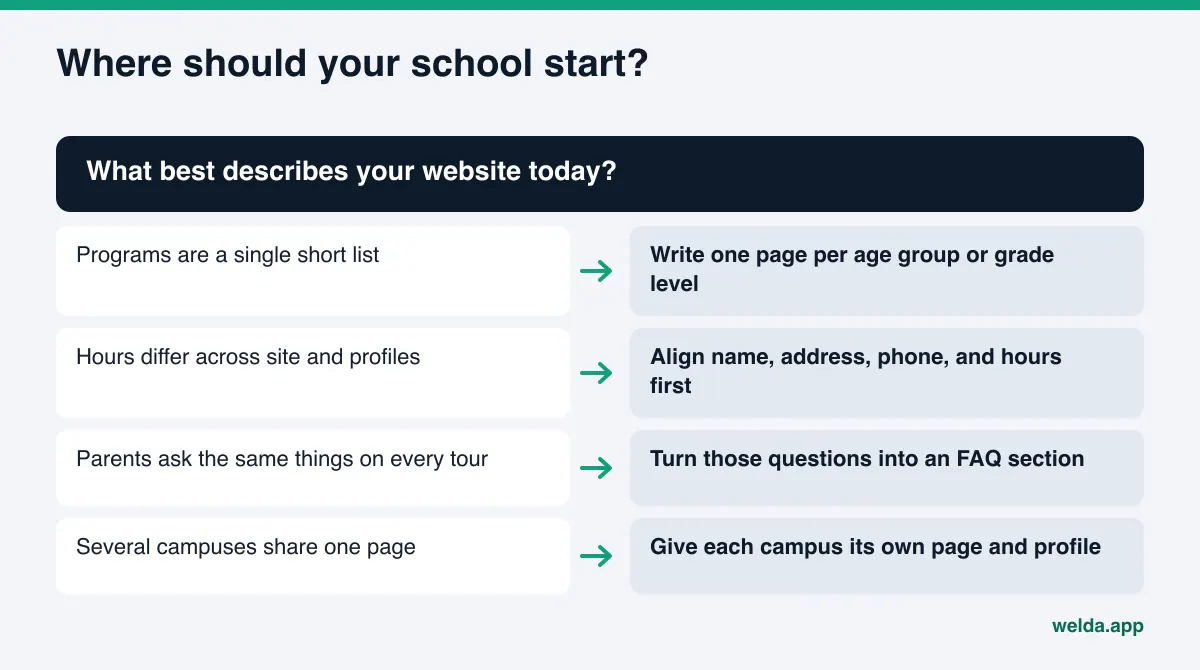
- Keep your school details identical everywhere. Name, address, phone, and hours should match on your website, Google Business Profile, and directories. Summer hours and holiday closures are the usual source of mismatches; our guide on keeping business hours accurate for AI covers this.
- Give every age group and program its own page. Replace a three-line "Programs" list with a page per group: who it is for, hours, daily rhythm, classroom setup.
- Add structured data. Schema.org has types such as ChildCare and Preschool. The right type, together with address and hours, helps AI systems classify your school correctly.
- Write a real FAQ section. Turn the parent questions you collected into short, direct answers. Our post on FAQ pages for AEO explains how to structure one.
- Fill in outside sources. Check how your school appears on Google Business Profile, Yelp, school directories such as Niche and GreatSchools, and local parent forums.
- Ask the same questions again on a schedule. Changes take weeks to show up in AI answers. Use the same question set at the same intervals and note what changes.
Which pages your school website needs: ages, programs, enrollment
The most common problem on school and daycare websites is that everything is packed into one "About us" page. When an AI system looks for an answer to a specific question, it prefers the page that matches that question directly. For "half-day program for 2-year-olds", the strongest source is a page whose title and first paragraph are about exactly that.
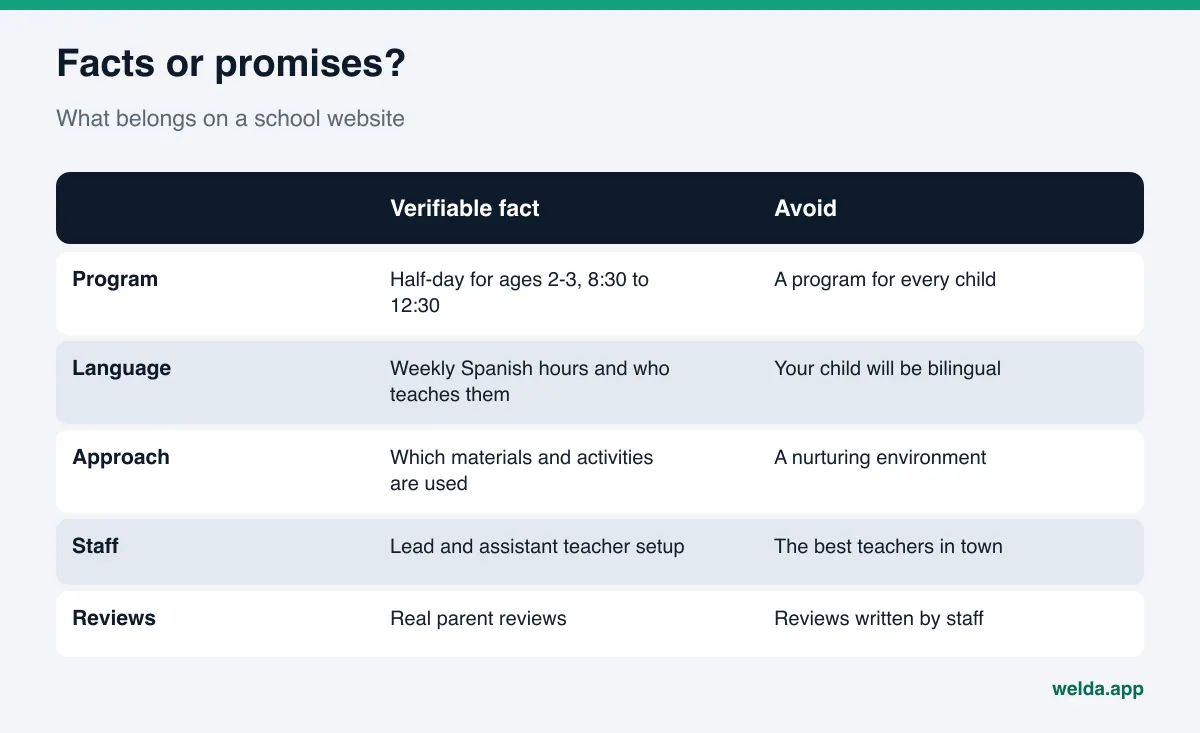
Age group pages. For each group, state the age range, how classes are organized (if you do not want to publish ratios, describe how groups are set up rather than saying "small classes"), the lead and assistant teacher setup, the daily rhythm (arrival, breakfast, activities, nap, pickup), and full-day and half-day options. These pages answer the parent's question: what will my child actually do here all day?
Philosophy page. "A nurturing, child-centered environment" carries no information for an AI. If you follow an approach (Montessori, Reggio Emilia, play-based, project-based), explain what it looks like in the room: which materials, which activities, how children choose their work.
Practical details page. Where meals are prepared, how menus reach parents, how allergies are handled, which neighborhoods the bus covers, nap routines, sick-day rules, before and after care. These topics sit near the top of a parent's checklist and are missing from many school sites.
Enrollment page. List the steps in order: inquiry, tour or open house, application, documents, deposit, first day. For tuition, state your actual policy. If you do not publish numbers, "tuition is shared during your tour" is still an answer and keeps the AI from guessing.
Licensing and background. Say which state agency licenses your program, when you opened, where your campuses are, and who leads the school. Parents look for trust signals, and AI systems use exactly this kind of consistent, checkable detail as source material.
Tone matters too. Swap hype for statements a parent can verify. Federal law requires advertising to be truthful and not misleading, according to the FTC, and the same sentences that keep you on the right side of that rule are the ones AI tools prefer to quote.
Beyond your website: Google Business Profile, Yelp, and school directories
AI answers do not rely on your website alone. The outside sources parents check also become the reasons an AI gives. For US private schools and daycares, these usually include:
- Google Business Profile and Google Maps: category, address, hours, photos, and reviews. Picking the right category and naming your age groups in the description matters most for "near me" questions.
- Yelp: parents can read daycare reviews there, and AI answers can draw on them. Make sure your details match your site.
- School directories such as Niche and GreatSchools: if you have a listing, check that programs, grades, and contact details are current.
- Local parent communities: neighborhood forums and parent groups shape opinion. You cannot control them, but you can answer questions calmly and accurately where you are invited to.
- Reviews: you can ask happy families for reviews. Fake or incentivized reviews damage trust and break platform rules.
One note on photos: get parent consent before publishing images of children, and check your obligations with your own counsel. This is not legal advice. You do not need children's faces for AI visibility; photos of classrooms, playgrounds, and materials do the job.
Daycare, preschool, or private K-12: how the questions change
Parents ask different things depending on the type of school. If your question set does not match your school type, you end up measuring questions nobody in your audience asks.
| School type | What parents ask first | Pages that should stand out |
|---|---|---|
| Infant and toddler daycare | Hours, ages, nap and feeding routines, distance | Age group pages, daily schedule, practical details |
| Preschool and pre-K | Philosophy, kindergarten readiness, half-day options | Philosophy page, program pages, classroom setup |
| Private elementary and middle school | Curriculum, languages, clubs, transportation | Grade-level pages, weekly schedule, bus information |
| Multi-campus school | Campus differences, moving between divisions | One page per campus and division, clear addresses |
Multiple campuses need extra care. In neighborhood questions, AI answers may name the school but give the wrong campus address. Each campus should have its own page, address, phone number, and Google Business Profile. If a program only runs at one campus, say so on that campus page.
An example scenario. Picture an example daycare with two locations: one full-day only, the other offering full-day and half-day. The site has a single "Programs" page with both schedules mixed together. A parent asks an AI for a half-day daycare nearby, and the AI either names neither location or names the one without a half-day program. The fix is not a new campaign; it is two location pages, each with a clear schedule table. This scenario is illustrative and does not describe a real school, but it reflects a structure that shows up on many school sites.
Plan your questions around the school calendar as well. In the months before enrollment opens, "when does enrollment open" and "how to apply" questions rise. In spring, "summer camp" questions take over. Reviewing your question set each season keeps your measurement in step with what parents are actually asking.
How Welda does this work
Welda is software that measures where a business appears in AI answers and fills in missing information on its behalf. For schools and daycares, three parts of it matter most: question tracking built around parent questions, a to-do list that asks you instead of guessing, and a compliance check that flags risky claims before anything is published.
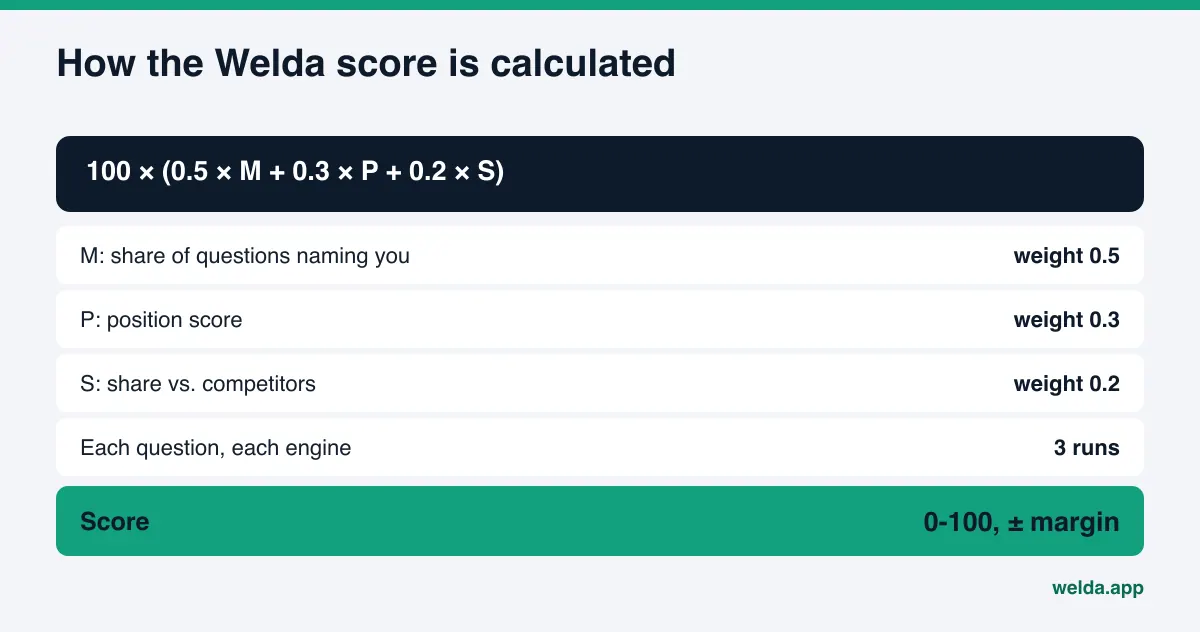
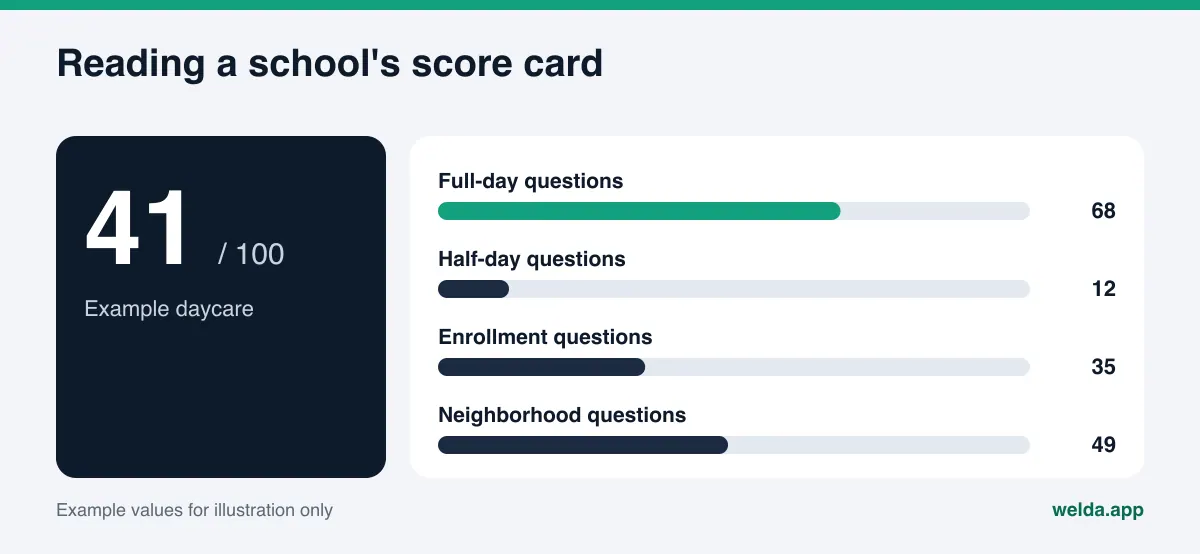
Question tracking. In the Welda dashboard, you define the questions parents in your area are likely to ask: "full-day daycare in Midtown", "bilingual preschool", "private elementary school with bus service". Each question is asked three times in ChatGPT, Gemini, Perplexity, and Google AI. For every question you see whether your school is named, in which position, and which source the answer leaned on. For a daycare, the practical value is simple: if you show up for full-day questions but never for half-day ones, you know exactly which page is missing.
The score uses a published formula, and each component shows up separately, so you are never guessing why it moved. Our guide on how to read your AI visibility report walks through the numbers.
A to-do list that asks instead of inventing. The most sensitive facts for a school are capacity, waitlist status, tuition policy, enrollment dates, and staff details. If Welda cannot find them on your site, it does not make them up. It asks you in the to-do list, and once you answer, the detail flows into the pages and profile texts it prepares. For connected accounts such as Google Business Profile, Welda drafts the text; for a directory it cannot connect to, the task is listed as manual, with ready-to-paste text next to it.
Compliance check before publishing. Phrases common on school sites, such as "the best preschool in town", "guaranteed kindergarten readiness", or "your child will be bilingual", are flagged by Welda's compliance check before publication. The check is not legal advice and has not been reviewed by legal counsel; its job is to put risky patterns in front of you.
If your site runs on WordPress, Welda connects through a dedicated Editor user and an application password, with no code to install. The age group page or FAQ it prepares opens on your site as a draft and goes live only when you approve it. Content always lives on your own site. For other platforms, Welda gives you a ready-made package that you or your web team apply.
The rest of the dashboard, including competitors, sources, and the monthly one-page report, is there to follow the results. The competitor view shows which nearby school is ahead on which question and from which source, a topic we cover in more depth in our post on AI competitor analysis.
Early access, limits, and what Welda does not do
To be clear about where things stand: the Welda dashboard is in early access and is opening first in Turkey. Regular four-engine measurement is being added during early access, and the sample screens you may see use representative data. Question language can be set to English or Turkish. What anyone can use today, in English, is the free site analysis. Pricing is discussed in an early access conversation.
The free analysis reads your homepage and a few inner pages, gives you a score out of 100 with technical and content parts shown separately, and explains each gap: what it saw, why it matters, and how to fix it. It also asks 5 questions parents might ask to an AI assistant that can search the web, and checks whether your school's name comes up. That is a one-time snapshot, not ongoing tracking. It is free once per site, your email and phone are verified, and the results link arrives by email and stays open for 14 days.
What Welda does not do:
- It does not guarantee rankings or placement in ChatGPT. No tool can guarantee what AI answers say.
- It does not write facts it does not know. Capacity, tuition, and staff details are asked of you.
- It does not create fake parent reviews.
- It does not publish sensitive content without approval. Final sign-off stays with the school.
- Handling negative reviews, directory accounts, and press work stays with you. Welda can draft a review reply; you decide and send it.
Timing matters as well. New pages and updated profiles typically take weeks to show up in AI answers. Starting a few months before enrollment season is far calmer than starting the week it opens.
Checklist: is your school ready for AI answers?
Use the list below as a one-evening audit of your own school. Every "no" is a line on your to-do list.
Before deciding how to proceed, ask yourself:
- Does every age group or grade level have its own page, or is everything on one page?
- If a parent asks about "half-day", "bus", or "lunch", will they find a clear answer using those words on our site?
- Do our Google Business Profile hours and category match the website?
- Which nearby schools are named in AI answers, and which sources do those answers rely on?
- Does our site make claims like "best" or "guaranteed" that a parent cannot verify?
- How much time can we spend on content, and do we want to write it ourselves or have software prepare drafts for approval?
For another local service example that follows the same logic of neighborhood, service, and trust details, see our post on AI search optimization for real estate agents.
Frequently asked questions
How is AEO for schools different from regular SEO?
Classic SEO focuses on rankings in search results. AEO focuses on whether your school is named, accurately, in AI answers. They share the same foundation: crawler access, clear pages, and consistent details. The difference is that AI assembles sentences from sources, so text that directly answers the parent's question carries more weight.
We are a small daycare with no marketing staff. Where do we start?
Start with three things: complete your Google Business Profile, write a short but specific page for each age group, and answer your ten most common parent questions in an FAQ section. Then run the free analysis to see what is still missing.
Do we have to publish tuition on our website?
No. But you should state your tuition policy clearly. "Tuition is shared during your tour" or "rates are updated each enrollment season" still answers the question and reduces the chance that an AI guesses.
Do negative parent reviews affect AI answers?
Review sites can be among the sources AI tools draw on. Responding calmly, specifically, and with a fix is healthier than trying to bury reviews. Welda can draft a reply; the final wording and sending stay with you.
Can Welda guarantee our school shows up in ChatGPT?
No. Welda measures, shows the gaps, and prepares content, but no tool can guarantee what AI answers say. Changes usually take weeks to appear.
Does the free analysis work for US school and daycare websites?
Yes. The free analysis works in English and reads your site regardless of sector: crawler access, page titles, structured data, address and phone, FAQ section, reviews and trust signals, clear service descriptions, and page speed. It also asks 5 parent-style questions to an AI assistant that searches the web.
Your first step: see your site the way an AI reads it
AI search optimization for private schools and daycares is not about a new marketing channel. It is about writing down what you already know in a form AI systems can read. When ages, hours, programs, enrollment steps, and location are clear, an AI has a reason to name you when a parent asks. To see where to start, run the free AI visibility analysis. The results link arrives by email and shows your gaps, ready-to-use text suggestions, and how much each fix is likely to move your score.