Why doesn't ChatGPT recommend my brunch restaurant, and what can I do about it? AI assistants build a brunch recommendation from what they can read clearly on your website, your Google Business Profile, and review sites. If your brunch hours, weekend wait policy, menu, and location are missing or inconsistent, your name drops out of the answer. This guide walks through AI search optimization for brunch restaurants step by step and shows which parts Welda handles for you.
What is AI search optimization for brunch restaurants?
AI search optimization, usually called AEO (answer engine optimization), is the work of getting your business named in the answers that ChatGPT, Gemini, Perplexity, and Google's AI Overviews and AI Mode give. You may also see the term GEO, short for generative engine optimization; it means the same thing. In a classic search, a diner scans a list of links and picks one. In an AI answer, the diner often sees a short list of three or four places. If you are not on that list, the decision is made without you.
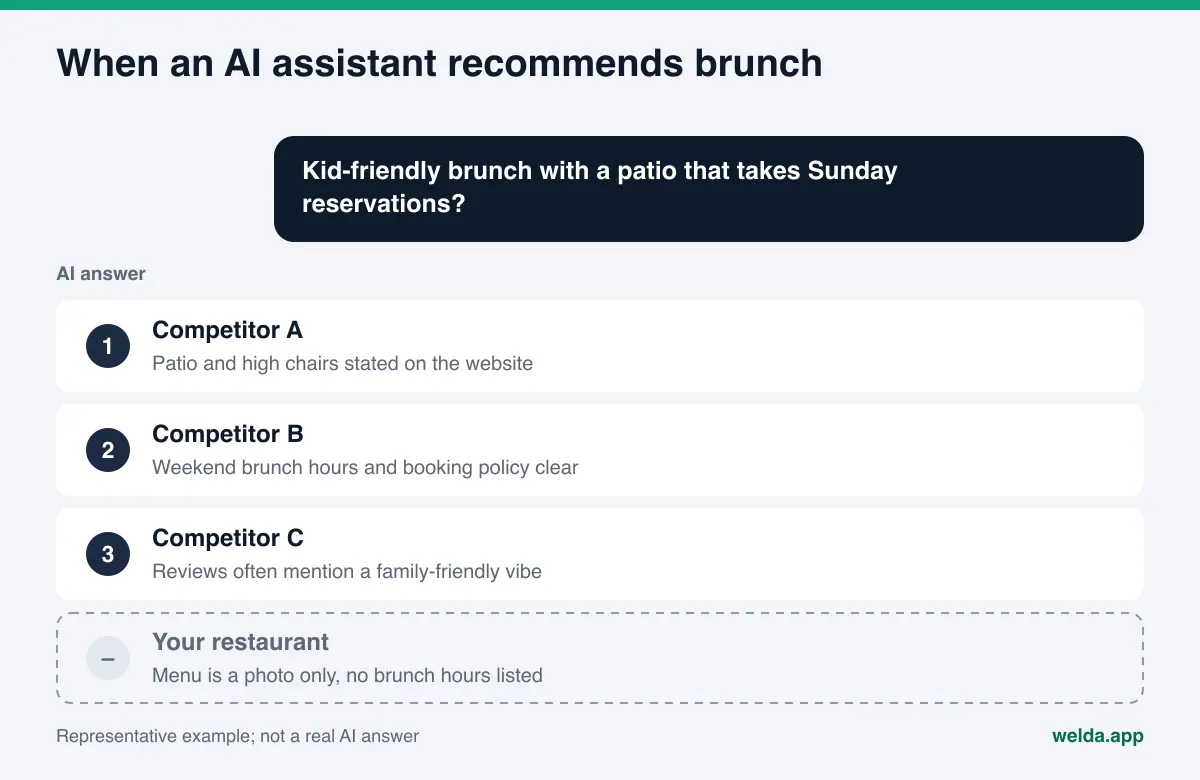
Brunch is a category where this matters more than usual, because brunch questions are almost always conditional. People rarely ask "where is brunch near me" and stop there. They ask "brunch spot that takes reservations for a party of eight on Sunday," "kid-friendly brunch with outdoor seating," "bottomless mimosa brunch downtown," or "brunch with good gluten-free options that opens before 9." An AI assistant answering that question looks for a place that has written those details down somewhere it can read. If you haven't, a competitor who has gets the mention.
Brunch information is also time-sensitive. Brunch runs only on certain days and certain hours. Holiday brunches, seasonal patios, and changing waitlist rules shift through the year. When an AI system finds old or conflicting details, it either skips you or tells a guest the wrong time. We cover the hours problem in more depth in our guide to keeping business hours accurate for AI.
The fastest way to see where you stand is to measure your site today. Welda's free site analysis reads your homepage and a few inner pages the way Google and AI assistants do, then lists every gap it finds.
What do diners actually ask AI about brunch?
Brunch questions tend to combine four or five conditions in one sentence. That is good news for a restaurant that writes clearly, because each condition is a fact you can publish. Here are the kinds of questions a brunch place should plan for. These are illustrative examples for building your own list, not measured data:
- Timing: "Brunch open at 8 a.m. on Saturday," "brunch that runs until 3 p.m.," "Easter brunch reservations."
- Party and occasion: "Brunch for a bachelorette group of 10," "baby shower brunch with a private room," "birthday brunch that takes large parties."
- Family and pets: "Kid-friendly brunch with high chairs," "dog-friendly patio brunch."
- Diet: "Vegan brunch," "gluten-free pancakes," "brunch with dairy-free options."
- Drinks and price: "Bottomless mimosas," "brunch prix fixe," "brunch under a certain budget."
- Wait and booking: "Brunch with no long wait," "does this place take brunch reservations or is it walk-in only."
- Location: "Brunch near the convention center," "brunch within walking distance of the stadium," or a specific neighborhood name.
Every one of these questions maps to a piece of information that should be stated plainly on your site or profile. When the answer isn't there, the assistant either guesses or leaves you out.
Where does AI look when it recommends a brunch spot?
AI assistants rarely build an answer from a single page. They search the web, read several sources, and favor details that agree across them. For a brunch restaurant, those sources fall into four groups:
- Your own website: Brunch menu, brunch hours, reservation and waitlist policy, address, parking, kids and pet policy. You control all of it.
- Google Business Profile and Google Maps: Category, hours, special hours, photos, menu link, reviews, and your replies. You control most of it.
- Review platforms: Yelp, Tripadvisor, and Google reviews. Guests write the reviews; how you respond is up to you.
- Local guides and media: City magazines, "best brunch in town" lists, local news food sections, and neighborhood blogs.
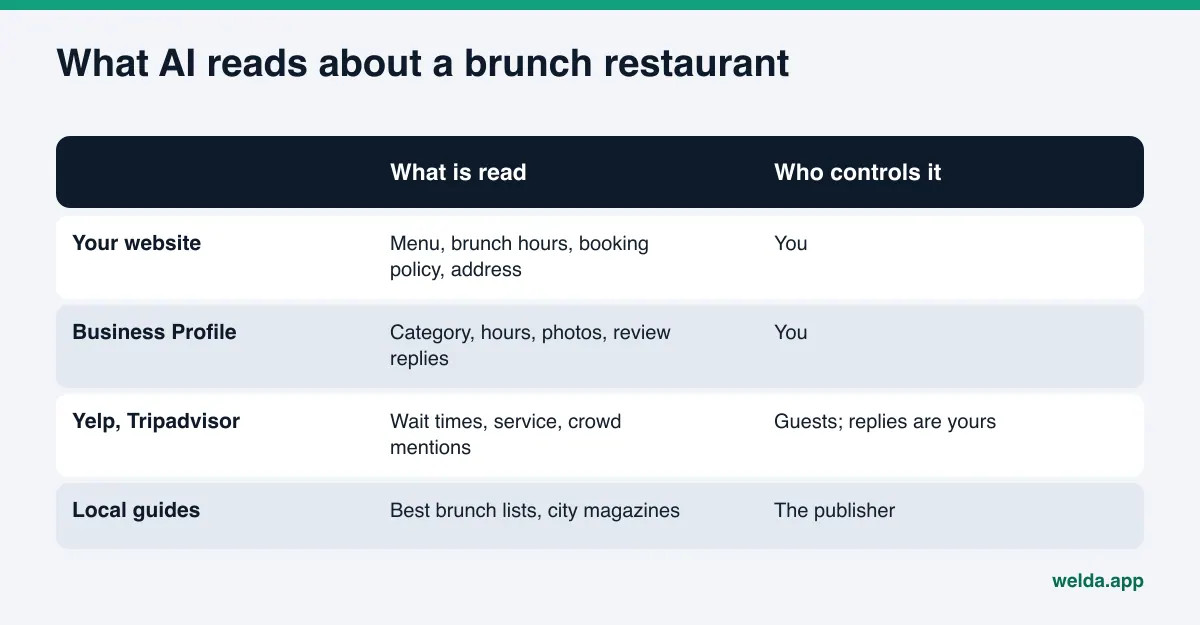
The key point is this. Getting into local guides takes time and is outside your control. But the first two sources are fully yours, and most brunch restaurants leave gaps there. The menu exists only as a photo or PDF. The website says brunch ends at 2, the profile says 3. Weekend waitlist rules appear nowhere. Fix those two sources first.
There is also a technical gate. If AI crawlers can't reach your site, the content won't be read no matter how good it is. OpenAI, for example, explains on its crawler documentation page that OAI-SearchBot is used to surface websites in ChatGPT's search features, while GPTBot is a separate crawler tied to model training. Check that your robots.txt file isn't blocking search crawlers by accident.
AI search optimization for brunch restaurants: a step-by-step plan
The steps below are ordered by impact per hour of work. The first four are technical and factual fixes. The rest build content and trust.
- Open the door to AI crawlers. Make sure robots.txt doesn't block AI search crawlers. Check your website builder's default settings too; some templates or security plugins block bots broadly.
- Publish the brunch menu as text. List your brunch dishes, sides, drinks, and any prix fixe option as real text on a page. Keep the PDF or photo as an extra, not the only source. AI systems don't always read prices and dish names reliably from images.
- Separate brunch hours from regular hours. If you open at 7 but brunch runs only Saturday and Sunday from 9 to 3, say so in those words. Post holiday brunch dates and special hours ahead of time.
- Add structured business data. Put Restaurant markup (Schema) on your homepage: name, address, phone, geo coordinates, opening hours, cuisine, and menu URL. Google's local business structured data guide recommends using the most specific subtype and defines servesCuisine and menu properties for food establishments.
- Explain how brunch is priced and booked. Is there a prix fixe? Are mimosas by the glass or bottomless with a time limit? Do you take reservations, and for what party size? Is there a waitlist app or a walk-in line? Even if you don't want to publish numbers, publish the structure.
- Write situation pages or sections. Short, plain paragraphs about kids, large groups, private events, vegan and gluten-free options, dogs on the patio, accessibility, and parking. Each one answers a question someone is asking an assistant.
- Add a FAQ section. "Do you take brunch reservations," "what time does brunch end," "is there a time limit on tables." Short questions with short answers. We go into detail in our guide to FAQ pages for AEO.
- Link your profiles and answer reviews. Link your Google Business Profile, Yelp page, and Instagram from your site. Reply to reviews, especially the brunch-specific complaints about long waits or rushed service, calmly and with facts.
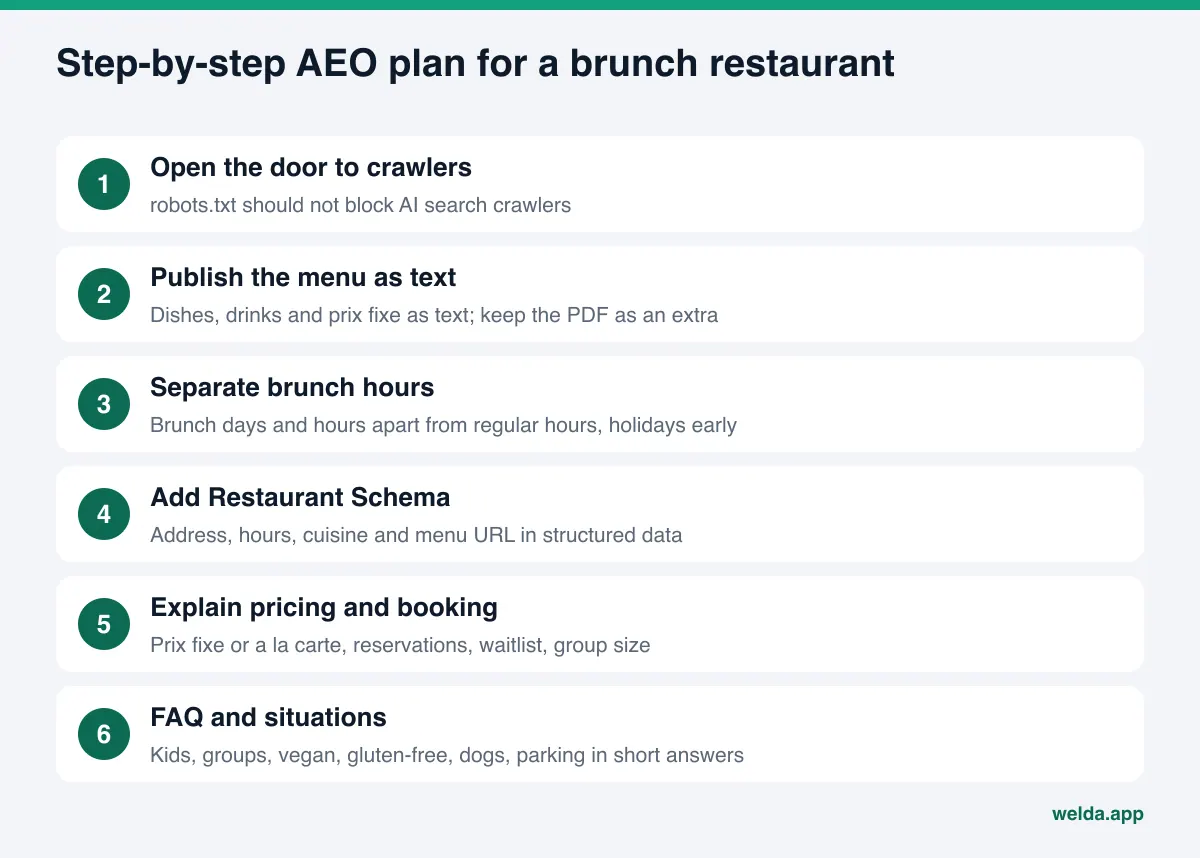
None of this needs an ad budget. Most of it is written once and updated only when something changes. The step restaurants skip most often is the fifth: how brunch is priced and booked. A place that never says whether it takes reservations will rarely appear for the diner who asks exactly that.
What should a brunch restaurant's website say?
The table below summarizes the information a brunch restaurant's site should carry, the question each item answers, and where it works best. Compare it with your own site and mark the missing rows.
| Information | Question it answers | Where it belongs |
|---|---|---|
| Brunch days and hours | Is brunch still served at 2 on Sunday? | Homepage, contact page, Business Profile, Schema |
| Brunch menu as text | Do they have chicken and waffles or eggs Benedict? | Menu page |
| Pricing structure | Is it a la carte or prix fixe? Are mimosas bottomless? | Menu page and FAQ |
| Reservations and waitlist | Can I book for eight, or is it walk-in only? | Homepage and FAQ |
| Dietary options | Is there something vegan or gluten-free? | Menu page |
| Space and policies | Patio, high chairs, dogs, private room, accessibility | About or visit page |
| Location and parking | Is it near the stadium? Is there parking or valet? | Contact page and Schema |
Every row must match across your site, your Google Business Profile, and your Yelp page. If your website says brunch ends at 3 and your profile says 2, an assistant has to pick one or trust neither.
Consider an example scenario. An example neighborhood brunch cafe posts its menu only as an Instagram photo, has a one-page website that says "Welcome," and never mentions that it takes reservations for groups. A diner asks for "brunch for a group of ten on Saturday that takes reservations." The assistant recommends Competitor A and Competitor B, which state their group policy clearly. If the example cafe writes its menu as text, adds weekend brunch hours, states its group reservation policy, and builds a short FAQ, it now has the facts an assistant needs to consider it. That is not a guarantee. But a restaurant without those facts has no way into the answer.
How does Welda handle AEO for a brunch restaurant?
Welda is software that measures where a business appears in AI answers and fills in what's missing on the business's behalf. For a brunch restaurant, the work comes in two parts.
The free site analysis: available to anyone today
The free analysis runs in English and reads your homepage plus a few inner pages (services, pricing, about, contact) the way Google and AI assistants do. It checks whether AI crawlers can enter your site through robots.txt, your page title and meta description, your main heading, structured business data (Schema), your address, phone, and location details, whether your social and map profiles are linked from the site, whether you have a FAQ section, review and trust signals, how clearly your offering is described, and page speed.
You get a score out of 100, with technical and content scored separately. For every gap, the report shows what was found, why it matters, and how to fix it. It includes ready-to-use homepage copy (title, description, main heading, intro paragraph, and FAQ), a simulation showing how much each fix would raise your score, a competitor comparison, a fix package to add to your site (including the business data code), a PDF, and a shareable score card. If you want help interpreting the result, our guide on how to read your AI visibility report goes through it section by section.
The analysis also asks five questions a customer might ask to an AI assistant that can search the web, then checks whether your business name appears in the answers. That is a one-time check, not ongoing tracking. The analysis is free once per site. Your email and phone are verified, the results link arrives by email, and it stays open for 14 days. It does not measure rankings and does not promise any.
The Welda dashboard: in early access
To be direct: the full Welda dashboard is in early access and opens in stages, starting in Turkey. Regular tracking across all four AI engines is being added during early access, and the sample screens in the dashboard use representative data. The part anyone in the US can use today is the free site analysis. Pricing is discussed in the early access conversation.
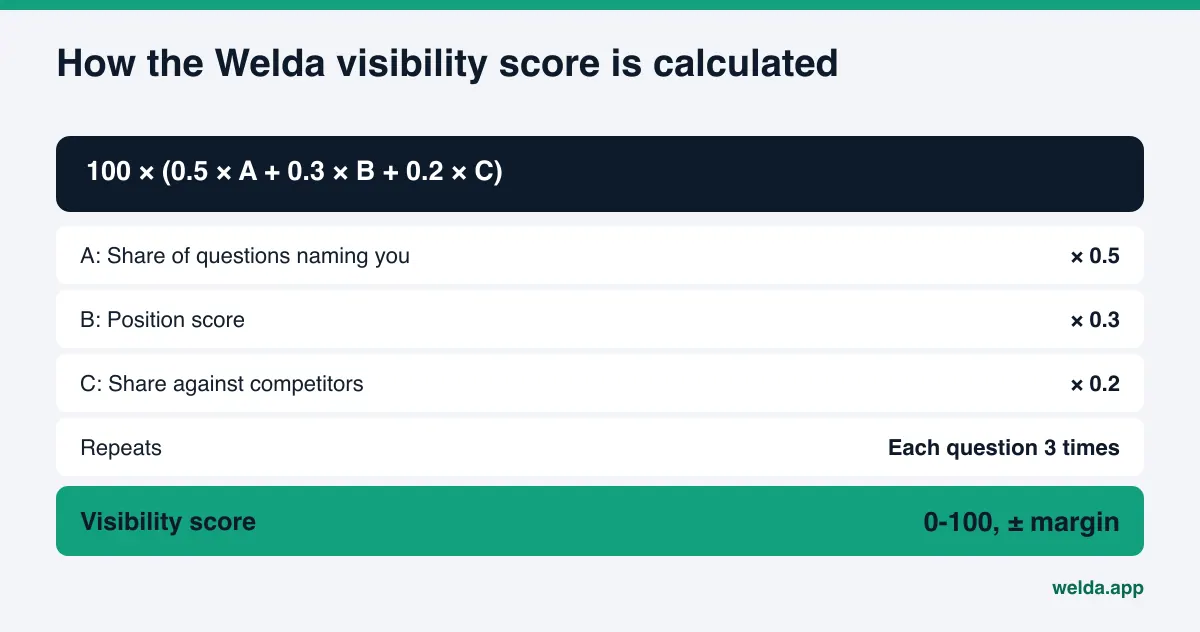
Here is how measurement works in the dashboard. The questions your guests would ask are put to ChatGPT, Gemini, Perplexity, and Google AI three times each. You see, question by question, whether your name appears, in what position, and where competitors are ahead. Question language can be set to English or Turkish.
The score formula is published: 100 × (0.5 × share of questions where your name appears + 0.3 × position score + 0.2 × share against competitors). Because each question runs three times, the spread across those runs produces a ± margin of error that is shown next to the score. That keeps you from reading normal fluctuation as real change.
The other dashboard screens map onto a brunch restaurant's work like this:
- Home: Score, a one-line summary, and the next tasks.
- Questions: Each question, engine by engine, with whether your name came up.
- Competitors: Which topic a competitor wins (for example "large groups" or "dog-friendly patio") and which source it wins from. We dig into this in our piece on AI competitor analysis.
- Sources: The sites AI engines draw from and where you are missing.
- To-do list: Missing information, items waiting for approval, and manual tasks in one list, with ready copy next to each.
- Ready pages: Applies suggestions and prepares the page for preview.
- Compliance check: Flags patterns such as price claims, guarantees, and superiority claims before publishing. It is not legal advice and has not been reviewed by legal counsel.
- Incoming requests, before-and-after comparison, and a one-page monthly report (PDF).
On the fixing side, Welda drafts content, profile text, and review replies. Approval to publish stays with you. Content always lives on your own website; Welda does not host it. On WordPress sites, Welda connects through a separate Editor user and an application password, with no code to install. Content opens as a draft on your site and goes live when you approve it. For systems without a connection, Welda hands you a ready package and you apply it yourself. Google Business Profile, Instagram, and Facebook can be connected; if they aren't, the task is listed as manual.
One detail matters for brunch places in particular: Welda doesn't write what it doesn't know. If it can't read your group reservation policy, your holiday brunch dates, or whether you have high chairs, it asks you in the to-do list. You answer once and it flows into the relevant copy.
What Welda won't do
AEO is a new field, so honest expectations matter. Welda does not:
- Guarantee rankings or promise you will "show up in ChatGPT." AI answers vary, and no software can guarantee them.
- Invent facts. Menu items, hours, and pricing structure come from you.
- Publish sensitive content without your approval.
- Write fake reviews. The FTC's Trade Regulation Rule on the Use of Consumer Reviews and Testimonials, effective October 21, 2024, targets fake reviews and testimonials, including buying them. This is not legal advice.
- Handle negative review disputes, directory account management, or press outreach. Those stay with you. Welda can draft the text, but you own the relationship.
Timing matters too. New content usually takes weeks to show up in AI answers. Turning your brunch menu into text today won't put you in every answer tomorrow. That's why measurement should be regular and read together with its margin of error.
Brunch restaurant AEO checklist
Compare this list with your site and profiles. Every "no" is a task.
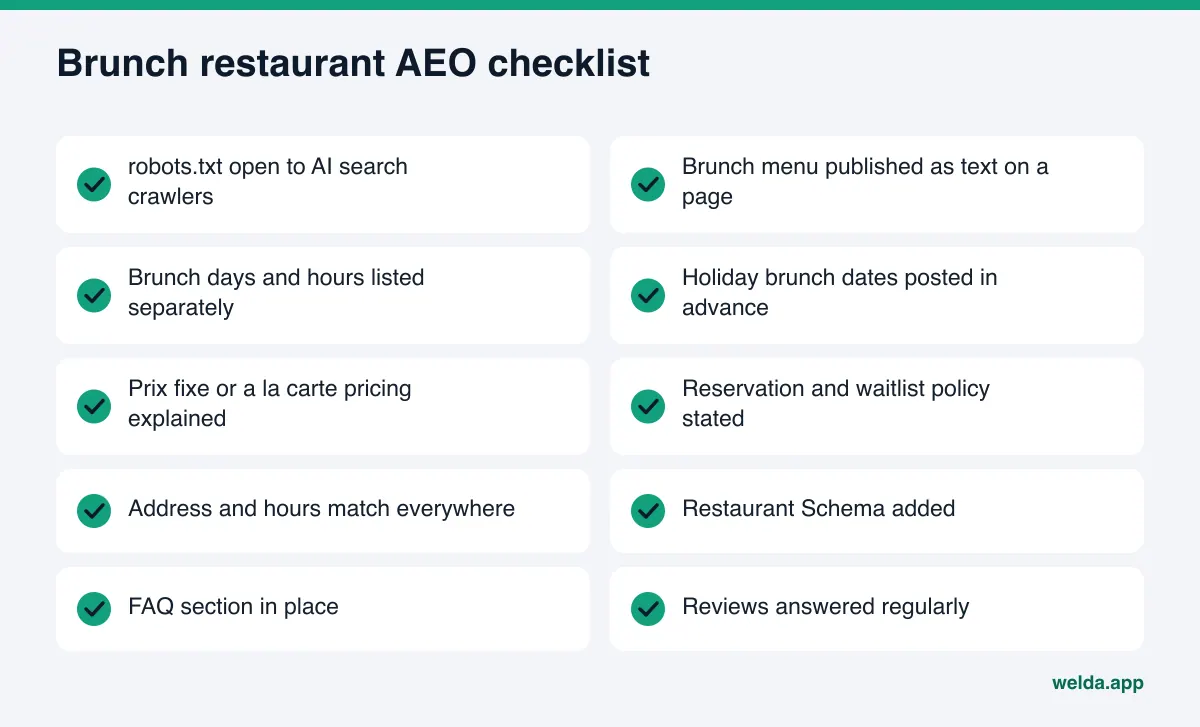
And when you're weighing what to fix first, this quick decision guide helps:
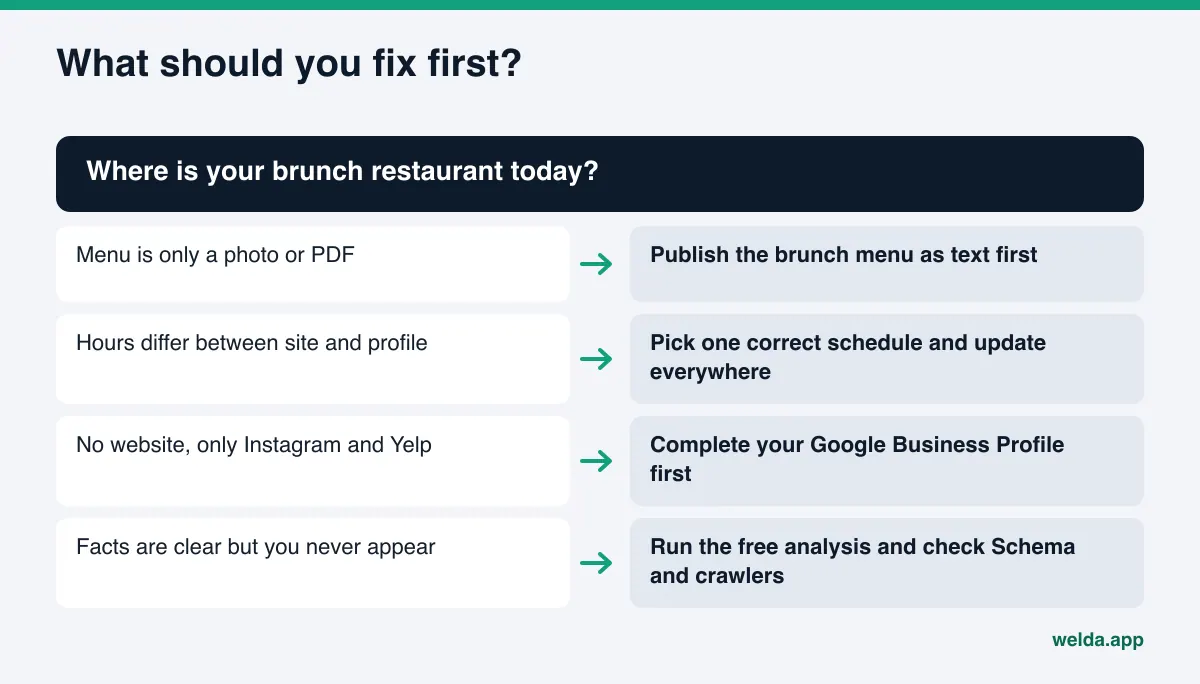
If you don't have a website at all, there's still a lot you can do; our guide to AI visibility without a website covers that case. Over time, though, information on a site you control is the most reliable source an assistant can find.
Frequently asked questions
Is AEO for a brunch restaurant different from regular SEO?
The foundation overlaps: crawlable pages, clear titles, structured business data. The difference is that an AI assistant gives a short recommendation instead of a list of links. That makes clear, consistent brunch details more decisive than they are in classic search.
Is a PDF brunch menu enough?
Keep it as an extra, but don't rely on it alone. Writing your main dishes, drinks, and pricing structure as text on the page is the safer choice.
Do I have to publish prices?
Publishing numbers is your call. Explaining the structure (a la carte or prix fixe, bottomless drinks or by the glass) answers one of the most common questions diners ask.
Does the free analysis work for US restaurants?
Yes. The free analysis works in English and reads your public website. The full dashboard is in early access and is opening first in Turkey.
How often can I run the free analysis?
Once per site. Your email and phone are verified, the results link is emailed to you, and it stays open for 14 days.
How soon will changes show up?
New content usually takes weeks to be reflected in AI answers. No one can promise a specific timeline or result, which is why regular measurement matters.
Start with a free check of your brunch restaurant
Diners increasingly ask an AI assistant where to go for brunch this weekend instead of typing into a search box. To be part of that answer, your site and profiles need to state the facts that answer the question. To see exactly where you're missing, run the free AI visibility analysis. You'll get your score, a list of gaps, ready homepage copy, and a fix package in one report.