Does site speed affect whether AI crawlers can read my website? Yes, but not the way most people assume. A fast site does not put you into a ChatGPT answer on its own. A slow site, one that throws intermittent errors, or one that only shows its text after JavaScript runs can keep AI crawlers from reading you at all. The real question about site speed and AI crawlers is simple: can the crawler get in and reach your words in time?
Site speed and AI crawlers: what is the actual problem?
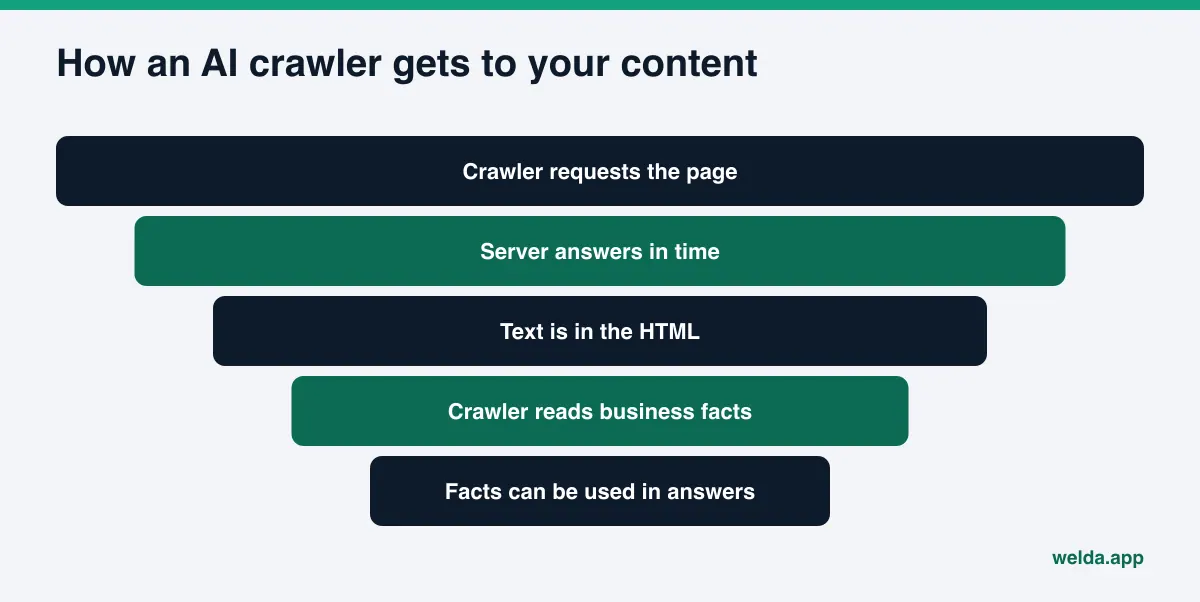
When ChatGPT, Gemini, Perplexity or Google's AI Overviews write an answer about a local business, they draw on two things: information collected earlier and, more and more often, a live web search. Either way, a crawler visits your site, requests a page, reads the HTML that comes back and tries to pull out facts about your business. This guide is about the technical side of that visit: how fast your server responds, how much text is in the response, and what sends the crawler away empty-handed.
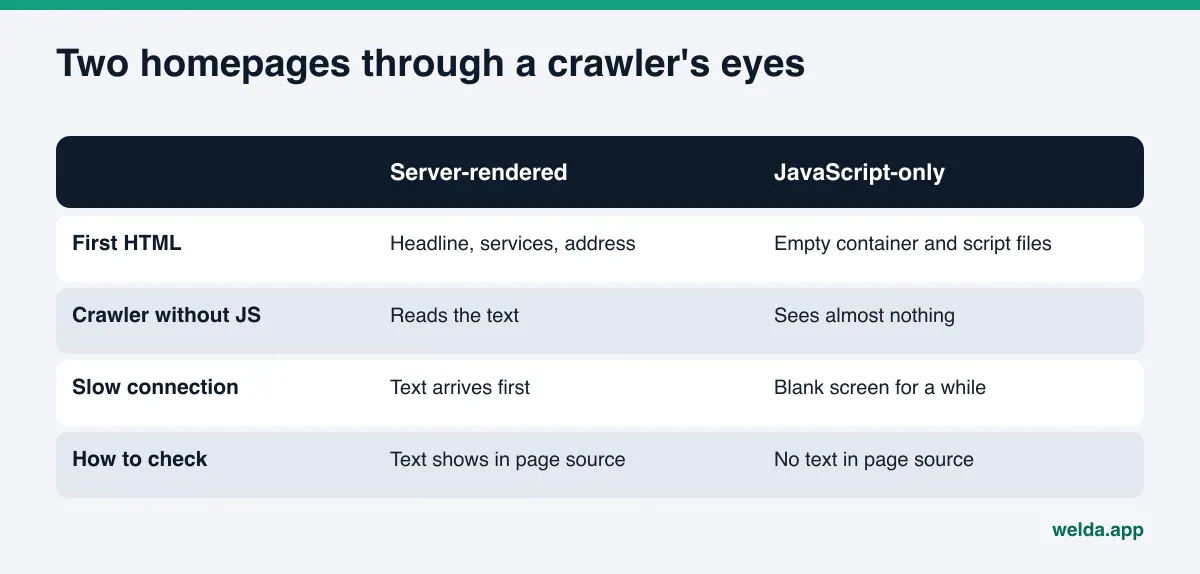
Two different problems tend to get lumped together. The first is classic speed: a slow server, a heavy page, a long wait on a phone. The second is readability: the page loads quickly, but the main text only appears after JavaScript runs in the browser. A human visitor experiences both as "the site feels slow." For a crawler, the second problem is often worse, because a crawler that does not execute JavaScript never sees that text.
Vercel published an analysis of AI crawler traffic that found OpenAI's crawlers and several other AI crawlers fetch JavaScript files but do not run them, while Gemini can render JavaScript because it uses Googlebot's infrastructure. In practice, the same page can look full to one AI system and empty to another. If you are not sure crawlers reach your site in the first place, start with our guide on whether AI bots are crawling your website.
This is part of answer engine optimization, or AEO: making your business easy for AI answer engines to find, read and quote. Some people call the same work GEO (generative engine optimization). Speed and crawler access are the plumbing under AEO. They do not win you anything by themselves, but when they are broken, nothing else you write can be read.
Who should care about this?
Large online retailers usually have engineers watching performance. This guide is written for a different reader: a dental practice, a restaurant, a boutique hotel, a home services company or a salon whose website was built on an off-the-shelf theme or a page builder, sits on shared hosting, and has collected plugins for years. On sites like that, the same patterns show up again and again:
- A hero slider at the top of the homepage made of full-size photos straight from a phone.
- Services, address and hours tucked into tabs, accordions or carousels that fill in with JavaScript.
- Two or three plugins doing the same job: caching, security, forms, a chat bubble, a review widget.
- A security plugin or the host's bot protection that serves unfamiliar crawlers an "access denied" page.
- No one has checked the mobile speed of the homepage in a year or more.
For these businesses, speed work is not a big engineering project. Often three or four simple fixes change what a crawler receives. The trick is to find out which problem your site actually has by measuring, not guessing. A good first step is the free site analysis, which looks at your homepage's mobile speed and whether your robots.txt lets AI crawlers in, side by side.
How do AI crawlers visit, and what do they expect?
"AI crawler" is not a single thing. One company may run several crawlers for different purposes. OpenAI spells this out in its crawler documentation: OAI-SearchBot crawls so sites can appear in ChatGPT's search features, GPTBot collects content that may be used for model training, and ChatGPT-User visits a page when a user asks ChatGPT something. According to that page, OAI-SearchBot and GPTBot are controlled separately in robots.txt, so you can block training and still allow search.
That split matters for speed. When a crawler fetches a page because a user is waiting for an answer, it has little reason to wait long for you. If your page is slow or returns an error, the system can move on to another source. AI companies do not publish how long their crawlers wait, so nobody can honestly tell you "stay under X seconds." What we can say is qualitative: a page that answers quickly and consistently has a better chance of being read.
On Google's side, the relationship is documented. Google's crawl budget guide says that when a site responds consistently and response times hold steady or improve, Google can crawl more; when the site slows down or returns server errors, Google crawls less. The guide is mainly written for very large sites, but the principle applies to small ones too: a slow, error-prone server means fewer and less frequent crawler visits. Because AI Overviews and AI Mode build on pages Google has crawled, this connects directly to AI search visibility.
Which speed metrics actually matter for AI search visibility?
Speed tools show dozens of numbers, and that is where confusion starts. For AI crawlers and AI visibility, this table separates what matters from what mostly matters to human visitors.
| Metric | What it tells you | What it means for crawlers |
|---|---|---|
| Server response time | How quickly the server answers a request | The most direct effect; crawlers wait on this first |
| Largest Contentful Paint (LCP) | When the main content shows up | Reflects visitor experience and Google's assessment |
| Interaction to Next Paint (INP) | How fast the page responds to taps | Mostly a visitor metric; little effect on crawlers |
| Cumulative Layout Shift (CLS) | Whether elements jump around while loading | Visitor experience; little effect on crawlers |
| Page weight | Total data to download | Heavy pages arrive late and partially on slow links |
| Server errors | Occasional 5xx or 429 responses | The crawler gets nothing at that moment |
| Text in the HTML | Whether content arrives in the first response | Decisive for crawlers that do not run JavaScript |
According to Google's Core Web Vitals overview, the "good" thresholds are an LCP of 2.5 seconds or less, an INP of 200 milliseconds or less, and a CLS of 0.1 or less, assessed at the 75th percentile of real page loads. Those thresholds were defined for people, not crawlers, and no AI company publishes a crawler equivalent. They are still a sensible baseline, because whatever hurts LCP (a slow server, huge images, late-loading content) usually slows crawlers down too.
Site speed and AI crawlers: a step-by-step fix list
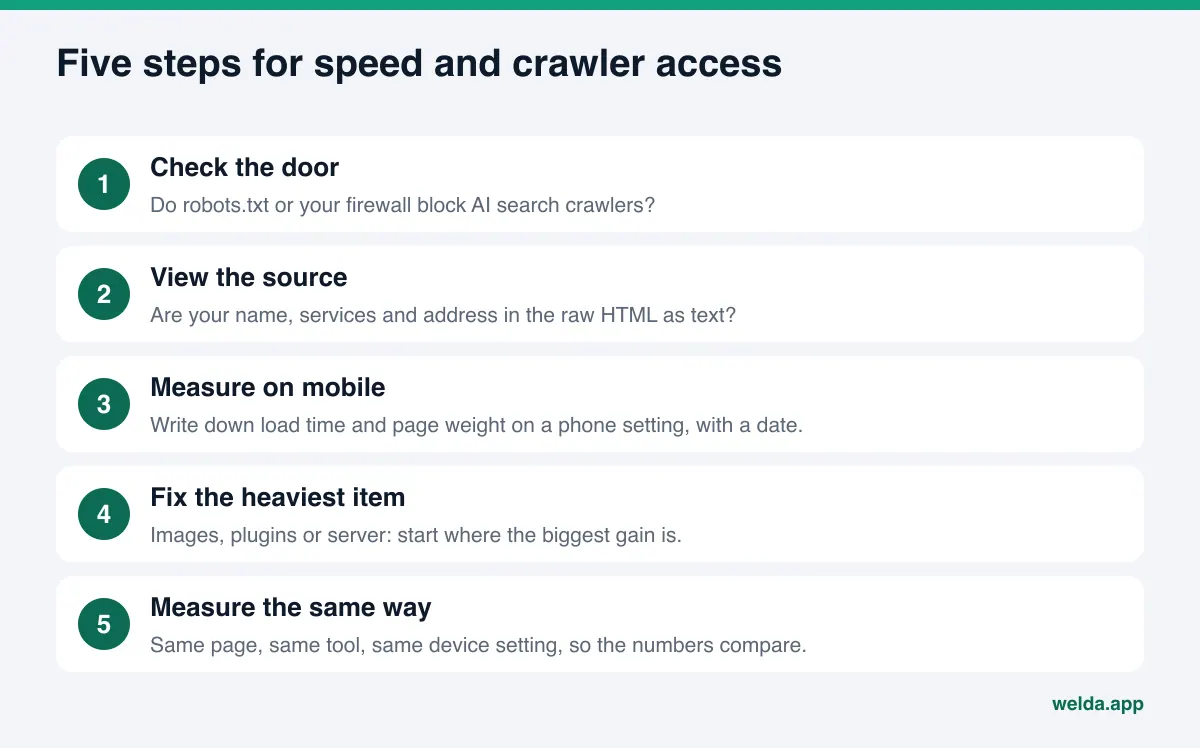
This order is built for a typical small business site and puts the biggest wins for the least effort first. After each step you can decide whether the next one is needed.
- Check the door. Add
/robots.txtto your domain and open it. Look for lines that block search crawlers such as OAI-SearchBot, PerplexityBot or Googlebot. Then check your security plugin and your host's bot protection settings. Some settings block every crawler they do not recognize, and the crawler gets a fast but useless "access denied" page. - View the page source. On a computer, open your homepage, right-click and choose "View page source." That is the HTML before any JavaScript runs. Search it for your business name, your main services and your address. If you cannot find them, crawlers that do not run JavaScript cannot either.
- Measure on mobile. Run your homepage through Google's free speed test or the speed section of the free site analysis, on a mobile setting. Write down the result with the date. Without that record, before-and-after comparisons are guesswork.
- Find the heaviest item. Speed tools usually rank suggestions by potential savings. Focus on the top two or three. On small business sites, that is usually oversized images, unused scripts and slow server response.
- Move key text into the HTML. If your services, address and FAQs live inside a tab or carousel that loads with JavaScript, ask for a version where that text sits in the page source as plain text. The design can stay the same; what changes is that the words arrive in the first response.
- Ask about server errors. Request recent error logs from your host. Occasional 500 or 503 errors go unnoticed by visitors, but for a crawler that arrives at that moment, your page does not exist.
- Measure again the same way. After the fix, test the same page with the same tool and the same device setting. Comparing two numbers from different methods will mislead you.
None of these steps gets you into an AI answer on its own. What they do is make sure a crawler can arrive and read. What it reads is a separate job: does the first paragraph of your homepage say plainly who you are, where you are and what you do? Our guide to homepage copy for AI search covers that part.
The most common speed problems on small business sites
Most slow small business websites are slow for a handful of familiar reasons. Here is how each one affects crawlers and who can usually fix it.
Oversized, uncompressed images
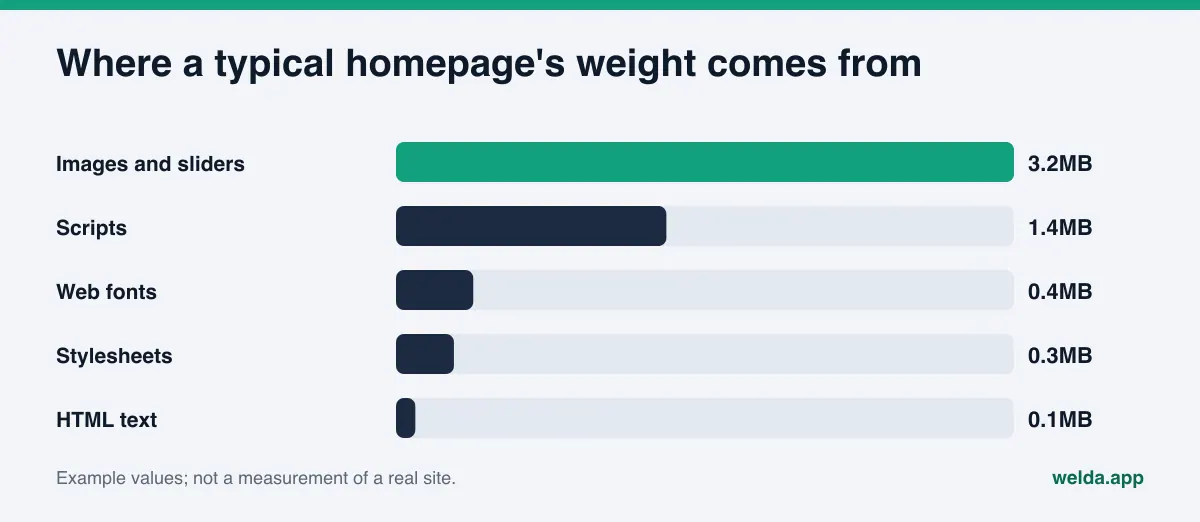
Photos uploaded straight from a phone can be several megabytes each. Crawlers do not read the images, but speed tests and Google's assessment do count them, and a heavy page arrives slowly on weaker connections. The fix is usually simple: resize images to the size they are displayed at, compress them in a modern format, and lazy-load anything below the fold. Whoever manages the site can often do this with a theme setting or an image plugin.
Plugin and script pile-up
Every plugin adds its own files. A chat bubble, a cookie banner, an Instagram feed, an embedded map, an animation library and a couple of analytics tags add up to far more code than actual content. Removing unused plugins, keeping only one of two plugins that do the same job, and loading third-party widgets only on the pages that need them is the cheapest first step.
Slow server and shared hosting
If the server's first response is slow, other fixes only go so far. A caching layer can shorten that time; if it cannot, the hosting plan itself may be the bottleneck. That is a technical and sometimes costly decision, and one to make with your developer or host.
Designs that load text with JavaScript
Some modern themes and page builders assemble the whole page in the browser. A visitor never notices. A crawler that does not execute JavaScript sees an empty page. The fix here is structural, not a speed setting: core text needs to be rendered on the server. The page source check above tells you within minutes whether your site has this problem.
Overly aggressive bot protection
Bot protection meant to stop attacks sometimes blocks legitimate search crawlers too. The crawler gets a challenge page, an error code or an empty response. Your site looks fast to you but is closed to the crawler. Checking how your security settings treat search and AI crawlers should come before any speed tuning.
An example: fast-looking, but unreadable
Take an example independent dental practice. The homepage feels quick on a laptop: a large slider, then treatments, insurance information and an FAQ. But the treatments and FAQ live in a page builder component that fills in with JavaScript, and the security plugin shows unknown crawlers a verification screen. From the owner's chair, everything looks fine. A crawler that does not run JavaScript either gets stuck on the verification screen or sees the practice name and a phone number. The priority here is not image compression. It is the security setting first, then getting the text into the page source. A speed score alone would never show that order; it makes sense only when read together with the access and source checks.
How does Welda handle this?
Welda's role here is to measure, rank what is missing and show clearly what is left for the business to do. It is not a tool that speeds up your site, changes your server or rebuilds your theme. Two parts of Welda are directly useful for this topic.
The speed and access checks in the free site analysis. The free site analysis reads your homepage and a few inner pages the way Google and AI systems would. Its speed section measures how fast your homepage loads on a phone using Google PageSpeed. If Google has enough real-visitor data for your site, you see Core Web Vitals; if not, you see the lab measurement. The report also shows page weight, whether the mobile viewport is set correctly, and the suggestions that would save the most time. In the same report, a separate check shows whether your robots.txt lets AI crawlers in. So "is the door open?" and "does the page arrive quickly once it is?" sit on one page.
The decision this leaves you with is straightforward: pass the top items on the speed list to your developer or whoever runs the site. You can download the report as a PDF and share it. For every gap, the analysis says what it saw, why it matters and how to fix it, so a business owner who does not speak "developer" can still read the list and see who owns which task. The score simulation shows how much each fix would move your score, which helps you decide whether to tackle speed first or a missing business detail first.
The task list in the Welda panel. In the Welda panel, which is in early access, measurement, content and profile work all land in one task list. Work Welda can prepare, such as page copy, FAQs and profile text, comes to you for approval. Work Welda cannot do is listed as manual, with ready-made text where it helps. Speed and server fixes belong to that second group; the business and its developer carry them out.
The rest of the panel (question-by-question tracking across four AI engines, competitors, sources, a monthly report) is outside the scope of this article. In short: after a speed fix, the same questions are asked again to see whether your name comes up more often. A word on status: the panel is in early access and is opening first to businesses in Türkiye. Regular four-engine tracking is being added during early access, and sample panel screens use representative data. What anyone can use today is the free site analysis, which works in English. Pricing is discussed in an early access call.
Limits: what speed will not fix, and what Welda does not do
The most common mistake with speed is treating it as the key to everything. Here is the honest picture:
- A fast, empty site stays invisible. If a crawler reaches you quickly but cannot read your services, location and reasons to choose you, it has nothing to recommend. Speed is a precondition for being read, not a substitute for content. Our guide to answer-first content covers how to write that content.
- There is no magic threshold. AI companies do not publish how long their crawlers wait. Be skeptical of anyone who promises that getting under a certain number of seconds will put you in ChatGPT.
- Results are not instant. After a fix, crawlers need to come back, and new information usually takes weeks to show up in AI answers.
- Welda does not speed up your site. It does not compress images, remove plugins or switch hosts. It measures, ranks and writes down what needs doing.
- Welda does not guarantee rankings or a spot in ChatGPT. The free analysis does not measure rankings. Panel measurements repeat each question three times and report a margin of error; our piece on margin of error in AI visibility tracking explains why that matters.
- Welda does not make up facts. If fixing a JavaScript-only page means writing new text, missing details such as service area or hours are not invented. Welda asks you.
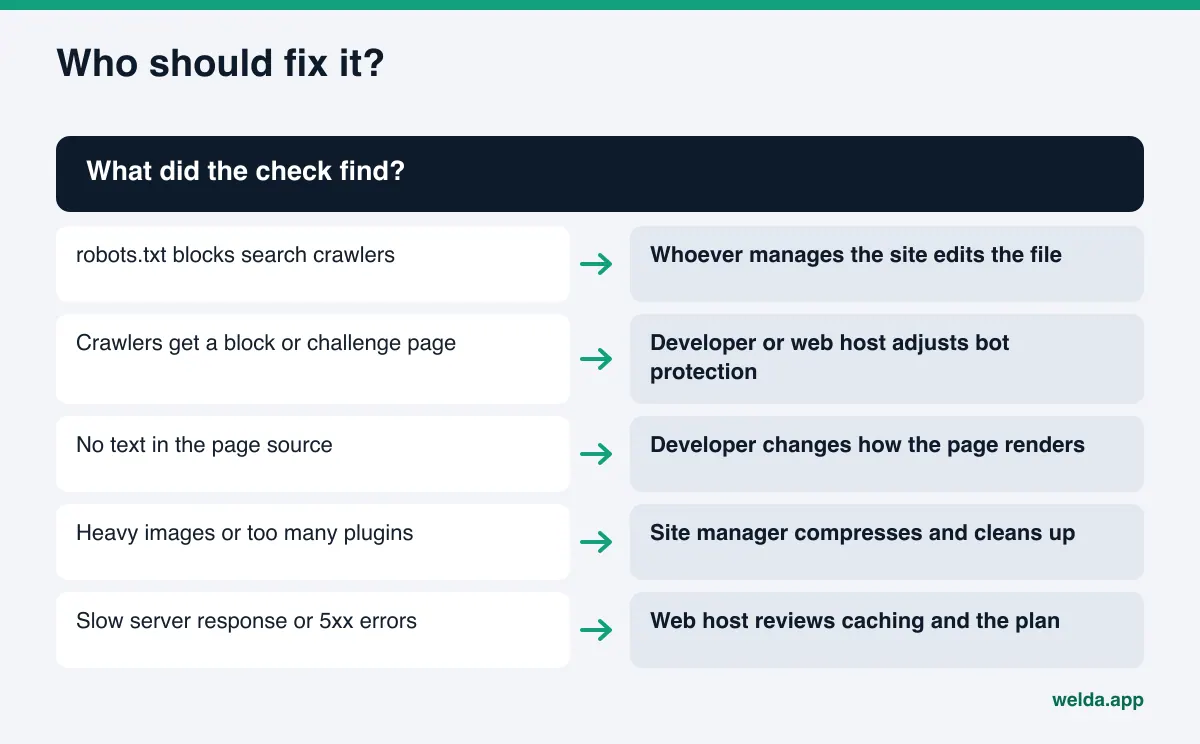
How do you decide who fixes what?
The biggest time sink in speed work is unclear ownership. This split works for most small businesses:
| Finding | Where to look first | Who handles it |
|---|---|---|
| robots.txt blocks search crawlers | The file at your site's root | Whoever manages the site |
| Crawlers get a block page | Security plugin, host's bot settings | Developer or web host |
| No text in the page source | Theme or page builder setup | Developer |
| Heavy images | Media library, theme settings | Whoever manages the site |
| Too many plugins | Plugin list | Site manager, developer if needed |
| Slow server response | Caching, hosting plan | Web host |
| Intermittent server errors | Server error logs | Web host |
Use this table alongside the free analysis report: drop each finding into its row and name an owner. A vague complaint like "the site is slow" turns into three or four concrete tasks with names next to them.
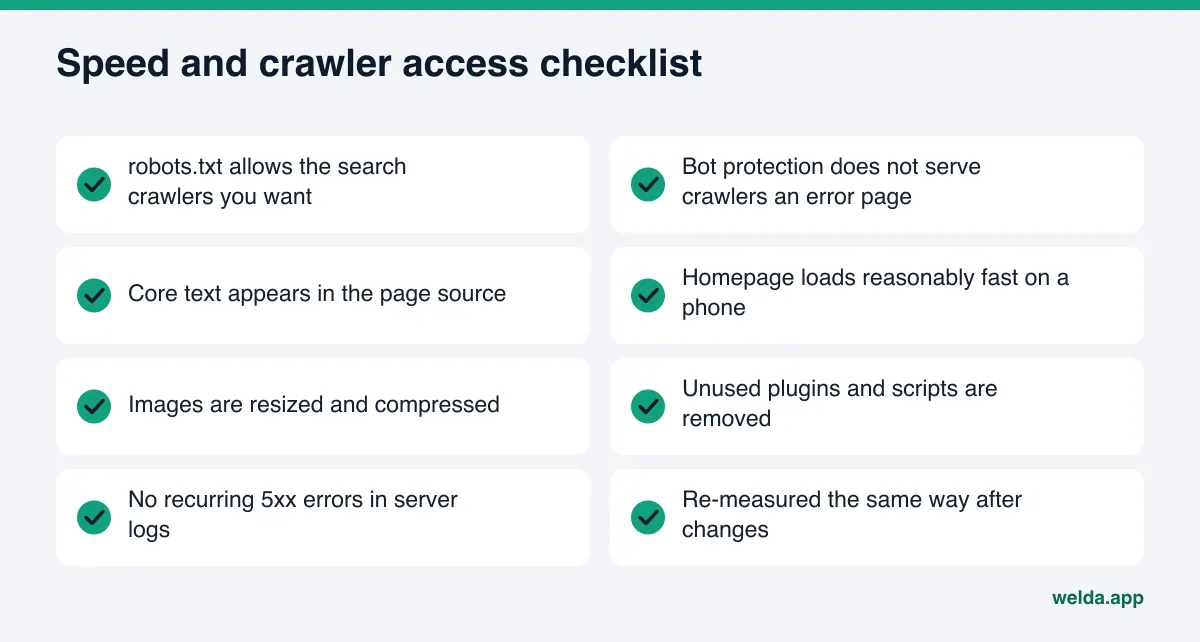
Checklist before you talk to your developer or host
Have answers to these questions ready before the conversation:
- Do you have the homepage's mobile speed result, with the date it was measured?
- What does your robots.txt say to search and AI crawlers?
- Do your business name, main services and address appear as text in the page source?
- Were any plugins, theme changes or new components added in recent months?
- Is bot protection turned on, and if so, are search crawlers allowed through?
- Who will re-measure after the fix, with which tool, and when?
Answering these six questions often solves half the problem, because many "slow site" complaints turn out to be access or structure problems.
Frequently asked questions
Does site speed directly decide whether I show up in ChatGPT?
No. Speed is a precondition for a crawler being able to read your page. If the page it reads does not clearly describe your business, speed alone changes nothing.
Is there a separate speed threshold for AI crawlers?
AI companies do not publish one. The best available yardsticks are Google's Core Web Vitals thresholds, which were defined for human visitors, and your server response time.
My site is built with JavaScript. Is that a problem?
Using JavaScript is not the problem. The problem is when the main text only appears after JavaScript runs. If you can see your business details in the page source, you are in good shape.
Could my security plugin be blocking AI crawlers?
It can happen. Some bot protection blocks every crawler it does not recognize. Check both robots.txt and your security settings; the free analysis covers the robots.txt side.
Will Welda make my site faster?
No. Welda measures speed, ranks the fixes with the biggest payoff and puts them in a report. Carrying them out stays with you or your developer.
How soon will I see results after a fix?
You will see the change in a speed test right away. Crawlers revisiting your site and that showing up in AI answers usually takes weeks.
Check your site speed and crawler access today
With site speed and AI crawlers, the first step is a measurement, not a guess. The free site analysis shows your homepage's mobile speed, your robots.txt access for AI crawlers and the business facts AI systems can read from your site, all in one report, with a fix for every gap. It is free once per site; you confirm your email and phone, and the results link arrives by email and stays open for 14 days.