Do pricing pages for AI answers change what ChatGPT says about your business? Yes. When someone asks ChatGPT, Gemini or Perplexity "how much does this cost," the answer engine looks for a readable, current price with clear terms. If your site has one, the answer can use your numbers and your conditions. If it does not, the answer comes from an old directory listing, a forum thread or a competitor who publishes prices.
This guide looks at pricing pages for AI answers from a small business owner's point of view: which price questions customers ask answer engines, what an engine can and cannot read on a pricing page, what to do if you would rather not publish exact prices, and how Welda measures the problem and prepares the fix. It is part of AEO (answer engine optimization), the work of making your business a source that AI systems can read, trust and cite. You may also see it called GEO, generative engine optimization. If you want a baseline first, run the free AI visibility analysis. It reads your homepage and a few inner pages, including a pricing page if you have one, and shows what is missing and how to fix it.
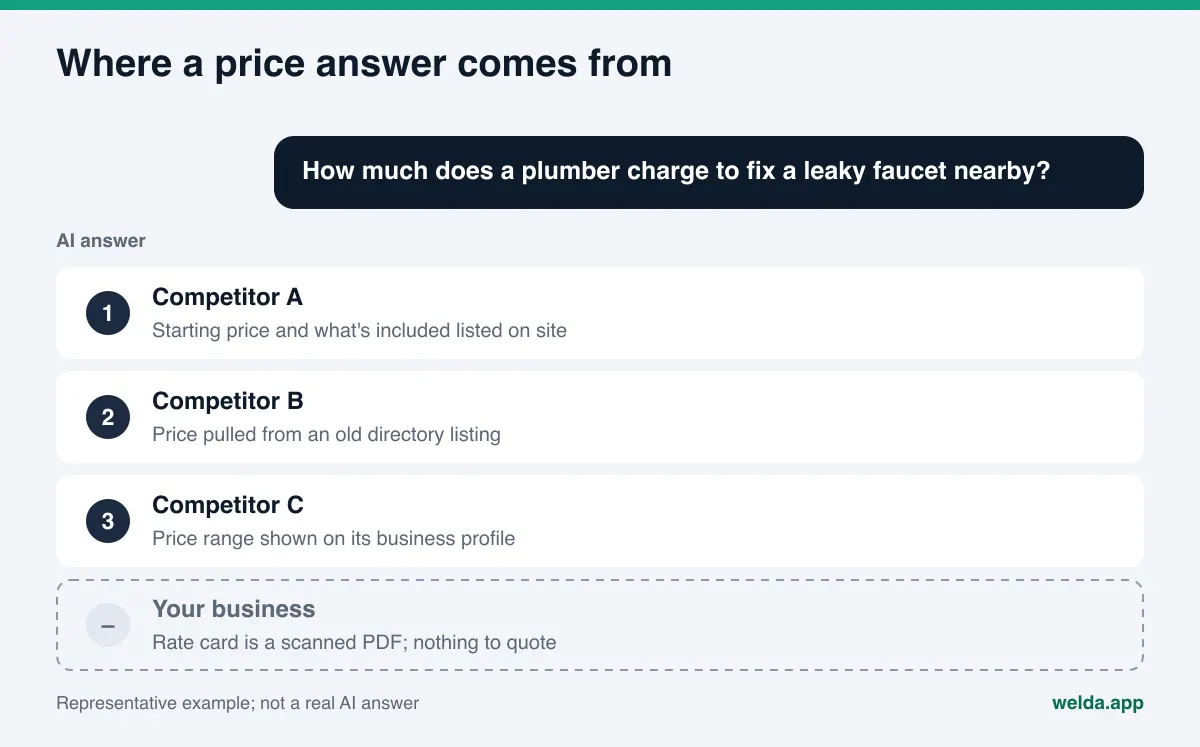
Why pricing pages matter for AI answers
Price questions sit right next to the buying decision. "How much is a water heater install in Phoenix," "average cost of teeth whitening near me," "boutique hotel in Savannah under 250 a night," "monthly lawn care price" are not research questions. The person already knows what they want and is checking whether it fits the budget. An answer engine handles that question in two steps: it searches for pages that match, then it writes a short summary from those pages.
The trouble starts in one of three places:
- There is no price on your site. The engine says "contact the business for pricing" and points to a competitor that lists a starting price. The customer goes where the budget question got answered.
- The price exists but cannot be read. Your menu or rate card is a photo, a scanned PDF, or a calculator that only shows a number after five clicks. People can see it. The engine has no text to work with.
- The price exists but is old or contradictory. Your site says one number, your Google Business Profile says another, and a promo page from two years ago says a third. The engine has no way to know which one is current, and sometimes it repeats the oldest.
The third case does the most damage. A customer hears a low number from an AI answer, calls, and learns the real price. That disappointment turns into a review on Yelp or Google, and the review becomes one more source the engine reads next time. We cover how outdated facts linger in answers in more detail in the piece on what to do when AI says your business is closed. Prices follow the same logic.
Which price questions do customers ask answer engines?
Before you rewrite anything, it helps to know what the page has to answer. Most price prompts fall into five patterns:
| Prompt pattern | Example | What the engine looks for |
|---|---|---|
| Direct price | "How much does a deep cleaning cost?" | A number or range, currency, what it applies to |
| Budget filter | "Affordable HVAC repair near me" | Price level, starting price, comparable packages |
| Scope | "What's included in the price?" | Line items included and excluded |
| Fees | "Any hidden fees?" | Service fees, trip charges, cancellation terms |
| Comparison | "Is A or B cheaper?" | Two options priced on the same basis |
Map the table to your own trade. A dental office and a plumber get different price questions, but the engine wants the same thing from both: one page, in plain text, with clear terms. Regulated categories like health care add their own rules, which we cover further down.
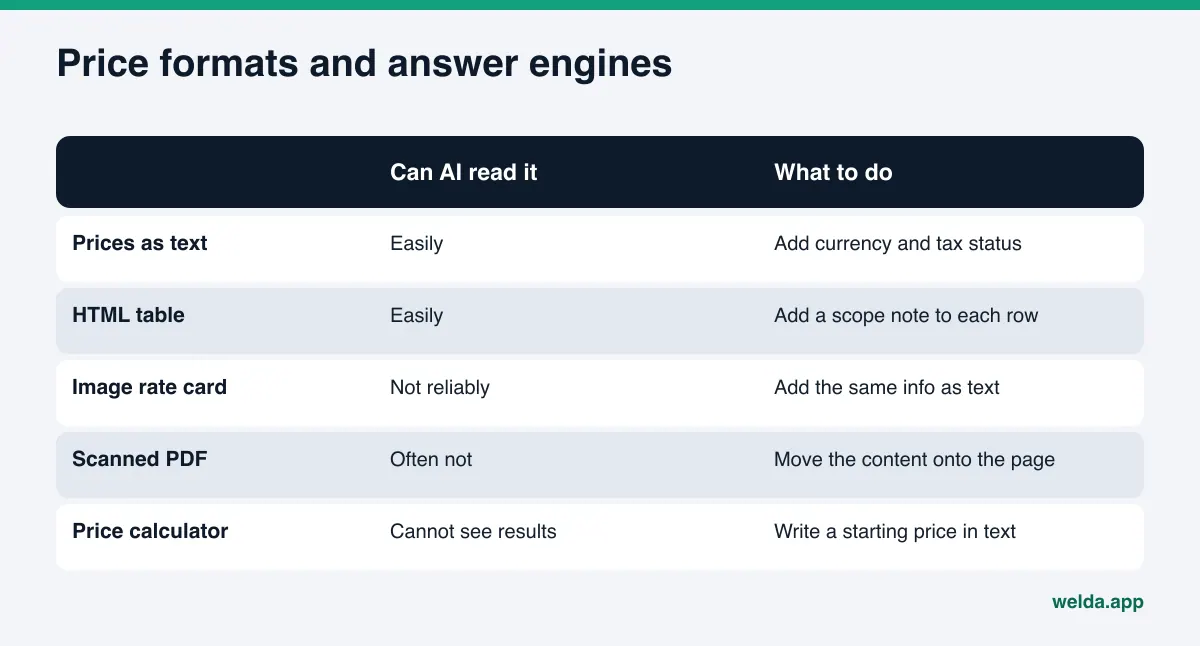
What an AI engine can and cannot read on a pricing page
Answer engines do not browse a page the way a person does. They read the text, headings, tables and any structured data on the page. The same price can end up in an answer or stay invisible depending on how it is published.
Easy to read: prices written as text, simple HTML tables, clear phrases like "starting at" or "most jobs fall between," a short "what's included" list under each package, and a note such as "prices effective as of" near the top or bottom.
Hard to read: a menu or rate card inside an image, a scanned PDF, prices that only appear after a form or calculator, vague phrases like "competitive rates" with no number, and figures scattered across pages that disagree with each other.
Not read at all: pages behind a login, and pages blocked by a robots.txt rule that shuts out AI crawlers. We walk through how to check crawler access in robots.txt for AI crawlers. No matter how well your pricing page is written, if the crawler cannot get in, it cannot be cited.
For structured data, the core price fields are defined in the schema.org Offer type: price, priceCurrency (for example USD), priceValidUntil for the date a price expires, and priceSpecification for more detailed pricing. Markup does not replace the visible text. It restates what the page says in a form machines parse easily. If the markup and the text disagree, trust drops, so update both at the same time.
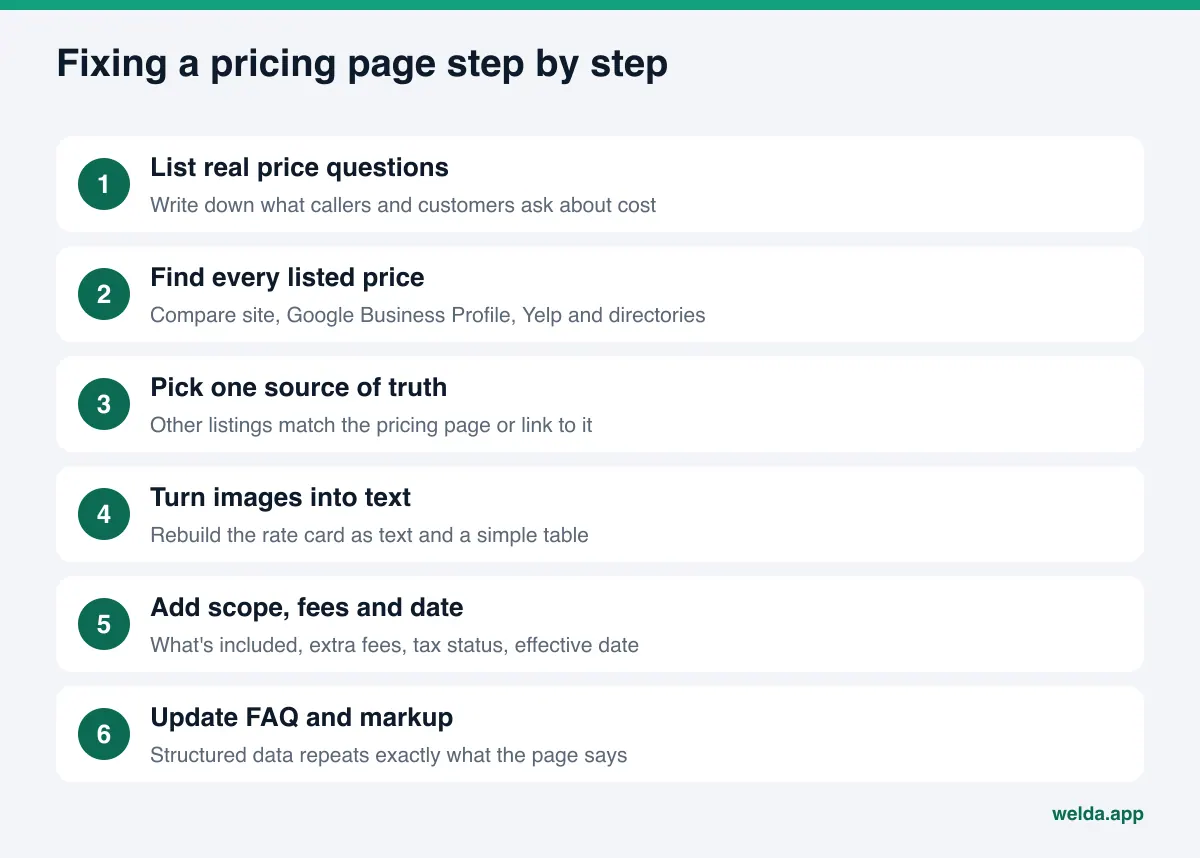
How to fix your pricing page for AI answers, step by step
These steps apply to most local and small businesses. It is not a one-afternoon job, but each step builds on the one before it.
- List your real price questions. Write down the price questions you hear most on the phone, by text and at the counter. "How much," "what's included," "is there a trip fee," "do you offer financing" become the backbone of the page.
- Find every place a price lives. Check your site, Google Business Profile, Yelp, Angi or other directory listings, and social posts. Mark anything outdated or contradictory.
- Pick one source of truth. Make the pricing page on your own site the main home for price information. Everything else should match it or link to it.
- Turn images into text. Rebuild the photo or PDF rate card as text and a simple table. You can keep the image; just make sure the same information also exists as text.
- Write scope and terms. Under each package or service, say what is included, what costs extra, whether tax is included, and the date the prices took effect.
- Add a short pricing FAQ. Answer the questions from step one in two or three sentences each. These are the lines an engine can lift straight into an answer.
- Add or update structured data. Give the same price, currency and validity date in markup that the visible text shows.
- Set an update routine. When a price changes, update the page, the profiles and the markup on the same day. Put a quarterly price check on the calendar.
A pricing page does not work alone. How your homepage describes your services, and which service lives on which page, affects whether an engine ties a price to the right service. We cover that in homepage copy for AI search. If you sell online, per-product price and stock data matter even more; see product pages for AI shopping.
Example: a home services pricing page
This scenario is an example and does not describe a real business. An example plumbing company in a mid-size city has a "Pricing" link in its menu that opens a downloadable PDF made from a printed flyer. Its Google Business Profile lists no services, and an old Angi listing shows a service call fee the company stopped charging last year. When a customer asks an answer engine "how much does a plumber charge to fix a leaky faucet in town," the answer names two competitors that list starting prices on their sites and mentions that some local plumbers charge a trip fee.
The fix starts with the PDF. The content moves onto the page as text, grouped into a table by job type: drains, water heaters, fixtures, emergency calls. Each row has the service name, a starting price and a short note such as "final price depends on parts and access." A line above the table says whether tax is included and when the prices took effect. Below it, a four-question FAQ answers "Do you charge a trip fee," "Is there an after-hours rate," "Do estimates cost anything," and "What payment methods do you take." Then the old Angi listing gets corrected and the Google Business Profile gets its services and starting prices.
Notice that the company did not set a single new price. It took information that already existed and made it readable, consistent and dated. Most pricing page work looks like this: less about creating something new, more about putting scattered facts in one correct place.
What if you don't want to publish exact prices?
Plenty of businesses avoid listing prices. Some work really is custom: remodeling, event planning, B2B services, long-term rentals. Some owners worry competitors will undercut them. Those concerns make sense. But the question keeps getting asked, and if you leave it unanswered, someone else answers it.
You can give answer engines something useful without a fixed number:
- Starting price: "Starts at" gives the customer a budget anchor and keeps the engine from saying "no pricing available."
- Typical range: "Most projects fall between X and Y" sets expectations without committing to a quote.
- Price drivers: "Price depends on square footage, materials and timeline" lets the engine build its "it depends" answer from your sentence.
- Sample job: A rough price for a typical job, such as painting a two-bedroom apartment, gives a reference point.
- Quote process: If you do not list prices, explain how quotes work, how fast they arrive and whether there is a charge. That still answers a price question.
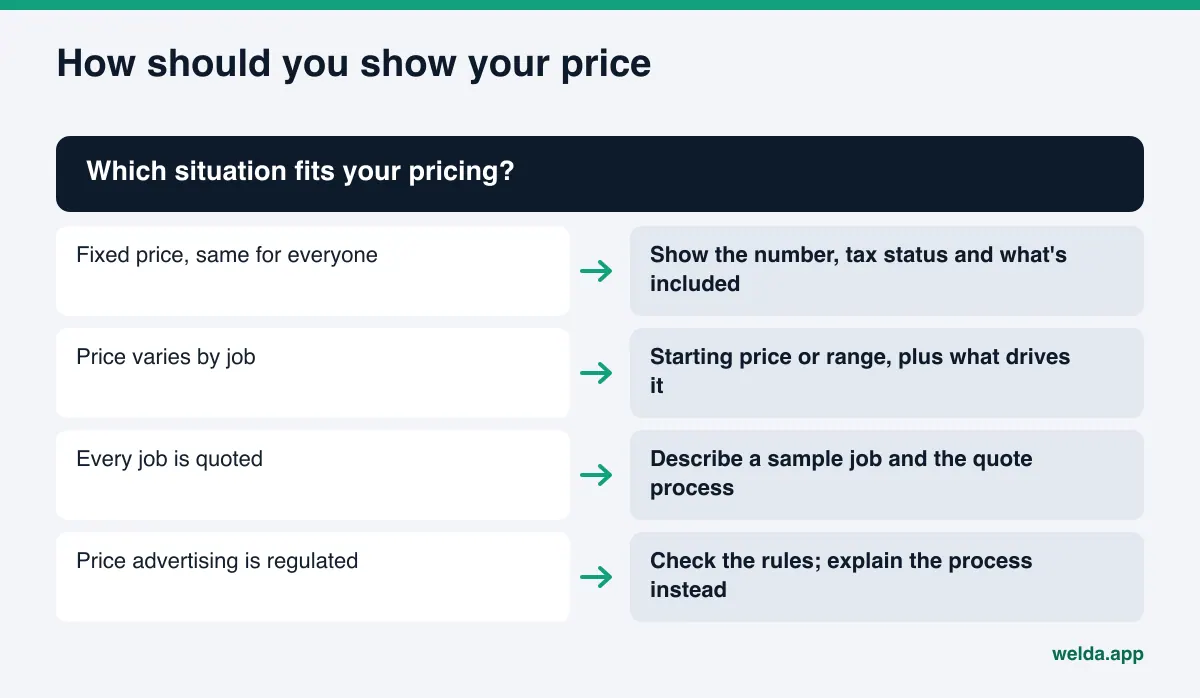
Whatever you choose, the rule is the same: what the page says has to be true, and the customer should hear the same thing when they call. A gap between the AI answer and the phone answer is the fastest way to lose trust.
Price disclosure rules to keep in mind
Writing prices for AI answers does not change the rules for advertising prices. In the US, the FTC's Rule on Unfair or Deceptive Fees took effect on May 12, 2025. It covers live-event tickets and short-term lodging and requires businesses in those categories to show the total price, including mandatory fees, up front. Even outside those categories, the FTC's general standard against deceptive advertising applies, and many states have their own pricing rules. Check with your attorney about how these apply to your pricing page. This article is not legal advice.
Some categories have extra limits. Health care pricing and promotional language can carry additional rules, so medical and dental offices should check them before publishing. In any industry, claims like "lowest price in town" or "half the cost of other shops" are risky both legally and for trust. Engines cannot verify them, so they often skip them or repeat them with a caveat.
How Welda handles pricing pages for AI answers
Welda is software that measures where a business shows up in AI answers and prepares the missing pieces on the business's behalf. For pricing pages, the work comes down to three parts: measuring price questions, showing where the price information comes from, and drafting the text that fixes the page.
1. Measuring price questions one by one. In the Welda panel, the questions customers ask are run three times each on ChatGPT, Gemini, Perplexity and Google AI. For pricing work, the question list includes prompts like "how much," "affordable" and "what's included." For each question you see whether your name comes up, in which position, and which sources the answer leans on. The decision here is simple: a price question where you never appear goes to the top of the fix list.
2. Showing where price information comes from. The sources view lists the sites answer engines cite. If a price answer cites a directory, an old news story or a competitor's rate card instead of your site, the usual cause is that your own price cannot be read. The competitor view shows which topics and sources a competitor wins on.
3. Drafting the text and asking for what it doesn't know. Welda does not know your prices and will not guess them. Its task list has a section for information it needs from you: current prices, whether tax is included, what each package covers, the effective date. You enter it once, and Welda works it into the pricing page text, the FAQ and the structured data. It also drafts profile text. If your Google Business Profile is not connected, the task stays on the list as a manual item with the draft text next to it.
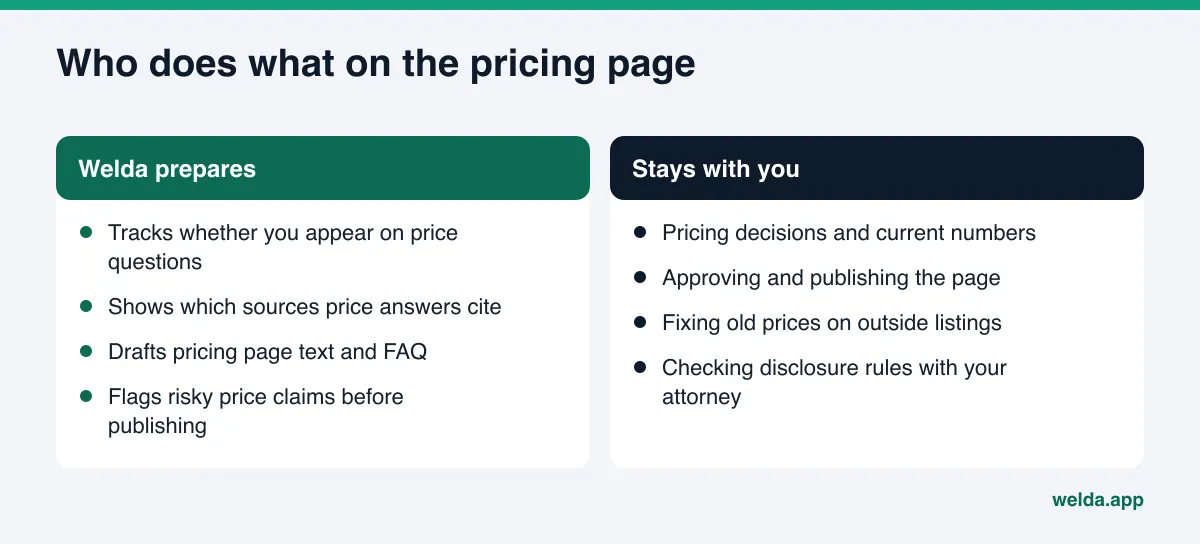
Before anything goes live, drafts pass through a compliance check that flags patterns like price, warranty and superiority claims, so "cheapest in the city" does not slip through unnoticed. This check is not legal advice and has not been reviewed by legal counsel.
On WordPress sites, Welda connects through a separate Editor user and an application password, with no code to install. The pricing page draft opens on your site as a draft, and you approve it before it goes live. For other systems, Welda provides a ready package that you or your web team apply by hand. Either way, the content lives on your site; Welda does not host it. A before and after comparison shows how your position on price questions changed.
A note on availability. The Welda panel is in early access and is opening first to businesses in Turkey. Regular four-engine tracking is being added during early access, and sample screens use representative data. The part anyone can use today, in English, is the free site analysis. Pricing for Welda itself is not published; it is discussed in the early access conversation.
Limits: what Welda does not do
Fixing a pricing page will not solve every price question, and Welda is direct about its limits:
- No ranking promises. Nobody can guarantee an answer engine will name you for a price question, and Welda does not.
- No made-up prices. Welda does not write prices, discounts or package contents it does not know. Missing information stays blank and comes to you as a question.
- No publishing without approval. Pricing text does not go live without your sign-off. In health care, nothing is ever published automatically.
- No pricing decisions. What you charge, and whether you publish it, is your business call. Welda shows how that choice plays out in AI answers.
- No removal of outside listings. Contacting directories or sites that show old prices stays with you. Welda shows which sources are the problem.
Timing matters too. Changes to your pricing page usually take weeks to show up in AI answers. Engines revisit pages on different schedules, and some answers keep leaning on old sources for a while. Watch the trend in regular measurement instead of expecting results in the first week.
Pricing page checklist before you publish
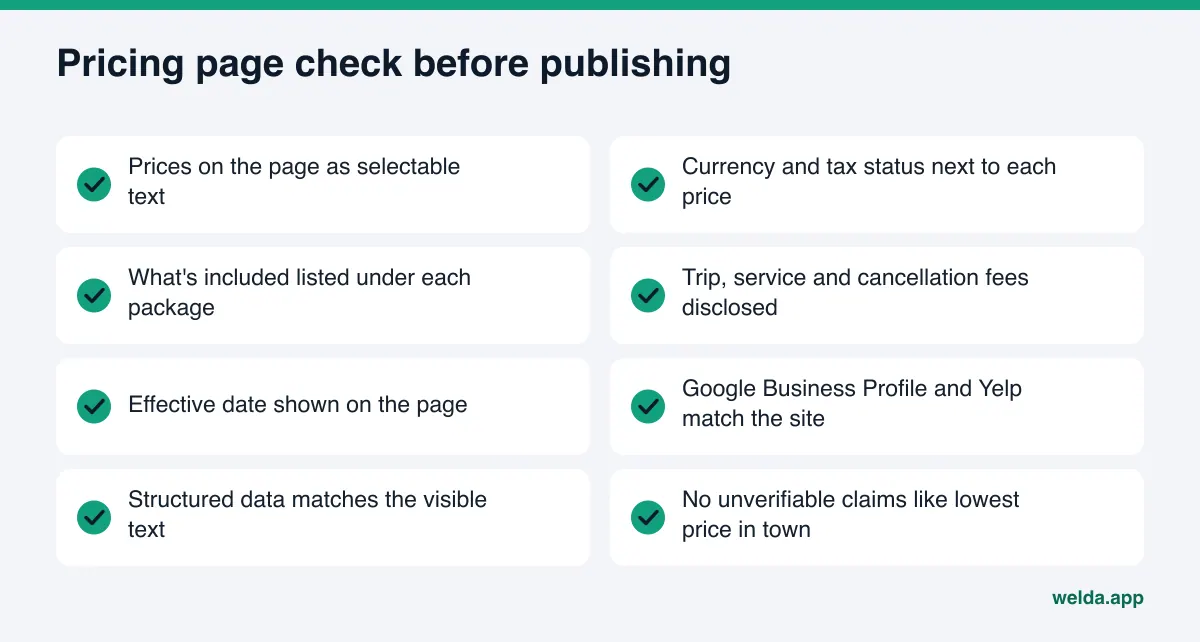
Run through this table before you publish or update your pricing page. Each row matches a piece of information an engine needs to answer a price question correctly.
| Check | Why it matters | How to tell |
|---|---|---|
| Prices are on the page as text | Images and scanned PDFs are hard to read | Can you select and copy the price |
| Currency and tax status stated | A bare number is easy to misread | Each price shows USD and a tax note |
| Scope under each package | "What's included" gets an answer | Included and extra items listed separately |
| Effective date shown | Old prices are not mistaken for new | "Prices effective as of" line present |
| Fees disclosed | "Hidden fees" prompts get your answer | Trip, service and cancellation fees listed |
| Profiles match the site | Contradictions lower trust | Compare with Google Business Profile and Yelp |
| Markup matches the text | Mismatched data lowers trust | Price and date in markup equal the page |
| Crawlers can reach the page | Blocked pages cannot be cited | Check robots.txt rules |
Most of these checks take an afternoon. The hard part is keeping the habit every time a price changes. Tie price changes to a simple routine: the day a new price is decided, the page, the profiles and the markup change together.
Frequently asked questions
If I don't publish prices, will AI tools ignore my business?
Not entirely, but you are at a disadvantage on price questions. Engines answering a budget question tend to rely on sources that include pricing. If you don't want exact numbers, a starting price, a typical range or a list of price drivers beats "no pricing available."
My price list is an image. Should I remove it?
No need. Keep the image and add the same information as text or a simple table. Engines read text reliably; they cannot always read the words inside an image.
How long until AI answers reflect a price change?
There is no fixed timeline. It usually takes weeks and varies by engine. Updating your site, profiles and markup on the same day will not make it faster, but it removes contradictions.
Do I need schema markup for prices?
It is not required, but it helps. The visible text matters most. Markup restates the price, currency and validity date in a machine-readable form, and it should always match the text.
Does the free analysis look at my pricing page?
Yes. Along with your homepage, it reads a few inner pages such as services, pricing, about and contact. It checks how clearly your services are described, your FAQ section and your business information, and explains what it found, why it matters and how to fix it. It does not measure rankings or promise placement.
Will Welda set or change my prices?
No. Prices are your decision. Welda asks you for the price information, drafts the text and markup from what you provide, and leaves the publishing approval with you.
See how your pricing page reads to AI today
Your pricing page shapes the answer to the questions closest to a purchase. A readable, current page with clear terms lets answer engines use your numbers. An unreadable or contradictory page hands that question to someone else. Start with the free AI visibility analysis: see how your site, pricing page included, reads to an answer engine, which fixes would raise your score the most, and a ready fix package to add to your site. The analysis is free once per site, and the results link arrives by email.