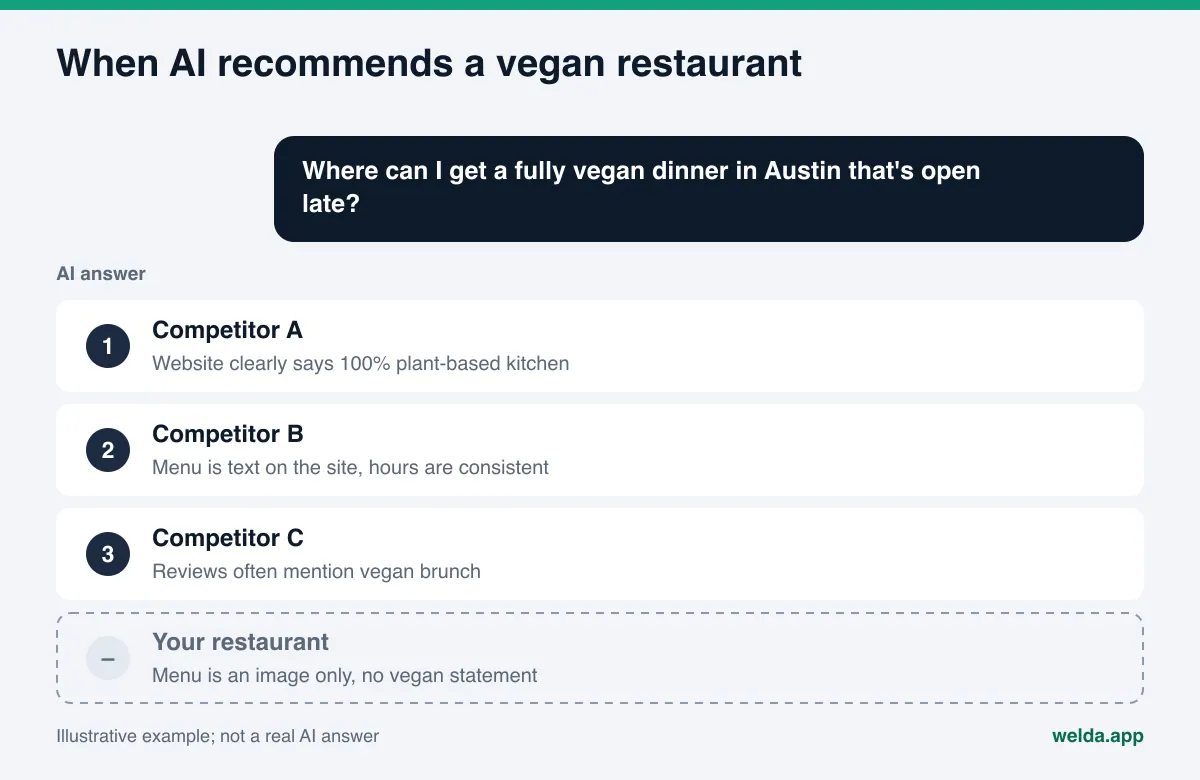
Why doesn't ChatGPT or Gemini recommend my vegan restaurant, and what does AI visibility software actually do about it? When AI assistants recommend a vegan restaurant, they rely on what your website, your Google Business Profile and your reviews say clearly and consistently. If your menu lives only in a photo, or it is unclear whether you are fully vegan or just vegan-friendly, your name gets left out or described the wrong way. AI visibility software for vegan restaurants measures those gaps, ranks them and drafts the fixes. This guide walks through the work step by step and shows which parts Welda handles for you.
What is AI visibility software for vegan restaurants?
AI visibility, often called AEO (answer engine optimization), is about whether your business gets named when people ask ChatGPT, Gemini, Perplexity or Google's AI Overviews and AI Mode for a recommendation. You may also see the term GEO (generative engine optimization); it describes the same goal. In a classic search, a diner sees a page of links and picks one. In an AI answer, they usually see a short list of three or four places. If you are not on that list, the diner decides without ever hearing about you.
For vegan restaurants, this shift carries extra weight. Choosing where to eat is a matter of trust for a vegan diner, not just taste. They ask things like "Is everything really plant-based here?", "Do the desserts contain honey?" or "Is there a vegan brunch with tofu scramble?" To answer, the AI looks for places that have written those details down somewhere it can read. If you have not, it either skips you or mentions you with vague, hedged wording. Both cost you the diner who is looking for certainty.
AI visibility software does three jobs. First, it measures: are you named for the questions diners actually ask, in what position, and where are competitors ahead? Second, it diagnoses: which gap on your site or profiles is causing the AI to pass you over? Third, it fixes: it drafts the missing copy, menu descriptions, business schema and profile text. This article covers all three for a vegan restaurant.
The fastest way to see where you stand is to check how your site reads today. Welda's free site analysis reads your homepage and a few inner pages the way Google and AI systems do, and lists every gap it finds.
What do diners ask AI when they want a vegan restaurant?
People looking for vegan food tend to ask very specific questions. A neighborhood, a meal, a dietary condition and sometimes a budget all show up in one sentence. The questions below are examples written for this article, not data from a study, but they show how diners phrase their requests:
- "Where can I get a fully vegan dinner in Austin that's open late?"
- "Best vegan brunch in Silver Lake?"
- "Vegan and gluten-free restaurant near downtown Portland?"
- "I'm taking a vegan friend and a meat eater to dinner in Chicago. Where should we go?"
- "Who makes a vegan birthday cake in Brooklyn?"
- "Quick, cheap vegan lunch near the Financial District?"
What these questions have in common: the AI needs specific facts about your restaurant to answer them. Location and neighborhood, opening hours, how far your vegan menu goes, what is in each dish, gluten-free and allergen information, and price level. If those facts are missing from your site and from the sources the AI trusts, it cannot put you on the list.
Here is how each question type maps to the information the AI looks for and where that information should live:
| Question type | What the AI looks for | Where it should live |
|---|---|---|
| Neighborhood and meal ("vegan dinner in Austin") | Address, neighborhood name, hours | Homepage, contact page, Google Business Profile |
| Vegan scope ("is it fully vegan") | One clear vegan statement | Homepage intro, About page, profile description |
| Dish contents ("any honey in desserts") | Ingredient lists on the menu | A text menu page |
| Extra condition ("vegan and gluten-free") | Gluten-free and allergen labels | Menu page, FAQ |
| Mixed group ("bringing a meat eater") | Menu range, signature dishes | Menu page, About page, review replies |
| Special order ("vegan birthday cake") | Ordering and reservation info | Catering or order page, FAQ |
Fully vegan or vegan-friendly: the most common mistake
The most frequent problem vegan restaurants run into in AI answers is an unclear vegan status. The website says "plant-forward" in one place and "healthy comfort food" in another. The Yelp listing says "vegetarian friendly." One reviewer writes "everything is vegan," another mentions "the cheese plate." When the AI tries to piece these together, it either plays it safe and leaves you out, or it produces a wrong summary.
The fix is simple but takes care. Define your status in one sentence. If your kitchen is fully vegan, say so plainly: "Our kitchen uses no animal products; the entire menu is vegan." If you are vegan-friendly, say that plainly too: "Vegan dishes are marked on our menu; our kitchen also prepares animal products." The second sentence may feel like a weakness, but for AI it is the opposite. Clear information gets passed along far more easily than vague information. A vegan-friendly place can win the "I'm bringing a meat eater" question; a fully vegan place can win "a truly vegan spot."
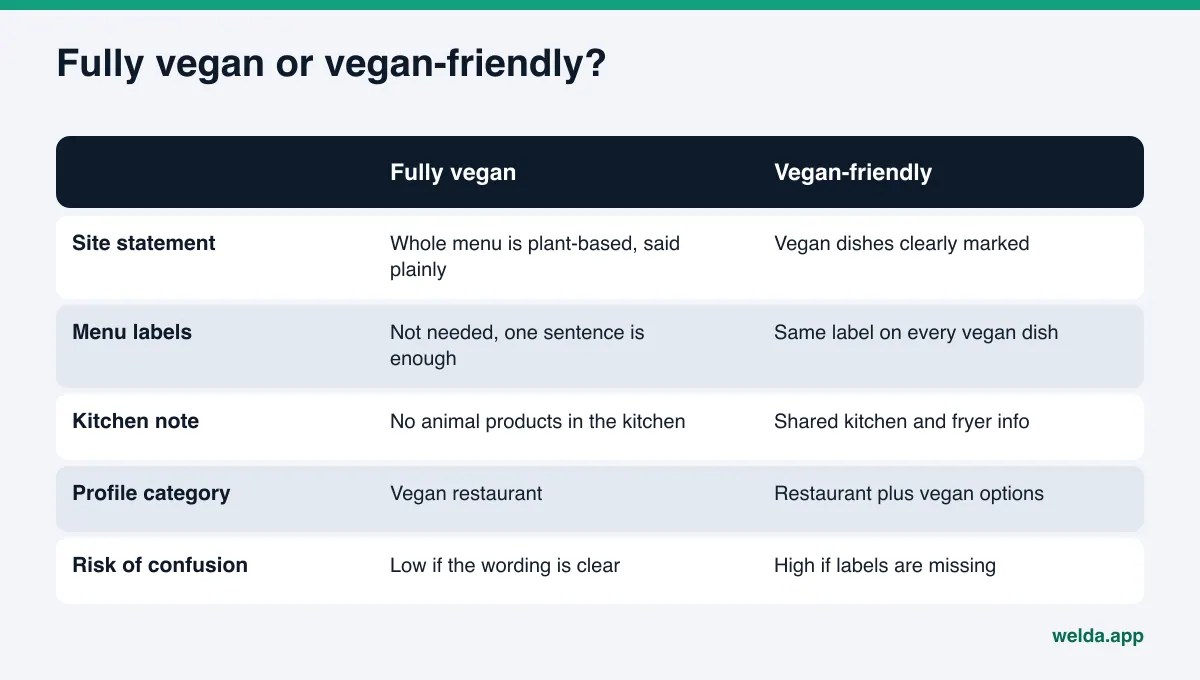
Use the same sentence everywhere: in your homepage intro, on your About page, in your Google Business Profile description and in your FAQ. Stick to it in review replies as well. If a guest writes "I thought everything was vegan, but it wasn't," reply calmly and restate the facts. Those replies are part of what the AI reads, too.
There is a practical reason to be careful with wording. In the US, the Federal Trade Commission is empowered to act against unfair or deceptive acts or practices in commerce. This article is not legal advice, but the plain lesson is that a precise, honest description of your menu is both the safer and the more AI-friendly choice.
Where does AI get its information about vegan restaurants?
AI answer engines rarely rely on a single source when recommending a restaurant. They read several kinds of sources together and look for consistency. For a vegan restaurant, the important ones are:
- Your own website: menu, vegan statement, address, hours, FAQ. This is entirely in your hands.
- Google Business Profile and Google Maps: category, hours, photos, reviews and your replies. Google's own help page notes that some attributes can only be changed in certain countries or business categories; if your profile editor shows attributes related to vegan or vegetarian options, set them accurately.
- Review platforms: Yelp and Tripadvisor reviews often carry the exact phrases diners use, like "best vegan mac and cheese" or "great for mixed groups."
- Vegan directories: HappyCow and similar guides that list vegan and vegetarian places can matter, especially for travelers searching in an unfamiliar city.
- Forums and local lists: Reddit threads and local "best of" roundups get read as well. You cannot control these conversations, but you should know how you show up in them. For more, see the piece on Reddit and AI answers.
Two of these sources are fully under your control: your website and your Google Business Profile. The first job is to make both complete and consistent with each other.
Step-by-step AEO plan for a vegan restaurant
The steps below are work a vegan restaurant can do on its own. Going in order helps, because each step prepares the ground for the next one.
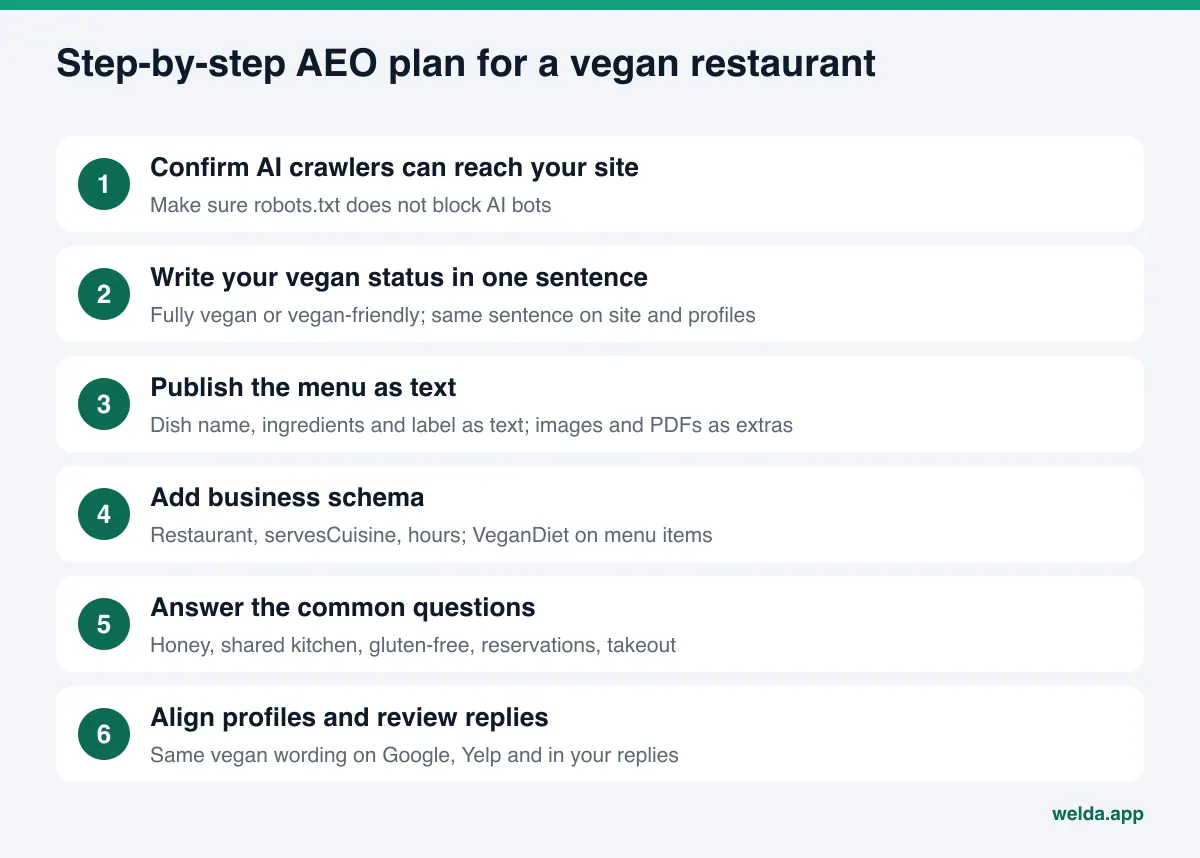
- Confirm AI crawlers can reach your site. Your robots.txt file might be blocking some AI bots, often without anyone noticing; a site builder setting or a plugin can do it. If crawlers cannot get in, even a great menu goes unread. For details, see whether AI bots are crawling your website.
- Write your vegan status in one sentence. Fully vegan or vegan-friendly? Put the sentence in your homepage's first paragraph. Make sure "vegan restaurant" and your neighborhood also appear in the page title and meta description.
- Publish your menu as text. A menu photo or PDF works for diners, but a text menu page is far easier for AI to read. For each dish, write the name, a short description and the main ingredients. State your price format (à la carte, prix fixe, tasting menu) clearly.
- Add business schema. The schema.org Restaurant type includes servesCuisine for cuisine type, hasMenu for your menu and acceptsReservations for booking. Menu items can use the suitableForDiet property with the VeganDiet value. The markup must match what is visible on the page.
- Answer the common questions. Add short, direct answers to "Do you use honey?", "Do you have gluten-free options?", "Is your kitchen shared?", "Do I need a reservation?" and "Do you offer takeout or delivery?"
- Keep name, address and phone identical everywhere. Your site, Google Business Profile, Yelp, Tripadvisor and HappyCow listing should match word for word. Link to your social and map profiles from your site.
- Reply to reviews. Restate your vegan sentence in replies and name your signature dishes. Never collect fake reviews; what AI trusts is real diner language.
- Measure and repeat. It usually takes weeks for changes to show up in AI answers. Ask the same questions at regular intervals and compare the results.
How to write a vegan menu page that AI can read
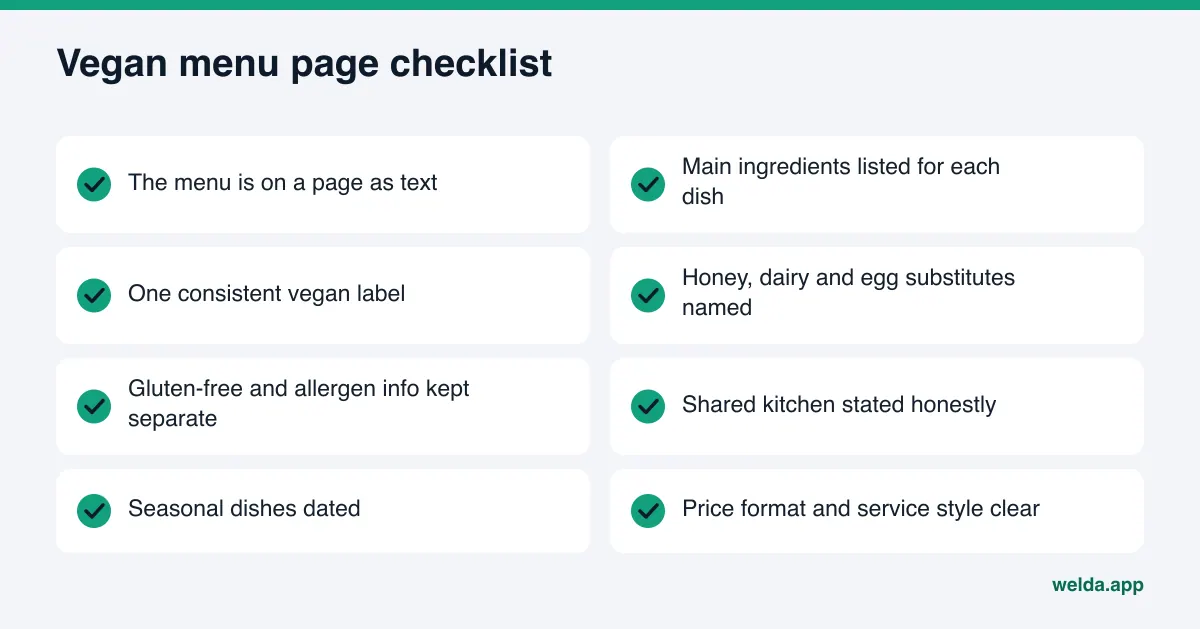
For a vegan restaurant, the menu page matters more for AI visibility than it does for most restaurants, because diners' questions often drill down to a specific dish or ingredient. When someone asks "Where can I get vegan cheesecake in Seattle?", the AI can only suggest a place that has that dish written on its menu as text.
A few points to watch. Name dishes in words diners actually use; if a dish has a creative name, add a plain description next to it ("The Forager: mushroom, chestnut and spinach stew"). If you are vegan-friendly, mark vegan dishes with the same label everywhere and explain the label in one sentence at the top of the menu. Say what you use instead of honey, dairy and eggs; those are the things vegan diners check most often.
Keep gluten-free and allergen information separate from vegan information. A vegan dish is not automatically gluten-free, and mixing the two confuses both diners and AI. If you use a shared kitchen or fryer, say so; a plain note like "Our gluten-free dishes are prepared in a shared kitchen" is far better than being misunderstood. If you run seasonal dishes, show when the menu was last updated so the AI does not treat an old menu as current.
Another common gap is the About page. Why the kitchen is vegan, the chef's approach and where ingredients come from build trust with diners and make it easier for AI to tell you apart from other vegan spots. Skip superlatives like "the best vegan restaurant in town" and describe what you actually do.
How Welda does this work for a vegan restaurant
Welda is software that measures where a business appears in AI answers and fills in the gaps on the business's behalf. For a vegan restaurant, the work comes in two parts: the free site analysis that anyone can use today, and the Welda panel, which is in early access.
The free site analysis. It reads your homepage and a few inner pages (services, pricing, about, contact) the way Google and AI systems do. It checks whether AI bots can access your site (robots.txt), your page title and meta description, your main heading, business schema, address, phone and location details, whether your social and map profiles are linked from your site, your FAQ section, review and trust signals, how clearly your offering is described, and page speed. You get a score out of 100, with technical and content scores shown separately. Each gap comes with what was found, why it matters and how to fix it.
The analysis also gives you ready-to-use copy for your homepage: title, meta description, main heading, intro paragraph and FAQ. For a vegan restaurant, that means a ready draft of the "state your vegan status in one sentence" step. You also get a simulation showing how much each fix would raise your score, a competitor comparison, a fix package to add to your site (including business schema code), a PDF and a shareable score card. On top of that, five questions a customer might ask are put to an AI assistant that can search the web, and Welda checks whether your business name appears in the answers. That is a one-time check.
The analysis is free once per site. Your email and phone number are verified, and the results link arrives by email and stays open for 14 days. It works in English. It does not measure rankings and does not promise any ranking.
The Welda panel. The full panel is in early access and is opening first in Turkey. In the panel, the questions your diners would ask are put to ChatGPT, Gemini, Perplexity and Google AI three times each. You see which questions mention your name, in what position, and where competitors are ahead. Question language can be set to English or Turkish. Early access means that regular four-engine tracking is being added during the program, and the sample screens in the panel use representative data.
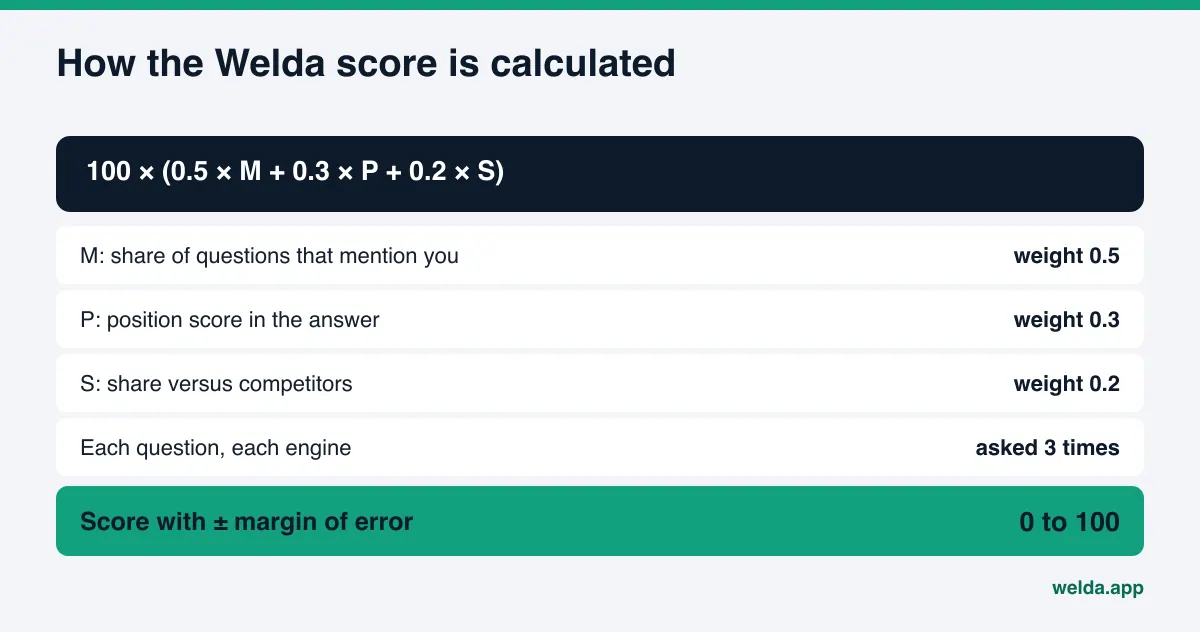
The score formula is open: 100 × (0.5 × the share of questions that mention you + 0.3 × position score + 0.2 × share versus competitors). The spread across the three runs produces a ± margin of error, so you are not making decisions based on one lucky or unlucky answer. To see how this kind of share is tracked over time, read about AI share of voice.
Panel screens include a home view (score, a one-sentence summary and next tasks), a single to-do list (missing information, items waiting for approval and manual tasks, each with ready text), a questions view (question by question: are you named?), a competitors view (which topic and which source a competitor wins on), a sources view (the sites AI draws from and where you are missing), ready pages (fixes applied and prepared for preview), a compliance check, incoming inquiries, a before-and-after comparison and a one-page monthly PDF report.
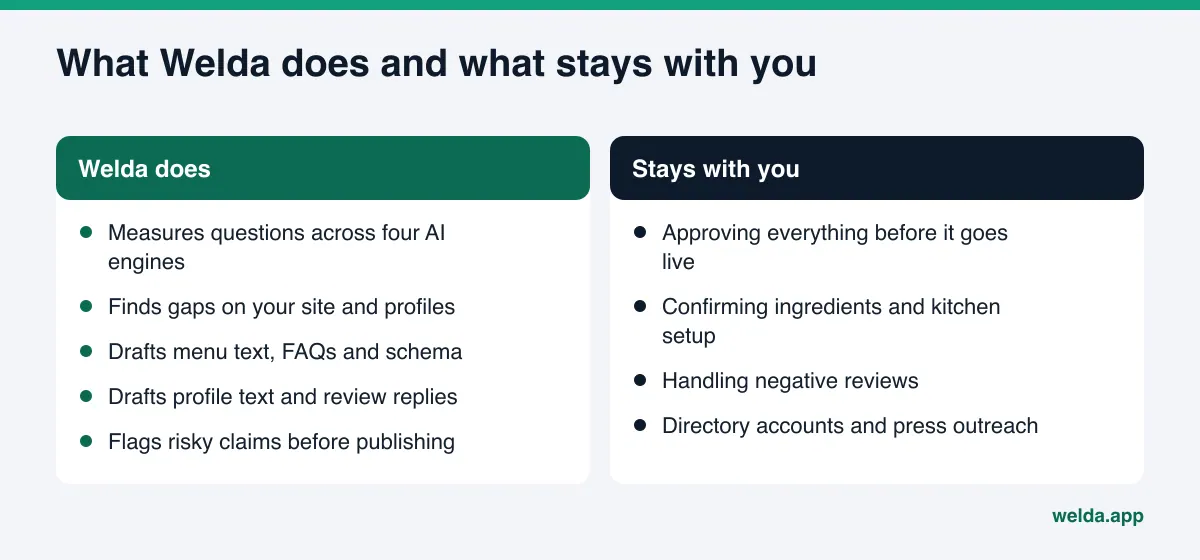
Fixes. Welda drafts content, profile text and review replies. Approval to publish always stays with you, and content always lives on your own site; Welda does not host content. On WordPress sites, Welda connects through a separate Editor user and an application password that you create, with no code to install. Content opens as a draft on your site and goes live once approved. On other systems, Welda gives you a ready package and the changes are applied by hand. Google Business Profile, Instagram and Facebook can be connected; if they are not, the task shows up as manual.
Welda does not write what it does not know. Whether your kitchen is shared, whether desserts contain honey, which dishes are gluten-free: Welda asks you instead of guessing. For a vegan restaurant this matters a lot, because a wrong vegan claim is the fastest way to lose a diner's trust. The compliance check also flags patterns like price claims, guarantees and superiority claims (such as "the healthiest") before anything is published. It is not legal advice and has not been reviewed by legal counsel.
If you run several locations, the picture changes; see AI visibility software for restaurant groups for how multi-location brands approach it.
Free analysis vs. the Welda panel: what you can use today
The most practical question for a vegan restaurant owner is what is available right now. This table puts the two side by side:
| Topic | Free site analysis | Welda panel (early access) |
|---|---|---|
| Who can use it | Anyone, today, in English | Opening in stages, first in Turkey |
| What it reads | Homepage and a few inner pages | Site, connected profiles, AI answers |
| AI answer check | 5 questions, one time | Four engines, each question three times, ongoing |
| Output | Score, gap list, ready copy, fix package, PDF | Score with margin of error, to-dos, ready pages, monthly report |
| Publishing | You apply the changes | WordPress drafts, published on your approval |
| Cost | Free once per site | Pricing is discussed in the early access call |
Limits: what Welda does not do
Knowing what to expect from AI visibility software starts with knowing what it does not do. Welda's limits are:
- No ranking guarantee. Welda does not guarantee that you will appear in ChatGPT or hold a given position. AI answers vary, which is why measurement uses three runs and a margin of error.
- No made-up facts. Your vegan status, ingredients and kitchen setup come from you.
- No publishing sensitive content without approval. You approve what goes live.
- No fake reviews. Welda drafts review replies, never reviews.
- Some work stays with you. Handling negative reviews, managing directory accounts and press outreach remain with the business; Welda provides ready text for them.
- Results take time. New content usually takes weeks to show up in AI answers.
One more limit specific to vegan restaurants: Welda does not rule on food labeling or on how the word "vegan" may be used. The compliance check flags risky patterns, but it is not legal advice. You know best whether your dishes are vegan; Welda helps you say it accurately and consistently. Pizza places and other casual concepts face similar questions about labels and options; see AI visibility software for pizzerias for that angle.
Checklist: does your vegan restaurant need AI visibility software?
Ask yourself these questions to decide whether you need a tool and where to begin:
- Does your homepage's first paragraph include the word "vegan" and your neighborhood?
- Is your status (fully vegan or vegan-friendly) written with the same sentence everywhere?
- Is your menu on a page as text, or only as a photo or PDF?
- Are honey, dairy, egg substitutes and gluten-free information clear on the menu?
- Do your Google Business Profile category, hours and description match your site?
- Does your site have business schema, and does it match what is visible on the page?
- Have you ever measured whether your name comes up for the questions diners ask?
- Do you know which questions other vegan spots win, and why?
The first six questions describe the state of your site and profile; the free site analysis covers most of them. The last two need ongoing measurement, which is what the panel is for.
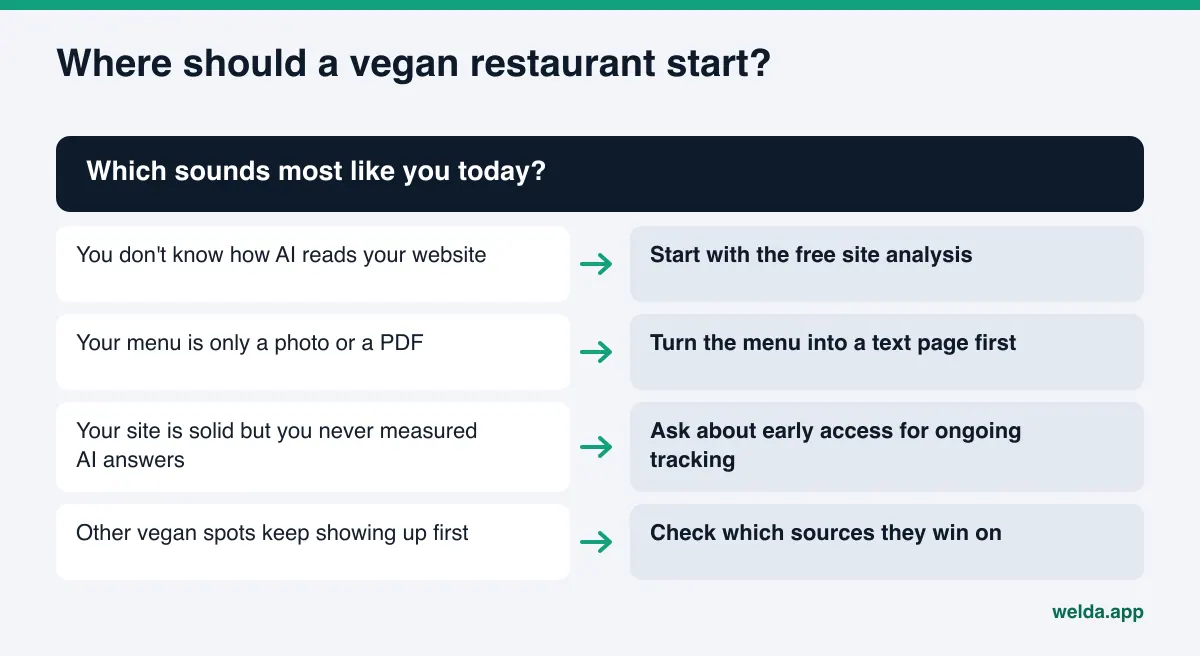
Keep one thing in mind: a one-time check is a starting snapshot. AI answers can change week to week. The real value comes from asking the same questions the same way over time and watching what changes.
Frequently asked questions
What does AI visibility software for vegan restaurants measure?
It measures whether your restaurant is named for the questions diners ask AI, in what position, and which sources help competitors get ahead. Welda's free analysis also shows how your site reads to AI and what is missing.
Our menu is already on Instagram. Do we need it on the website too?
Yes. AI answer engines lean on information that is published as readable text. A text menu page on your own site makes it more likely you get named for dish and ingredient questions. Linking Instagram from your site helps, but it does not replace the menu page.
We are vegan-friendly. Can we call ourselves a vegan restaurant?
Describing yourself exactly as you are is the safest choice. "Vegan-friendly" is better than an inaccurate "fully vegan" claim, and AI passes along clear information more easily. This is not legal advice; if you are unsure about wording, talk to a qualified advisor.
Can Welda guarantee we show up in ChatGPT?
No. Nobody can guarantee that. Welda measures, shows the gaps and drafts the fixes. Changes usually take weeks to show up in AI answers.
Is the Welda panel available in the US?
The free site analysis works in English today. The full panel is in early access and is opening first in Turkey.
How much does Welda cost?
The free site analysis is free once per site. Panel pricing is not published; it is discussed in the early access call.
What if our site is not on WordPress?
For systems without a connection, Welda provides a ready package: copy, FAQs and business schema code. The changes are applied by hand. Google Business Profile, Instagram and Facebook can be connected separately.
First step: see how your vegan restaurant reads today
You do not need a long setup to see how AI describes your vegan restaurant. In one pass you can check crawler access, how clear your vegan statement is, whether your menu can be read, and your business schema. You will also see which fix to make first and how much it would add to your score.
Run the free site analysis. Your results link arrives by email and stays open for 14 days The Welda panel for ongoing tracking and fixes is opening in stages through early access.