What does AI visibility software for specialty coffee roasters actually do, and how do you choose one? AI visibility software for specialty coffee roasters asks ChatGPT, Gemini, Perplexity and Google AI the questions your customers ask, records whether your roastery is named in the answers, and shows you what information is missing so you can fix it. When you compare tools, look for transparent measurement, coffee-specific questions and a workflow where you approve everything before it goes live. This guide covers why roasters struggle to show up in AI answers, the steps that help, and how Welda handles the work.
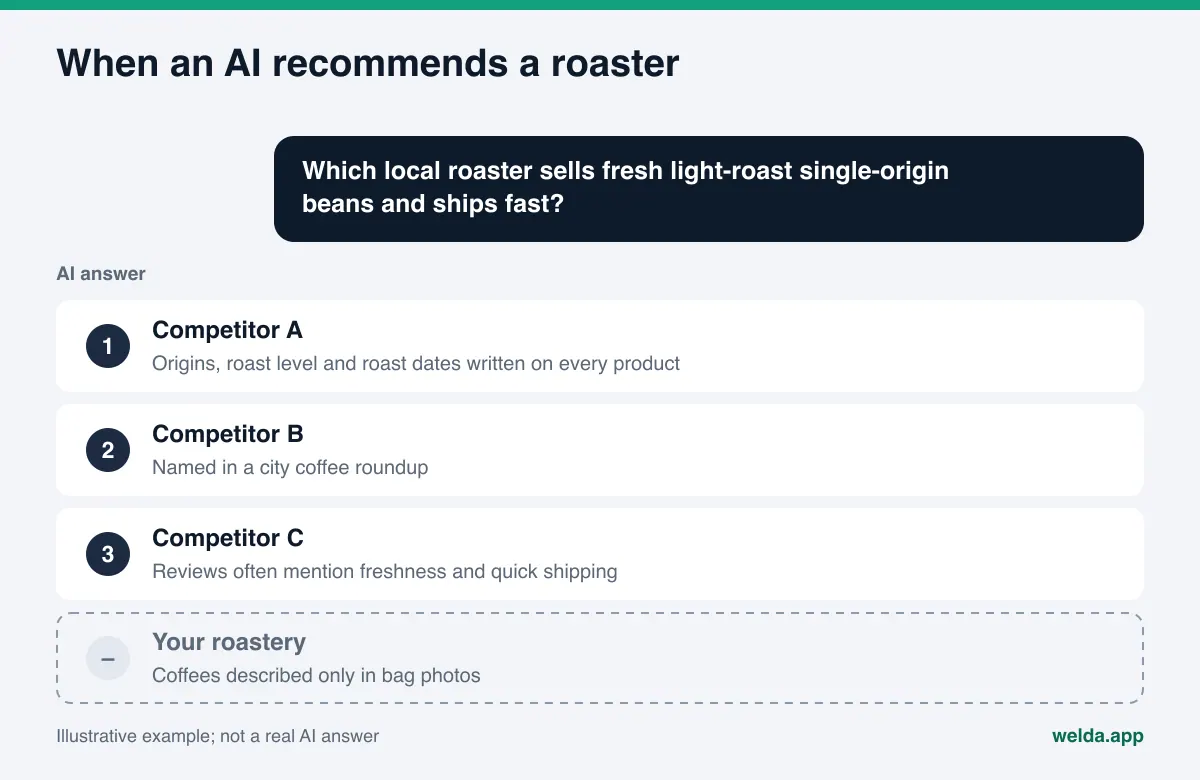
Why specialty coffee roasters need AI visibility software now
AEO (answer engine optimization) is the work of making sure AI assistants can find, understand and recommend your business. You will also hear it called AI search visibility, and some people use GEO (generative engine optimization) for the same idea. Whatever the label, the shift is the same. A coffee drinker used to search "coffee roaster near me," scan a map and click a few links. Now the same person types a full question into ChatGPT or Google's AI Mode: "Which local roaster sells fresh light-roast Ethiopian beans and ships within two days?" or "Is there a roastery café in Portland with a pour-over bar that opens at 7?" The answer is not ten links. It is a short list with a sentence of reasoning for each name.
Roasters are in an unusual spot. You are often three businesses at once: a café with a counter and opening hours, an online shop selling bags of beans and subscriptions, and a wholesale supplier for restaurants and offices. Each of those draws a different kind of question. A café customer asks about hours, seating and drinks. A home brewer asks about origins, roast dates, grind options and shipping. A café owner looking for a supplier asks about wholesale programs and training. An AI assistant can only match you to these questions if each answer is written down somewhere it can read.
The other challenge is that specialty coffee is detail-heavy, and the details tend to live in places AI assistants read poorly: a chalkboard behind the bar, a product photo with tasting notes printed on the bag, an Instagram story about a new lot. Your team knows the producer, the process and the roast profile. Online, the "About" page often says only "small-batch coffee roasted with care." To an AI assistant, that sentence describes every roaster in the country.
The fastest way to see where you stand is to look at your site the way an AI does. Welda's free site analysis reads your homepage and a few inner pages, lists what is missing and explains how to fix each item.
What coffee drinkers ask AI assistants about roasters
Questions about roasters fall into a handful of patterns. Each pattern is answered from a different kind of information. The example questions below were written for this guide to show the patterns; they are illustrative, not measured.
| Question pattern | Illustrative question | What the answer relies on |
|---|---|---|
| Freshness and origin | "Where can I buy freshly roasted single-origin beans in Denver?" | Product pages with origin, process, roast date policy |
| Brew method fit | "Best light roast for a V60 from a local roaster" | Roast level and brew recommendations written in text |
| Café visit | "Roastery café near downtown with good espresso and laptop seating" | Address, hours, seating rules, Google Business Profile |
| Shipping and subscriptions | "Coffee subscription from a small-batch roaster that ships nationwide" | Subscription page, shipping regions, frequency options |
| Wholesale | "Specialty roaster that supplies cafés and offices in Austin" | Wholesale page, service area, what is included |
| Trust and value | "Is specialty coffee worth the price compared to grocery store beans?" | Clear sourcing story, reviews, how prices are explained |
Very few of these questions ask for "the best coffee." Most ask about fit: freshness, origin, brew method, location, shipping. That works in your favor, because fit is something you can describe accurately without claims you cannot support. If your café side matters most, our guide to AEO for coffee shops covers the café questions in more depth.
What AI assistants read before recommending a roaster
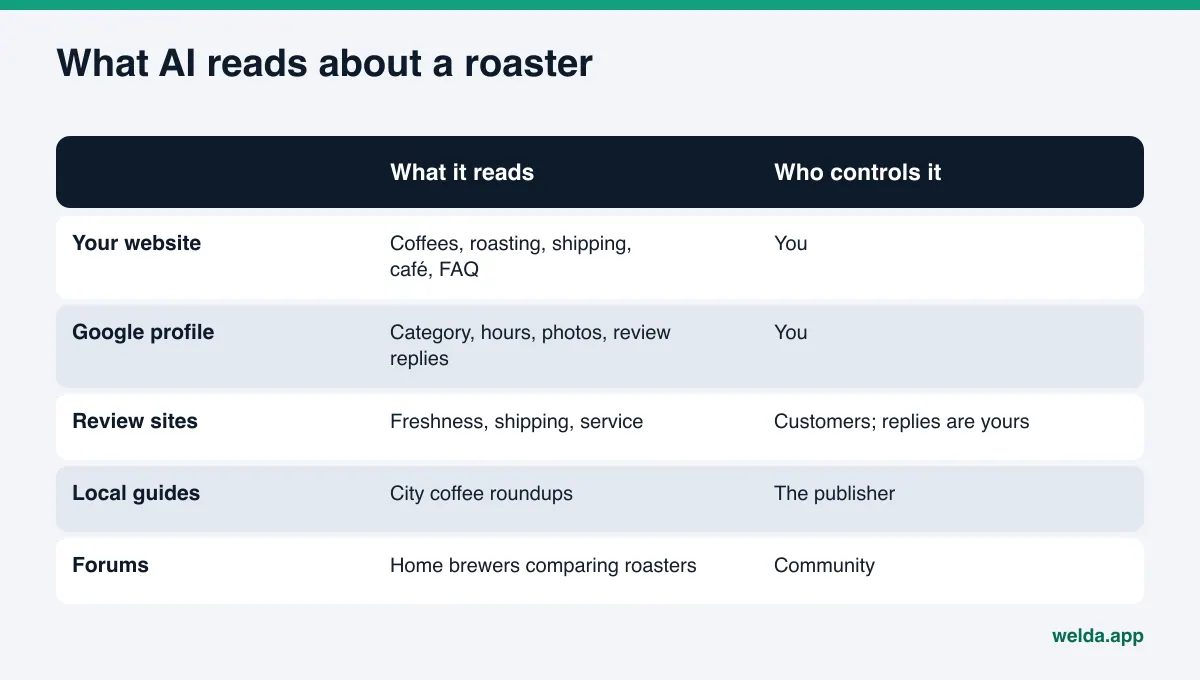
When an AI assistant answers with web search, it pulls from several types of sources and compares them. For a specialty roaster, these are the ones that usually matter:
- Your own website: product pages for each coffee, the roasting and sourcing story, subscription and wholesale pages, café hours and an FAQ. This is the one source you control completely.
- Google Business Profile and Google Maps: category, hours, photos, attributes and reviews for the café or roastery location. Google's AI Overviews and AI Mode draw closely on this data.
- Review platforms: Google reviews, Yelp and, for visitors, Tripadvisor. Recurring phrases such as "beans always roasted within the week" or "slow shipping" shape how an AI describes you.
- Local guides and coffee media: city coffee roundups and neighborhood guides. Being named in an independent list gives an AI a second source that confirms what your site says.
- Forums and communities: threads where home brewers compare roasters. You do not control them, but they show how real customers talk about you.
The AI compares these sources against each other. If your site lists café hours from 7 a.m. but your Google profile says 8, or your coffees are only described in product photos, the AI either repeats the wrong detail or skips you. That is why the first job is always to make the two sources you control, your site and your Google Business Profile, complete and consistent with each other.
Step by step: what a roaster should fix first
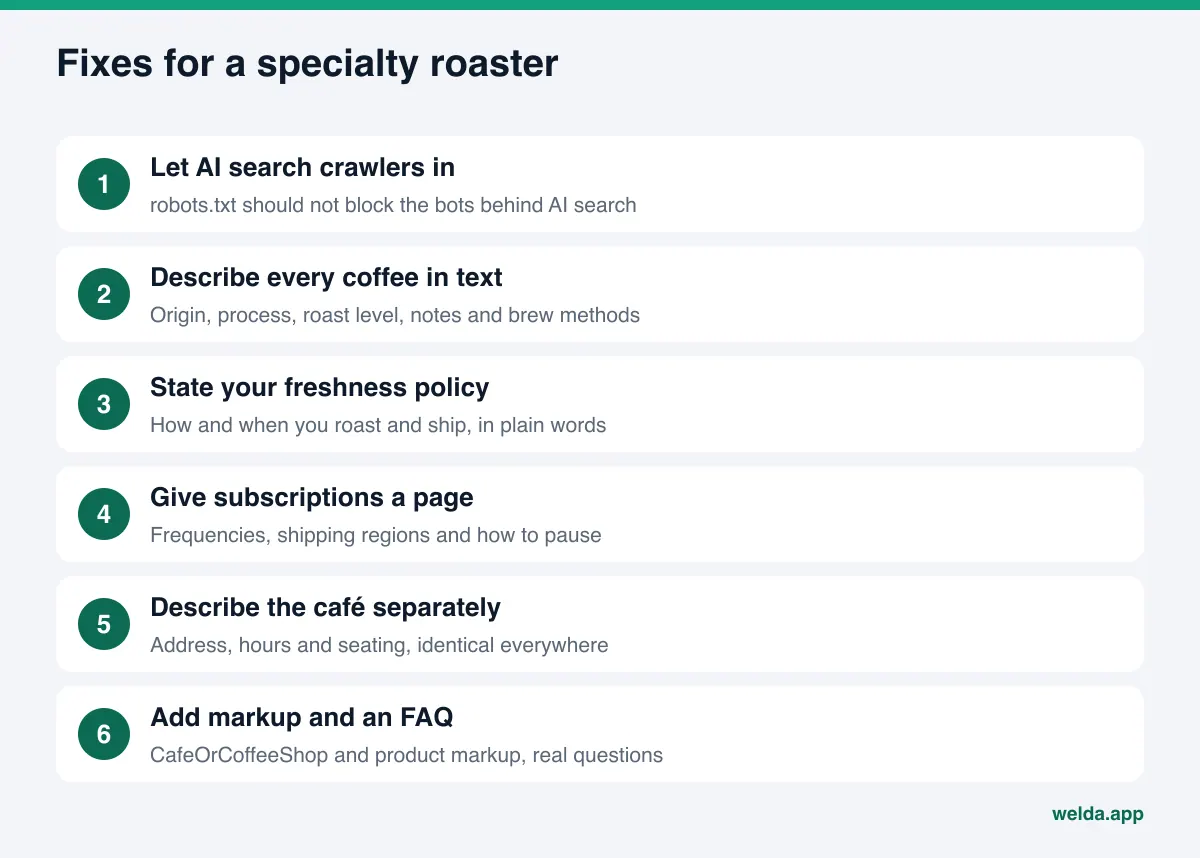
None of these steps require special software. They are ordered from the basics outward.
- Let AI search crawlers in. Your robots.txt file should not block the bots that power AI search. OpenAI's crawler documentation explains that
OAI-SearchBotis used to surface sites in ChatGPT search, whileGPTBotrelates to model training. You can block training and still allow search. - Write every coffee out in text. For each product page: origin, producer or cooperative if you know it, process, variety, roast level, tasting notes and suggested brew methods. Text on the bag in a photo is not enough.
- State your freshness policy. If you roast to order or print roast dates on every bag, say so on the product page and in the FAQ. This is exactly the detail freshness questions look for.
- Give subscriptions and shipping their own page. Frequencies, shipping regions, how long orders take to leave the roastery, and how to pause. Avoid vague promises; write only what you actually do.
- Describe the café separately. Address, hours, seating, Wi-Fi, laptop policy and what is on the bar. Keep these details identical on your site, Google Business Profile and social profiles.
- Add business markup. Schema.org has a CafeOrCoffeeShop type for the café location, with name, address, phone, hours and map profile. Product markup on your shop pages helps the product side.
- Write a real FAQ. Collect the questions you hear at the counter and by email: "Do you sell decaf?", "Can you grind for espresso?", "Do you offer wholesale training?" Answer each in two or three sentences.
- Answer reviews. A reply puts your side of a topic on record. Our guide to reviews and AI recommendations explains how reviews feed AI answers.
How to write product pages an AI can quote
For many roasters, the online shop matters most for AI visibility, because home brewers ask the most specific questions. A product page an AI can quote is short, factual and structured. Here is an example layout for one coffee:
- One-line summary: "A washed Ethiopian coffee, roasted light for filter, with notes of citrus and black tea." This is the sentence an AI is most likely to reuse.
- The facts: origin region, producer or washing station, variety, process, elevation if known, roast level.
- Brew guidance: which methods it suits and a simple starting recipe.
- Freshness and shipping: how you roast and ship, in one or two lines that match your shipping page.
- Options: bag sizes, whole bean or ground, subscription availability.
When the coffee changes with the season, update the page or mark it as sold out rather than leaving old details live. An AI that quotes a lot you no longer carry sends customers to a dead end. For more on structuring shop pages, see our guide to product pages for AI shopping.
What to look for in AI visibility software for specialty coffee roasters
You can do everything above by hand. Software helps in two places: measuring, on a regular schedule, which questions you appear in, and turning the gaps into ready-to-use text. These are the criteria worth checking.
| Criterion | Why it matters for a roaster | What to ask |
|---|---|---|
| Question set | Generic prompts miss origin, roast and shipping questions | Are questions built around my coffees, café and wholesale offer? |
| Engine coverage | Customers use different assistants | Are ChatGPT, Gemini, Perplexity and Google AI measured separately? |
| Repeats and error margin | AI answers change from run to run | Is each question asked more than once, with variance shown? |
| Transparent score | You need to know why a number moved | Is the scoring formula published? |
| Fixes, not just charts | Measurement alone changes nothing | Does the tool draft the text I need to add? |
| Approval and ownership | Your coffee facts and voice are your responsibility | Do I approve every change, and does content stay on my site? |
One run of a question tells you little, because answers vary. Our explainer on why AI answers change every time covers why repeated measurement matters.
How Welda handles AI visibility for roasters
Welda is software that measures where a business appears in AI answers and fills the gaps on the business's behalf. For a roaster, three parts do most of the work: question-by-question tracking, a competitor view that shows why another roaster is ahead, and a to-do list that asks you for facts it cannot find.
First, where the product stands today. The Welda dashboard is in early access and is opening first in Turkey. Regular four-engine tracking is being added during early access, and the dashboard screens are shown with sample data. What anyone can use today is the free site analysis, which works in English. Pricing is discussed in an early access conversation.
Question-by-question tracking
In the dashboard, the questions customers would ask are built around your business: your city, your café hours, your origins, your subscription and wholesale offers. Each question is asked three times in ChatGPT, Gemini, Perplexity and Google AI. You see, row by row, whether your roastery is named, in what position, and which sources the answer cited. Questions can be tracked in English or Turkish.
Take an example scenario: a small roaster with a café, a webshop and a few wholesale accounts. It shows up in answers to "where to buy fresh single-origin beans in our city" in two engines, but not at all for "roasters that supply cafés." That split tells you the gap is information, not quality: there is no wholesale page, so no AI can describe that side of the business.
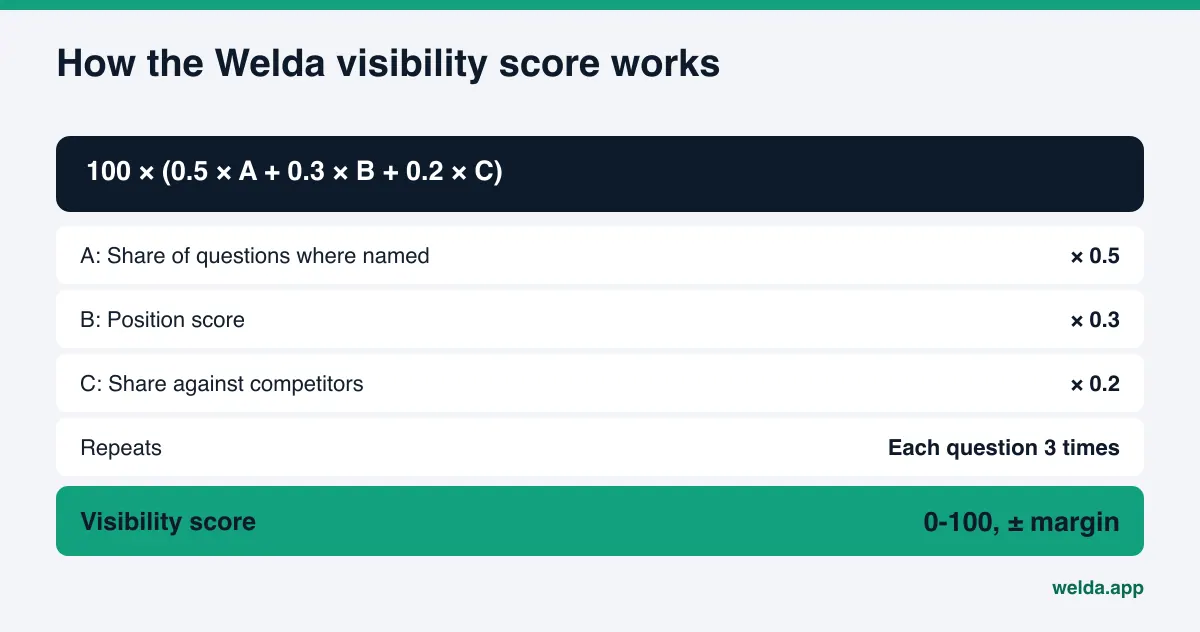
The score formula is public: 100 × (0.5 × share of questions where you are named + 0.3 × position score + 0.2 × share against competitors). Because each question runs three times, the score comes with a ± error margin, so you can tell a real change from normal variation.
Competitors and sources
The competitor view shows which question group a rival roaster wins and which source the AI relies on. If Competitor A keeps appearing for subscription questions and the AI cites a city coffee roundup, the decision is clear: describe your subscription plainly on your own site and work toward being included in independent guides. The sources view lists the sites AI assistants draw on for these questions and whether you are present there.
A to-do list that asks instead of guessing
The to-do list has three parts: information Welda needs from you, drafts waiting for approval, and tasks you do by hand. Welda does not invent facts it cannot find on your site. If the producer of a coffee, your roast-date policy or your wholesale service area is missing, it leaves the field blank and asks you. Once you answer, the detail flows into every draft.
Welda drafts website content, Google Business Profile descriptions and review replies, and you approve each one before it goes live. On WordPress sites, Welda connects through a separate Editor user and an application password, with no code to install; drafts appear on your site as drafts and are published only after you approve them. For other platforms, Welda provides a ready-made package that you or your web person applies. Content always stays on your own site. Google Business Profile, Instagram and Facebook can be connected; if they are not, the task appears as a manual step with the text ready next to it.
What the free analysis shows a roaster
The free site analysis reads your homepage and a few inner pages, such as services, pricing, about and contact, the way Google and AI assistants do. It checks whether AI crawlers can reach the site, your page title and description, main heading, business markup, address and phone details, whether your social and map profiles link to the site, your FAQ, review and trust signals, how clearly your offer is described, and page speed.
You get a score out of 100, split into technical and content, with what was found for each gap, why it matters and how to fix it. You also get ready-to-use text for your homepage title, description, main heading, intro paragraph and FAQ; a simulation showing how much each fix would raise the score; a competitor comparison; and a fix package to add to your site, including business markup code. The analysis also asks a web-searching AI assistant 5 questions a customer might ask and checks whether your business name appears. That is a one-time measurement, not ongoing tracking.
The analysis is free once per site. Your email and phone number are verified, the results link arrives by email, and it stays open for 14 days. Note that the analysis focuses on your main pages; product-level detail on individual coffees is something you will want to review yourself using the layout above.
Limits: what Welda does not do
- No guarantees. Welda does not guarantee rankings or placement in ChatGPT. No tool controls what AI assistants say.
- No invented facts. If your origins, roast dates or shipping times are not on your site, Welda asks you rather than filling in a guess.
- No unapproved publishing. Every draft goes live only after you approve it.
- No fake reviews. Welda drafts replies to reviews but never writes reviews. The FTC's rule on fake reviews and testimonials, announced in August 2024, bans fake and AI-generated reviews. This is general information, not legal advice.
- Some work stays with you. Handling negative reviews, managing directory listings and press outreach remain your job. Welda can prepare text and lists; you send them.
- Results take time. New content usually takes weeks to show up in AI answers.
Checklist for specialty coffee roasters
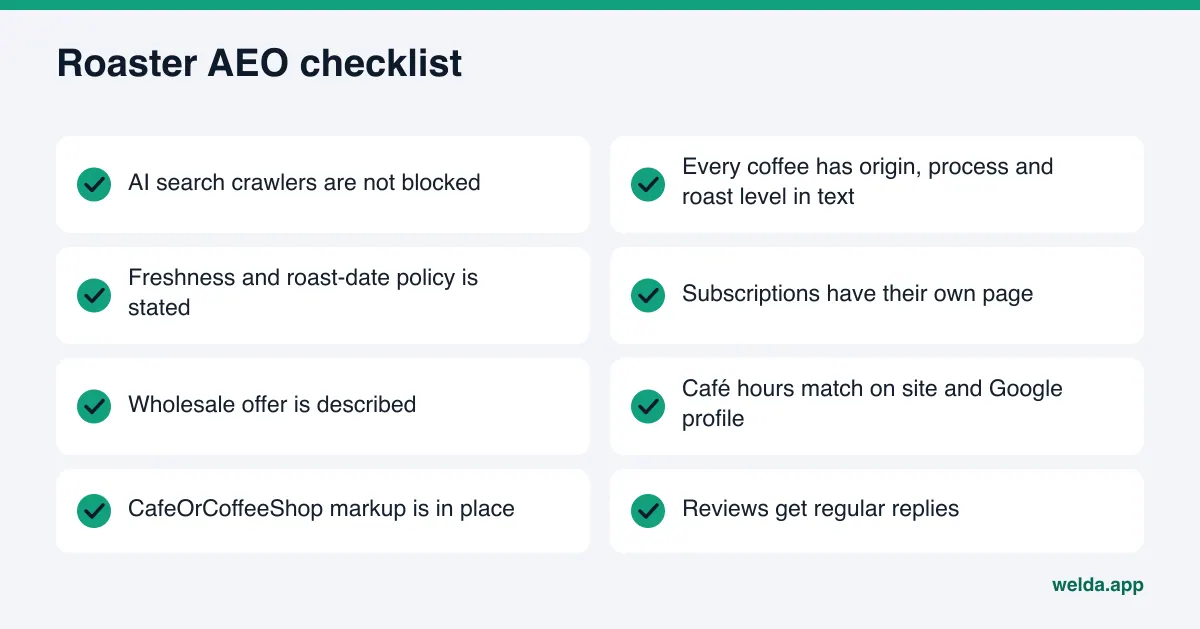
Use this table as an afternoon review. Every "no" is a task.
| Check | Where to look | If it is missing |
|---|---|---|
| Can AI search crawlers reach the site? | robots.txt | Allow OAI-SearchBot and other search crawlers |
| Is every coffee described in text? | Product pages | Add origin, process, roast level and notes |
| Is the freshness policy stated? | Product pages, FAQ | Write how and when you roast and ship |
| Do subscriptions have their own page? | Shop navigation | Create one with frequency and shipping regions |
| Is there a wholesale page? | Main menu | Describe who you supply and what is included |
| Are café hours consistent? | Site, Google profile, social | Pick one source of truth and update all |
| Is business markup in place? | Page source | Add CafeOrCoffeeShop markup for the café |
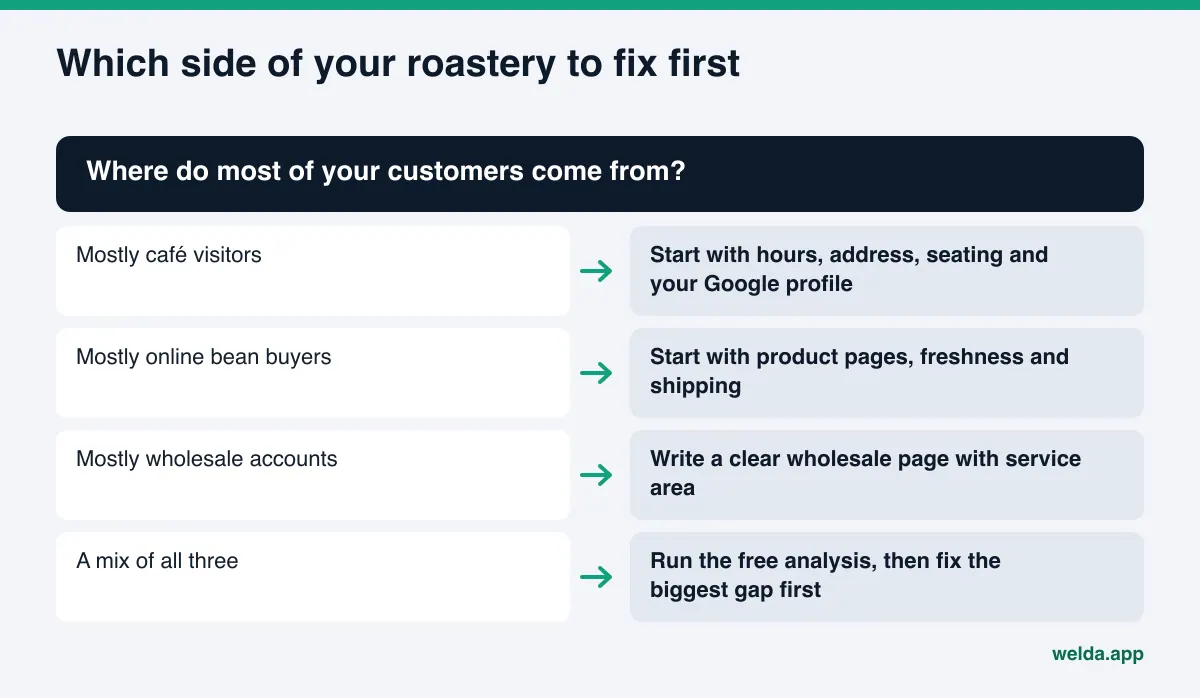
If you run several cafés, location consistency matters even more; see our guide to local AI rank tracking for how city-level measurement works.
Frequently asked questions
How is AI visibility software different from an SEO tool?
An SEO tool tracks where your pages rank among Google's links. AI visibility software checks whether AI assistants name your business in their answers, in what position, and which sources they cite. The two are related but measure different things.
Does a small roaster with one café need this?
If customers ask detailed questions about origins, freshness, shipping or your café, yes. For a small roaster the first step is usually the free analysis, because fixing the basics on your own site often makes the biggest difference.
Should my online shop and café be on the same site?
They can be, as long as each side is described clearly. AI assistants need to understand that you are both a café with an address and hours and a roaster that ships. Separate, clearly titled pages for each make that easy.
Can Welda get my roastery to the top of ChatGPT?
No. Welda does not guarantee rankings or placement. It measures where you appear, shows what information is missing and drafts the text needed to fill those gaps.
Is the Welda dashboard available in the US?
The dashboard is in early access and is opening first in Turkey. The free site analysis works in English today and is available to anyone.
How long until changes show up in AI answers?
New content usually takes weeks to be reflected. That is why tracking should be repeated over time rather than judged from a single test.
Where to start
Before choosing any AI visibility software for your roastery, find out what your site already tells AI assistants and what it leaves out. Run the free site analysis to get your score, a list of gaps, ready-to-use homepage text and the results of a five-question AI test. A roaster that writes down its origins, roast dates, café hours and wholesale offer gives AI assistants the answer they are looking for.