Why doesn't ChatGPT recommend my seafood restaurant, and what can I do about it? AI assistants build their restaurant picks from what they can read and confirm: your website, your Google Business Profile, Yelp, Tripadvisor and local guides. If your catch, your market-price policy, your hours and your reservation details are vague or inconsistent, you get left out of the short list. This guide covers AEO for seafood restaurants step by step, and shows which parts Welda handles for you.
What is AEO for seafood restaurants, and why does it matter now?
AEO (answer engine optimization) is the work of getting your business named in the answers that ChatGPT, Gemini, Perplexity and Google's AI Overviews and AI Mode give to people. You will also see it called AI search visibility, or GEO (generative engine optimization); they describe the same goal. In this guide we use AEO.
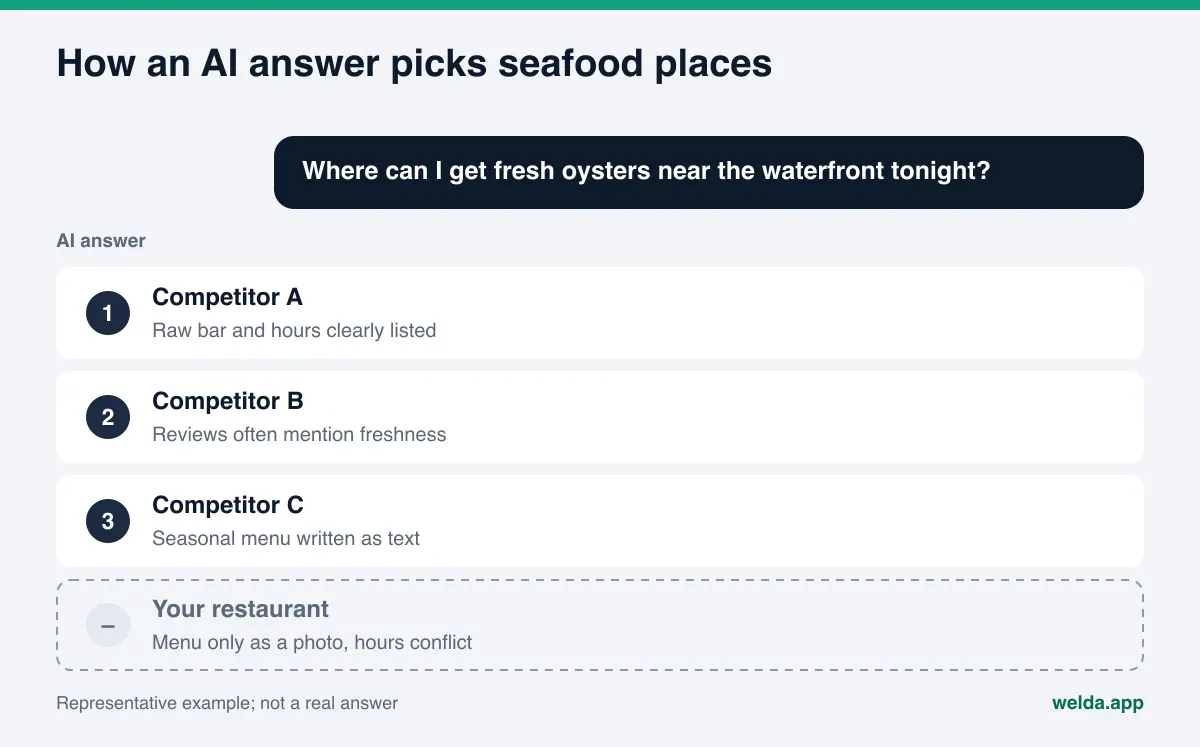
Classic search gives a diner ten blue links and a map pack to scroll through. An AI answer usually gives three or four names with a sentence on each. If your restaurant is not one of those names, the diner may never see you at all. That is a different game from ranking on page one.
Seafood restaurants feel this shift more than most, because diners ask very specific questions. Nobody types "dinner" into ChatGPT. They ask "where can I get fresh oysters near the waterfront tonight", "is there a seafood place nearby that isn't a tourist trap", or "which crab shack takes reservations for a party of ten". To answer, the AI looks for a place that has written those details down somewhere it can read. If you have not, a competitor that has will be named instead.
There is a second reason. Seafood information changes all the time. The catch of the day, seasonal items like soft-shell crab or stone crab, winter hours, and the "market price" line on the menu all move. When an AI finds outdated or conflicting details, it either skips you or repeats the wrong thing. If that second problem sounds familiar, read our guide on what to do when ChatGPT has wrong information about your business.
The fastest way to see where you stand is to measure it. Welda's free site analysis reads your homepage and a few inner pages the way Google and AI assistants do, and lists every gap it finds. It works in English.
What do diners ask AI about seafood restaurants?
Questions about seafood places fall into a handful of patterns. Each pattern is answered from a different piece of information. Once you know which information feeds which question, it becomes clear what to write and where.
| Question pattern | Example question | What the answer relies on |
|---|---|---|
| Location and proximity | "Best seafood restaurant near me" | Address, map pin, neighborhood name, Google Business Profile |
| Setting and view | "Seafood with a water view for a date night" | Description of the space on your site, photo captions, review language |
| Product and season | "Where can I get soft-shell crab right now?" | A seasonal page, a current menu written as text |
| Price and trust | "Is market price lobster going to be a shock?" | A clear explanation of how market price works, reviews |
| Hours and status | "Seafood place open late on a Monday" | Opening hours, seasonal closures, structured data |
| Groups and reservations | "Seafood restaurant for a birthday dinner for 12" | Capacity, private dining, how to book |
| Dietary needs | "Seafood place with good options for a shellfish allergy" | Allergy notes on the menu, how to ask staff |
Location questions are the AI version of "near me" searches. We cover that pattern in depth in how near me searches work in AI assistants.
How does AI decide which seafood restaurant to recommend?
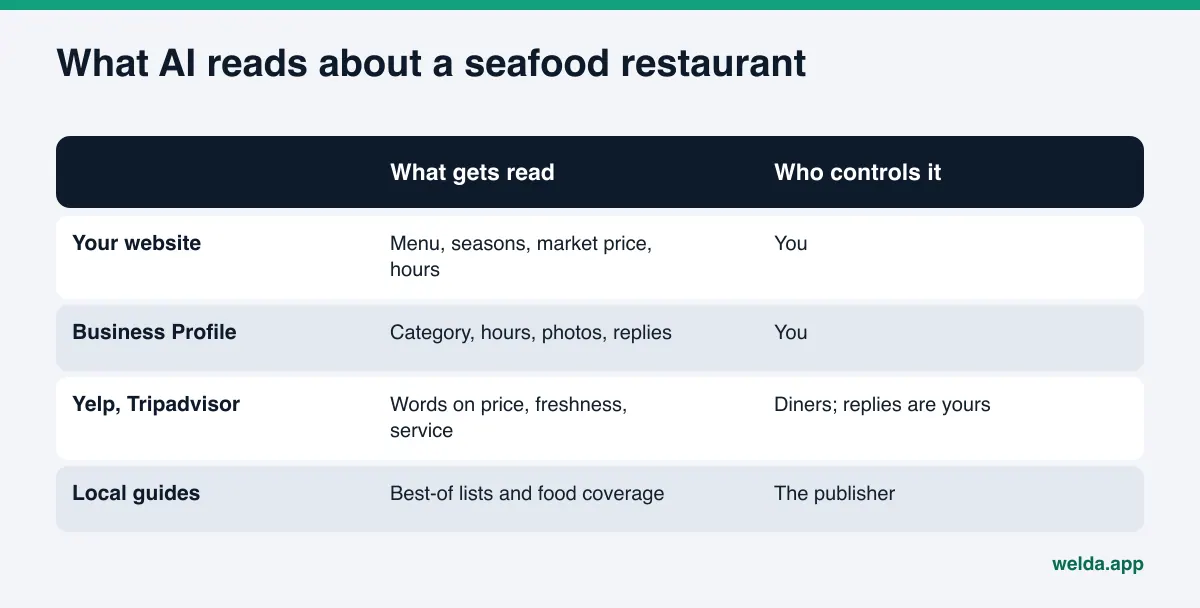
When an AI assistant searches the web to answer a question, it pulls together several kinds of sources. For a seafood restaurant, these are the ones that usually matter:
- Your own website: Menu, seasonal items, market-price policy, address, hours and FAQ. It is the source you fully control, so it should be the most complete.
- Google Business Profile and Google Maps: Category, hours, photos, reviews and your replies to them. Google's AI Overviews and AI Mode lean on this data heavily.
- Review platforms: Yelp and Tripadvisor reviews shape the tone of an answer. Repeated words like "fresh", "overpriced" or "slow service" tend to carry over.
- Local guides and media: City food guides, "best of" lists and local news coverage.
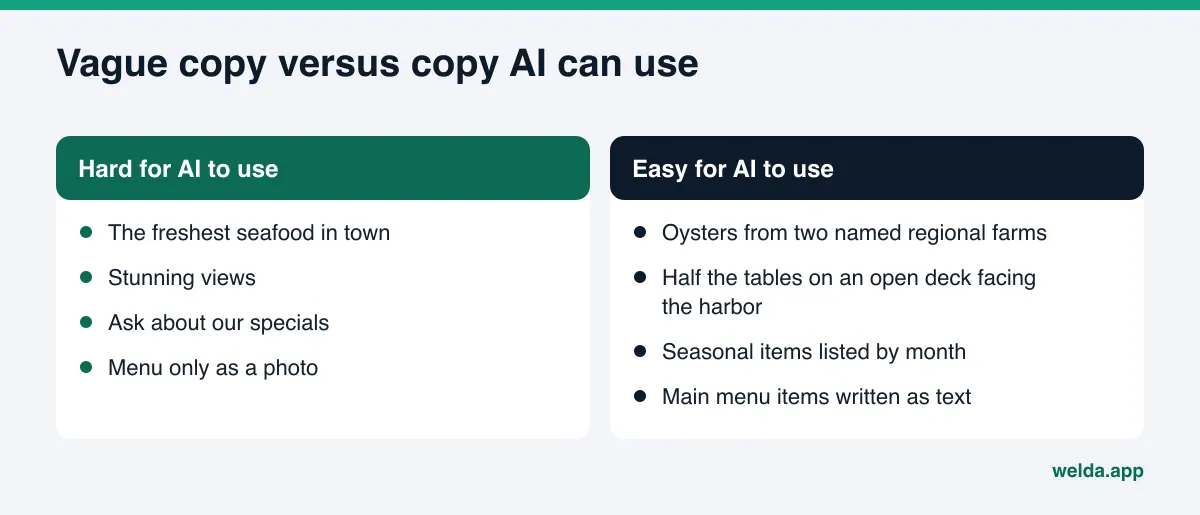
The AI compares these sources. A line like "the freshest seafood in town" on your homepage tells it very little. A line like "Gulf shrimp and grouper year-round, stone crab claws in season, oysters from two named regional farms" gives it something it can repeat when someone asks where to find stone crab. The items in that example are only illustrations; write what you actually serve.
There is also a technical gate. If AI crawlers cannot reach your site, the content is never read. OpenAI's page on its crawlers states that OAI-SearchBot is used to surface websites in ChatGPT's search features. If your robots.txt blocks crawlers like this one, fix that first.
AEO for seafood restaurants: a step-by-step plan
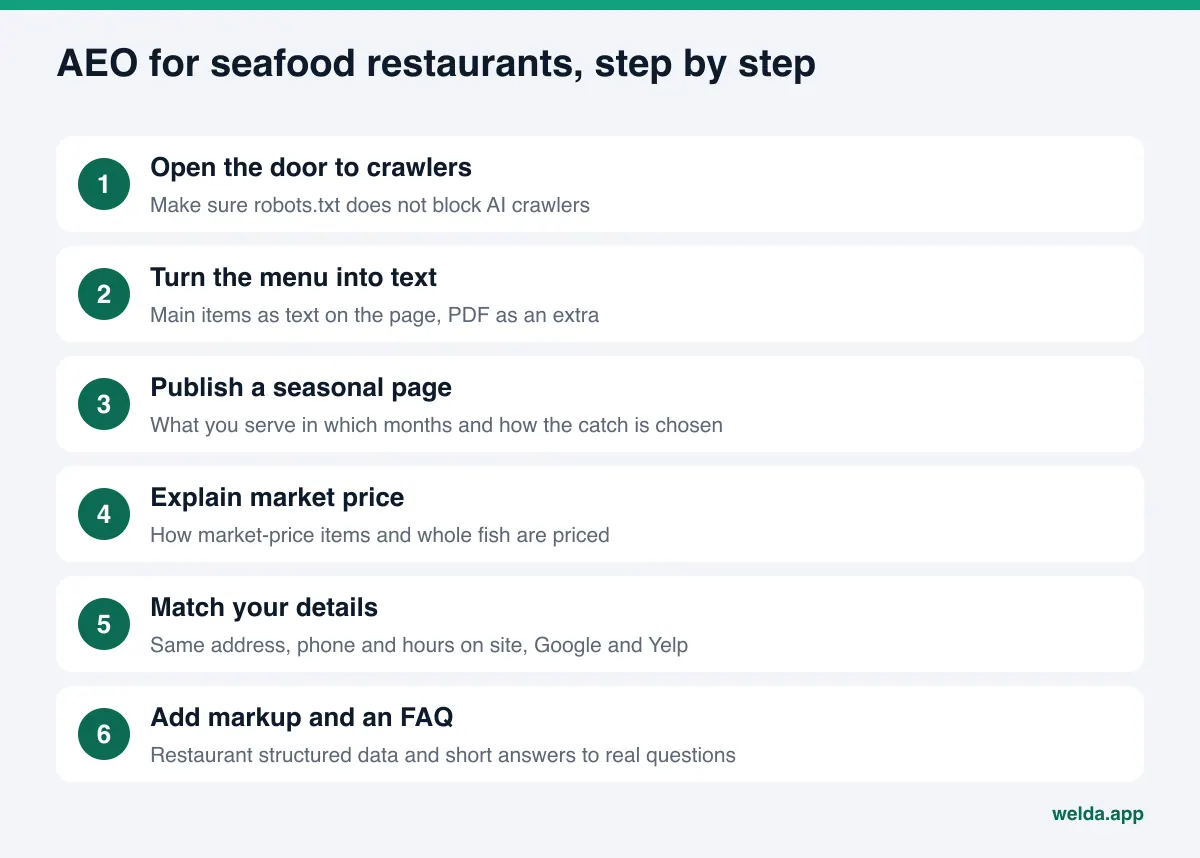
The order below puts the highest-impact, lowest-effort work first. Most restaurants can finish the first three steps in an afternoon.
- Open the door. Check robots.txt for rules that block AI crawlers. If your site loads its menu only through JavaScript or a third-party widget, check that the menu text actually appears in the page source.
- Turn the menu into text. A menu that exists only as a PDF or a photo may not be read reliably. Put at least the main items and sections on the page as plain text, and keep the PDF as an extra.
- Publish a seasonal page. Say what you serve in which months, how the daily catch is chosen, and which items depend on supply.
- Explain market price. You do not have to publish numbers. But explain how market-price items are priced, whether whole fish is sold by the pound, and how a server will quote the price at the table. Vague pricing comes back in reviews as "the bill was a surprise".
- Make your details match everywhere. Your address, phone number and hours should be identical on your site, Google Business Profile, Yelp and Tripadvisor. Name your neighborhood and a landmark nearby, such as the pier or the marina, and say where to park.
- Add structured data. Add Restaurant markup to your site: cuisine, menu URL, reservation info, opening hours and price range.
- Write an FAQ. Answer the questions your host stand hears every day: reservations, kids, private dining, outdoor seating, parking, allergies.
- Reply to reviews. Respond calmly and with facts, especially to reviews about price, freshness or service. Your replies are part of what gets read.
Seafood places that run a busy bar or oyster happy hour will find some overlap with AI search optimization for bars and cocktail lounges, which covers the evening and late-night question patterns.
How should a seafood restaurant write its website for AI?
The details diners need to decide are the ones most often missing from seafood restaurant websites. The table below shows how to write each one on the page and which structured data property matches it. The property names come from the schema.org Restaurant type.
| Information | How to write it on the page | Schema property |
|---|---|---|
| Cuisine | One plain sentence, such as "Gulf Coast seafood and raw bar" | servesCuisine |
| Menu | A text menu page; the PDF as an extra | hasMenu |
| Reservations | How to book, how far ahead for groups, whether walk-ins are welcome | acceptsReservations |
| Hours | Summer and winter hours listed separately; seasonal closure dates | openingHoursSpecification |
| Price level | How market price works and a general price level | priceRange |
| Address and location | Full address, neighborhood, nearby landmark | address, geo |
A few writing rules that help:
- Say what you are in the main heading. "Welcome" tells an AI nothing. "Waterfront seafood and oyster bar in your neighborhood" tells it who you are on line one.
- Use your neighborhood name naturally. Put it in the page title and the first paragraph. Many questions include a neighborhood or a landmark.
- Swap adjectives for facts. Instead of "stunning views", write "half of the tables are on an open deck facing the harbor".
- Be specific about sourcing, but only if it is true. If you name a farm, a region or a dock, keep it current. If it changes often, describe how you choose suppliers instead.
- Date your seasonal page. A "last updated" date shows the information is current.
Example: how to structure a seasonal page and an FAQ
Here is a skeleton for an example waterfront seafood restaurant. The structure is what matters; fill it with your own facts. The goal is that every detail a diner or an AI is looking for sits on one page, in short, concrete sentences.
- Page title: Neighborhood plus what you serve, for example "Neighborhood name seasonal seafood and raw bar menu".
- Intro paragraph: Two or three sentences on what kind of seafood restaurant you are, where you are, and how the daily catch is chosen.
- Season table: Month ranges and what you serve in each. A short note on items that depend on supply or fishing seasons.
- How pricing works: Which items are market price, how whole fish is priced, how the server confirms the price before ordering.
- Preparation options: Grilled, blackened, steamed, fried, and which fish you recommend for each.
- Special needs: Options for guests who do not eat seafood, a kids' menu, and how to tell staff about an allergy.
- Last updated date: At the bottom of the page.
For the FAQ, use the questions your hosts hear most on the phone. Typical ones for a seafood restaurant: "Do I need a reservation, and how far ahead?", "Are you open in the off-season?", "Do you have indoor seating?", "Where do I park?", "Can you do a set menu for a large group?", "How does market price work?". Give each a direct two or three sentence answer. Where something varies, do not overpromise; "we suggest calling a day ahead for weekend tables" is better than a promise you cannot keep.
Together, the seasonal page and the FAQ answer almost every question pattern in the first table. Once they are live, update your Google Business Profile description and your Yelp business details with the same facts, so the sources confirm each other.
How Welda does this work
Welda is software that measures where a business shows up in AI answers and fills the gaps on the business's behalf. For a seafood restaurant, the work comes in two parts.
Available to everyone today: the free site analysis
The free site analysis reads your homepage and a few inner pages such as services, pricing, about and contact. It checks whether AI crawlers can access your site (robots.txt), your page title and description, your main heading, your business information markup (Schema), your address, phone and location details, whether your social and map profiles are linked from the site, whether you have an FAQ section, review and trust signals, whether what you offer is clearly described, and page speed.
You get a score out of 100, with technical and content scores shown separately. For every gap, the report says what was found, why it matters and how to fix it. It suggests ready-to-use text for your homepage: title, description, main heading, intro paragraph and FAQ. It also includes a simulation of how much each fix would raise your score, a competitor comparison, a ready-to-install fix package (including the business information code), a PDF and a shareable score card.
The analysis also asks 5 questions a diner might ask to an AI assistant that can search the web, and checks whether your restaurant's name appears in the answers. This is a one-time measurement. The analysis is free once per site. Your email and phone number are verified, the results link arrives by email and stays open for 14 days. It does not measure rankings and does not promise any.
In early access: the Welda dashboard
The full Welda dashboard is in early access. It is opening in stages, first for businesses in Turkey. Regular measurement across four engines is being added during early access, and the sample screens in the dashboard use representative data. The part anyone can use today, including in the US, is the free site analysis. Pricing is discussed in an early access call.
In the dashboard, the questions your customers would ask are put to ChatGPT, Gemini, Perplexity and Google AI three times each. You see which questions mention your name, in what position, and where competitors are ahead. Questions can be run in English or Turkish.
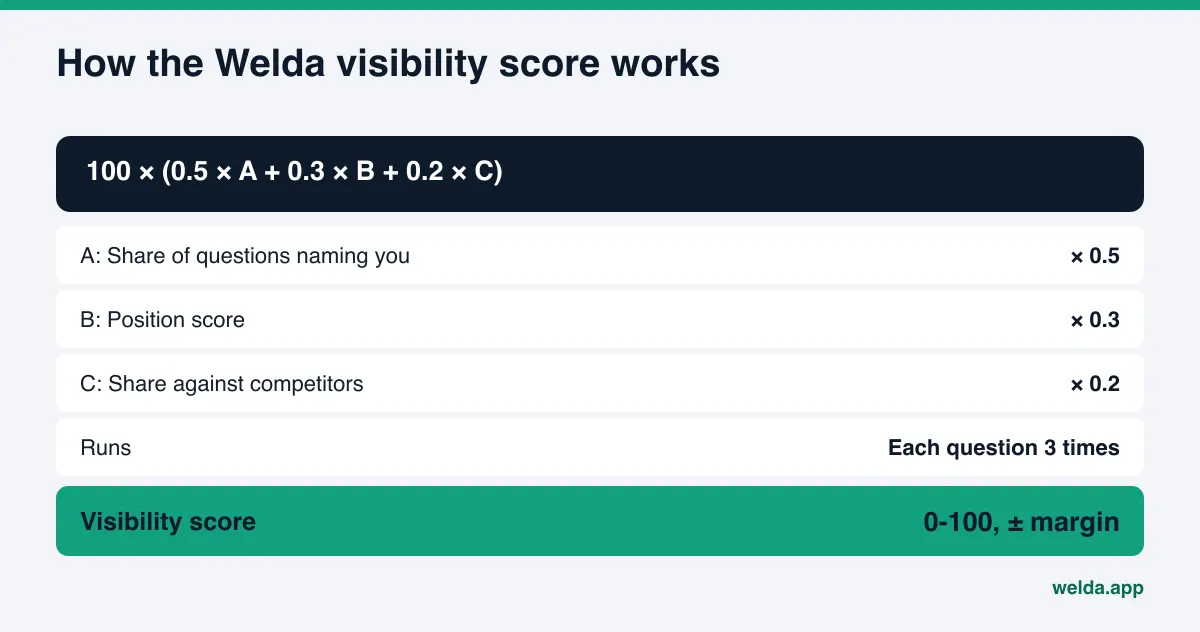
The score formula is public: 100 × (0.5 × share of questions that mention you + 0.3 × position score + 0.2 × share against competitors). The spread across the three runs gives a ± margin of error, so you can see whether a change is real or just noise.
The dashboard screens map to the work like this:
- Home: Your score, a one-line summary and what to do next.
- To-do list: Missing information, items waiting for approval and manual tasks, each with ready text beside it. If Welda cannot find your seasonal items on your site, it does not invent them; it asks you.
- Questions: Question by question, whether your name appears.
- Competitors: On which topics and from which sources a competitor wins.
- Sources: The sites AI draws on, and where you are missing.
- Ready pages: Applies the suggestions and prepares a page, such as a seasonal menu page, for preview.
- Compliance check, inbound requests, before-and-after comparison, and a one-page monthly PDF report.
On the fixing side, Welda drafts content, profile text and review replies. Publishing approval stays with you. Content always lives on your own site; Welda does not host content. On WordPress, Welda connects through a separate Editor user and an application password, with no code to install; content opens on your site as a draft and goes live once you approve it. For systems without a connection, Welda provides a ready package and the changes are applied by hand. Google Business Profile, Instagram and Facebook can be connected; if they are not, the task is listed as manual.
The compliance check flags patterns like price claims, guarantees and superiority claims before publishing. A line like "the best seafood on the coast" would come to you flagged. It is not legal advice and has not been reviewed by legal counsel.
Limits: what Welda does not do
AI answers draw on many sources, and no software controls them on its own. It helps to know the limits up front.
- No guarantees: Welda does not guarantee rankings or "showing up in ChatGPT".
- No invented facts: It does not write information it does not know. It asks you. Your catch, capacity and hours come from you.
- No fake reviews: Welda does not create fake reviews. It drafts replies to real ones. In the US, the FTC has also announced a final rule banning fake reviews and testimonials, including AI-generated ones. This is not legal advice.
- No unapproved sensitive content: Nothing sensitive is published without your approval.
- What stays with you: Handling negative reviews, managing directory accounts such as Yelp or Tripadvisor, and press outreach stay with the business. Welda can draft text for them, but the accounts and the relationships are yours.
- Time: New content usually takes weeks to show up in AI answers. We explain why in how long AEO takes.
Decision guide and checklist for seafood restaurants
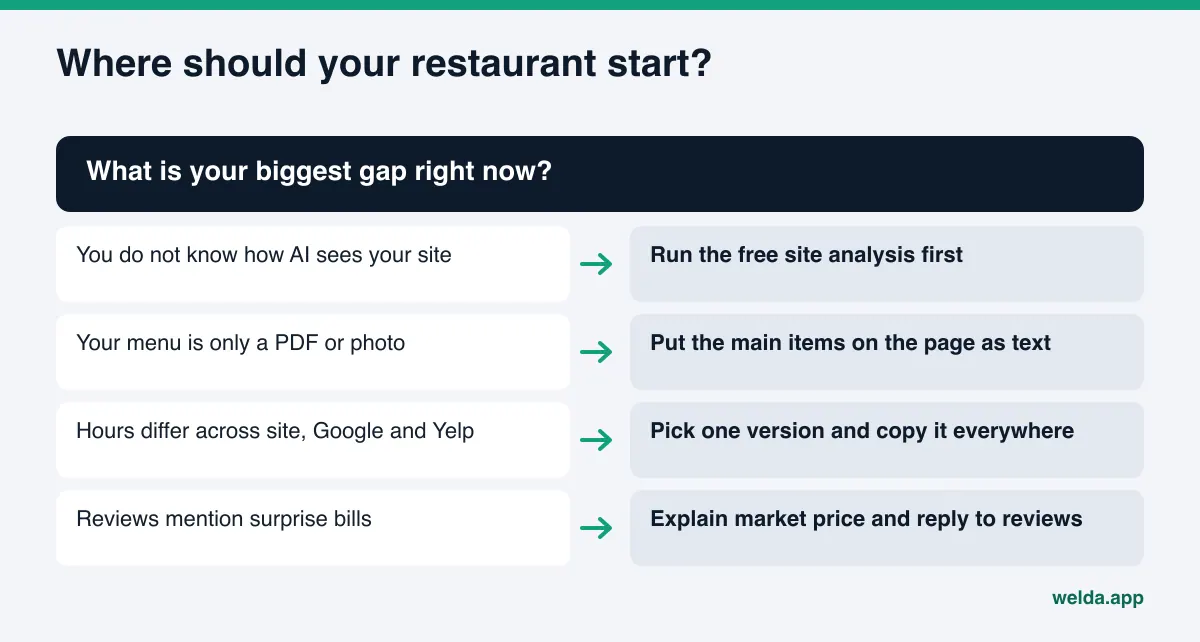
Use the table to decide what to do first. If you are not sure where you stand, start with the first row.
| Your situation | First thing to do | Who does it |
|---|---|---|
| You do not know how your site looks to AI | Run the free site analysis | You, in a few minutes |
| Menu is only a PDF or photo | Put the main items on the page as text | You or whoever manages your site |
| No seasonal information anywhere | Publish a seasonal page | Facts from you; draft text can come from the Welda dashboard |
| Hours differ between site, Google and Yelp | Pick one correct version and copy it everywhere | You |
| Reviews keep mentioning surprise bills | Explain market price on your site and reply to those reviews | You; reply drafts can come from the dashboard |
| Many visitors are tourists | Name nearby landmarks and answer visitor questions in your FAQ | You |
Quick checklist: robots.txt open to AI crawlers, menu in text, seasonal page live, market price explained, address and hours identical everywhere, Restaurant markup added, FAQ in place, reviews answered. If you can say yes to all eight, the foundation is ready.
Frequently asked questions
Is AEO for seafood restaurants different from local SEO?
The base is shared: crawlable pages, clear headings and accurate business details help with both. The difference is that an AI answer is a short list, not a page of results. To be on that list, your details need to be specific, consistent and confirmed by more than one source.
Is a PDF menu enough?
Sometimes a PDF is read, sometimes it is not. A photo of a menu is even less reliable. The safe route is to put the main items and seasonal notes on the page as text and keep the PDF as an extra.
Do I have to publish prices?
Publishing numbers is your call. Explaining how market price works, and whether whole fish is sold by the pound, answers a question both diners and AI assistants ask. For any pricing disclosure rules that apply to you, check with a professional; this article is not legal advice.
Will the free analysis tell me where I rank in ChatGPT?
No. The free analysis does not measure rankings. It asks 5 questions to an AI assistant that can search the web and checks whether your name appears. It is a one-time measurement. Running questions three times on four engines with position tracking is part of the Welda dashboard, which is in early access.
Will Welda publish on my site for me?
On WordPress, Welda opens content as a draft, and it goes live only after you approve it. Approval always stays with you. For other systems, Welda gives you a ready package and the changes are made by hand.
How long until I see results?
New content usually takes weeks to show up in AI answers. Removing a technical block, such as a robots.txt rule, can show up sooner, but no one can promise an exact timeline.
Next step: see where your restaurant stands today
AEO for seafood restaurants starts with making sure your site and profiles answer the detailed questions diners actually ask. When your catch, pricing method, location and booking details are clear and consistent, AI assistants have what they need to name you.
Start by running the free site analysis. You will see your score, your gaps, ready text for your homepage and the result of the 5-question AI test. Then pick the shortest task on the checklist above and do it first.