The best dermatology practice management software for a mixed practice is the one that can follow a single patient through two very different journeys: a medical course of care with follow-up dates, and a paid series of cosmetic sessions with a balance and a remaining count. Before comparing brands, settle one question. If insurance claims, e-prescribing and pathology orders drive your day, you need a dermatology EHR or a certified billing system at the centre, and anything else sits beside it. If your day is driven by private consultations, follow-ups and session packages, a clinic CRM can carry most of the load, and your selection should turn on three tests: photos tied to the right lesion or session, follow-ups that survive when no appointment exists yet, and clean separation of medical and cosmetic work.
This guide is written for the person who has to sign the contract at a practice doing both medical dermatology and aesthetic treatments. It is a way to think through the purchase rather than a ranking, because no ranking can know how your front desk works.
Three kinds of software share one search term
Vendors use "practice management" loosely, so a shortlist can easily end up comparing products that were never meant to do the same job. Start by putting each candidate in the right column.
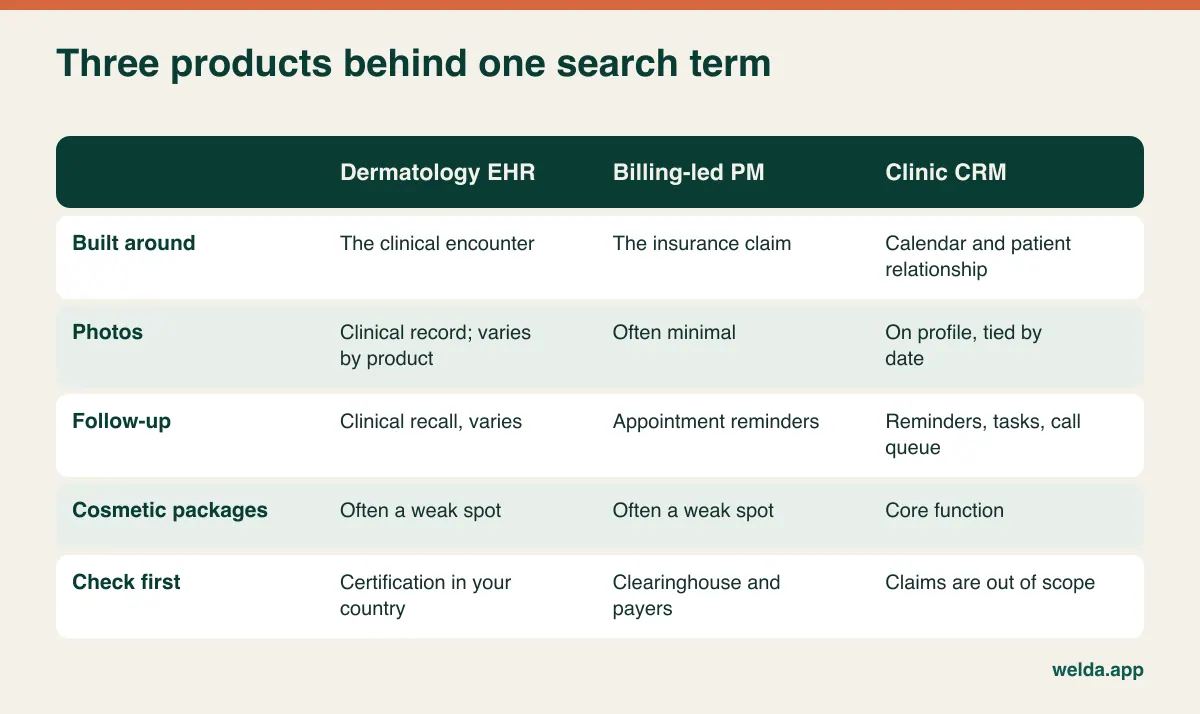
An EHR is built around the clinical encounter and the regulatory record. Traditional practice management and billing systems are built around the claim. A clinic CRM is built around the relationship and the calendar: who is coming, what they have bought, who has gone quiet, and who needs a call. None of these is automatically superior. They answer different questions, and the mistake that costs most money is buying from one column while expecting the strengths of another.
Requirements also differ sharply by country. In the United States, insurance-driven practices usually lean on certified EHR and claims workflows, and vendors handling patient data are normally expected to sign a business associate agreement under HIPAA. In the UK and EU, GDPR frames what you must ask of a processor, while national health systems and private insurers bring their own connection rules. In a largely self-pay market or a private cosmetic-led clinic, claims may barely matter. Write down which of these worlds you are in before your first demo. Your local adviser, not a vendor's marketing page and not this article, should confirm what applies to you.
The dermatology patient who breaks generic software
Picture a hypothetical patient. She is on a monitored course of acne medication with regular reviews. She has also bought six laser sessions for pigmentation from your aesthetic team. And last spring your dermatologist looked at a mole on her back and asked to see it again next year.
That one record now holds three calendars, three types of image and two payment logics. Generic booking tools handle the sessions and lose the mole. Clinical tools handle the review and the mole, then push the package balance into a spreadsheet at the front desk. In both cases the software technically works, and the practice quietly builds a second system around it.
This is why a feature checklist will mislead you. Almost every product will tick "photos", "reminders" and "packages". The useful question is what happens when all three apply to the same person at once, and who on your team sees which part of it. A laser therapist may need to see a contraindication alert but has no reason to read a note about a sensitive diagnosis. Your receptionist needs the next due date, not the reason for it.
Skin conditions make this more pointed than in many specialties. A record might include a sexually transmitted infection, hair loss, or a chronic visible condition the patient would rather keep private, sitting right next to a commercial transaction. Software that treats everything as a "client file" with one level of access will force you to choose between protecting patients and letting staff do their jobs.
An archive that holds three different kinds of photo
Ask a vendor about photos and you will usually see an upload button. Whether that is enough depends on which of three jobs the image is doing.
Lesion monitoring is the hardest. The unit that matters is not the patient but the lesion. If someone has eleven moles on their back, you need to know which one you are looking at across two dates. Dedicated systems offer body maps and dermoscopy comparison and work directly with imaging devices. If mole mapping is a meaningful service line, budget for it as its own tool. At minimum, any system you use must let you hold a strict naming convention, such as "left scapula, upper, 2026-10", or you will find the same lesion filed under two names a year later.
Treatment course images belong to a review visit. For acne, psoriasis or vitiligo, the clinician wants the previous image and previous note together. The test here is mundane and telling: how many clicks does it take to reach last visit's photo, and can you see it with the note?
Cosmetic session images belong to a package and a session number. When a patient says "I've seen no difference since session three", the quality of that conversation depends on whether you can open session one in that moment. Consistent lighting, angle and distance are a matter of your room setup and your staff habits, and no software will rescue inconsistent shots. Our guide to before and after photo software for clinics goes deeper on consent and archive design.
Welda CRM keeps treatment notes, images and documents chronologically on the patient profile, which suits the second and third jobs well. For the first, plainly: it has no direct integration with imaging devices, files are uploaded to the profile, and it offers no diagnostic suggestion or lesion analysis. If you need body mapping, plan on a specialist tool alongside.
Why a reminder feature does not solve follow-up
"Automated reminders" appears on every feature list, and it almost always means one thing: a message about an appointment that already exists. Dermatology loses patients somewhere else, in the gap between "let's see that again in eight months" and the moment someone actually books.
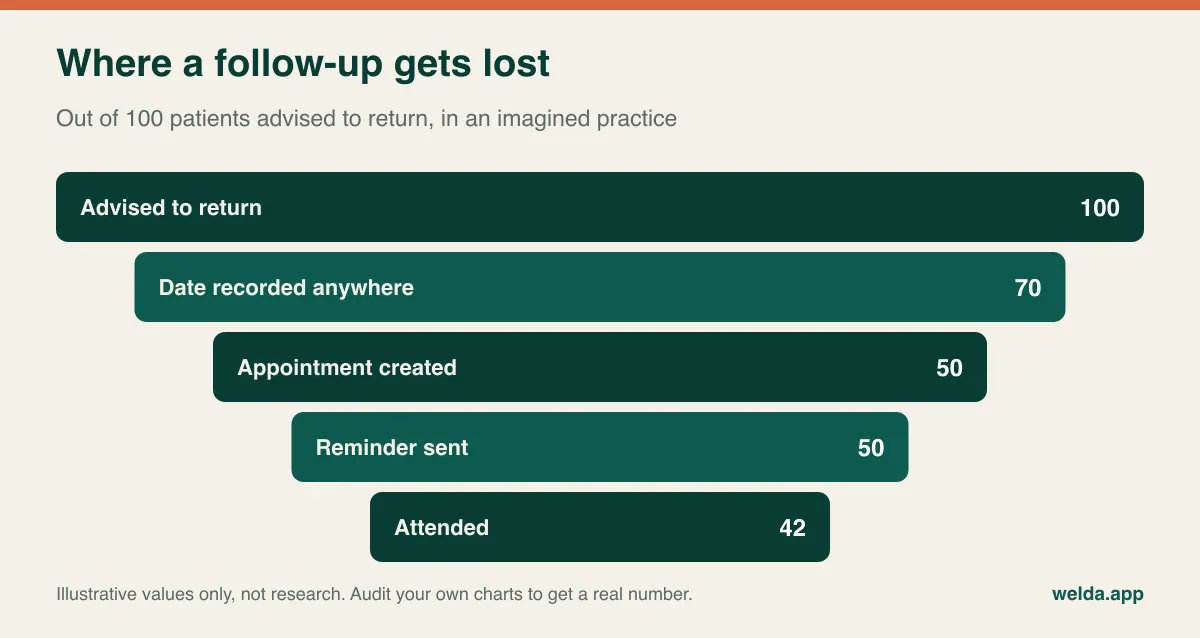
Measuring this takes an afternoon. Pull a sample of charts from a year ago where a recheck was advised, and count how many patients came back. You will then have a real number for your practice, which is more useful than any vendor's general claim and gives you a baseline for judging any new system.
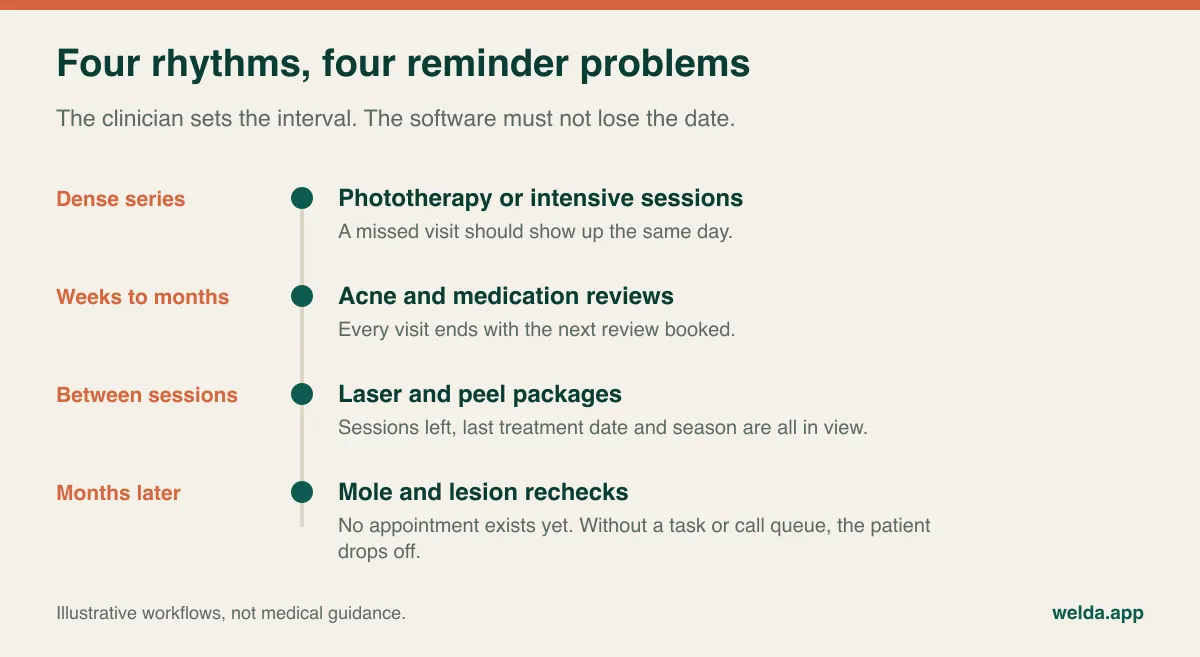
Test each rhythm separately. For frequent series such as phototherapy, a missed visit should be visible the same day. For a medication course, each visit should end with the next one booked. For session packages, the remaining count and last-treatment date need to be in plain sight. For long-interval checks you need a record independent of the calendar: a task, a recall list or a call queue.
Season matters too. Clinicians may prefer to complete or delay certain light-based or resurfacing treatments around periods of strong sun exposure, depending on the patient and the procedure. Could your team pull up every package paused over the summer on one list in September? If the answer involves exporting and filtering a spreadsheet, it probably won't happen when the clinic is busy.
In Welda CRM, follow-ups added to the calendar trigger automatic WhatsApp reminders. For a recheck too distant to book, you have two options: open the appointment far ahead, or leave a task with a reminder on the profile so it appears in the daily follow-up queue. Pick one as a rule, because a team mixing both by personal preference will still lose people. Our article on the patient recall system walks through how to set up that list.
Assume someone else is reading the lock screen
A reminder appears on a phone lying on a kitchen table or a desk at work. "Your isotretinoin review is tomorrow" tells whoever glances at it something the patient may not have chosen to share. Template design is a confidentiality decision first and a communication decision second.
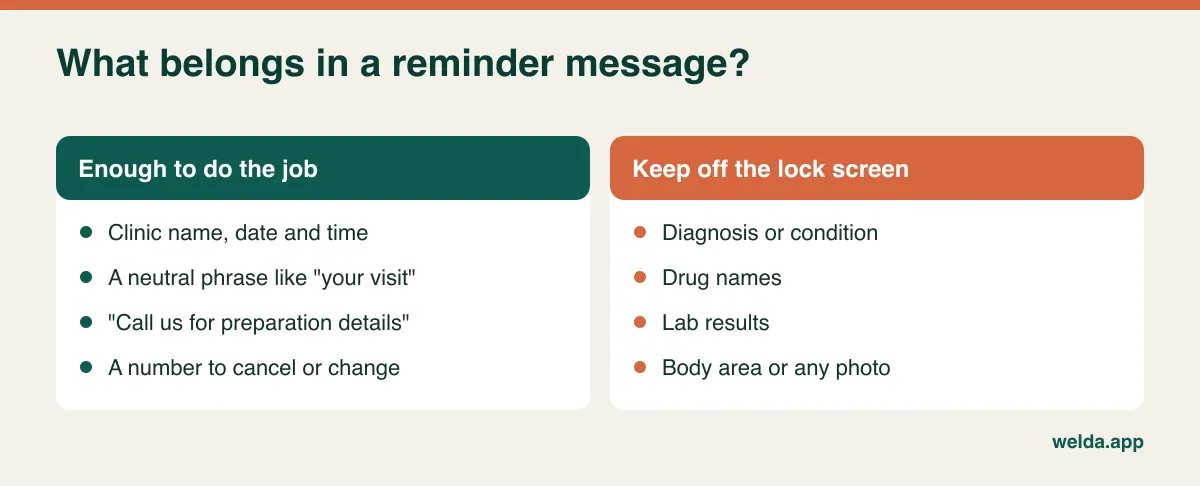
Ask each vendor: Can we edit templates ourselves? Can medical and cosmetic appointments carry different wording? Where is an opt-out recorded? Who sees a message that failed to send? Channel matters as well. Welda's reminders run over WhatsApp, with templates in English, Turkish and German. That is natural in markets where patients live on WhatsApp, but it may suit you less if your patients expect SMS or a portal, or if your compliance adviser has concerns. Raise this early. Our product pages describe WhatsApp as the reminder channel and do not promise SMS, so bring this up in the first conversation.
Keep operational reminders and promotions apart as well. A note about tomorrow's visit and "autumn laser offer" may fall under different consent and marketing rules, depending on where you practise. Have your adviser decide; this article gives only a general picture.
One till, two businesses
A hybrid practice is really two businesses sharing a building. Medical consultations are paid for visit by visit, often with an insurer involved. Cosmetic work is often sold in advance and delivered over months. The management questions diverge accordingly.
| Question | Medical side | Cosmetic side |
|---|---|---|
| How is it sold? | Per visit, possibly via insurer | Package, upfront or in instalments |
| What limits the calendar? | Clinician availability | Therapist, room and often one shared device |
| What does the manager watch? | Visits, missed reviews, open invoices | Sessions sold versus used, open balances |
| How is staff paid? | Usually no commission logic | Commission or targets are common |
| Tax treatment | Depends on country and medical purpose | May differ; ask your accountant |
A few scenarios reveal more than any spec sheet. A patient stops after two of six sessions: what does the record show about remaining entitlement and money owed? A patient's instalment is overdue: does the therapist see that when booking the next session? You own one laser and two therapists want it at 3 p.m.: does the calendar stop that? Welda CRM offers staff, room and branch calendar views with conflict detection; whether modelling your device as a room fits your layout is something to try in the demo. Our guide to session and package tracking in clinics covers the operational side.
Accounting deserves a word early. Many countries treat medically necessary care and purely cosmetic treatment differently for VAT or sales tax. Bring your accountant in before the choice is final, and ask how a mixed invoice would be handled. Welda CRM handles invoices, receipts, payments and instalments, and e-invoicing runs through a provider you choose. Insurance claims submission is not part of what our product pages describe, so we won't suggest it is.
Reading a quote by your own volume
Licences get all the attention. In dermatology, images and messages are what grow quietly. Before asking for prices, calculate your own volume, because that is what lets you compare two quotes honestly.
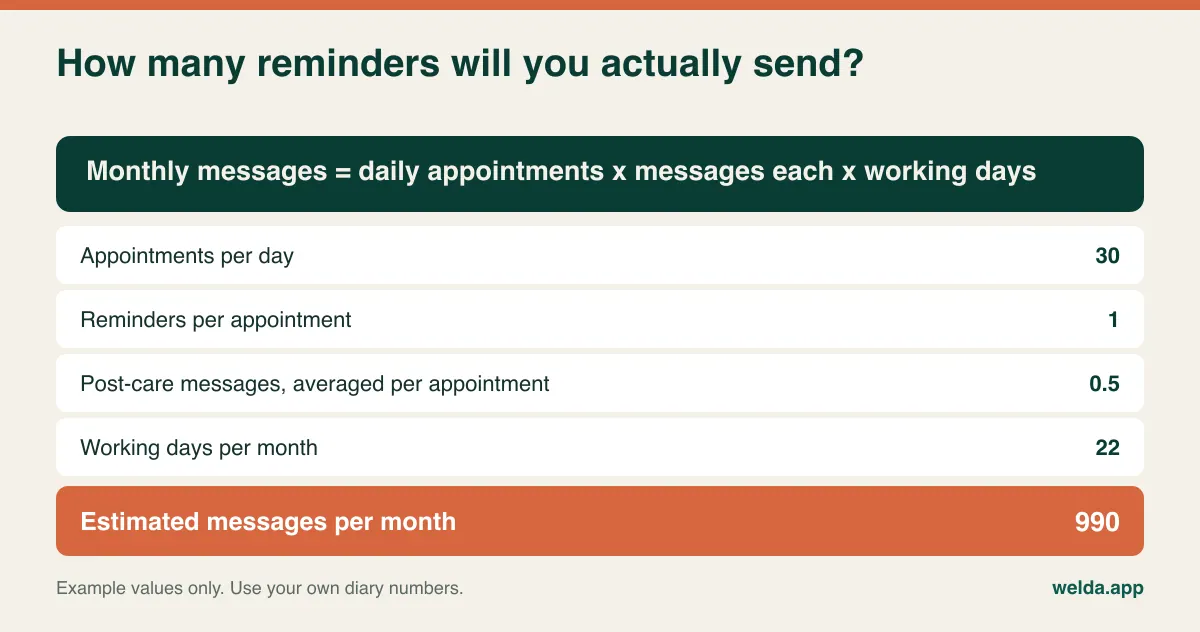
Run the same sum for images. As an illustration, eight photo visits a day at four shots of 4 MB each comes to about 128 MB daily, or roughly 2.8 GB across 22 working days. Your camera and habits may shift this widely, so test with a real file. Then compare offers over twelve months of realistic use and ask for each of these in writing:
- Who counts as a user? Do part-time clinicians and your bookkeeper need seats?
- What happens at the storage cap: uploads stop, overage is charged, or images are compressed?
- What happens at the message cap, and are channel fees included?
- Are setup, data migration, photo migration and training included or charged separately?
- Are clearinghouse, e-invoicing, lab or device connections paid to third parties?
- What do you receive when you leave, in what format, and how fast?
That last point is the one people regret skipping. Getting back thousands of images with no patient or date attached is close to getting nothing, so ask to see a sample export before signing.
For reference, Welda CRM's plans are set out by limits: Starter covers 1 branch, 3 users, 500 messages a month and 1 GB of storage; Pro covers 3 branches, 10 users, 5,000 messages and 10 GB; Enterprise has unlimited branches and users, 50,000 messages and 100 GB. Storage is shared by photos and documents. Stock, automated message flows, POS and commissions start at Pro. On the example above, a photo-heavy practice might choose its plan on storage rather than on headcount. We set the cost with you in a free consultation, based on your size and needs; there is no separate setup fee, and setup, data migration and training are included.
Should Welda be your only system?
Often it shouldn't, and the honest answer depends on your payer mix.
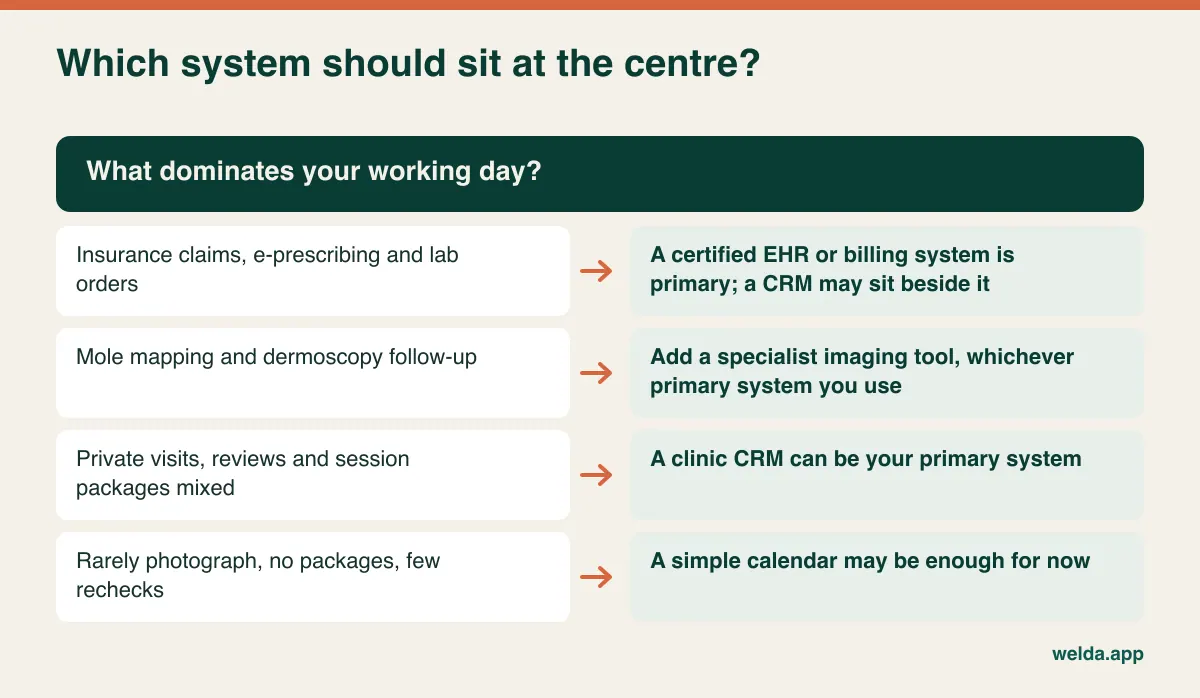
Choose an EHR or certified billing product as your primary system if insurance claims, e-prescribing or electronic lab and pathology orders are central. Our product pages describe none of those, and we also don't claim HIPAA compliance or offer a business associate agreement on those pages, so a US insurance-based practice should treat that as a stop sign until it has been clarified directly. Welda CRM's published materials address KVKK and GDPR requirements: encrypted records, versioned consent, role-based permissions and an audit log.
Where we fit better is a private or largely self-pay practice combining consultations with session-based treatments, wanting a single view of calendar, history, packages and payments. If that describes you, our dermatology practice management software page shows the typical flows. A solo practitioner who photographs little, sells no packages and rarely loses a follow-up may not need any of this; a simple calendar would do, and our note on solo practice management software helps you make that call.
Stage the demo around your messiest patient
Vendor demos follow a rehearsed best path. Take that away by handing over a scenario based on your own complicated cases, stripped of any real identifying data, and ask to drive the mouse yourself. Bring your front-desk lead. Physicians often never see the screens used hundreds of times a day.
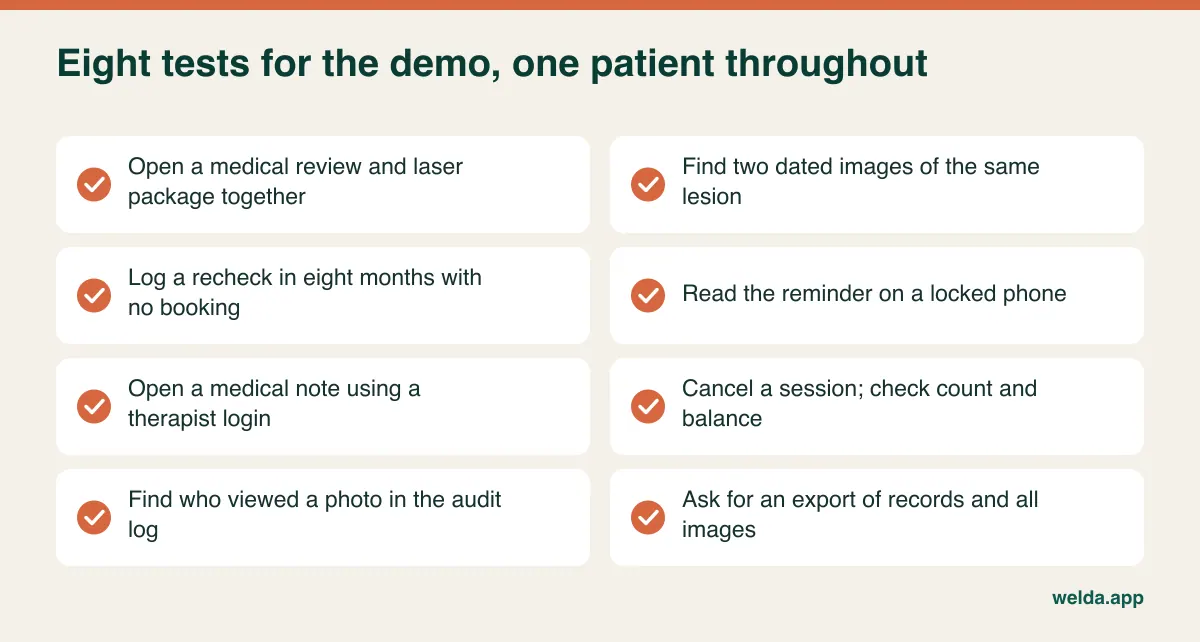
Add one timed test: with a caller waiting on the line, how many seconds does it take to find the next slot across three clinicians and a laser room? Measure it with your receptionist's hands. Never bring real patient images to a demo. Welda CRM's 7-day free trial has all modules open, so you can run this script on test data with your own team.
Assumptions that lead to regret
"The doctors liked it, so we're done." Reception and therapists live in this software all day. If their screen is slow, data goes in late or not at all, and your follow-up list stops being trustworthy.
"We'll tidy the photos up later." Without a capture and naming rule from day one, the archive becomes a copy of everyone's camera roll within weeks.
"We have reminders, so follow-up is solved." Reminders recover people with appointments. Long-interval patients, the group you most risk losing, have none.
"One system must do everything." That belief leads to either an oversized enterprise product or a thin one that does everything poorly. A well-documented two-tool setup is a sound architecture, not a failure.
Move open treatment first, old history last
The instinct is to migrate from the oldest record forward. Yet what will decide your first week is the patient arriving on Tuesday for session four. Move open items first: active treatment courses, unfinished packages with their balances, and every future review date, including those without bookings. Have two people reconcile session counts against the old system, because one wrong number at the desk damages staff trust in the new tool right away.
Then move images in order of usefulness, active patients first. Decide at the same time what happens to copies on personal phones and cloud accounts; a new archive does not remove them. Keep the old system read-only afterwards, and ask your adviser how long records must stay available in your jurisdiction. Avoid going live at the start of your busy cosmetic season, and compare open package lists daily for the first week. At Welda, moving existing patient and appointment data is part of setup on every plan. Whether older photos can move cleanly depends largely on what your current software allows, so we look at that with you beforehand, ideally with a sample export.
If that plan fits your practice, book a free consultation to walk through it with your actual workflow, or start from the overview of our dermatology practice management software to see whether it is worth the conversation.
Frequently asked questions
What is the difference between dermatology EHR and practice management software?
An EHR centres on the clinical record and, in many countries, on regulated functions such as e-prescribing and lab orders. Practice management software centres on scheduling, billing and day-to-day operations. Some products combine both. Ask exactly which functions are certified or formally connected in your country, and get the answer in writing.
Does dermatology software need to be HIPAA compliant?
If you are a covered entity in the US, vendors handling protected health information are generally expected to meet HIPAA obligations and sign a business associate agreement. Confirm with your own adviser. Welda's published materials speak to KVKK and GDPR rather than HIPAA, so ask us directly before assuming anything for a US setting.
Can the software compare moles automatically?
That function belongs to specialist imaging products, and tools that assess lesions may be regulated as medical devices in some jurisdictions. Welda CRM does not offer it. It stores images chronologically on the profile, and the clinician makes the judgement.
Is it safe to receive patient photos over WhatsApp?
Images on personal phones create copies you cannot control, so it is one of the riskier habits a practice can have. If patients want to send photos, set a clinic-wide rule with your adviser. Welda's WhatsApp functions are for reminders and information messages, and we don't present them as a photo-sharing channel.
How should we handle medication reviews and lab results?
The prescriber sets the interval, and booking the next visit before the patient leaves is the most reliable routine. Lab results can be attached to the profile as documents. Do not assume a CRM provides drug-specific protocols or clinical decision support; Welda makes no such claim. Keep drug names out of reminder text.
What drives the cost of dermatology practice management software?
Mainly branches, users, message volume, image storage, modules and any third-party connections. Migration and exit terms can matter as much as the headline number. For Welda CRM, the cost is settled in a free consultation around your setup, and there is a 7-day free trial with all modules available.
Can we run Welda alongside an existing EHR?
It is worth exploring if your EHR holds the clinical and claims record and you want better calendar, package and follow-up control around it. Pro and Enterprise plans include an open API, but no ready-made link to a specific EHR is described on our pages, so bring your system's name to the conversation and decide which tool holds which data.