To choose beauty salon software, ignore the feature grid at first and test three things with your own data: whether one booking can hold the therapist, the treatment room and the machine at the same time; whether a prepaid course shows sessions left, money owed and every session used on a single record; and whether consent and medical history stay attached to the client in a form you can actually find later. Software that passes those tests on your busiest day belongs on the shortlist. Software that fails them will send your front desk back to a notebook within months, however polished it looks.
This guide is written for owners of salons with more than one room, staff with different skills and a growing pile of prepaid courses. It walks through what to test, how to read quotes without being misled by the monthly headline, and how to switch without losing track of what clients have already paid for. If you would rather see a product first, our page on beauty salon software shows how Welda CRM is set up for this sector. The criteria below apply whichever vendor you end up with.
Start with your worst Saturday, not with the feature list
Feature lists are written to be ticked. Almost every product in this category will say it offers calendars, packages, reminders and client records. The word "packages" can mean anything from a full ledger to a free-text note, so a table of ticks tells you very little.
A better starting point is to write down one real day, the one that went wrong. Take last Saturday, or the Saturday before a holiday. List who was booked, which room, which machine, who ran late, who cancelled at short notice, who turned up asking how many sessions she had left. That page becomes your buying document. It is specific to your salon, it cannot be answered with a slide, and it quickly exposes whether a vendor understands your work.
Here is the kind of day we mean, as an example. Your salon has three rooms, four therapists and one laser. At 10:30 a therapist is in room 1 doing a facial, and another is in room 2 with the laser on a full-leg appointment that runs until 11:30. Reception takes a call from a client wanting underarm laser at 11:00. A third therapist is free and room 3 is empty. A calendar that only looks at staff will happily accept the booking, and at 11:00 your client will be sitting in a robe, waiting for a machine that is in use next door.
Why beauty scheduling breaks general booking apps
The difference between a beauty salon and most appointment businesses is that one booking uses several resources at once. A general booking tool typically sees a person and a time. Your salon has to see the person, the room and sometimes the machine, plus the time needed between clients.
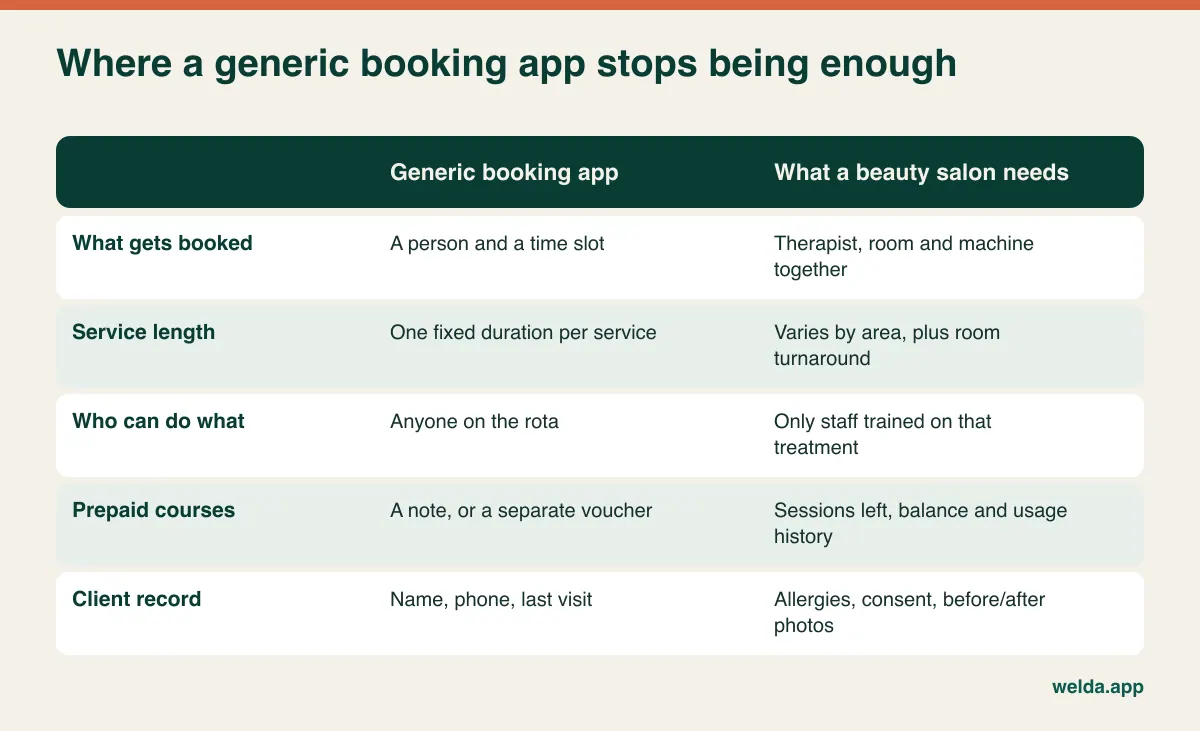
Four details are worth checking separately because they cause most of the day-to-day friction:
- Duration depends on the area. Upper lip and full-body laser may be the same service in your price list, yet they occupy very different amounts of the day. If a service can only have one fixed length, reception ends up editing every booking by hand, and the day they forget is the day the clashes begin.
- Rooms need turnaround. Changing linen, cleaning surfaces and preparing the machine all take time. If that gap is not built into the calendar, the schedule fits on screen and fails in the room.
- Skills are not interchangeable. Perhaps only one person does permanent make-up and two are trained on the laser. Being able to record who may perform what is a planning convenience, and also a basic safety measure when you have a new starter on a busy day.
- Combined appointments need sequencing. A client who books a facial and a wax wants them back to back, possibly with different staff and rooms. Check how the software handles that without two separate manual bookings.
Turn this into a test. Ask the vendor to clear the sample data and do the following with you, live:
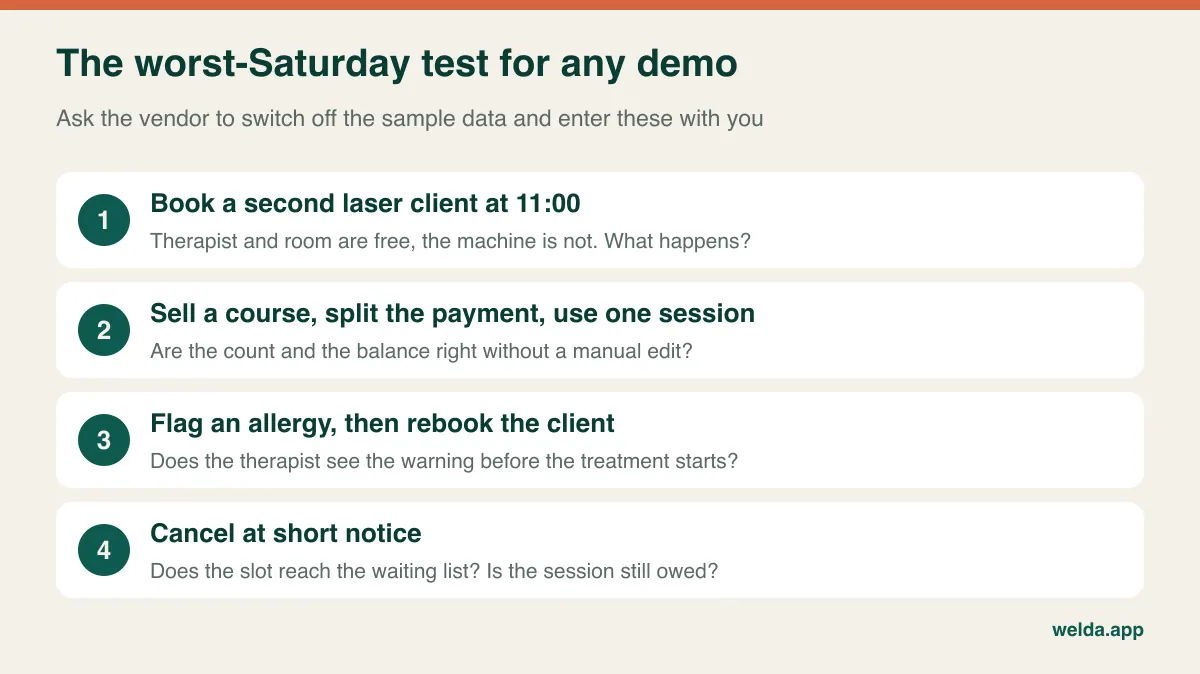
Not every gap is a dealbreaker. If a product cannot track a machine as its own resource and your only laser lives permanently in one room, the room can stand in for the machine. If the laser moves between rooms, that workaround collapses. What you are after is knowing the limits in advance and deciding consciously whether you can live with them.
A course of treatments is money you still owe
Prepaid courses are good for cash flow and easy to misread. When a client pays for six sessions and has had two, most of that money is payment for work you have not done yet. Your bank balance after a busy promotion looks healthy, and a few months later your rooms are full of clients who have already paid while very little new money is coming in.
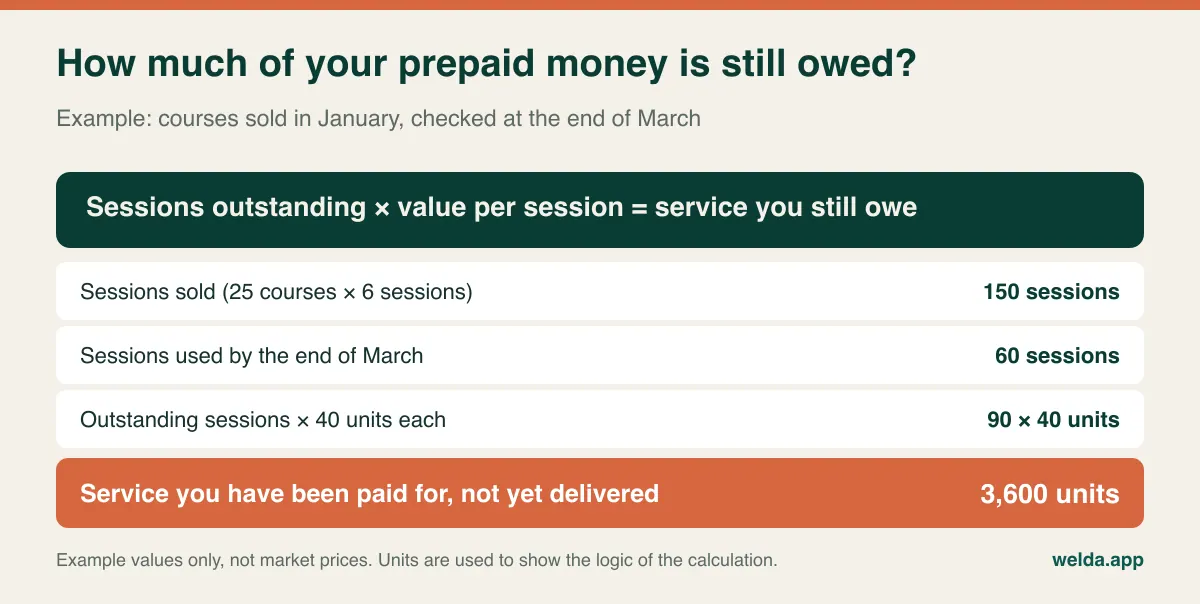
How that liability should be treated in your accounts, and when tax or VAT falls due on prepaid services and gift vouchers, varies by country and by your setup, so take that question to your accountant. The question for the software is simpler: can it show, for any client, sessions sold, sessions used, money paid and money outstanding, without you opening three screens?
Then test the messy cases, because this is where real courses go wrong:
| What happens in real life | What you should be able to see or do | What goes wrong otherwise |
|---|---|---|
| A client disputes the count: "I've only had four" | Date, therapist and treatment for each session | You give way to keep the peace, or lose the client |
| Pregnancy or a medical reason forces a pause | Pause or extend the course and keep a record | Paper notes vanish and the client feels cheated |
| She wants to give the remaining sessions to her sister | A recorded transfer, or a clear rule | No one knows who used what |
| She wants to swap leg sessions for another area | The conversion recorded as sessions or value | Each receptionist invents a different rule |
| Instalments slip while the sessions carry on | Remaining sessions beside remaining balance | You find the debt after the final session |
| She moves away and asks for a refund | A clean statement of sessions used and payments | The refund becomes an argument |
Not every product will have a button for each of these. That alone need not rule one out. But if there is no built-in route, you need a single agreed way to record the case and everyone on the team must follow it. We go deeper on the logic in our guide to tracking sessions and packages, which was written for clinics but applies directly to a salon, and our beauty salon management guide covers the commission and occupancy side.
The long gap between sessions is where courses leak
This one rarely appears on feature lists, and it matters. Many beauty treatments are spaced weeks apart, sometimes longer. Laser is the obvious case, but facial courses and body treatments have their own rhythm too. A hair salon sees a client when her roots grow out; a beauty salon has to bring back a client who has already paid, who feels no urgency and whose next session is six weeks away.
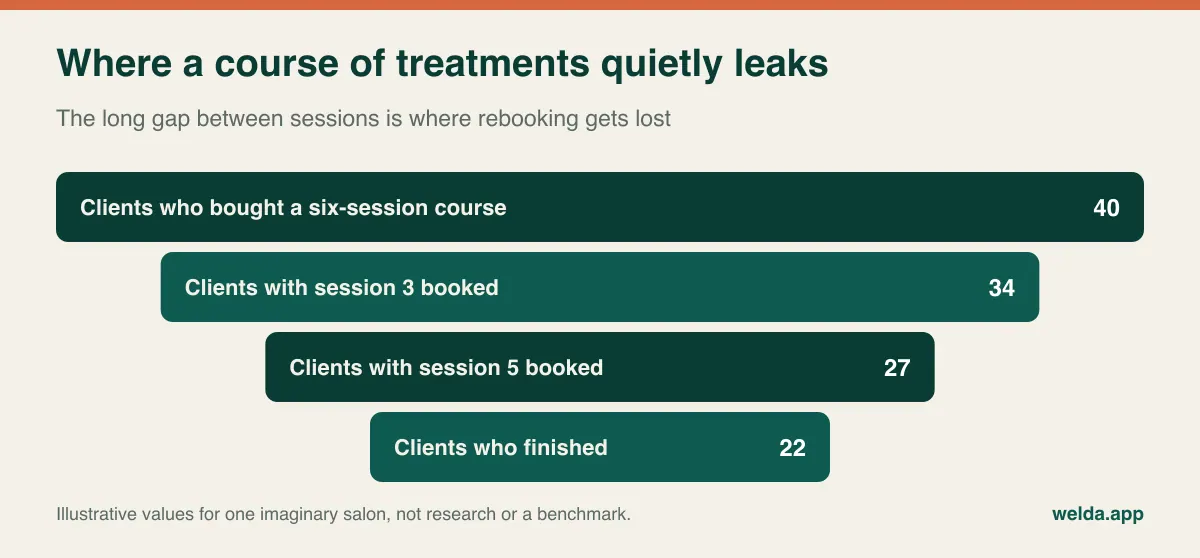
Unused sessions may look like free money, but they are often a quiet complaint in the making: the client who never finished rarely thinks "my fault". She thinks the treatment did not work. So when you compare software, ask how it surfaces courses that have stalled:
- Can you list everyone with sessions left and no future booking?
- Can a follow-up task or queue be generated from that, so someone actually phones those clients?
- Can reminders be based on the treatment interval rather than only on an existing appointment?
- Can reception book the next session in one or two clicks while the client is still at the desk? That habit costs nothing and does not depend on any automation.
Be careful with marketing messages here. A reminder about a booked appointment and a promotion for a new treatment may be treated differently by privacy and e-marketing rules in your country, so ask how the system stores permission for marketing.
Consent, patch tests and medical history: what you need to retrieve
Salons do not always think of themselves as handling health data, yet the intake form asks about allergies, medication, pregnancy and skin conditions. In the EU and UK that information can fall under the stricter GDPR rules for special category data. Other countries have their own frameworks, and rules on who may perform laser or injectable treatments vary widely by country, state and local authority. Check your obligations with a local adviser or your insurer. The points below are practical buying questions rather than legal advice.
When a client reports a burn after laser, or a reaction to a lash tint, you will need to answer two questions quickly: did she know the risks, and did you know her situation? A folder of paper forms can answer that, provided you can find the page, know which version she signed and are sure the therapist read it before starting.
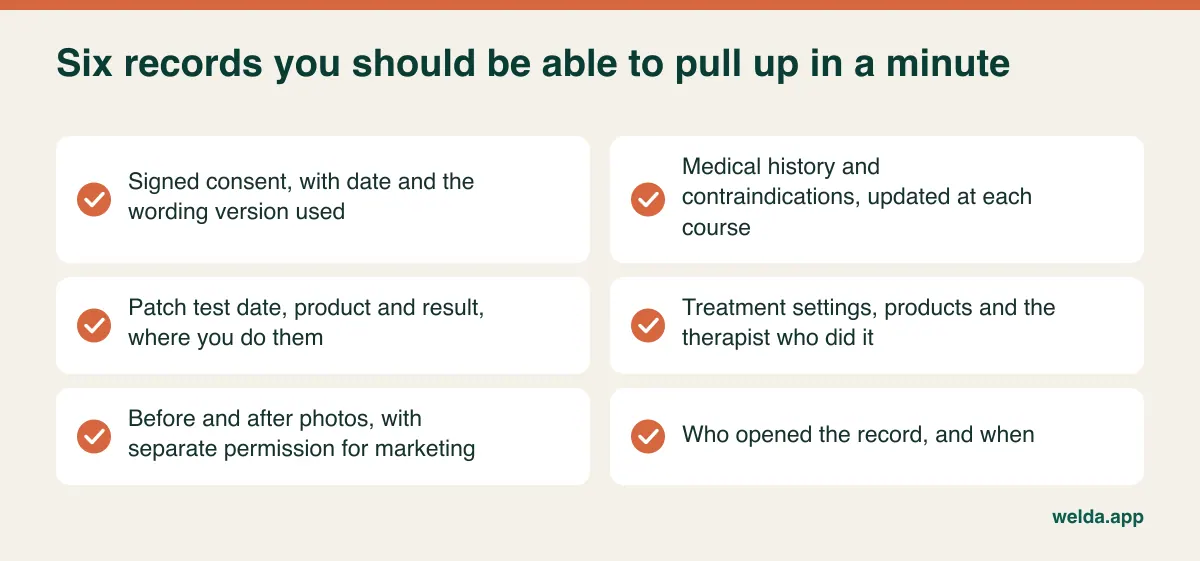
Questions to put to any vendor:
- Versioning: When you update your consent wording, can you still see which client agreed to which version?
- Timing of warnings: Does an allergy or contraindication appear when the therapist opens the appointment, or does it sit three tabs away?
- Separate permissions: Keeping before and after photos for treatment records is one thing. Posting them on Instagram is another and calls for its own permission. Can the two be recorded separately, and are the photos stored in the system rather than on a therapist's own phone?
- Who sees what: Can you limit reception to bookings and payments while therapists see health notes? Is access logged?
- Your processor relationship: Where is data stored, who are the sub-processors, what agreement do you sign, and how do you export or erase a client's record on request?
Our article on patient data security goes further into these questions. It is aimed at clinics, but the same logic applies once you hold medical history on your clients.
Different salons, different shortlists
Not every salon should weigh these criteria equally. Use the chart below to decide which question to ask first, then read the notes on who probably should not buy this class of software at all.
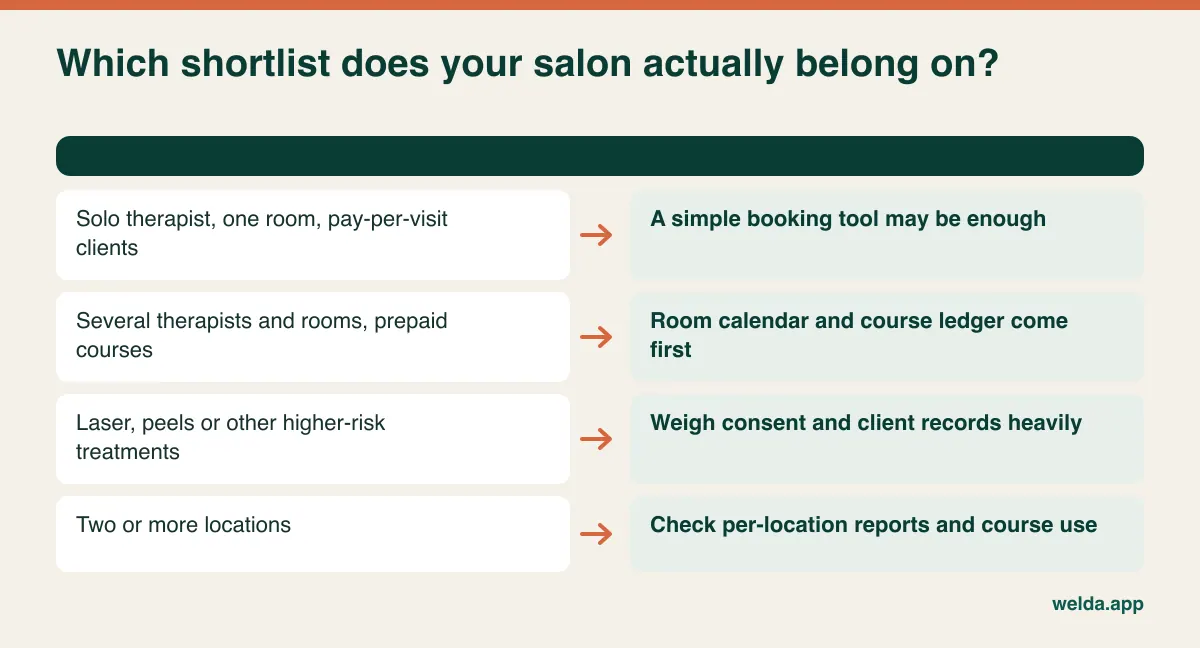
Probably overkill: A solo therapist with one room, pay-per-visit clients and no plans to grow may do perfectly well with a simple booking tool and an organised client list. Do not pay for a growth story you do not intend to live.
Hard to postpone: A salon where prepaid courses are a large part of revenue, and where only one person can say how many sessions a client has left. If that person's holiday causes problems, the risk is already in the business.
Worth a different search: If doctors deliver most of your treatments, clinical record keeping and medical responsibility change the criteria, and this guide is only a starting point. If hair is the bulk of your work, our piece on hair salon software cost will be closer to home.
Marketplace-first tools: Some booking products double as a place where new clients discover you. That can be useful, and it is a different job from running your operations. Ask who owns the client relationship and data, and what happens to your bookings and history if you leave.
Reading a quote without being led by the headline number
Quotes in this category rarely cover the same scope, so comparing the monthly figure tells you little. First make the scope match. These are the items that usually move the total:
- Locations and users: Does every therapist need a login? Is someone who only views her own diary a paid user?
- Message volume: Reminders plus aftercare messages add up fast. What does the allowance cover, and what happens when you pass it? WhatsApp and SMS may be priced differently.
- Storage: Before and after photos accumulate for years. What happens at the limit?
- Modules: Are stock, commission, automated message flows and till features included or held back for a higher tier?
- Setup, migration, training: Are they included? Is training for a future new hire covered too?
- Payment processing: Is there a commission on online payments or deposits, and does it grow with your busy months?
- Exit: Is there a minimum term, a price rise clause, or a charge for handing over your data?
Then cost each option for the same salon over three years, once at today's size and once at the size you plan to reach. The cheapest monthly headline is not always the cheapest total, and a lower price that forces reception to do manual work has a cost of its own, even though it never appears on an invoice.
Your demo script
A prepared demo always goes well, because the sample data is chosen to flatter the product. Bring your front desk and one therapist, since they will use it every day and they spot friction in minutes. Bring your real service list, a half-used course on instalments, and your current consent form. Ask to be shown, rather than told:
- What happens if I double-book a room with two different therapists?
- Can service length vary by area, and where do I set turnaround time?
- Can I restrict who is allowed to perform which treatment?
- Who records a session as used? How is a mistake corrected, and does the correction leave a trace?
- How do I record a paused or transferred course?
- Can I see sessions left and balance outstanding on one screen?
- What does the therapist see about allergies when she opens the booking?
- How do I show which consent version a client accepted?
- Can online bookings be held for my approval rather than confirmed automatically?
- What happens when the internet goes down?
- What languages can the interface and client messages use? This matters if your team or clientele is multilingual.
- If I leave, what do I get back, and in what format?
That last question is the one people forget. If you cannot take your data with you, you have very little negotiating power at renewal.
Switching without losing what clients have paid for
It feels natural to begin by moving appointments, because that is what you can see. The riskier data is open courses. A wrong appointment can be fixed with a phone call. A wrong session count turns into an argument with a client who has paid you in advance. Plan accordingly:
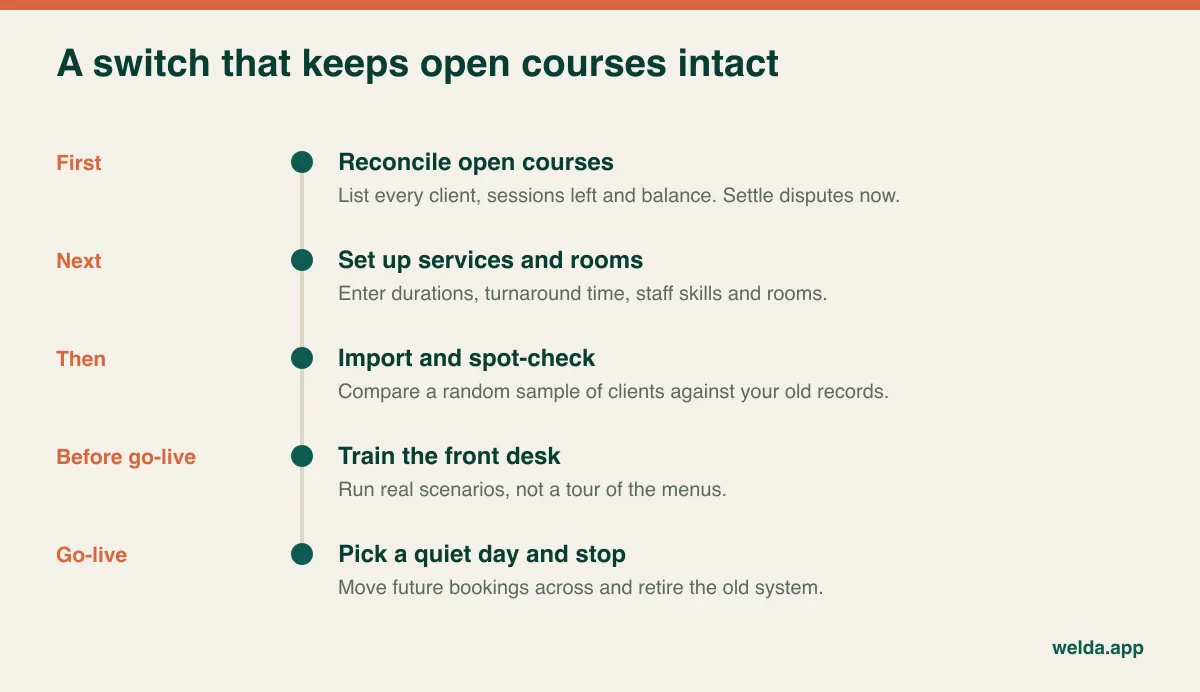
A step that pays off: in the two weeks before you switch, tell each course client who comes in how many sessions she has left and ask her to confirm. You surface disagreements before the import rather than after it. Do the same with paper consent forms, noting which clients have no current form, and renew those at their next visit. Timing matters too. Right after a big promotion is when you have the most open courses and the least slack, so avoid it.
Keep the overlap short. When a paper diary and software run side by side for long, the team stops knowing which one is right and ends up trusting neither. Run a short check period, then remove the old system from the front desk.
Three mistakes are easy to make during this phase. Buying before tidying the service list, so one treatment ends up under three names and reports mean nothing. Leaving the front desk out of the decision, so they quietly go back to the old diary. And turning on automatic online confirmation for complex treatments before the rooms, durations and skills are set up correctly, which hands your clashes over to the clients.
Where Welda CRM fits, and what to check with us
It seems only fair to put our own product through the same questions. Welda CRM is web-based software for appointment-led businesses. When you select your sector, the starting modules and on-screen terminology follow it, so a salon sees "client" rather than "patient". The interface and message templates are available in English, German and Turkish.
- Calendar: One calendar with staff, room and location views, and conflict prevention. Online requests are confirmed by you, and a waiting list notifies the next person when a slot opens.
- Courses: Package sales, total and remaining sessions and usage history sit on the client profile, with a session deducted when it is used. Payment status, instalments and package balance are tracked as well.
- Records: An encrypted health record with allergy and contraindication warnings, and a before and after photo archive. Consents are stored with their version, access is logged, and permissions are role-based.
- Follow-up: Automatic WhatsApp reminders, a daily follow-up queue, tasks, and a client portal showing appointments and packages.
There are also things we would rather you test than take from a blog post. Treating a machine as a separate resource, area-based durations, pausing or transferring a course: bring those scenarios to the demo and look at how they behave with your setup. Because the system is web-based, access stops during an internet outage, though your records remain intact when you reconnect, so factor that in if your connection is unreliable. Stock, commission, till features and automated message flows sit on higher plans, so tell us early if you depend on them. Our reminders run over WhatsApp, so if your clients expect SMS, ask us how that would work. If we are not the right fit for your salon, it is better for both of us to find out before you sign.
Price depends on your locations, users, message volume and modules, and is agreed in a free consultation. Setup, data migration and team training are included in every plan. If you are still working out how to choose beauty salon software, you can try Welda CRM free for 7 days with all modules open, or book a free consultation and we will enter your worst Saturday together.
Frequently asked questions
What is the difference between salon software and spa or clinic software?
Labels overlap and tell you little. Hair-focused tools tend to be built around staff and time. Clinical tools are built around medical records and can feel heavy at a busy front desk. A beauty salon usually needs rooms, courses and client records together. Test the product against your day rather than relying on the category name.
Can I keep running my salon on spreadsheets?
For a solo therapist with few courses, for a while, yes. Once several people edit the same file, you lose clash warnings, automatic session counts and any trail of who changed what, so mistakes surface late. Keeping clients' medical details in a shared spreadsheet is a separate risk of its own.
Should every therapist have her own login?
It is usually worth it. Individual logins show who recorded each session and allow access to health notes to be tied to a person. Shared passwords erase that trail. Check how users are counted in each quote before deciding.
Is digital consent legally sufficient?
That depends on your country, the treatment and how the consent is captured, so ask a local adviser or your insurer. What the software should do is tie the record to the client, the date and the wording version, and make it easy to retrieve. Scanning signed paper forms to the profile is a common approach during a transition.
Can open course balances be imported from my current system?
It depends on what your current provider lets you export and in what format. Client and appointment lists tend to move more easily than course balances, so sample-check those by hand after the import. With Welda CRM, moving existing client and appointment data is part of setup, and we can look at your course data together in the consultation.
Will software eliminate no-shows?
No product can promise that. Automatic reminders help with clients who simply forget, and a waiting list makes it easier to refill a slot. Your cancellation policy still has to be set by you, including whether a missed session counts against a prepaid course.
How many products should I compare?
There is no magic number. It usually works best to narrow the field by type, then run the same test on two or three candidates. Watching many demos does not make the decision easier. Applying one consistent test does.