Hair salon software cost is not one number, so a price list alone will not tell you what you will pay. Your real cost is the base subscription plus whatever is charged per seat, per message, per transaction and at setup, added up over the time you expect to stay. To compare two products honestly, build the same 12-month and 36-month total for each, using your own team size, booking volume and online payment share. This guide shows you how to do that, where the expensive surprises tend to sit, and what to get in writing before you sign.
You will not find market prices or Welda prices in this article, on purpose. Vendors change price lists often, run time-limited offers and bundle different things under the same plan name, and currencies and taxes vary from one country to the next. So every worked example here uses neutral "units" instead of dollars, pounds or euros. Replace them with the figures from your own quotes and the method still works.
The five line items behind every quote
A quote with a single monthly figure is a summary, not a cost. Before comparing anything, split it into the parts below. Some will be zero; that is useful to know as well.
| Line item | What drives it | Where people get caught |
|---|---|---|
| Base subscription | Plan, location count, features | A "monthly" price that assumes annual prepayment |
| Per-seat fee | Number of logins or staff calendars | Part-timers, assistants and booth renters all counted |
| Messaging | Reminder and confirmation volume | A quota that disappears in your busiest month |
| Transaction fees | Card payments, online bookings, marketplace leads | Commission charged on your own regular clients |
| Setup and onboarding | Data volume, training | Importing future bookings and notes treated as extra |
Base subscription
This is the number on the pricing page and it tells you the least. Check whether it includes tax, whether it needs an annual commitment, and what happens when an introductory offer ends. "First six months at half price" tells you nothing about year two. Look for the renewal terms and how much notice you get before a price increase. A cheap first year is not a cheap product.
Per-seat fees
Per-seat pricing sounds simple until you count who is really in your salon. Say you have an owner, three stylists, a front-desk person and one booth renter. That is six seats if every person needs a login. Does the junior who only needs a calendar count? What about the Saturday-only stylist? If someone leaves in the middle of the month, does the bill go down straight away or at renewal? In a trade with real staff turnover, the answers matter more than the rate.
Messaging
Reminders are among the most useful things salon software does, and also a place where costs creep. A salon handling 25 bookings a day, sending a confirmation and a reminder for each, reaches about 1,300 messages over 26 working days (example: 25 × 2 × 26). Ask which channel is used, because text message pricing varies a lot by country and WhatsApp may be billed differently. Ask what happens when the quota runs out: do reminders stop, or do you get an overage bill? We cover how the automation works in our guide to WhatsApp appointment automation.
Transaction fees and commission
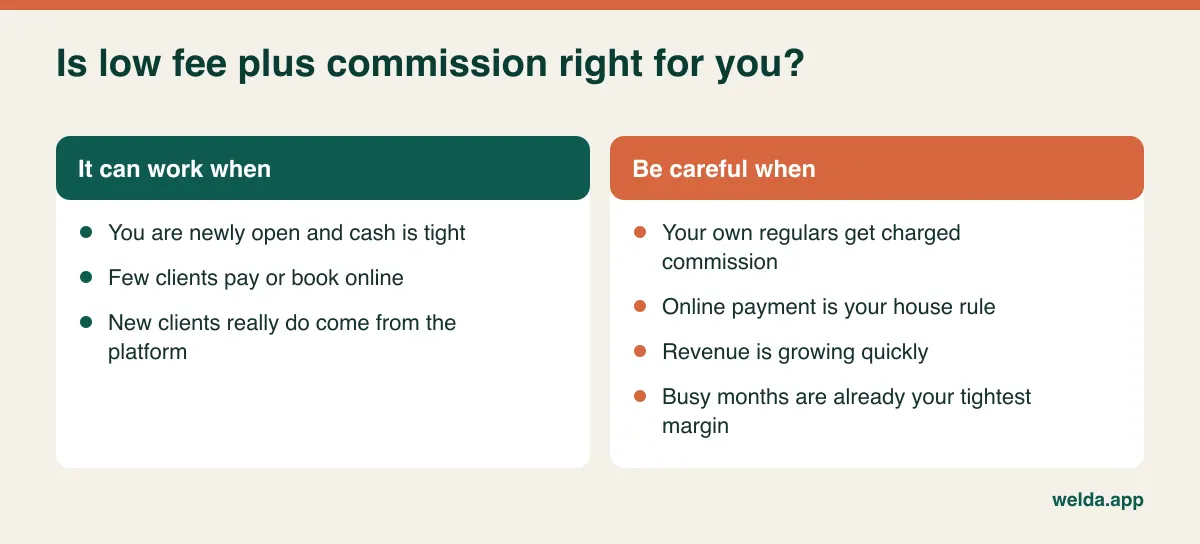
Software that costs little or nothing per month usually earns from something else: a share of card payments, a commission on marketplace bookings or a markup on processing. That is not automatically a bad deal, since it reduces your fixed costs while you are getting established. But it turns a fixed cost into one that grows with your success. Separate three things that often get blurred: what your card processor charges, what the software adds on top, and what a marketplace takes for introducing a new client. Then ask directly whether commission applies only to new clients from the platform, or also to your regulars who book through your own link.
Setup, data import and training
"Free setup" may mean an account and nothing else. Getting a client list out of a spreadsheet is easy. Moving future bookings, color formulas, gift card balances and prepaid packages often is not. Ask exactly which data is included, who does the work and whether training is live. Remember the cost that never shows up on an invoice: a closed chair during training and a slower front desk in week one.
Which pricing model suits which salon?
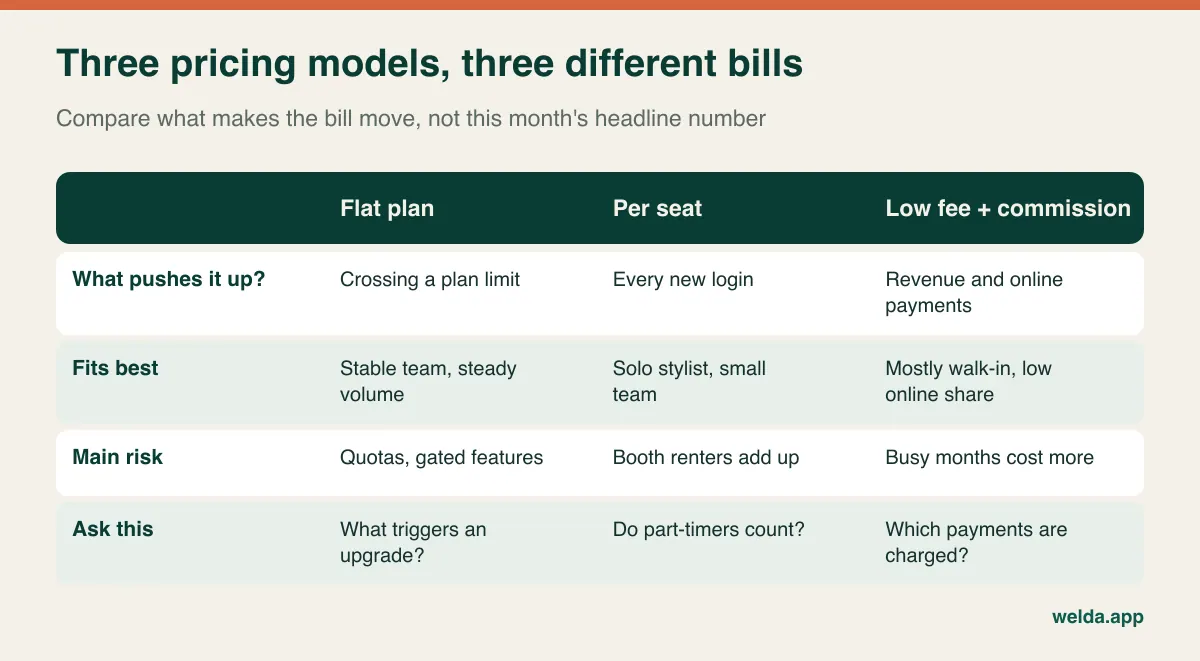
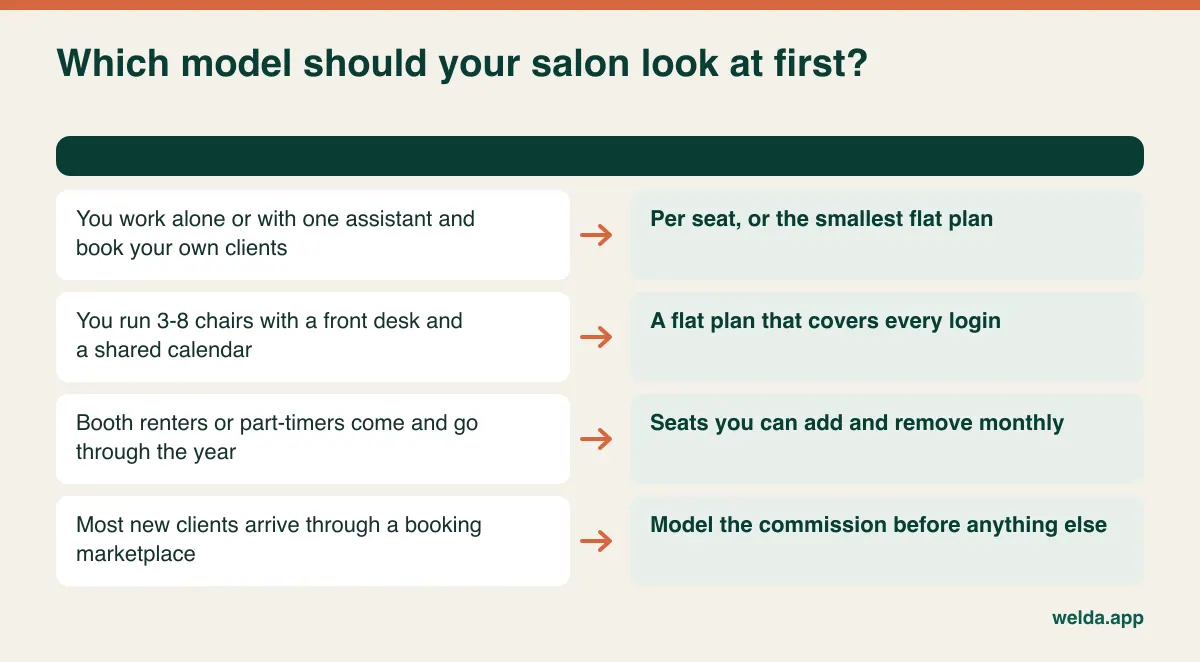
Most offers are a version or a blend of three models. Knowing which one fits your salon lets you discount a poor match before spending time on a demo.
Flat plan. You pay the same amount each month within set limits on locations, users and messages. It is the easiest to budget, which suits an established salon with a stable team. The risk is the step at the edge of the plan: if your seventh login pushes you into a much larger tier, one hire can move the bill by more than that person's share.
Per seat. Fair and cheap at a small scale. A solo stylist or a two-chair barbershop pays little and gets the same tool as everyone else. Costs then rise in a straight line as you hire, and the model gets awkward with booth renters, who may each need a calendar but do not necessarily want the salon to pay for them. Ask whether renters can be set up and billed separately.
Low fee plus commission. Attractive when you have just opened and every fixed cost hurts. But the fee is proportional to your income, so a good December costs more than a quiet February. If most of your clients pay at the desk, the effect may stay small. If online prepayment is your house rule, this can become the most expensive model on the table.
Worked example: comparing three quotes
Take an imaginary single-location salon with six logins: owner, three stylists, a front desk and one booth renter. It takes 8,000 units of payments online each month. These three quotes are invented for illustration and do not represent any real vendor or market price.
| Example quote | Monthly | One-off | 12 months | 36 months |
|---|---|---|---|---|
| A: Flat plan | 120 units, all included | None | 1,440 | 4,320 |
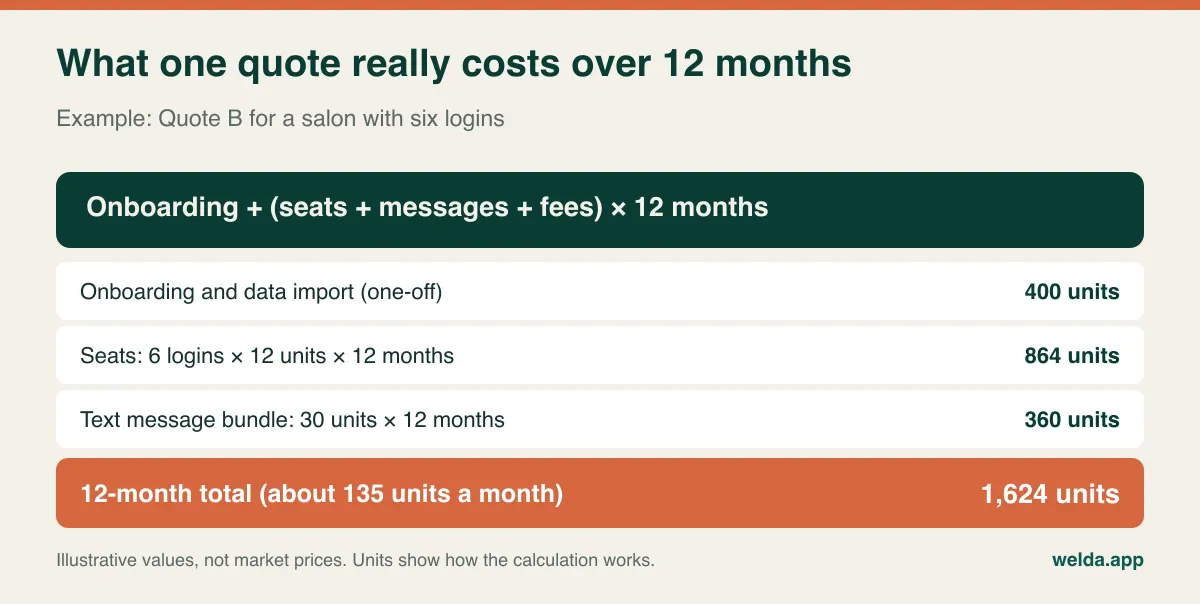
| B: Per seat | 6 × 12 units + 30 units messaging | 400 units | 1,624 | 4,072 |
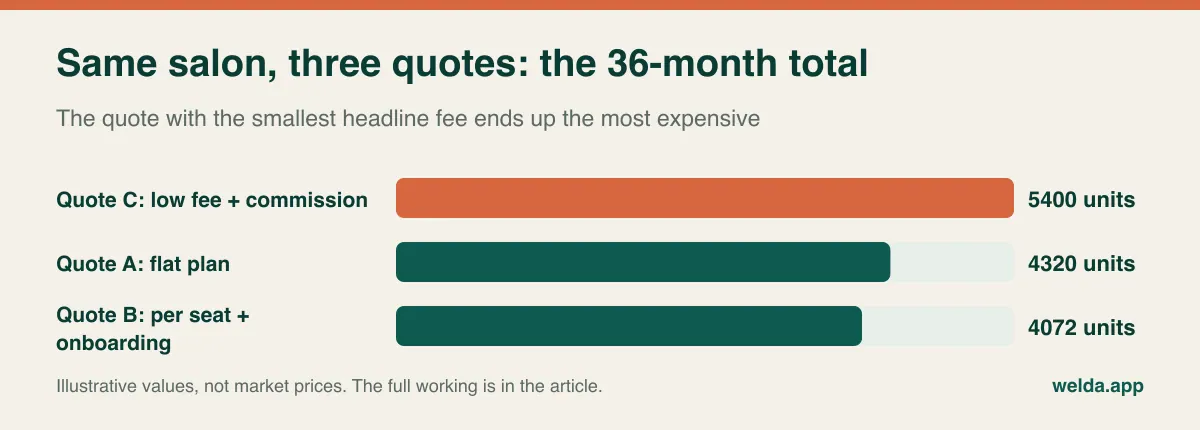
| C: Low fee + commission | 30 units + 1.5% of 8,000 units | None | 1,800 | 5,400 |
Look at what the comparison reveals. On headline numbers, C looks cheapest at 30 units and A looks most expensive at 120. After a year, A is actually the lowest of the three. After three years, B has paid off its onboarding fee and comes out on top, while C is well above both. So two honest answers exist depending on how long you plan to stay, and neither is visible on a pricing page.
Now stress the example with growth. Suppose you add two more logins at the start of year two and online payments rise to 11,000 units a month. Quote B grows to 126 units a month from month 13, for a 36-month total of 4,648 units. Quote C reaches 195 units a month and totals 6,480. If Quote A's plan stops at six logins and the next tier costs 160 units, its total becomes 5,280. Growth widened the gap between the three, and it would look different again if you assumed different hiring or a different share of online payments. Run this with your own realistic plan, not your most optimistic one.
To do this yourself, start by writing down four inputs: logins, bookings per day, online payment value per month and how long you expect to stay. Then put each quote into the same table. Any empty cell becomes a question for the vendor. If the answer is "it depends", ask for a calculation using your numbers. If your cash is tight this year, weight the 12-month column. If your salon is established, the 36-month column deserves more attention.
Hidden costs worth checking before you sign
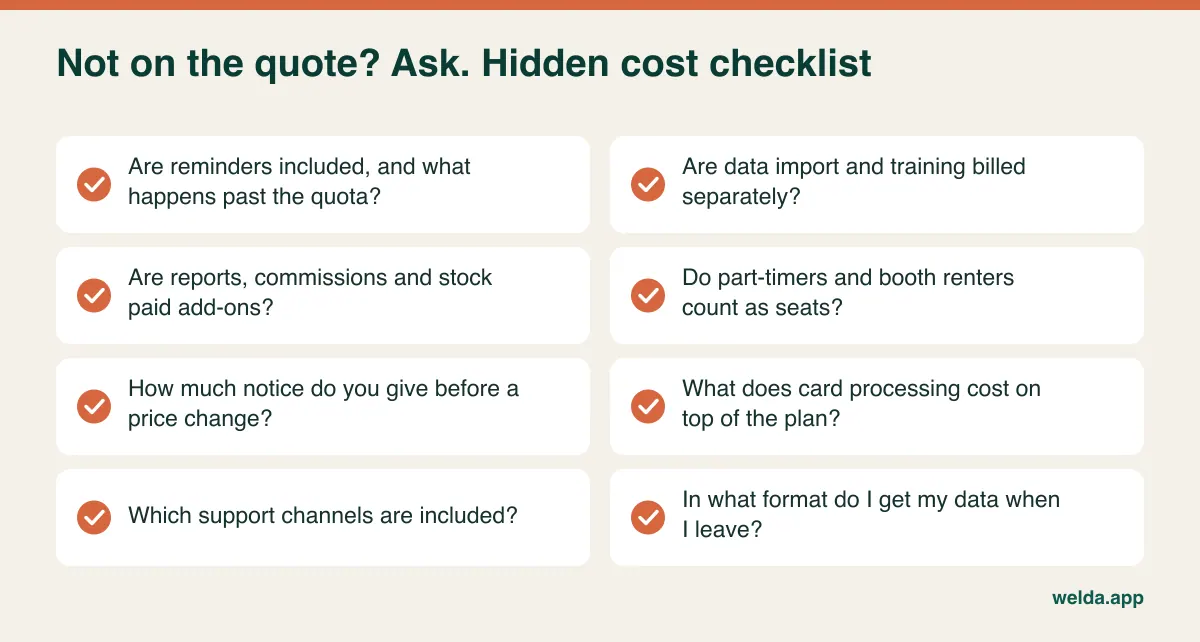
Few hidden costs are really concealed. Most are simply things nobody brought up, because the demo showed the best plan and the contract describes yours. Close these out one at a time.
Feature gating. Commission calculation, stock tracking and automated message flows are common salon needs and are often reserved for higher tiers. Ask which plan the demo is running on and get the feature list for the plan you are quoted.
Payment hardware and processing. Card readers, receipt printers and a front-desk tablet belong in your budget even though they are not software. If the vendor requires its own payment processor, compare its rates with your current ones, and ask whether you are free to keep your existing provider.
Accounting and tax. A data export your accountant can use has real value, because manual reconciling is paid for in hours. Tax rules for receipts, invoicing and sales tax or VAT differ by country. Confirm what the software produces and whether it suits your local obligations. Do not rely on a sales demo for this.
Exit costs. This is the least discussed item and potentially the most expensive. When you leave, what do you get, in what format, and at what cost? Is there a minimum term or early termination fee? Your client history is one of the most valuable things your salon owns, and you should not have to negotiate to get it back.
Set the cost against what it saves
A pure cost comparison always favors the cheapest tool, which is not always the right one. Software pays for itself, when it does, by reducing specific losses. Salons can measure three of them: empty chairs from no-shows, staff time spent messaging, and clients who drift away because nobody noticed they were due back.
Use your own records, not an industry average. Count last month's no-shows and multiply by your average ticket. As an example, 4 no-shows a week over 4 weeks is 16, and at an average ticket of 30 units that is 480 units of revenue at risk each month. A reminder will not rescue all of those, since some clients will still cancel late, but advance notice gives you the chance to offer the slot to someone else. Our article on reducing no-shows was written for clinics, but the logic transfers well to a salon chair.
Then think about the less visible value. If your front desk types tomorrow's reminders by hand every evening, that time has a cost. If a regular's color formula lives in one stylist's notebook, a client who sees a colleague may not get the result she expects. Software that keeps this in a profile has a value that no pricing table shows, though you should only count it if your team will actually use it.
What to ask in the demo
Do not let the vendor run its own script. Hand over your hardest Saturday morning and ask them to show you, live:
- What happens when a second client is booked onto a stylist who is already occupied?
- How do you book a root color with processing time, then a blow-dry, with the right person at each stage?
- How many steps does it take to record a booking from a phone call while a client is waiting?
- When someone cancels, how does the next person on the waiting list find out?
- How quickly can a stylist reach a regular's color notes?
- Can a stylist see their own calendar without seeing salon revenue?
- How do monthly occupancy and commission reports look per stylist?
- How does a client who does not use the default messaging channel get a reminder?
Bring your front-desk person. They will spot a slow booking flow far sooner than an owner will. Give every vendor the same brief, covering locations, logins, daily bookings, online payments and your current system, or you will end up comparing answers to different questions. Keep a column in your table labelled "in the contract?" and treat anything that is only verbal as not yet offered. If you are also working out whether you need a full CRM, our CRM guide for small businesses will help.
Who should buy now, and who should wait
You can probably wait if you work alone, take a modest number of appointments and never get double-booked. A shared phone calendar is fine for now. Set yourself a trigger for reviewing this, such as a first hire or the first time a mix-up loses you a client.
It is probably time if more than two people use the calendar, bookings clash, reminders eat your front desk's afternoon or you cannot quickly answer "what did we use on her last time?" At that point the paper book has a cost too, even if it never sends you an invoice.
Now the honest view of our own product. Welda CRM is built for businesses that run on appointments, and the page on hair salon software cost and features shows what it offers a salon: a per-stylist calendar with conflict detection, online booking requests you confirm, automatic WhatsApp reminders, a waiting list, client history with notes, role-based permissions, and occupancy and revenue reports.
It will not suit everyone. Our reminders are described as WhatsApp-based. In markets where clients expect text messages and rarely use WhatsApp, such as much of the US, raise this early and confirm what will work for your clients. If taking a deposit or card-on-file at the moment of booking is essential to you, we do not list that as a feature, so ask before you assume. If you want a marketplace that sends you new clients, Welda's booking page is your salon's own page, not a discovery platform. And it is web-based, so access pauses during an internet outage, although your records remain intact.
Privacy and compliance: what affects the budget
This is general information, not legal advice, and the rules depend on where you operate. Speak to a local adviser about your own situation.
Client names, phone numbers and appointment histories are personal data, and allergy or sensitivity notes can require additional care. If you are in the EU or UK, GDPR and UK GDPR are likely to apply; elsewhere, a local privacy law may set similar duties. Reminder messages and promotional messages are often treated differently, so ask how a system records consent for each. Welda CRM stores records in encrypted form, records consent and logs access. Those tools help you, but they do not remove your own responsibilities as the business holding the data.
Tax and receipt rules also vary widely. Some countries require approved invoicing or fiscal registers, and in those places the compliant setup can be a real cost line of its own, possibly with a separate provider. Welda's e-invoicing runs through an integration with your chosen provider, so treat that provider's fee as its own line, and check locally whether that setup meets your rules. Do not assume any software, ours included, handles this until you have confirmed it for your country.
Common mistakes when comparing salon software
- Comparing only headline prices. As the example shows, the lowest monthly figure can become the highest total.
- Costing today's team only. Include the hires you are realistically planning for next year.
- Ignoring seasonal peaks. Prom season, the weeks before the holidays and wedding months can push you over a quota set for an average month.
- Forgetting your booth renters. Agree who pays for their seats and who owns their client data before you migrate. That conversation is far harder afterwards.
- Testing with fake data. Three test bookings teach you nothing. Enter a real week, Saturday included.
- Treating the booking link as separate from your website. Clients need to find it easily. Our hair salon and barbershop website guide covers where it belongs.
- Skipping the exit clause. The best moment to ask how you leave is before you have any reason to.
How to switch without chaos
Switching cost grows fastest when nobody has planned it. The order below keeps the risk low.
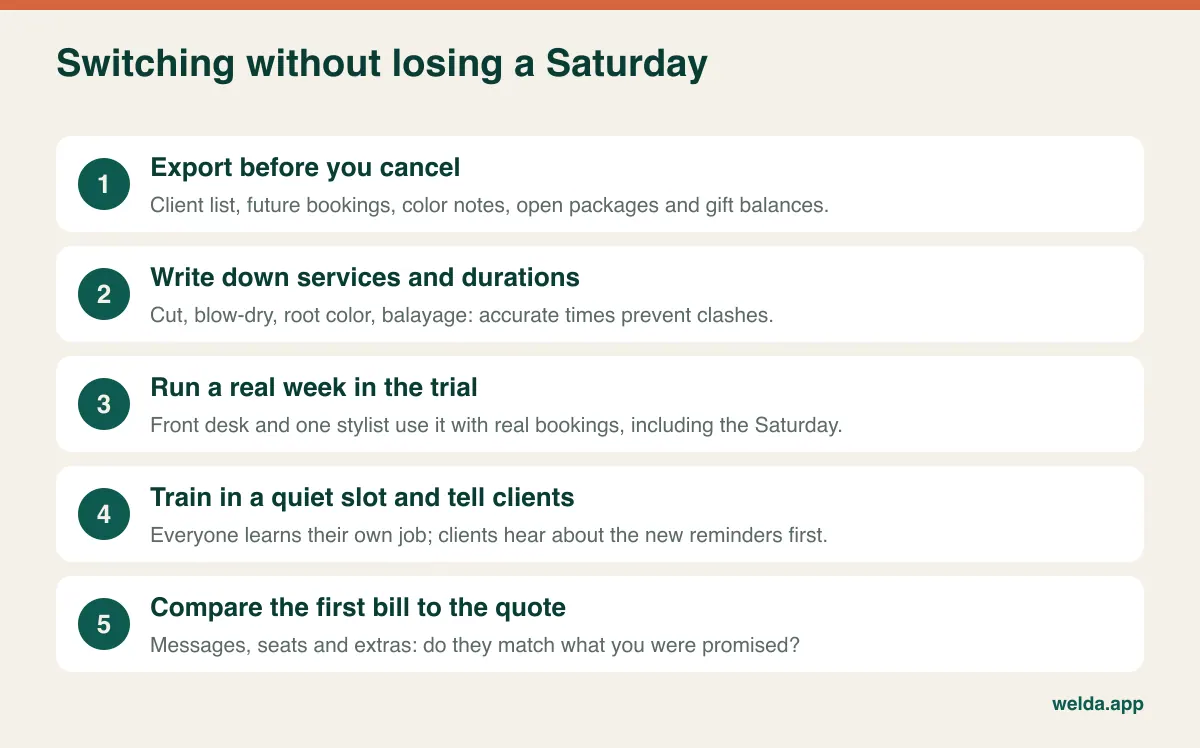
- Check your current contract first. Note your notice period and export your data before you cancel anything. Some systems restrict access soon after cancellation.
- Clean the data. Prioritize active clients, future bookings, color notes and any prepaid balances. A client who has not visited in years does not need to delay your launch.
- Define services and durations. The calendar is only as good as your service list. Check how long a balayage really takes with your team, not how long the price list says.
- Trial with real work. Have your front desk and one stylist use it for a week, then listen to their complaints.
- Train during a quiet slot. People only need to learn their own job. Stylists rarely need the reports screen.
- Tell your clients. Warn them that reminders may come from a new number or channel, and sort out consent at this stage.
- Run the old system briefly, then stop. A two-week overlap catches errors. Any longer and your team never fully commits.
- Review the first bill. Compare messages, seats and extras with the quote while the details are still fresh.
How pricing works with Welda CRM
It seems fair to answer our own checklist. Welda CRM is a monthly subscription with no separate setup fee: account setup, staff calendars, importing your existing client and appointment data, and hands-on team training are included in every plan. There are three plans, and they differ by the same factors discussed above: locations, users, message volume and modules.
Starter covers one location, 3 users and 500 WhatsApp messages a month, with the day-to-day appointment and client tools. Pro covers 3 locations, 10 users and 5,000 messages, and adds stock, expenses, the cash desk and POS, automated message flows and staff commissions. Enterprise is designed for chains. So our six-login example salon would have to think about how many people truly need access, and whether it needs commissions in the system at all. Please ask us the same awkward questions you would ask anyone: what happens past the message quota, how non-login staff are treated and how you would take your data with you. Get our answers in writing.
We do not publish a figure in this article. The price is agreed after a free consultation where we learn about your locations, team and modules, which gives you a number you can drop straight into your comparison table. A 7-day free trial is also available with all modules unlocked, so you can test the system with your own data. If the trial ends without a subscription, your data is not deleted; the account moves to read-only.
Frequently asked questions
Why does hair salon software cost vary so much?
Products with the same label do very different jobs. Some are essentially a calendar, while others include messaging, commissions, stock and reports. Pricing models differ too. Only a comparison built on your own salon's numbers shows which differences actually matter to you.
Is free salon software really free?
It may be fine for a solo stylist, but look at how the vendor earns. Common routes are commission, mandatory payment processing, ads or paid upgrades. Check message limits and, above all, whether you can export your client data.
Is per-seat or flat pricing better for a salon with booth renters?
That depends on who pays and how often renters change. Per-seat can be fairer if each renter covers their own seat. Flat pricing is simpler if the salon absorbs the cost. Either way, agree who owns the client data first.
How do I work out whether commission or a flat fee is cheaper?
Find the break-even volume: divide the monthly fee difference by the commission rate. With a 90-unit difference and a 1.5% commission, the break-even is 6,000 units of online payments a month (example). Above that volume, the flat plan starts to win.
Should I pay annually for a discount?
Only once you are confident in the product. Monthly billing gives you a cheap way out during the first few months, which is when you learn the most about the fit. If you do prepay, get the refund terms in writing.
What is the cost of Welda CRM?
Welda CRM is a monthly subscription, and the price depends on your locations, users, message volume and modules, agreed in a free consultation. Setup and data migration are included. You can read more about hair salon software cost at Welda on the product page, and a 7-day free trial is available.
Will I lose my data if I switch systems?
When you move to Welda, your existing client and appointment data is imported during setup. What you can get out of your current system, however, depends on that vendor and your contract, so check the export options before you cancel.