You should replace Excel with custom software when a workbook has quietly become the system your business runs on and cheaper fixes have stopped helping: several roles write to it, wrong numbers reach customers or suppliers, and only one person can repair it. If you get there, start with the single workflow that has one accountable owner, runs on its own data and lets you retire a tab on the day it goes live. That is rarely the dashboard everybody is asking for.
This guide is for the operations manager who inherited, or built, the file everything depends on. Maybe it is called something like Ops_Master_FINAL_v7, it takes a while to open, and there is a colleague who gets a phone call whenever it misbehaves. You are not trying to become a software expert. You need to decide whether this is worth a budget request and, if so, how to scope it so it does not become a two-year project.
Spreadsheets do not fail, they get promoted
Nobody ever decided to run order management in Excel. Someone made a useful sheet for a real problem, it worked, a colleague asked for a copy, and a tab got added. A few years later that sheet is acting as a database, a task queue, an approval process and a reporting layer, without having been designed as any of them. Excel is superb at what it was built for: modeling, analysis and quick answers. Its weakness only shows once it has been promoted into a role that requires it to manage people and process.
Worth keeping in mind before you go further: size is not the trigger. A modern worksheet holds over a million rows, and most operations workbooks start hurting at a tiny fraction of that. What hurts is how the file behaves with several people around it. A formula gets pasted over and nobody notices. Two people change the same record in two copies. A date arrives as text, and a lookup quietly returns nothing. These failures are hard to see, which is the real danger: a broken report looks exactly like a working one.
Run the cheap fixes first
A vendor will not usually tell you this, so here it is: plenty of spreadsheet problems can be solved without commissioning anything. Work through this order, and stop as soon as the pain stops.
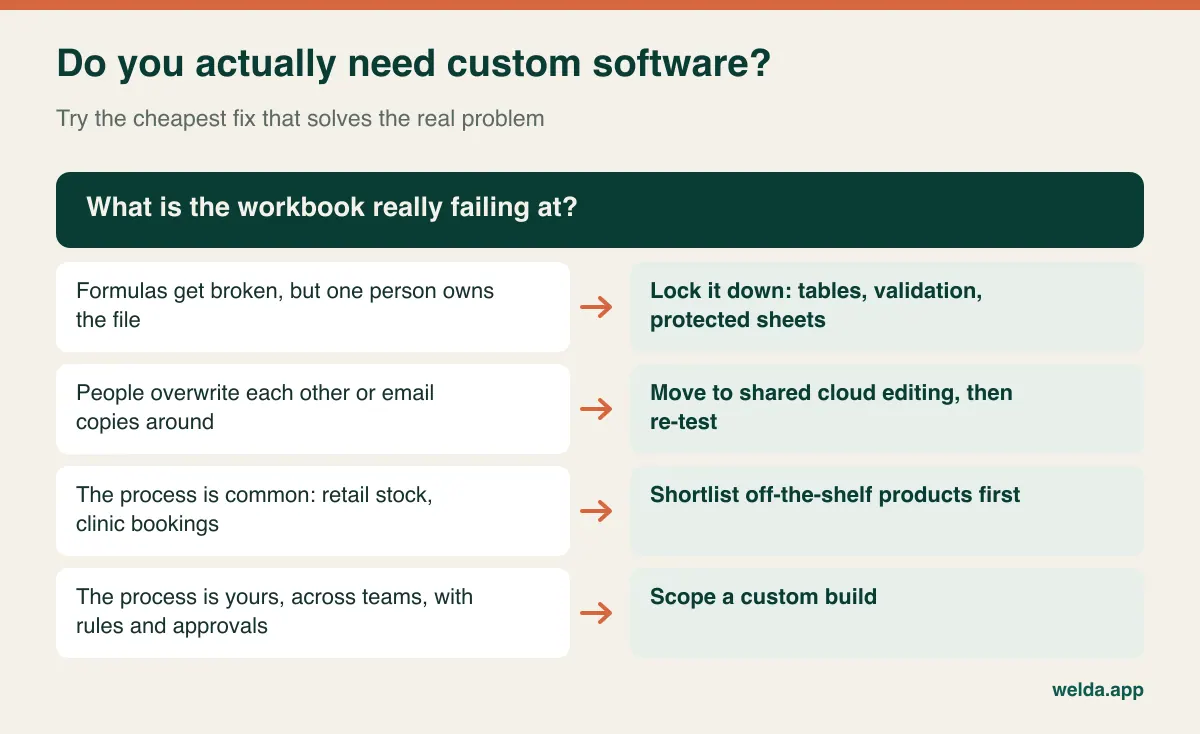
- Harden the workbook. Convert ranges to structured tables, add data validation to the columns people type into, protect the formula cells, and write a one-page note on how the file is used. It is a few days of effort and often removes a whole class of errors.
- Fix how it is shared. If the main complaint is emailed copies and overwritten changes, move the file to a shared cloud location and use co-authoring. Do check your macros first, because they generally do not run in the browser version of Excel.
- Automate the hand-offs. If your tools are fine and the problem is retyping between them, an integration or automation may be all you need. Our workflow automation examples show what that can look like.
- Check the market. If the workbook does something common, a product almost certainly exists. If what you are tracking is retail stock and sales, look at inventory software before anything custom; our guide to moving from Excel to inventory software covers that path, and Welda Stock is our own product for it, with product and customer import from Excel included. If it is clinic, salon or studio appointments, Welda CRM has a 7-day free trial you can test with your real work.
Only after these does a custom build start to make sense. That sequence also helps your budget request, because you can show what you already tried and why it was not enough.
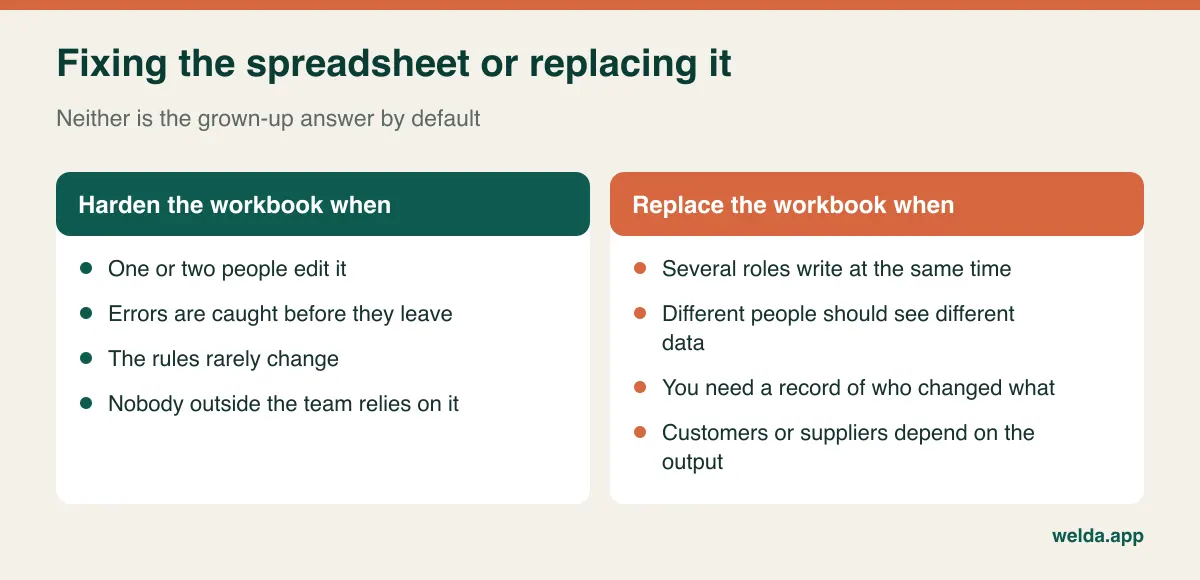
Keep a 90-day signal log
Opinions about spreadsheets are cheap and very loud. Before you decide, log what actually happens for a few weeks, or reconstruct the last 90 days from email and memory. Track four numbers: how many times a wrong figure reached someone outside the team, how many live copies of the file you can find, how many hours the month-end version takes, and how many people can repair the file when it breaks.
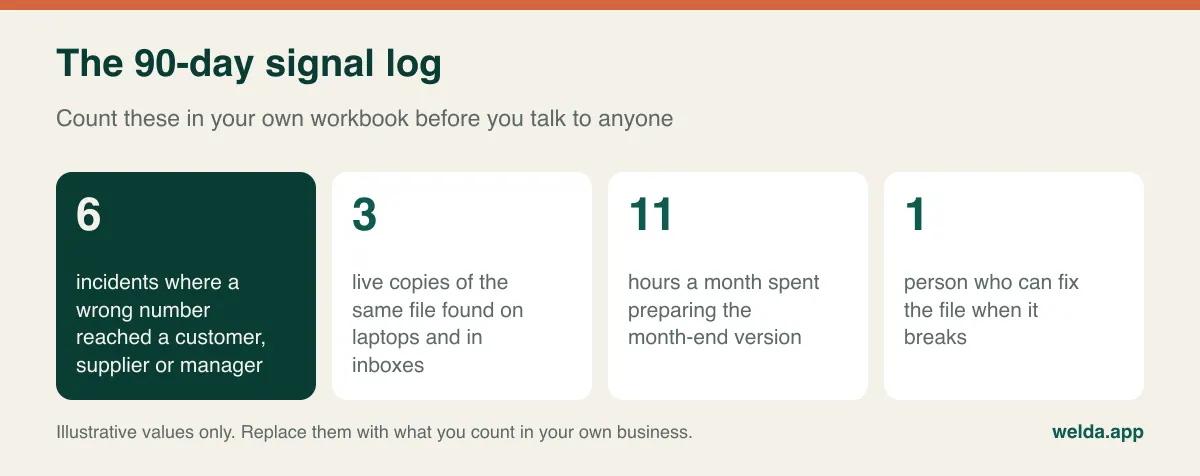
Then read the log with three thresholds in mind. Any one is worth attention, and two together usually justify a scoping conversation:
- Errors are escaping. Mistakes caught inside the team are an annoyance. Mistakes that reach a customer invoice, a shipment or a promised date cost money and trust.
- Access has outgrown the file. A sales rep should see their own accounts, a contractor should not see margins, and finance needs a locked month. Sheet protection was not designed to deliver that across a dozen roles.
- The business depends on a person, not a process. If the file's author left next month, who would keep it alive? Ask the question out loud and watch the room.
Now put a rough value on it, with honest assumptions. Suppose, purely as an example, three people spend a combined 20 hours a week entering, reconciling and correcting data in the file. Software will not remove all of that, since somebody still has to enter an order. If 8 hours remain afterwards, the realistic saving is 12 hours a week, not 20. Multiply by your own loaded labor cost, add your best estimate of what those escaped errors cost, and then compare the total against real quotes, including running costs. If the numbers do not support a build, that is a useful result too: harden the file and look again next year. For how those quotes are put together, see what drives custom software development cost.
Choosing the first module by elimination
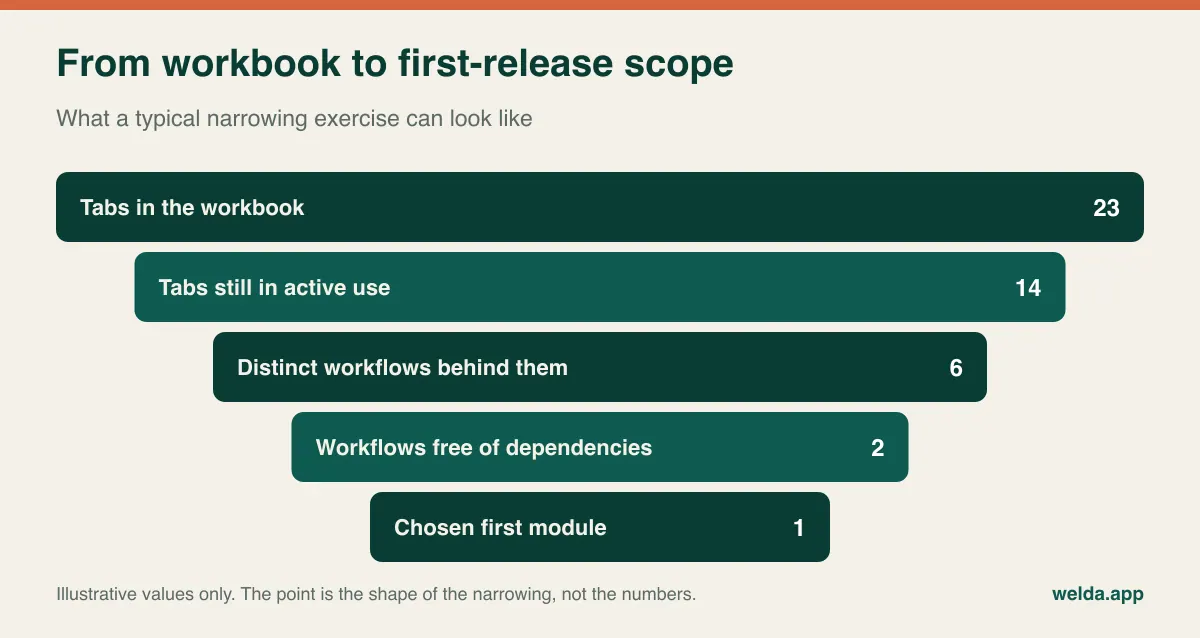
Teams tend to approach scope by listing everything they want and arguing over rankings. Elimination works better, because it surfaces the dependencies that wreck early projects. You are looking for a module that can succeed alone.
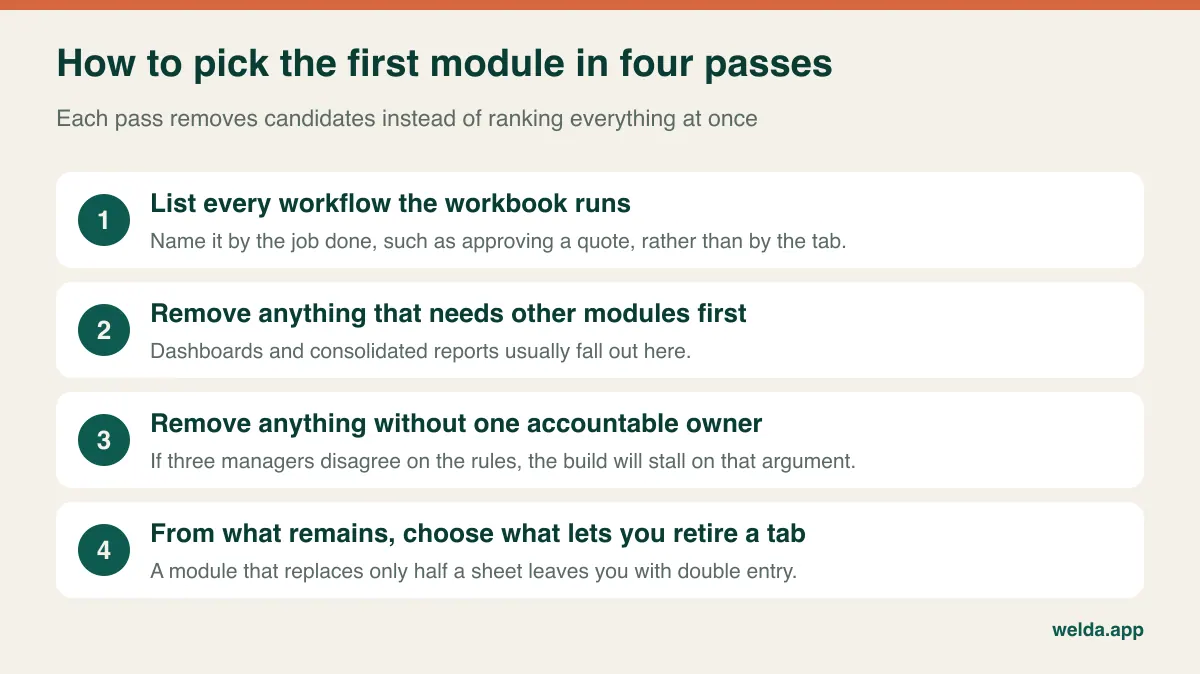
Consider a hypothetical installation company with a sprawling workbook. It has tabs for job status, crew allocation, materials, customer contacts, invoicing notes and a management summary. The owner wants the summary first, because that is the screen he looks at. Run the passes and the picture changes. The summary depends on all the others, so it drops out. Invoicing notes depend on job status and on an accounting system, so they wait. Crew allocation has two managers with different rules, which is an unresolved business disagreement rather than a software problem. Job status remains: the ops coordinator owns it, it is updated daily, and it can fully replace one tab.
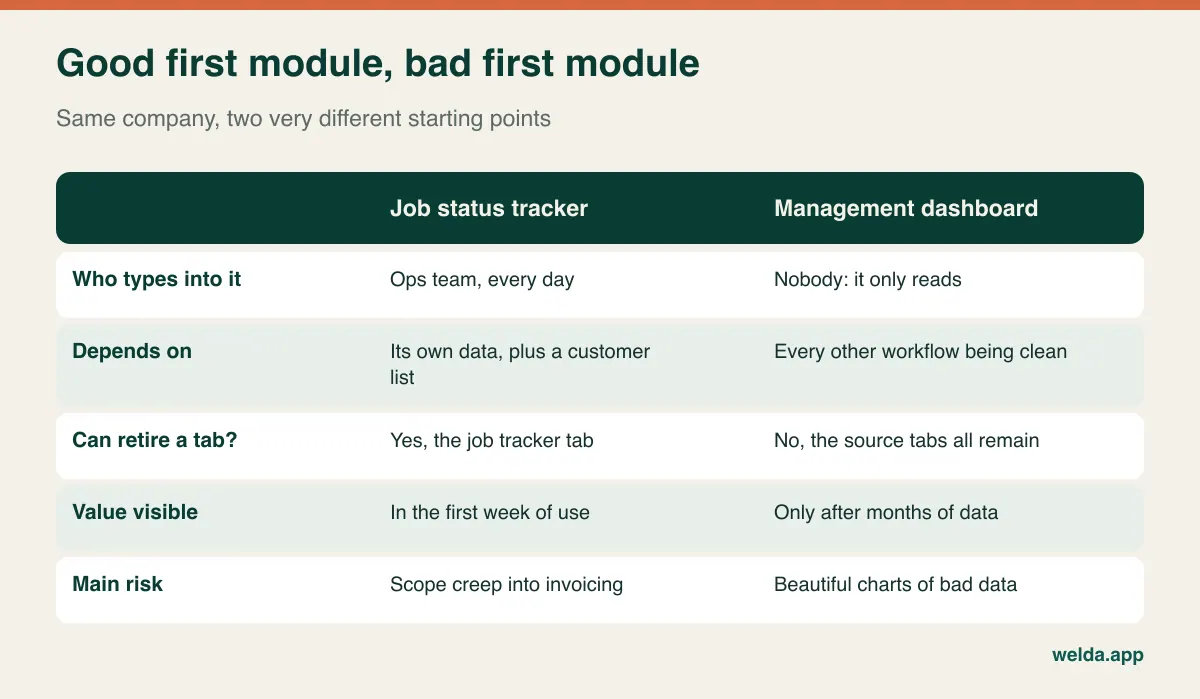
The principle underneath is that the first module should create trustworthy data rather than display it. Once job status lives in an application with required fields, validated dates and a change history, every later module has something reliable to stand on, and the management view gets dramatically easier to build. Asking for the dashboard first means paying for a very attractive chart of data you already distrust.
Two more checks before you commit. First, can you state the boundary in one sentence? "From the moment a job is booked to the moment it is signed off, everyone sees its status and who is responsible" is a boundary. "Digitize operations" is not. Second, will it let you switch the old tab off? A module that replaces half a sheet is worse than it looks, because now people must enter data in two places and they will resent both.
What to leave out of version one
The workbook's flexibility will tempt you to reproduce all of it. Resist that. Much of what is in the file exists only because the file was the only tool available, and a good chunk of it is not used by anyone anymore.
Good candidates to postpone are customer-facing portals, automated notifications, secondary integrations, role variations you can handle with a manual workaround for a few months, and rare edge cases. The test for an edge case is simple: how often did it occur last year, and what would it take to handle it by hand? If it happened twice, a note and a phone call may be fine for now.
A few things should not be postponed, even though they look unexciting. Keep an export to Excel from day one. Your team has real analytical habits, and you want them to keep analyzing, just not to keep the master record in a file. Build in permissions and a change history, because retrofitting them is unpleasant and they are often why you are doing this at all. And think through the data model with the next two modules in mind. You do not need to build them, but you do not want to discover that a job can only ever have one customer because version one assumed it.
Your workbook is the best brief you will ever write
Written requirements tend to describe how a process is supposed to work. A workbook shows how it actually works, including the exceptions no one remembered to mention. Before you speak to a developer, sit down with the people who use the file daily and walk through it together. Write down what each color means, because color is usually an undeclared status field. Unhide the hidden sheets, since they hold reference lists and rates someone will need to maintain. Search for hard-coded numbers in the middle of formula columns: each is either a bug or an undocumented exception, and you need to know which. Mark the columns nobody has touched in a year.
Then write out two or three real scenarios from start to finish, using real records with sensitive details masked. Give every vendor the same scenarios, and quotes become comparable. Without them, one vendor is pricing your process and another is pricing their guess about it. For background on the wider decision, our explainer on custom software covers the types of build and how the development process runs.
When you meet vendors, these questions tell you more than a portfolio does:
- Who reads our workbook, and when? Is that work in the proposal or assumed to be done by us?
- Who cleans the data and how many rehearsal imports are planned?
- Will the people who use the file see screens and flows before code is written?
- Who owns the source code, documentation and accounts, and what is handed over if we part ways?
- What does post-launch care cover, and how are new requests scoped and charged?
- Can we export all of our data, in a usable format, whenever we want?
- How would the design change if a second module arrived in six months?
On commercial terms, the things that move a price are business rules, roles, integrations, data cleanup and ongoing maintenance. Screen count is a poor proxy: three screens enforcing thirty pricing rules can be harder than a dozen simple forms. Compare proposals by what they include and what they exclude. The shortest proposal is often just the one with the most unstated assumptions, and those assumptions tend to return as change requests. If somebody quotes confidently without having seen the file, ask what the number is based on.
Compliance, money and time zones: what a workbook hides
Spreadsheets tend to carry regulated data simply because it was convenient to paste it there. None of what follows is legal or tax advice, and rules vary by country, so involve your own advisers. It is still useful to raise these points during scoping.
Personal data. Customer, employee or patient details in a workbook are subject to whichever privacy regime applies to you, such as GDPR in the EU, UK GDPR, or various national and state laws. A file on laptops, in inboxes and on personal phones makes it hard to answer who has access, or to delete a record everywhere. Moving to an application does not make you compliant on its own, but role-based access, a single location for the data and an access history make the job far more manageable. Ask any vendor where data will be hosted and how deletion requests are handled.
Financial records. If the file feeds invoices or the general ledger, avoid rebuilding accounting logic and tax handling in your new tool. Most businesses are better served by sending clean data to the accounting system they already use, so check early whether that system has an API or a reliable import format. The answer can change your scope substantially. If you are subject to audit controls, tell your auditor what is changing before it changes.
Currencies and time zones. International operations often hide logic that is easy to miss. Which exchange rate applies: the one on the quote date, the order date or the payment date, and where does it come from? When a team in one country marks something due today, whose today is it? In a spreadsheet, people apply these rules in their heads. In software, they must be written down, which is precisely why this conversation should happen before development and not during the first month-end close.
The week people go back to the old file
Sooner or later, in almost any migration, somebody hits an issue on a busy day and opens the workbook again "just for now." Once one person does that, you have two sources of truth, which is worse than the problem you started with. Plan for it, because good intentions will not be enough.
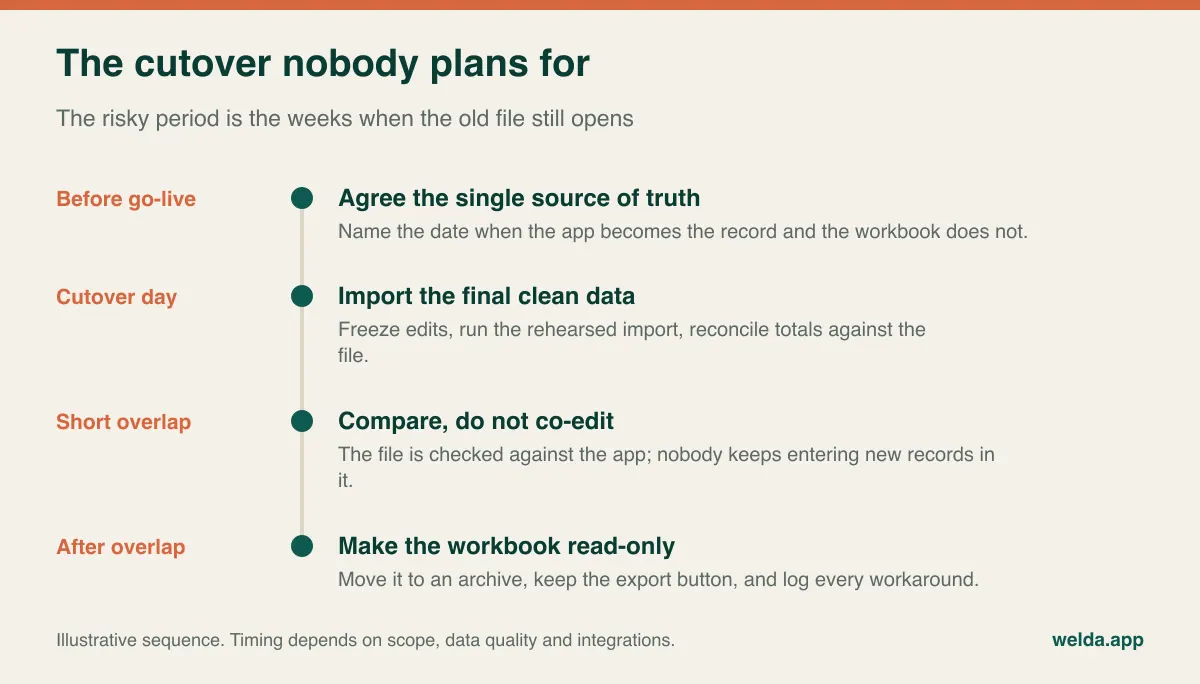
Agree on a cutover date and do not schedule it during your peak season or a month-end close. Run at least one rehearsal import so that reconciling totals against the workbook is a routine, not a discovery. Make the person who used to maintain the file the first point of contact, because they know the process best, and their authority over the new system matters more than any training deck. Train on real work in short sessions rather than a single long demo.
Finally, keep a workaround log. Each time someone has to leave the application to finish a task, they write it down. That list is your most honest requirements document for the next release, and it tells you what to build second. Return to the elimination passes with it: the data the first module now produces will have changed which workflows can stand on their own.
If you want to talk it through with Welda
Welda builds custom web applications, internal tools, process automations, integrations and dashboards, and we also build and run our own products, Welda Stock and Welda CRM, in production. If you have decided to replace Excel with custom software, our process starts with discovery and requirements. We then plan the data model and put flows and interface in front of you before any code is written, deliver in increments, and train your team at launch. You own the source code and documentation, and maintenance and support continue afterwards at agreed service levels.
We work from Istanbul, so if your data or contracts have location requirements, raise them in the first conversation and we will tell you plainly how we can handle them. Pricing depends on scope and integrations and is settled in a tailored quote after a free consultation. Bring the workbook if you can. And if it looks like hardening the file or an existing product would solve your problem, we would rather say so. You can read more about how to replace Excel with custom software step by step on our service page.
Frequently asked questions
Our workbook is a mess. Should we clean it up before talking to anyone?
No. A messy file is a perfectly good starting point because it reveals how the work really happens. You will need data cleanup before migration, but deciding what to clean is easier once the first module is scoped. Otherwise you may spend weeks tidying tabs you were going to retire anyway.
We have a large macro-driven file. Is that already custom software?
Functionally, yes, usually without tests or documentation. That makes it a useful specification and a real risk if its author has left. Start by listing what each macro does and how often it runs, as many will turn out to be workarounds that disappear with a proper application.
Would a no-code tool or online database be enough?
It can be, particularly for a small team with simple permissions and one workflow, and it is often a good way to test an idea. Before you commit, check how complex rules, role-based access, data ownership and exports will work as you grow, since those are the same pressures that broke the spreadsheet.
How small is too small for custom software?
Headcount alone does not settle it. A small team with one narrow, costly, unusual workflow can justify a small module, while a much larger company doing something standard should buy a product. Use the signal log and the savings estimate instead of a rule of thumb.
Will we stop using Excel altogether?
You should not, and you do not need to. Excel remains an excellent tool for analysis and one-off modeling. What changes is its role: the master record moves to the application, and people export what they need to work with.
How do I find out what this would cost?
Any number given before seeing the workflow would mislead both of us. In a free consultation we look at your file, the first-module boundary and the integrations involved, and the quote is prepared from there. You can reach us at get@welda.app.