Build vs buy software comes down to one measurable question: how much of the work you actually do can an existing product handle? Buy when a product covers roughly 80% or more of your work, weighted by importance, with no critical gaps. Buy and extend when coverage sits between 60% and 80% and the gaps cluster in a few places. Build when coverage falls below 60% and the gap is in the process that makes customers choose you.
Those thresholds are a working rule of thumb we suggest, not a research finding. The value is in the exercise behind them, which forces you to separate what is truly specific to your business from what is merely habit. One disclosure before we start: Welda runs ready-made products (Welda Stock and Welda CRM) and also builds custom software, so we earn money on both sides of this question. The method below is designed to work whichever vendor you end up talking to, including ones that are not us.
The mistake in the question itself
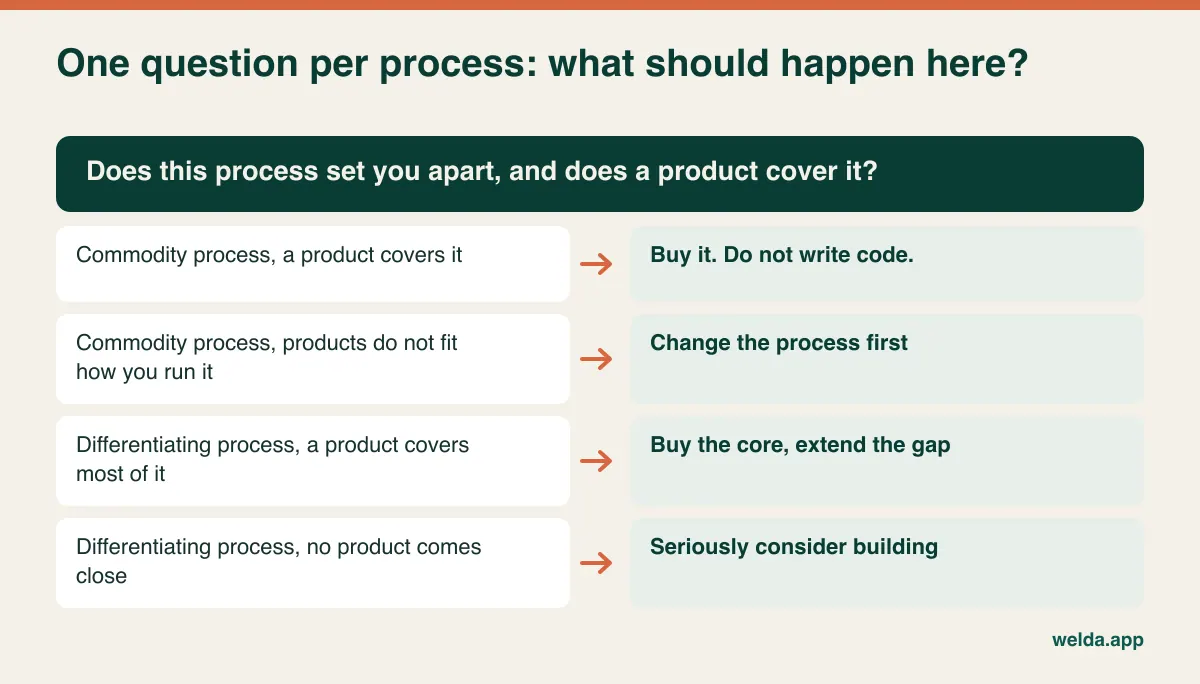
"Should we build or buy?" sounds like a single company-wide decision. It almost never is. A healthy business might run payroll on a standard package, customer records in a SaaS tool and quote calculation in a small application written just for them. Looking for one answer pushes you into one of two expensive errors: paying developers to recreate commodity features, or forcing the thing that makes you different into someone else's template.
So split your processes before you look at a single product. Commodity processes are the ones everyone does more or less the same way, such as invoicing, payroll, email and expense capture. Being original here gives your customers nothing, and your accountant would much prefer you were boring. Differentiating processes are the reason customers pick you: the complex quote you return in ten minutes, the service guarantee competitors will not offer, the pricing logic built around how your industry really buys.
A useful test: if a competitor started doing this process exactly the way you do it tomorrow, would it hurt you? If not, the process is commodity, and buying is nearly always right. If it would, the process deserves a serious look.
Be suspicious of your own answer. Almost every team believes "our business is different", and often what is different is an accumulation of workarounds from a decade ago. If customers cannot see the difference and would not pay for it, consider changing the process. Adapting software to fit a habit is the most expensive form of change resistance there is.
Scoring your coverage in two weeks
A vendor's feature list cannot give you this number. It tells you a feature exists, not that your job can be done with it. All you need is a spreadsheet and the people who actually do the work.
Write down the real tasks. For two weeks, ask the people running the process to log what they do, line by line. "Order management" is useless as a line. "Enter an order received as a PDF by email", "check the customer's contract rate" and "split a shipment across two jobs" are useful. A mid-sized process usually produces 30 to 60 lines. Have the people doing the job write them, because managers tend to describe how the process should run, and staff know how it does.
Weight each line. Give it a 3 if failure directly touches customers or cash, a 2 if it is frequent and time-consuming, and a 1 if it is occasional or minor. If much more than a fifth of your lines come out as 3, you are probably not being honest.
Score it live, against your own data. Sit with each candidate product and run your real examples through it, using this scale.
| What you see | Score | How to tell |
|---|---|---|
| Works out of the box | 1.0 | You watched it happen with no extra steps |
| Works through configuration | 0.8 | Set up in the admin screens, no code |
| Works through an integration | 0.5 | Requires connecting another system or automation |
| Needs a manual workaround | 0.2 | Spreadsheets, copy and paste, side notes |
| Not available | 0 | Cannot be done, or only "on the roadmap" |
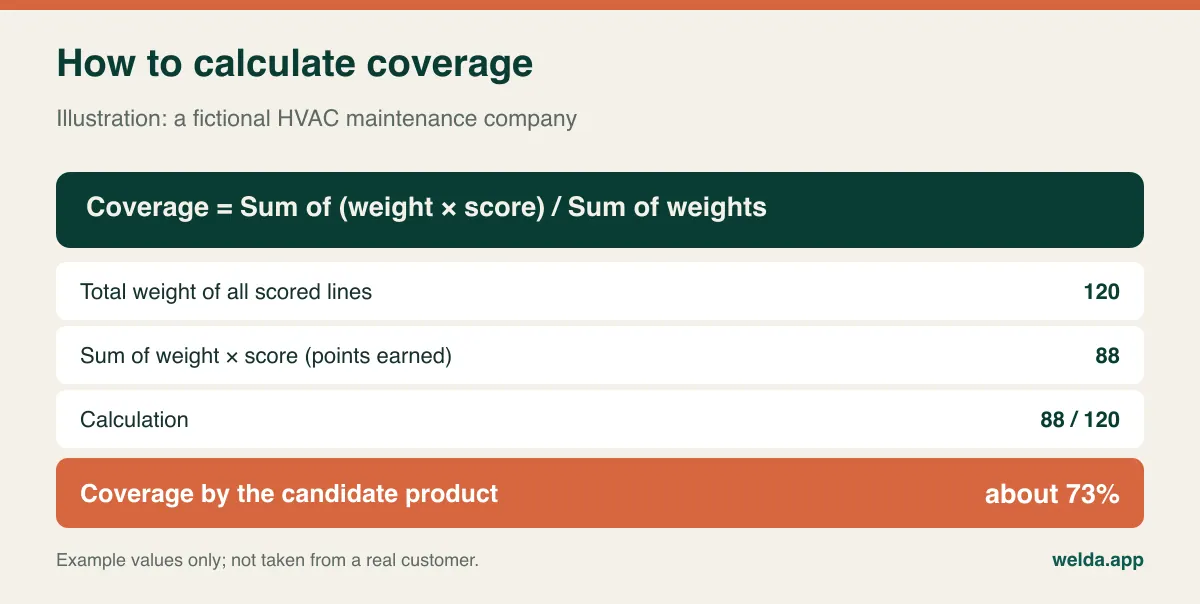
Do the arithmetic. Multiply each line's weight by its score, add the results and divide by the total weight. As an illustration, picture a fictional commercial HVAC maintenance company with 35 staff and a few hundred service contracts. After scoring a field service product line by line, it reaches 88 points out of a possible 120, which is about 73% coverage.
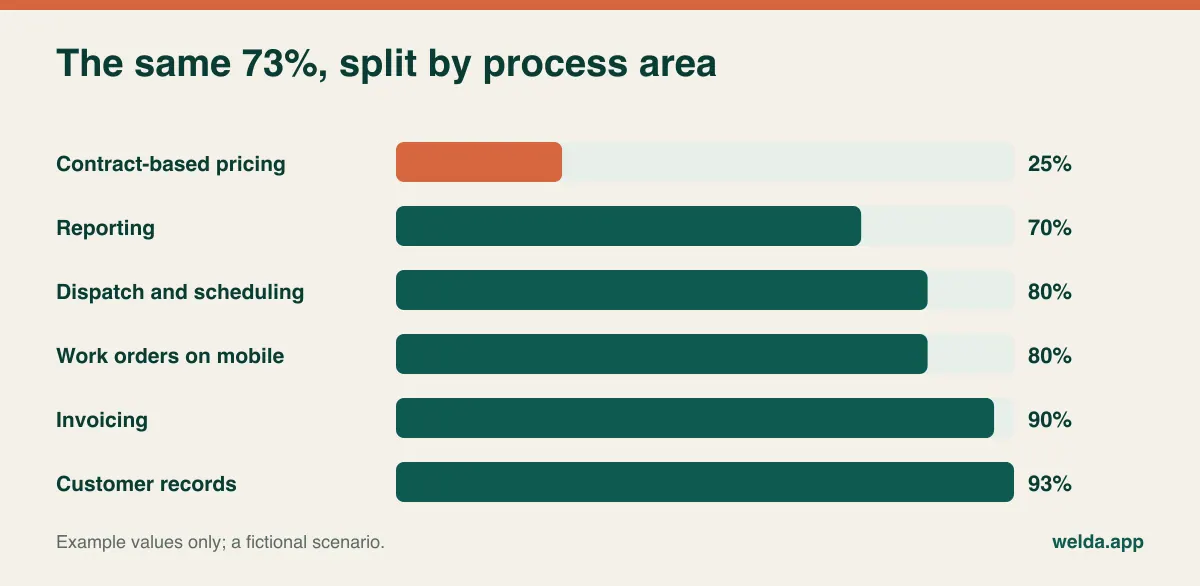
On its own, 73% tells you very little. Broken down by process area, it tells you plenty. Customer records, invoicing, dispatch and work orders are comfortably covered, while contract-based pricing barely registers. That shape does not say "build a custom field service platform". It says "solve one specific thing". You will not see it unless you keep the breakdown.
What the average hides: dealbreakers and quiet workarounds
A strong score can still mislead you in two ways. The first is dealbreakers. A weight-3 line scoring zero sinks the product even if everything else is flawless. A food distributor without lot traceability has no use for an otherwise excellent inventory system. Write your dealbreakers down and get them agreed before the first demo, because a polished demo has a way of quietly softening them.
The second is the running cost of workarounds. A 0.2 looks small on a spreadsheet, but someone pays for it every single day. Count it in hours rather than money, since hours are harder to argue with. In our illustrative example, three coordinators check contract rates in a separate spreadsheet and key them into each job. At 40 minutes per person per day and 22 working days a month, that comes to 44 hours a month. The figure does not include billing disputes from a mistyped rate, or what happens when the one person who understands that spreadsheet goes on holiday.
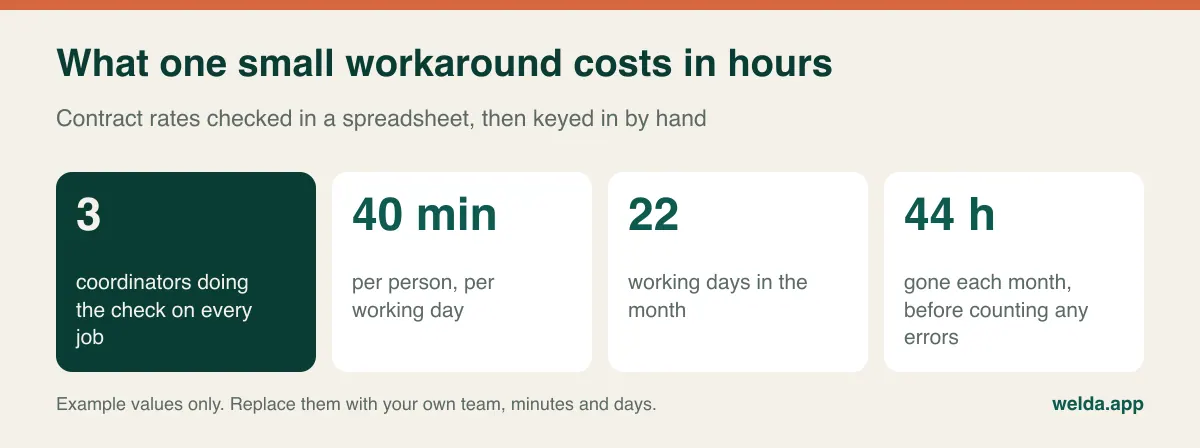
Run this for each workaround and total the results. It cuts both ways. Commissioning software to remove a copy-and-paste job that takes two hours a month is plain waste. Some gaps should stay open. When you decide to live with one, give it an owner and a written procedure, then stop revisiting it.
Buy and extend is usually the real answer
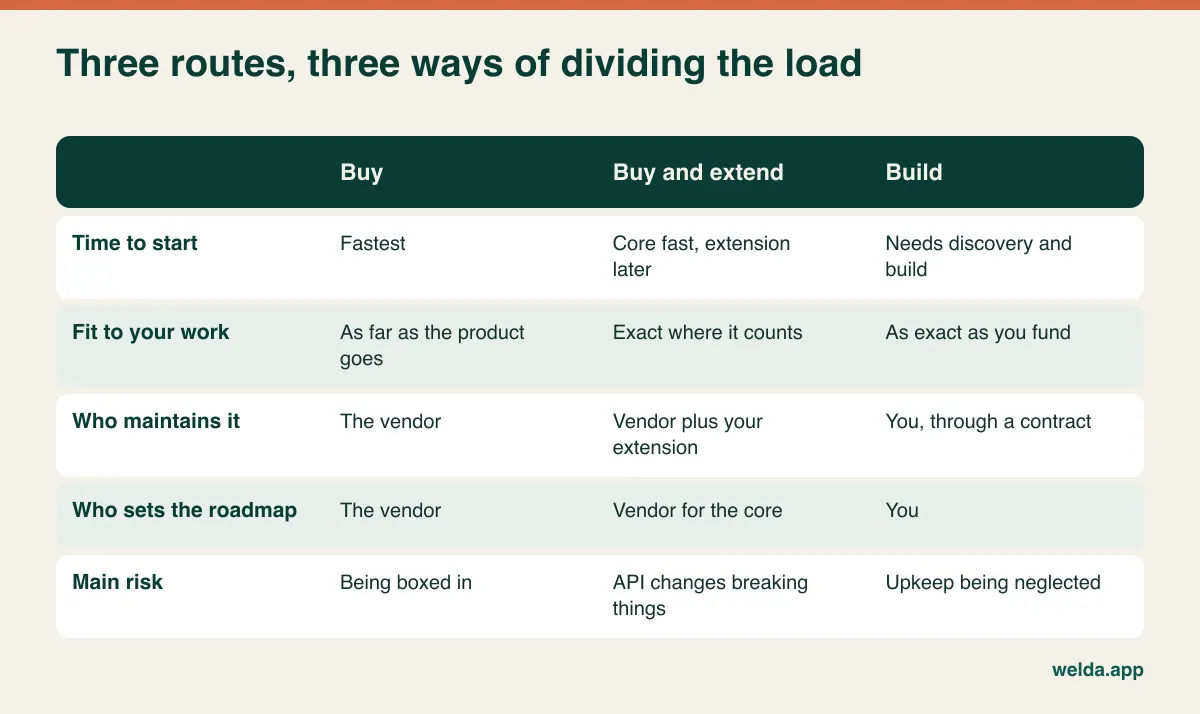
The framing of "build vs buy" hides the option most growing companies should take: buy the core, and build only the piece that is missing. For our HVAC firm, that might mean keeping scheduling and invoicing in a field service product, then adding a small rate engine that talks to it through an API.
This path has grades of its own. The lightest are automation tools such as Make, Zapier or n8n, where a flow like "when a job closes, update this sheet and notify this person" takes little or no code. Workflow automation examples are a good way to spot candidates. Next comes API integration, where two systems exchange data directly and nobody retypes anything. Heavier still is a small custom application alongside the product: a customer portal, a quote calculator, a one-screen tool for the field team.
All of this rests on one condition: the product's doors must be open. Check for a documented API, whether it is available on the plan you would actually buy, whether it allows writing data and not just reading it, and what the rate limits are. When a vendor changes its API, your extension changes with it, so put that in the maintenance budget. Buy and extend is not cheap custom software. It carries the constraints of both worlds, and in return gives you the best of each.
Two different conversations
A product demo and a meeting with a development team are not the same kind of meeting, and they should not get the same questions. With a product, you want to know how well it overlaps with your work and whether it will box you in later.
- Can you run our three messiest real scenarios now, using our sample data?
- For anything "on the roadmap", can you commit to a date in writing? What happens if it slips?
- If we leave, what data do we get, in what format and how fast? Can I see an actual export file?
- What has changed in your pricing model over the past two years? Which line grows when we add users, locations or transactions?
- Do your security reviews and certifications match what our largest customers ask of us?
That last question matters more than people expect. If you sell to larger companies, their procurement teams may send you security questionnaires asking about things like SOC 2 or ISO 27001. A vendor with those reports can make your answer easy. A custom system puts that work on you and your developers.
With a development team, you want to learn how they handle uncertainty, because the biggest risk in a custom project is rarely technical. It is the requirement nobody knew about at the start.
- What do we get before any code is written? Do we approve screens and flows first?
- How often will we see working software, and when can we try it with our own data?
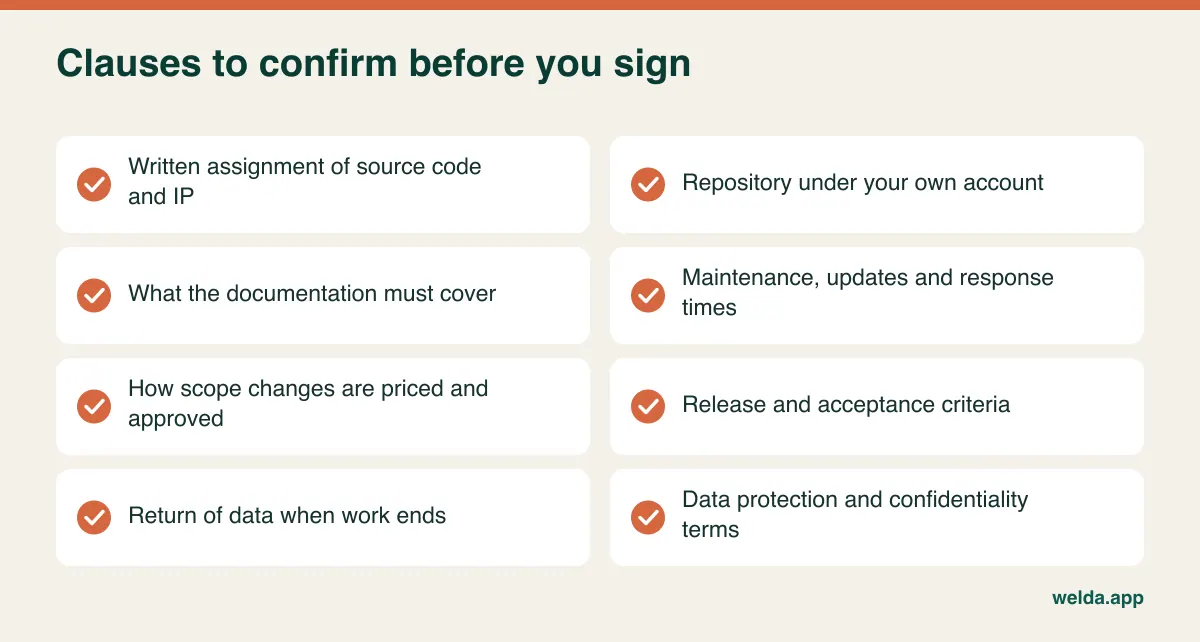
- How are scope changes priced, and who signs them off?
- If we stopped working with you tomorrow, could another team take over? What does the documentation actually cover?
- Who handles monitoring, updates and bugs after launch, and are response times in writing?
Be wary of any development shop that says yes before it has finished listening. A good team will also tell you what not to build. The same goes for products: a demo claiming it does everything is only a claim until the scorecard agrees.
What owning the code really means
The appeal of building is ownership. Nobody can raise your price, discontinue the product or ignore your roadmap. All true. But ownership also means responsibility. With a product, the vendor deals with the security patch, the screen a browser update broke and the failed server. With your own system, each of those is a line in your maintenance contract, or it is nobody's job at all.
Launch is also not the finish line, though it is often budgeted that way. Real users bring real requests, connected systems change, and libraries reach end of life. If the budget only covered development, the system starts ageing in its second year and gradually turns into the thing nobody dares touch. Treat custom software as an operating expense from day one, or it will become a legacy problem sooner than you think.
AI coding tools have changed part of this picture. They can make the first version of a small internal tool much faster to produce, which makes building tempting for more teams. They have not removed the work that comes after: understanding what the code does, keeping it secure and handling it once the person who prompted it has moved on. Cheaper writing does not automatically mean cheaper owning.
Then there is the key-person problem. If one freelancer wrote it and documented nothing, you may own it on paper but depend on them in practice. The real test of ownership is whether the source code lives in a repository you control, the documentation has been delivered and a different developer could set the system up alone.
Do not assume that paying for code makes it yours, either. In many jurisdictions, including the US and UK, a contractor can retain copyright unless the rights are assigned in writing. Have a lawyer check the clause for your country. With Welda's custom software service, the source code, IP and documentation belong to the client, but whoever you hire, get this in writing.
What not to build, whatever your score says
Some decisions do not need a scorecard. Where rules are set by governments and change regularly, a mid-sized business has no reason to keep its own code in step with them, and customers will never reward you for trying.
Tax and e-invoicing. VAT and sales tax rules, and e-invoicing mandates such as those using the Peppol network, vary by country and keep changing. Even if your custom system needs to issue invoices, connect it to a specialist provider or your accounting package. What you are building is the connection, not the compliance engine. Test credits, cancellations and corrections as well as the happy path.
Payroll. Parameters change, and errors land directly on your employees and your regulators. Leave this to a payroll product or provider.
Authentication and card data. Use established identity services and payment providers rather than writing your own login security or storing card numbers. The liability is out of all proportion to the benefit.
Personal data obligations. Neither route is automatically safe. If you handle personal data of people in the EU, GDPR may apply, and other regions have their own rules. With a product, look at its data processing terms, where data is stored and which subprocessors it uses. With custom software, access rights, logging, retention and deletion need designing from the start. Your legal adviser should review how this applies to you.
Keeping these out of scope also protects your budget. A familiar failure begins with a sensible project for a quoting tool, followed by "while we're at it, let's add invoicing". That is how a focused project loses its purpose.
Making quotes comparable over five years
Setting a monthly subscription beside a one-off project fee tells you nothing, since one recurs and the other arrives up front. The fair comparison fills in the same lines over the same five years for each option. It is also why a generic price range would mislead you: your scope, your number of integrations and your support expectations decide the result. Include at least the following:
- Up front: setup, discovery, design, development, data migration and training.
- Recurring: licences as users and locations grow, hosting, maintenance and support, and third-party services such as messaging.
- Change: new features each year, adapting to connected systems or regulation, and paid customisation on a product.
- Internal time: hours your managers and specialists give the project, reduced output in the first months, and remaining workarounds.
- Exit: what it would cost to move data and retrain the team if you left in year five.
Each side has a line people love to forget. For a product, it is per-seat pricing scaling with your headcount. For custom software, it is maintenance, which goes missing simply because it is not in the project quote. Ask every bidder to complete this sheet themselves. When a line comes back blank or marked "depends", ask exactly what it depends on.
If you build, start embarrassingly small
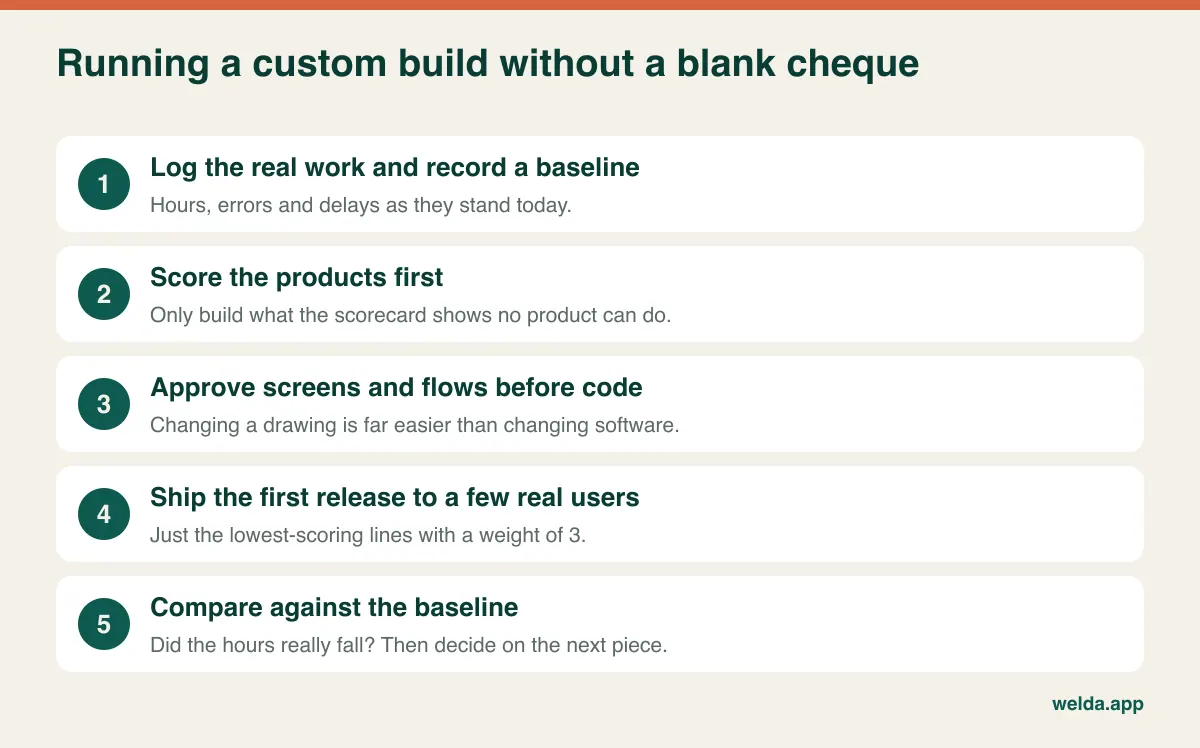
The classic custom software failure is cramming the entire wish list into version one. Your scorecard solves this. Version one is the set of lines weighted 3 that scored lowest; everything else can wait. For the HVAC firm, version one is a tool that works out the contract rate and writes it to the job. Nothing more until it has survived real jobs.
Write the success measure before work begins. "Faster process" is not a measure. "The 44 hours a month spent on contract rates drops below 5" is. Record today's baseline, or in six months nobody can say whether it worked. Name one internal owner who can make decisions and has real time for this each week. Without that person, even an excellent team will build the wrong thing beautifully.
Other traps to watch for: asking for a copy of your old screens (you inherit the old flaws), leaving data migration until the final week (old data tends to be worse than anyone admits), keeping end users away until launch, and running old and new systems side by side with no end date. That last one also applies when switching to a bought product. Once you cut over, close the old route, because trust in both systems erodes while two versions of the truth exist.
Where Welda fits, and where it does not
If your score favours buying and your business matches, we have two products. Welda Stock covers inventory and sales for retail. Welda CRM covers appointments and customer management for clinics, salons and studios, and its 7-day free trial, with all modules unlocked, gives you room to complete the scorecard with your own team. Outside those fields, we have no product for you, and we would rather say so: for payroll or manufacturing planning, for example, look elsewhere.
When products fall short, we build custom web apps, internal tools, process automation, WhatsApp Business API flows, system integrations and live dashboards. Work begins with discovery, screens and flows are approved before code is written, development ships in increments, and maintenance and support continue after launch. Because we run our own products in production, we know what daily operation costs, which makes it easier to tell a client not to build something. We are based in Istanbul, so raise time zones and data location early if they matter to you.
If you have completed the scorecard, bring it to a free consultation and we can review your build vs buy software decision together. If you have not, your three messiest scenarios are enough to start. Pricing depends on scope and integrations, so that conversation is where the figure gets settled too.
Frequently asked questions
Is it cheaper to build or buy software?
Buying usually takes less money up front. Over five years, the answer depends on your user growth, integrations and remaining manual work, so run the same lines for each option. We can go through a build vs buy software comparison with your numbers in a free consultation.
Should a small business ever build custom software?
Most should buy first. The exception is one process at the heart of the business that no product handles well. There, a small application scoped to that process alone can make sense at any company size. Our explainer on what custom software is and when you need it covers the basics.
Is a highly customised product the same as custom software?
Configuration is fine. Paying a vendor for bespoke code is different: ask whether that code survives each upgrade, and who pays when it does not. The more you customise, the further you drift from the main benefit of buying, which is painless updates.
How long does a custom build take?
Scope and integrations decide that, so any single figure would be guesswork. The more useful question is how soon you will see a working first release. With incremental delivery, you can test the most critical piece early and base later decisions on what you learn.
Can we start by buying and build later?
Yes, and it is often the healthiest route. Using a product for a while clarifies your needs better than any workshop. Protect that option by testing early that you can export all your data in a usable format. If the product is SaaS, it helps to understand how cloud software works and where your data lives.
What if our team disagrees on the answer?
That is useful information. Disagreement usually points at lines that were weighted differently, or at a process that different people run differently. Score those lines together with the people involved. The argument tends to shrink once it is about a specific task rather than a general preference.