Custom CRM development cost comes down to five things far more than the number of screens: how many systems it must integrate with, how complicated your data model is, who is allowed to see and approve what, how messy your existing data is, and what it takes to keep the system running after launch. A custom build pays off when your sales process structurally does not fit packaged tools and that mismatch costs you measurable hours and lost deals every month. If the gap is a missing field or a broken sync, it almost certainly will not pay off.
A figure quoted before anyone has seen your scope is either padded for risk or based on a misunderstanding of the work, so generic ranges tell you little about your own project. Three tools help far more: a way to estimate whether the investment makes sense for you, a method for scoping the project so that vendors can quote it properly, and a framework for comparing the proposals when they arrive.
What actually drives the number
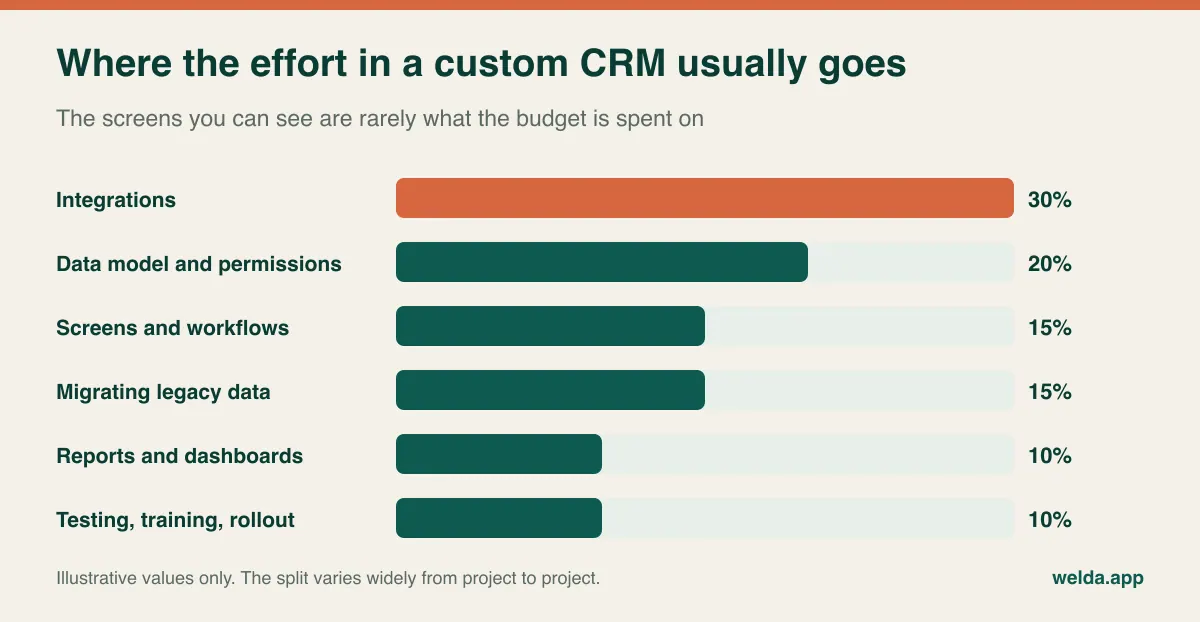
When companies ask for a custom CRM quote, they tend to describe what they can picture: a contact list, a pipeline board, a quote form. Those are the easy parts. Most of the budget goes into work nobody sees in a demo, which is why two vendors can read the same brief and return wildly different numbers.
| Cost driver | What makes it expensive | Answer this before you talk to anyone |
|---|---|---|
| Integrations | Poor third-party APIs, two-way sync, handling failures and conflicts | Which systems must connect, and which one is the source of truth for each piece of data? |
| Data model | Nested relationships among parents, subsidiaries, partners, sites and contracts | Can one deal involve several companies? Can one contract cover several sites? |
| Permissions | Territory or partner-level visibility, multi-step approvals | Who sees whose accounts? Who can sign off a discount, and up to what limit? |
| Pricing logic | Multi-currency, tiered discounts, configurable products, quote versions | Are your pricing rules written down, or do they live in one person's head? |
| Migration | Number of sources, duplicates, inconsistent records, attachment history | How many spreadsheets and systems are involved, and who will clean them? |
| Mobile and field use | Offline mode, location, photo capture | Are your reps really in the field, and how many seconds do they have between visits? |
| Reporting | Live dashboards, historical comparisons, audit trails | What does management decide each week, and from which number? |
The integration line deserves the most scrutiny. Reading data from a well-documented accounting API is a modest task. Keeping two systems in two-way sync, where either side can change a record and someone has to decide which one wins, is a much larger one. When a vendor asks a lot of questions about this and another one asks none, the second is not cheaper. It has simply not noticed the problem yet. If the mechanics are unfamiliar, our explainer on how API integration works will help you hold that conversation.
The second-largest swing factor is rules. A pricing rule you can state in a sentence takes little effort. A rule that begins "usually, except for these three distributors, unless the order includes..." can absorb weeks of discovery and testing. Writing your rules out before you request quotes is the cheapest cost-reduction work you can do, and it will often reveal that a few exceptions exist only because nobody ever removed them.
The costs that stay out of the first quote
A proposal describes what the vendor will deliver, not what the project will cost your company. Those are different totals, and the gap between them is where budget surprises come from.
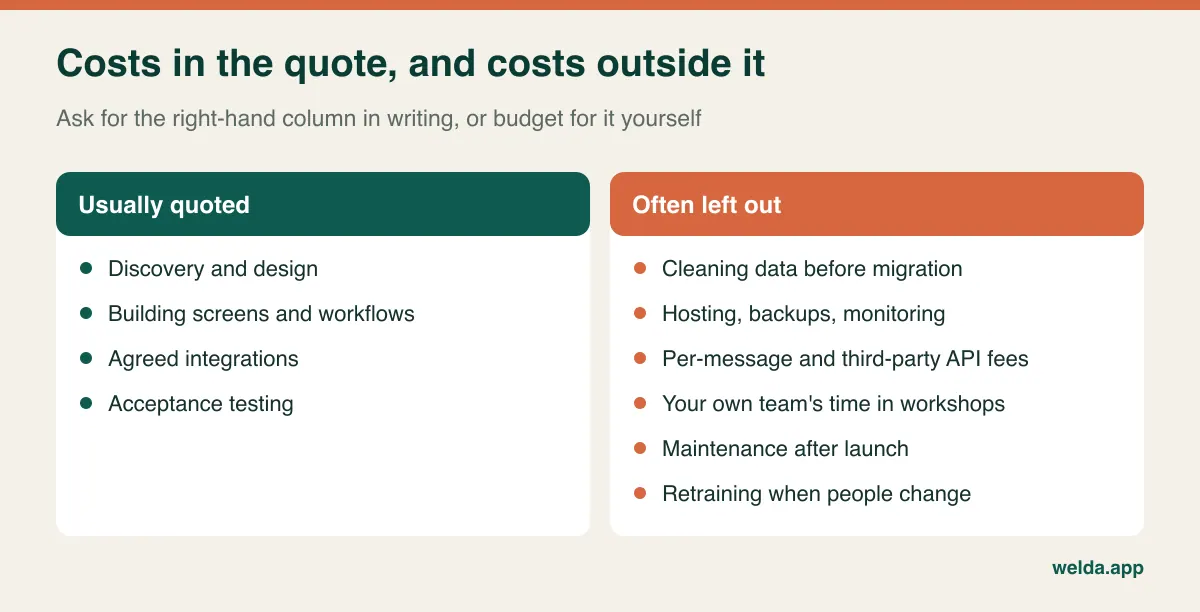
Your team's time is the largest of these, and it never appears on an invoice. Your sales lead will spend hours in workshops, reviewing prototypes and testing. Somebody has to merge duplicate accounts by hand, because no vendor can decide which of your five "Acme" records is the real one. Plan for this explicitly and take it off someone's regular workload, or it will happen badly in the evenings.
Recurring costs come next. Hosting, backups, monitoring and security patches continue forever. Usage-based services such as messaging APIs, telephony, enrichment data or email sending are billed by third parties and rise with volume. Every external system you connect will eventually change its API, and each change means maintenance work. A useful question when reading any proposal: "Assuming we add no new features at all, what will it take to keep this running for three years?" If nobody can answer, you do not yet know your cost of ownership.
Finally, there is opportunity cost. While your team is building a CRM, it is not doing something else, and the first months of a new system typically feel slower than the old one, even a bad one. A switch planned for your busiest quarter carries a cost that no spreadsheet will show.
Buy, extend or build: the option most comparisons skip
The debate usually gets framed as off-the-shelf versus custom. There is a middle route that often makes more sense: keep the commodity parts (contacts, activity history, email sync) on an established platform, and build only the part that makes your process different as a separate application connected through the API. A quote calculator, a partner portal or a contract renewal engine are typical candidates.
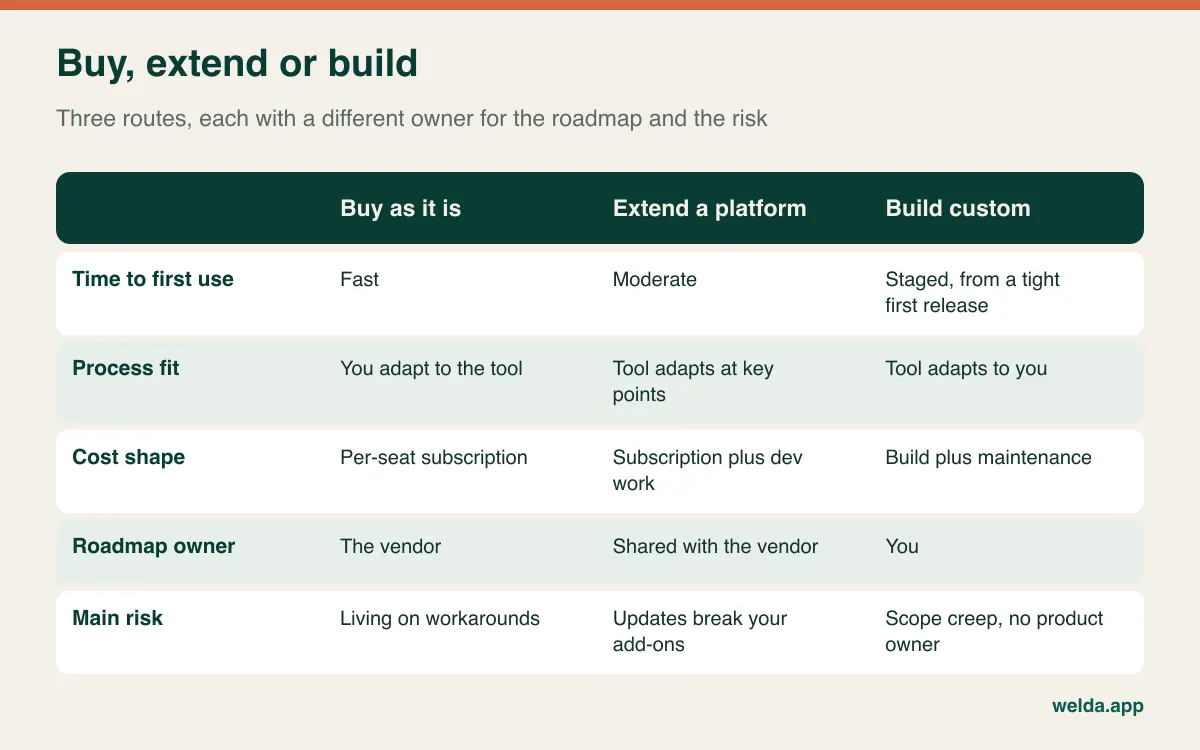
Extending shrinks the initial investment and keeps the decision reversible. If your custom piece proves valuable and weight gradually shifts toward it, moving to a full custom system becomes a far safer conversation later. The downside is that you carry per-seat subscription fees and development costs at once, and vendor updates can occasionally break what you built.
Full custom has one cost people rarely mention: ownership. On a packaged product, the vendor manages the roadmap and you choose among what it ships. On your own system, somebody inside your company must decide what gets built next, say no to loud requests, and own the result. Without that person, the system slowly fills with screens that belonged to whoever complained most. For a broader view of this trade-off beyond CRM, see what custom software is and when a business needs it. And if you are still deciding whether you need a CRM at all, begin with our CRM guide for small businesses instead.
Sales models that genuinely strain packaged CRMs
The default setup of many packaged CRMs starts from one assumption: a company sells to another company through a single opportunity with one value. Many businesses work that way, and for them a custom build would be a waste. The hypothetical scenarios below are where that assumption tends to crack. Some platforms handle parts of them with add-ons or configuration, so test your own scenario before concluding anything.
Channel sales with overlapping claims. For example, an equipment maker sells through regional distributors, while a consultant specifies the product and an end customer holds the warranty. Two distributors register the same project. Who owns the deal, who gets the margin, and who sees the end customer's contact details? When these rules decide real money, a "partner" text field cannot enforce them.
Quotes that live through many versions. For example, a contract manufacturer quotes in euros, buys inputs in dollars and invoices in a third currency. The quote goes through five revisions over three months, and management wants margin for every version at the rate that applied on that date. The real work then moves to a spreadsheet and the CRM holds only a rounded total.
Revenue that begins after the signature. For example, a service company signs a multi-site maintenance contract where each site has its own start date, renewal terms and technician schedule. "Closed won" is the start of the relationship rather than its end, and sales, service and finance need one shared view of the contract.
Long, multi-party public or enterprise tenders. Deadlines, mandatory documents, consortium partners and compliance steps matter more than a probability percentage. A funnel with weighted stages describes this kind of selling poorly, and teams end up keeping the real tracker elsewhere.
Field reps with minutes between visits. A visit note is either captured on a phone in ten seconds, possibly with no signal, or not captured at all. Offline capability sounds like one small feature, but it changes the architecture and with it the budget.
One of these on its own rarely justifies a full build. Two or three together, with the real work happening outside your current CRM, is a strong signal that it is time to run the numbers. That is the next step.
A break-even you can run before anyone sends a proposal
Comparing a licence fee with a build quote misses the point, because most of the value sits in what the current setup leaks. So measure that first, in hours. For two weeks, ask each rep to keep rough notes on four activities: building or revising quotes outside the CRM, re-entering data between systems, compiling reports or follow-up lists by hand, and correcting errors caused by bad data. Fifteen-minute rounding is accurate enough.
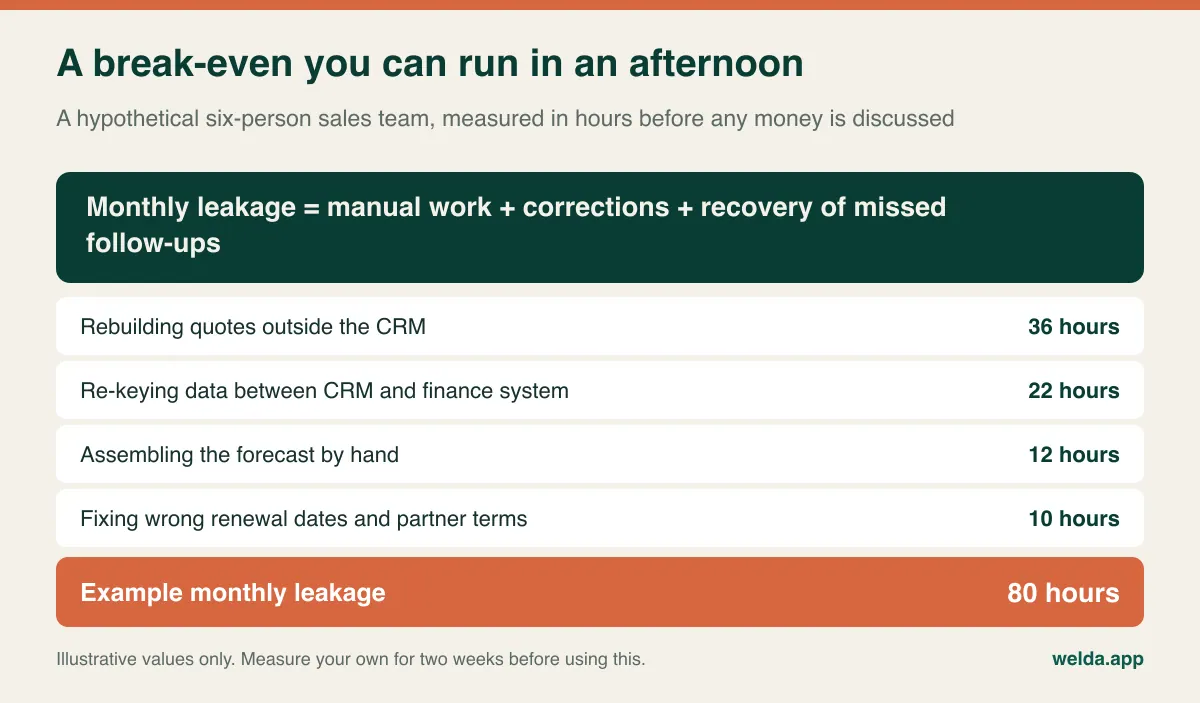
In this hypothetical example, 80 hours a month is about half of one person's working month. Before you get excited, test the figure honestly with three questions:
- How much of it really disappears? Even with automated quotes, somebody still checks them. Run your numbers again with half the savings and see whether the case survives.
- What does the freed-up time become? If reps use it for more selling conversations, it has value. If no pipeline is waiting for them, the saving exists only on paper.
- What could close the same leak for less? If one integration eliminates 50 of those 80 hours, the custom CRM has to justify itself against the remaining 30, not the full amount.
Then list what hours cannot capture: renewals missed because no rule flagged them, deals won at a margin no one could see, and account knowledge that left with a departing rep. Do not invent percentages for these. Write down the actual incidents from the past year. A list of five real events persuades a leadership team better than an estimated uplift, and it stands up better to scrutiny too.
The decision test then becomes simple. Multiply the remaining hours by your fully loaded hourly cost, add whatever real losses you can defend, and compare that with the build cost spread over a realistic system life plus the annual cost of running it. You can only finish this once you have actual proposals, but without the leakage number you have nothing to judge a proposal against. And if the number turns out to be small, you have just saved yourself an expensive project, which is as good a result as any.
Scope it as one deal, not a list of features
The fastest way to inflate your custom CRM development cost is to collect wish lists from every department and hand them over. Sales wants this, finance wants that, and leadership wants twelve reports. The result is a long project that nobody can use until very late. A better approach is to filter requests through what really happened on recent deals.
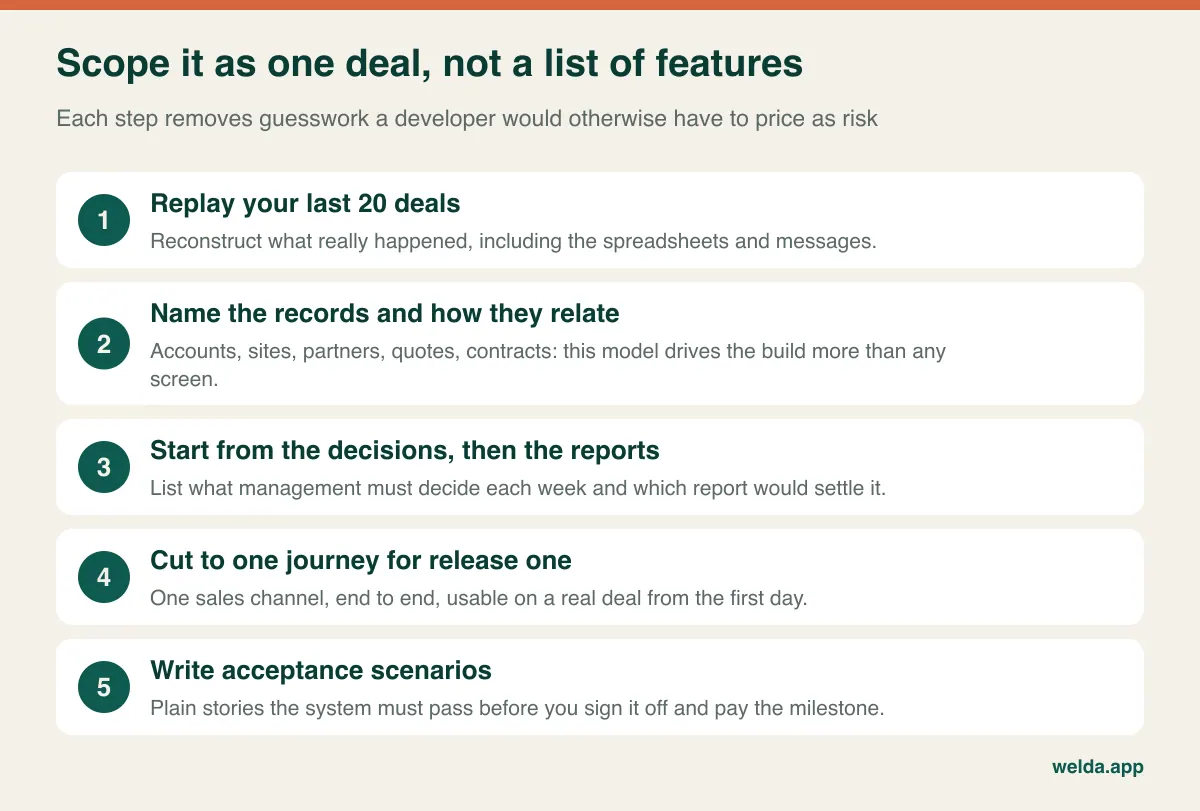
Replaying 20 recent deals, a mix of won and lost, is usually the most revealing exercise. Write down what happened from first contact to payment: who did what, in which tool. The real process almost never matches the one on the org chart, and much of the project's value hides in that difference.
The data model comes next, and it is the most expensive thing to get wrong later. Name the things your business tracks and how they connect. Does a contract belong to one site or many? Can a contact work for two companies? A developer can make better decisions from one page of this than from fifty pages of screen descriptions.
Work backwards from decisions rather than forward from fields. If leadership reviews discount levels by territory every Monday, you need those fields captured reliably. If no decision depends on a field, leave it out of release one. Every mandatory field is a small tax on your sales team, and they will pay it with made-up data if there are too many.
Then cut hard. A sensible first release might include account and contact records, rule-based quoting with version history, discount approval, a one-way push to the finance system, and a weekly follow-up list. The partner portal, mobile app and advanced dashboards wait for release two. One channel carried end to end beats four channels carried halfway, because a half-finished system simply becomes one more place to check.
Finally, swap feature names for stories. "Has a quoting module" is unverifiable. "A rep creates a quote in euros for a distributor, the regional manager approves the discount, and a revised version keeps the original visible side by side" can be built, priced and tested. This prep work is what makes your custom CRM development cost predictable. It is also close to how our custom software and automation team works: discovery first, then the data model and integration points, with interface and flows shown to you for approval before code is written, and delivery in incremental releases.
How to compare proposals so the numbers mean something
The gap between two quotes is often less about price than about where each one's scope stops. One might cover migration in a single line, while the other prices it by data source. The lower number may simply reflect a thinner understanding of the job. Send every vendor the same pack: the data model page, acceptance scenarios, the integration list and the questions below.
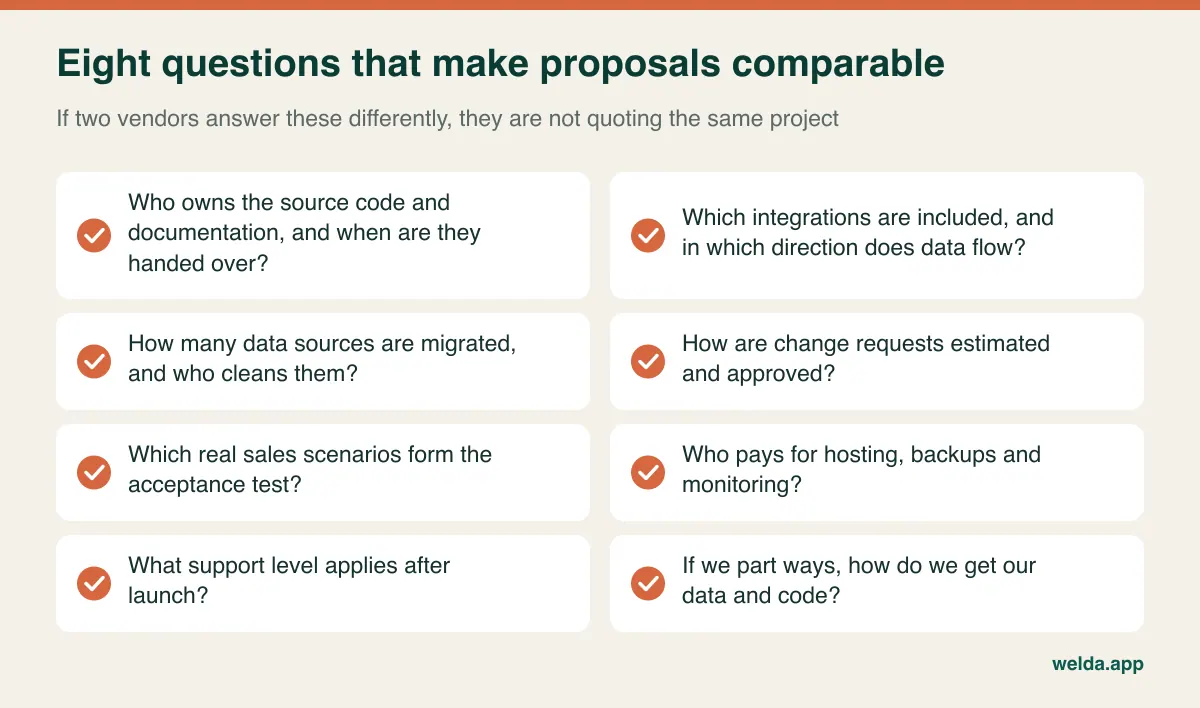
A few things in the meeting tell you more than the slide deck does:
- Ask to see something they run in production. Screenshots prove little. Ask who fixes things when they break and how updates reach users.
- Give them one messy scenario and watch. A team that replies "what's the exception to that rule?" is more reassuring than one that says "we can do all of it."
- Walk through a sample change request. This is a well-known source of mid-project conflict, so hear how it is estimated and approved while everyone is still friendly.
- Meet the people who will do the work. The person selling the project and those building it may be different, and fit matters over a long engagement.
The commercial model should follow how clear your scope is. A fixed price is comforting when requirements are truly settled, though the vendor will rationally include a risk margin. Time and materials is more flexible but needs a budget cap and transparent reporting. For most first-time CRM projects, the honest option is to fix the price for discovery and release one, then plan later phases with what you learned. That also gives you a clean exit point, should the partnership not work out.
Selling across borders: data rules to raise early
A CRM is usually the densest store of personal data your company owns: names, phone numbers, call notes, and sometimes a rep's frank opinion of a buyer. The rules vary by country and change over time, so treat what follows as a list of topics to take to your legal adviser, not as legal advice.
- Which regimes apply. If you hold data on people in the EU or UK, GDPR and its UK counterpart are likely to matter even if your company is based elsewhere. US state privacy laws and other national rules may apply depending on where your contacts and your business are.
- Retention and deletion. Decide how long you keep a lead who never bought, and have the system delete or anonymise accordingly. Bolting this on later is much harder.
- Marketing consent. Email and SMS rules differ considerably across markets. Store where and when consent or an objection was recorded alongside the contact.
- Access and audit trails. Who can export the whole customer base in one click? Which changes are logged? This matters for security and also when a rep leaves for a competitor.
- Hosting and subprocessors. Know where data sits, who can access it remotely and which third-party services touch it. Some enterprise buyers will ask you these questions in their own security reviews.
- Tax documents. A CRM rarely has to issue invoices itself; many countries have specific e-invoicing requirements best left to your finance system. Decide which system holds the single truth for customers and invoices.
Why CRMs die after launch
A technically flawless custom CRM is still an empty database if reps avoid it. Training cannot rescue this later; it has to be designed in from the start.
The strongest single factor is the pipeline meeting. Until the weekly review runs from the system's own screen, nobody treats data entry as a priority. If a manager keeps asking for "a quick spreadsheet", the team hears that clearly. The most important line in your rollout plan therefore has nothing to do with software.
The second factor is what the system gives reps in return. If it only produces reports for management, it is extra admin for them. If the same data tells them who to call today, drafts their quote and warns them about a renewal they forgot, they have a reason to use it. Put your most experienced seller in the design sessions. They will spot real problems, and they will defend the system later among their colleagues.
The other usual failures are familiar: no single internal owner with authority to decide; automating today's mess instead of simplifying it first; forms with twenty mandatory fields, which get filled with nonsense; and migrating dirty data, which destroys trust on day one.
Moving over without losing live deals
A single big-bang launch day is the riskiest pattern for a team with active pipeline. The safer route is staged, with two goals: prove the system on real work, and never ask a rep to enter the same thing twice.
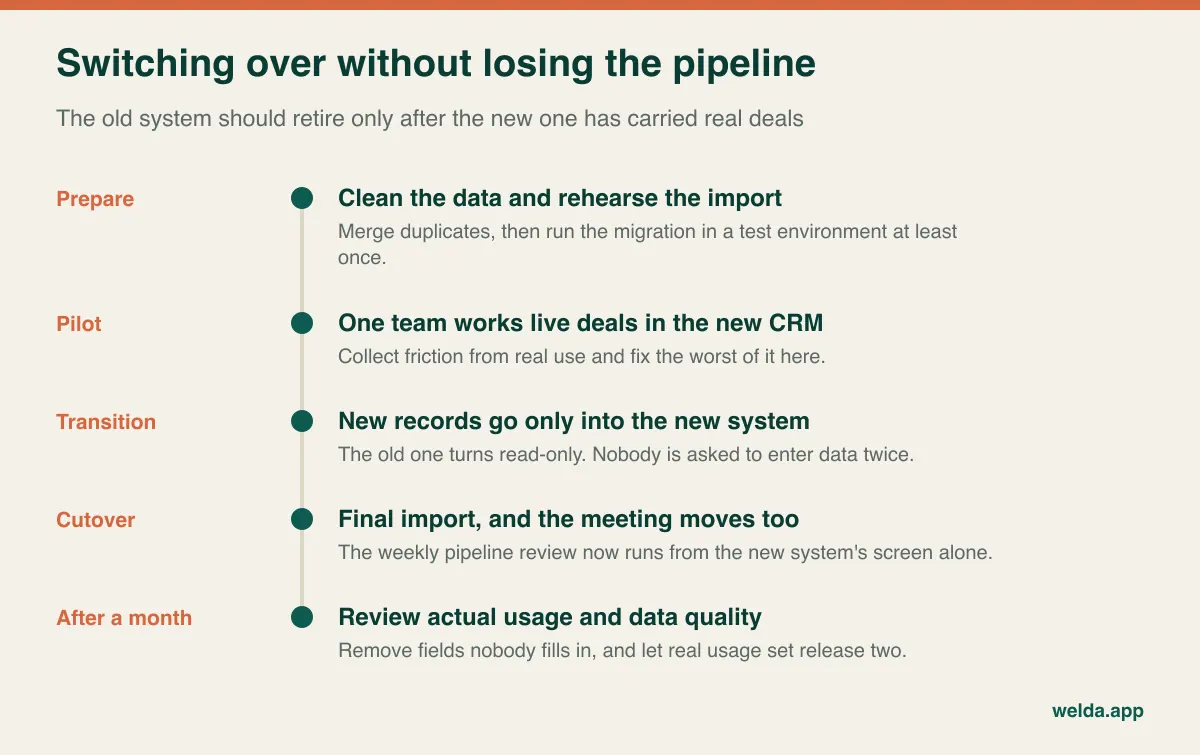
Before you close any old system, separately verify open opportunities, live quotes and upcoming renewals, since a loss there hurts most. If you are leaving a subscription product, export everything before cancelling and check that call history and attachments really came across. Then resist the urge to jump straight to release two. Watch for a few weeks which fields stay empty, which screens nobody opens and which reports get read. That is your real backlog.
Where Welda fits, and where it does not
We have two separate things that are easy to confuse. Welda CRM is a ready-made product built for appointment-based businesses such as clinics, beauty salons, hair salons and fitness studios. If that describes you, try it before you think about custom development; the 7-day free trial has all modules open. If you run a B2B operation with distributors, multi-stage quoting or long project sales, Welda CRM was not designed for that, and we will not pretend otherwise.
In that case we would be talking about custom work: web applications, CRM setups and customisation, REST and GraphQL integrations, WhatsApp Business API flows and dashboards, built by a team based in Istanbul that also develops and runs its own products in production. You own the source code and documentation, and post-launch maintenance is available at agreed service levels. If a call shows that a simple integration would solve your problem, we will tell you that as well.
Custom CRM questions buyers ask
What is the typical custom CRM development cost?
There is no honest typical figure, since integrations, data model, permissions and migration vary so widely. A reliable number only comes after scoping. At Welda, scope and price are settled after a free consultation, once we have heard what you need.
How many users do we need before custom makes sense?
Headcount matters less than process structure. Per-seat fees do grow with team size, but a small team handling complex, high-value quotes can benefit from a custom module, while a large team with a standard process may do perfectly well on a packaged tool. Your leakage calculation is a better guide.
Can we migrate data from our existing CRM?
Usually, but agree on the scope beforehand. Accounts and contacts are relatively simple; activity history, attachments and quote versions take more work. Allow internal time for deduplication, because only your team can settle which record is right.
How long does a custom CRM project take?
That depends on scope, integrations and how fast your side can make decisions, so a date given before scoping means little. A better question is when the first usable release will carry real deals. Keeping that release small is the most dependable way to shorten the wait.
Could low-code or automation tools do this instead?
Often, for part of it. Tools such as Make, Zapier and n8n can close many gaps between existing systems, and our workflow automation examples show what that looks like. They get fragile when complex permissions, large volumes or heavily nested rules come into play.
What happens if we part ways with the developer?
Settle this before you sign. The contract should say when and how source code, documentation and data are handed over. At Welda, source code, IP and documentation belong to the client, and standard technologies make it realistic for another team to take over.
If you have measured your leakage and a custom route is still on the table, the next step is a short conversation. Walk us through your last few deals, and we will tell you plainly what shapes your custom CRM development cost, or whether an integration alone would do. The consultation is free.