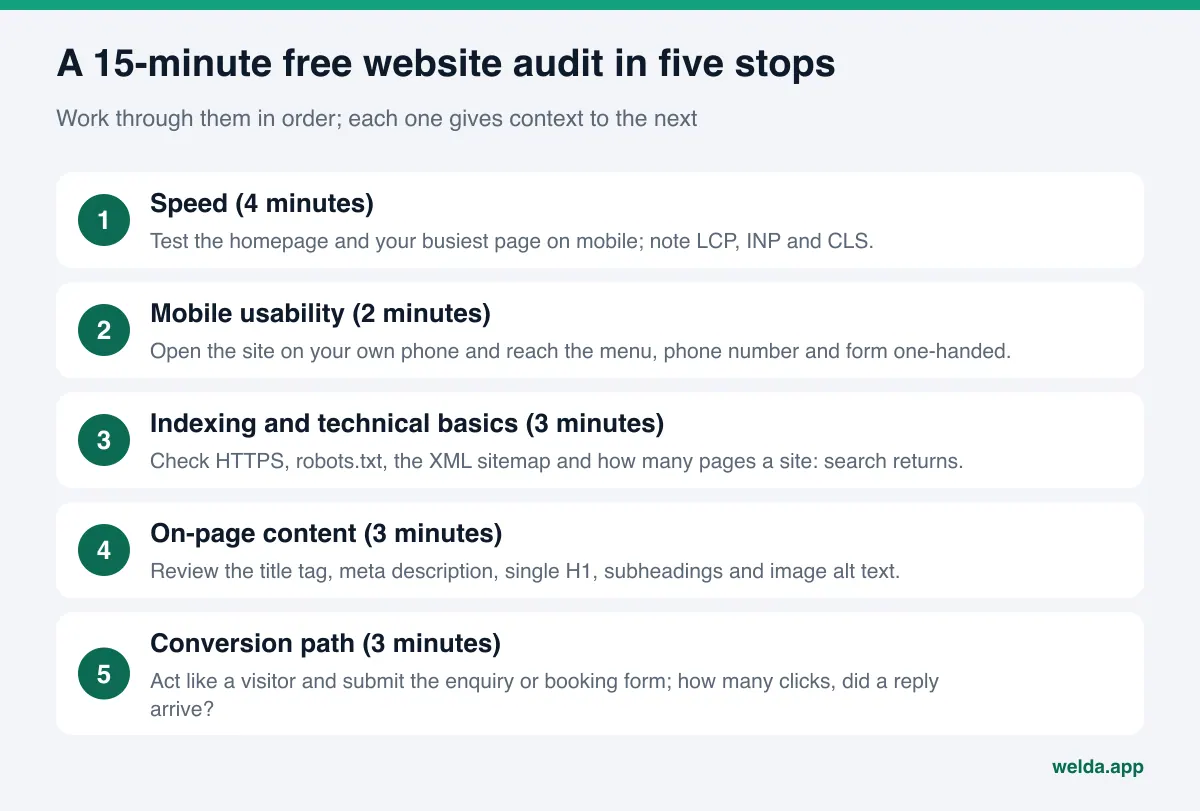
A free website audit doesn't need an expensive tool or a consultant. In 15 minutes you can check the five things that matter most on your own site: how fast your pages load, whether the site is comfortable to use on a phone, whether Google can crawl and index it properly, what your page content tells search engines, and whether a visitor can reach your enquiry or booking form without friction. At the end you will have one of three answers: "it's fine", "it needs a few fixes" or "the site no longer carries the business". If you want a deeper picture, Welda's free SEO report runs your site through more than 20 checks, scores it out of 100 and lists what to fix in order of priority.
This guide is for business owners and marketing leads who suspect their website isn't bringing in enough enquiries but aren't sure where the problem lies. Below we walk through how to run each check, how to interpret the numbers, what free tools can and can't tell you, and how to give an honest answer to the question that always follows: should we improve the site we have, or rebuild it?
What a free website audit measures, and what it doesn't
A website audit is a snapshot of where your site stands today. A useful audit answers three questions. Is the site technically sound, meaning can search engines find, crawl and understand it? Is it fast and usable, meaning do visitors see the content before they lose patience? And is it doing its job, meaning does it turn visitors into people who call, write or ask for a quote?
Free tools are good at the first two questions. Google's PageSpeed Insights measures speed, Search Console shows indexing status, and your browser's developer tools let you inspect titles and tags. But these tools give you a measurement, not a decision. "LCP 4.1 seconds" on its own doesn't tell you whether the cause is images, the server or the theme. The third question, conversion, can barely be measured by any automated tool, because why a visitor doesn't fill in a form also depends on your offer, your copy and your trust signals.
So treat a free audit as a screening test rather than a diagnosis. The goal is to find out which layer the problem sits in and to spend your time in the right place. Ranking losses, competitor comparison and backlink profiles call for a more thorough piece of work; we come back to those near the end.
Stop 1: Measure speed and read Core Web Vitals correctly
Give the first four minutes to speed. Enter your homepage address into PageSpeed Insights and look at the mobile tab. The desktop score is usually higher and reassuring, but Google evaluates the mobile version of your site, and most of your visitors probably arrive on a phone. Repeat the test for your second busiest page too; it's often a service or product page and can behave very differently from the homepage.
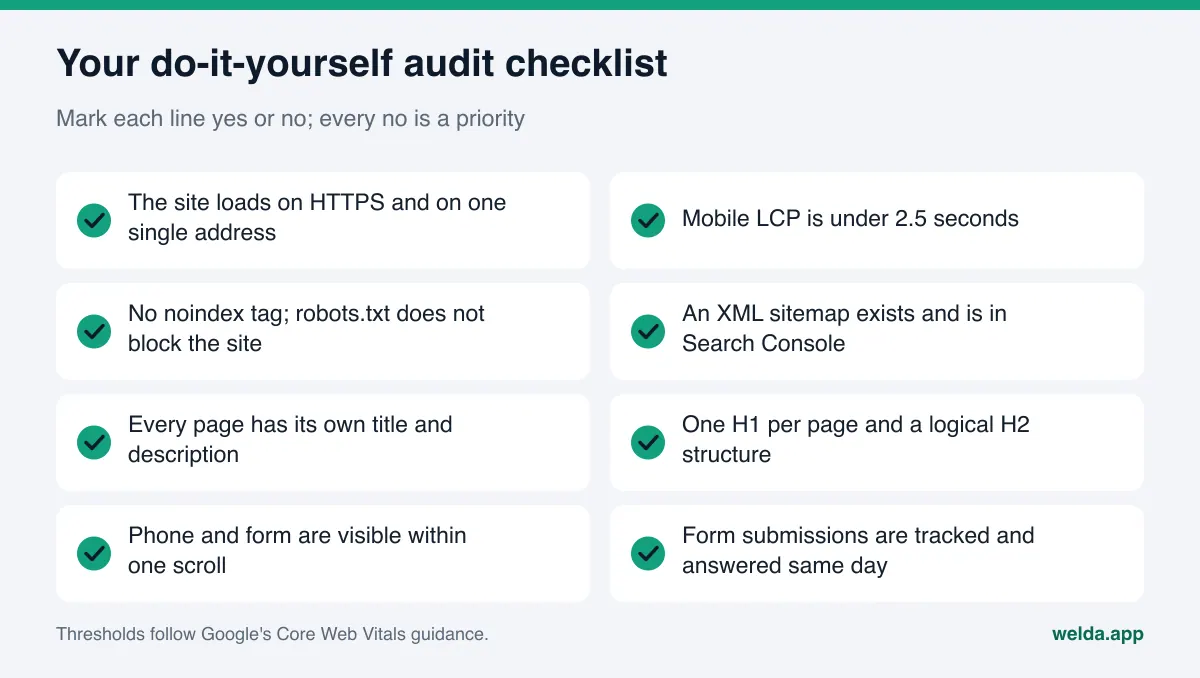
Focus on three numbers. LCP (Largest Contentful Paint) is the time until the largest piece of content appears; Google treats anything under 2.5 seconds as good. INP (Interaction to Next Paint) is how quickly the page responds when you tap something; under 200 milliseconds is good. CLS (Cumulative Layout Shift) measures how much elements jump around while the page loads; under 0.1 is good. The 0 to 100 performance score at the top is a lab summary. It is not a ranking factor on its own and it can move a few points between runs.
If the report includes a section with real-user data, prioritise it: that's what Chrome users actually experienced on your site over recent weeks. Low-traffic sites often have no field data, in which case lab results will do. When you interpret the numbers, separate two cases. If the server's first response is slow, the problem is hosting, caching or the database. If the first response is fast but LCP is slow, the usual suspects are oversized images, web fonts and render-blocking scripts. For more on how speed affects rankings and sales, see our guide to website speed and Core Web Vitals.
Stop 2: Test mobile usability on your own phone
You don't need a tool for the second step. Pick up your phone, switch off Wi-Fi if you can so you are on mobile data, open your site and behave like a customer. How long did the homepage take? Is there a sentence on the first screen that says what you do and for whom? Can you open the menu comfortably with your thumb? Does tapping the phone number start a call? Do form fields overflow the screen, and does the submit button disappear when the keyboard opens?
The problems we see most often in this two-minute test are tables designed for desktop that shrink into unreadable text on a phone, cookie or promotional pop-ups that cover half the screen, links placed so close together that people tap the wrong one, and wide images that force sideways scrolling. None of these may show up in red in a scoring tool, but each one is a reason for a visitor to leave. Since Google indexes the mobile version first, these issues matter for search as well as for customers.
Stop 3: Can Google see your site? The technical SEO basics
In the third step we look through a search engine's eyes. First, type your site into the browser with http://, with www and without www; every version should redirect to one single https:// address. If the site opens on two different addresses, Google sees the same content twice and splits its value. Next, open yourdomain.com/robots.txt. A line reading "Disallow: /" blocks the whole site from crawling and is sometimes left over from development. Then open yourdomain.com/sitemap.xml; there should be a sitemap, and it should be submitted in Search Console.
Finally, search Google for "site:yourdomain.com". Is the number of results roughly in line with the number of real pages on your site? If a 40-page site returns 3 results, you have an indexing problem; if it returns 900, filter, tag or search pages may be indexed unnecessarily. The figure isn't precise, but it's good enough to catch large gaps. The precise answer lives in the Pages report in Search Console; if you haven't used it before, our Google Search Console guide takes you from setup to reading the reports.
Issues in the technical foundation are usually the cheapest to fix and the most expensive to ignore. A forgotten noindex tag can keep even your best-written page out of Google entirely, so never skip this step.
Stop 4: What does your page content tell search engines?
For the fourth step, look at the structure of a single page, ideally your most important service page. Is the title tag shown in the browser tab between 30 and 60 characters, and does it describe the page, ideally with the main keyword? When you search for your site, is the description under the title one you wrote, or a random sentence Google pulled from the page? A meta description should be roughly 70 to 160 characters and give people a reason to click.
Right-click the page and choose "view page source". You should find exactly one H1 heading; multiple H1s or none at all is a common mistake. Is the content broken up with H2 subheadings? Do images have alt text? Is there real text on the page, or is everything baked into images or loaded later with JavaScript? Search engine bots see the raw HTML first; if the content isn't there, your page may be treated as nearly empty.
Checking these one page at a time is tedious, and spotting the same title repeated on ten pages is hard. For a fuller list, use our technical SEO checklist. For a 15-minute audit, though, one important page is a fair sample: if the problem is there, it probably comes from the template and affects other pages too.
Stop 5: The conversion path, your website's real job
A fast, visible, technically flawless site can still lose money if visitors don't know what to do. Spend the last three minutes acting like a customer and genuinely send an enquiry, booking or quote request through your site. How many clicks from the homepage did it take? How many fields does the form ask for, and are they all necessary? Did you see a thank-you page or confirmation after submitting? Where did the submission go, and when did someone reply?
This test turns up problems surprisingly often: a broken form, enquiries going to an inbox nobody has checked for years, a contact button that only appears on desktop, or a page that says "call us" without showing a number. These are ways of losing visitors without ever noticing. If you use an analytics tool, check that form submissions are tracked as a separate event or conversion; if they aren't, you simply don't know how many customers your site brings in.
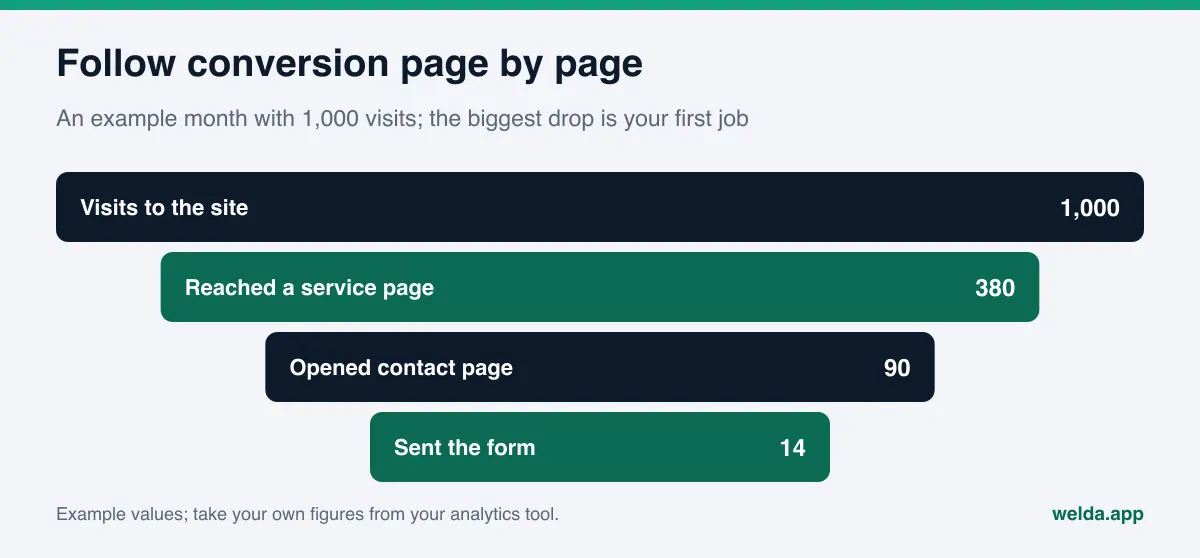
When you assess conversion, think of your pages as a funnel. How many visitors move on to a service page, how many open the contact page, how many send the form? The step with the biggest drop is where you start fixing.
Interpreting the results: which problem comes first?
After 15 minutes you will probably have a list of fifteen to twenty notes. Trying to fix them all at once means either finishing none or wasting time on the least effective ones. We suggest a simple rule for prioritising: first the problems that stop the site being seen, then the problems that drive visitors away, and only then the fine-tuning.
The first group includes noindex tags, robots.txt blocks, missing HTTPS, broken redirects and broken forms. They undermine the reason the site exists, and most can be fixed within hours. The second group covers mobile LCP above four seconds, menus and forms that don't work on a phone, and a first screen that doesn't explain what you do. The third group holds title lengths, missing alt text, social sharing tags and structured data: important, but none of them will rescue a site on its own.
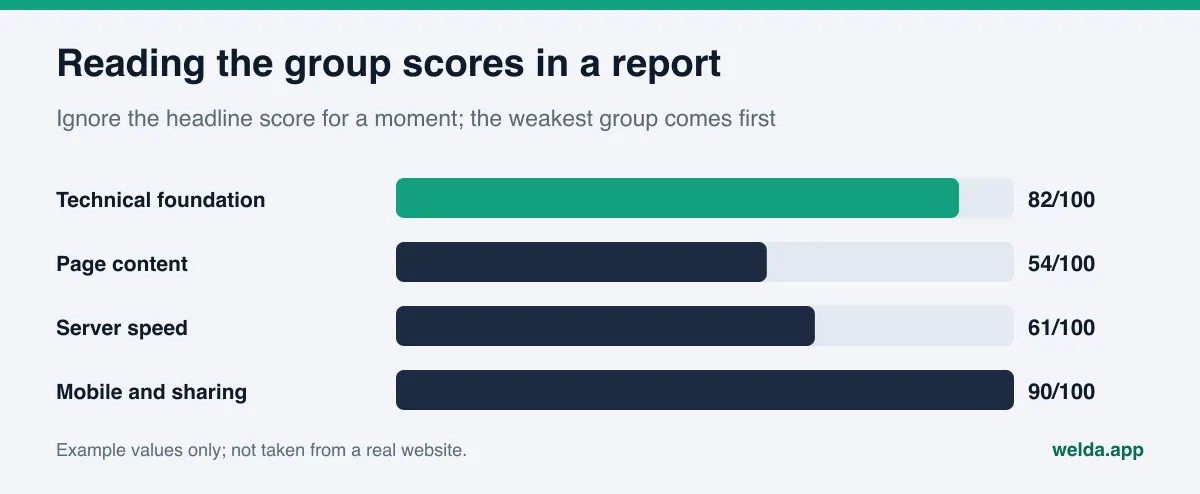
Apply the same logic to the headline score in any free report. A score of 72 is neither good nor bad news; the useful information is in the groups. If the technical foundation scores 90 and content scores 50, the problem is content, and spending money on developers won't change the outcome.
Free tools vs Welda's SEO report vs an in-depth audit
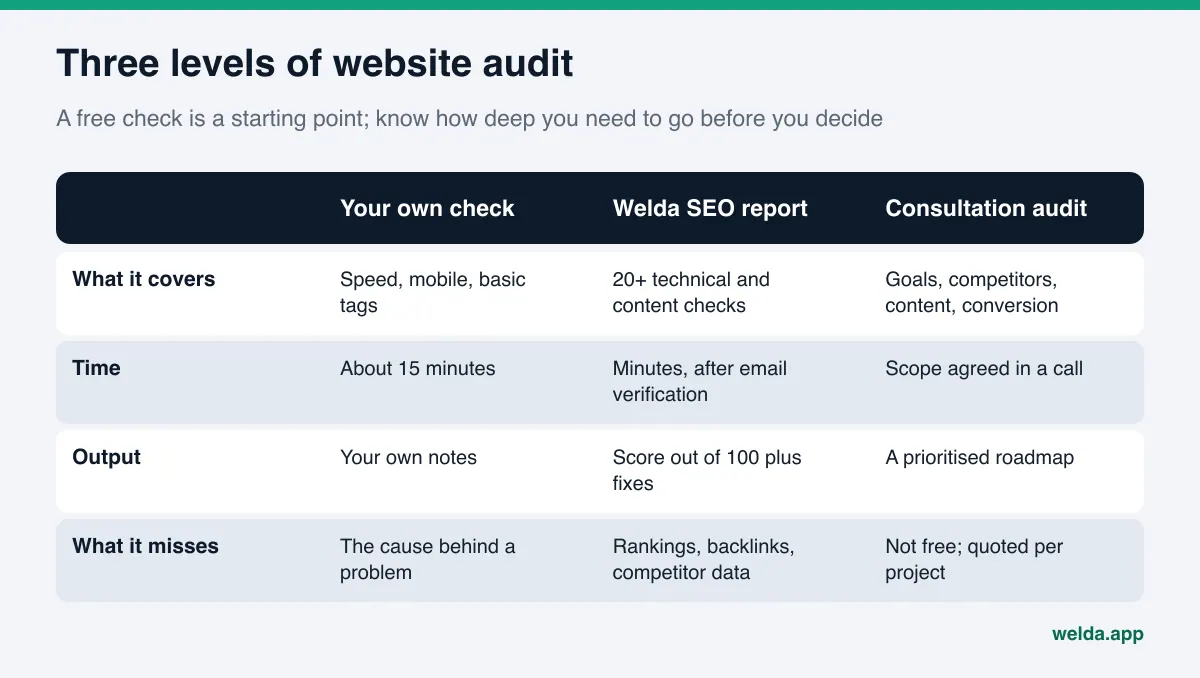
Your own 15-minute check catches the obvious problems. It does, however, expect you to understand every metric and to switch between several tools. Welda's free SEO report does part of that work for you: you enter your website address, email and phone number, type in the 6-digit code sent to your inbox, and the report opens on the same page.
The report runs more than 20 checks across four groups. Technical foundation covers HTTPS, the HTTP-to-HTTPS redirect, redirect chains, indexability, robots.txt, sitemap and canonical tag. Page content covers title and description length, H1 and H2 structure, content volume, image alt text and internal links. Server speed covers response time, HTML size and compression. Mobile and sharing covers the viewport tag, language declaration, social media tags and structured data. You get a score out of 100 and a short note for each failed check explaining what to do.
Let's be clear about the limits too. The report does not crawl your whole site; it reviews the page you enter, usually the homepage, plus your domain's robots.txt and sitemap, based on raw HTML. Content loaded later via JavaScript may not be reflected, and the server speed measurement does not replace Core Web Vitals. It doesn't show keyword rankings, competitors or backlinks. For those, we work through a conversation about your goals as part of our SEO services.
Improve or rebuild? Making the right call after an audit
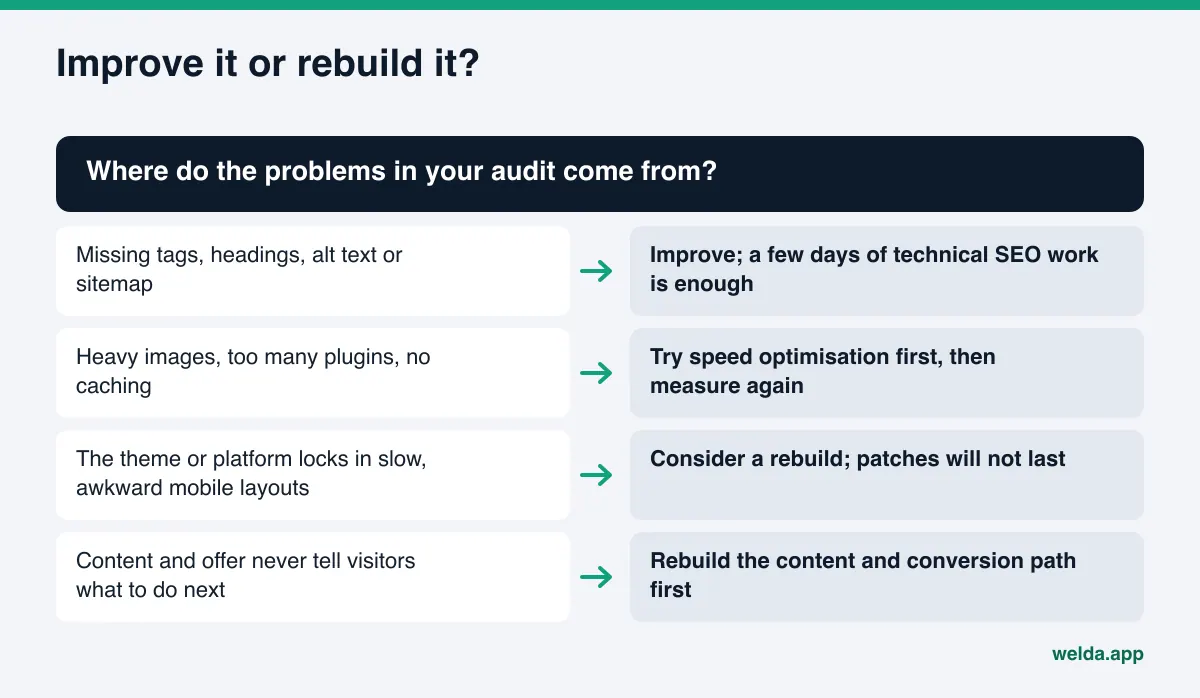
The question we hear most after an audit is: "Should we fix this site or build a new one?" The answer lies in where the problems come from, not how many there are. Missing headings, forgotten tags, empty alt text or a missing sitemap are fixed on top of the existing site. Rebuilding for those reasons is like knocking down a sound house because the paint is peeling.
Speed problems such as heavy images, unnecessary plugins and missing caching are usually solved by optimisation, too. The rule is simple: fix first, then measure again, and carry on if the improvement is enough. But if the theme or platform locks in poor speed and an awkward mobile layout, so every fix breaks something else and mobile LCP still isn't acceptable after a few rounds, patches won't last. Likewise, if the site's content and structure no longer describe what your business offers today, the problem is strategic rather than technical.
If you choose to rebuild, our website build page explains how the process works: the site is designed from scratch without a template, speed and technical SEO are built into the code from day one, and the source code is handed over to you with documentation.
Common mistakes in a free website audit
Free audit tools are easy to use, and that ease leads to a few common mistakes. The first is looking only at the desktop score. A site that scores well on desktop and poorly on mobile is slow for most of its visitors. The second is testing only the homepage. The homepage usually gets the most care; the service or product page where customers actually land can be in much worse shape.
The third mistake is turning the score into the goal. Removing useful features to push the performance score to 100, for example deleting live chat or a map that customers rely on, can cost more than it gains. The fourth is trusting a single run. Lab results vary each time, so decide based on several measurements. The fifth, and perhaps the most expensive, is running the audit and changing nothing. If findings don't become a list with an owner and a date, the same audit six months later will produce the same result.
Finally, be wary of exaggerated "free audit" reports designed to sell you a package. A report that flags every gap as critical, promises rankings, or sells a fix without explaining the cause isn't an audit that helps you. A good report tells you what matters and what can wait.
From audit to action: a 30-day improvement plan
To turn findings into a plan, spend week one on visibility blockers: noindex, robots.txt, redirects, HTTPS and testing the form. These are usually quick and directly effective. In week two, set up or verify Search Console and analytics, and define form submissions as a conversion. Without measurement, you can't tell whether a change worked.
Give week three to speed: convert and resize images into modern formats, remove unused plugins, turn on caching and compression, then rerun the mobile test. In week four, rework the titles, descriptions, H1 and H2 structure and first-screen message of your three to five most important pages. At the end of the month, repeat the same 15-minute audit and compare it with the first. That comparison also makes clear whether the next step is to keep improving or to plan a rebuild.
You can run this plan with your own team. If the technical parts are eating time, or fixes keep breaking each other, you have reached the point where working with a team will save you time.
How Welda helps
At Welda we run a process that starts with an audit in three stages. The first is the free SEO report that anyone can use. There's no payment or sign-up; once you verify your email the report opens, and it also reaches our team. If you like, we will contact you to talk through your priorities; if not, you use the report with your own team.
The second stage is improving the site you already have. Through our SEO services we work on the technical foundation, content structure and measurement, and this is where we analyse rankings, competitors and backlinks. The third stage, if it's needed, is a rebuild. In our website build process the site is designed from scratch in Figma, developed after your approval, measured so it passes Core Web Vitals thresholds at launch, and handed over to you with its source code and documentation. Search Console and GA4 setup are part of the process.
On pricing, to be straightforward: we don't sell fixed packages. The cost of improvement or a rebuild depends on the number of pages, the state of the current platform, content preparation, integrations and the number of languages. We listen to what you need and set out the scope in a written quote. The initial conversation and quote are free.
Who this approach suits, and who it doesn't
The method in this guide, and Welda's report, suit small and mid-sized businesses that have their own website and expect enquiries, bookings or sales from it: service firms, clinics, consultancies, local businesses and corporate brochure sites. If you want to understand why your site isn't delivering, come to an agency conversation with facts in hand, or check your current agency's work, you are in the right place.
For large e-commerce or news sites with thousands of constantly changing pages, a 15-minute audit only scratches the surface; those sites need full-site crawlers and regular technical audits. For businesses whose online presence is only a marketplace store or a social media account, most of this audit doesn't apply. We say this plainly, because an audit with the wrong tool leads to the wrong decision.
Take the first step now: set aside 15 minutes to run the five stops above on your own site, then get your free SEO report. If you would like to go through the results together, decide between improving and rebuilding, or get a quote, get in touch with us.
Frequently asked questions
Is a free website audit really free?
Yes. The checks in this guide use Google's free tools and your own phone. Welda's SEO report needs no payment or sign-up either; you only verify your email address. Your email and phone number are used to contact you about your report.
How long does an audit take?
The five-step check you run yourself takes about 15 minutes. Welda's SEO report opens on the same page within minutes of verifying your email. The verification code is valid for 15 minutes.
Will an audit improve my rankings?
An audit on its own doesn't change rankings; it shows what's missing. What moves rankings is fixing the findings and working on content. Be cautious of any audit or service that guarantees a specific position.
My performance score is low. Is that bad?
Not on its own. The score is a lab summary. What matters is LCP, INP and CLS in the mobile test, with real-user data taking priority where available. If the score is low but those three are in the good range, there's no urgent problem.
The report found critical issues. Should I rebuild my site?
Not necessarily. Missing tags, sitemap or title problems are fixed on the existing site. A rebuild makes sense when the theme or platform is the cause, when fixes keep breaking each other, or when the site no longer describes what your business offers.
Can I share the results with my current agency?
Of course. The report is yours, and you can use the findings with your current agency or in-house team. We recommend running the same audit again after their fixes so you can compare the results.