If patients forgetting their appointments is your only real problem, straightforward dental appointment scheduling software with automatic reminders may be all you need. If your chairs sit empty because the next visit in a treatment plan never got booked, because three dentists share two chairs, or because nobody at the front desk can see what a patient still owes, a scheduling tool on its own will not fix it, and you should be looking at full clinic software. The size of your practice matters less than the reason the chair is empty.
That reason is something you can measure this week with nothing more than your diary. The rest of this guide walks through that count, explains what makes a dental calendar harder than the calendars most booking tools are built for, and gives you a way to choose without taking any vendor's word for it, including ours.
Empty chair time has more than one cause
Practices tend to describe the problem as "no-shows". Once you actually look, the gap between the hours you have open and the hours you spend treating patients usually breaks into several smaller leaks, and each one calls for something different.
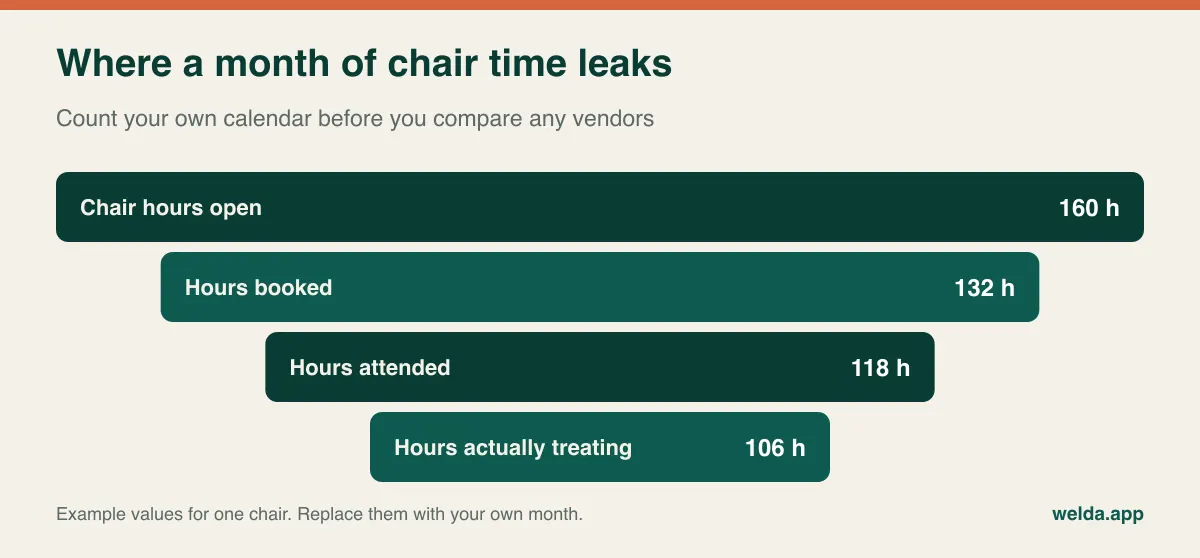
- Open but never booked. Slots nobody took. Reminders do nothing here. The usual culprits are unbooked follow-up treatment, a weak recall list and a phone line that goes unanswered at lunchtime.
- Booked but not attended. True no-shows and late cancellations. This is where reminders earn their keep, and where a waitlist helps. We cover the methods in our guide on reducing no-shows in clinics.
- Attended but not treating. A 60-minute slot used for a 30-minute procedure, a chair waiting on sterilisation, a late patient who pushes the whole afternoon back. This is a template problem more than a software one, but the software has to let you fix the template.
Take four recent weeks and write a cause next to every empty block. A single week can mislead, because a holiday or a dentist's leave will distort it. Do the count with the person who runs the front desk, because they will remember that the "cancellation" on Tuesday was really a patient who was never given a clear date for the next visit.
When you are done, turn the result into your own number. Multiply lost chair hours by what a chair hour earns in your practice. Don't expect to recover all of it, since some gaps get filled by emergencies anyway. The useful question is modest: if I recovered only part of this, would it cover the software and the effort of switching? Treat any vendor's promised reduction percentage with care, and ask where it was measured and in what kind of practice.
Why a dental diary breaks generic booking tools
Plenty of booking software is built around a simple assumption: one person, one service, one fixed length. That suits a lot of businesses. Dentistry stretches it in ways you will only notice once you are live, so test these before you commit.
Visit length varies enormously, and it isn't obvious in advance
A recall check can take a quarter of an hour; a root canal can run well past an hour; surgery can take a large part of a morning. You need visit types with sensible default lengths that your team can override, and a calendar view where a dentist can read the day at a glance. If every appointment looks the same size on screen, reception ends up carrying the real schedule in their heads.
The chair is a resource too
Three dentists and two chairs is a common way for a schedule to go wrong. A dentist can be free while no chair is. Hygienists and part-time associates make it worse. Check whether the software can catch a clash on the room as well as on the person. Ask to see it fail: book the same chair under two different dentists and watch what happens.
Emergencies arrive on their own timetable
Someone with toothache will not wait for next Thursday. Many practices hold back a small number of short blocks each day and release them in the afternoon if nobody needed them. Your software should make that easy, and it should make the release visible so the waitlist can benefit.
The patient and the contact aren't always the same person
Children, elderly patients and families booked together all raise the same issue: the reminder should reach the person who actually manages the appointment. Try setting that up in the demo with a child's record and a parent's phone number.
Treatment happens in stages
Crown preparation, then fit. Extraction, healing, then implant, then restoration. These sequences stretch over months, depend on lab turnaround and sometimes on insurance approval. The gap between stages is where patients quietly disappear. No appointment was cancelled, because no appointment existed, so nothing shows up in a no-show report.
The real comparison: scheduling tool or clinic software
Both will show you a calendar and send reminders. The difference is everything around the calendar. A scheduling tool answers who is coming, when, and to whom. Clinic software also answers where this patient is in their treatment, what they have paid, who saw them last and what should happen next.
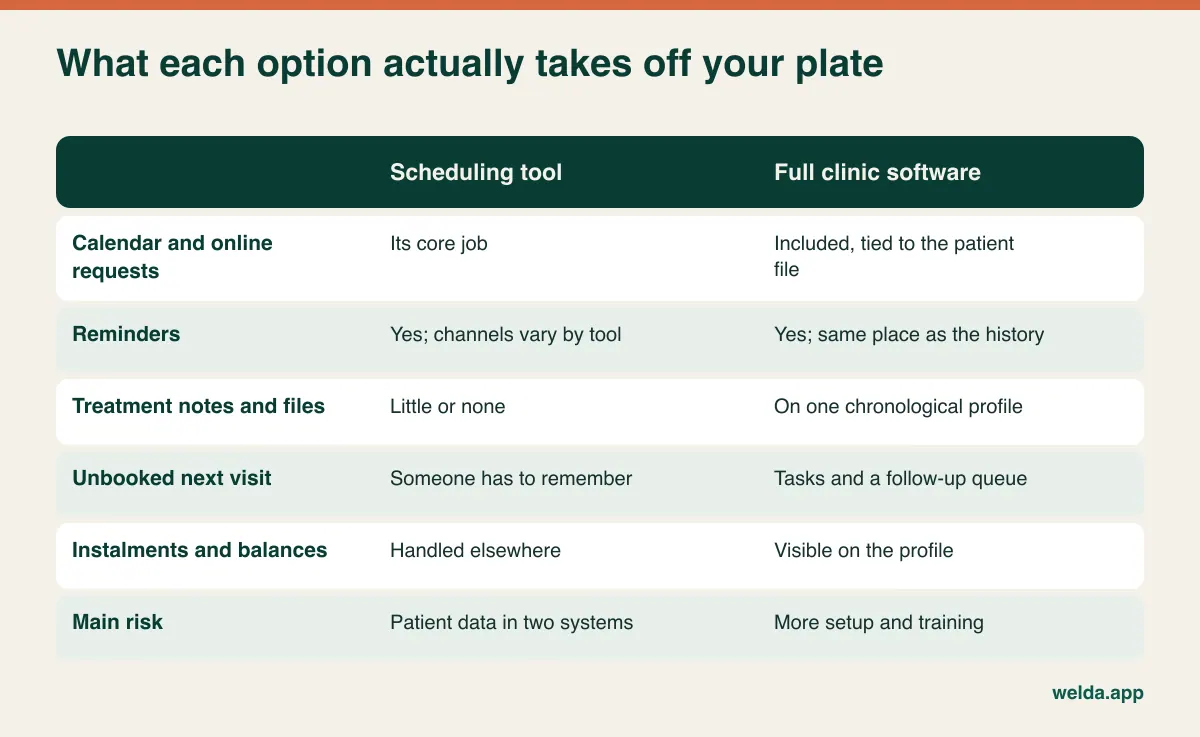
Here is a test you can run at the front desk right now. A patient phones and asks three things: what do I still owe, when is my next visit, and what did the dentist do last time? Count how many screens, files or notebooks your receptionist needs to answer. If the answer is one, your current setup is working and a scheduling tool might be all that's missing. If it is three, a better diary will only make the other two feel worse.
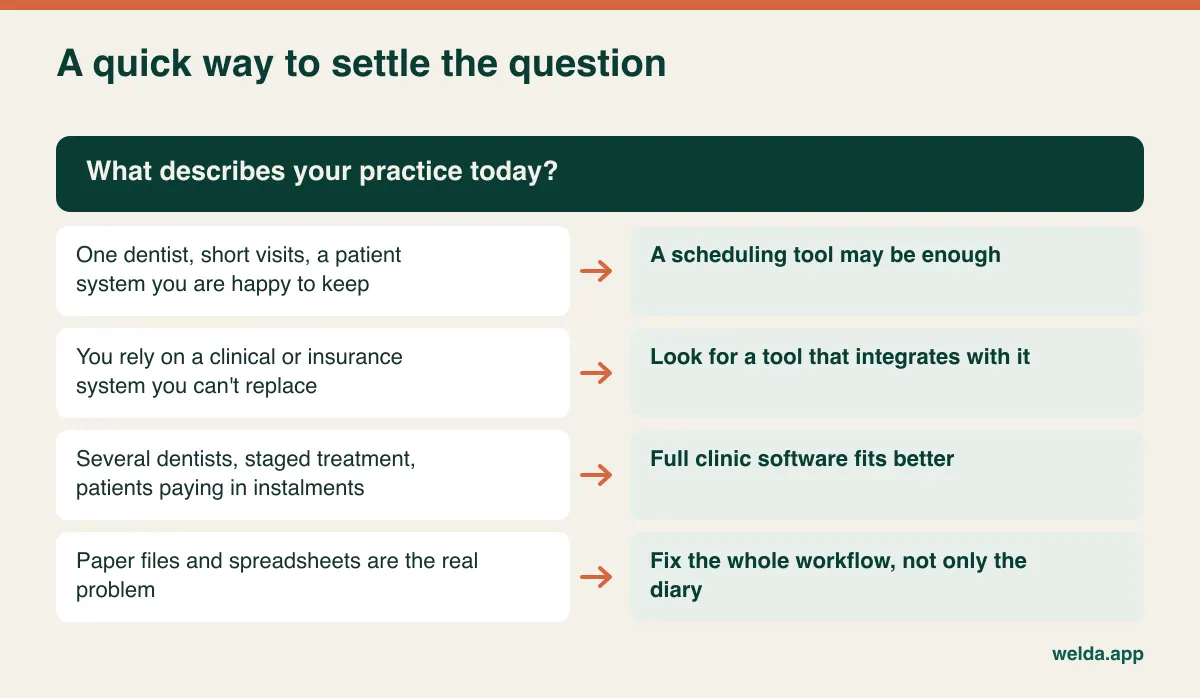
A scheduling tool makes good sense in a few situations. You are a solo dentist with short, predictable visits. You already have clinical software that you trust and don't want to replace. Or you depend on an insurance or practice-management system with deep billing functions, and only the booking side is weak. In that last case, integration is the question that decides everything. If the two systems don't talk, your team will be typing each new patient twice, and after a few months that habit tends to collapse.
Full clinic software is usually the better choice once several dentists share patients, treatment regularly runs across multiple visits, patients pay in instalments, or the owner wants to see occupancy and revenue per dentist without assembling a spreadsheet each month. If you recognise your practice here, take a look at how Welda's dental appointment scheduling software is set up for dental clinics, and compare it with your own day rather than with a feature list.
Online booking is where dental differs most
Patients who book a haircut know what they want. Patients who book a dentist often don't. "Something hurts" could be a ten-minute look or a long emergency visit, and a patient choosing from open slots has no way of telling. That makes the design of online booking a real decision, and two models dominate.
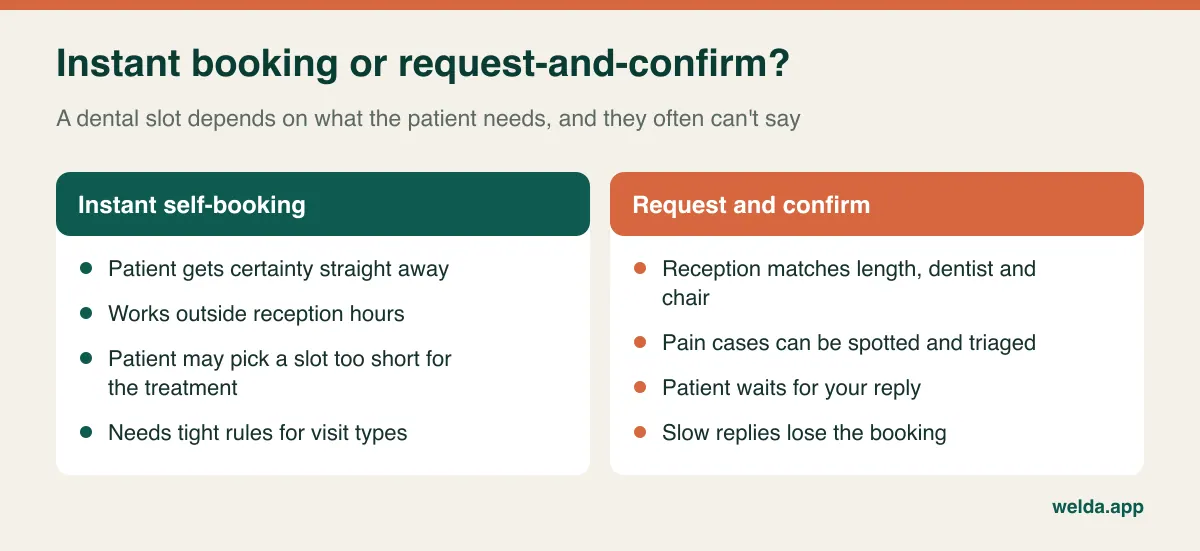
Instant self-booking gives the patient immediate certainty, including at 11 pm, when a lot of people finally get around to it. It works best when the visit type is clear and short, such as a hygiene appointment for an existing patient. It works less well for new patients and anything urgent, and the rules for who can book what need to be tight or your template will suffer.
Request-and-confirm means the patient asks for a slot and your team confirms it. That lets reception match the right length, dentist and chair, and spot a patient in pain who should be seen sooner. The cost is a delay. A patient who sends a request in the evening and hears nothing until mid-morning may already have phoned somewhere else. If you go this way, agree on how quickly you answer and who is responsible for it.
Welda CRM uses the second model: patients request a slot through your clinic's booking page and the request becomes an appointment once your team confirms it. We think that suits dental well, but it is a real trade-off, and if instant confirmation around the clock is non-negotiable for you, say so early. Patients can also see their appointments through a portal. For the wider question of placing booking on your site, see our guide to a website with online booking.
Reminder channel is a bigger decision than it looks
Whichever software you choose, ask exactly how reminders reach your patients, because what works depends heavily on where you practise. In many countries WhatsApp is how people expect to hear from a business. In others, plain text messages or email are the norm and some patients won't have WhatsApp at all.
This matters for us too. Welda CRM sends automatic reminders and pre-visit and post-visit messages through WhatsApp, with templates in English, Turkish and German. WhatsApp is the automatic channel we describe, so if your patient base lives on SMS, look carefully before you buy; you may find a tool built around text messaging is a better fit for that part of the job. Our guide to WhatsApp appointment automation goes through how those flows are usually designed.
Content deserves a second look too. A reminder may be seen on a lock screen or read by a family member, so a cautious default is to keep it to the date, time, clinic name and how to change the appointment, and leave out the procedure. Whether you need specific consent, and what counts as a service message rather than marketing, varies by jurisdiction. Recall campaigns and review requests often fall under different rules from a simple reminder.
Timing is the other lever. Longer procedures need earlier notice, because a two-hour gap is hard to fill on the day. Short checks may do well with a nudge on the same morning. Test one change at a time for about a month and recount, otherwise you won't know which change helped. Deposits and late-cancellation fees are a policy decision that comes before any software one; rules on charging them differ by country and by contract, so get advice locally. Welda doesn't list automatic deposit collection tied to bookings, so raise it if it is essential to you.
Patient data: the question that outlives the demo
Dental records are health data, which most privacy regimes treat with extra care. The law that applies depends on where you practise. It might be GDPR or UK GDPR in Europe and Britain, HIPAA in the US, or a national health-privacy law somewhere else. We can't tell you what yours requires, but we can tell you what to ask any vendor, in writing.
- Where is the data stored, and who processes it on the vendor's behalf?
- Will you sign the agreement my jurisdiction expects, such as a data processing agreement or, in the US, a business associate agreement?
- Can I limit what each role sees, so reception can run the diary without reading clinical notes?
- Is there a log of who opened which record?
- When I leave, how do I get everything out, in which format, and when is my copy deleted?
On Welda's side, records are stored encrypted, roles decide who sees what, consent is managed for KVKK and GDPR, and access is written to an audit log. Those are the frameworks we describe, so if you are bound by HIPAA or another regime, ask us directly before going further and have your own adviser review the answer. Our article on patient data security in clinics covers the day-to-day habits that matter just as much as the software.
Retention is easy to forget. Dental records often have to be kept for years, and sometimes longer for minors. Your exit plan should assume that you still need access to old records long after you have stopped paying a vendor.
Where Welda fits, and where it doesn't
Welda CRM is clinic software rather than a pure booking widget. All dentists' calendars sit on one screen with live availability and conflict detection. Calendars can be viewed by staff member, room and branch. A cancellation can notify the next patient on the waitlist. Treatment notes, documents and payment records live on one patient profile, with balances and instalments visible, and tasks with reminders plus a follow-up queue give you somewhere to track the visit that hasn't been booked yet. Reports show occupancy, revenue and performance.
It may not be the right call in a number of situations, and we would rather you found out now.
- Imaging: X-rays and consent forms are uploaded to the profile as files. There is no direct integration with imaging devices.
- Dental charting and insurance claims: we don't describe a tooth chart or insurance claims submission as Welda features. If your practice runs on these, a specialist dental system is likely to serve you better, or you may want a booking tool that plugs into it.
- Lab tracking: there is no dedicated lab module that we can point to. Notes and dated tasks may be enough for a small practice; a lab-heavy one should test this hard.
- Non-WhatsApp markets: as above, check the reminder channel before anything else.
- A narrow problem: if forgetful patients really are your only issue, a whole new system may be more change than you need.
Run the demo on your hardest day
Every product looks tidy on the salesperson's example data. Bring your own. "Do you have this feature?" nearly always gets a yes; "show me this now" gets you a real answer. Have your front-desk lead in the room, because they will use it all day long and they will see friction that an owner misses.
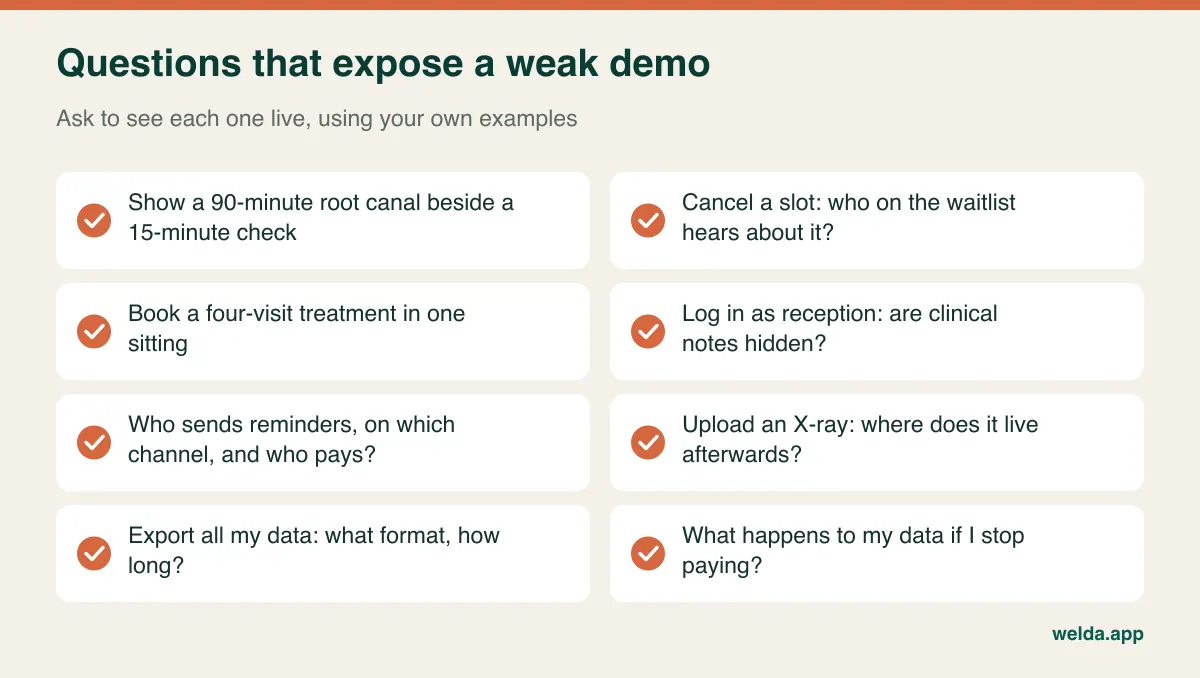
When you compare offers, don't stop at the monthly figure. Ask how charges respond to the number of users or dentists, whether message sending is included or metered, whether setup, data import and training cost extra, and what support actually covers. Get these answers in writing from each vendor in the same format, otherwise two quotes that sound alike may describe very different things. For Welda CRM, the price depends on your locations, users and modules and is agreed in a free consultation; setup and data migration are included, and there is a 7-day free trial. Use that week well: rather than spreading it thinly across the practice, run one dentist's real calendar through it from Monday to Friday.
Switching without a lost week
Most of the risk in a change of system sits in the handover of future appointments, not the software itself. Patients have dates in their heads, and those dates need to still be there on the day you switch.
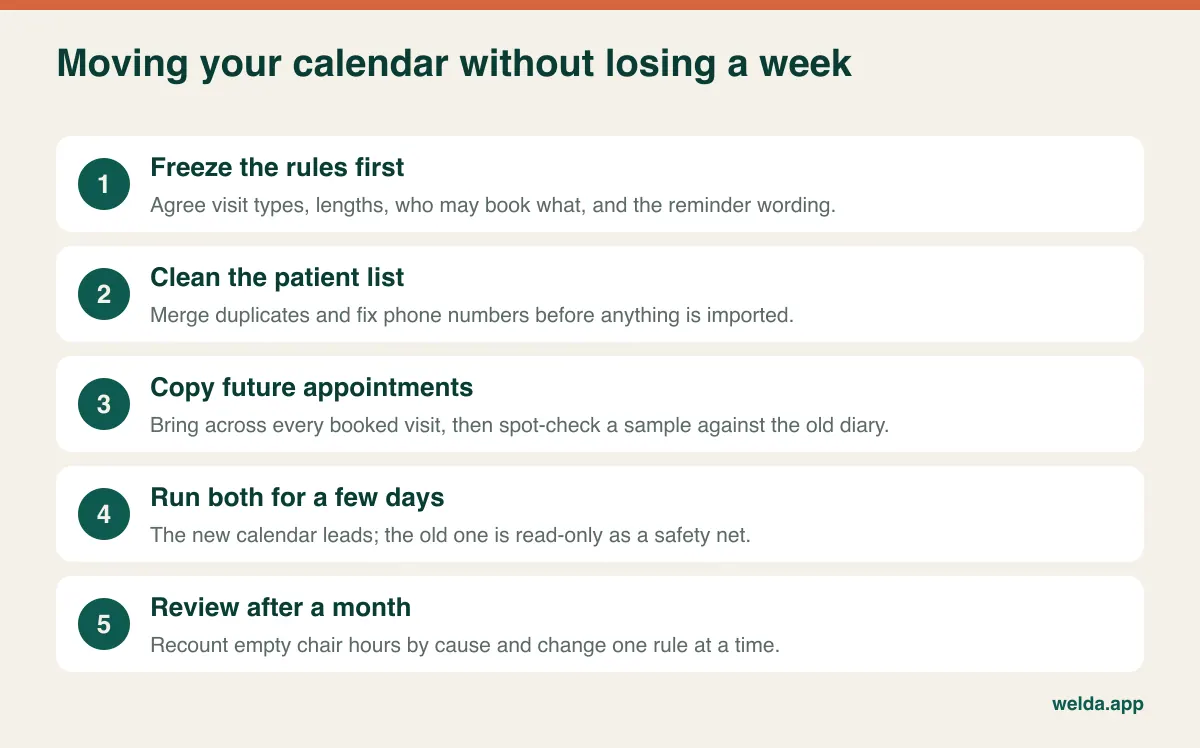
Avoid your busiest season. Do your data cleaning before the import, since duplicate patients and old phone numbers are much cheaper to fix now than after reminders start going to the wrong people. Decide who owns the new calendar during the changeover, so that nobody is unsure which one is right. When your reminders go live, send a short notice to patients explaining the new messages, particularly if they are coming from an unfamiliar number. Train reception on the awkward cases, such as a family booking or moving a treatment sequence, rather than just on creating a basic appointment.
A month after going live, repeat the empty-chair count using the same method. That comparison will tell you whether the switch worked, and it will also show you the next leak. If you would like to go through your own count with us, you can book a free consultation about dental appointment scheduling software, and we will tell you honestly if a simpler tool would serve you better.
Frequently asked questions
Is full clinic software overkill for a solo dentist?
Not necessarily. What decides it is the treatment and payment pattern rather than headcount. A solo dentist doing implant work with instalment plans can benefit from a single patient file, while one doing mostly short visits with tidy records may only need scheduling and reminders.
Will software definitely reduce my no-shows?
Nobody can promise you a figure. Reminders help with forgetfulness and encourage earlier cancellations, but results depend on your patients, your timing and how you handle freed slots. Count your no-shows before you switch and again afterwards, using the same method.
Can patients book online without us confirming each request?
That depends on the product. With Welda CRM, patients send a request through your booking page and your team confirms it. If you need instant confirmation for every visit type, check for that specifically when you compare options.
Can I keep my current clinical software and just add scheduling?
Yes, if the two can stay in sync or if you are prepared to maintain both. Ask exactly what passes between them and in which direction. If nothing does, estimate how much duplicate typing your team will accept in the long run.
Do you migrate my existing patient list?
Yes. For Welda CRM, existing patient and appointment data is migrated as part of setup. Bringing a sample of your current export to the consultation makes it quicker to spot any problems.
How do I find out what it costs?
The price depends on locations, users and the modules you need, so it is settled in a free consultation rather than from a list. Come with your dentist and chair numbers and your empty-chair count, and the conversation can start from your actual problem.