The right shoe store POS software treats every size of every color of every style as its own stock item, sells it by scanning the box, and tells you in one glance what is left on the size run. If a system can only tell you that you have "nine pairs of the black Chelsea boot" and not that all nine are size 6 and size 11, it will ring up sales without solving the problem that sent you looking for software in the first place.
So before you compare feature lists, settle two things: how your size-level item codes will be structured, and how a pair physically travels from the stockroom to the register. Those two decisions rule out most bad fits. The rest of this guide walks through them, then covers size systems, case packs, exchanges, tax questions and a demo script you can run with your own boxes. If you already know you want size-level stock and barcode sales, our page on shoe store POS software for footwear and clothing retailers shows how Welda Stock handles them.
The pair is what you sell, but the size is what you stock
A general retail POS assumes one product equals one barcode equals one shelf position. Footwear breaks that assumption immediately. A style that comes in three colorways and eleven sizes, with half sizes in between, is not a product. It is a grid. Your customer sees one shoe on the wall; your software has to see every cell of the grid, because each cell can run out on its own.
Do the multiplication before you talk to any vendor. It is the number they will ask for, and it is usually far higher than owners expect.
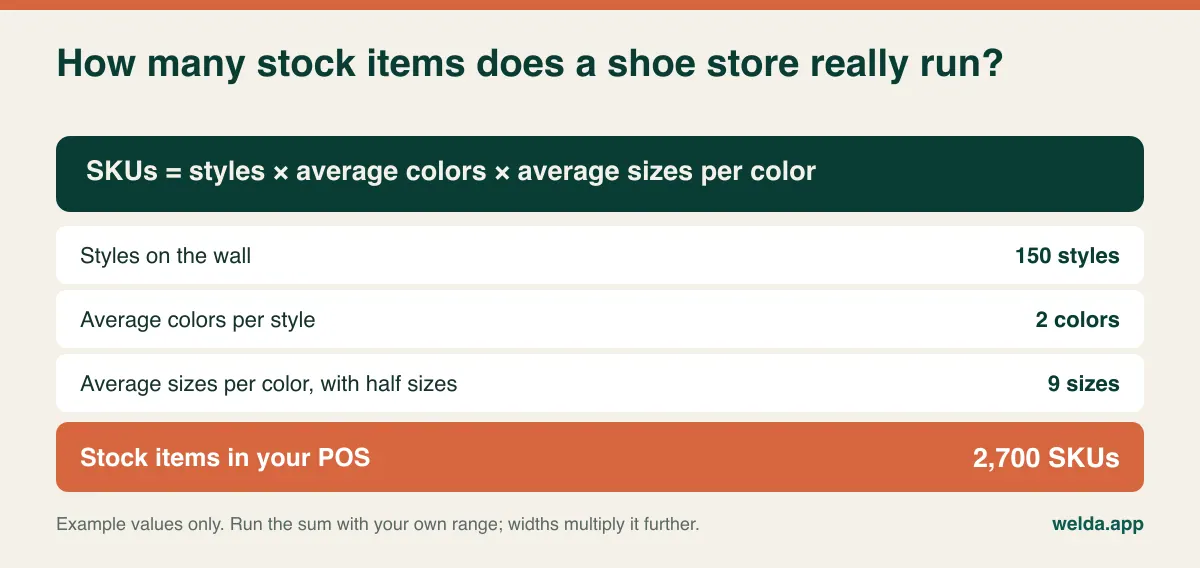
That figure changes real decisions. It tells you that typing products in by hand is out of the question and that bulk import matters. It tells you how long your opening stock count will take. And it tells you that the search box will be used constantly, which means item names and codes must be readable by someone in a hurry on a Saturday afternoon.
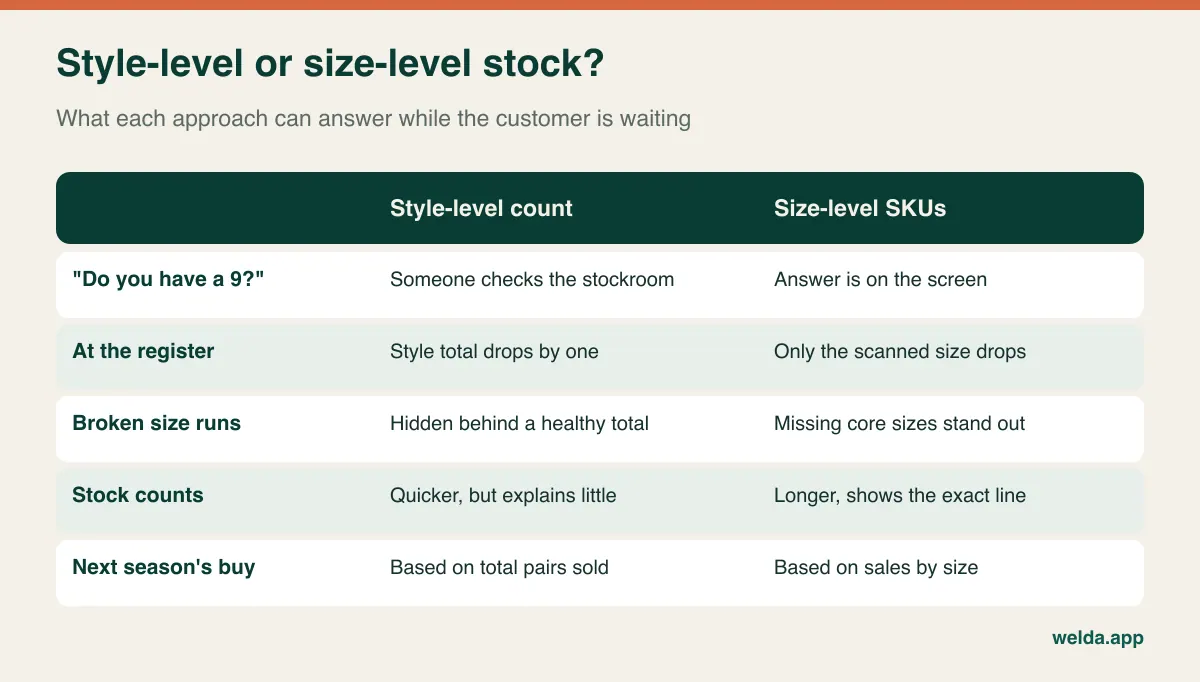
Software handles this grid in one of two ways. Some systems give you a single style record with a size-and-color matrix beneath it. Others treat each size and color as a separate product with its own SKU and barcode. Welda Stock follows the second approach: each size and color is set up as its own product, and only the scanned item's stock goes down at the register. That keeps the sale simple and each size's stock unambiguous. The trade-off is that you work with separate lines rather than one style card with a size grid, so if a matrix view is central to how you buy, say so at the start of a demo, not at the end.
Three size systems, widths and half sizes: write the code before the software
Here is something clothing retailers rarely run into. A single shoe can carry a US, UK and EU size at once, and those numbers do not convert cleanly across brands. A men's US 10 may be labeled UK 9 or EU 43 or 44 depending on the maker's last. Add widths such as narrow, medium, wide and extra wide, or D and EE in men's styles, and the grid grows in a third direction.
The fix is to pick one primary size system for your store and build it into the SKU. Keep the brand's alternate sizes on the label for the customer, not in your stock logic. If you sell in a US store, US sizes go in the code. If you sell to tourists or carry imported European lines, you may print EU on the shelf tag as well, but the database still needs one truth.
| Situation | Example SKU | Why it is built this way |
|---|---|---|
| Whole size | CHEL214-BLK-09-M | Style, color, size, width; zero-padded so 09 sorts before 10. |
| Half size | RUN088-WHT-09H-M | Avoid a decimal point, which spreadsheets may treat as a number. |
| Wide fitting | CHEL214-BLK-09-W | A separate cell with separate stock, and it should look like one. |
| Kids | KID031-NVY-12K | The K stops child size 12 being confused with adult 12. |
| Accessories | ACC-LACE-BLK-120 | Laces, insoles and polish have no size run, so do not force one. |
Avoid building your code on the supplier's style number alone. Two brands may use the same number, and the same brand may reuse it for a different last a few seasons later. Store the supplier's code as a reference and let your own code carry the weight.
Barcodes follow from this. Most branded footwear arrives with a UPC or EAN on the box, unique to the size and color. Use those. Smaller makers may ship without them, in which case you assign internal barcodes and print a label for the box end. A label printer and label stock are costs to plan for, and worth confirming with any vendor. Welda Stock works with products, SKUs and barcodes and standard barcode scanners; our product materials do not describe a dedicated label-printing feature, so raise this in the consultation if you need to label much of your range. For more on the discipline behind scanning, read our guide to barcode inventory tracking.
Case packs quietly create your dead stock
Footwear is often bought in prepacked size runs: a case of twelve pairs split 1-2-3-3-2-1 across six sizes. That works for the vendor, and it can work for you, but only if your customers' feet happen to match the pack. When they do not, the same pattern plays out season after season. The middle sizes sell through early. The wall still looks stocked. A customer asks for a 9, there is no 9, and the style effectively stops selling while you still own a stack of 6s and 11s.
Retailers call this a broken size run, and a style-level stock number hides it completely.
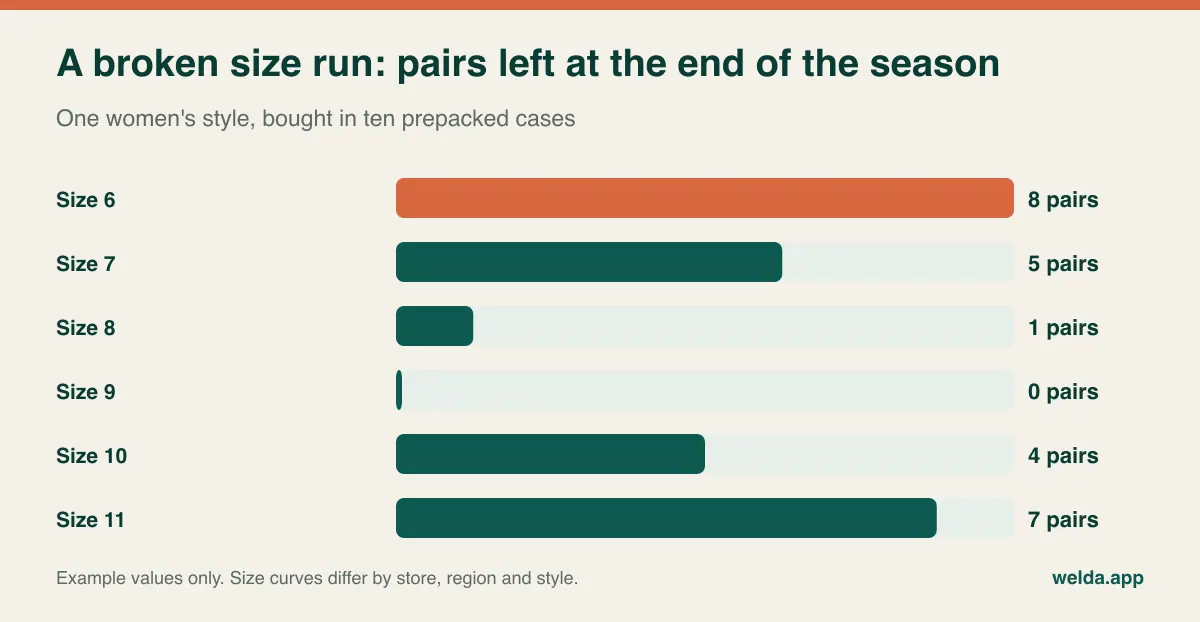
Those numbers are illustrative; your curve will differ by location and category, and that is precisely why you need your own. Once you have a season of sales by size, you can do three things that were guesswork before:
- Negotiate the pack. Show a supplier your sell-through by size and ask for a pack that leans toward your strong sizes. They may refuse, but you are now having a conversation grounded in records.
- Judge a fill-in order. If a style is still selling and a supplier allows single-size reorders, you buy only the missing cells. If they only sell full cases, you can calculate how many extra edge sizes each reorder would add.
- Mark down earlier. Once the core sizes are gone, the remaining pairs are not going to recover. Moving them while there is still time in the season usually beats waiting for the clearance table.
In Welda Stock, per-product profit margin reports show what room you have when marking down, and you can export reports to Excel. Because each size is a separate product, a clean SKU prefix lets you total a whole style in a spreadsheet. If you want style-level summaries on screen without that step, ask to see the options in a demo. Our guide to seasonal inventory planning goes further on timing buys around the calendar.
The display shoe is not what you are selling
In a grocery store, the item on the shelf is the item at the register. In a shoe store, the customer holds a single display shoe while the pair they will buy sits in a stockroom. Between those two points, boxes get opened, sizes get swapped, and a tired associate returns a 9 to the box marked 8.5. No software can prevent that on its own. Your process has to, and your software has to make the mistake visible when it happens.
A typical failure looks like this. A customer tries an 8.5, then a 9, and buys the 9. The pair goes into the wrong box. The cashier scans the box, which says 8.5. The system now believes there is one fewer 8.5 and one more 9 than there really are. Next week a customer is told a 9 is in stock, the associate spends four minutes in the back, and nothing is there. When you finally count, two lines are wrong and nobody can explain why.
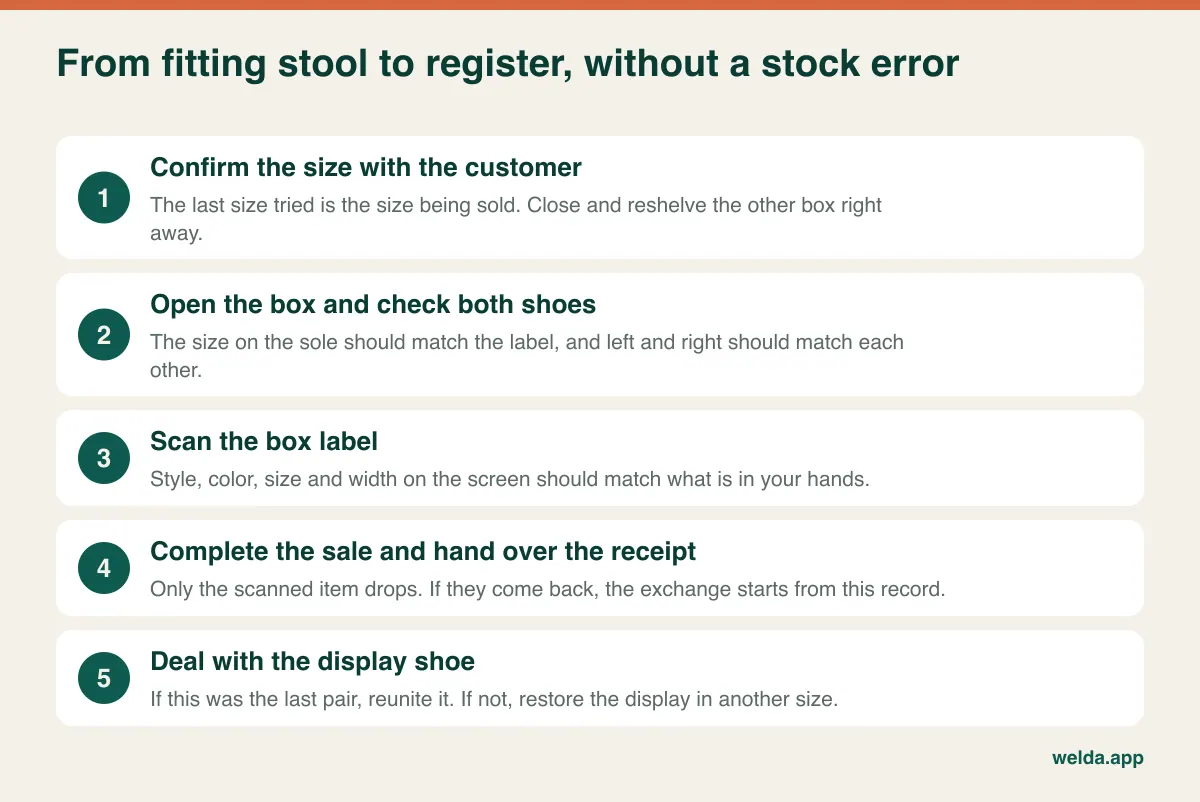
Build a few store rules around this, and write them down so new hires do not have to guess:
- Check, then scan. Compare the size stamped on the shoe with the box label before scanning. It takes a second and catches the failure described above at the register.
- Count pairs, not shoes. A pair whose left shoe is on display still counts as one pair. A note on the box saves it from being written off during a count.
- Decide about the last pair. Will you sell the display shoe? If yes, who cleans it, and does it get a markdown? Make that a rule rather than a register-side debate.
- Tidy before you count. A short end-of-day box check beats finding mismatched pairs a month later.
- Separate permissions. In Welda Stock, cashier, stock lead and manager have separate permission levels, and you decide which roles can handle returns, voids and report viewing.
Counting cadence matters as well. An annual count on a store with thousands of near-identical SKUs lets small errors spread for months. Cycle counts by brand or by wall section keep them contained and are far less disruptive. Welda Stock includes stock counts and tracking for write-offs, so differences go on record rather than disappearing.
An exchange is two stock movements that often go unrecorded
Fit problems make size exchanges a routine part of footwear retail. A customer returns on Tuesday with a size 9 that felt tight at home and leaves with a 9.5. The price is the same and no money moves, so in a busy store it is easy for nothing to be rung up. Stock is now wrong on two lines, and the sale report still says they bought a 9, which will quietly distort your next order.
Test this on any shoe store POS software you consider. Run the exchange from start to finish. How many steps does it take? Is there a dedicated exchange flow, or is it a return plus a new sale? Can a part-time associate do it correctly at the busiest hour without a manager? What receipt does the customer get, and does your policy window still run from the original purchase?
Welda's product materials explain that return permissions are controlled by role. They do not describe a dedicated size-exchange screen, so we would rather walk through it with you using a real example than promise it here. What matters is that you see the process with your own eyes before deciding.
Think too about what happens to the returned pair. If it has been worn outdoors, it is not sellable stock. Holding it in a separate damaged or write-off category keeps your on-hand figures honest and your next customer happy. Consumer rights differ by country, and statutory rights around faulty goods are separate from your store's goodwill exchange policy, so check locally and print your terms at the register. Our article on returns and exchanges in retail covers the wider procedure.
Reorder alerts only belong on the shoes you can reorder
Low-stock alerts are a popular feature and a blunt one in footwear. Set a minimum on your entire catalog and you get a daily list of sizes you could never restock, because the seasonal style was a one-time buy. People stop reading the list within a week, and then they miss the alert that mattered.
Split your range into two groups instead:
- Carryover styles: Black work shoes, school shoes, staple sneakers, anything a supplier keeps in stock for reorder. Minimums make sense here, and you should set them by size, because a size 9 needs a different floor than a size 13.
- Seasonal styles: Sandals, fashion boots and trend pieces bought once. Set no minimum. What you watch is whether the core sizes have broken and when to start moving what remains.
Welda Stock lets you set a minimum stock level for each product and lists the items that hit that level, so a split like this is easy to apply: only the carryover SKUs get a floor. The same logic also helps ahead of back-to-school, when children's sizes can disappear quickly and a reorder may not arrive in time. Look at last year's sales by size and place your order on that basis, rather than on a single total.
Do not forget items with no size at all. Insoles, laces, polish, socks and shoe trees are easy to leave out of the system because they feel minor. Set them up as ordinary products from day one. You will then know what they contribute to margin, and you will stop running out of black polish without noticing.
Tax rules and customer data vary by market, so ask directly
This guide is written for an international reader, and no single answer applies everywhere. Some countries require a certified fiscal printer or registered cash register. Others only need accurate sales records. Sales tax rules in the US vary by state and sometimes by price point on footwear. In the UK, certain children's shoes can be zero-rated for VAT. A store selling both adult and children's lines may therefore need more than one tax treatment in the same basket. Your accountant should confirm what applies to you.
The question to put to a software vendor is plain: "In my country, is the receipt from your system a compliant document, and if not, what do I run alongside it?" For Welda Stock, our product materials describe a customer receipt for each sale. We do not claim a fiscal or certified-register integration in this article, so ask in the consultation if your market requires one, and do not treat the receipt as a tax document by default.
On customer data, keep it modest. If you record names, phone numbers or a child's shoe size to send reminders, you are handling personal data, and privacy laws such as the GDPR may apply depending on where you and your customers are. Keep only what you will use, restrict who can see it, and get proper consent for marketing. This is general orientation, not legal advice.
Where Welda Stock fits, and where it probably does not
A store with thirty styles, one location and no system yet does not need the same thing as a regional chain. The clearest way to choose is to start from what currently hurts most.
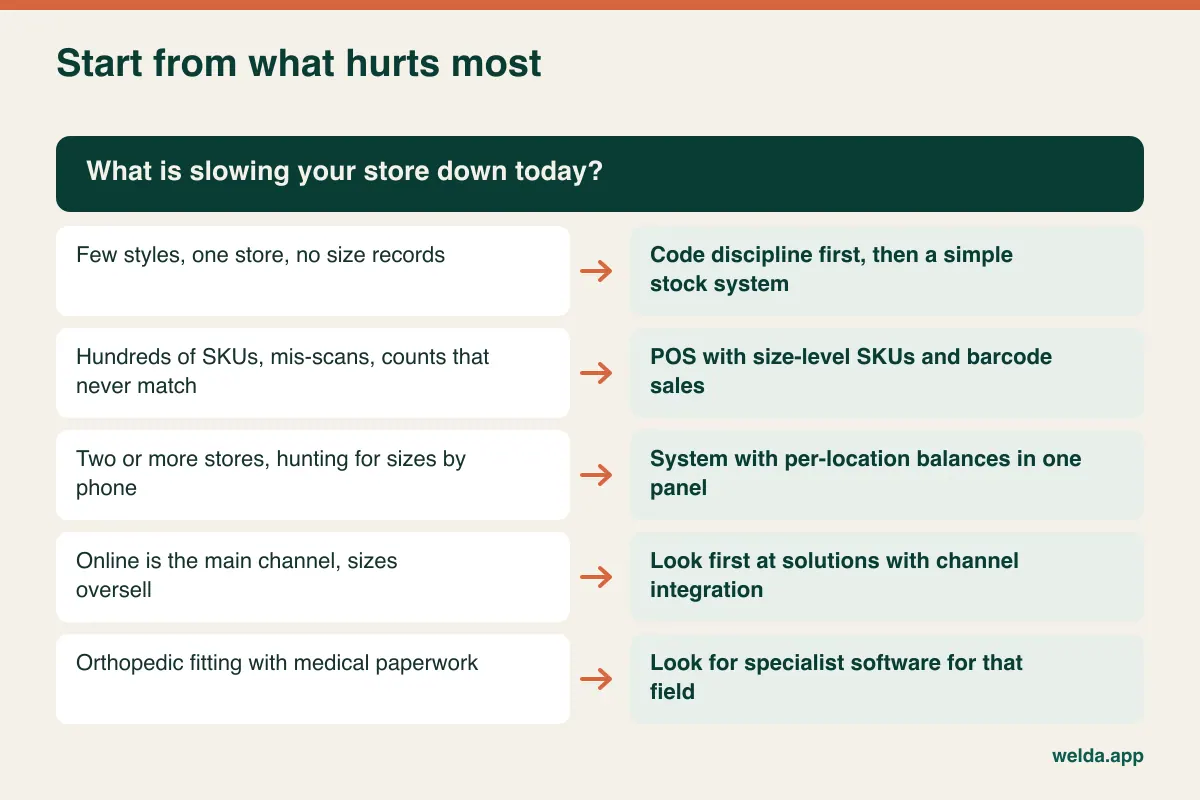
Welda Stock is designed for retailers who want size-level stock, barcode sales, supplier invoices and balances, per-product margins and multi-location visibility in one web-based system. There is no separate shoe edition. It runs on the same setup as our shoe store POS software and clothing store solution, with a shoe's size set up the way a garment's size would be. Multiple stores and stockrooms are tracked with separate balances, so you can see which size sits where. How a transfer between stores is recorded step by step is something to check live if you move boxes often.
It may not be the right choice in some cases, and you should know that up front:
- Online is your main channel. E-commerce and marketplace integrations are not listed in our product materials. If the same size sells in two channels at once, sync should be your first criterion.
- You must be able to sell offline. Welda Stock is web-based and runs over your internet connection. We plan a way of working for unreliable lines during setup, but do not read that as offline mode.
- You run a specialist fitting practice. Orthopedic and medical footwear with measurement records and insurance paperwork belongs with specialized software.
- You need a style matrix on one screen. See how separate SKUs feel for you in a demo before committing.
Take three real boxes to your demo
Sample data flatters every system. A short test with your own stock tells you more than an hour of slides. Bring a style with half sizes, a pair with no barcode, and an accessory, then work through this list.
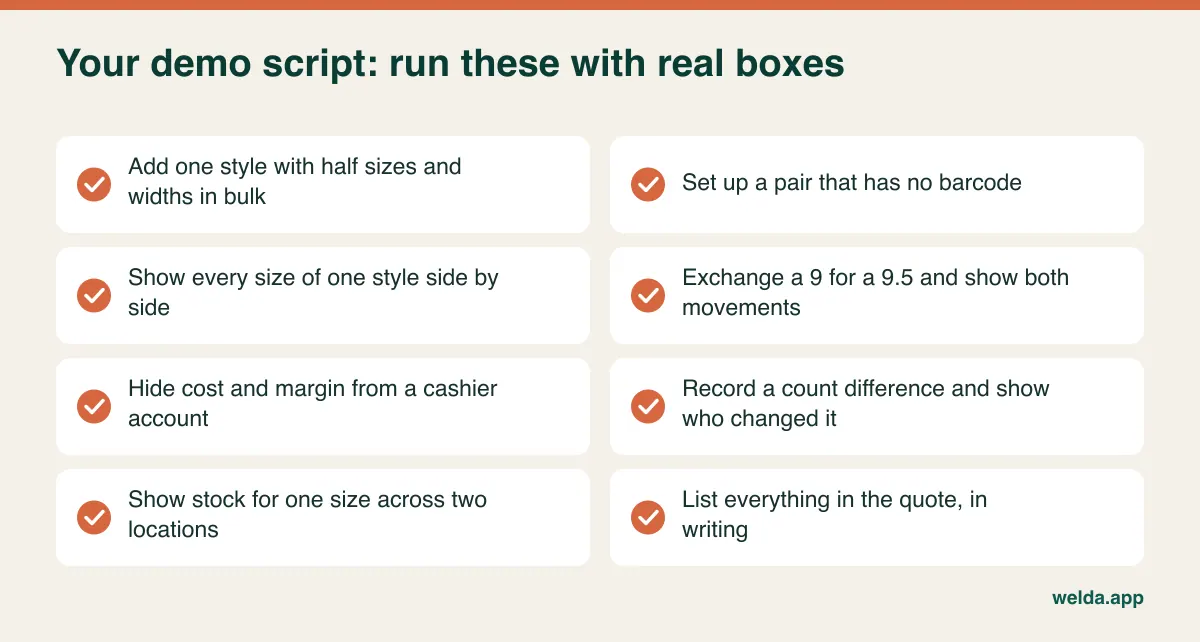
Then compare proposals properly. What drives the cost of this kind of software is typically the number of users and registers, stores and stockrooms, catalog size and how much data needs migrating, plus hardware. Line up quotes on the same sheet: setup, import, training, support hours, scanners, label printers, anything billed yearly, and what it costs to add a user or a location. Ask how you get your data back if you ever leave. Also budget your own hours, because cleaning codes, labeling and the first count do not appear on any invoice.
Welda Stock is quoted according to your users, locations and products. It has a one-time setup fee with no hidden or recurring costs, and setup, data import from Excel and team training are included. The actual figure is worked out in a free consultation once we know your store.
Moving over without losing a season
Choose your window. The easiest time to switch a shoe store is after the sale period, when walls are thin and the next collection has not landed. Fewer pairs to count, and the new delivery goes in correctly from its first day. Switching at peak season means your team learns a new register while customers wait.
- Write the code dictionary. Color abbreviations, category prefixes, how half sizes and widths are written. One page, used by everyone.
- Clean the spreadsheet. Format barcode columns as text before you paste anything. Otherwise a spreadsheet may turn a 13-digit EAN into scientific notation or strip the leading zero from a UPC, and you may not notice until the scanner fails.
- Import a test batch. Try one brand first. Check that a scan finds the right size, then import the rest.
- Count by section. Tape off each section as it is done. Count display shoes with their partners, as pairs.
- Go live in quiet hours. Spend a day or two with an experienced person beside the register. Practice a mis-scan, a void and an exchange as real transactions.
- Spot-check in week one. Count your two biggest brands and compare them with the system. A difference at this stage usually points to a process gap you can still fix cheaply.
Welda Stock is web-based, so nothing needs installing, and your existing product, stock and price lists are imported from Excel with our team's help during setup. For a deeper look at what can go wrong, see moving from Excel to inventory software.
Frequently asked questions about shoe store POS software
Do I really need a separate SKU for each size?
If you want to know which sizes you have, yes. Whether a system shows them as a matrix or as separate lines, each size has to be its own stock record. A style-level count tells you how many pairs you own, but not whether any of them fit the customer in front of you.
Will clothing store software work for shoes?
Often, since a size is a size to the database. The differences are in the workflow: boxes and display shoes, case packs, pairs as a unit, width as an extra dimension and frequent exchanges. Test those points specifically rather than relying on a clothing demo.
Can I use the barcodes already on my boxes?
Generally yes, and you should where they exist. Check first that the supplier's barcode is unique to each size and color, since a smaller maker may reuse one code across a style. In that case you will need internal barcodes for those lines. Welda Stock works with standard barcode scanners; bring a sample box to the demo.
How should I handle a brand whose sizing runs small?
Keep the labeled size in the SKU so that stock matches the box. Record fit advice for staff outside the stock logic, for example in the product name or in a store note. Changing the size in your system to reflect fit will only make counts and reorders harder to reconcile.
Is a free trial available?
Welda Stock starts with a free consultation and demo, using sample data suited to your sector, so you can review it before you buy. It is a no-commitment conversation. Bring your questions and your boxes.
How many SKUs is too many for a spreadsheet?
There is no hard limit, but a spreadsheet does not reduce stock when you make a sale, and it is rarely safe with several people editing it. If you have more than one person selling, or the sheet is out of date by the end of the day, you have probably already outgrown it.
If you would like to talk through your store, book a free consultation. Tell us how many styles, sizes and locations you run, and we will work out scope and fit together, and be straightforward if another type of system would suit you better.