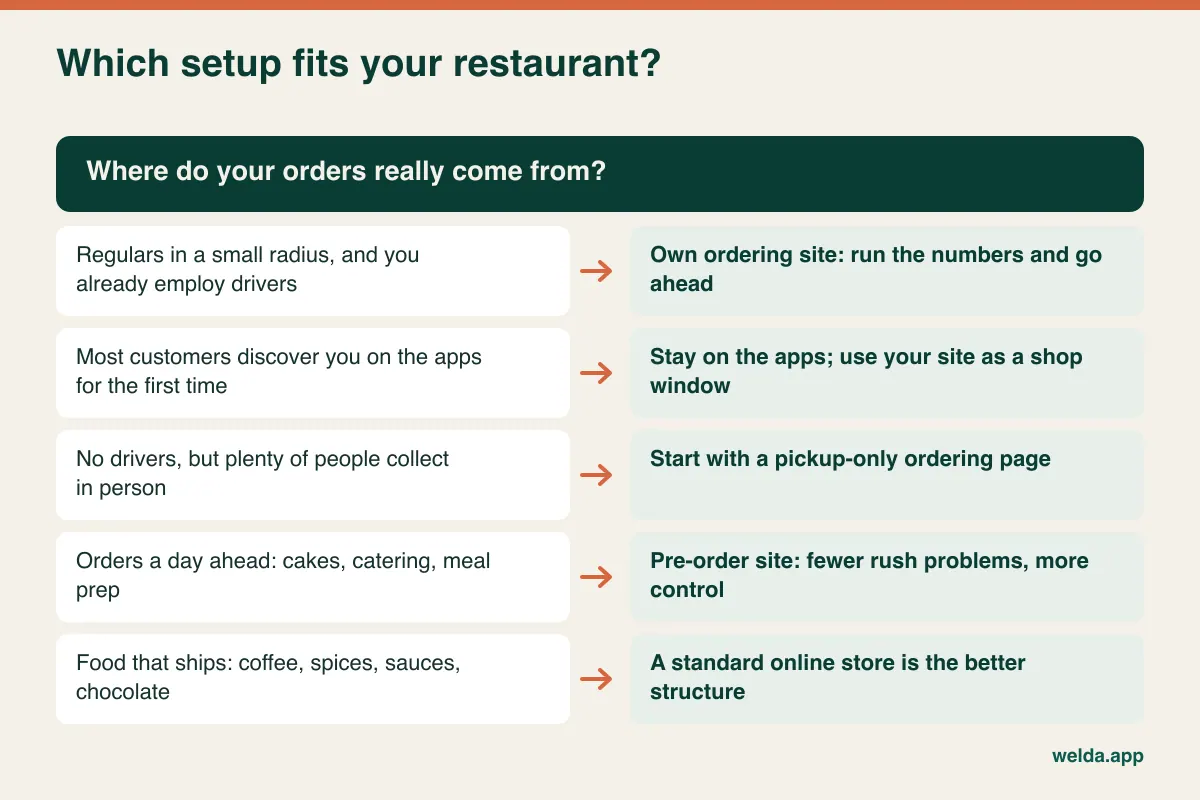
An online ordering website for restaurants pays for itself only if it moves repeat customers off the delivery apps. It does not replace the discovery the apps provide, and it does not make the delivery problem disappear. If you serve a tight local area, have regulars and can handle delivery or pickup yourself, it is usually worth pricing up. If most of your customers find you on an app for the first time, your own site will sit quiet and you will trade commission for advertising.
The decision comes down to a short calculation you can do with last quarter's payout statements, plus an honest look at who will answer the phone when something breaks on a Friday. This guide walks through both, for owners of restaurants, takeaways, cafes, bakeries and delis currently selling through apps like Uber Eats, DoorDash, Deliveroo or Just Eat.
The number to pull before you talk to anyone
Open your last three months of payout statements and work out what the apps really take per order. Not the commission rate from your contract, the whole deduction. Add up commission, delivery charges if you use their couriers, your share of promotions you opted into, sponsored listing spend, payment processing lines, and refunds or adjustments charged back to you. Divide by the number of orders.
That figure will often differ from the rate you remember signing, and it varies by platform, city and contract, which is why somebody else's percentage is useless to you. For the same type of breakdown applied to product marketplaces, see our guide on marketplace fees and profitability. The logic carries over.
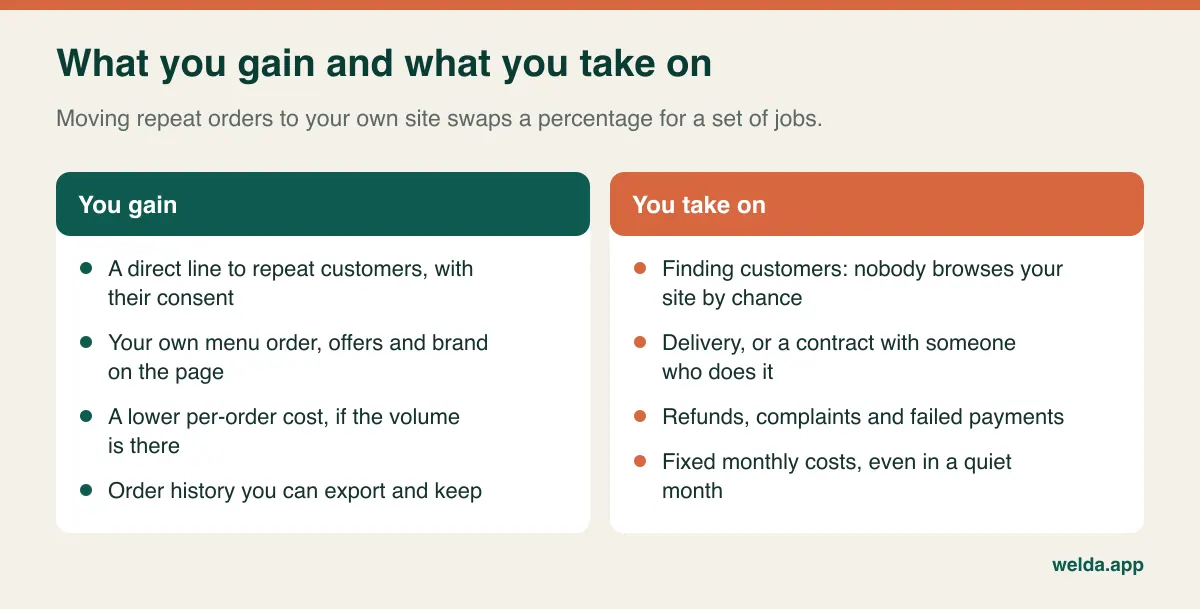
Then do the same for orders you would take on your own site. List the card processing fee, the delivery cost per drop, packaging if it changes, the promo you would run, and customer support time. Most owners stop at "no commission". That is the mistake this whole article is trying to prevent, because the fee does not vanish. It splits into several smaller bills, some of them fixed and due in months when orders are slow.
Run the break-even before you run a demo
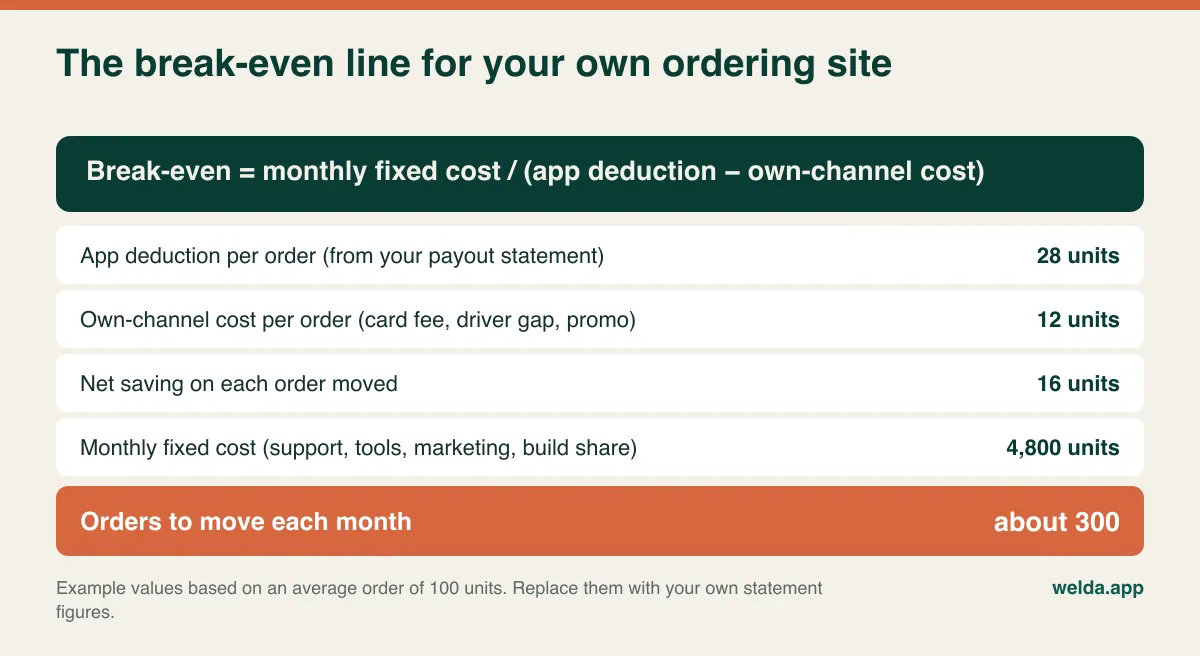
One line of arithmetic settles most of the argument. Take your monthly fixed cost for the site and divide it by the net saving on each order you move from the apps.
Here is a worked example, using generic units instead of a currency because the method matters more than anyone's amounts. Say your average order is 100 units and your statements show the apps deduct 28 units per order, everything included. On your own site the same order costs you 12 units in card fees, the gap between your delivery cost and what you pay now, and a small incentive. You keep 16 units on each order you move. If your fixed monthly costs (support, tools, marketing, plus a share of the build fee spread over the months you want to recover it in) total 4,800 units, you need around 300 moved orders per month. A restaurant doing 800 app orders a month would need more than a third of them to change channel. A restaurant doing 3,000 would need one in ten. Those are two very different projects.
Three things quietly break this calculation. First, phone orders. A customer who already rings you pays no commission, so moving them to the site saves nothing and may add a card fee. Count only orders that come from the apps, plus genuinely new ones. The staff time you save by taking fewer calls is real, but treat it as a separate benefit.
Second, discounts. "10% off when you order direct" is the standard advice, and it comes straight out of your net saving. In the example above, a 6-unit discount drops the saving from 16 to 10 units and pushes break-even from 300 orders to 480. Offer something that costs you less: a free side the kitchen has spare capacity for, a loyalty stamp, or simply a menu with items the apps do not carry.
Third, time. Decide over how many months you want to recover the build cost, and be conservative. Software that needs a redesign after two years has not been an asset for ten.
Repeat customers are the entire business case
An ordering site does not find hungry strangers; it shortens the path for people who already like you. So the key question after break-even is whether enough of those people exist in your current order flow.
If your app dashboard separates new from returning customers, start there. If not, use rough methods. Ask whoever packs orders to tick a sheet for two weeks whenever they recognize a name or address. Sort the delivery addresses on your statements by postcode or neighborhood and see how concentrated they are. A business where most orders come from a handful of streets, with the same names returning weekly, has customers it can move. A business whose orders scatter across a wide area, with mostly new names, is getting real discovery value from the apps, and that is worth paying for.
The type of venue matters. A neighborhood pizzeria with family regulars, a lunch spot sending trays to the same offices, or a bakery taking weekly standing orders are natural candidates. A dark kitchen in a large city, a venue near a university with constant turnover, or a concept that wins on impulse scrolling depends far more on the app's audience. Neither is better. They simply give different answers.
A food order is not a shop order
When someone orders shoes, nobody cares if the box leaves tomorrow. When someone orders dinner, the clock is running and the product is getting worse every minute. That is why the shortcut "just set up a store and list the dishes" causes so much trouble. Store platforms can do this with configuration and add-ons, but test the following before accepting anything.
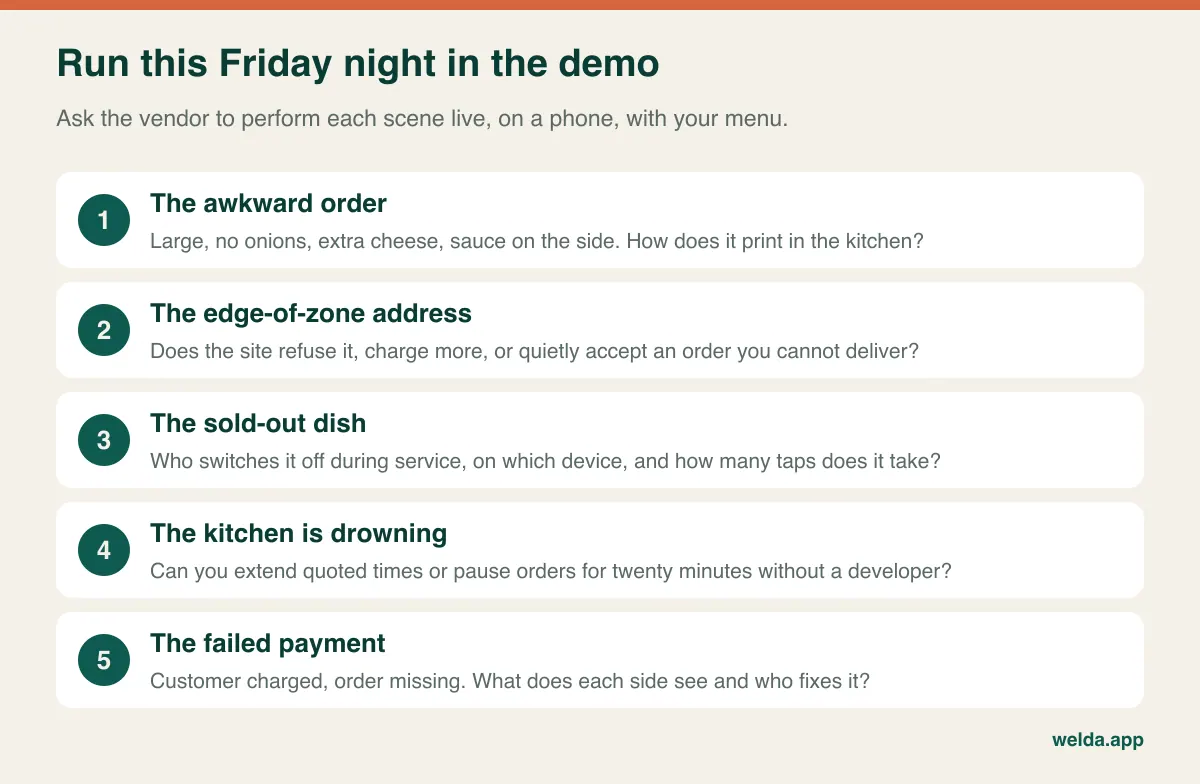
Modifiers that survive the kitchen. Size, sauce, no onions, extra cheese, half-and-half pizza. The system needs required and optional choices with correct price changes, and those choices must print clearly on the ticket. A menu that looks elegant to the customer but compresses everything into one unreadable line is how meals get remade.
Delivery zones you draw yourself. A radius lies. The neighborhood across the river may be close on the map and twenty-five minutes away at six o'clock. You want zones with their own minimum order, delivery fee and quoted time, and addresses outside them refused before payment.
Hours, cut-offs and capacity. Last-order times before closing, lunch and dinner menus, public holidays, and, most importantly, a way to extend quoted times or pause ordering when the kitchen is overwhelmed. The apps gave you a busy button. Your site needs one that does not require calling a developer at 7 pm.
The sold-out switch. When the short ribs run out, someone standing at the pass should be able to turn them off on a phone with wet hands. If that needs a desktop login in the back office, it will not happen, and customers will order a dish you no longer have.
An alert nobody can miss. An order that arrives as an email has not really arrived. You need sound, a printed ticket or a kitchen screen, plus an escalation if an order goes unacknowledged. The worst failure in this category is a customer told "your order is confirmed" for a meal nobody started.
Who carries the food
Delivery is where the savings most often disappear. If you currently use the app's couriers, leaving means finding your own, and the cost may be higher than you assume. There are three realistic options, and many operators combine them.
Your own drivers give you control and customer contact, but you are paying wages, insurance, vehicles and fuel, including during the dead hour at 3 pm. The useful question is not "what does delivery cost?" but "how many more drops can my existing driver handle in the hours they are already paid for?" Extra orders on existing capacity are cheap. Orders that force a new hire are not.
A delivery-as-a-service partner charges per drop. Courier-only services for orders placed elsewhere do exist, and local courier firms operate in many cities. You avoid idle time and you carry a clear cost per order, but check availability on peak nights, what happens when no driver accepts, and who is responsible for cold or missing food.
Pickup-only is the underrated option. It needs no driver at all, almost removes the operational risk, and lets you test the entire system with people who walk past your counter. Plenty of restaurants should start here and only add delivery after a few months of data.
Food that ships changes the question entirely. If you sell coffee, spice blends, hot sauce, cookies or chocolate, you do not need a restaurant ordering flow. You need a regular online store with carrier integration. And for bakeries or caterers taking orders a day or more ahead, the gain is less about commission and more about replacing a mess of phone calls and DMs with a calendar, a deposit and a clear cut-off time.
Three ways to get one built
Vendors use the same words for very different products, so understand the routes first.
A SaaS ordering tool made for restaurants gets you going fastest, with menu modifiers and zones usually standard. The trade-offs are template limits, a monthly or per-order fee that scales with your success, and questions about who controls the domain, customer list and order history when you leave. A store platform such as Shopify or WooCommerce with restaurant add-ons offers more control over design, content and search visibility, and suits businesses that also sell packaged food. The trade-off is that the menu logic depends on add-ons, each with its own fee, compatibility and upkeep. Fully custom software makes sense for groups with several sites, unusual workflows or their own app plans, and it brings long development time and a lasting dependence on developers.
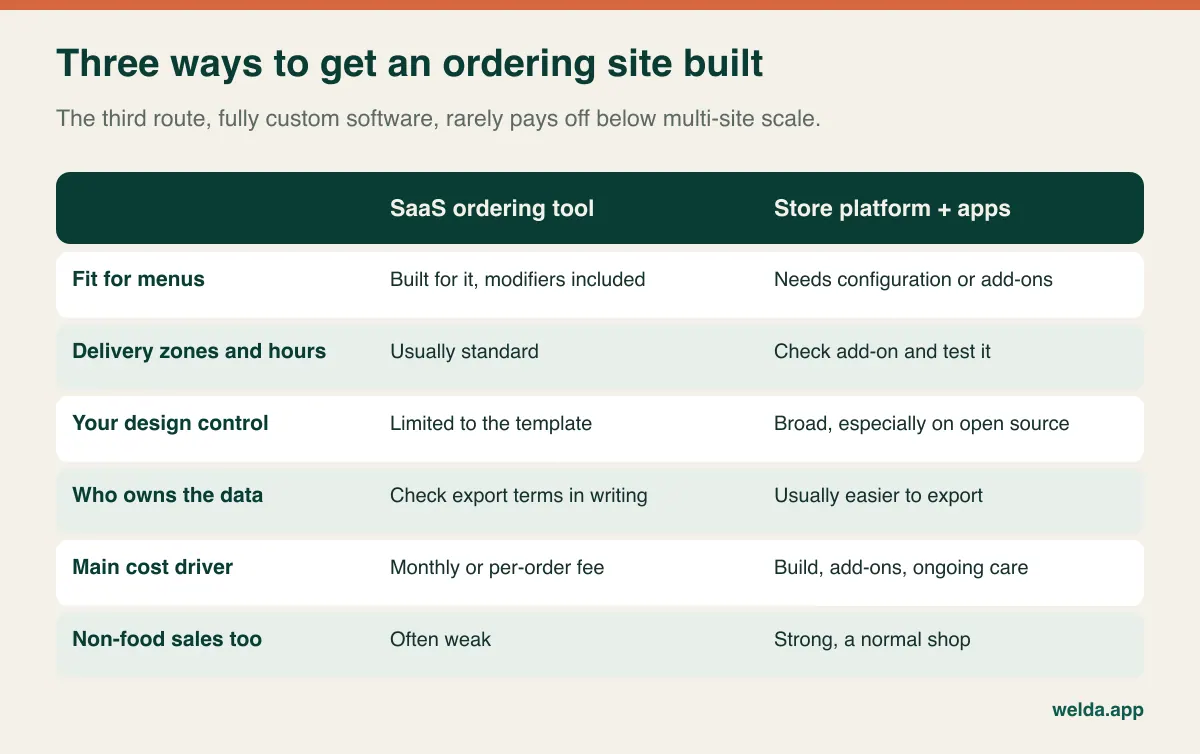
When comparing proposals, these items drive the cost, so ask every vendor about each one in writing: number of locations and delivery zones, number of dishes and modifier groups, who enters the menu (a photographed menu with options is real work), payment methods including cash on delivery, ticket printing or kitchen display, connection to your POS, multilingual menus, analytics, training and post-launch support.
Then line the proposals up on a two-year total, not on the setup fee. Include subscriptions, add-on licenses, card fees, any per-order platform fee, hosting, the domain, maintenance and the rate for small changes. Finish with four questions. Whose name is the domain under? In what format can I export customers and orders? What do I keep if I leave? Can I change a price myself tonight? Our guide to website ownership and source code goes deeper on the last ones. We are leaving amounts out on purpose, because scope moves them so much that any range would mislead you. With the list above filled in, two or three like-for-like quotes tell you far more than a market average ever could. The cheap one often turns out to exclude menu entry, kitchen tickets or ongoing care.
What ends up on your staff's plate
Proposals do not list the daily chores. Daily: reconciling card payouts against orders, handling cancellations and refunds, sorting out calls between driver and customer, checking that the day's receipts and sales records match. Weekly: menu and price changes, checking your prices are consistent across channels, setting up promos, reinstating sold-out items. Occasionally: replying to reviews, helping someone who cannot get through checkout, reshooting a dish.
Picture a small team on a Friday. Three in the kitchen, one on the counter. A customer calls: "My card was charged but I never got a confirmation." On an app, that call went elsewhere. Now your counter person answers, needs the payment dashboard, and the login belongs to the owner, who is out. Four people are waiting to pay. Decide before launch who handles this, on which screen, and up to what amount they can refund without asking.
Write down the hours for a typical week, multiply by your staff cost and add them to the fixed cost in your break-even. An owner who says "I'll handle it" is not free either. This forgotten line explains why a site that looked profitable on paper gets quietly abandoned a year later.
Also ask how orders reach your till. If they do not flow into your POS automatically, someone keys them in, and if that slips, your sales and stock numbers stop being true. Restaurants still deciding what their back-of-house system should be can start with restaurant POS vs inventory software.
Rules vary, so check locally
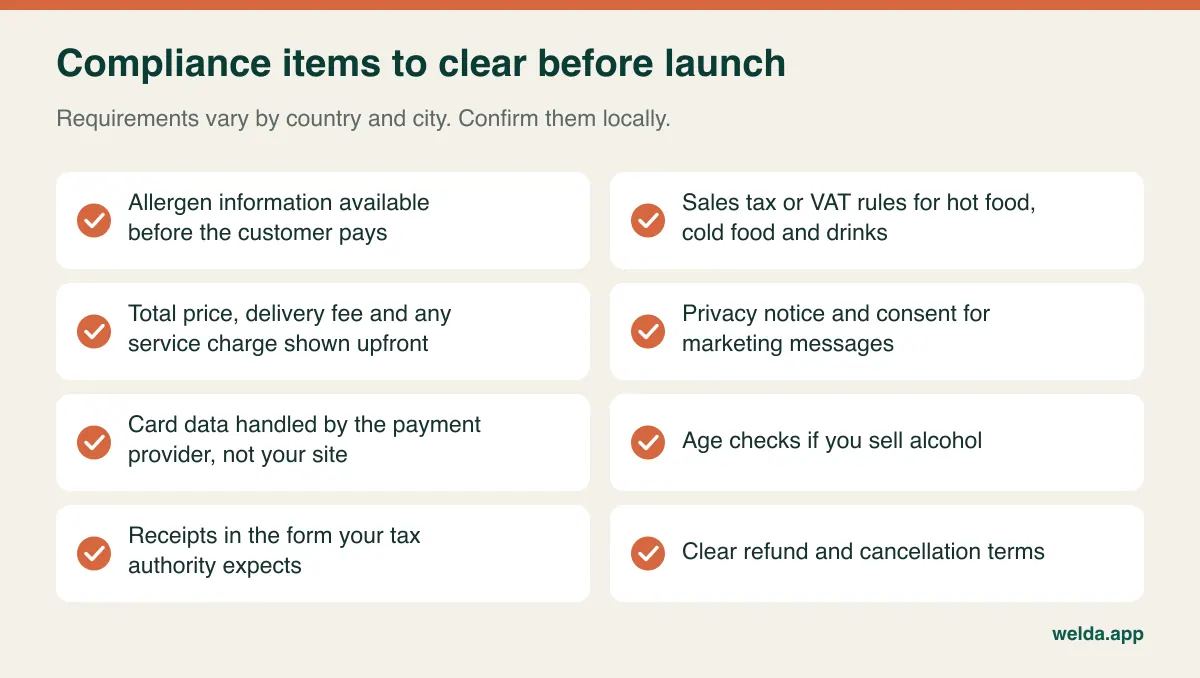
When an app is the seller or the intermediary, some of this may sit with them. On your own site, more of it sits with you. Treat what follows as a checklist of questions for your accountant and, where needed, a lawyer in your country, because the details differ by jurisdiction and change over time.
Allergen information is the one to take most seriously. Many places, including the UK and EU, expect it to be available before the customer completes a distance order, and again in some form at delivery. Tax treatment often differs between hot food, cold food, delivery and drinks, so the site must apply it correctly for your location. Alcohol usually brings licensing and age-verification duties. Some cities and states regulate how delivery and service fees are displayed, and total-price rules are spreading. Privacy law such as GDPR or US state laws covers addresses, order history, tracking pixels and marketing consent. Do not assume that everyone who placed an order has agreed to receive your promotions.
On cards, use a hosted payment flow from a recognized provider so raw card data never touches your server. That reduces your PCI DSS burden, though it does not eliminate it. Finally, publish clear refund and cancellation terms; a dispute over a wrong or late meal is far easier to settle when the terms are already on the page.
Moving customers without burning the relationship
Traffic to a restaurant's site usually starts in places you already control. Your Google Business Profile is the first one. People searching your name should see a direct ordering link, rather than a route to an app. If your site itself needs work first, our restaurant and cafe website guide covers the basics. Instagram bio and stories come next, then QR codes on tables, windows and bags. Regulars who call can be told about the site, with the caveat above that it saves workload, not commission.
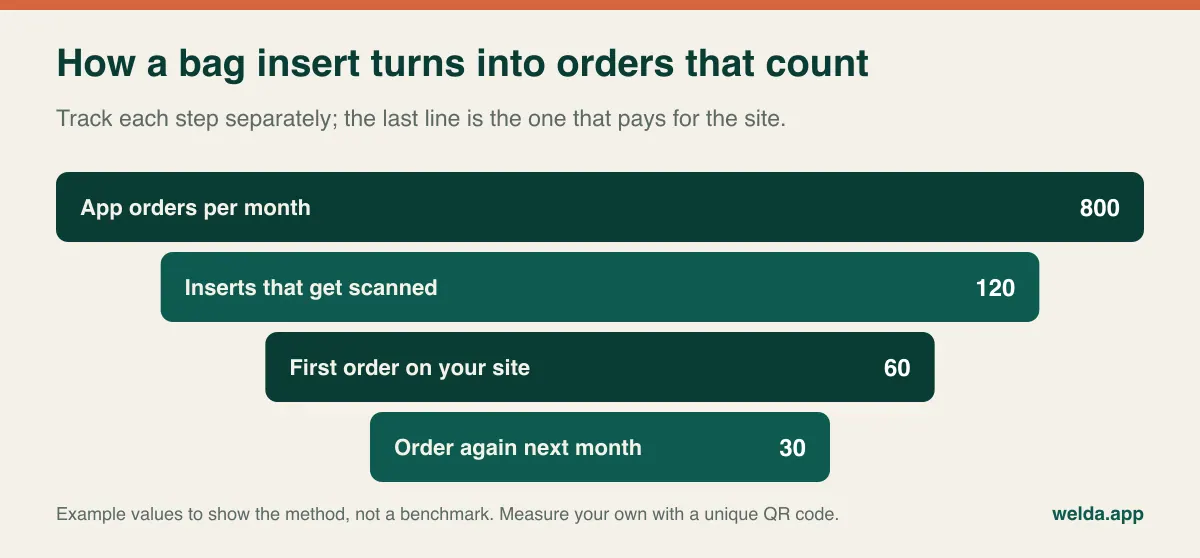
The real target is the repeat app customer, and here you need care. A bag insert is the classic move, but platform contracts can contain clauses about price parity, redirecting customers or marketing materials in orders. Read yours first and ask your account manager if unsure. The insert should offer a reason other than a steep discount: dishes only on your own menu, lunch offers, saved favorites. Give each channel its own QR code and measure orders by source so you are not guessing what worked. If you buy ads, count them in your cost per order, or you have just renamed the commission.
Do not plan to quit the apps, at least not at first. For many operators the healthiest long-term state is both: the apps find new customers at a cost you accept, and your site serves the regulars. Whether you can price differently across channels is a contract question, so check before deciding.
Run a Friday night before you sign
A slide deck will not show you whether the system survives a rush. Give the vendor three dishes from your actual menu and ask them to run these scenes live, on a phone, with the kitchen side visible on screen.
After that, ask about contract matters. How long are launch bugs fixed free? Who do we reach on a Friday night, and how? Which licenses do we pay directly? Get the answers in writing.
The common mistakes in these projects are not technical. Launching the full menu with every option instead of the top sellers. Photos that make a good dish look cheap, though you do not need to shoot sixty items in one day. A checkout that was tested on a laptop. Launching without a plan for who gets customers to the site. And treating launch as the finish line: an owner who never looks at the order data will never learn where people drop off.
When the honest answer is no
If the break-even number is close to your total order volume, the site will not pay back at this stage. If you are new and do not have regulars yet, spend that money on visibility and on getting reviews on the channels where people already look. If your food cost and margins are not clear, the commission may not be your first problem. And if you are a one-person operation with nobody to pick up a complaint call on a busy night, a new channel may lose you more customers than it saves.
There are smaller steps between nothing and a full delivery system: a pickup page, a lunch order form for nearby offices, a next-day ordering page for cakes and platters. For many businesses, one of these is the correct first project.
Where Welda fits, and where it does not
Our part in a project like this is building the store and connecting payments and measurement. Our service for an online ordering website for restaurants and food businesses runs on Shopify or WooCommerce, depending on your needs: a mobile-first store, a structured catalog, payment and shipping integrations, GA4 Enhanced Ecommerce and Meta Pixel tracking, plus admin training and documentation. After launch we can track the numbers and keep improving things.
To be straight about the limits: our service is written around online stores in general, and it is not a packaged restaurant product. Delivery-zone logic, kitchen tickets and live driver tracking depend on the platform and add-ons chosen, so we go through them one at a time when scoping, and tell you up front what is and is not feasible. We do not promise integration with delivery apps; the marketplace connections we set up are for Amazon and Etsy. If you sell packaged food or anything that ships, the fit with what we build is more natural.
If you also have counter sales, Welda Stock can keep shop and in-person stock in one pool. It does not do table and tab management, and we do not promise fiscal device integration or automatic recipe-based depletion. We are working on a separate product for tables and tabs, Welda Restoran, without promising a date.
Frequently asked questions
How much does an online ordering website for restaurants cost?
It depends on menu size, modifiers, delivery zones, payment methods, POS connection and ongoing care, so a single number would mislead you. Compare quotes on a two-year total. For our own work, scope and price are settled in a free consultation.
Should I leave the delivery apps completely?
Rarely at the start. Keep them as your source of new customers and move repeat orders to your site. Base any later decision on how many orders actually moved in the first few months.
Can I charge less on my own site than on the apps?
That depends on your contract and local rules, so check first. And remember that any discount comes out of your net saving, so put it in the break-even before running it.
I have no drivers. Can I still start?
Yes. Start with pickup, or use a per-drop courier service. Include the fee in your per-order cost and check peak-hour availability first.
Do I need a mobile app too?
Usually not at first. A fast mobile website gets customers ordering with no download step. An app is worth considering only once you have a large and frequent customer base.
How do orders reach my POS?
It depends on your POS and the platform chosen. Without an integration, someone enters them by hand every day. Ask about feasibility using the exact name of your system.
How long does it take?
Mostly it depends on how ready your menu, photos and copy are. Add your own steps to the plan as well, such as approval from a payment provider and advice from your accountant. These often take longer than the build.
What to do this week
Pull three months of statements, work out the deduction per order, estimate your share of repeat customers and do the delivery math. If the break-even is a modest slice of your orders, an online ordering website for restaurants is worth pursuing. If it looks out of reach, you have just learned that the commission is not your best fight this year, which is also useful. Bring the numbers and your menu to a free consultation, and we will go through the scope, the cost drivers and whether this fits your business.