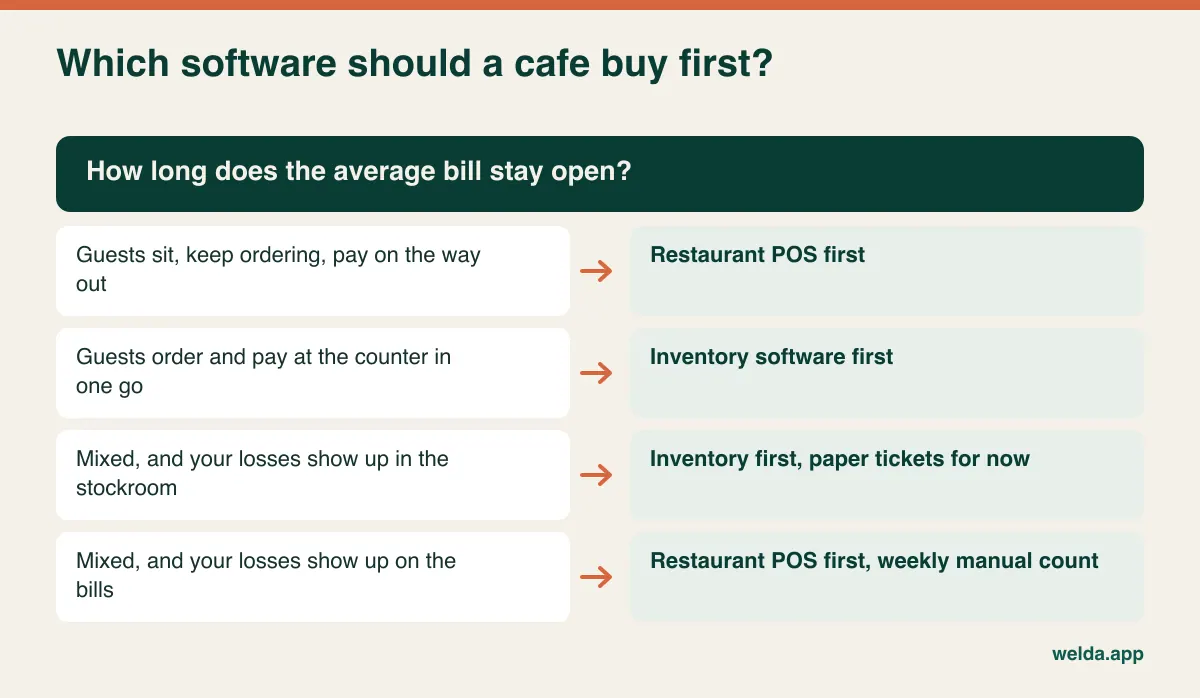
If your guests sit down, keep ordering and pay on the way out, buy a restaurant POS first. If they order and pay at the counter in one motion, sort out inventory software first. That is the short answer to the restaurant POS vs inventory software question, and it holds because the two products solve different problems: one keeps track of a bill that stays open, the other keeps track of what you have, what you lost and what you owe.
The difficulty is that plenty of cafes are not one thing. A place can run a takeaway queue until eleven, then fill its tables for brunch, then sell slices from a display case all afternoon. For those owners, a one-line rule is not enough. This guide gives you a way to measure which kind of business you really are, shows what you will be stuck doing by hand whichever tool you pick first, and explains why buying both on the same day often backfires. It also says plainly where our own product stops, because that affects your decision.
Stop counting tables, start timing the bill
Vendors tend to open with "how many tables do you have?" It is the wrong first question. A coffee bar with ten tables where guests pay at the till and carry their own flat white to a seat is a counter business with furniture. The sale is finished before anyone sits down. A tiny bistro with four tables can hold a single bill open for ninety minutes, add to it three times and split it between two cards at the end.
What separates them is the lifespan of the bill: the time between the first item being ordered and the money being taken, and how many times the bill changes in between. When that lifespan is measured in seconds, a sale is a closed event and all you need is a fast, accurate record of it. When it runs to minutes or hours, something has to remember the bill while your team does other things. That memory is what a restaurant POS sells.
You can measure this in a week without any software. Choose an ordinary week, not one with a local festival or a heatwave. Keep a sheet by the till with two columns. Every sale goes in one or the other: paid when ordered, or opened on a table and settled later. If a tally sheet feels unrealistic during the morning rush, compare your receipts with your handwritten tickets at closing instead.
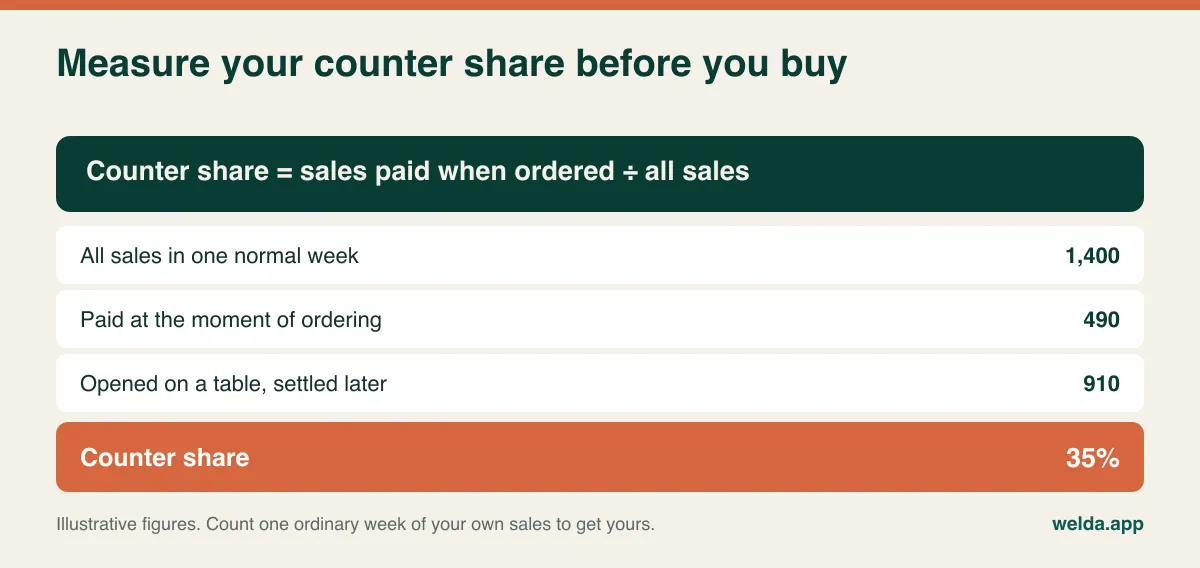
No study will tell you the exact line, and we are not going to invent one. Here is how we would read the figure in practice. If counter sales are the clear majority, table tracking can survive on paper for now. If they are the clear minority, get the tables under control first. Anywhere in the middle, the number alone will not decide and you need the question in the next section. Run the sum by revenue as well as by count, because a minority of table bills can easily carry most of your takings.
In a mixed cafe, follow the money that goes missing
When both patterns live under one roof, think back over the last three months and ask what actually cost you. Two different sets of symptoms point in two different directions.
The money is leaking at the tables if the drawer and the tickets rarely agree at closing, if a server says "I think table six had two more coffees", if kitchen orders go astray, or if a group argues over who had what. A restaurant POS pays back first here, since every one of those problems is a bill that nobody was properly holding.
The money is leaking in the stockroom if someone runs to the supermarket for milk on a busy Saturday, if you cannot explain where a month's coffee beans went, if cakes go in the bin and nobody writes them down, or if you need the paper invoices to find out what you owe a supplier. Here inventory software pays back first, and no amount of table management will make those problems visible.
Three made-up businesses show how this plays out. A commuter kiosk by a train station has no seating, one till, and a brutal hour from seven to eight. Buying a POS built around a floor plan would mean ringing every sale through a screen designed for something else. Its real questions are how quickly a sale can be recorded and whether oat milk will last until Friday. A forty-seat seaside brunch place, by contrast, has three servers in season, big groups and separate payments. Unrung items and tangled bills hit it first. Its stock problem is real too, but it is second in the queue.
The third type causes the most hesitation: a neighbourhood cafe with a dozen seats, counter orders in the morning, table orders after lunch, the owner and one employee on shift. Two people who know every regular can hold a dozen seats in their heads, and paper tickets genuinely work most days. Purchasing, meanwhile, runs entirely on instinct. For this type, fixing stock first often changes more. Your own loss list still gets the final word.
Why a latte breaks most inventory assumptions
Retail stock is simple in one important respect: the thing you sell is the thing on the shelf. Scan a bottle of water and one bottle leaves your count. Cafes run on two systems at once. Bottled drinks, wrapped cookies and pre-cut slices behave like retail. A latte does not exist in your stockroom at all. What exists is beans, milk, a cup and a lid, in quantities that vary with the barista, the cup size and whether the guest asked for an extra shot.
That is why it helps to think of cafe stock control as three levels. You do not have to reach the top one to get value.
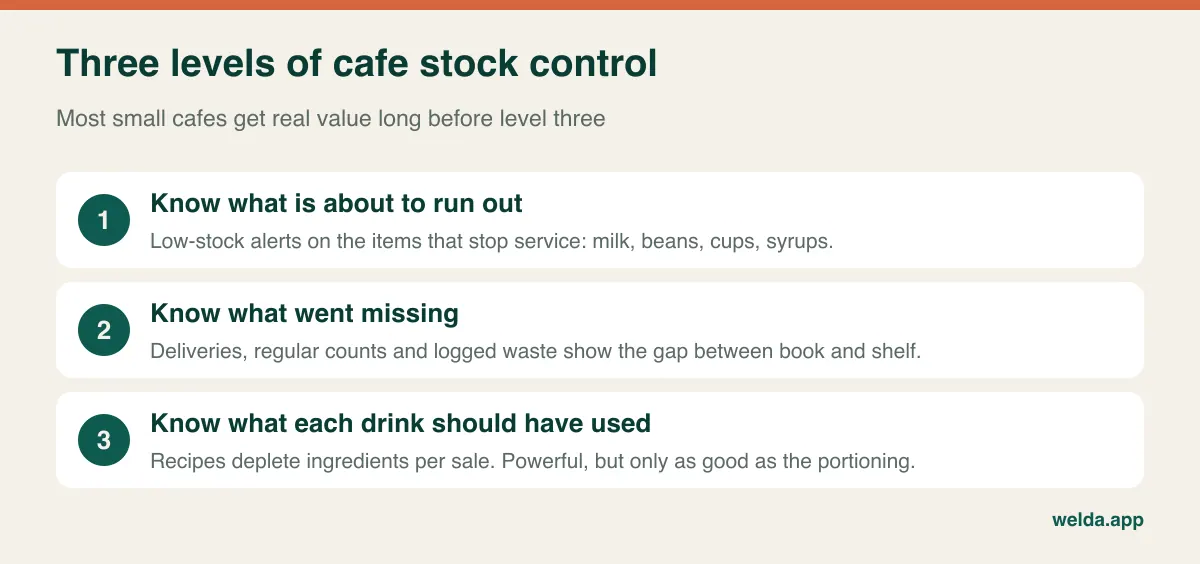
Level one tells you what is about to run out. You set a minimum for the items that stop service and you get a warning before they hit zero. Level two tells you what went missing. You record deliveries, count regularly and log what spoils or spills, so the gap between what your records say and what is on the shelf becomes visible. Level three is recipe-based depletion, where each drink sold deducts a defined amount of milk and beans automatically and you can compare theoretical usage with actual usage.
Level three sounds like the obvious goal, but it is the most demanding. Someone has to write and maintain a recipe for every drink in every size, update them each time the menu changes, and make sure baristas actually pour to the recipe. If they do not, the system will still deduct its neat numbers, and your next count will produce an even more confusing variance. For a short menu, levels one and two usually deliver most of the control you were looking for. For a long menu with a real kitchen, recipe costing is a serious requirement and belongs on your demo list.
In the interest of being straight about our own product: Welda Stock's documentation covers levels one and two, meaning low-stock alerts, stock counts and waste tracking. We do not promise automatic recipe-based depletion. If you need it, ask in the conversation and you will get a direct answer. For broader selection criteria, our guide to choosing inventory software goes further, and how to calculate minimum stock levels will help you set alerts from real usage rather than guesswork.
What you are paying a restaurant POS to remember
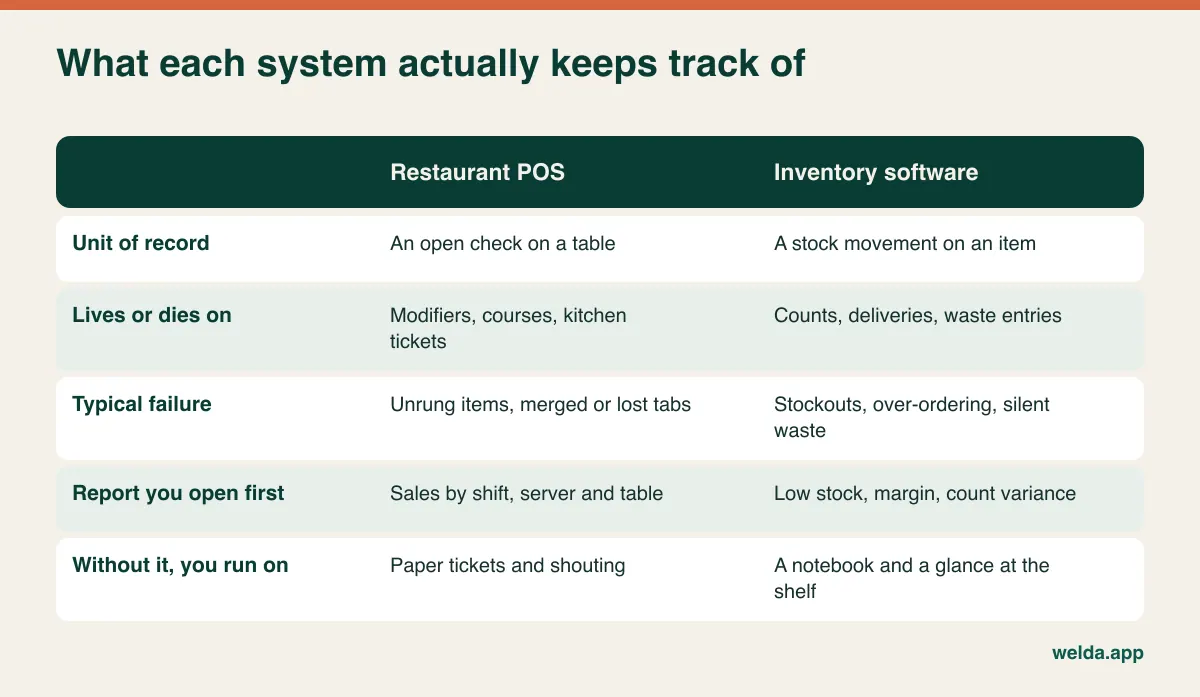
A restaurant POS earns its keep through what happens to an open bill over an evening. Picture one table: opened, three drinks rung in, two sent to the bar and one to the kitchen, one voided, the party moves to a bigger table, two desserts added, one comped by the manager, the bill split, one guest pays by card and the other in cash. Each of those steps is a chance for an error, and on paper every one of them depends on a server's memory during a rush.
So if table service is your main trade, look hard at these: a floor plan with table transfers, merging and splitting of bills, modifiers ("oat milk", "no sugar", "extra shot"), order routing to separate printers or screens for bar and kitchen, tableside ordering from a phone or handheld, partial payments, tips, and a record of who voided or comped what. Then look at speed. On a full screen at seven on a Friday, how many taps does it take to open a table? If servers abandon the system, the paper comes back and your new software is just another line on a bank statement.
Most restaurant POS products also advertise inventory. Treat that word with care, because it can cover anything from a simple count of bottled items up to full recipe-level tracking. The useful question is not whether inventory exists but how far up the three levels it goes. Can you record a supplier invoice? Does a count produce a variance report? Is waste logged separately? Can you see what you owe each supplier? One product really can cover both needs for some cafes. You find out by entering your own milk during a demo, not by reading a feature grid.
The manual work you are signing up for
Whichever tool comes first, the other job stays manual for a while. So the decision becomes: which job can you keep doing by hand with the least damage? Owners who skip this question often buy both at once. Their team tries to learn two systems together, usually right before the busy season, and ends up using half of each.
A paper ticket book can be a respectable short-term bridge if you add some discipline: numbered pads, a firm rule that nothing leaves the bar or kitchen until it is written down, and a daily reconciliation against the till, provided your local tax rules allow it. The stock-side bridge is equally simple: a weekly count sheet for the fifteen or twenty items that tie up the most money, plus one folder for all supplier invoices. Keep these bridges short. Cafe staff turn over quickly, and a bridge that depends on one careful person disappears the day that person leaves.
Buying both at once makes sense in a couple of cases: when you are opening a new site and have no old habits to undo, or when one product truly covers both jobs. If you buy two separate products, ask on day one how sales data reaches the inventory system. Without a working integration, every sale has to be entered twice. Nobody will keep that up in a queue, your stock figures will quietly stop meaning anything, and two good programs will add up to one bad system.
Tax, receipts and the rules that vary by country
Requirements around sales recording differ widely between countries and sometimes between regions. Some jurisdictions require certified fiscal devices or tamper-proof recording of every sale. Others rely on VAT or sales tax rules that treat dine-in and takeaway differently, which your system needs to handle correctly. Tip reporting, service charges and e-invoicing rules also vary. We cannot tell you what applies to your business in a blog post, and rules change, so ask your accountant before you sign anything.
Then put three questions to each vendor. Is the printed receipt a legally valid tax document where you operate, or only an information slip? Does the system connect to whatever fiscal device or tax authority service you need, or will staff key the amount into two places? Can it export the records your accountant wants, in a format they can use? Privacy matters as well. If you keep customer accounts or loyalty data, you are likely responsible for it under your local data protection rules (GDPR in the EU and UK), so limit who can see it. For a closer look at register hardware against software, see our guide to choosing a POS system.
Welda Stock issues customer receipts, but do not read those as a fiscal integration; our product documentation does not promise one. Tell us what your country requires and we will talk it through with you honestly.
Lining up two quotes that measure different things
These two kinds of quote are hard to compare because they scale on different axes. POS costs tend to grow with devices and staff. Inventory costs tend to grow with users, locations and product count. Rather than comparing bottom lines, rewrite both quotes into the same table. Until the lines below are filled in for your cafe, the gap between two headline totals tells you very little.
| Cost driver | Ask the POS vendor | Ask the inventory vendor |
|---|---|---|
| Licence unit | Per terminal, per handheld, per location? | Per user, per location, per item count? |
| Hardware | Handhelds, bar and kitchen printers, customer display, card terminal | Barcode scanner, receipt printer, a computer with a browser |
| Setup | Menu, modifiers, floor plan, printer routing | Item import, opening count, roles |
| Payments | Must you use their processor? What happens if you leave? | Does it work with your existing terminal? |
| Training | Included each season for new staff? | Separate for till and stockroom roles? |
| Three-year total | All subscription, add-on and support fees | Subscription or one-off, plus any modules |
Add the costs that never appear on an invoice: hours spent training, the service slowdown on go-live day, your plan when the internet drops, and how you get your data out if you leave. A small monthly fee and a large one-off fee can only be compared over a common period, which is why three years is a useful yardstick. Ask for add-ons, extra locations and support fees in writing.
Bring your worst Saturday to the demo
A vendor's demo runs like a quiet Monday morning. Send over ten items from your own menu in advance, then ask them to work through the situations that actually hurt you.
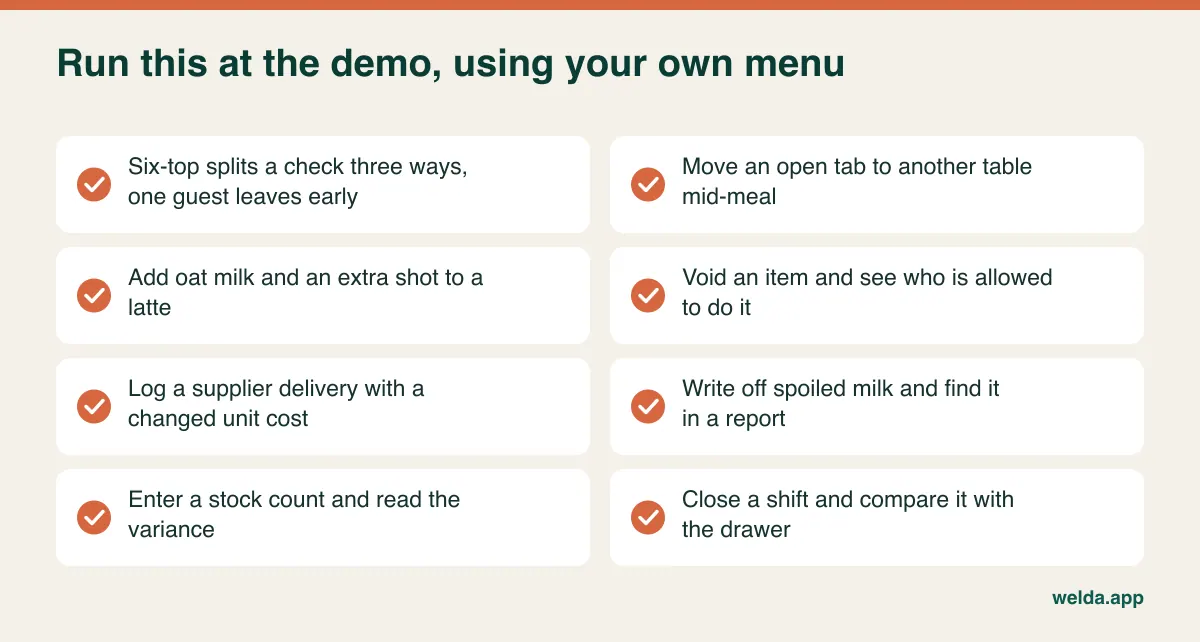
Pay particular attention to one question: "When I sell a latte, what happens to my milk count, and if nothing happens, what do I have to do by hand?" The answer tells you more about the product than the whole feature list. Also bring your newest employee. Turnover in cafes is high, so software a new hire can use on the first shift is worth a great deal. A screen the owner finds comfortable but a newcomer cannot follow after twenty minutes will cause trouble in the middle of the season.
Where Welda Stock sits in this decision
Welda Stock does not do table and tab management. It focuses on counter sales and stock. We are working on a separate product, Welda Restoran, for tables and tabs, but we will not promise a date. If your bills stay open for hours and that is where you lose money, Welda Stock is not the answer today. You are welcome to tell us what you need and we will keep you posted.
If your guests pay at the counter, or you run a mixed cafe and the losses are in the stockroom, the picture changes. If you landed on the inventory side of restaurant POS vs inventory software, our cafe inventory page shows how a working day looks. What the product covers: real-time ingredient and product stock, low-stock alerts, a fast checkout screen, barcode sales of packaged items that deduct from stock automatically, stock counts and waste logging, supplier invoices and balances, margin per product, an end-of-day till report, customer credit accounts, separate permissions for cashier, stockroom and manager, and multiple branches with separate stock and comparative reports. The interface is available in English, German and Turkish.
It has limits too. Welda Stock is web-based and runs in a browser, so it depends on your connection. If your line is unreliable we plan a working setup with you during onboarding, but if you need a fully offline till, say so at the start. As noted above, we do not promise recipe-based depletion or fiscal device integration. Pricing depends on your users, locations and product count, with a one-time setup fee. You can see what drives the price in advance, and the actual figure is settled in a free consultation.
Plan the switch around your season, not the software
The calendar decides more than the vendor does. For a seaside cafe, the week before summer is the worst possible moment. For a campus coffee bar, it is the week term starts. Pick a quiet period and give the new routine at least two calm weeks before the pressure returns.
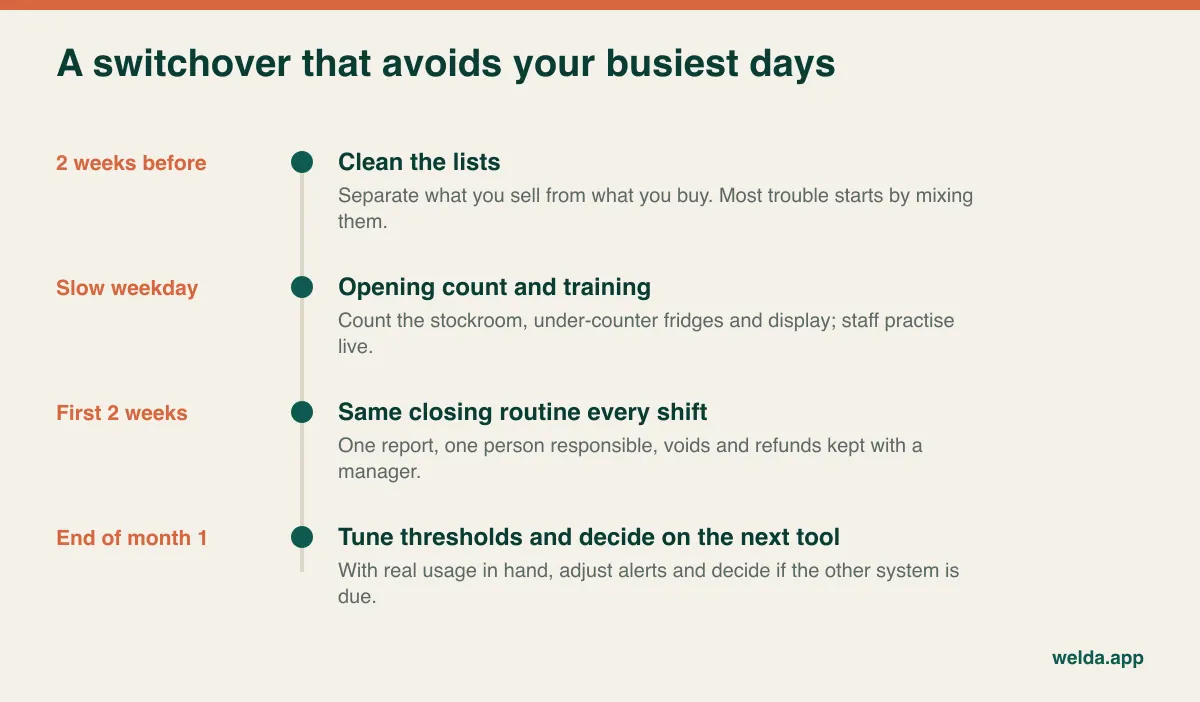
If you start on the inventory side, the classic error is trying to define everything at once. Separate two lists first: what you sell and what you buy. Mixing them is the source of most early confusion. From the buying list, begin with the items that tie up the most money or stop service when they run out. Napkins can wait a month. If your data lives in a spreadsheet, our notes on moving from Excel to inventory software will speed up the cleanup. Settle your units early, too. If milk arrives by the case and gets counted by the litre, your figures will make no sense until someone decides which unit the system uses. Count everything for your opening balance on a quiet evening, and do not forget the under-counter fridge and the display case.
If you start on the POS side, use the move to trim the menu; every unnecessary button slows a server. Keep the old ticket pads around for a week and rehearse what happens when the connection drops. Limit voids and comps to one person at first, then widen access once you have read a few reports.
Put the second purchase in your diary, because otherwise the temporary bridge quietly becomes permanent. Once the first system has run smoothly for about two months, ask yourself when the manual side last cost you money. If the answer is "last week", you know your next step. If you cannot remember, you may not need the second system yet, and that is a perfectly good result.
Questions cafe owners ask
Does a small cafe need both a restaurant POS and inventory software?
Not necessarily. A small counter-service coffee bar may never need table tracking, and a place with few tables and two staff can run on paper tickets for a good while. What you do need is some reliable record of both sales and ingredients. Which one lives in software depends on where you are losing money.
Can a POS inventory module replace dedicated inventory software?
It depends how deep the module goes. If it only keeps item quantities, no. If it handles supplier invoices, count variance, waste, supplier balances and recipes where required, it can be enough for many cafes. Test it with your own ingredients and ask to see the variance report after a count.
Can I run table service with Welda Stock?
Welda Stock has no table or tab management; it is built for counter sales and stock. We are working on Welda Restoran for that. If you run tables on paper and want Welda Stock for stock and the till, describe your setup in a consultation and we will tell you honestly whether it fits.
Will selling a latte reduce my milk stock automatically?
Only in software with recipe-based depletion, which not every product has. Our Welda Stock documentation does not promise it. It describes tracking ingredients through low-stock alerts, purchase records and regular counts instead. If this is a requirement for you, raise it early.
How often should a cafe count stock?
A weekly count is a sensible starting point for perishable and high-value items, while packaging can be counted less often. Consistency matters more than frequency: same day, same person, same units. Our step-by-step stock count guide covers the method.
Can I get my data out if I change my mind?
Ask before you buy, not after. Find out in writing whether products, customers and sales history can be exported in an open format such as Excel, and whether that costs extra. With Welda Stock, product and stock lists can be imported from Excel and reports exported to it.
Should I decide based on price?
Price comes after fit. The cheapest system that does the wrong job costs you the fee and the original problem. Decide which job comes first, then compare three-year totals only between products that do that job.
Give yourself one week, then decide
Count this week's sales in two columns, sort the past three months of losses into "tables" and "stockroom", and leave the job you can best handle by hand as your temporary bridge. For most cafes, that settles the restaurant POS vs inventory software question on a single page of notes. If it points to stock, bring your numbers to a free consultation and walk us through how your cafe runs. If Welda Stock fits, we will show you how it would be set up. If it does not, we will tell you why.