Gym management software pricing comes in three basic shapes: a fee per member, a flat monthly fee, or a modular plan where you pay for the parts you switch on. As your membership grows, a per-member bill rises in a straight line, a flat fee holds until you cross a tier limit, and a modular bill follows your features and message volume more than your headcount. The short version of the decision: if your numbers are low and uncertain, per-member or a small plan limits your risk; if your base is settled and growing, flat pricing is usually easier to live with; if you run many classes for a modest membership, modular or plan-based pricing tends to fit best.
To make that call for your own gym you only need two numbers: how many members a vendor would actually bill for, and the headcount at which two quotes cross over. The worked examples below use neutral "units" instead of currency, because list prices vary by country, promotion and scope, and what you really want is a method you can reuse on the quotes sitting in your inbox.
The number on the invoice is rarely your member count
Ask a gym owner how many members they have and you'll get one answer. Ask their software and you may get four. Gyms differ from salons and clinics here: a member isn't a one-off visit but a long-running record. People who froze in March, whose contract lapsed last year, or who bought a single class pack all stay in the database. Which of them a contract treats as billable is one of the most expensive sentences you'll ever skim past.
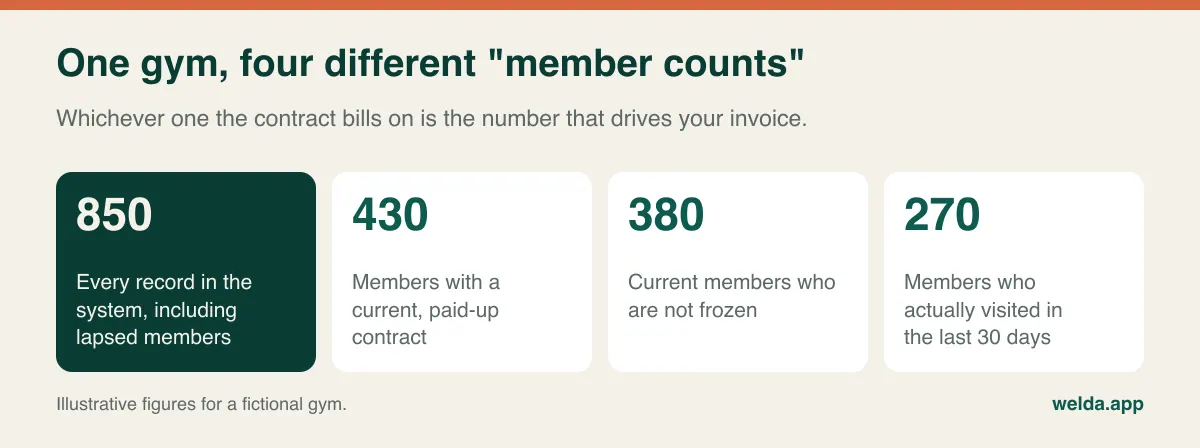
Take the gym above and a quote of 0.4 units per member. Billed on all records, that is 340 units a month. Billed on members who visited in the last 30 days, it is 108 units. Same price list, same building, very different cost. Before you compare anything, get these answers in writing:
- Is a billable member anyone in the system, anyone with a current contract, or anyone who has checked in within a set period?
- Do frozen memberships count, and does that change if a freeze runs for months?
- Do class-pack holders, drop-ins and trial visitors count as members?
- When is the count taken: month end, or the highest point in the month?
Keeping these categories clean is worth doing regardless of what you buy. Our guide to gym membership management goes through member types, freeze rules and how to spot people about to leave.
Three pricing models under growth pressure
Sales language blurs these models. A "flat" plan may hide a member cap; a "per-member" plan may carry a monthly minimum. Ignore the label and look at what moves the bill.
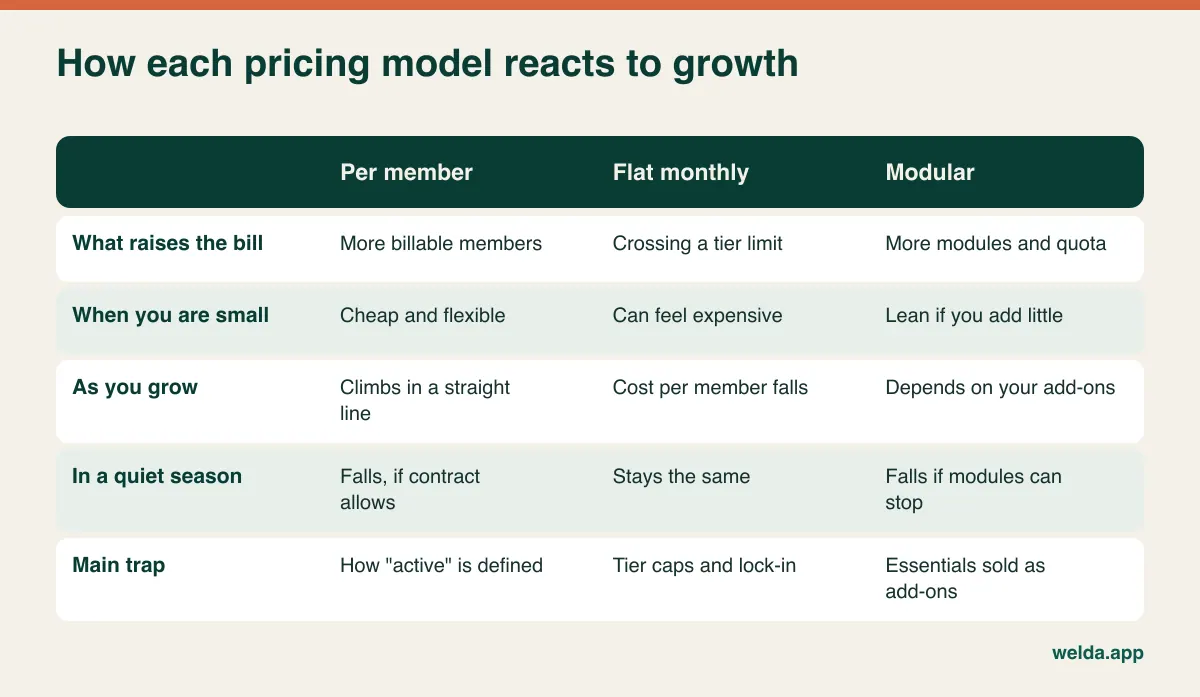
Per-member pricing makes the vendor your partner on the way up. For a new opening this is reassuring: if the floor is empty, so is the invoice. The price of that comfort is paid later. Double your members and the bill doubles, even though your front desk, your floor and the software's workload haven't doubled. If there is a monthly minimum, the early-stage advantage shrinks as well.
Flat monthly pricing is the easiest to budget. It goes into the spreadsheet next to rent and stays put. In practice, truly unlimited plans are less common than the word "flat" suggests. Most are tiered by members, users or sites, so the bill moves in steps rather than a slope. It's worth asking what happens if a successful January campaign takes you over the limit, and whether you can step back down when numbers settle.
Modular pricing gives you a core package and optional parts for class scheduling, payments, messaging, retail stock and so on. Paying only for what you use sounds like the fairest deal, and it can be, provided your essentials are in the core. If capacity limits or class credit tracking are add-ons, the headline price means little to a class-led studio.
Running the same gym at 200, 400 and 800 members
Let's put the models through the same growth curve. These three quotes are invented for illustration and don't represent any product or market. We've spelled out the assumptions so you can swap in your own.
- Quote A (per member): 0.4 units per billable member per month.
- Quote B (flat): 160 units a month up to 600 members, then 240 units in the next tier.
- Quote C (modular): a core of 50 units plus three modules at 25 units each, so 125 units. At 400 members you add a message pack (25), and at 800 a second pack and additional user seats (75 in total).
| Members | A: Per member | B: Flat | C: Modular |
|---|---|---|---|
| 200 | 80 units | 160 units | 125 units |
| 400 | 160 units | 160 units | 150 units |
| 800 | 320 units | 240 units | 200 units |
| Cost per member at 800 | 0.40 units | 0.30 units | 0.25 units |
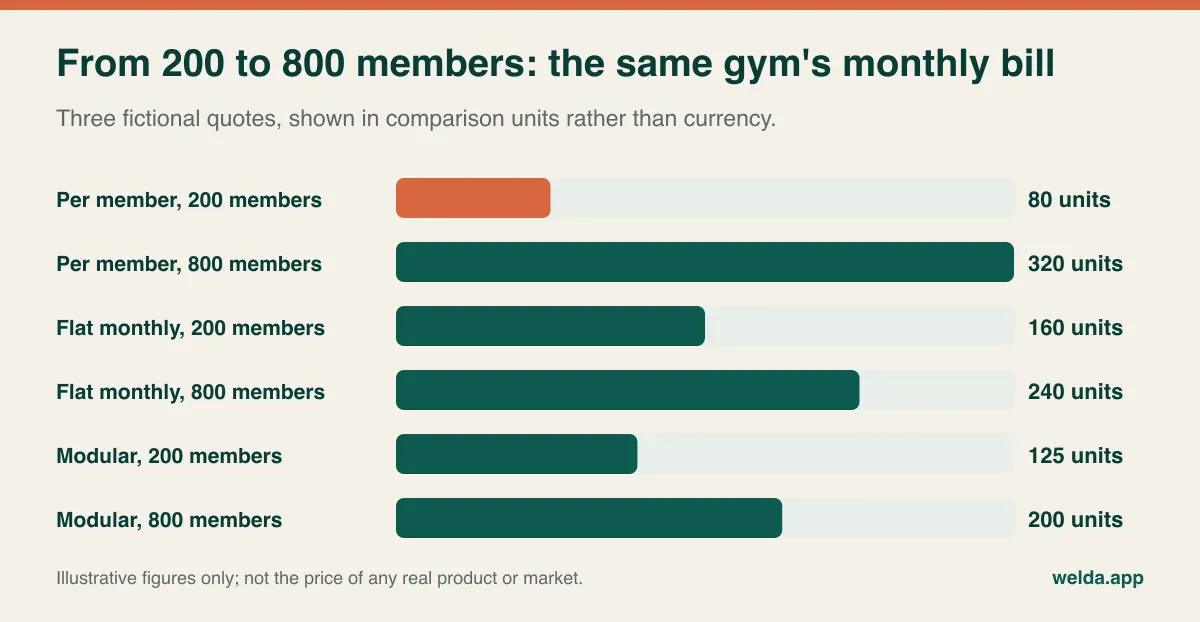
Three things stand out. The cheapest quote at 200 members is the most expensive at 800, so choosing on today's price means ignoring the bill you'll be paying in two years. The flat quote jumps by half when it crosses 600 members, and that step can arrive in a single good month. And the modular quote only looks best because this gym stops at three modules. Add a few more and the ranking can flip, which is why you should count the modules you would really switch on rather than the ones in the demo.
The fastest check on any pair of quotes is the break-even point:
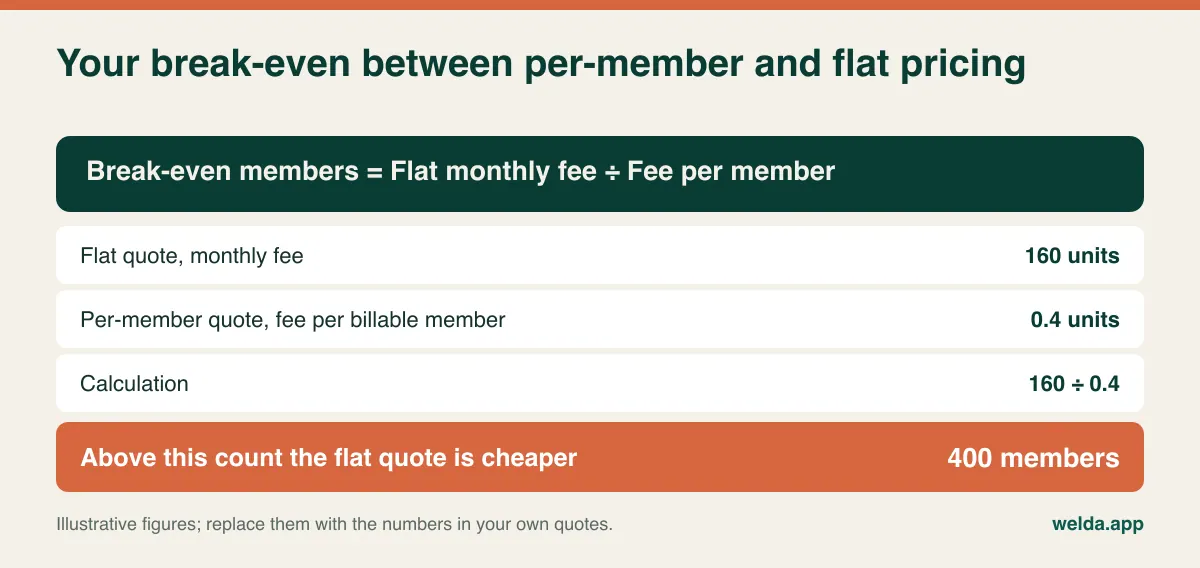
In this example, below 400 billable members the per-member quote wins and above it the flat quote wins. Test it against where you expect to be in 12 and 24 months, not where you are today. A gym at 300 with a target of 500 by next year will pay for that cheap-looking per-member deal in the second half of the contract. If you want a simple framework for separating costs that scale from those that don't, fixed vs variable costs applies neatly to software too.
January rush, summer dip: what seasonality does to the contract
Gym revenue is famously lumpy. New Year's resolutions and pre-summer sign-ups lift the numbers, and holiday months flatten them, with the exact curve depending on your climate and your market. How the software contract treats that wave is a small clause with a big effect.
Take the 0.4-unit per-member quote across a year in which the gym has 380 active members for four months, 330 for five and 260 for three:
| Contract term | Calculation | Annual total |
|---|---|---|
| Billed on each month's active members | (4 × 152) + (5 × 132) + (3 × 10⁴) | 1,580 units |
| Billed on the year's peak member count | 380 × 0.4 × 12 | 1,824 units |
| Flat quote, for comparison | 160 × 12 | 1,920 units |
One clause adds about 15 percent to the same unit price and almost closes the gap with the flat deal. "Per-member pricing falls in summer" is only true if the contract says so. The question to ask is whether the bill drops automatically when the count drops, or only at the next renewal.
There's a cash-flow angle too. If you sell annual memberships upfront, your money arrives in clumps while your costs arrive evenly, and an annual software prepayment is painless only when it lands in a strong month. Avoid a renewal date in your quietest month if you have the choice. It's a small detail that bites every year.
An open-floor gym and a class studio are not buying the same thing
"How many members?" often explains very little of the bill, because what drives cost is frequently activity rather than headcount. Messaging shows this most clearly.
Consider two fictional businesses. The first is a boutique reformer studio with 110 members who each book around 10 classes a month. One reminder per class is 1,100 messages, plus one renewal or balance update per member, for a total of 1,210. The second is an open-floor gym with 450 members who mostly walk in unbooked; only 70 of them attend around four group classes a month. That's 280 messages, plus 450 updates, for a total of 730.
The studio has a quarter of the members and sends two-thirds more messages. It looks like a bargain on a per-member quote, right up until messages are billed separately. For a closer look at how reminder flows are set up, see our piece on WhatsApp appointment automation.
User seats behave differently as well. On an open floor, only reception and management tend to log in. In a studio, every instructor wants to see their own timetable, and freelance instructors can make seat costs grow faster than membership. If you rent space to independent personal trainers, ask a precise question: are they users on your account, and do their clients count toward your limits?
Then there's what you actually need the software for. A studio lives on capacity, waiting lists and remaining credits; who gets the spot when someone cancels the 7 pm class is real money. We cover this in depth in pilates studio class booking, capacity and waitlists. An open-floor gym lives on access control and recurring billing. A package designed for one can leave the other over-served or under-served at the same price.
Costs that ignore your member count
You can model the unit price perfectly and still be surprised, because plenty of the total comes from other lines. Most of these are legitimate. The issue is simply that nobody mentioned them at the start.
- Access hardware. Turnstiles, fob or card readers, door controllers, installation and maintenance usually sit outside the software quote. If you already own a turnstile, ask whether the software talks to it and who charges for the connection. If you run a 200-member class studio with no turnstile, leaving this out altogether is a perfectly good decision. Don't upgrade a plan for hardware support you won't use.
- Payment processing. Recurring card or direct debit billing normally involves a per-transaction fee that never appears on the software invoice, because it comes out of your takings. That means a flat-priced product can still carry a hidden per-member cost. Ask about the rate, plus refund, chargeback and failed-payment charges.
- Extra locations. A second site can move you up a tier when your member count wouldn't. If one is in your plan, ask for the quote in both scenarios.
- Member apps and branding. A branded app may be a separate line, or may rely on a plan above the one quoted. Decide whether members would really use it before you pay for it.
- Onboarding. Setup, data migration and training range from fully included to separately invoiced. Get that spelled out, along with what "migration" covers: names only, or end dates and class balances too.
- Renewal and exit. Is the renewal price capped? Can you export member lists, contract dates, balances and payment history, in what format, and at what cost? Vendors rarely object to this question, and it's far easier to ask before you sign.
Which model does your gym lean toward?
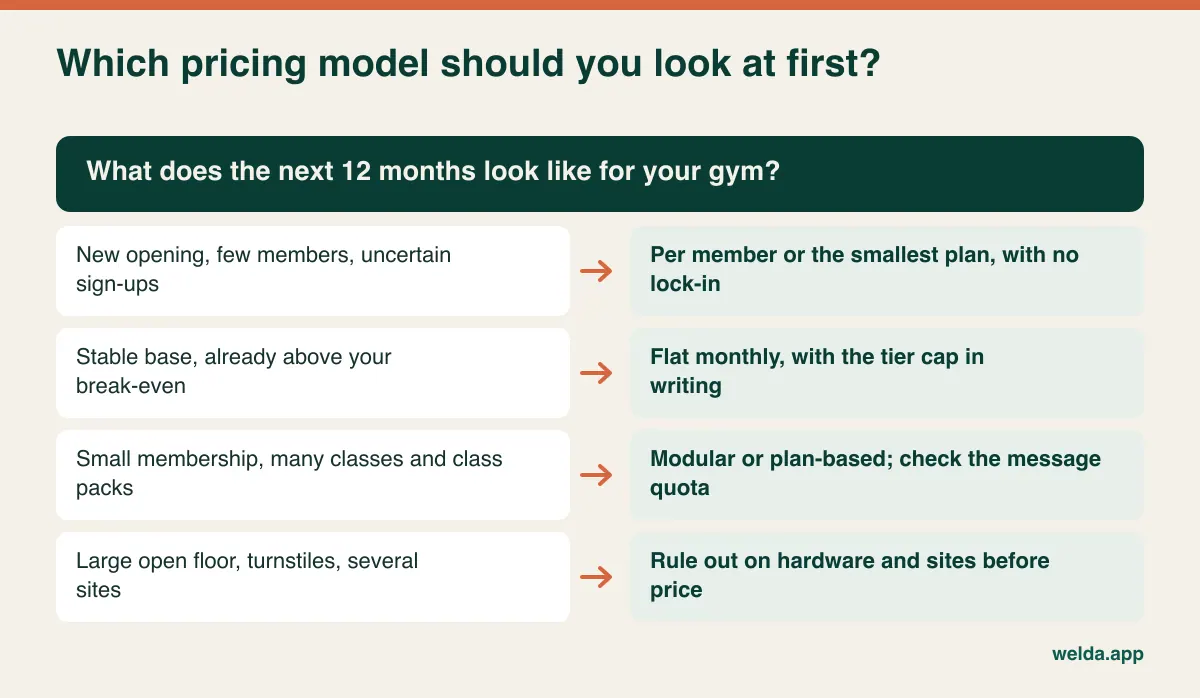
New opening. Commitment is your main risk. A per-member deal or smallest plan handles both slow starts and fast ones. Resist annual discounts for now, since you haven't seen your first year's curve.
Settled single site above break-even. Flat or plan-based pricing makes sense here. Get the tier limit in writing and find out what happens after an unusually good campaign.
Modest membership, packed timetable. Choose on timetable features and message quota, not on member count. If waitlists or credit tracking are add-ons, recalculate the modular quote with those lines included.
Large floor, turnstiles, multiple sites. Start with requirements rather than price. Filter out anything that can't handle your access hardware, central reporting and recurring billing, then compare what's left.
When you may not need software yet. A small boutique gym with a few dozen members, a single trainer and no capacity limits can get by on a tidy spreadsheet and a messaging app for a while. The moment to switch is when missed renewals and untracked payments start costing you more each month than the software would. Run that sum honestly. Vendors, us included, will tend to suggest you're ready sooner than you are.
A one-page brief makes quotes comparable
Quotes tend to arrive in incompatible formats. You can fix that by writing your scenario down first and asking every vendor to price the same thing. A single page covers it:
- Current members, frozen members and pack-only customers, plus your estimate for 12 and 24 months out
- Number of sites, and the date of any planned opening
- Who needs a login: front desk, instructors, managers, freelance trainers
- Weekly group classes, typical capacity and an estimated monthly message count
- Access hardware you own or plan to buy, and whether you want recurring billing through the system
- Data to bring across: member list, end dates, remaining credits
Put each reply into a 36-month column: setup, migration, training, users, messaging, processing fees and any hardware, plus renewal increases if the contract allows them. Only then is a comparison of gym management software pricing a real comparison. Your negotiating position improves as well. "Can you do it cheaper?" gets you a discount at best. "This line isn't included, which puts you above the other quote over three years" gets you scope, and scope is often worth more.
Make the demo live through your worst week
Standard demos flatter every product, because the data is tidy and nothing goes wrong. Your gym isn't like that. Ask the presenter to do these things live:
- Freeze a membership for three weeks. What happens to the end date and to the billable count?
- Add a ninth person to a full eight-spot class, then cancel a booking. How does the next person get told?
- Mark the wrong class against a 10-class pack and reverse it. Who can see that this happened?
- Show a member whose second instalment is overdue. What does the front desk see?
- Give an instructor access to their own classes while hiding revenue reports.
- Find last month's emptiest time slots in the reports.
- Show where I can see the number you're going to bill me on this month.
That last request is the one most buyers forget. If you can see the billing number on your own dashboard, surprises are much less likely.
Member data, consent and tax invoices
This section is general information rather than legal or tax advice, and rules differ by country, so check with a local adviser.
Member records are personal data, and gyms often add medical declarations, injury notes or body measurements, which many privacy regimes, including the GDPR and UK GDPR, treat with extra care. From a pricing perspective, ask whether consent records, access logs and encryption come as standard or only on an upper plan, where data is hosted, and whether a data processing agreement is available. Also separate class reminders from promotional messages, since marketing typically has stricter consent rules.
On invoicing, VAT or sales tax treatment and local e-invoicing obligations vary widely, so your accountant is the right person to ask how memberships should be invoiced. The software question is simpler: can the system produce the document you need, or will you be paying for a connection to another tool?
Where Welda CRM fits in this picture
To be fair, we should hold our own product to the same questions. Welda CRM is a monthly subscription with three plans, and we don't present it as a per-member product. The factors on our pricing page are locations, users, message volume and modules. Member count isn't listed as a separate factor, but do tell us yours and make sure the proposal states exactly what it's based on. Of the three models above, this is closest to a tiered, module-based plan.
The plan limits are public. Starter covers 1 location, 3 users and 500 messages a month. Pro covers 3 locations, 10 users and 5,000 messages. Enterprise has unlimited locations and users and 50,000 messages. So the studio calculation above applies to us as well: a reformer studio sending more than a thousand messages a month would expect to outgrow Starter's quota, however few members it has. Stock, expenses, automation flows, a cash desk/POS and staff commissions come with Pro. The price itself is agreed in a free consultation once we know your needs, and there's no separate setup fee, since setup, data migration and team training are included.
For gyms and studios, Welda CRM tracks membership periods and end dates, reduces remaining class credits as attendance is recorded, schedules group classes per instructor with a set number of spots, runs a waiting list for full classes, takes online booking requests, sends WhatsApp reminders, follows instalments and balances, and reports on occupancy and revenue. Instructors get their own calendars and role-based permissions, and consent management and an audit log are built in. The interface is available in English, Turkish and German.
Now the gaps. Turnstile or door access integration, automatic recurring card billing and a dedicated membership-freeze workflow aren't listed as features on our product pages. If you depend on any of these, ask us directly in the consultation rather than assuming. We'd describe Welda CRM as a more natural candidate for class-led and package-based gyms and studios than for a large turnstile-controlled floor.
You can see how the modules work for studios, along with what shapes gym management software pricing on our side, on the fitness studio page. The 7-day free trial has every module unlocked, so you can test which plan is enough with your real timetable. When it ends, your data isn't deleted and the account becomes read-only.
Timing the switch around your season
The most expensive moment to change software is in the middle of the sign-up wave. Nobody can train at a busy front desk, and a wrong class balance turns into an argument with a paying customer. Aim to finish a few weeks before your main campaign, ideally starting in a quiet month.
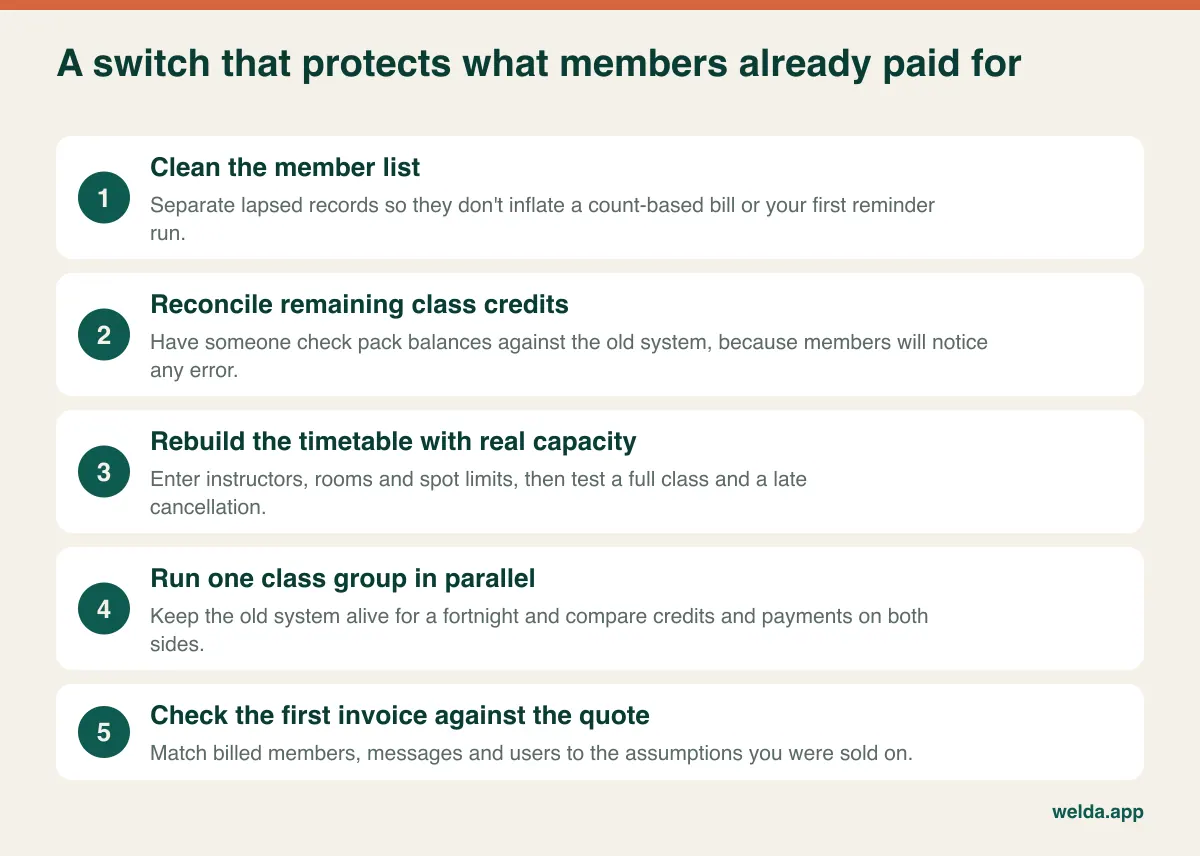
Class credits deserve the most care. A one-day slip on an end date is usually forgiven, but a member and a system disagreeing on a 10-class pack becomes a matter of trust. After migration, sample some pack holders and check them against your old records. Then, at the end of month one, put the invoice beside the quote: do billed members, messages and users match what you were told? If not, that is the easiest time to raise it.
Frequently asked questions
Why does gym management software pricing vary so much?
Because quotes aren't pricing the same thing. One bills on members, another on sites and users, another on modules, while setup, messaging, hardware and processing fees may or may not be included. Without the same scenario and a 36-month total, two numbers can't be compared.
If my membership doubles, will my software bill double?
Only on pure per-member pricing. Flat pricing holds until you cross a tier, then jumps. On modular or plan-based pricing the bill follows users, sites and message quota, although more members usually means more messages, so growth still has an indirect effect.
Do I pay for frozen members?
It depends on the contract. Some models exclude them and others don't. If you handle many freezes in the holidays or over winter, this one line can change your annual total, so ask for the definition in writing.
Is free gym software good enough for a small gym?
It can be, for a small gym without capacity-limited classes. Check member caps, data export, backups and support. Migration later can cost more than you saved, so find out on day one how you'd get your data out.
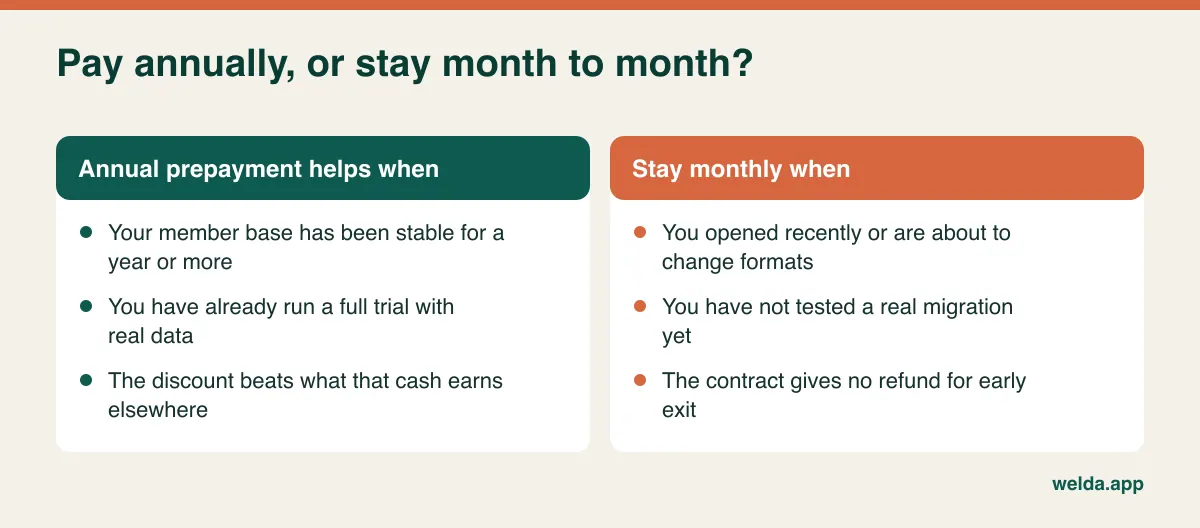
Is paying annually worth it?
It can be if your base is stable and you've already tested the product on real data. If you've just opened or plan to change format, staying monthly is safer. Ask how refunds work if you leave early.
Can I run gym software without a turnstile?
Yes. Many class studios and small gyms run on bookings or front desk check-in. A turnstile is an operational choice, so budget for it separately if heavy traffic or unauthorized entry is a real problem for you.
How much does Welda CRM cost?
The price depends on your locations, users, message volume and modules, and we agree it in a free consultation. Tell us your sites and users, your weekly class load and whether you sell memberships or packs. You're also welcome to start with the 7-day free trial.
Will I lose my member data if I switch from another system?
That depends on what your current vendor can export, so request an export before you commit. With Welda CRM, migration of your existing client and appointment data is included in every plan. We recommend spot-checking remaining credits afterward. If you'd like to talk through your numbers, book a free consultation and we'll help you work out which questions to put to each vendor, ours included.