The right butcher shop POS software is the one that reads your scale's labels correctly, keeps stock in weight rather than units, lets you log bone and trim as waste, and puts weighed sales on a customer's account without a second notebook. If a system fails on any of those four, its other features will not save it. Once you have a shortlist that passes, the decision comes down to the kind of shop you run, how you deal with suppliers, what receipts your country requires, and what the quote actually covers.
This guide is for owners about to spend money, not for people browsing. It starts with the question most buying guides skip, which is what sort of butcher you are, because a neighbourhood counter, a shop supplying restaurants and a business making its own sausage need three different things from software. Then it works through the tests you can run yourself, ideally with a few labels from your own scale in your pocket.
Start with your shop, not the feature list
Feature comparisons tend to treat every butcher alike. In practice, the same words mean different jobs. "Customer accounts" for a counter that lets a few regulars pay on Friday is a small convenience. For a shop delivering to four restaurants a week, it is the core of the business, and you will need statements that survive an argument. Work out where your day actually goes before you open a single vendor site.
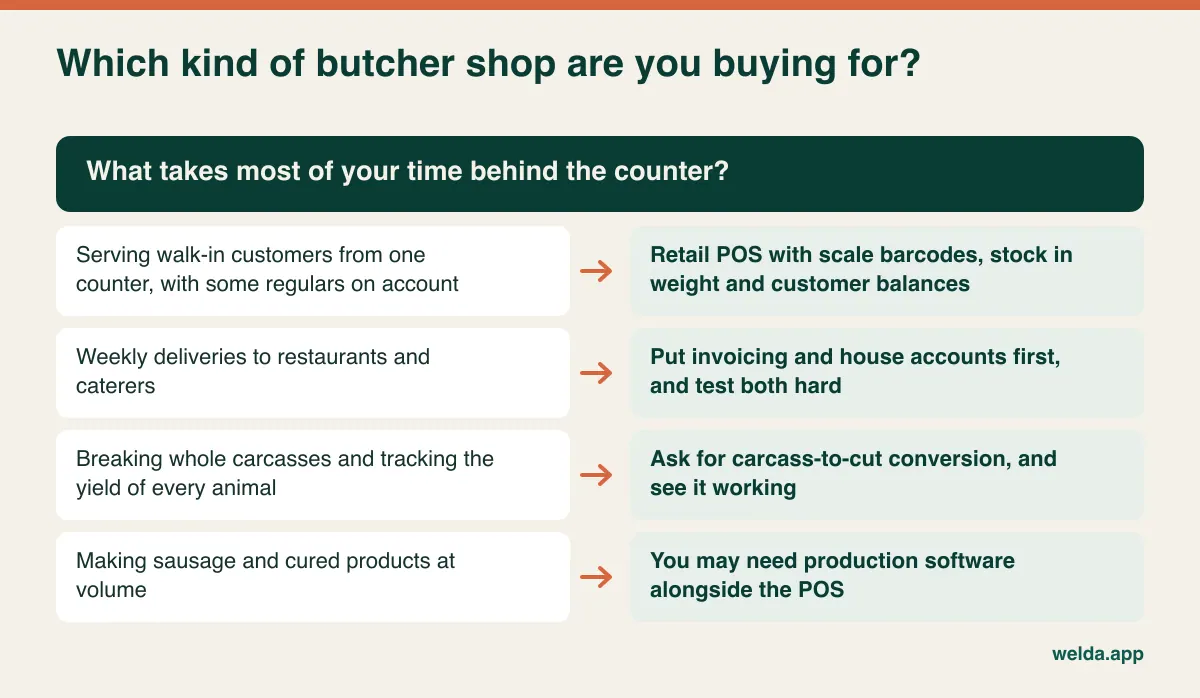
Be honest about the last row in particular. If you run a real production operation, with batches of sausage, cured products and traceability records that have to link back to the incoming meat, a retail POS is unlikely to cover it. That does not make a retail system the wrong purchase, only an incomplete one. Many businesses would be better off running the counter on one system and production on another than forcing either to do both.
Halal butchers, game dealers and shops with a strong ethnic customer base may add further specifics: certificate records, unusual cuts, bulk family orders, or a counter that serves in more than one language. None of these are exotic, but each one is a question you should put to a vendor rather than assume. Write your own version of the list before the first call.
Why a general retail POS stumbles behind a meat counter
A grocery system assumes that what comes in is what goes out. A case of pasta arrives, and individual packets leave. A butcher buys a side of beef and sells ribeye, stewing beef, ground beef and marrow bones, with a fair amount of weight disappearing on the way. The product changes shape and name between the delivery door and the counter, sometimes more than once in a day, as trim becomes ground meat and ground meat becomes burgers.
The trouble with using ordinary retail software here is that nothing breaks on day one. Sales ring up. Receipts print. The problem arrives a few weeks later, as a gap between what the system says and what is in the cooler, and nobody can explain it. The report is not wrong so much as incomplete: it knows you sold 40 kg of ground beef but has no idea which primals it came from or what happened to the rest of them.
That is why "how many products can it hold?" and "does it look modern?" are poor first questions. The useful question is whether the system understands a business that accounts for everything in weight. If you want the full logic of tracking a carcass by weight, our guide to butcher shop inventory from carcass to counter covers it. Here we turn that logic into buying criteria.
Scale barcodes: the test you can run in ten minutes
Ask a vendor whether their system works with scales and they will say yes. It tells you almost nothing, because "scale integration" describes at least two different setups. In one, staff weigh the meat, the scale prints a barcode label and the label is scanned at checkout. In the other, the scale is wired to the till and sends the live weight to the screen. They need different hardware and are proven in different ways, so decide which one describes your counter first.
With a label-printing scale, the software's job is to take the barcode apart. Part of the number identifies the item and part of it holds either the weight or the price. In markets using EAN-style labels this is typically a 13-digit code with a prefix reserved for in-store use. In North America you are more likely to meet 12-digit UPC-style codes that begin with a 2 and often embed the price. Either way, the exact layout depends on how your scale has been set up.
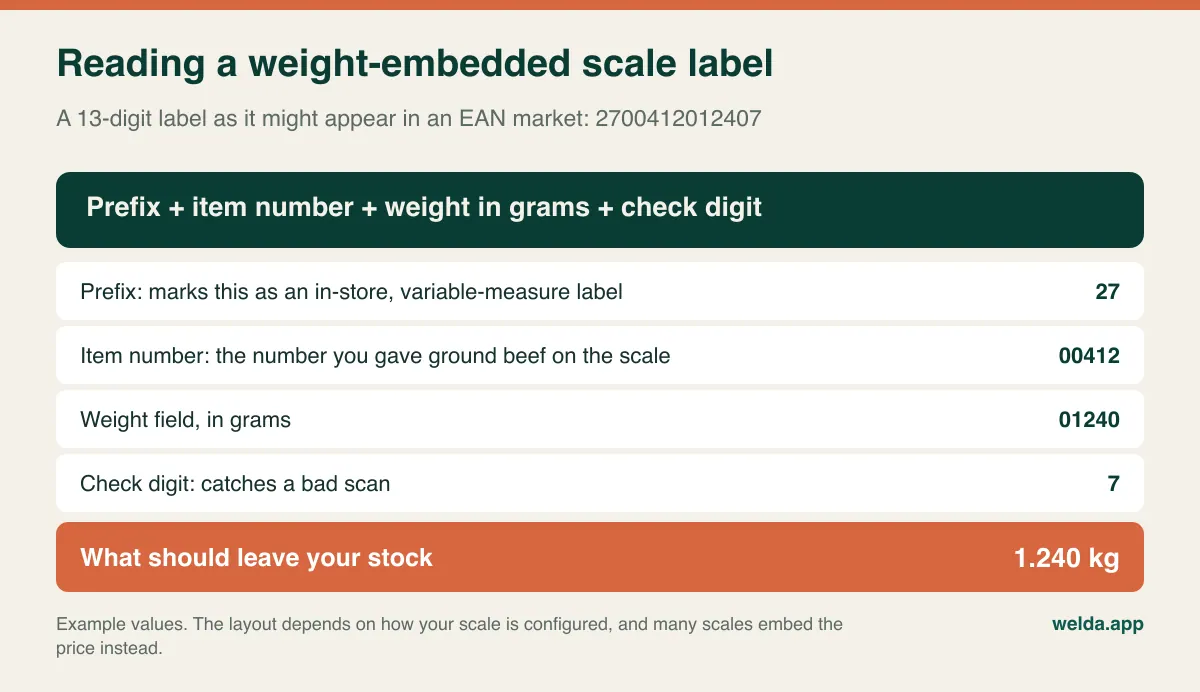
That difference matters more than it sounds. If the label carries only the price, the system has to divide by the current price per kilo to work out the weight it should remove from stock. Change the price at the scale but not in the software, or the other way round, and stock quietly drifts even though every sale looks correct. If the label carries weight, the stock figure is safer, but the price depends on the software being up to date. Ask which your scale prints and how the vendor handles it.
To test it, write the item, weight and total on the back of each label, then scan them and compare with the screen. A butcher's test set should include these:
- A very light weighing: something under 100 g, such as a small piece of suet. Leading zeros are where parsing errors tend to hide.
- A heavy weighing: more than 10 kg of diced beef for a restaurant, in case the weight field overflows in your configuration.
- A greasy, creased label: labels at a meat counter get handled with gloves and stuck on damp wrap. See how many tries the scanner needs.
- An unreadable label: watch how the sale is keyed by hand and whether the entry is recorded against the person who made it.
Our guide to POS software with scale integration goes through this label test in more depth. If your scale only displays a price and prints no barcode, ask your service company about a barcode option before you buy any software, or you will keep keying every sale by hand and your stock will only be as accurate as your busiest employee's typing.
Welda Stock takes the label route. As our page on butcher shop POS software explains, scanning the weight or price barcode printed by the scale brings up weight and amount automatically, and the weight is deducted from that product's stock. We do not publish a list of supported brands and models, and we check compatibility with you before setup. If you need a live weight over a cable or want product lists pushed from software to the scale, raise it in the first conversation, because we are not promising that here. Our product pages also work in kilos, so if you sell in pounds, ask about that directly.
Stock in weight, and the waste nobody writes down
A "kg" label on the screen does not prove a system really tracks by weight. Check three things. Can a delivery be received in decimal kilos or pounds? Does a sale remove exactly the weighed amount? Can you enter a weighed count during stocktaking? Also look for rounding. If the software trims decimals, a few grams slip on every sale, and at month end those grams look just like shrinkage.
Waste is a separate issue, because much of it is entirely legitimate. Bone comes out, fat gets trimmed, meat loses moisture in the cooler. You are not asking software to eliminate that. You are asking it to make the loss visible, so that normal loss and unexplained loss stop being the same number. Only then is there something to talk about with your team.
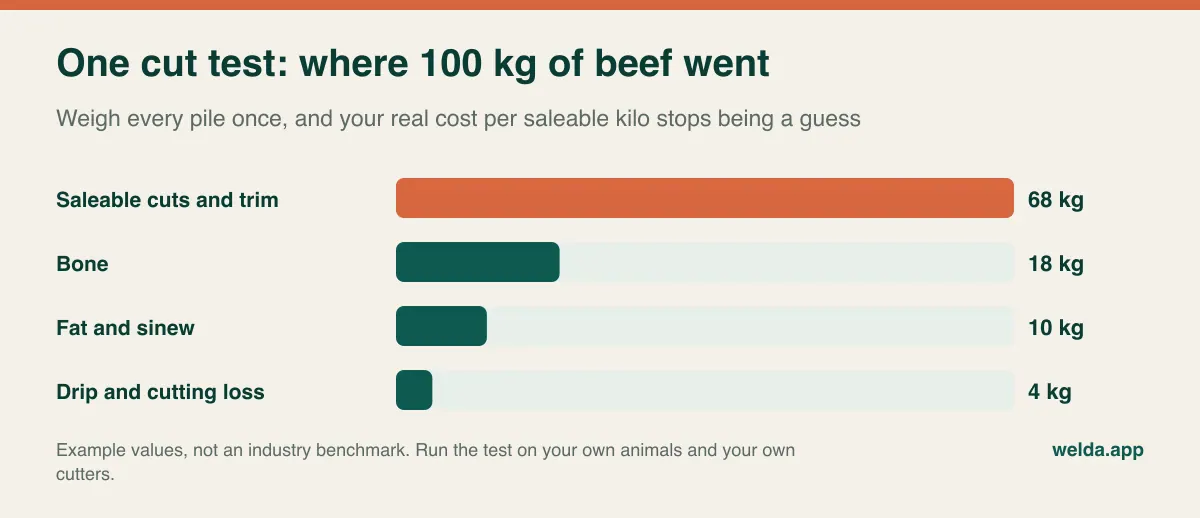
A cut test, where you weigh every pile after breaking down a known weight of meat, shows what this does to your margin. In the example above you buy 100 kg and end up with 68 kg to sell, so each saleable kilo costs about 1.47 times the purchase price per kilo. If the margin report uses the purchase price as cost, it flatters every cut you sell. So ask in the demo: which cost does the per-product margin use, and how do I enter my cost after cutting? Our article on butcher shop pricing and margin shows the calculation in full.
The evening check itself is simple arithmetic. Opening stock plus deliveries, minus sales, minus logged waste, gives the weight you should have. Then you weigh what is actually there. Suppose the system expects 22 kg of ground beef and the scale says 20.5 kg. Now you have a specific question about 1.5 kg: a sale keyed wrongly, trim that was never logged, or meat ground from a primal without a matching entry. A system earns its keep by putting that question in front of you every night, while people still remember the day.
How much carcass detail do you actually need?
There are three common ways to hold meat in a system, and the right one depends on your routine more than on the software's ambitions. A shop buying boxed cuts can receive each one by weight and be done. A shop breaking its own sides can bring the carcass in, then record the resulting cuts and waste by hand. A high-volume operation may want a recipe that splits a carcass into expected cuts automatically.
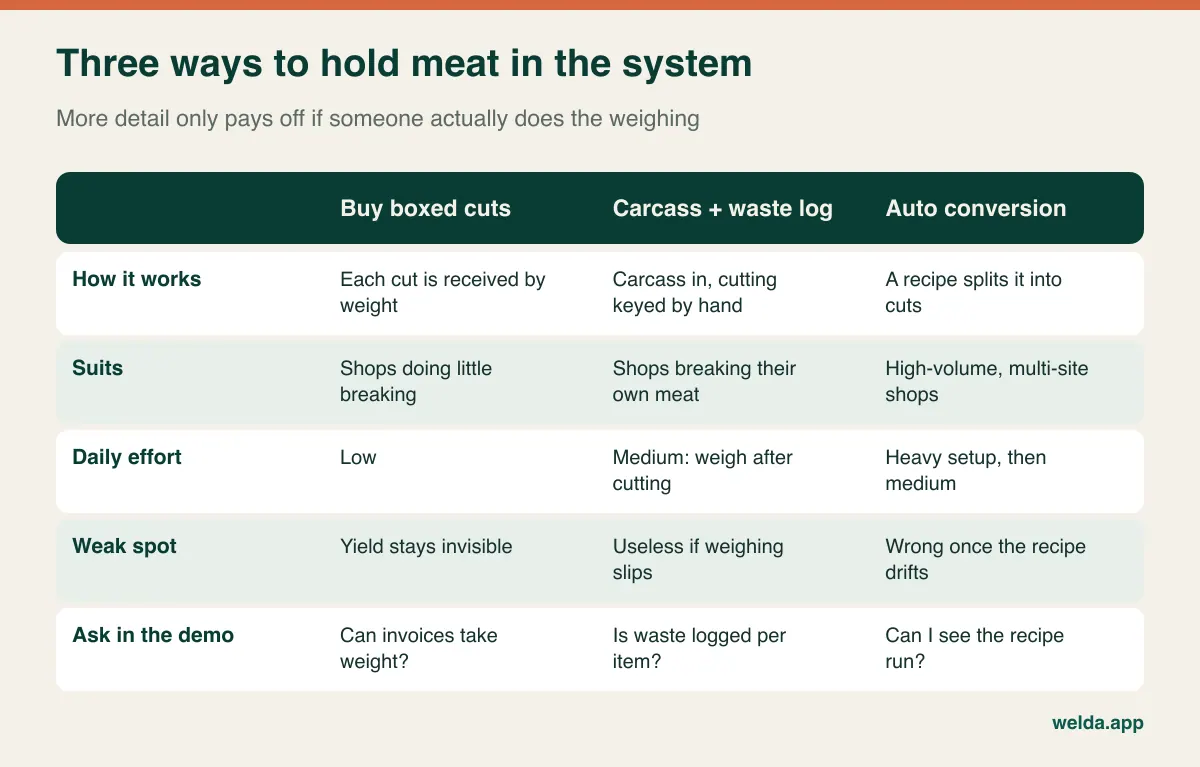
To be clear about Welda Stock: our pages describe waste and shrinkage tracking per product for bone, fat and other cutting losses, with stock counts bringing inventory back to the real quantity. They do not describe an automatic carcass-to-cut recipe, so we will not claim one. If your business depends on that conversion, ask us, and do not sign anything with any vendor until you have watched it run on your own numbers.
House accounts: regulars, restaurants and the Friday argument
Selling on account comes in two forms at a butcher's. There is the regular who settles up on payday, and there is the restaurant, caterer or care home that takes large quantities several times a week and pays monthly. Software can handle both, but you test them differently.
With a regular, speed is what counts. Finding the customer and putting the sale on their account should take seconds at a full counter. If it takes three screens, staff will say "I'll add it later", and the paper book returns within a week. With a restaurant, what counts is the statement. When the chef says "we never took 12 kg of mince last Tuesday," you need to pull up the date, item and weight on the spot. Being able to show that calmly is often what keeps the customer.
Run this sequence in a demo. Put a scanned, weighed sale on an account and read the balance. Take a part payment and read it again. Return one line from that sale and see what happens. Finally, open every movement for that customer on one screen. A system that handles those four steps smoothly replaces the notebook. Anything less adds a second notebook beside the first. For more on leaving paper behind, see our guide to digital customer credit tracking.
Welda Stock tracks balance and payment history per customer, and importing your existing account records is included in setup. Remember that names, phone numbers and debts together are personal data, covered by privacy law in many countries, such as the GDPR in the EU and its UK counterpart. Limit who can see those records and check your obligations with a local adviser.
Holiday weeks are the real exam
A butcher's hardest days look nothing like a quiet Tuesday. Christmas and Easter, Thanksgiving in the US, Eid for halal butchers, and the first warm weekend of barbecue season all bring long queues, extra hands and bulk orders. Any system that felt fine in the demo meets its actual test here.
So think through a holiday morning when you evaluate. Can several staff work at the same time, each under their own login? Can you see who sold what? Can a temporary helper change prices or issue refunds, or is that blocked? What happens to the counter when the internet drops? Web-based systems run over your connection, and that applies to Welda Stock too. If uninterrupted offline selling is a requirement, ask about it directly and plan a backup such as a mobile hotspot.
Pre-orders deserve their own question. Taking deposits, reserving turkeys or lamb, and printing a pickup list is a separate workflow from selling over the counter. Welda Stock's product pages do not describe a pre-order module. If holiday orders are a big part of your year, ask each vendor to show you this specifically. If they are a small part, a simple shared sheet for orders plus a proper POS for the sale itself is a perfectly sensible setup.
Suppliers: the other side of the till
Meat turns over fast, while suppliers expect payment on schedule and restaurants may pay late. That makes supplier tracking more than an extra. When you enter an invoice from a wholesaler or abattoir, the stock should go in, the debt should be recorded, and each payment should bring the balance down, without you having to reconcile a separate book on Sunday night.
Try it in the demo with a real invoice from your own files. Can it take weights? Can you see which invoice a payment closed? Can you show the whole history when the supplier queries a figure? Welda Stock handles supplier invoices and debt tracking this way, with payment history held on the supplier's card. Ask any vendor, too, whether margin uses the last purchase price or an average cost, because meat prices move often and that choice changes your profit report.
Receipts, tax and trade rules vary, so ask early
This is general orientation, not legal or tax advice. Requirements differ widely by country and change over time, so confirm them with your accountant before you commit.
- Fiscal rules: several countries require certified tills, fiscal devices or real-time reporting. Others simply require accurate records. Check what applies to you, then ask each vendor in writing whether their product meets it. Welda Stock's pages mention customer receipts; do not read that as a claim of fiscal certification in your country.
- Tax rates: meat may carry a different sales tax or VAT rate from other goods you sell, and prepared food may differ again. Check how the system handles mixed baskets.
- Legal-for-trade scales: scales used to sell by weight usually have to be verified or certified under local weights and measures law. Changing software does not change that duty, and your scale's approval is a matter for your service company.
- Labelling and traceability: food law in many markets expects you to know where meat came from, and may have rules for what goes on a label. Do not assume a POS covers this. Ask, and keep supplier documents regardless.
- Data protection: ask where customer data is stored, who can reach it, and how you get it back if you leave.
Run the demo yourself
Standard demos go perfectly because the sample data was built for them. To see how a system behaves at your counter, take over. Bring five labels, one supplier invoice and three customer balances from your notebook, and go through the following list.
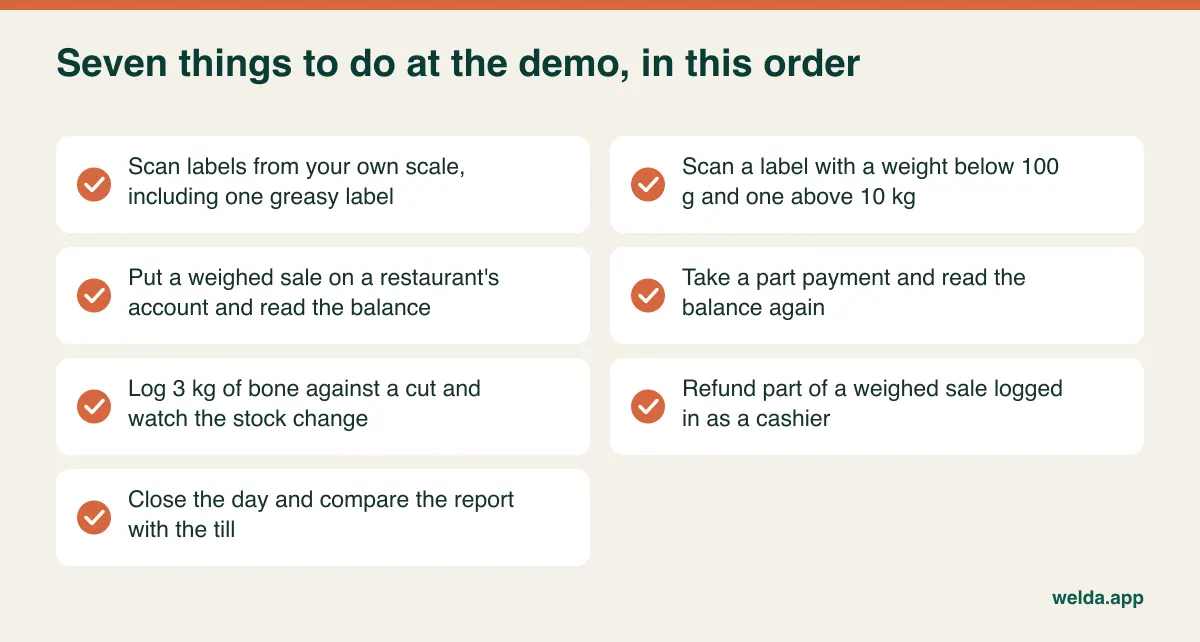
All of this fits into an hour. Add one final question: if I leave in two years, what data do I get back and in what format? If a vendor would rather stay on their slides than run these steps, you have already learned something useful.
Comparing quotes without comparing apples to oranges
Two quotes that look alike may cover different work. One may include setting up the scale labels while another bills it separately. Rather than comparing totals, send every vendor the same questions and ask for written answers.
| Cost driver | What to ask | Why it matters |
|---|---|---|
| Payment model | One-time or recurring? Are annual increases possible? | Sets your total cost over several years |
| Users and sites | Does an extra cashier or location change the fee? | Affects holiday staffing and growth plans |
| Scale and hardware | Who configures labels, and who pays for the service visit? | No readable labels means no system |
| Data migration | Are products and customer balances included? | Manual entry costs staff hours |
| Consumables | Label rolls, scanner and receipt printer: yours or theirs? | An ongoing cost whichever software you pick |
| Fiscal and invoicing add-ons | Is any required connection charged separately? | Can surprise you late in the process |
| Training and support | Is it repeated when staff change? In which channels? | Counter staff do change |
| Exit | In what format do you get your data back? | Sets the cost of your next switch |
For Welda Stock, the quote depends on the number of users, branches and warehouses, your product range and data import, plus your hardware and checkout flow. The model is a one-time setup fee, with setup, Excel import and team training included and no hidden or recurring costs. The actual figure is settled in a free consultation once we know what you need. Whichever vendor you choose, treat the quote as the second filter. The label test still comes first, because extra steps on every scan add up quickly on a busy Saturday morning.
Two switching risks that are specific to butchers
A grocer counts opening stock with a scanner. You do it with a scale. Each primal in the cooler, each tray in the case and each hanging side has to be weighed and entered. It is tiring, so it gets put off, and then every stock figure from day one is meaningless. Do it after closing and before the next delivery.
The second risk is the account balances. Copy your book into software without confirming the figures, and you have digitised every old disagreement. Tell regulars in advance that you are moving their account and what balance you have for them, and get written confirmation from restaurants.
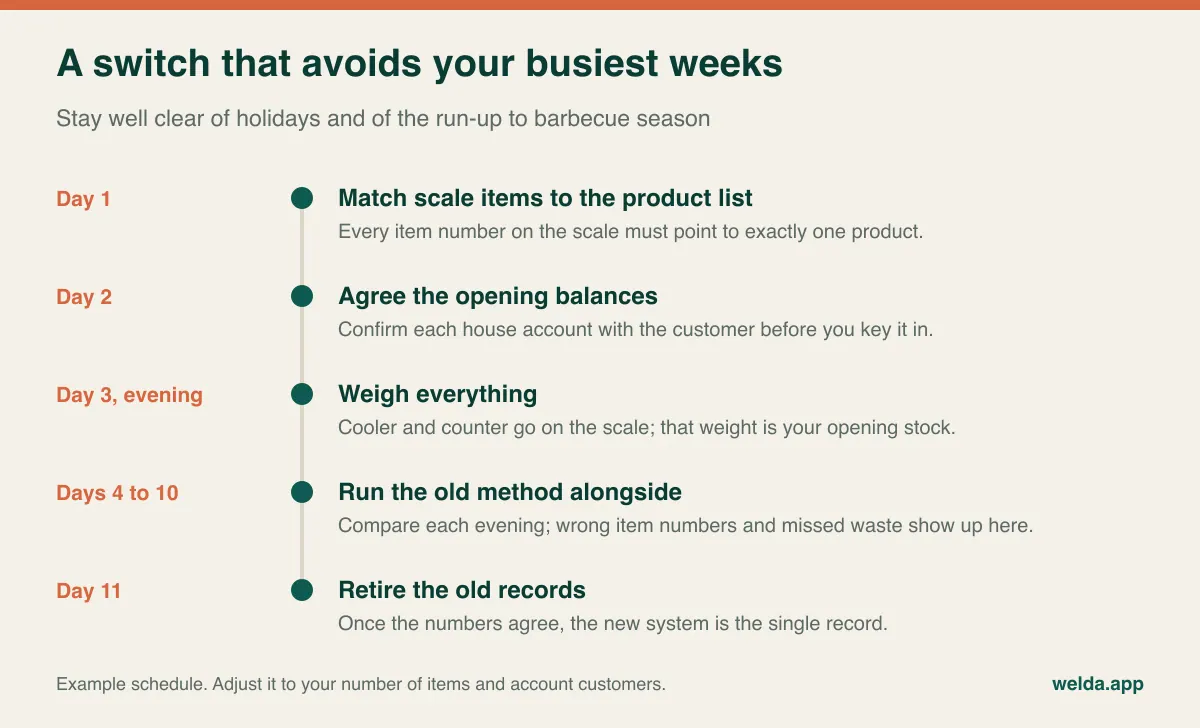
Match the item numbers on your scale to the product list before going live, so that if 412 means ground beef on the scale, it means ground beef in the software too. A wrong match left unnoticed for a week mixes up the stock of two cuts, and that is hard to untangle afterwards. And stay with staff on the first busy morning; the small questions are the ones that send people back to the notebook.
Where Welda Stock fits, and where it does not
Welda Stock is not the right choice for every butcher. It suits a shop with a label-printing scale, one or several locations, customers and suppliers on account, and an owner who wants stock held by weight and waste logged per product. Scale barcodes, low-stock alerts, stock counts with waste tracking, per-product margin, customer accounts, supplier debts, separate permissions for cashier, warehouse and manager roles and an end-of-day report all sit in one place. It is web-based, so a computer with a browser is enough, and the interface comes in English, Turkish and German.
If you need offline selling, a cabled scale connection, automatic carcass recipes, batch traceability, holiday pre-orders or certified fiscal functions for your country, know that our product pages do not promise these. Ask us. If we cannot meet the need, we will say so, and you will be better off looking elsewhere.
Frequently asked questions
Can I use ordinary grocery POS software in a butcher shop?
You can if it reads your scale labels correctly, holds stock in decimal weight, logs waste per product and handles customer accounts alongside weighed sales. If one of those is missing, it may be excellent for a grocery store and still leave you with an unexplained gap every evening.
Do I have to replace my scale?
Often not, as long as it prints barcode labels, but run the label test first. If it only shows a price on its display, ask your service company about a barcode option. Settle this before you buy software so that a hardware bill does not appear afterwards.
What is a normal cutting loss, and will the software tell me?
The software will not tell you what is normal, only what yours is. Loss depends on species, cut, the style of butchery and the cutter. Run your own cut tests a few times to get a reference, then watch for deviations rather than chasing someone else's benchmark.
How do I record meat that gets ground into mince?
If the system has a conversion record, use it. If not, enter it as two movements, one out of the source cut and one into ground meat. Watch this in the demo, as it happens several times a day. For Welda Stock, describe your routine in the consultation and we will go through how to handle it.
Can I issue invoices to restaurants?
Tracking what a customer owes and issuing a formal tax invoice are different jobs. Ask your accountant which document you need, and ask the vendor how the system produces it. For Welda Stock, cover this in the consultation, particularly if your country requires e-invoicing.
Does it work in pounds as well as kilos?
Ask every vendor to show you, with your own labels. Our Welda Stock pages describe weight in kilos, so if your counter works in pounds, raise it with us before making any decision.
How long does switching disrupt the shop?
You do not need to close. The real effort goes into the opening weigh-in and confirming balances. Pick a quiet week and run both methods side by side for about a week, and much of the risk is gone. With Welda Stock, setup and Excel import are usually done the same day; the count and the confirmations stay with you.
How do I find out the price?
Book a free consultation. Bring a rough count of your products, the state of your scale and how you track stock today, and the scope and price get settled from there.
The fastest way to find out whether a system fits is to try two or three of your own labels. See Welda Stock as butcher shop POS software and book a free consultation. If it is not right for your counter, we will tell you.