If you already own a label-printing scale, the question to ask when shopping for POS software with scale integration is not "which brands do you support?" but "can your software correctly read the digits my scale prints on its labels?" The fastest way to find out is to bring ten different labels from your own scale, write down the item, quantity and total you expect from each, and scan them before you pay anything. This guide walks through that test, explains how scale barcodes are built, covers the hardware that usually causes trouble, and shows when a label-based setup will not be enough for you.
It is written for owners of delis, butcher shops, greengrocers, bulk and refill stores, spice shops, nut shops and farm shops: anyone who sells by weight, already has a scale on the counter, and would rather not discover after purchase that the new software and the old scale do not agree.
First, decide what "scale integration" means for your counter
Vendors use the phrase loosely. One may mean scanning the barcode on a printed label. Another may mean a checkout scale wired to the till that sends live weight to the screen. These are different setups that need different equipment and are proven by different tests. Before you speak to anyone, write down which of the following describes your shop.
| Setup | What happens at the counter | What the POS must do | How to prove it |
|---|---|---|---|
| Label-printing scale | Staff weigh the item, a label prints, the customer carries it to checkout | Turn the label barcode into item, quantity and total | Scan labels from your own scale |
| Connected checkout scale | The cashier places the item on a scale at the till and weight appears on screen | Exchange data with the device over a cable or port | See it running live with your exact model |
| Display-only or receipt scale | A price shows on the display, or a receipt with no barcode comes out | Nothing automatic; the sale is keyed in by hand | Check whether the scale has a barcode option |
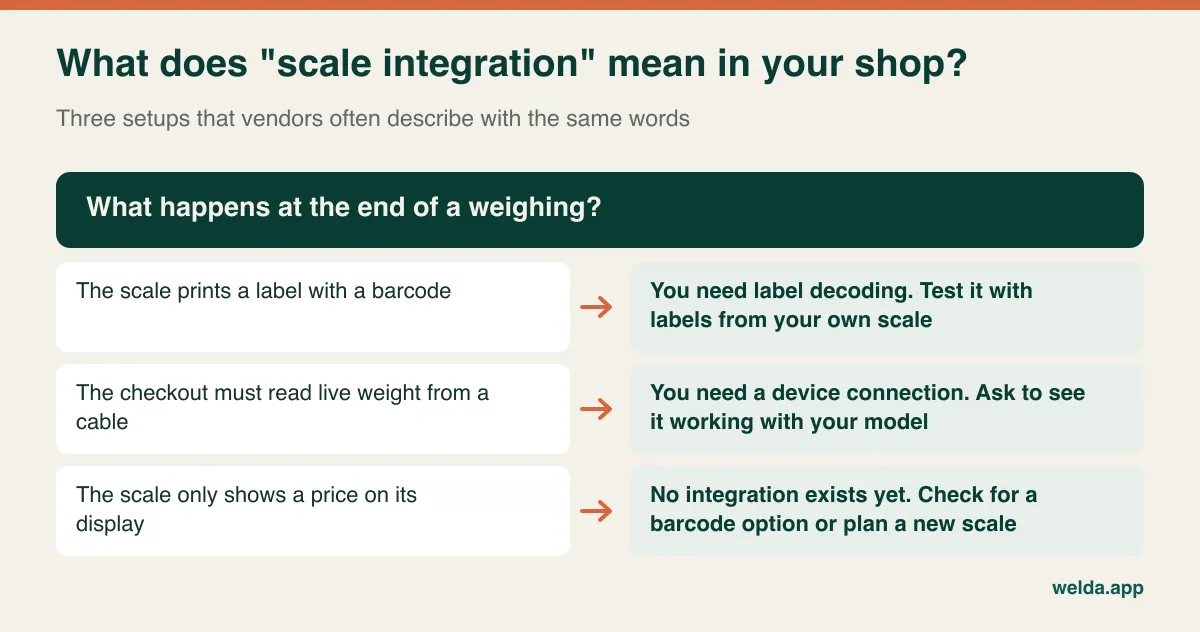
This guide concentrates on the first setup, the usual arrangement in a shop where staff serve from a counter and customers pay at a separate till. It is also the route Welda Stock takes: our product page describes scanning the weight or price barcode printed by the scale and decoding it automatically. If you need a cable connection with live weight at the till, or want the software to push item lists to the scale, raise that directly in your first conversation. We do not promise those functions here.
How a scale barcode works, and how to identify yours
A packaged product has a fixed barcode: the same jar has the same number today and next month. A scale label is generated fresh for every weighing, so its number has to carry information. In the common 13-digit layout, the opening digits are a flag saying this is an in-store code. GS1, the barcode standards body, sets aside numbers beginning with 20 to 29 for restricted, local use, which is why scale labels so often start with a 2. After the flag comes the item number stored in the scale, usually called a PLU. Next comes the weight or price, and last a check digit that confirms the scan.
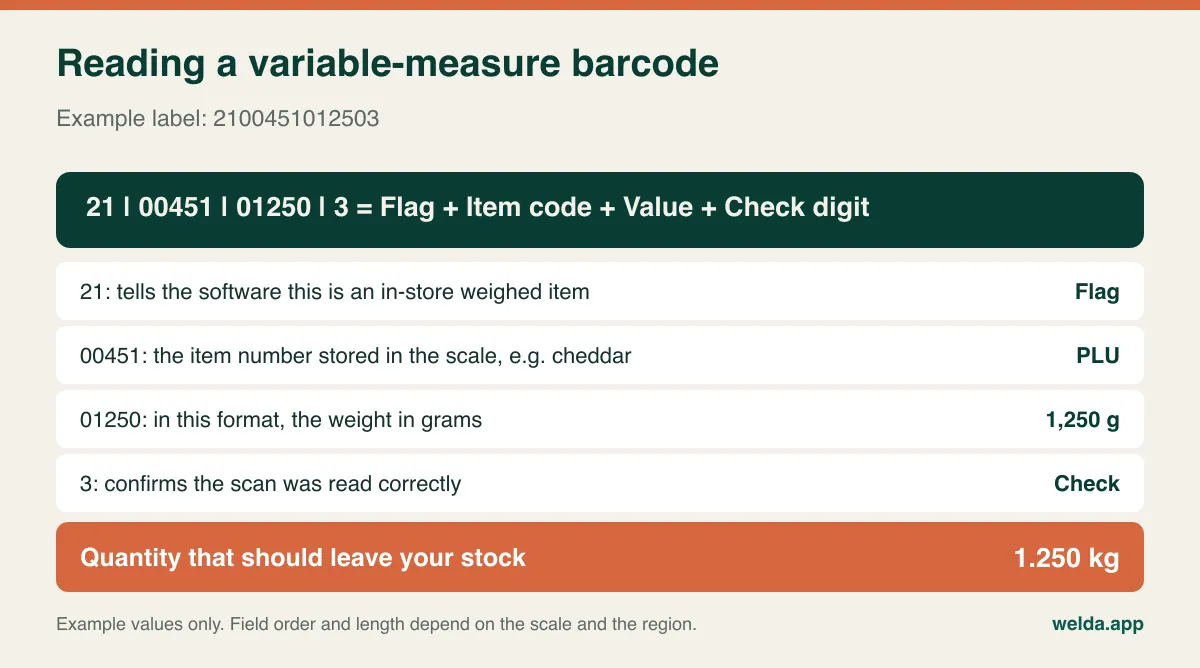
Regional habits differ. In North America, variable-measure items commonly use a 12-digit UPC-style code beginning with 2, often with the price in the last few digits before the check digit. Elsewhere you will see EAN-13 variants with different field lengths, and sometimes an extra check digit inside the price field. There is a common pattern, but no single compulsory layout. So do not trust a claim that a program "reads scale barcodes" until it has read yours.
You can identify your format in about half an hour without calling a technician:
- Weigh one item twice at different weights. Print a label at, say, 350 g and another at 700 g. The digits that change are the value field.
- Weigh two different items at the same weight. Now the digits that change are the item code. Compare them with the numbers stored in your scale.
- Temporarily change a price and reprint at the same weight. If the barcode changes, the label carries the total. If it stays the same, the label almost certainly carries the weight.
- Scan into a blank text document. Plug your scanner into a computer, open a plain text file and scan a label. Do the digits on screen match those printed under the bars? UPC and EAN conversions can add a leading zero, and some scanner settings drop the check digit. If digits are missing here, your problem sits in the scanner settings, before any POS gets involved.
You now have something concrete to hand a vendor: "flag two digits, item five digits, value five digits in grams." Compare it with the barcode setting in your scale manual, and repeat the test on every scale you own. Two scales bought in different years may well use different settings. Nobody notices until a month of stock numbers makes no sense.
For the fundamentals on the packaged side, our guide to barcode inventory tracking is a good companion. Scale labels are a special case built on top of those basics.
Weight in the barcode or price in the barcode?
Many scales let you choose what the label encodes. There is no universally right answer, but your choice decides where errors will show up later.
When the label carries weight, the POS reads the quantity straight from the label and calculates the total from its own stored unit price. This is the cleanest route for stock: sell 350 g and exactly 0.350 kg leaves inventory. The weak spot is price changes. Update the price of olives in the POS but forget the scale, and the label on the tub says one amount while the receipt says another. A customer who notices will rightly ask which one is true.
When the label carries the price, the customer pays exactly what the label says, which is reassuring at the till. But the POS has to work out the quantity by dividing the total by the unit price. If the scale's price and the POS's price drift apart, nothing looks wrong at checkout. The total is right. The quantity leaving stock is not, and you will meet that error weeks later as an unexplained count difference.
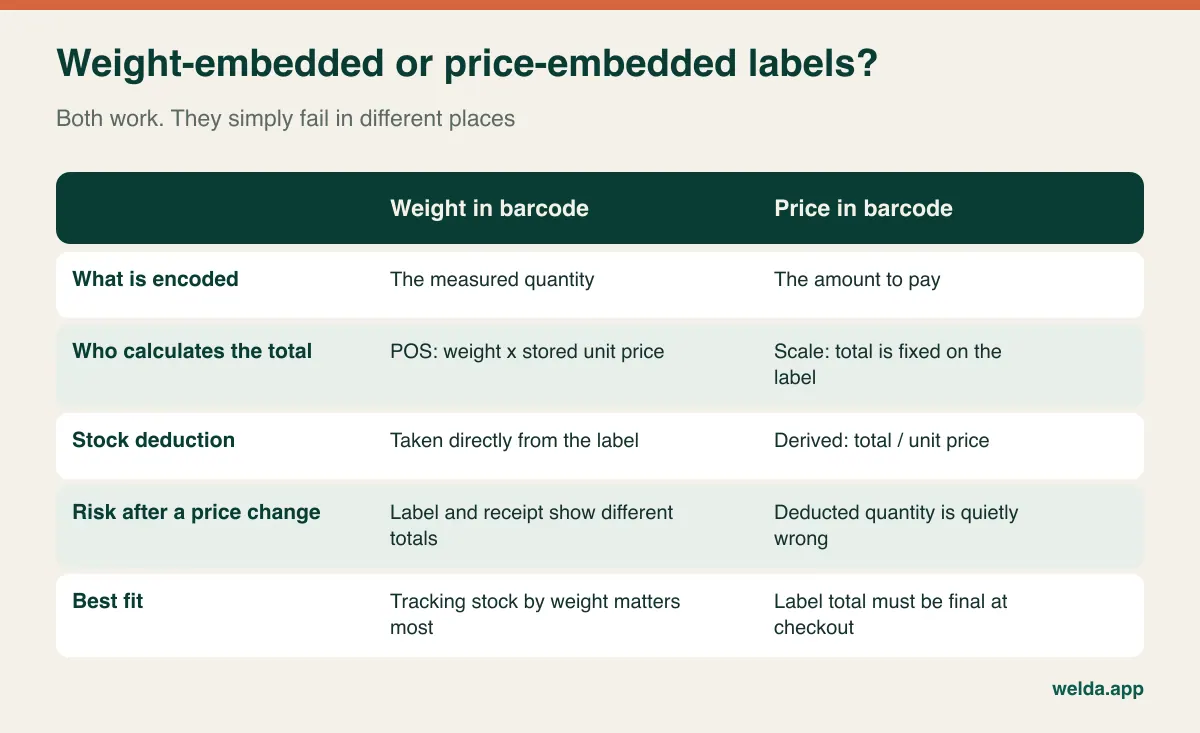
A workable rule: if tracking stock by weight and seeing margin per item matter most, choose weight-embedded labels and make price updates a fixed routine. If the printed total has to be final, choose price-embedded labels and do not skip regular control counts. Either way, the day a price changes, the scale and the POS must change together. So ask every vendor who updates prices, where, and in what order.
The field-length trap
Barcode fields hold a fixed number of digits, which matters most on price-embedded labels. A five-digit price field with two decimals tops out at 999.99. A four-digit field, common where a check digit sits inside the price block, stops at 99.99. In a butcher shop selling a whole rib or a cheese shop selling a large wedge, that lower ceiling can be closer than you think, and in high-denomination currencies it can be a daily problem. Some scales let you shift the decimal to buy more room, but then the POS needs to know about the shift as well.
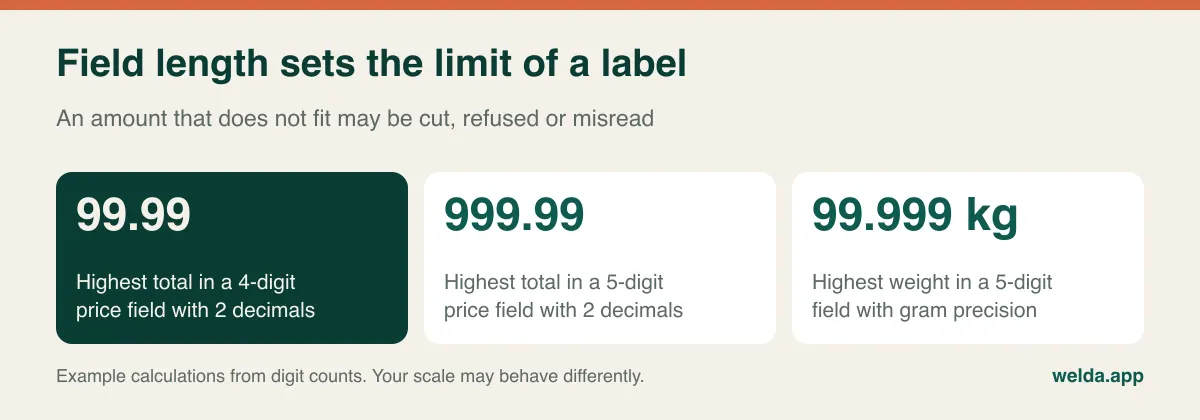
The test is simple. Take the highest total you have ever printed and try a label three times that size. Does the scale print it? Does the software read it correctly? Better to meet that limit in a demo than during a price rise next year.
Hardware compatibility beyond the scale
The scale is only one link. Selling by weight runs through the label, the scanner, the computer and the connection, and the weakest link decides what the till feels like at five o'clock on a Friday.
- Barcode scanner: Can it read greasy, damp and slightly creased labels? Does it drop a digit or add a prefix? Does it send Enter automatically after each scan? All of this is normally adjustable from the scanner's settings, and it is often the real cause of a "software fault".
- Labels and rolls: Thermal labels fade with heat and time. A pre-packed tub sitting under warm lighting can come to the till with a barcode nobody can read. Squeezing the barcode height to fit a small label also slows scanning.
- Computer and browser: Welda Stock is web-based. There is nothing to install, and it runs from a computer with a browser. For any other product, ask about operating system requirements and how updates reach you.
- Internet connection: Web-based software runs over your connection, and that applies to Welda Stock too. If your line is unreliable, plan a backup such as a mobile connection. We work through the best setup with you during onboarding; if uninterrupted offline selling is essential for you, ask about it explicitly.
- Receipt printer: See a real receipt from your own printer during the demo. Paper width and cutting behaviour look minor until there is a queue.
What we can say plainly about Welda: a retail scale that prints barcode labels, a standard barcode scanner and a computer with a browser make up the basic setup, and we check compatibility with you before setup. We do not publish a brand and model list, so testing a sample of your own labels is more reliable than talking about brand names. If you are thinking about replacing your scale, test the one you have first.
The ten-label test to run before you buy
This is the most useful part of this guide. Whichever product you evaluate, bring labels printed by your own scale. For each one, write down the item, quantity and total you expect. Do it before you scan, because it is very easy to look at a confident screen and assume it must be right.
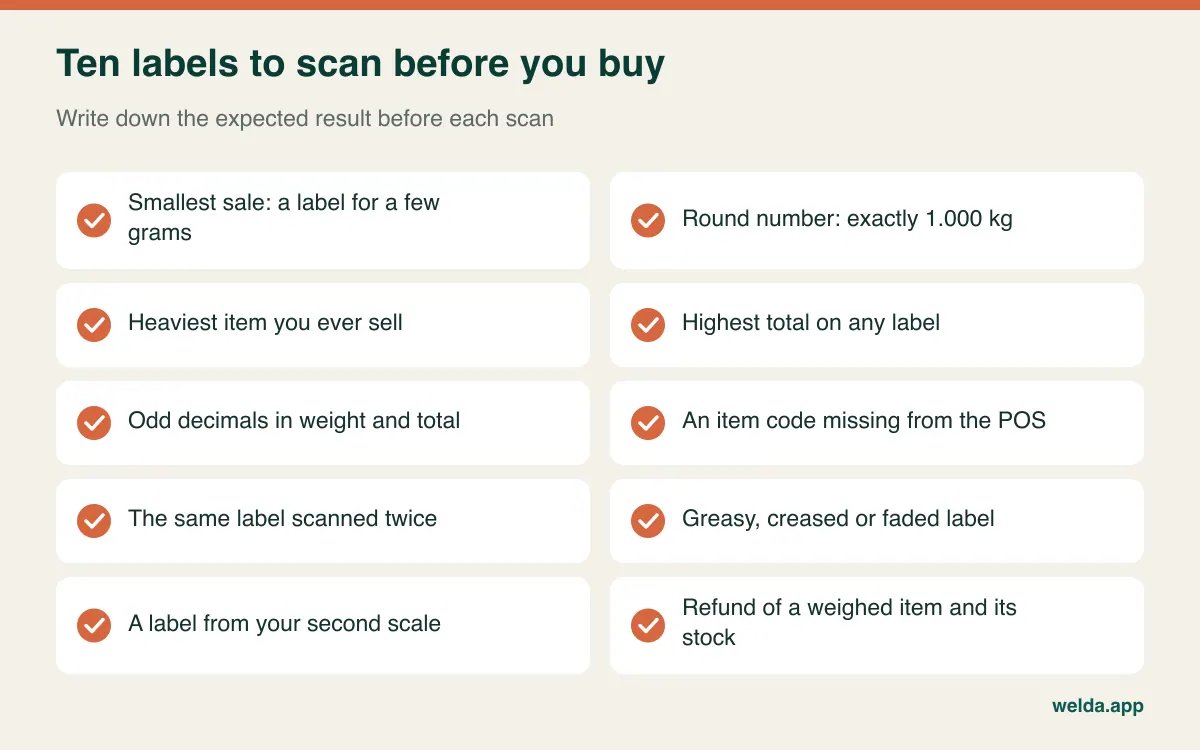
Knowing what each label is designed to catch makes the results easier to read:
- Smallest sale: A label for a few grams exposes any confusion between grams and kilograms at once. A 12 g sale should not remove 12 kg from stock.
- Exactly 1.000 kg: Shows whether leading or trailing zeros are being handled properly.
- Heaviest item: A primal cut or a large tin tests the capacity of the weight field.
- Highest total: Checks the field limit described above.
- Odd decimals: At a weight like 0.875 kg, the scale's total and the POS's total can differ by a cent. Find out where rounding happens and which number the customer pays.
- Unknown item code: Scan a code the POS has never seen. The correct behaviour is a clear warning. A sale quietly posted to the wrong item is the worst possible outcome.
- Same label twice: In one shop this is an accident. In another it is a loophole. See whether quantity increases and whether the cashier would notice.
- Damaged label: Smear it, crease it, let it fade. If it will not scan, how is the sale keyed in, and is that manual entry recorded?
- Second scale: If you own more than one, this shows whether different settings can be handled in one system.
- Refund: Refund a weighed item and check that the right weight returns to stock, and who has permission to do it.
Finish with a control count. Enter a starting quantity for one item, scan three labels and work out the balance by hand. If the system's balance does not match yours, a good-looking checkout screen is worth very little. A vendor who is comfortable doing this with you is telling you more than any slide deck could.
What to look for in the software after the scan
Decoding the barcode is only the first half of the job. The real benefit comes from what the data does afterwards for stock, margin and cash. When assessing POS software with scale integration, check the following:
- Decimal stock units: Keep items in kilograms and allow sales to deduct in grams. A program that forces everything into whole units will fight you all day.
- Mixed baskets: Weighed cheese, a bottle of oil and a loaf of bread should sit on one receipt, each in the right unit.
- Shrinkage and waste recording: Trimming, drying out and spoilage are normal when you sell by weight. If you cannot record them, the difference becomes a mystery at month end. We go deep on this for meat in butcher shop inventory from carcass to counter.
- Stock counts: You should be able to enter a count in kilograms and see the difference.
- Margin per item: Buying prices for weighed goods can move often. Without per-item margin, a high-turnover, low-profit item stays hidden.
- Permissions: Who can override a price, refund, or key in a weight? In weighed retail, leakage tends to start here.
- Store credit: Regular customers on account are common in neighbourhood shops and for small trade buyers. Weighed sales must post to those accounts as well.
Welda Stock covers much of this list. Our product page describes automatic decoding of scale barcodes, a receipt for each sale, low-stock alerts, stock counts with shrinkage tracking, margin per product, store credit and customer accounts, separate permission levels for cashier, warehouse staff and manager, multiple branches, and an end-of-day cash report. The interface is multilingual, covering English, Turkish and German.
If you sell loose goods from sacks and jars, our piece on managing bulk and weighed stock in a spice shop applies the same thinking to a very different counter.
Who this approach suits, and who should look further
A label-based approach is usually the right starting point when staff weigh at a counter and payment happens at a till, when you already have a scale that prints barcode labels, and when you also sell packaged goods and want credit accounts and supplier debts in the same place.
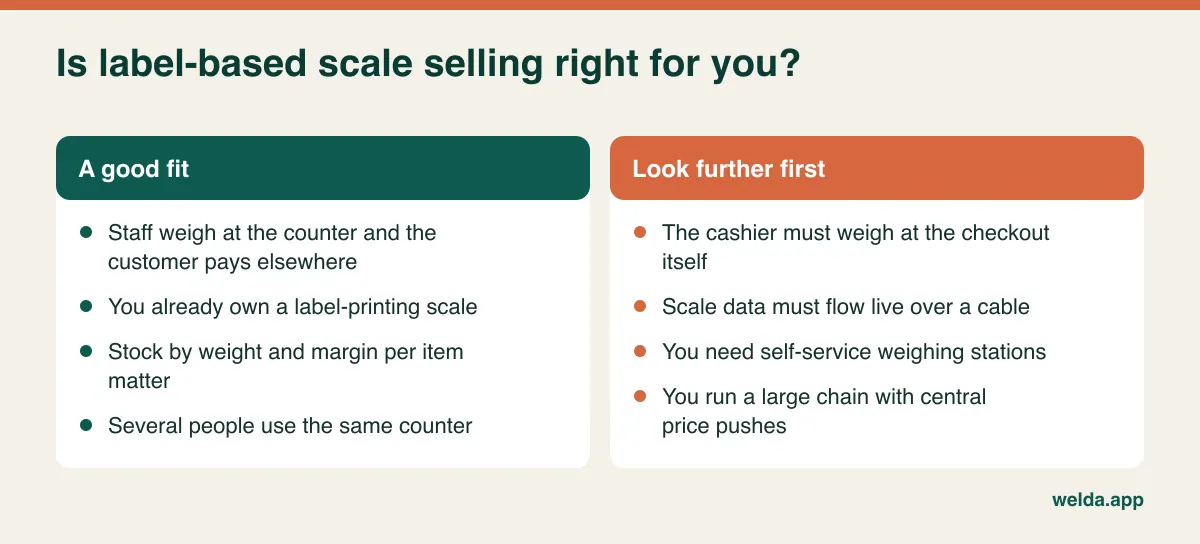
Be more careful if your cashiers weigh produce at the checkout itself. That setup generally needs a wired connection, and scanning labels will not prove it works. Self-service weighing stations raise further questions about label fraud and supervision. A chain that wants to push prices to many scales from head office needs dedicated scale management infrastructure. If any of that describes you, ask us and every other vendor the same direct question and insist on seeing it running.
You may not need any of this if everything you sell is pre-packed and arrives with a fixed barcode. And for a small stall with few items and light trade, keying in amounts by hand may be good enough for a while, as long as you accept that your stock data will be weak.
Compliance: a cautious overview
Software does not change the rules that apply to you. The following is general orientation rather than legal or tax advice. Rules differ by country and change over time, so check with your accountant or local authority.
- Legal-for-trade scales: In most markets, a scale used to sell goods by weight must be approved and may need periodic verification. In the US this usually means NTEP certification and state weights-and-measures inspection. In the EU the Non-Automatic Weighing Instruments Directive applies alongside national rules. The UK has its own approval regime. Software does not replace any of this, and some scale adjustments may break a seal, so ask your service company first.
- Fiscal and tax requirements: Some countries require certified fiscal devices or registered tills. Others do not. Sales tax or VAT on food often varies by item, so each weighed product may need the correct rate. Check whether a program meets your local rules before you rely on it as your main till, and ask us directly; we do not make a blanket fiscal compliance claim here.
- Labelling: Food information rules, such as allergen and unit price requirements, may affect what your label has to show. Keep this separate from the barcode question, since it depends on the scale's label template.
- Customer data: Names, phone numbers and purchase history in credit accounts are personal data under regimes such as GDPR and UK GDPR. Limit who can see them and do not collect what you do not need.
What drives the cost, and how to compare quotes
We are not giving figures here, because the amount depends on your scope. What helps more is a table that puts every quote on the same terms. For someone selling by weight, comparing software prices alone is the most misleading comparison available.
| Cost item | Question to ask | Why it matters |
|---|---|---|
| Licence model | One-time or recurring? What happens at renewal? | Changes total cost over several years |
| Users and locations | Is every till, user or branch charged separately? | Shows what growth will cost you |
| Scale configuration | Who sets the barcode format? Is a service call extra? | Often left out of the quote |
| Hardware | Can your current scale and scanner stay? | Needless replacement is the largest hidden cost |
| Consumables | Which label size, and who supplies it? | A permanent cost in weighed retail |
| Data migration | Are product lists and open balances included? | Manual entry costs staff hours |
| Training and support | What is included, and through which channels? | You will need it again with new staff |
| Exit | How do you get your data out if you leave? | Determines the cost of your next move |
With Welda Stock, the quote depends on your number of users, branches and warehouses, your product count and data import, and your hardware and checkout flow. The pricing model is a one-time setup fee, and setup, Excel data import and team training are included. The amount itself is settled in a free consultation once we understand what you need. It helps to come with your approximate item count, number of users and two or three sample labels.
Common mistakes
- Choosing software first and thinking about the scale later. A format mismatch after purchase tends to end in a rushed hardware replacement.
- Accepting a demo with the vendor's own sample barcode. Sample labels always scan beautifully. Yours are the ones that count.
- Setting weighed items up as "each". Sales of 0.350 units make every report meaningless.
- Importing an uncleaned item list. Two codes for one cheese and live codes for discontinued items create matching errors from day one.
- Updating prices in only one place. You get label and receipt conflicts with weight barcodes, and corrupted stock with price barcodes.
- Ignoring tare. If the container weight is not deducted, the customer pays for packaging and too much leaves stock. Review tare settings with counter staff.
- Giving everyone manual entry. Keying in an unreadable label is unavoidable sometimes, but the record should show who did it.
- Skipping the opening count. If starting stock is wrong, every later report is wrong too, and the software takes the blame.
Going live, step by step
If you are coming from a notebook or spreadsheet, cleaning the product list is half the work. Our guide to moving from Excel to inventory software covers that part. For weighed goods, add the sequence below.
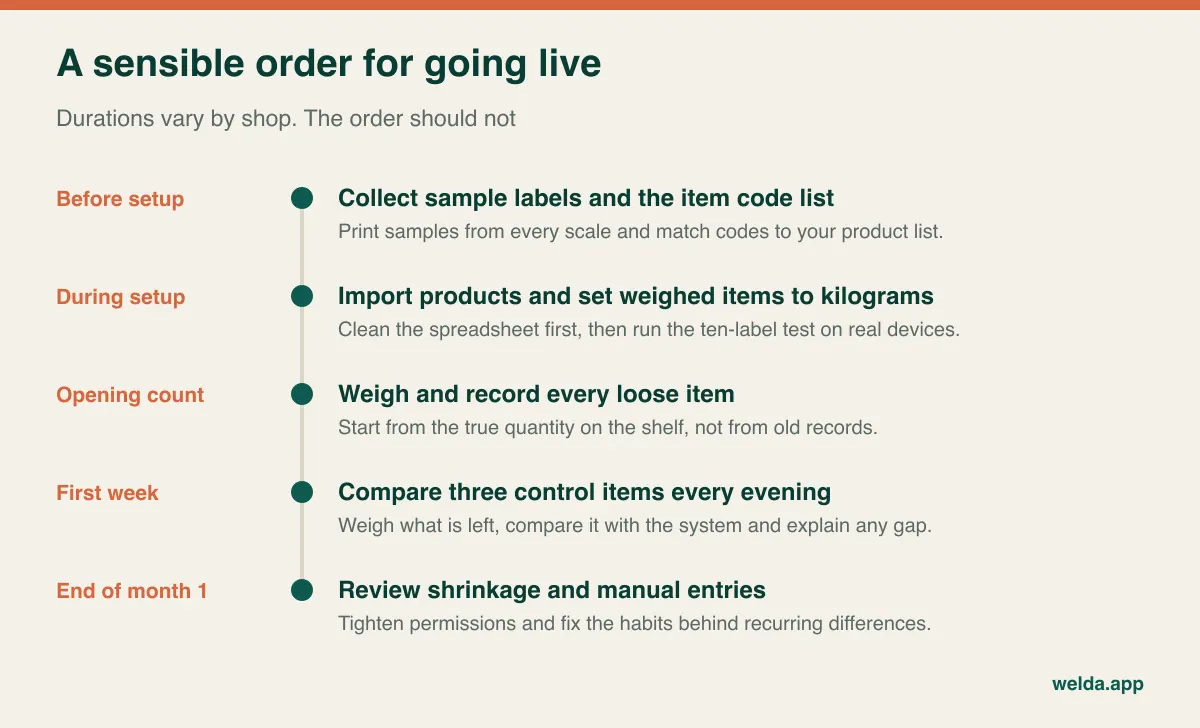
One more practical point: do not go live in your busiest weeks. The run-up to Christmas in a deli or a holiday weekend in a butcher shop is a poor time to learn new habits. Train the people working at the scale as well as the cashiers. They need to know why the label matters and what to do when one is damaged.
Questions to ask in the demo
- Can we scan my labels now and look at the result together?
- Do you decode both weight and price barcodes? How do you handle different settings on different scales?
- What happens when an unknown code is scanned? Is manual entry logged?
- How are prices kept in step between scale and POS: manually or automatically?
- What happens at the till if the internet goes down?
- How does your receipt relate to the fiscal requirements in my country?
- Can you show me a count difference and a shrinkage report in kilograms?
- If the scale causes problems after setup, who helps and through which channel?
Frequently asked questions
Do I have to replace my scale?
If it prints barcode labels, usually not, but do not take that as settled until a sample label has been tested. If it does not print barcodes, ask your service company whether a barcode option exists.
Can the same scanner read scale labels and normal product barcodes?
In most cases, yes. Standard scanners read both. Still, scan into a text document to confirm it is not dropping digits, and try it on a greasy label.
Which scales does Welda Stock work with?
Welda Stock automatically decodes weight and price barcodes printed by retail scales. We do not publish a brand and model list, and we check compatibility using a sample of your labels before setup.
Does it work with a scale wired to the till?
The method described on our product page is scanning the label barcode. If live weight over a cable is essential, raise it in your first conversation and see it running before you decide.
Does the sale stop if a label will not scan?
It should not. In any product, look at the manual entry route during the demo and confirm that it is recorded per user. You should be able to restrict it through permissions.
Does stock go down by the exact weight sold?
In a properly configured flow, yes, in kilograms or grams. In Welda Stock, the weighed quantity is deducted from the product's stock. Verify it yourself with a control count.
Can branches use different scales?
Welda Stock supports multiple branches with separate stock balances. If scales in different branches use different barcode settings, tell us before setup. One setting across all scales is the healthiest option.
You can settle most of this by testing a label. Book a free consultation, bring two or three samples, and we will look at whether Welda Stock is the right POS software with scale integration for your counter, and tell you plainly if it is not.