The best stationery store POS software is the one that passes two tests on your own products: can you load several thousand lines from a file without spending weeks keying them in, and can a cashier ring through a 30-item school supply list quickly when the line is out the door? Barcode scanning, live stock and reports are table stakes. What separates a good fit from a bad one in this trade is what happens to the loose pen with no scannable code, the box you buy by the dozen and sell by the each, and the second week of the back-to-school rush.
This guide shows you how to run those tests before you sign anything, how to compare proposals fairly, and when a different type of system would serve you better. The arithmetic below is illustrative; every example is labeled as such, and you should redo it with your own numbers.
Count your catalog before you talk to anyone
Most software demos begin with the vendor's sample store. Reverse that. Before the first call, spend an hour sorting your shop into three piles, even roughly. How many lines carry a retail barcode you can scan today? How many are singles whose only barcode is on the box they came in? How many have no code at all: greeting cards with a tiny publisher code, loose stickers, ribbon by the yard, imported novelty pens?
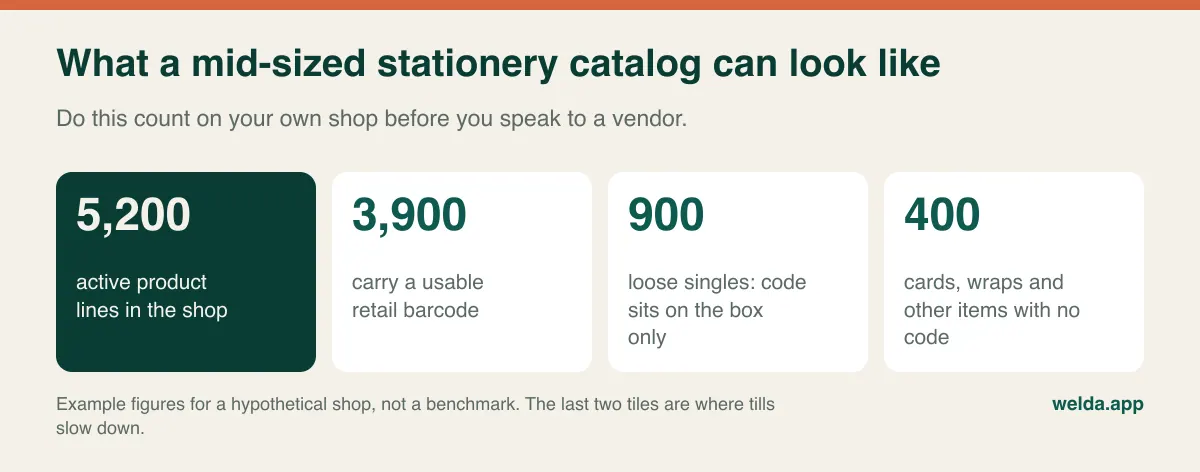
This count changes the entire conversation. A vendor who hears "about 5,000 lines, a quarter of them without a scannable code" can no longer show you a grocery checkout and call it done. It also gives you the first honest measure of your setup effort, because every item in the second and third piles needs a decision: a printed shelf label, a short code on a cheat sheet, or a quick key on the touchscreen.
A stationery catalog behaves unlike most retail. The value per line is small, so tracking any one eraser feels pointless, yet a large share of your working capital is spread across exactly those small lines. Items are near-duplicates of each other: the same notebook in A4 and A5, wide-ruled and college-ruled, 80 and 120 sheets, each with its own barcode and price. Searching a screen under pressure means picking the wrong row all too easily. And demand is lumpy in a way that a convenience store never sees, with weeks of quiet followed by days that make your year.
The loose-pen problem
Here is the moment that quietly kills inventory accuracy in stationery shops. A customer brings one gel pen to the counter. The only barcode is on the display box of twelve. The cashier scans the box code by mistake and gets a box price, or searches for the pen and finds six similar rows, or does what every busy person eventually does and rings it up under a catch-all "misc stationery" key. After one season of that, your stock numbers describe a shop that doesn't exist.
There are three workable answers, and the software you pick must make at least one of them easy. You can print your own barcode labels for high-volume singles, which is the fastest at the till but takes setup time and a label printer. You can keep a laminated short-code sheet by the register for loose items, which is cheap and surprisingly quick once staff learn the common numbers. Or you can assign touchscreen quick keys to your top twenty loose sellers, which works beautifully until you try to fit a hundred on one screen.
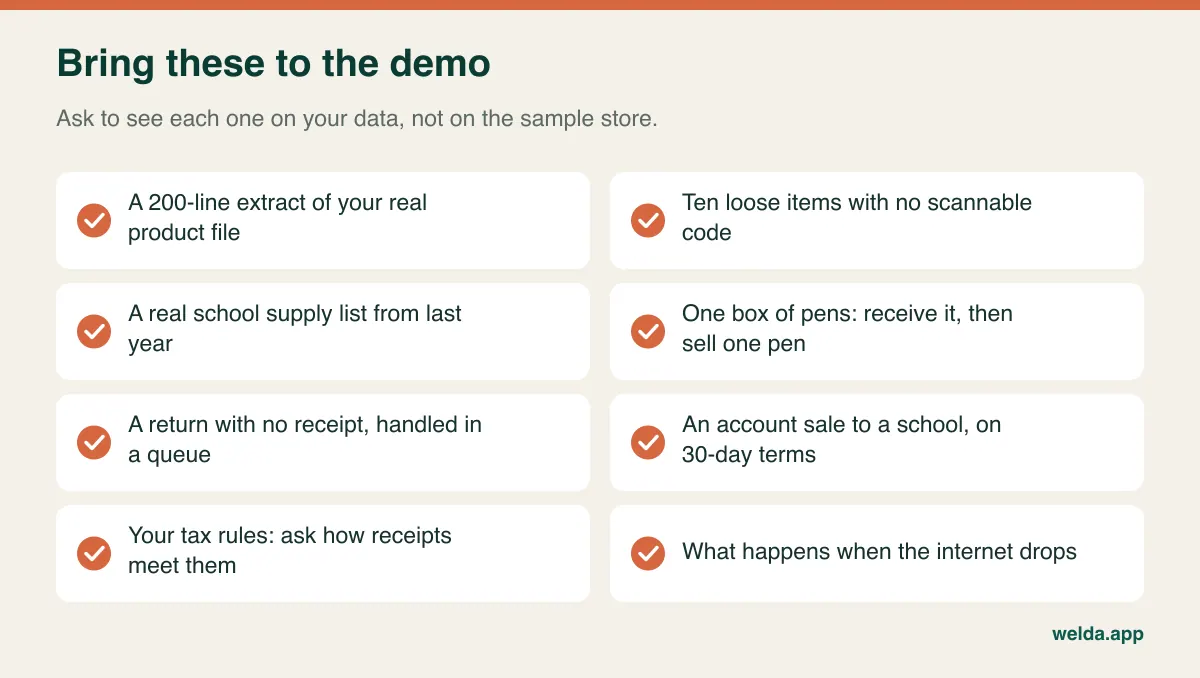
Don't take "yes, we handle that" as an answer. Hand the salesperson ten of your codeless items and ask them to sell all ten while you time it. If the flow involves opening a menu, typing and scrolling for each one, multiply that by your September traffic and decide whether you can live with it. Our guide to barcode inventory tracking covers the labeling side in more depth.
Sold by the each, bought by the box
The second structural issue is units. You buy pens by the dozen, cardstock by the ream, notebooks by the carton. You sell one pen, three sheets, one notebook. Sometimes the same product sells both ways: a teacher wants the full box, a student wants a single.
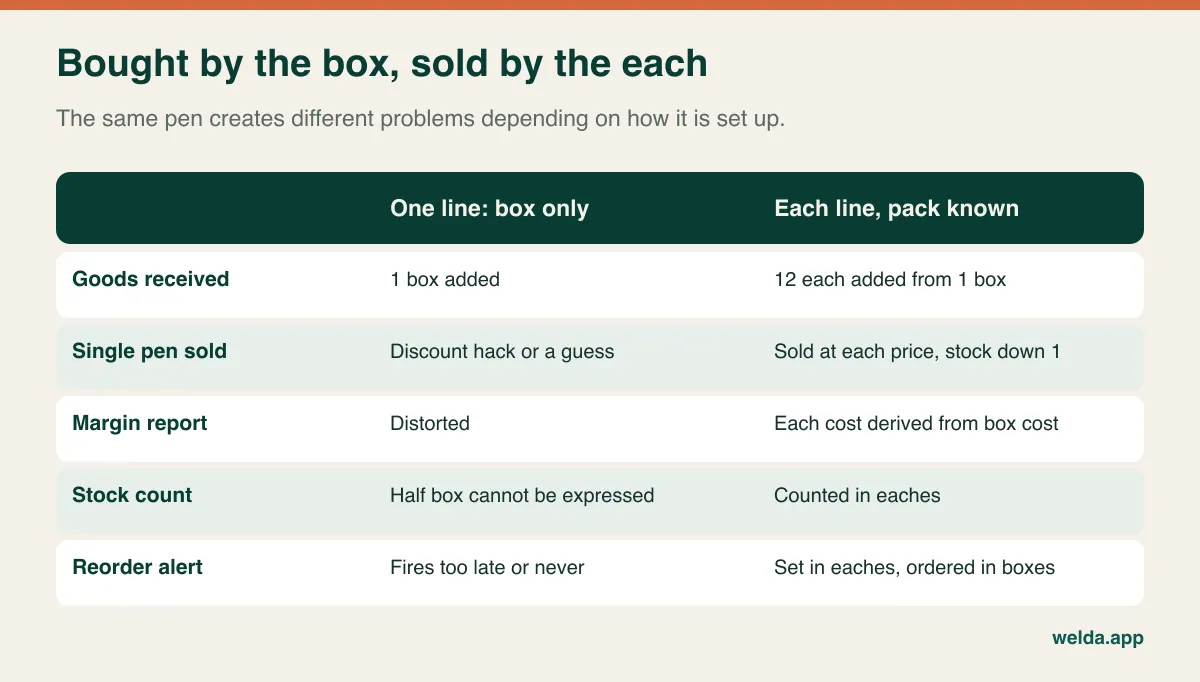
Software handles this in three different ways, and brochures rarely make the difference clear. Some systems let one product hold multiple units and barcodes with a conversion between them. Some ask you to create two linked products, or two separate products you reconcile by hand. Some have one unit per product, full stop. Any of these can work for a small shop if you know what you are getting, and each will give you different receiving, counting and margin workflows.
The test is simple and takes five minutes. Bring one real box. Ask the vendor to receive it into stock on screen, sell one pen from it, then show you the remaining quantity and the cost of the pen that was sold. If the answer requires a spreadsheet, a workaround or a promise about a future release, you have your answer.
Test one: getting 5,000 lines in without losing a season
Almost every vendor will tell you they can import from Excel. That is the start of the conversation, not the end. Here is what skipping it costs in example terms.
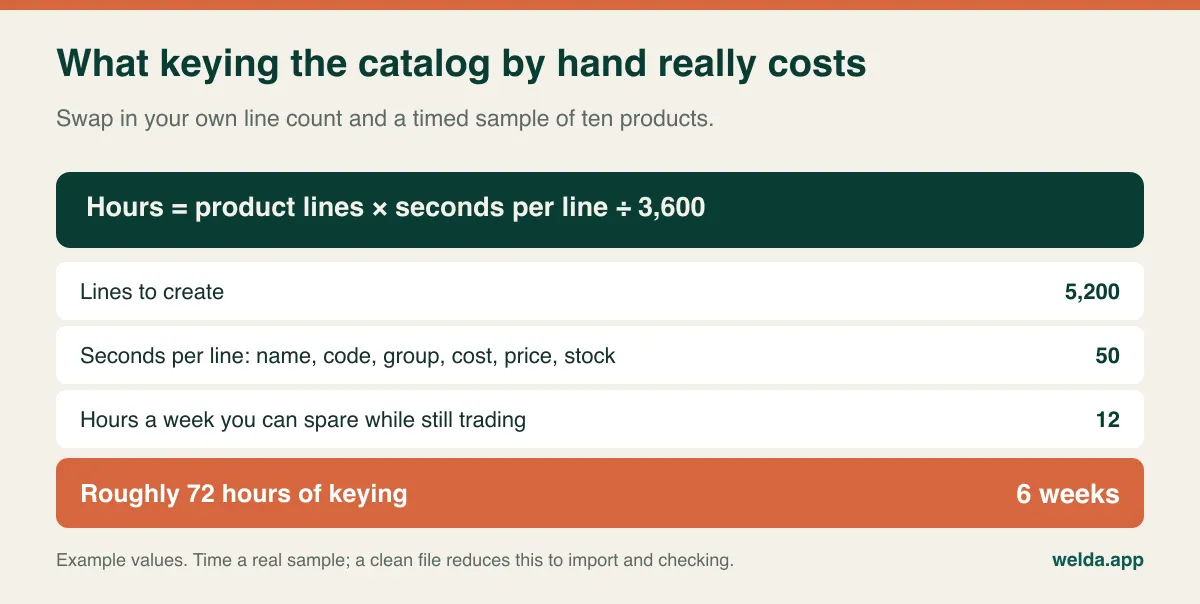
By week six, the stock quantities you typed in week one are already wrong. That is why bulk import is a selection criterion for this trade rather than a convenience. Ask specific questions. Which fields come across: name, barcode, group, supplier, cost, retail, on-hand quantity? What happens to a bad row: does the whole file fail, or do you get a report of the rejects? What happens with a duplicate barcode? Can a bad import be undone? And the one people forget: can you update prices in bulk from a file later?
That last question matters because stationery suppliers tend to revise whole price lists at once, often right before the season. If each change means editing lines by hand, your retail prices will lag, and your margin will shrink where nobody is looking.
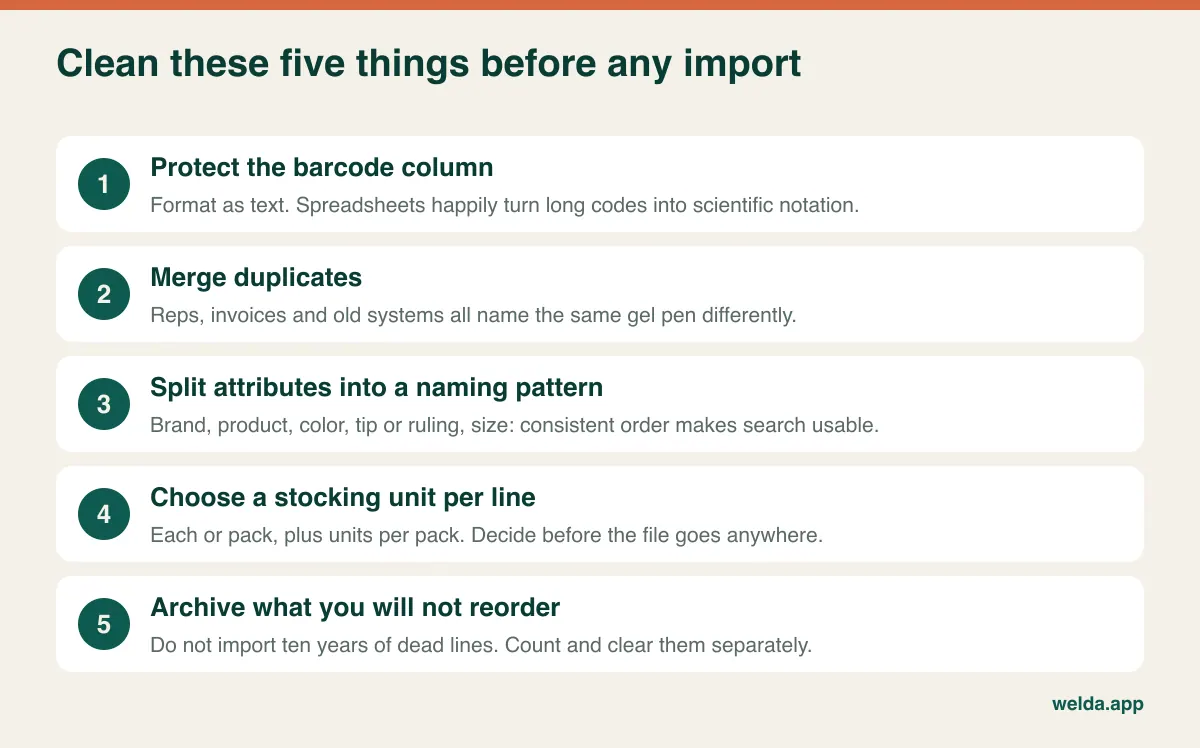
Be ruthless about what goes in. Importing a decade of discontinued lines just moves your dead stock into a nicer-looking database. Pull out anything that hasn't sold in two seasons, count it separately, and decide what to do with it. If you are currently running on spreadsheets, our walkthrough on moving from Excel to inventory software goes through the migration step by step.
Test two: the back-to-school basket
A parent arrives holding the school's list. Twenty pencils, a 24-pack of crayons, safety scissors, two glue sticks, three composition books, a ruler, colored folders. Several items are loose, and one or two are brands you don't carry, so you suggest an alternative. Behind that parent are six more with the same list from the same school. That transaction is not like a large grocery basket, where nearly everything scans. It is half scanning, half hunting.
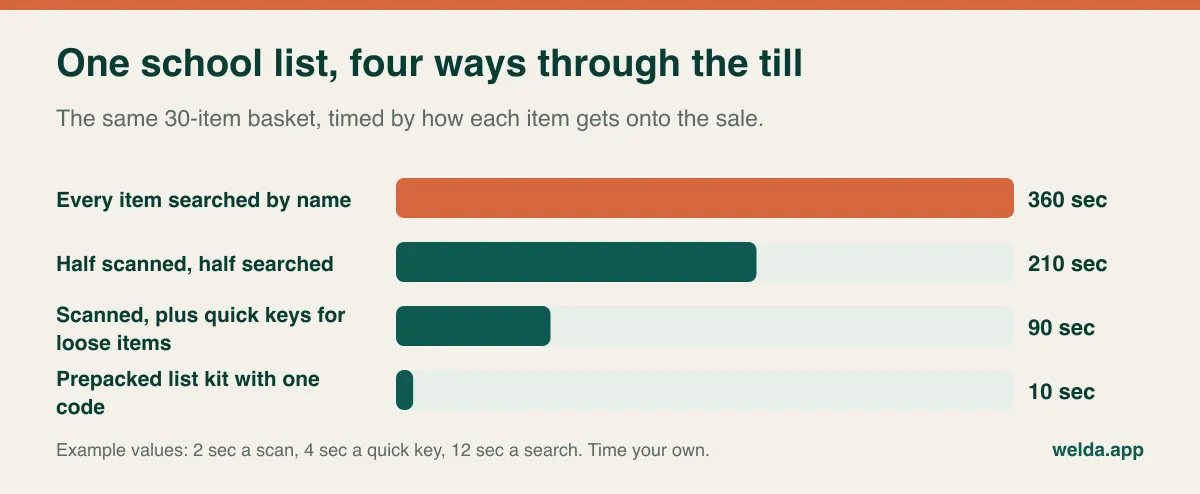
So don't ask whether the system is fast. Take last year's real list, pull those products off your shelf, and run the sale in the demo. Record three things: the seconds from first item to payment, the number of items that needed a screen search, and how many steps it takes to remove an item when the parent changes their mind. Then process an exchange, because you'll be doing plenty of those in the second week of term.
Many shops eventually prepack kits by class or grade. A kit that sells on one code and deducts each component from stock is a real timesaver, but not every system has it. If yours doesn't, you can still prepack and scan each item, though it saves only some of the time. Whether that gap matters depends on your volume: a shop that sees only a handful of lists each season can live without it, while one with a formal arrangement with local schools should treat it as a requirement. Also ask how a kit behaves when the school changes one item in June.
Check the hardware under real conditions as well. If the system is web-based, plan for a dropped connection during your busiest hour. Decide in advance where sales get recorded, whether a phone hotspot can serve as a backup, and who is authorized to make that call.
Cards, fine pens and the copy counter: three shops under one roof
Many stationery stores are really several small businesses, and each one stresses a POS differently.
Greeting cards are a catalog nightmare in miniature. Hundreds of designs may share a handful of price points, and tracking each design can be more trouble than it is worth. Many retailers track them by publisher and price band rather than by design. Decide this before you import, because it changes your line count dramatically. Ask your supplier too, since some card lines are sold on special terms and returned or replaced by the supplier, which affects how you should record them.
Fine writing instruments are the opposite: low volume, high value per piece. Here you want every item tracked individually, with staff permissions on discounts and voids, and a count that happens far more often than the once-a-year stocktake. A missing fountain pen costs more than a hundred missing erasers. Role-based permissions earn their place here.
The copy and print counter is a service, not inventory. Copies per page, binding and lamination need to be sold without pretending to have stock. Check that the system can ring up a non-stock item without driving a quantity negative. If print jobs are a big share of your revenue, with quotes, proofs and job tracking, a general retail POS is not the right tool for that half of the business.
School and office accounts
A school secretary, a local law firm or a daycare may want to buy through the month and settle at the end of it. For this you need customer-level account balances, a clear history of what was bought and paid, and invoices that meet what your customer's accounts department expects. Paper tabs fall apart here quickly, and disputes over "we never ordered that" are expensive in a small community where the customer is also a neighbor.
Tax handling varies widely by country and sometimes by state or province. Books, children's supplies and general stationery may fall under different VAT or sales tax treatment in your jurisdiction, and some regions run back-to-school tax holidays that affect certain items for a few days. Fiscal receipt rules and registered-till requirements also differ. We can't tell you what applies where you trade, so ask your accountant, then ask each vendor in writing: "How does this system meet the receipt and tax rules in my jurisdiction, and do I need anything else alongside it?" The same goes for customer data. If you keep names and phone numbers for accounts or parents, data protection rules such as the GDPR may apply. Keep only what you need, and don't record children's details just because there is a free field for them.
What's left on the shelf in October
Back-to-school profit gets decided by what you do not sell. Licensed backpacks and character lunchboxes date quickly. Last year's cartoon rarely sells at full price next August. Plain notebooks can wait for next season, but they tie up cash in the meantime. Workbooks and study guides can be superseded by a new edition.
What you want from software in October is a clear view of leftover stock by supplier and category, with last-sold dates and cost values. Without it, you will reorder from memory, and memory is a poor buyer. Our article on seasonal inventory planning shows how to build next year's buy from actual sell-through, and clearing dead stock covers what to do with what remains. Keep an eye on supplier payables at the same time. Season buys are often large and on extended terms, and seeing what falls due when will tell you how much of September's cash is really yours.
Which kind of system fits your shop
Not every stationery shop needs this kind of software today. Be honest about which of these you are.
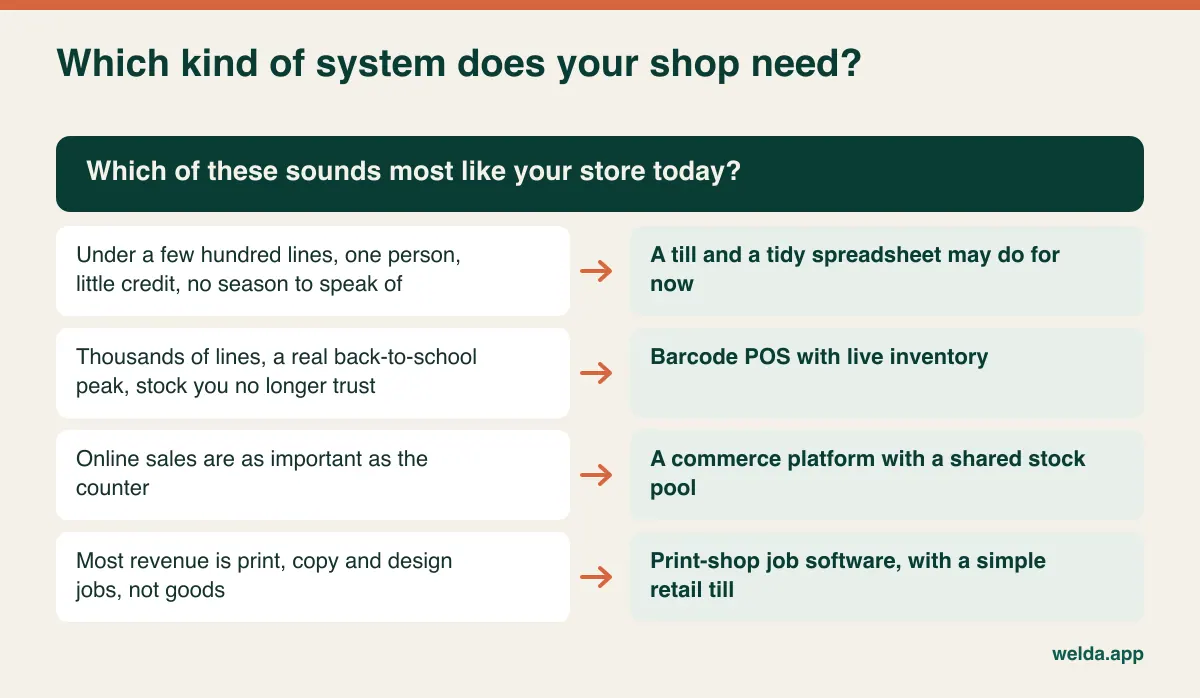
A barcode POS with live inventory is the right family if you carry thousands of lines, have a pronounced season, employ cashiers, no longer trust your stock count, and sell on credit to some customers. It is the wrong one if your growth is online and you need one stock pool across a website and marketplaces, if your core business is contract supply to offices with quotes and delivery runs, or if the shop is mostly a print bureau with some pens at the door.
Where Welda Stock fits, and where it may not
We build Welda Stock, so take this section for what it is. Stationery isn't one of the retail sectors we have a dedicated product page for; those are shops like grocery, delis, kiosks and clothing stores. If you're evaluating it as your stationery store POS software, the overlap is still substantial. It offers fast product lookup by name, SKU or barcode, barcode checkout, a receipt for each sale and real-time stock that decreases as you sell. It also has low-stock alerts, stock counting and shrinkage tracking, multiple branches and warehouses, cashier and manager permission levels, customer credit balances, supplier invoices and debt tracking, per-product margin, and daily, weekly and monthly reports. Product, stock and price lists can be imported from Excel, and we help with the migration during setup, which is usually finished the same day.
Now the limits, which we'd rather you hear from us. Our product documentation doesn't describe box-to-each unit conversion, kit or bundle selling, website or marketplace sync, or local tax-holiday handling as features. Don't assume they are there; bring your box of pens and test it with us. It also doesn't describe fiscal certification for any particular country, so if your jurisdiction requires a certified till, raise that at the very start. And since Welda Stock is web-based and runs over your internet connection, we don't promise offline selling. If your connection is unreliable, we plan the working setup with you during onboarding. The interface is available in English, Turkish and German, so ask to see it in your language during the demo.
Comparing proposals when every vendor quotes differently
Stationery shops get proposals that can't be compared, because line count, users, registers and locations each drive cost differently from vendor to vendor. Rewrite each proposal against one scenario: your actual line count, your registers, your number of logins, and a five-year horizon. Then ask the same questions of everyone.
Is setup separate, and does it include data migration or is that billed per line or per hour? Is this a one-time license or a subscription, and what are the renewal terms? What does an extra register cost during peak weeks? How are additional users, a second location or new modules charged? Which hardware is included, and which is merely compatible? What does fiscal or tax compliance add? What support is available on the first Saturday of September? Can I export all my data, in a usable format, if I leave?
The largest hidden costs rarely appear on an invoice: the staff hours spent keying products, sales rung up at last year's price, parents who walk out of a slow line. A cheap system that fails your two tests can easily be the expensive choice. For Welda Stock, pricing depends on your users, locations and product count, setup and data migration are part of the proposal, and we confirm scope and price in a free consultation.
Timing the switch around the calendar
The bad time to switch is obvious: the six weeks before and the four weeks after school starts, whichever months those are where you trade. In the Northern Hemisphere that often means late summer; in other markets the school year starts at a different time, so count back from your own peak.
A sensible sequence looks like this. Start the file cleanup right after the season, when the leftover stock decision gets made anyway. Run the import and a full stock count in the quiet months, and take your opening balances from that count rather than your old system. Run the new till during a slow period so staff can make their mistakes without a queue. Receive the season's buying through the new system, which is where missing codes reveal themselves while there's still time to fix them. Then freeze everything a month before the rush: no new setups, only kits, quick keys and your backup plan.
Counting thousands of lines in a day is unrealistic for most small shops. Count by section, loading each one as you finish it. Afterwards, run short spot checks for a few weeks. Variances tend to cluster on the shelves whose coding is weakest, which tells you which labels or short codes to fix first. Get your cashiers involved early, too. Staff who help choose the quick keys actually use them.
Your next step
Three things make a first conversation useful: a rough line count, your current product file in whatever state it's in, and one real school list. You can review stationery store POS software features in Welda Stock first, then book a free consultation. We'll try your file together, and if it isn't the right fit, you'll find out before spending anything.
Frequently asked questions
Can I use grocery or general retail POS software for a stationery store?
Often, yes. Scanning, stock, alerts and reports work the same way. The differences show up around codeless items, box-and-each units and multi-item school lists. Test those three with your own products and you'll know quickly.
How many products is too many for a spreadsheet?
There's no magic number. The signs matter more: items the sheet says you have that aren't on the shelf, reorders you remember too late, tills that don't balance, and no idea which lines make money. If two of those sound familiar, it's time to look.
Do I need to barcode every single item?
No. Label your fastest loose sellers, use short codes or quick keys for the next tier, and let the rarest items be found by name search. What matters is that everything has an honest route onto the sale, so nobody reaches for the misc key.
Should I track greeting cards individually?
Usually only if you have a good reason, such as a supplier who needs design-level data. Many shops track by publisher and price band to keep the catalog manageable. Decide before import, and confirm how your card supplier handles replacements.
Can I update supplier price lists in bulk?
Ask each vendor to show this using a file you bring, matched by barcode. Welda Stock supports importing product, stock and price lists through Excel; test your own list in the demo to see how it behaves with your data.
Will POS software take care of my tax and receipt requirements?
Don't assume it. Rules vary by country and region. Get your accountant's view on what applies, then ask the vendor to state in writing how the system meets it and what else you may need alongside it.
Can stationery store POS software run without internet?
Some systems can and some can't. Web-based products, Welda Stock among them, run over your connection. Ask what happens during an outage, and prepare a backup connection and a manual fallback before the season rather than during it.