Grocery store POS cost is not one number. It is the sum of five separate things: the software licence, setup and data import, hardware, the number of lanes or users you pay for, and support. On top of those sits card processing, which often comes from a different contract altogether. What moves each line is how your store actually runs: how many checkouts open at peak, how many products you carry, whether a deli or produce counter uses a label-printing scale, and how many locations you have or plan to have.
That is why a figure quoted over the phone, before anyone has asked about your scale or your product list, tells you very little. If you have two quotes on the table and the gap between them makes no sense, the likely explanation is that the two vendors are pricing different jobs. The method below turns any quote into the same format, so you can see what you would pay over three years and what you would be getting for it.
What makes a grocery store harder to fit than a gift shop
Most POS marketing is written with a generic shop in mind: a few hundred items, each with a barcode, one tax rate, one till. A grocery breaks nearly all of those assumptions, and each break can appear on your quote as an extra module, an integration or a day of a technician's time.
Start with the size of the catalogue. Thousands of active lines means the product import is a project rather than a formality. Then there are the items with no manufacturer barcode at all. Loose bread, bulk nuts, carrier bags and a single banana have to be sold through a quick-key, a search or a code the cashier remembers. Produce often relies on PLU codes in stores that use them, and a slow lookup at six in the evening is something your customers feel straight away.
Weighed goods add a further layer. In a store with a label-printing scale at the deli counter, the scale encodes either weight or price in a barcode, and the POS has to decode that label correctly and remove the right quantity from stock. In a store with a scale at the checkout, the POS needs to read directly from the device, which is a different integration altogether. These are two different jobs, and a vendor who says "yes, we support scales" may only do one of them. Our guide to POS software with scale integration covers what to test.
Then come the rules that vary by country and sometimes by city. Food can be taxed differently from household goods, and the rate may depend on the product. Age-restricted items need a prompt at the till. Some markets have deposit schemes for bottles, food-assistance payment programmes or specific receipt requirements. None of this is exotic for a grocer, but all of it is the sort of thing that gets priced as an add-on if you do not raise it early.
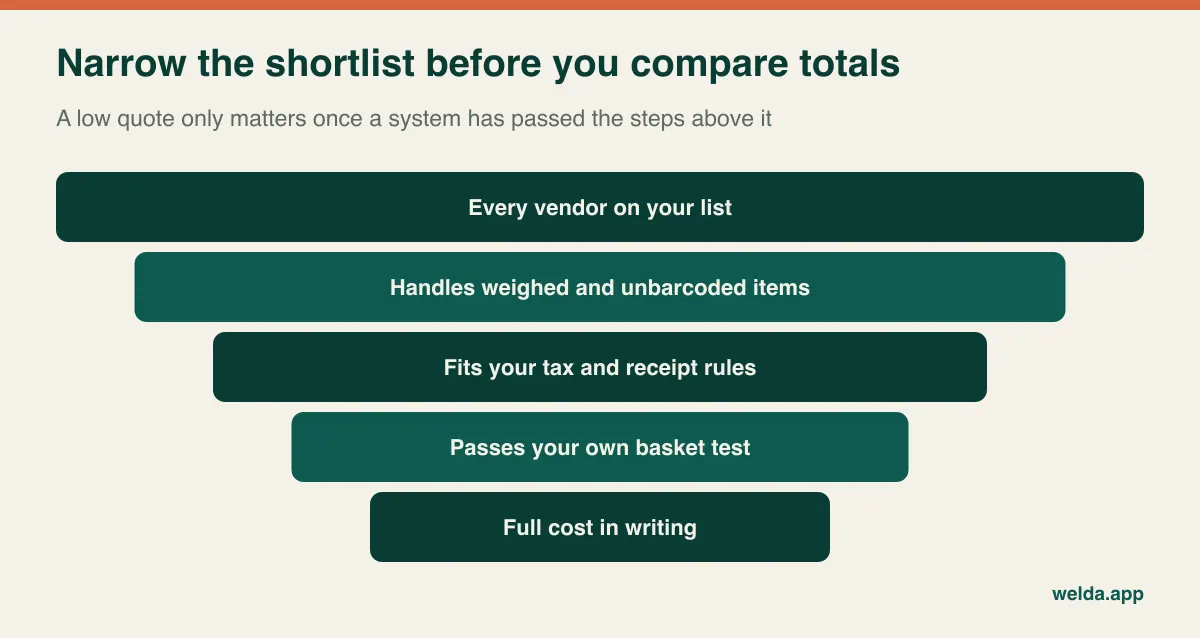
Reading the quote: five lines and the one that sits outside it
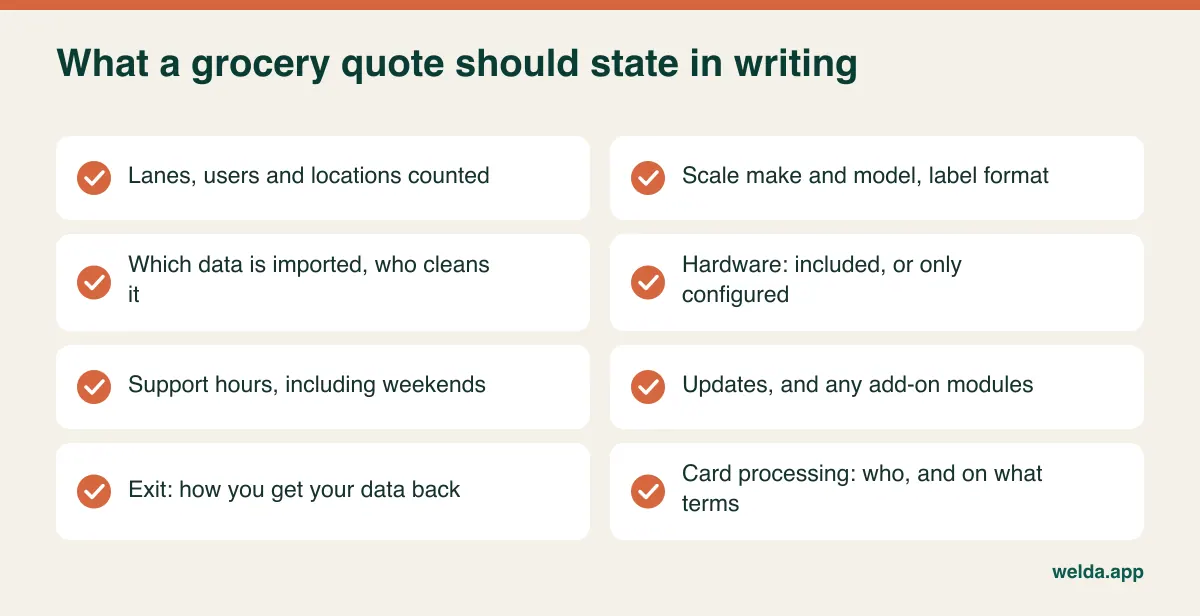
Vendors lay out their quotes in whatever order flatters them. Rewrite each one into the table below. An empty cell is not a saving; it is a question you have not asked yet.
| Line | What may be inside | The sentence to send the vendor |
|---|---|---|
| Licence | Subscription or one-off fee, updates, included modules | Which modules does this cover, and what happens to my access if I stop paying? |
| Setup and import | Product and price load, roles, scale configuration, training | Who cleans my data, and how many staff does the training cover? |
| Hardware | Computers or terminals, scanners, receipt printers, scales, cash drawers | Can I keep my existing devices? Which ones must be replaced, and why? |
| Lanes, users, locations | Charges per checkout, login or store; back-office and warehouse access | What changes if I open a spare lane in December or replace half my staff? |
| Support | Hours, channels, remote access, on-site visits | If a till stops on Saturday evening, who answers and is there a charge? |
The line that sits outside it is card processing. Payment fees are usually charged by a processor as a share of each transaction or through a fee schedule, and in a low-margin business they can matter more over time than the software itself. Some POS vendors bundle their own payments and price the software lower on that basis; others leave you free to choose a processor. Neither is automatically better, but they should not be compared as though the payment contract did not exist. Ask whether you are locked to a processor, how long the terminal contract runs, what happens if you leave, and who owns responsibility for card security standards such as PCI DSS on your setup.
How the licence is counted changes the answer
Grocery trade is lumpy. One lane is enough at ten in the morning; three are needed at six in the evening; the week before a holiday you would open a fourth if you could. So the unit a vendor bills by has a direct effect on your total, sometimes more than the headline rate.
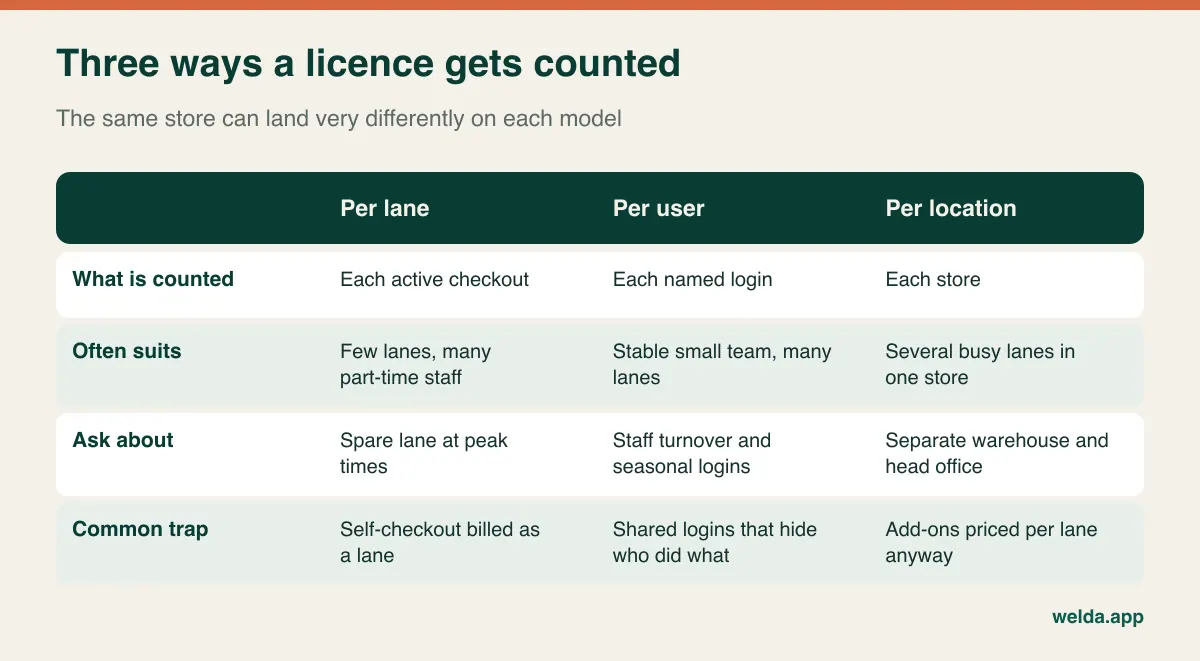
Take a store with two regular lanes and a spare, open seven days, staffed by a dozen part-timers. Billed per lane, it pays for two or three units. Billed per user, it may pay for twelve, plus the owner, plus whoever does the ordering. Billed per location, it pays once, but check whether the add-ons on top are still counted per lane. The same store can look expensive on one vendor's page and reasonable on another's for no reason other than arithmetic.
When per-user pricing looks steep, the obvious way out is to give everyone the same login. This is usually the most expensive saving available. Once voids, discounts and refunds are made under one shared name, you can no longer tell where a cash variance came from, and that is often where the real money goes in a busy store. See our guide on preventing retail shrinkage for what good till control looks like. Compare models on the assumption that every cashier gets a personal login and an appropriate role.
Also ask about the direction you are heading. If a second store is possible within a year or two, get its cost in writing now, even though you are not buying it yet. Ask whether a stockroom counts as a location, whether consolidated reporting is an extra, and whether you can reduce what you pay if a location closes. Those questions are easy before you sign and awkward afterwards.
Subscription or one-off fee: the question behind the question
Most owners start here, and it deserves less time than it receives. A recurring fee protects cash on day one and continues for as long as you trade. A one-off fee hits harder at the start and simplifies later budgets. What matters is what each arrangement leaves out, and the only honest way to see that is to compare them across the same time period.
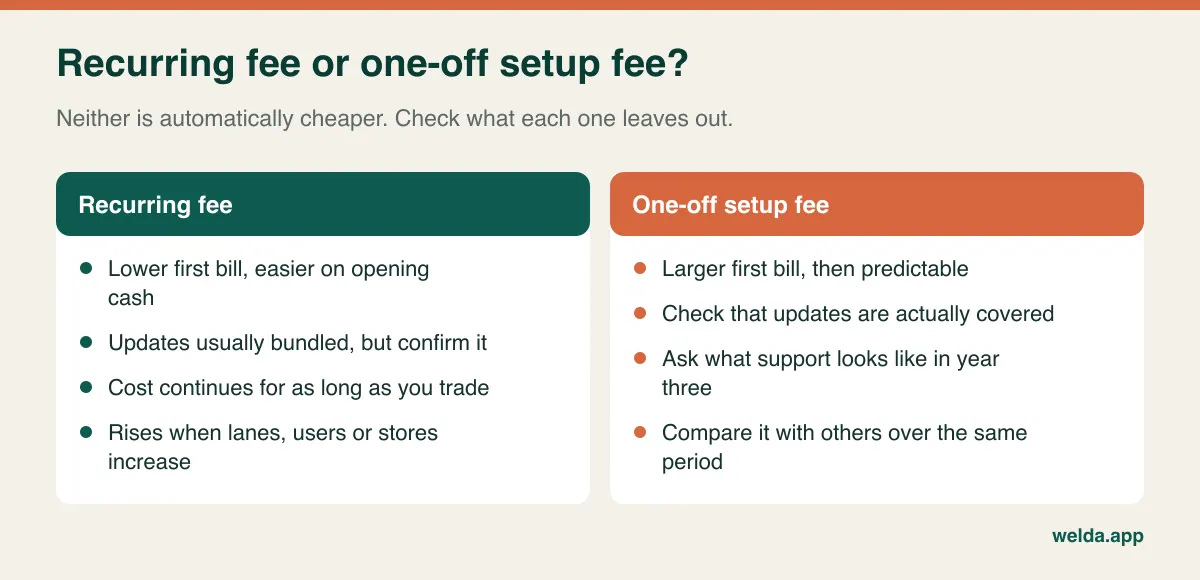
Watch for hybrids. A "one-time" licence with compulsory annual maintenance is a recurring cost with a different name. A low monthly subscription with paid updates, paid training and a paid scale module may not be low at all. And a contract with an escalation clause leaves the last two years of your forecast undefined unless the method for raising the fee is written down. Move each amount into the column it really belongs to, whatever the vendor's label says.
A worked comparison, in units instead of currency
Three years is a sensible comparison window for most independents: long enough to expose recurring charges, short enough to avoid guesswork. Add up the one-off items, multiply the annual items by three, then add your own cost of switching. The example below uses abstract units because the aim is to demonstrate the method, not to suggest what software should cost. Prices vary too much by country, vendor and scope for a generic figure to be useful.
Imagine two quotes for the same store. Quote A has 15 units of one-off items, 30 units of annual items and 10 units of switching cost. At the end of year one it stands at 55 units, and after three years at 115. Quote B asks for 60 units up front, 10 units a year and the same 10 units of switching cost. After year one it stands at 80, clearly the heavier quote. After three years it stands at 100.
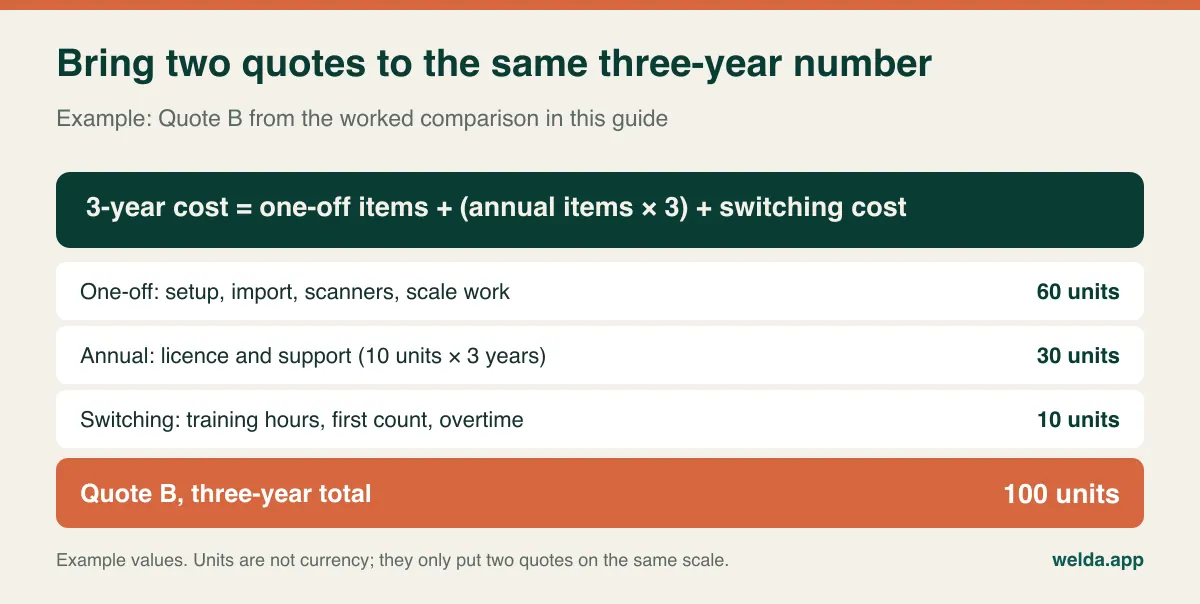
That does not mean the larger first bill wins. It means the answer depends on how long you expect to stay on the system. If your lease ends in eighteen months or you are planning to sell the store, Quote A may be the sensible choice. Run the numbers again under two scenarios. In the growth scenario you add a lane and a second location. In the shrink scenario you lose a lane and three staff. Whichever quote holds up under both is usually the safer one, even if it never looks cheapest on page one.
Costs nobody will put on the invoice
Every switch involves spending that no vendor quotes for, because it happens inside your own business. Pencil in time and money for the following.
- Cleaning the product file. Years of duplicates, dead lines, incorrect tax flags and missing costs will come across unchanged unless somebody fixes them first. That somebody is often the owner. Our guide to moving from Excel to inventory software explains how to prepare the list.
- The opening stock count. The new system is only as accurate as the quantities you start with. In a store of several thousand lines, that means an out-of-hours count and paid hours to do it.
- A slower first week. Queues lengthen while cashiers learn. Avoid launching just before a holiday or on your busiest trading day.
- Connection resilience. If the checkout depends on the internet, a backup connection is a small but real cost. If your system works offline, ask precisely what still functions and how sales sync afterwards.
- Staff turnover. Grocery teams change. Find out whether refresher training for new hires costs extra or whether good documentation will cover it.
- Margin leakage during price changes. When supplier prices rise, each product you fail to update sells at yesterday's margin. If bulk price updates are awkward, you pay in hours or in lost margin.
- Leaving. Ask, in writing, in what format you will receive your products, customers and sales history if you end the contract. A system you cannot get your data out of will eventually be the most expensive one you ever bought.
Bring your own basket to the demo
A vendor's demo always runs smoothly, because it was built to. The demo that helps you decide is the one you run yourself with goods from your own shelves. Take a small mixed basket: a packaged item, something weighed at your counter with its printed label, a loaf with no barcode, a product with a different tax rate, and an item to return. Bring a cashier, because they will spot what you will not.
Work through it in order. Scan the basket and time it. Void one line. Process a return. Put a sale on a customer's account, if you offer store credit, and take a payment against it later. Close the day and check that takings, tax totals and stock levels all make sense. Then log in as a junior cashier and try to do something they should not be allowed to do, such as a large refund. Finally, ask to see the margin on the cheese you just sold, using the cost you actually paid for it. If that number is hard to reach, the reporting module you are paying for will not get used.
Score each vendor on the same three questions. Would this screen slow me down during a queue? Could a new cashier handle a refund without calling me over? Does the end-of-day close leave me with any unanswered questions? Place those scores next to your three-year totals. A system that costs somewhat more and that your team actually uses often costs less than a cheap one they work around. For wider selection criteria, our guide on how to choose a POS system makes a useful companion.
Spend according to the store you actually run
Extra modules burn money just as missing ones do. Treat the following as a starting point rather than a rule.
| Store type | Put the money here first | Can usually wait |
|---|---|---|
| Corner shop, one till, limited range | Fast barcode sales, end-of-day report, low-stock alerts | Multi-warehouse, elaborate roles |
| Neighbourhood grocery, two lanes, deli or produce counter | Scale label handling, cashier permissions, per-product margin, stock counts and spoilage records | Multi-store features, advanced analytics |
| Small chain or store with a separate warehouse | Per-location stock, consolidated reports, clear roles, a defined support plan | Screens no location really needs |
| High-volume supermarket with many lanes | Offline operation, self-checkout, promotions engine, loyalty, contracted on-site service | Very little; this scale calls for a dedicated evaluation |
Paying for nothing new is sometimes the right call as well. If you carry few lines, work alone, and do not need margin reports, a well-kept spreadsheet alongside a simple till can last for a while. The signs that it has stopped working are clear enough: the cash does not reconcile at day's end, you find out a shelf is empty from a customer, or a second person now works the till.
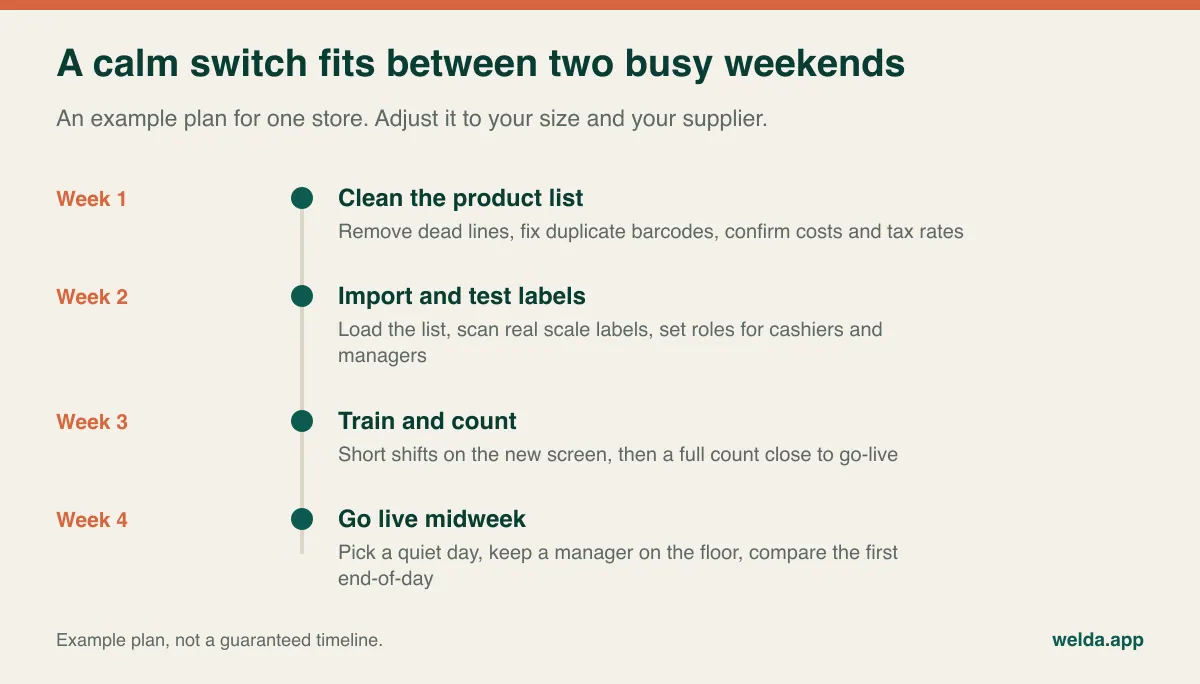
A switch that fits between two busy weekends
Once you have decided, the schedule matters as much as the software. Most of the trouble in a switch comes from starting too late or going live on the wrong day. Here is a shape that works well for a single store, assuming your data is in reasonable condition.
Keep your old records accessible for as long as your accountant recommends, and check what your local rules say about retaining sales data. Ask your accountant to confirm how sales totals and tax will be handed over from the new system before the first month closes, not after. If you collect customer details for store credit or loyalty, make sure you have a basis for keeping them under your local privacy law, and limit who can see them. Rules differ a great deal between countries, so treat this as a prompt to ask rather than as legal advice.
Where Welda Stock fits on this table, and where it does not
We should hold our own product to the same test. With Welda Stock, there is no fixed package list. The price depends on your number of users, your stores and warehouses, your product count and data import, and your hardware and checkout flow. There is a one-time setup fee with no hidden or recurring costs. Setup, import of products, stock and customers from Excel, and training for cashiers, stock staff and managers are part of the quote. If you are researching grocery store POS cost, our pricing page sets out those factors, and the actual price is agreed in a free consultation once we understand your store.
For a grocery, the relevant features are fast barcode sales, automatic decoding of weight and price labels printed by retail scales, customer receipts, an end-of-day cash report, real-time stock with low-stock alerts, stock counts with spoilage and waste tracking, supplier invoices and balances, margin per product, separate permissions for cashier, stock staff and manager, multi-branch support, and store credit for customers who settle later. It runs in a browser, with interfaces in English, Turkish and German.
Some points are worth checking rather than assuming. Welda Stock is web-based, so operations run over your connection; if your line is unreliable we plan the working setup with you during onboarding, but if you need a fully offline lane, say so upfront. A customer receipt is not the same as any fiscal device or certified receipt your country may require, and we do not promise that kind of integration here, so raise your local requirements in the conversation. The setup covers configuring your hardware; confirm separately whether any devices need to be bought. Card processing is not something our product material describes as part of the service. Self-checkout, loyalty, expiry-date tracking, shelf-label printing and online store connections are not described in our product material either. If any of those is essential to you, make it the first question you ask us, and if we are the wrong fit we would prefer to tell you early.
If you have competing quotes, bring them along. Tell us your users, locations, product count and scale model, and we will fill in the same table for Welda Stock so you can compare like with like. You can talk through your grocery store POS cost in a free consultation; there is no commitment attached to it.
Grocery POS questions owners ask most
What determines grocery store POS cost?
The main drivers are how licences are counted, the number of lanes, users and locations, the size and condition of your product file, your scales and other hardware, the support hours you need, and the payment contract that sits alongside the software. The same system can produce quite different totals for two stores.
Why will a vendor not just tell me a price?
Often because the scope really does change the number, and sometimes because the opening figure leaves things out. Either way, the useful move is to send every vendor the same one-page summary of your store and ask for a quote that follows your table. A list price with no scope is hard to compare with anything.
Can I keep my existing scanners and scale?
Often, yes, but confirm with the exact model numbers. Standard barcode scanners tend to carry over. Scales are where assumptions go wrong, so ask for a test with a real printed label from your own scale before you sign, and establish who is responsible for label format changes.
Is free POS software enough for a small grocery?
It can be for a very small, single-user store with a limited range. Limits tend to show up once you need staff permissions, weighed goods, customer accounts or margin reports. Some free options depend on a payment contract, so check that too, along with how you would export your data.
Should I replace everything in one go?
Not necessarily. If your scanners, printers and scale work with the new system, keeping them reduces both cost and disruption. What you should not do is run two sets of stock records side by side for long, since neither one will stay accurate. Set a clear cutover date.
How long does it take to switch?
That depends on your product count and the state of your data rather than on the software alone. A tidy list in a single store can move quickly, and with Welda Stock setup is usually done the same day, but allow time beforehand for data cleaning, label testing, training and an opening count.
Does the POS handle my tax and receipt obligations?
Do not assume so. Requirements differ by country, and in some places by product. Ask your accountant which obligations apply to you, then ask each vendor exactly how the system meets them. Get the answer in writing, including what happens when the rules change.