The right housewares store POS software does three things beyond ringing up a sale: it shows what you owe each supplier, it lets broken stock reduce your margin rather than disappear, and it reveals which lines have tied up your cash for months. Almost any modern system can scan a barcode. Few buyers test the rest, and in a shop selling glassware, cookware, cutlery and gifts, the rest is where the money goes.
This guide is written for the owner of a kitchenware, china or general housewares store who is close to buying. It explains what is unusual about your trade, what to test, and when a given product (ours included) is the wrong choice. We build Welda Stock, a general retail system with stock, barcode checkout and supplier payables. Housewares is not listed as a dedicated sector on our product pages, so we will be precise about what is described there and what you should verify in a conversation. If you want to see the features first, the housewares store POS software overview lists them.
The SKU count is not the problem. The SKU shape is.
Vendors like to ask how many products you carry. In housewares that number tells them little. A shop with two thousand items may sell fifty of them every week and hold the rest for months. Water glasses and frying pans behave like staples. A decorative vase may sit for a year and then pay for itself on one good Saturday. Inexpensive spoons and premium cookware share an aisle, with margin structures that have nothing in common.
A second oddity is that the same physical product can be sold in different ways. A dinner set is one item on the delivery note, twenty-four items on the shelf after a customer asks for two replacement plates, and something else again when you repackage leftovers as a gift. Software designed around grocery logic assumes one barcode, one unit, fast turnover and no splitting. Your first evaluation question is therefore not "how many SKUs do you support?" but "how does your system behave when a product is opened, split, broken or left unsold?"
Open stock and boxed sets: decide before you import anything
Open stock is the trade's name for pieces sold individually from a pattern, rather than only as a boxed set. It wins sales. It also causes the most persistent stock errors in the category. Imagine a six-pack of tumblers on the shelf. A customer needs two. You open the box, sell two, and now have four loose glasses that your system does not know exist. Depending on how the sale was keyed, the record shows either one intact set or none at all. A few months of this and your stock count stops matching anything.
The fix is a rule, and it should exist before you choose software. The diagram below is a sensible starting point. Most small and mid-sized shops end up with two SKUs for lines they split: one for the set and one for the single piece, with a recorded stock movement each time a box is opened.
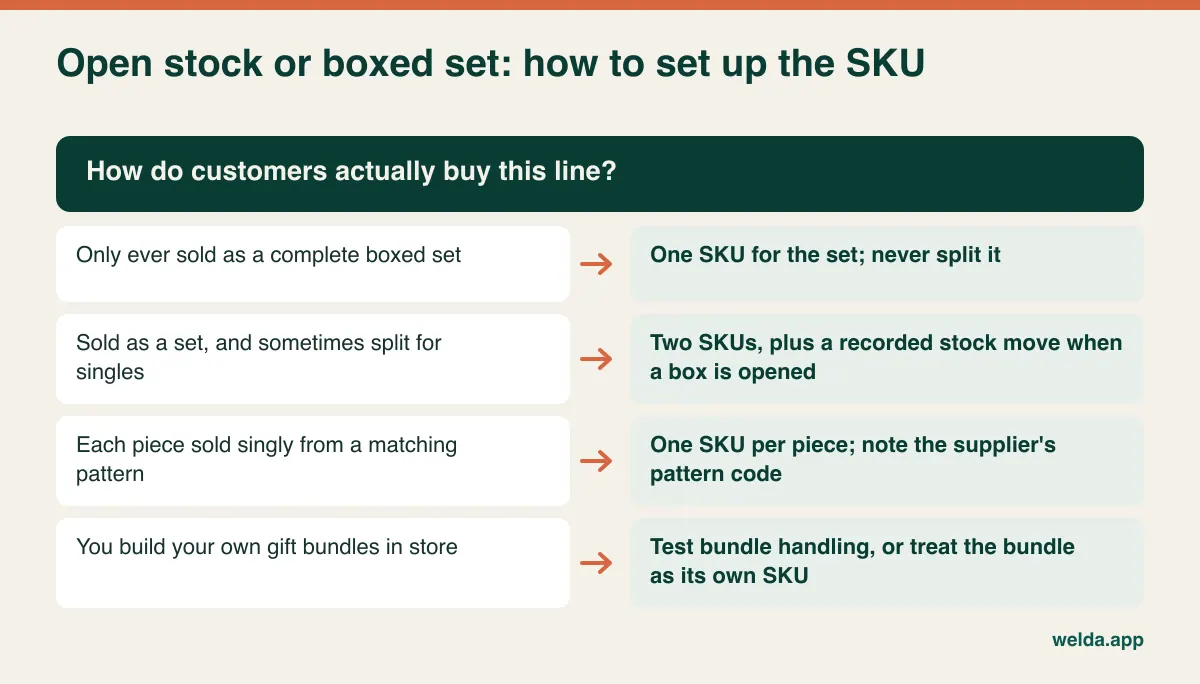
Some systems offer true bundle logic, where selling a set automatically reduces its components. That is useful if you build bundles often, and it adds configuration for every line if you do not. Welda Stock's product pages do not describe set or bundle logic. They do describe defining each variant with its own SKU and barcode, which fits the two-SKU approach. If automatic bundling is essential, raise it first so nobody wastes your time.
Breakage has three owners
Most software brochures mention shrinkage and stop there. In a store full of glass and porcelain, breakage deserves a more careful record, because the cost belongs to different people depending on when it happened. A plate that arrives cracked is normally a matter for the supplier or carrier, if you report it in time and according to their terms. A glass knocked off a shelf is your cost. A mug returned with a hairline crack is first a customer return, and only then, if it cannot be resold, a write-off.
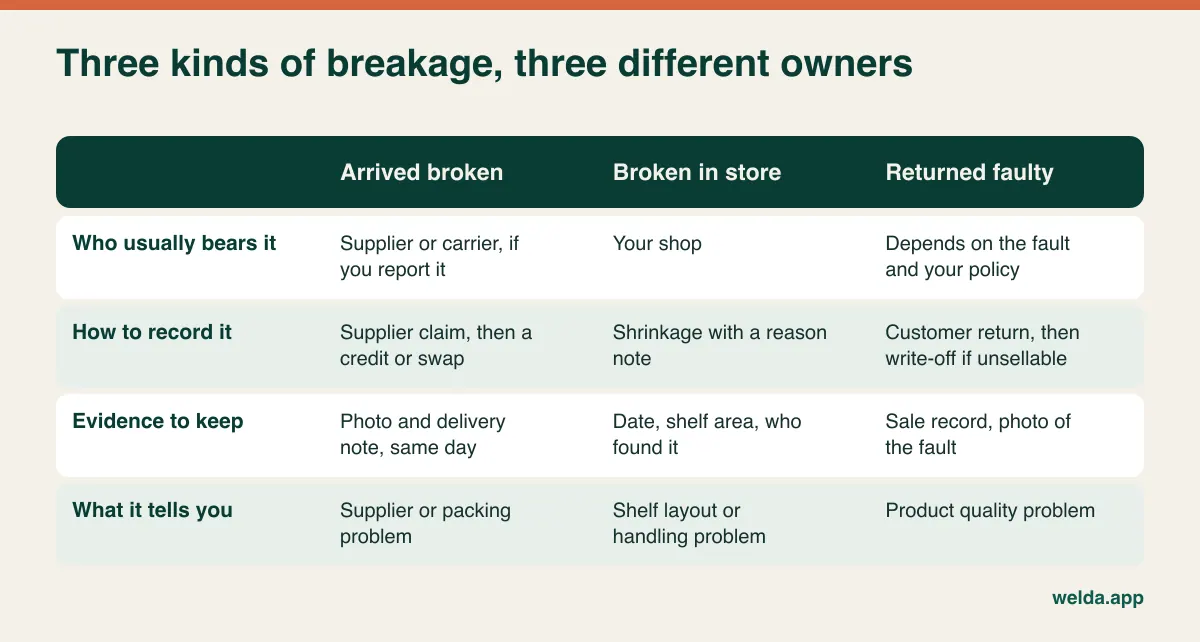
That distinction pays for itself in two ways. First, you stop losing money you are owed: a supplier credit you never chased is a straightforward loss. Second, the pattern becomes readable. Constant damage on arrival from one source points to packaging or freight, and now you have dates and photos to discuss it. Damage clustered around one fixture points to a shelf layout issue that no software will solve.
In Welda Stock you can record stock counts and shrinkage, and our product material says the aim is to keep inventory accurate. Whether that gives you the reason codes you want is something to test with an example. A simple habit works in any system: start each write-off note with "arrival", "store" or "return", and compare the three once a month. For wider causes of stock loss, see our guide to preventing retail shrinkage.
Supplier balances: the ledger most shops keep in their heads
A typical housewares buyer does not deal with one main distributor. Glass may come from an importer, flatware from a regional wholesaler, cookware from a brand's sales representative, and gifts from a trade-show order placed six months ago. One wants payment in advance, another offers net 30, a third allows net 60 on seasonal orders. Add minimum order values, early-payment discounts and part-deliveries, and the owner's mental ledger starts to fail.
Look for software where the purchase invoice is the single event that updates both stock and supplier balance. If those live in separate places, the two will drift apart. Our product material describes Welda Stock as recording supplier invoices and keeping debt and payment tracking in order, and that is the core of what you need. Then probe the details, using this picture of a Monday morning as your target.
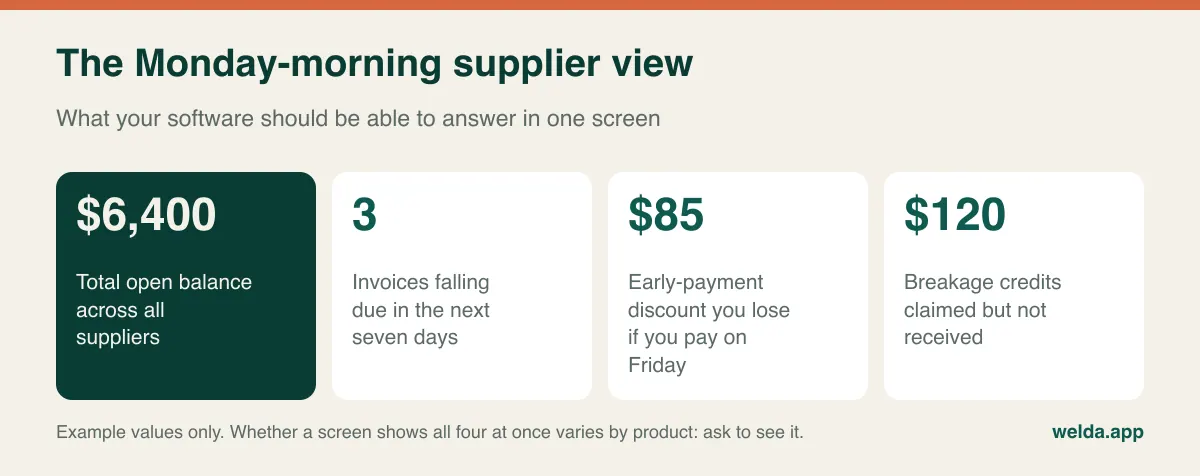
Questions worth asking any vendor:
- Can I see open balance per supplier without adding up invoices?
- Can I list what falls due this week? Our product pages describe payables tracking but do not describe a due-date calendar, so ask us directly if your cash planning depends on one.
- Can I record a part-payment or a round-sum payment on account?
- How does a return to the supplier affect both stock and the balance?
- Can I compare what I paid different suppliers for similar products?
Reconcile each supplier's statement against your own record monthly. It is dull work, and it is how small differences stay small. For the relationship side of this, including when to drop a supplier, read how to choose and manage suppliers.
Your margin is smaller than the screen says
A margin report is only as honest as the cost behind it. Housewares costs are particularly slippery. Trade discounts, free goods ("buy ten, get one free"), year-end volume rebates, freight charged on some orders and not others, and unclaimed breakage all move the real number away from the list price on the invoice. Here is a worked example with invented figures.
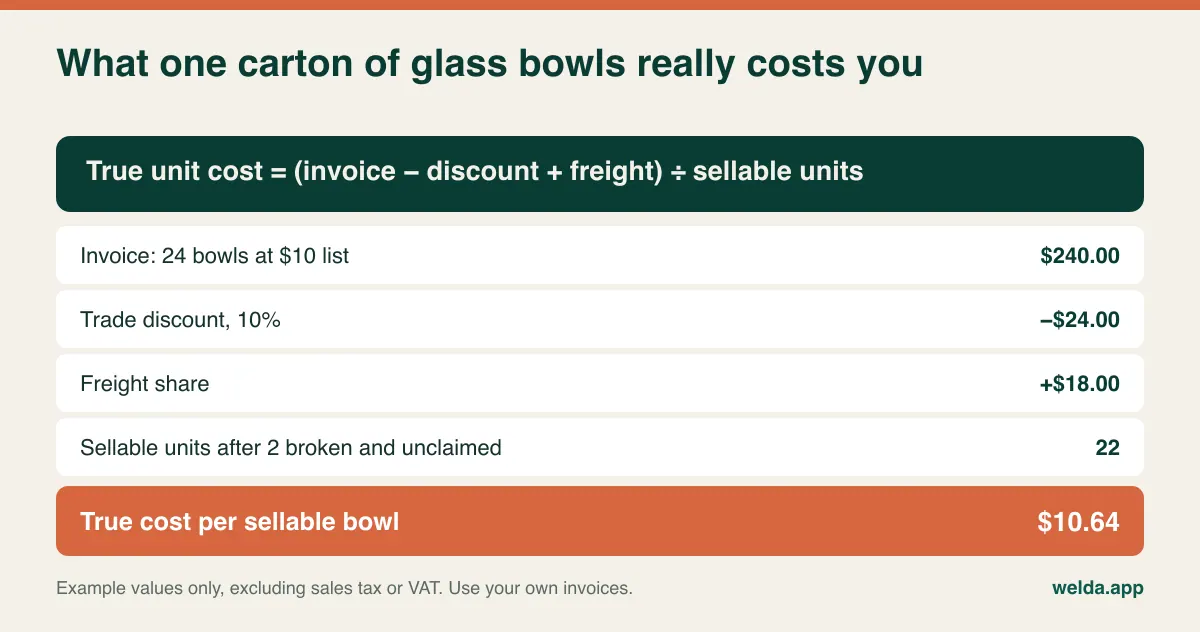
Sell that bowl at $18 and the discounted invoice suggests a $9 gross profit. The honest figure is $7.36, about 18 percent less per unit. On one carton, that is hardly a crisis. Spread across hundreds of lines, it changes which products you should reorder and which you should quietly drop.
Welda Stock shows buy-sell margins per product and identifies your most profitable items. What every buyer should check, with this system or any other, is the mechanics. When the purchase price changes, what happens to the cost of units already on the shelf? If you bought the same line from two sources at different prices, which cost does the report use? Where do freight and free goods go? We would rather you test this with one of your real invoices in the demo than rely on a sentence on a website, ours included.
Registries, gifts and the big one-off basket
Housewares has customers that a corner store never sees. Someone setting up a first home might buy thirty items in one visit. A couple may have a gift registry. A café or small hotel may reorder the same plates on account. These sales expose gaps that everyday checkout does not.
Large baskets. Staff need to find items quickly by name or code when half the products have no scannable barcode. Welda Stock supports product entry and lookup by name, SKU or barcode, which helps here. Time it with your own list.
Reserved goods. A set paid for today and collected next month is sold, yet physically still on your premises. If your staff can sell it again, you have a problem. Registry and reservation features are not described on our product pages. A low-tech approach works: complete the sale, label the goods with the customer's name, and keep them on a separate shelf.
Customers on account. Trade buyers and trusted regulars often pay later. Welda Stock tracks store credit and per-customer balances with payment history, so you can move that record off the notebook. Check that invoices for trade buyers can be produced in the form your tax rules require, which leads to the next point.
Cash on the shelf
Low-stock alerts get all the attention in software demos. They are valuable for your staples: everyday glasses, popular pans, storage containers. Setting a minimum on every decorative item only creates a list nobody reads. In this trade the more profitable question is usually the reverse: what is not selling, and how much did it cost?
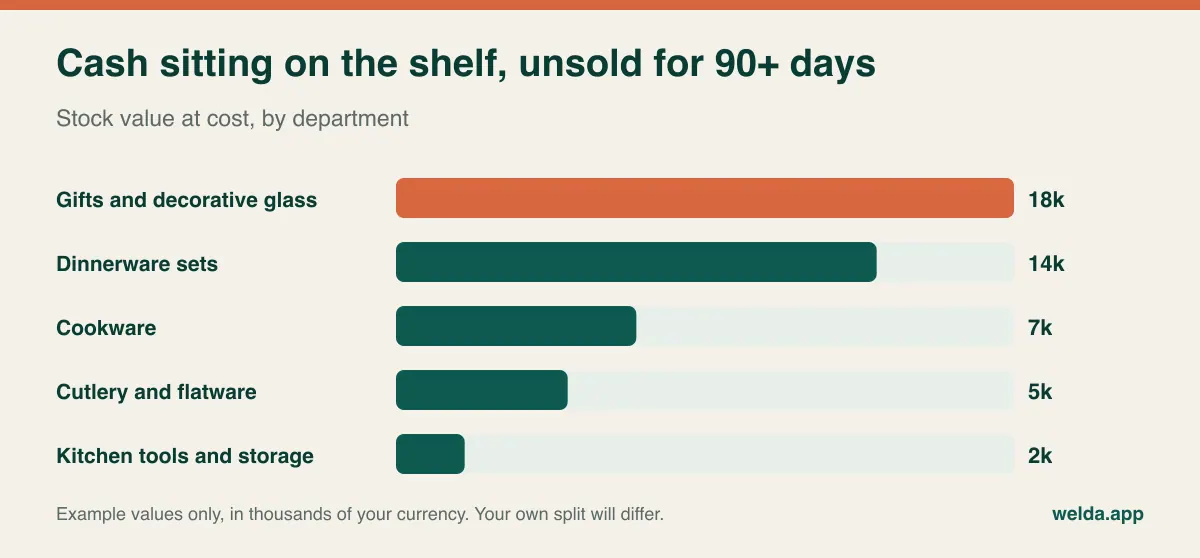
Get this view before you place seasonal orders. The Christmas gift buy is often committed months in advance, and it is easy to reorder a category that still has last year's stock in the back room. Welda Stock provides daily, weekly and monthly sales reports and Excel export, so at minimum you can filter by last sale date in a spreadsheet. See in the demo whether the list you want is one click or a small project, whichever product you are looking at. When you find the dead lines, our guide to clearing dead stock covers the options, and housewares adds a few of its own: rebuild loose pieces into sets, or bundle slow items as gifts ahead of a seasonal peak.
Receipts, tax rules and customer data vary by country
Because this guide serves readers in many countries, we can only give you the question and not the answer. Many jurisdictions have rules on electronic cash registers, fiscal receipts, tax reporting and record retention, and they differ widely. Some require certified fiscal devices or real-time reporting; others are lighter. Ask your accountant which rules apply to you, and confirm the current position, since this is an area that changes.
Then ask every vendor in writing: "Is your product a compliant fiscal register for my country, and if not, how does it work next to one?" For Welda Stock, our product pages describe a customer receipt for each sale. They do not describe it as a fiscal document or a certified fiscal register. If you need that, plan on running a compliant device or service beside it, and discuss how sales are recorded so nothing is entered twice.
Customer accounts hold personal data, which brings privacy laws such as GDPR or their local equivalents into play. Permission levels are the practical tool here. Welda Stock lets you set separate levels for cashiers, warehouse staff and managers, so that access follows the job. That same control keeps cost prices away from the shop floor, which matters when staff are negotiating discounts.
An honest read on fit
A general retail system suits a lot of housewares shops, but not all of them. This is how we would sort it if you asked us across a table.
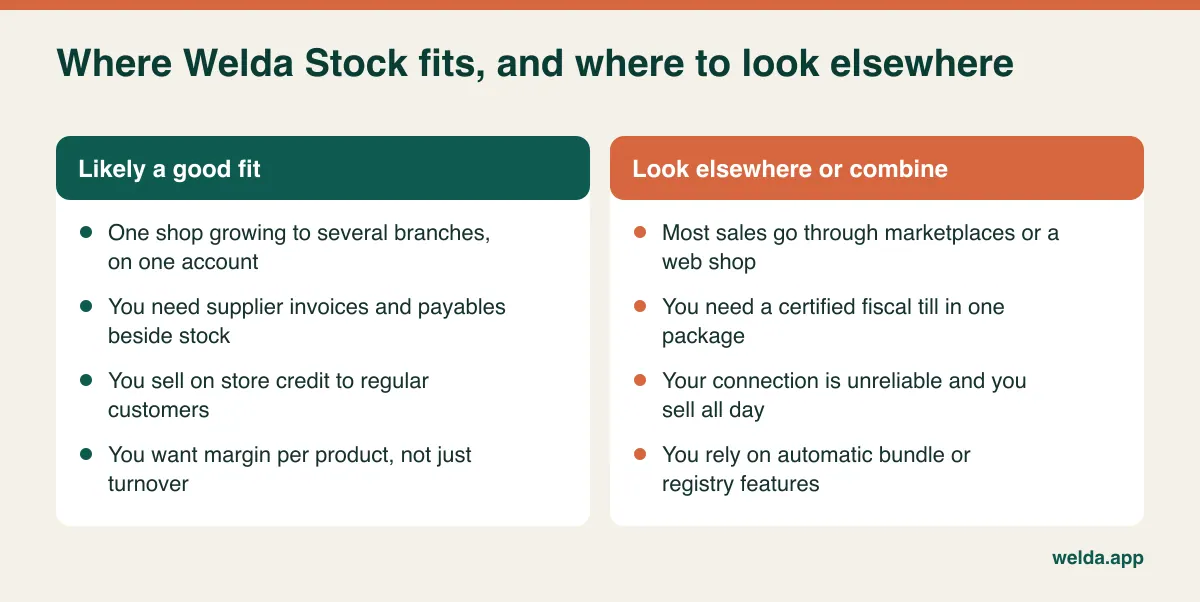
A note on the right-hand column. Welda Stock is web-based, so it needs no installation and works from any computer with a browser, but operations run over your internet connection. If yours is unreliable, tell us first and we will plan around it during setup, or you may decide another option suits you better. Our product pages do not describe marketplace or web shop syncing, so if most of your volume comes from online channels, that should lead your search. Among vendors in general, an offer that claims to do everything equally well deserves a hard look at what is actually included.
Comparing quotes without being misled by the total
Housewares store POS software is priced in ways that make totals hard to compare. Fill in the same grid for each vendor: number of users, tills, branches and warehouses; any product limit; data import; training; support hours; updates; and hardware such as scanners and label printers. Work out the three-year total when there is a subscription. Where there is a one-off fee, list what it leaves out.
The costs that catch people out are rarely on the quote: staff hours cleaning your product list, labelling products that have no barcode, duplicate entry if a separate fiscal device is required, per-seat charges as you add seasonal staff, and the terms for getting your data out if you leave. For Welda Stock, the price is tailored to your users, branches and product count, and is settled in a free consultation. The model is a one-time setup fee, with data import from Excel and team training included in setup. Ask us to fill in your grid the same way as everyone else.
Run the trial with your awkward products
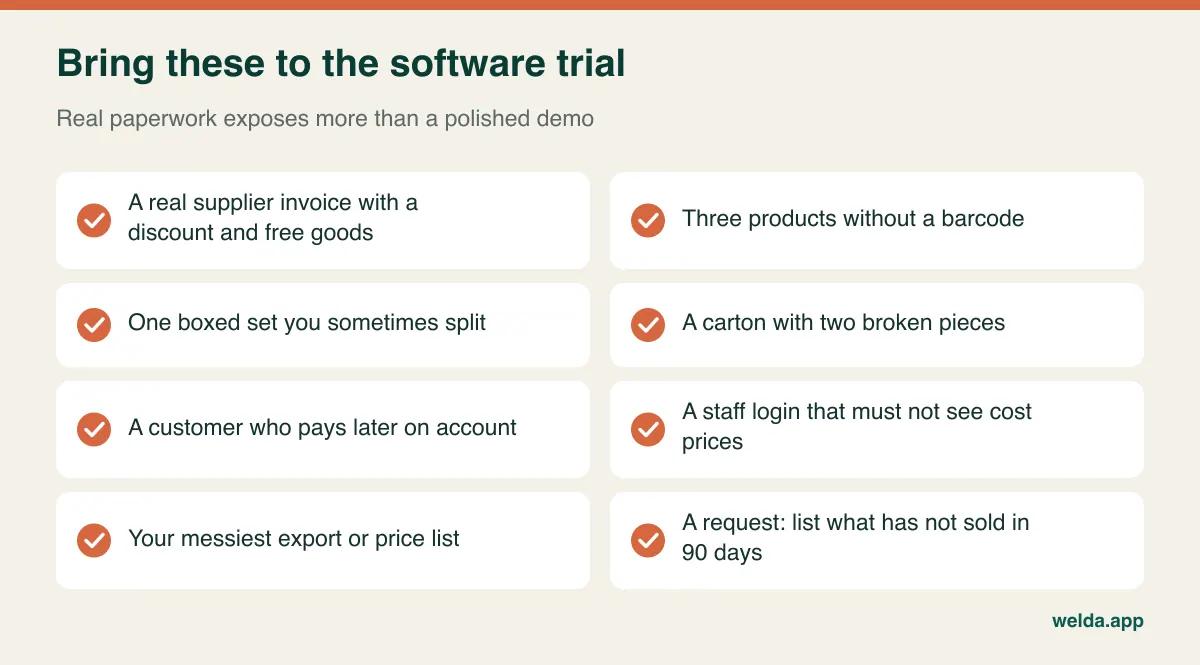
Any system looks tidy on sample data. Bring the messy parts of your business and ask the vendor to perform each task on screen while you watch. "Yes, we can do that" is not a demonstration. "No, we can't" is a perfectly good answer, and much cheaper to hear now than in three months.
Moving over without losing a selling season
Do not switch in the run-up to the holiday season, or during your local wedding and gifting peak. Pick a quiet stretch. Then work in this order, because each step depends on the last.
- Clean the list. Merge duplicates, fix naming, add department and supplier columns. Decide which lines get two SKUs. Our guide to moving from Excel to inventory software covers the common traps.
- Agree on a code format. Something simple such as GLS-0142 for items without a manufacturer barcode. Start labelling on the fastest shelves; slow lines can be done when they sell.
- Confirm opening balances. Check each supplier balance against their statement before entering it. A wrong opening figure damages trust in the whole system at the first reconciliation.
- Count by department. Rather than closing the shop for days, count one area at a time during quiet hours and enter the results as you go.
- Watch the first month. Note which products staff sell under a generic line; that list shows what still needs a code. Close the first month together and check breakage notes, supplier balances and the margin report.
With Welda Stock, setup itself is usually completed the same day, and we help import your product, stock and price lists from Excel. Preparing clean data remains the longer job, and it is one only you can really do.
Frequently asked questions
Do I need special software for a housewares store?
Not necessarily. A general retail system can work well if it handles supplier balances, write-offs and product-level margin. What matters is testing it with your own sets, breakage and unbarcoded lines.
How do I sell products that have no barcode?
Give them your own codes and find them by name or SKU at the till, or print labels if your setup supports that. Ask any vendor, us included, how label printing works; our pages describe standard barcode scanners and do not describe label printing.
Can Welda Stock handle several stores?
Yes. Several branches and warehouses can run from one account, each with its own stock balance, and you can view sales and stock status from one panel.
Can I stop staff seeing cost prices?
Yes. Permission levels for cashier, warehouse staff and manager let you decide who can see and do what.
What does housewares POS software cost?
It depends on users, tills, branches, data import, training, support and hardware, so compare using the same grid. For Welda Stock, the price is settled in a free consultation once we understand your setup.
Will it replace my fiscal register?
Don't assume so with any system. Our pages do not describe Welda Stock as a fiscal device. Ask your accountant which rules apply and how the two should run side by side.
Can I import my current product list?
Yes. Product, stock and price lists can be imported from Excel, and we assist during setup. The cleaner the file, the shorter the job.
If you have a stack of supplier invoices and a shelf of opened boxes, those make a good starting point. Book a free consultation, bring them along, and we will show how our housewares store POS software handles them, and say plainly where it doesn't.