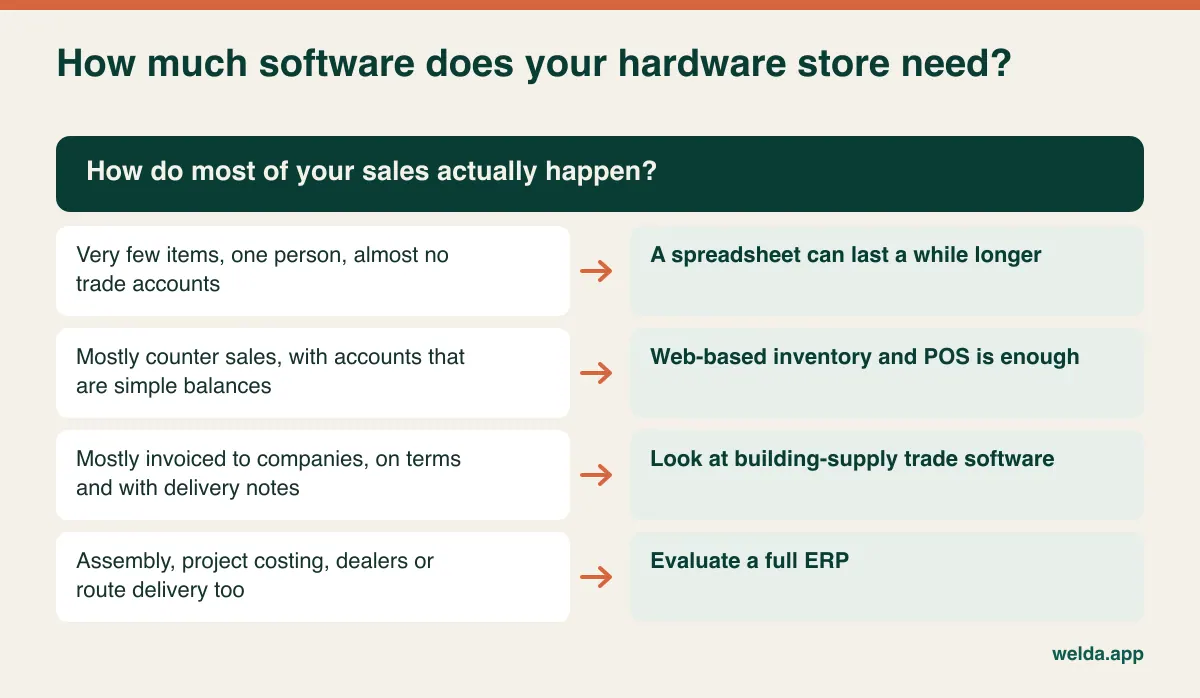
The right hardware store POS software is the one that lets a counter clerk find a part with no barcode in a few seconds, sell it in the correct unit, and put it on a contractor's account with enough detail to survive the month-end argument. If most of your sales happen at the counter and your trade accounts are simple balances, a web-based inventory and point-of-sale system with part numbers, barcode scanning, customer accounts and low-stock alerts is usually enough. If most of your revenue is invoiced to companies on terms, or you run special orders, delivery routes and contractor pricing tiers at scale, you should be looking at a dedicated hardware or building-supply system, or a full ERP.
This guide is written for owners of independent hardware stores and trade-counter suppliers with tens of thousands of line items, a lot of loose stock and a handful of contractors who matter more than any walk-in customer. It skips the general advice you can find in any POS buying guide and concentrates on what is different about selling a single carriage bolt from a bin.
Run the counter test before you read a single feature list
Picture 7:15 on a Tuesday. A plumber is at the counter asking for a half-inch brass elbow, a roll of PTFE tape, ten feet of chain for a pipe hanger and a box of 8 by 1-1/4 wood screws, and he wants it all on his account. Your newest employee is working the register. Two others are waiting behind him.
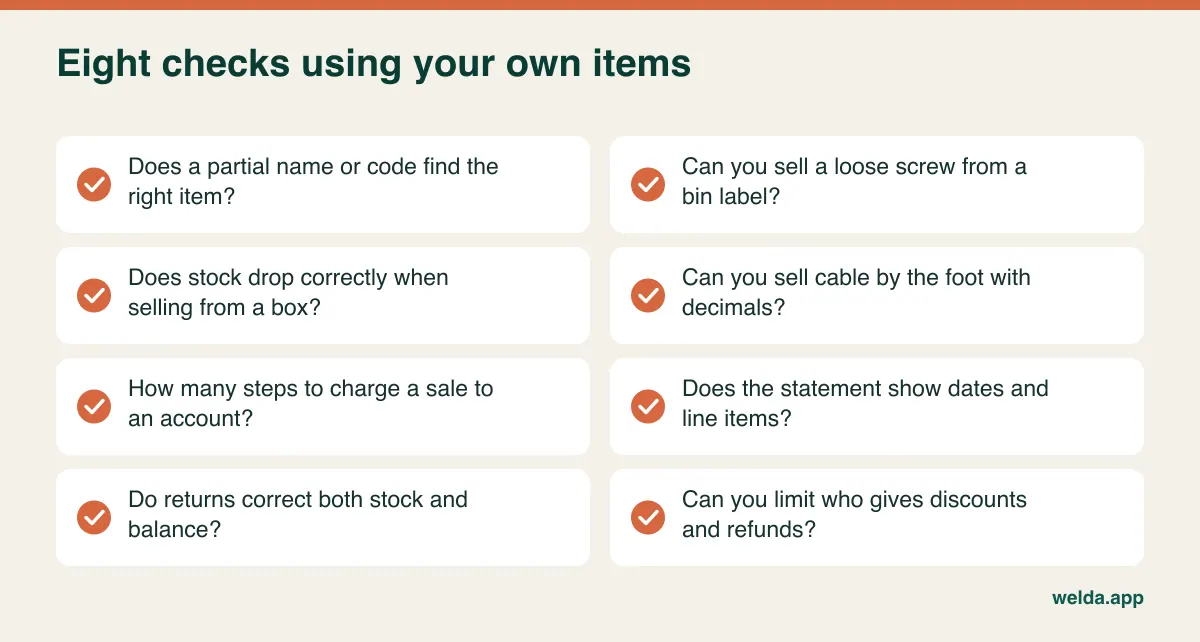
That single transaction tests nearly everything a hardware store needs: a search that understands how parts are described, an item that has no scannable code, a sale measured in feet, a box-versus-each decision and a charge to an account. Ask every vendor to perform this exact sale live, using your items rather than their sample data, and time it. A demo database with twenty clean products flatters every system. A list with thirty thousand lines of half-consistent descriptions tells you the truth.
While you watch, pay attention to how many keystrokes separate the clerk from a finished sale. Could someone with two weeks' experience do it without help? If the sequence is slow, staff will eventually start writing things down "to enter later", and that is how accurate stock figures quietly die.
Why the fastener aisle breaks generic retail software
Most retail POS products were built on an assumption that holds in a grocery store or a clothing shop: every item carries a manufacturer's barcode and is sold in the unit it arrived in. Hardware retail violates both parts of that assumption, thousands of times over.
Fasteners are the classic case. One bolt has a thread size, a length, a head type, a drive, a grade and a finish. Multiply that across sizes and you can generate hundreds of near-identical records from a single product family. Customers don't use your terminology either. One asks for an Allen bolt, another for a socket cap screw; one asks for a lag bolt, another for a coach screw. Depending on where you trade, one size might be requested in metric and the next in fractions. Meanwhile, the supplier's invoice uses a third description and its own part number.
The practical consequence is duplication. Different people add the same screw under slightly different names, and stock splits across records. One shows 400 on hand, another shows minus 60, and the shelf holds something else. The stock math may be flawless while the answer is wrong. So when you evaluate software, look at search before anything else. Does it match on any part of the description, on your part number and on the barcode? Does it stay fast when the catalog is at full size? Can you find an item when you only know two words of its name?
A part-number scheme your staff can read
Software won't fix your catalog, so settle the coding before you migrate anything. A good scheme is a one-page rule anyone can apply. Its purpose is not to pack every attribute into the code, but to make the code readable at a glance and sortable in a list.
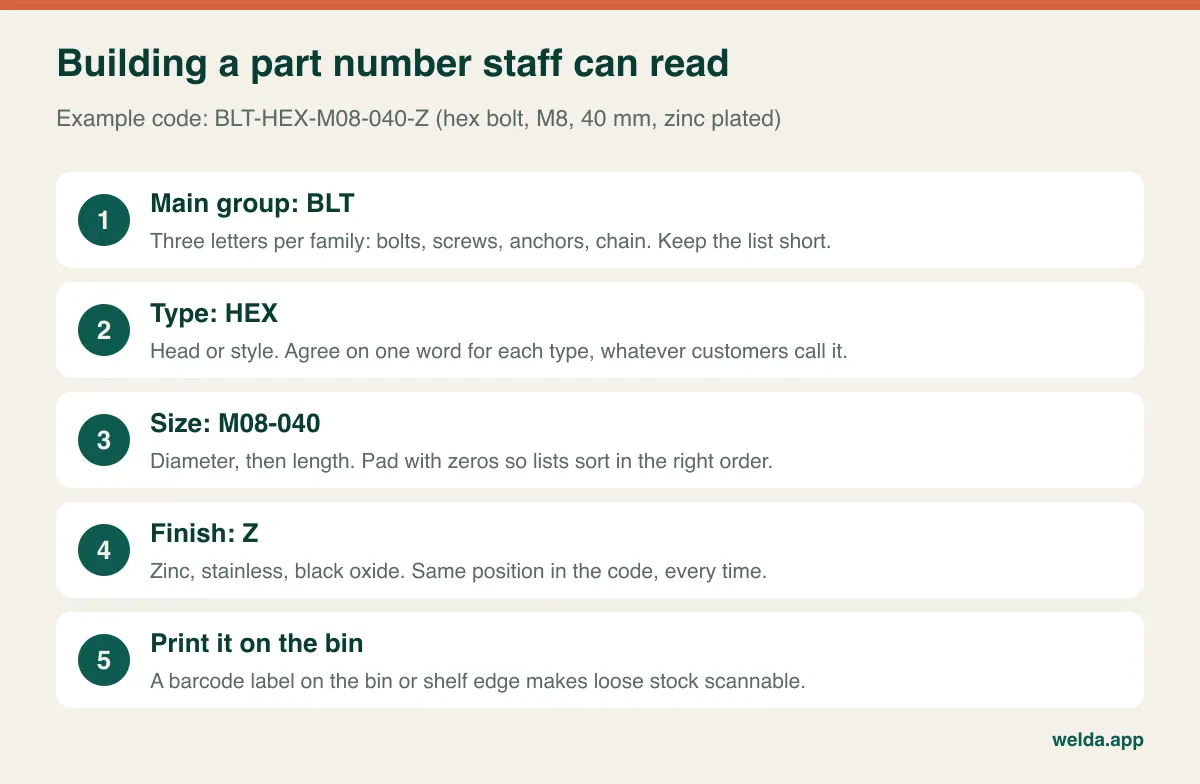
The sample code BLT-HEX-M08-040-Z reads as a hex bolt, M8, 40 mm, zinc plated. In an imperial store the same logic might produce BLT-CAR-0375-300-Z for a 3/8 by 3 inch carriage bolt. Keep three rules. Put the same information in the same order every time. Pad numbers with zeros so lists sort properly. And never make a supplier's number your own primary code, because the supplier may change while your item doesn't. Keep the vendor number as separate information if your system allows it.
Then attach the code to the location rather than the product. A barcode label on the front of the bin or shelf lip turns a loose item into a scannable one. The clerk scans the label, keys the quantity and moves on. Our guide to barcode inventory tracking covers the labeling discipline. Keep bin positions stable where you can, so labels stay meaningful when stock is moved.
Don't try to code everything at once
Thirty thousand items sounds like a project that never ends, but they don't all deserve the same attention. Sort your catalog into rough groups: items that sell weekly, monthly, a few times a year, and not at all in the past twelve months. Code and label the first two groups immediately. Create records for the third group the first time one is sold. Treat the last group as a stock decision rather than a data-entry chore: clear it, return it or stop counting it as a live item. Moving a dirty list into a clean system just gives you dirty data with a nicer interface.
Each, box, pound, foot: where margin leaks away
You buy screws by the box and sell them by the each. You buy chain on a reel and sell it by the foot. Nails may move by the pound, and rope, wire and hose are cut to length. If the link between purchase unit and selling unit isn't solid, stock counts drift and margin reports stop meaning anything.
| Item | Comes in as | Goes out as | What to check in the demo |
|---|---|---|---|
| Wood screws | Box | Each or box | Does selling one box deduct the right number of pieces? |
| Chain, rope, wire | Reel | Foot or meter | Are decimals allowed? Can you see the remaining length? |
| Bulk nails | Carton | Weight | How is a weighed sale recorded? Does a scale fit in? |
| Anchors | Bag | Each or bag | What happens to stock when a bag gets opened? |
| Sealant | Case | Each | Does receiving a case convert automatically into units? |
Some stores work around missing conversions by creating two records, one for the box and one for the each. It's a workable stopgap at small scale, but when a box is broken open, someone has to adjust both records by hand. Forget once and the system shows full boxes that are no longer on the shelf.
The arithmetic matters because the smallest items can carry a wide markup when sold singly, and they are also where cost errors hide. If a system holds the box cost against an item sold by the each, the margin report can be wildly wrong in either direction.
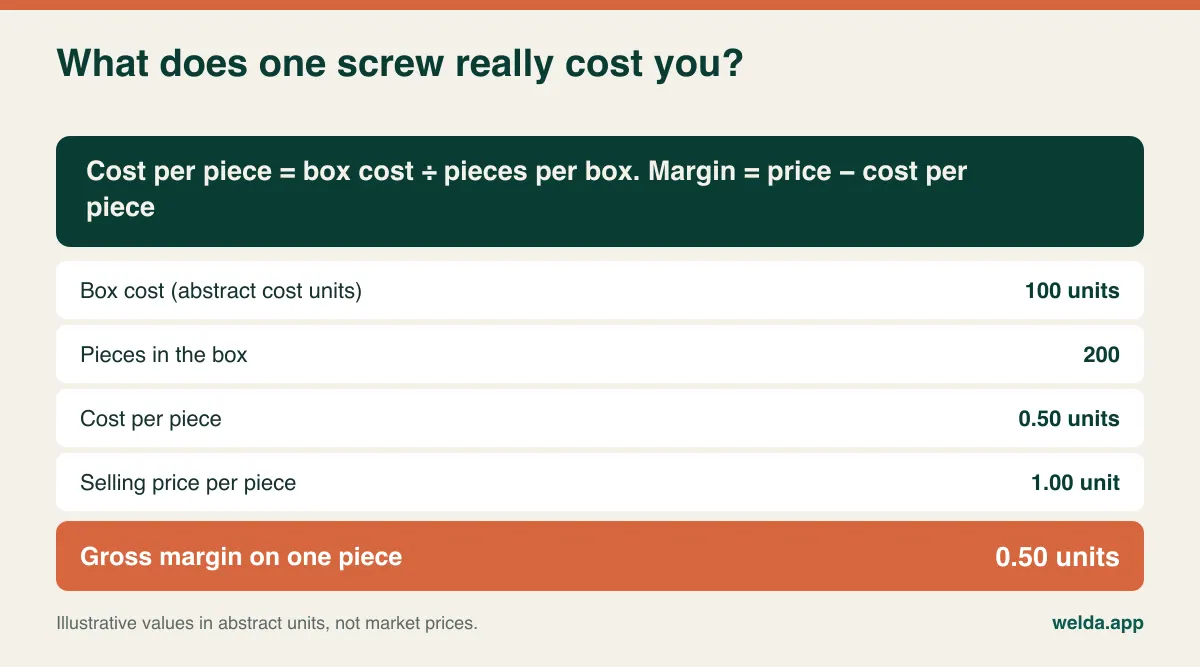
Ask vendors directly: when I sell by the each from a box I bought, which cost does the margin report use? Also ask how that cost changes when the next box arrives at a different price, since last-cost and average-cost methods produce different results. Which one suits you is a question for your accountant, but you should know which one the software is using.
Units also change how you count. Nobody counts 40,000 loose screws one by one. Many stores count by weight: weigh a known quantity, weigh the bin, subtract the bin's own weight and divide. It's an estimate, but a reasonable one for low-value, high-volume stock. Save exact counting for power tools and other items where one missing unit genuinely hurts. Our article on how to do a stock count explains how to divide the work.
Trade accounts are not store credit with a nicer name
A neighborhood shop extending credit deals with one person. A hardware store's trade account is a business relationship with more moving parts. The account belongs to the contractor, but the goods are often collected by an apprentice or a laborer who says "put it on Dave's account" and leaves. At the end of the month Dave looks at his statement and says he never bought that much sealant. Maybe he didn't. Good faith won't resolve the dispute, but a record will: date, items, quantity, who collected them and, ideally, which job they were for.
This matters to contractors for their own reasons. Someone billing materials back to clients needs to know what went to which job. A store that can answer that question becomes part of how the contractor runs his business, and that kind of loyalty is harder to undercut than a small discount. Returned materials belong to the same picture: contractors bring back unopened boxes when a job finishes, and if the return isn't recorded properly, both stock and balance go wrong.
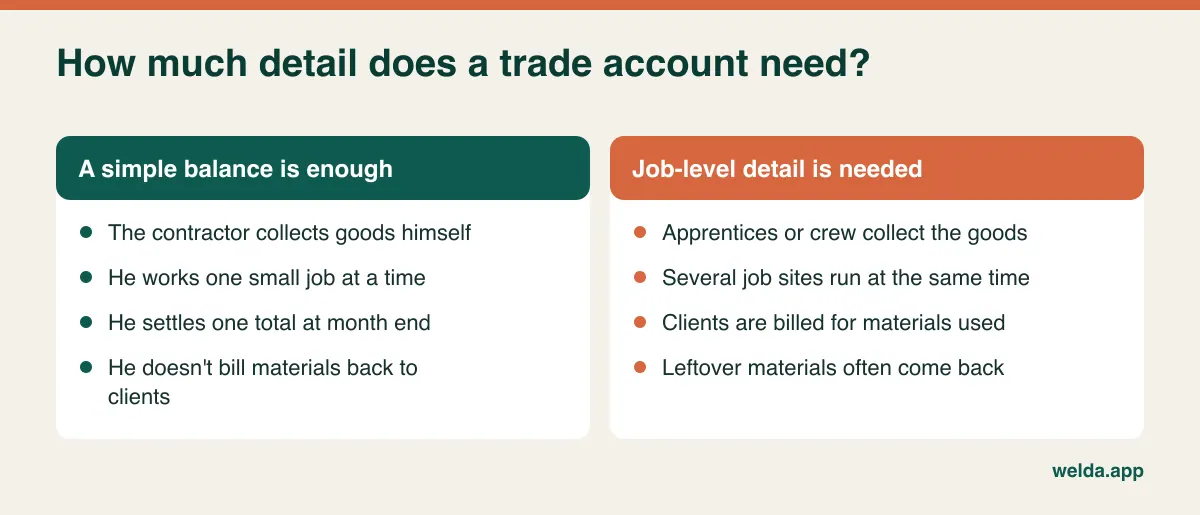
When a vendor shows you trade accounts, check these: how many steps does it take to charge a sale to an account at the counter? Does the statement list dates and line items in a form you could hand to a customer? How does a part payment appear? Will the clerk see it when an account is over the limit you've set? If the system has no separate job field, one account per job, like "Dave Miller - Elm Street", can be a practical workaround. It separates balances by job, but you lose a single view of what Dave owes overall. If you're moving off paper, our guide to digital customer credit tracking covers the switch, and the most important step is simple: agree each opening balance with the customer before you enter it.
Cut keys, mixed paint, threaded pipe: the sales that aren't stock
Hardware stores sell services across the same counter, and these are where inventory software tends to get awkward. Key cutting consumes a blank and adds labor. A tinted gallon of paint consumes a base and colorant. Threading pipe, cutting glass, sharpening blades and repairing screens all generate revenue that isn't a straightforward "one unit out of stock" sale. Tool rental, if you do it, is a different business model altogether, with deposits, due dates and returned goods.
You don't necessarily need a system that handles all of this natively, but you should decide how each one will be recorded before you commit. The usual simple approach is a non-stock service item for the labor and a separate stock deduction for the consumed material. In a demo, ask to ring up a key: is a blank deducted, is the service visible in sales reports, and can you see the margin? If tool rental or paint formula storage is a significant part of your revenue, treat that as a primary requirement, because it may move you toward a specialist system regardless of how well everything else works.
Three stores, three answers
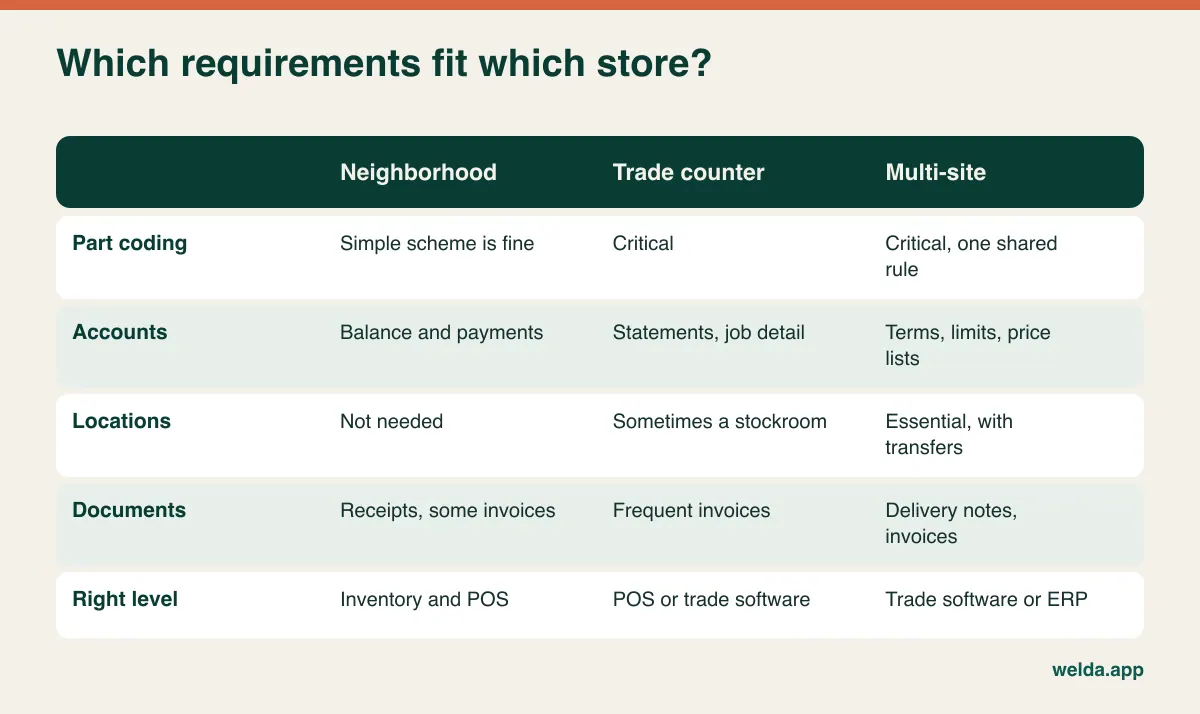
The level of software you need depends more on your business model than on your item count. These three profiles are fictional composites, so find the closest one and rank your criteria accordingly.
The neighborhood hardware store. One location, a few staff, homeowners and a few regular tradespeople. Mostly cash and card at the counter. What matters here is fast checkout, low-stock alerts, simple account balances and an end-of-day report. Heavyweight software slows this store down until the staff simply stop using it.
The trade-focused counter. A very large range of fasteners, hand tools and safety gear, sold largely to tradespeople and small workshops. Part-number discipline, search speed, supplier balances and account statements become critical. As company customers grow in share, invoicing and payment terms start to dictate the choice of system.
The multi-location or wholesale operation. Transfers between a central warehouse and stores, per-branch stock, customer-specific price lists, sales reps and collections. Multi-location support is necessary but no longer sufficient, and a dedicated building-supply system or ERP generally deserves a look.
Where Welda Stock fits, and where it doesn't
Plainly put, Welda Stock sits closest to the first two profiles. It's web-based inventory and sales software for stores that sell over the counter and need to trust their stock numbers, so there's nothing to install. You add items by name, SKU and barcode, sell with standard barcode scanners, and stock is deducted as you sell. It gives you low-stock warnings, stock counts, shrinkage and waste tracking, and several branches and warehouses from one account, each with its own stock balance. On the accounts side, it keeps balances and payment history per customer, tracks supplier invoices and what you owe, and shows margin per product. Cashier, warehouse and manager roles have separate permissions, and Excel import gets your existing lists in. For a full rundown, see our page on Welda Stock as hardware store POS software.
Here's what our product pages don't promise for Welda Stock: automatic box-to-each conversion, multiple alternative codes per item, job-level sub-accounts, customer-specific price lists, credit limits, purchase-order or delivery-note workflows, tool rental, paint formulas, or tax-exempt handling. Integrated card processing and country-specific tax or fiscal connections aren't described there either. It also runs through your internet connection, so if yours is unreliable, we'd plan how to work around that during setup rather than pretend the issue doesn't exist. If any of these is a must-have for you, ask us directly. If we can't meet it, we'll tell you, and a different product will serve you better.
Bring your messiest hundred items to the demo
Before any demo, export or write out the hundred most awkward lines you stock: similar sizes in different finishes, cable by the foot, screws by the each, an anchor with no barcode. Ask the vendor to load them, then have one of your own counter staff drive. An interface only proves itself in the hands of someone who didn't help design it.
Afterward, get a few answers in writing. Who owns your data, and in what format can you take it with you if you leave? When is support available, and through which channel? A support line that opens at 9 isn't much use to a store whose first rush starts at 6:30. Which country's tax and receipt rules has the vendor actually implemented? Sales tax, VAT, receipt formats and electronic invoicing rules vary widely by country and sometimes by state. This article can't tell you what applies to you. Ask your accountant first, then ask the vendor to show you how the requirement is met, instead of accepting a verbal yes. Customer account data also counts as personal data under many privacy laws, so limit who can see it and check your local obligations.
Reading quotes when your catalog is this big
Quotes for hardware retail often look comparable until you consider the catalog. Put scope, not headline figures, side by side, and ask each vendor the same questions:
- Data cleanup and migration: How many rows are covered? Who deduplicates them? Is a second import included if the first one reveals problems?
- Users and locations: Are extra users, counters or warehouses charged separately?
- Labels and hardware: Scanners, label printers, shelf labels and consumables can add up across thousands of bins. Which ones can you source yourself?
- Training: Is it one administrator, or everyone at the counter? What happens when a new hire starts?
- Payments and compliance: Are card processing, tax modules or e-invoicing connections extra? Are there third-party fees?
- Payment model: One-time, monthly or annual? Are updates and support included? Compare the total over three years rather than the first invoice.
- Your own hours: Coding and labeling will never appear in a quote, but it's a real cost. Estimate it before you decide on a go-live date.
For Welda Stock, the quote depends on your number of users, branches and warehouses, your product range and data migration, and your hardware and sales flow. There's a one-time setup fee with no hidden or recurring costs, and setup, Excel data migration and team training are part of it. The actual figure gets worked out in a free consultation, after we've heard what you need.
Switching without closing: move one aisle at a time
Few hardware stores can close for three days to count everything, and a full count of that size is rarely reliable anyway. Divide the changeover by product group. Start with one busy, error-prone group, typically fasteners, then test your code scheme there. Label, count and run sales through the new system. If something goes wrong, the damage stays in one aisle. Once staff feel comfortable, roll out through hand tools, electrical, plumbing and paint. Our guide on moving from Excel to inventory software covers how to prepare your import file.
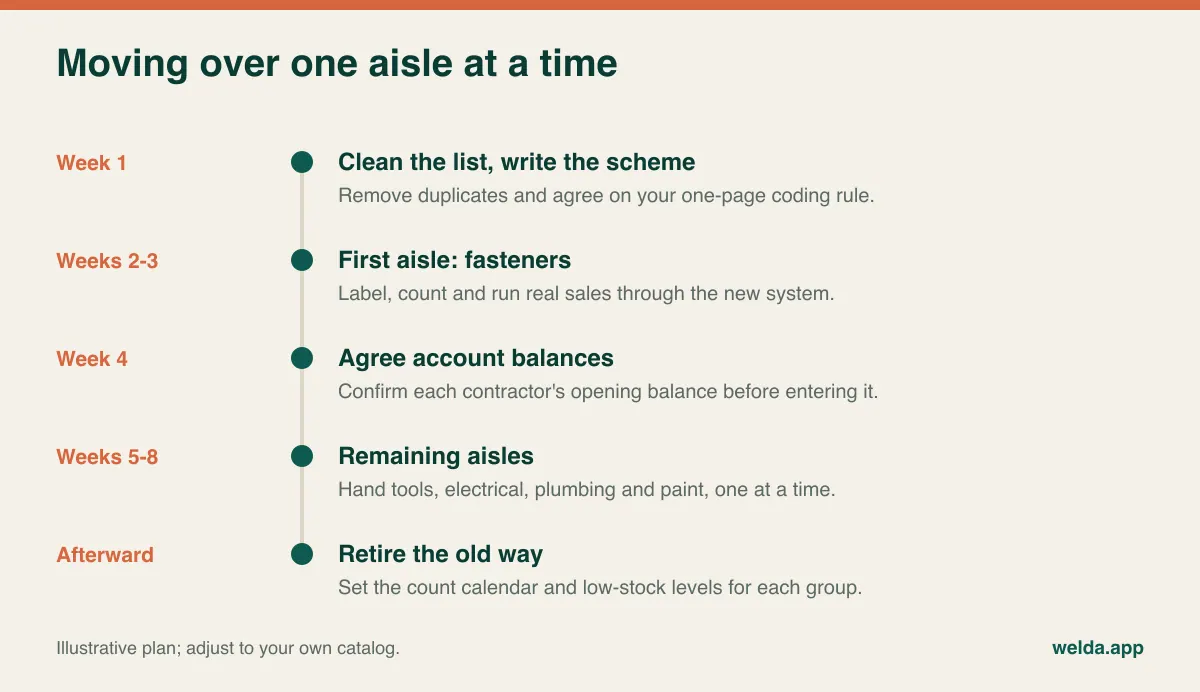
Two rules keep this from falling apart. Once an aisle is live, nobody records sales for it the old way, because two parallel systems both end up being wrong. And no contractor's balance goes in until he has confirmed it. An error on a contractor's first statement costs you more trust than any feature can earn back.
Watch one signal during the transition: are people actually using the system at peak times? If sales slip through unrecorded during the morning rush, find out why. The search may be slow, a label may be missing or the code may be hard to find. Fix it within days, and the system becomes a habit. Ignore it, and the old clipboard returns within a season.
FAQ
What's the difference between hardware store POS software and a general retail POS?
General retail POS assumes every product has a manufacturer's barcode and a single unit of sale. Hardware stores often assign their own codes, mix boxes, pieces, weight and length, and run trade accounts. A general POS can work if it passes tests with your actual items, so run them before you buy.
How do I sell items that have no barcode?
Put a barcode label with your own part number on the bin or shelf edge. The clerk scans that label and keys in the quantity. Until the label exists, search by name or part number. Start labeling with the items that sell most often.
Do I have to load my entire catalog before going live?
No. Load and clean your regular sellers first, and add slower items when they next sell. Decide whether items with no sales in a year should stay in the range at all before you spend time on them.
Will Welda Stock handle tens of thousands of items?
Product count is one of the things we consider when preparing a quote, so tell us yours. What really matters is whether search is fast enough at your counter, and the honest way to find out is to try part of your own list in a free demo. You can review what's included on our hardware store POS software page first.
Can I keep contractor accounts in a spreadsheet?
With a few accounts, for a while. The weakness is the gap between the sale and the account entry: when the counter is busy, a line doesn't get written, and both balance and stock go wrong. Keeping sales and accounts in one system closes that gap.
Does POS software replace my accountant or bookkeeping system?
No. It organizes daily stock and sales records. Tax filings, official books and compliance remain with your accountant, so ask what reports and file formats they need before you switch.
What should I prepare to get a price?
Your approximate item count, number of users and branches, whether you use scanners, and how you track stock today. That's enough for a free consultation, where we can pin down scope and price together.
One week of tallies will tell you more than a brochure
For one week, keep a tally at the counter of how often someone asks "how many of these do we have left?" and "what has this contractor bought this month?" Good software answers both in seconds on the screen. If you'd like to see whether Welda Stock can do that with your list and your accounts, book a free consultation and bring your hundred messiest items. We'll try them together, and if it isn't the right fit, we'll say so.