Flower shop POS software earns its place when you sell perishable stems, more than one person rings up sales, and you cannot say with numbers how many stems you threw away last week or which flower really made money. If you work alone, keep a narrow range and buy mostly to order, a two-week waste log is the better first step. The decision rarely comes down to a feature list. It comes down to how invisible your shrink is, how many hands touch the register, and how much of your stock is not flowers at all.
Most retail POS advice assumes products that sit on a shelf until someone scans them. A flower shop breaks that assumption every morning. You buy by the bunch and sell by the stem. One bouquet consumes ten stock items. Your best-selling product might be worthless by Friday. And your biggest day of the year can be several times busier than a normal Tuesday. This guide is about those differences, because they decide whether a system helps you or simply gives you a tidier record of the wrong numbers.
A bucket is not a SKU
Start with what a florist's inventory actually looks like. There are at least three kinds of stock in the building, and each behaves differently in software.
Cut flowers and foliage lose value daily. The count in the system can be perfectly accurate while half of the bucket is two days from the compost bin. A barcode rarely exists at stem level, so sales are usually picked from a screen rather than scanned.
Plants, vases and gifts behave like ordinary retail. They often have barcodes, they sell one at a time, and they do not wilt. They can quietly tie up cash instead: a ceramic vase that has been on a shelf for a year never shows up in your waste log, but it is still money you cannot spend. For many shops this is the part of the business where POS software pays back fastest, simply because the standard retail tools fit.
Consumables such as floral foam, wire, ribbon, wrap and cards are used inside other products. Nobody scans them. You need them on a reorder list, not on the sales screen, and running out of wrap on a holiday morning costs more than the wrap itself.
When you look at any system, ask how it would treat each of those three groups. A demo built around scanning packaged goods will look smooth and tell you almost nothing about the first and third groups. Then ask yourself what share of your revenue sits in each group. A gift-heavy shop and a design-led studio can be the same size and need quite different things.
Where the stems go
Shrink in a flower shop is not one event. A stem can leave your inventory without a sale at several points, and each exit points at a different problem. Follow a hundred stems through a typical week and the picture changes from "we waste some flowers" to something you can act on.
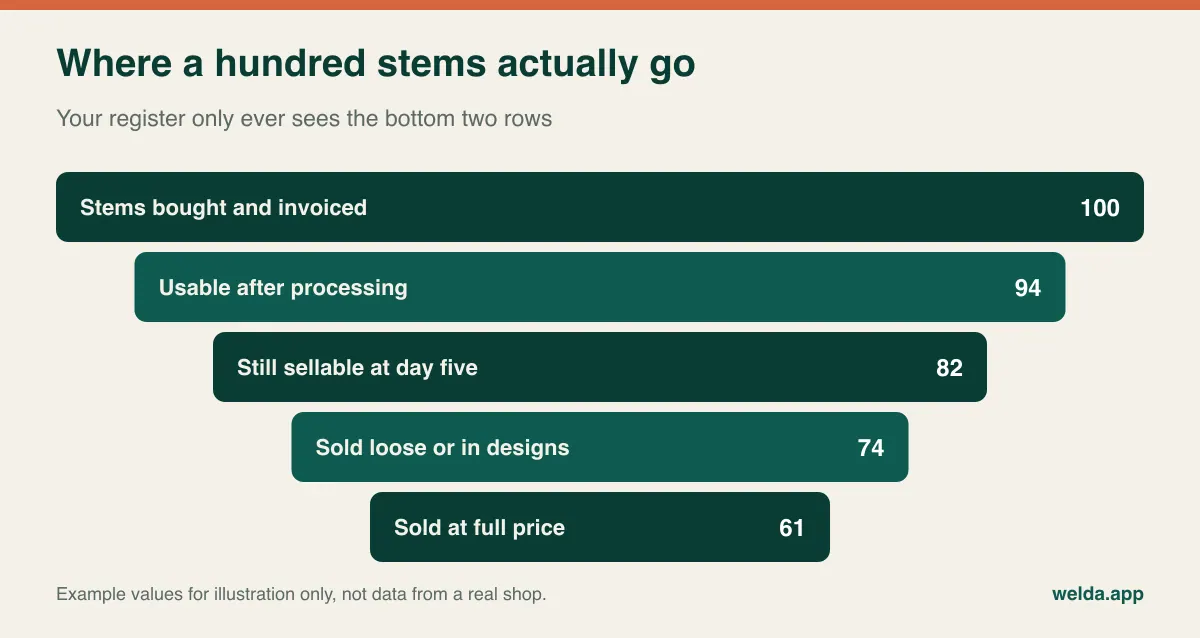
Some of those losses happen before you can sell anything. Stems arrive broken or short-counted, or lose their heads during processing. If those are not recorded on arrival, you have no basis for a credit request and no way to compare suppliers. A wholesaler that looks cheaper per bunch may cost more per usable stem, and only your own receiving notes can show that.
Others happen because you bought too much or the wrong mix: the classic bucket that never moved. That is a purchasing problem, and the answer is a smaller order or an earlier markdown, not a better cooler. Still others happen on your own bench. Stems snap during design work, and offcuts go unused. That is about workroom habits and standard recipes. Finally there are stems you chose to use, such as the window display or a replacement for an unhappy customer. These are closer to marketing and service costs than to waste, and treating them as shrink hides what is really going on.
This is why a single "waste" button is not enough on its own. You want at least the flower, the quantity, the date and a reason. If a system has no reason codes, ask whether a note can sit on the stock movement, and whether you can filter on it later. For a broader view of loss types in retail, see our guide to preventing retail shrinkage. Our piece on tracking spoilage at a greengrocer covers a neighboring trade whose daily routine translates well to flowers.
The arithmetic your item report skips
Standard margin reports compare cost with selling price. That sum assumes every stem you bought gets sold. In a flower shop, the stems that sell also have to pay for those that did not.
Here is a worked example, using neutral units rather than currency so you can substitute your own costs. You buy 50 stems at 1 unit each and sell them at 2 units each. The report shows a 50% margin. But only 40 stems sold, and the other 10 went in the bin. Revenue is 80 units, cost is 50 units, and the real margin is 37.5%. Each stem you sold truly cost you 1.25 units, not 1.
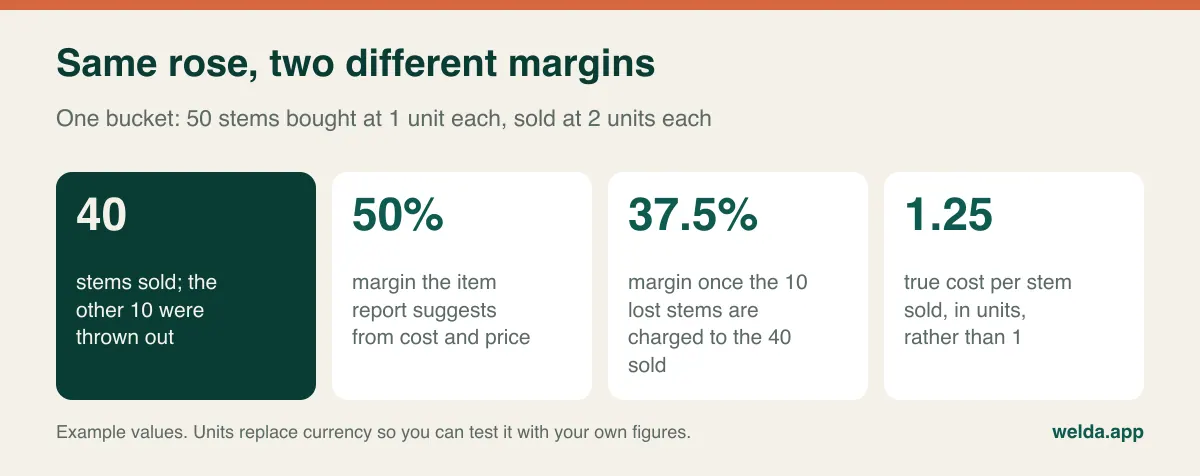
Push the example further. If only 25 of those stems sell, revenue is 50 units and you have earned nothing, even though every report line still says 50%. A delicate variety that opens fast may look identical in cost to a sturdier one and yet carry a very different true cost. Pricing decisions belong on the second number, and that number only exists if someone records waste consistently.
So here is a useful test for any vendor: "Show me a screen where my margin on roses reflects the roses I threw away." If the system cannot do it directly, ask how you would combine the waste records and the margin report yourself, and how long that takes each month. A monthly job you will actually do beats an elegant dashboard fed by entries nobody makes.
Run a two-week waste log before you buy anything
The cheapest experiment in this whole decision costs one notebook. Keep it by the bench for two weeks. Every stem that gets discarded, replaced or used for display goes in with four fields: date, flower, quantity, reason. Nothing else.
At the end you will know three things. First, whether waste is actually your problem or only feels like it. Second, where it starts: buying, supply, the workroom or the display. Third, and most telling, whether your team will keep records at all. If people skip a notebook for two weeks, they will skip a touchscreen as well, and the system you buy will produce confident reports from incomplete data. Better to learn that now.
If the log shows mostly unsold stems, stock visibility and purchasing history will help, so software is worth looking at. If it shows mostly damaged arrivals, your next conversation is with your supplier. If waste turns out to be small and your real pain is end-of-day cash that never balances or unpaid business accounts, then you are shopping for different features than you assumed, and you now know which ones.
Three ways to track a bouquet
Here is the question that causes more disappointment than any other. Ask a vendor, "When I sell a bouquet, do the stems come out of stock?" and listen carefully. Some systems support recipes or bundled items. Recipes can be hard to keep up for hand-tied work, though, because each design is different and nobody wants to count stems at the counter when three customers are waiting. So decide how much precision you actually need.
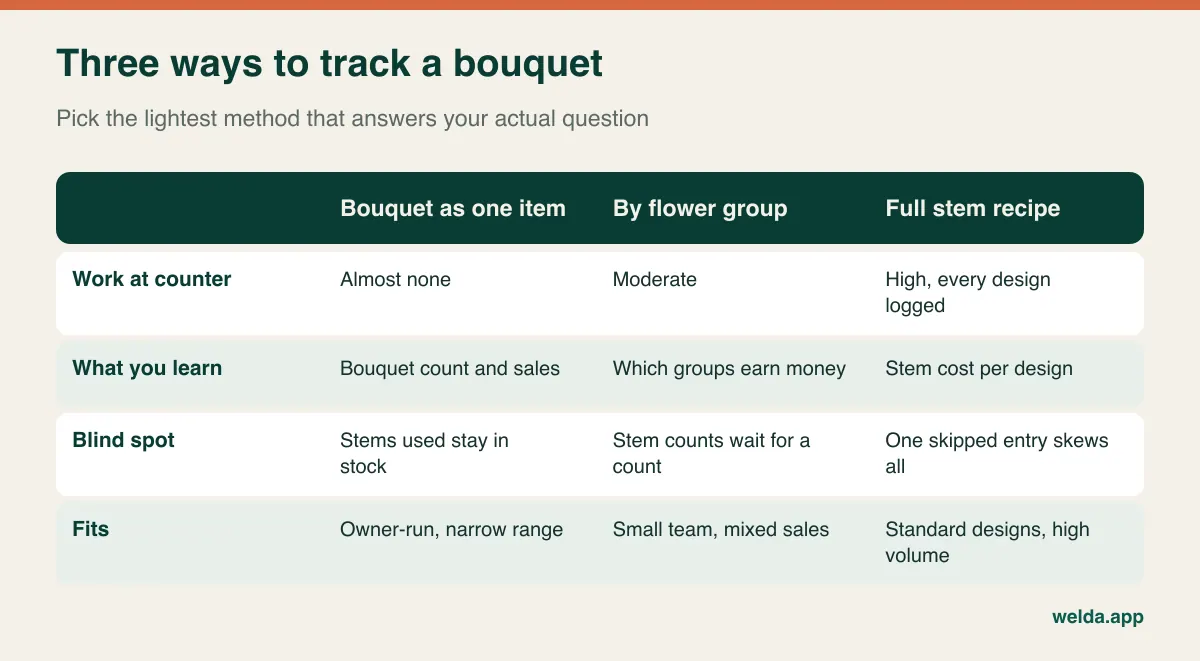
Bouquet as a single item. You create "Medium hand-tied" as a product and ring that up. Setup takes minutes and sales are fast. The stems used stay in stock on paper, so you reconcile them at the next count. For an owner-run shop that can eyeball its buckets, this is often enough to start, because you still see bouquet count and revenue.
By flower group. You record purchases and waste against groups such as roses, lilies, seasonal, foliage, and you count regularly. Consumption is what is left over: opening stock plus purchases, minus closing stock and waste. You will not get stem-level accuracy, but you will find out which groups are earning. For a small team with mixed sales this tends to be the sensible middle.
Full stem recipe. This works when designs are standardized and volume is high, such as a recurring corporate arrangement or a set holiday range. You see exact cost per design. The catch is that a few skipped entries undermine the whole report, and people stop trusting it. If you go this way, time how long one sale takes with a recipe attached, on the actual device you plan to use.
You can also mix them: recipes for your five standard holiday designs, single items for everything else. Whatever you pick, write it down, because a shop where one person uses recipes and another rings up an "open item" gets the worst of every method.
Bunches in, stems out
Invoices arrive in bunches, boxes or stem counts that vary by supplier and variety. Sales go out by the stem or as part of a design. If the system cannot separate purchase units from sales units, the first delivery will set up numbers that make no sense, and staff will stop believing the screen. Ask to see an invoice for ten bunches of 25 entered and stock rising by 250 stems, with the cost per stem worked out correctly.
If a system has no conversion feature, there is a simple workaround: create every flower in stems, enter every invoice as stems, and convert the cost yourself before entry. That is a discipline rather than a feature, and it needs to be agreed from day one. It also makes supplier comparison easier, because everything ends up expressed as cost per stem.
What a holiday morning does to your system
Valentine's Day, Mother's Day, Christmas, prom season and wedding weekends change the shop completely. Purchase costs can rise, the queue never clears, seasonal helpers are on the register and phone orders keep arriving. Testing software on a quiet weekday tells you little about the days that pay for your year.
Check three things with holidays in mind. Speed: how many taps does it take to sell a pre-made bouquet with an add-on card? Permissions: can a one-week helper give discounts, void a sale or read your margin report? Connectivity: if the system runs online, what do you do when the connection drops at 9 a.m. on February 14? A backup connection and an agreed paper procedure belong in your plan long before the day itself.
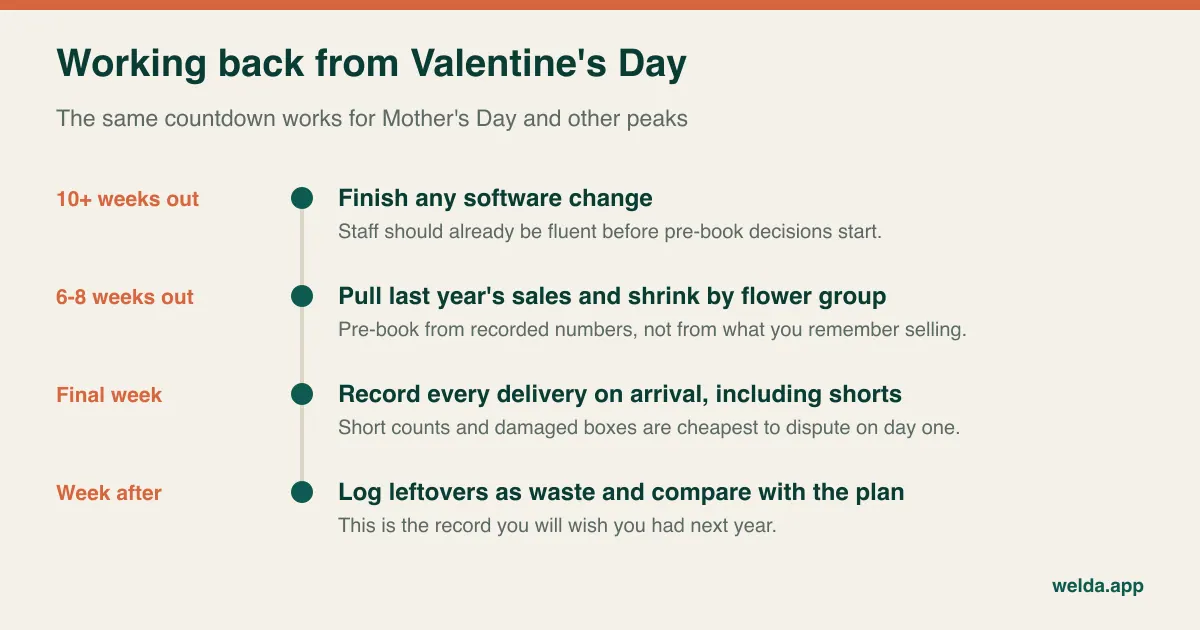
The larger payoff comes a year later. Holiday over-buying is the most expensive waste you will ever have: you paid peak cost, and demand drops off a cliff the day after. If you recorded sales and leftovers by flower group last time, this year's pre-book comes from evidence rather than memory. No software delivers that in its first season, so judge it by the second year, and start recording before it matters.
Event deposits, house accounts and delivery
Money does not always come in across the counter. Weddings involve a deposit and a balance weeks or months later. Funeral homes, hotels, restaurants and offices often run on account and pay monthly. A paper ledger handles this until the busy month when two invoices go missing.
So look for customer balances, purchase history and payment records in one place. Then ask two sharper questions. How do you record a deposit for an event that has not happened yet, so that monthly reports do not overstate sales? Talk that one through with your accountant. And how do you reserve stems for a Saturday wedding so that someone does not sell them on Thursday? If the answer to the second is "you can't", plan on a physical hold bucket and a clear label.
Delivery and online orders are a different job altogether. Delivery windows, recipient addresses, card messages and routes belong to order management, and orders that arrive through relay networks or marketplaces add their own process. If most of your revenue comes this way, evaluate that workflow first and treat stock as the second question. Your own site matters here too, and our florist website guide looks at that side of the business.
Should your shop buy now?
Not every florist needs this. A one-person studio that buys for specific jobs may see little unsold stock and every stem by hand, and a system could add more work than it removes. The picture changes when a second person starts taking payments. Who sold what, why the drawer is short, who gave which discount: none of these can be answered by looking around the room any more.
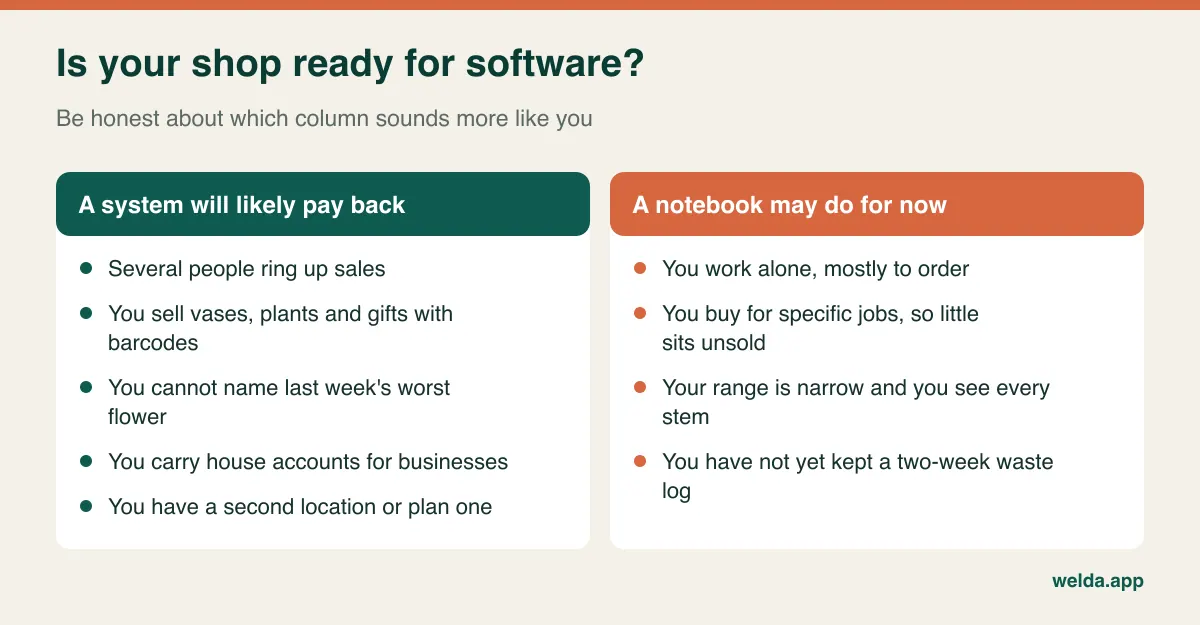
Timing matters as well. A shop that is about to open a second location, or that has grown its gift range substantially, gets more from a system than one that is steady and small. And if your real problem is late couriers or scrambled online orders, an inventory-focused POS will not fix it however good it is. Name the actual problem before comparing products.
Where Welda Stock fits, and where to ask hard questions
Welda Stock is retail inventory and sales software. Our sector pages describe businesses like grocery stores, butchers, delis and produce shops, and we do not market a packaged florist edition. If you are considering it as flower shop POS software, these documented capabilities are the ones that map to this article: real-time stock, low-stock alerts, stock counts with waste and shrinkage tracking, fast barcode sales with customer receipts, an end-of-day cash report, customer accounts with balances and payment history, supplier invoices and payables, margin and profitability analysis per product, roles for cashier, warehouse staff and manager, multiple branches, and data import from Excel.
Here is what we will not promise in this article, because it is not described in our product documentation: automatic stem deduction through bouquet recipes, purchase-to-sales unit conversion, batch tracking by arrival date, delivery and courier planning, card message handling, and online order or relay network integrations. Bring these to the conversation if they matter to you. If they are dealbreakers, you should know early, and we would rather say so. Our weighing-scale barcode feature is built for grocery and produce shops and is not a reason to choose us as a florist.
Welda Stock is web-based, needs no installation and operates over your internet connection, so a shop with unreliable connectivity should plan its way of working during setup. The interface is available in English, German and Turkish. The product page lists every feature, so you can judge it as flower shop POS software for yourself.
Sales tax, receipts and customer data
Rules vary a lot by country and state, so treat this as a list of questions for your accountant rather than as advice. Some jurisdictions require certified fiscal devices or real-time reporting of retail sales, and a customer receipt printed by sales software is not automatically a fiscal document. Ask every vendor how their system works alongside your local requirement. We do not claim fiscal certification for Welda Stock here, so raise it with us as well if it applies to you.
Flower sales also bring tax questions that many other shops never see. A delivery may be taxed according to where the recipient is, not where your shop is, and different items in one arrangement may be treated differently from one place to another. Check how your system handles this if you deliver across state or national borders.
Then there is customer data, and florists hold more sensitive information than they might think. Recipient addresses, hospital rooms, funeral details and handwritten card messages can reveal personal relationships and circumstances. Under privacy laws such as the GDPR, what you must do depends on your situation, but sensible habits apply everywhere: collect only what you need, do not keep card messages longer than necessary, limit who can read them, and take professional advice if you are unsure.
Comparing quotes without being fooled by the bottom line
Two quotes can look comparable and cover quite different things. Cost is usually driven by the number of users and locations, the size of your data import, hardware and support. Put these questions to every vendor and record the answers on one page:
- Is this a one-time payment, a subscription or a mix? What happens to your data if you leave?
- Do seasonal helpers count as extra paid users during peak weeks?
- Are setup, data import and staff training included, or billed separately?
- Will your existing scanner and receipt printer work, or does the quote assume new hardware?
- What are the card processing terms, and are you tied to one payment provider?
- When is support available, and can you reach someone on the morning of February 14?
- What would a second location cost, and do any fiscal or integration services carry their own fees?
The biggest hidden cost is software your team stops using. A cheap system abandoned after a month has cost more than a notebook, in both money and goodwill. For Welda Stock, pricing is tailored to your users, branches and product count and gets settled in a free conversation. Setup, Excel data import and staff training are part of the offer.
Script the demo yourself
Vendor demos are full of clean sample data. Bring a messy day instead. Take a real supplier invoice, a recent bouquet you made, and your waste notebook. Enter the invoice. Sell one stem. Log three as waste. Then find those three in a report. If that short sequence stumbles, the rest of the demo hardly matters.
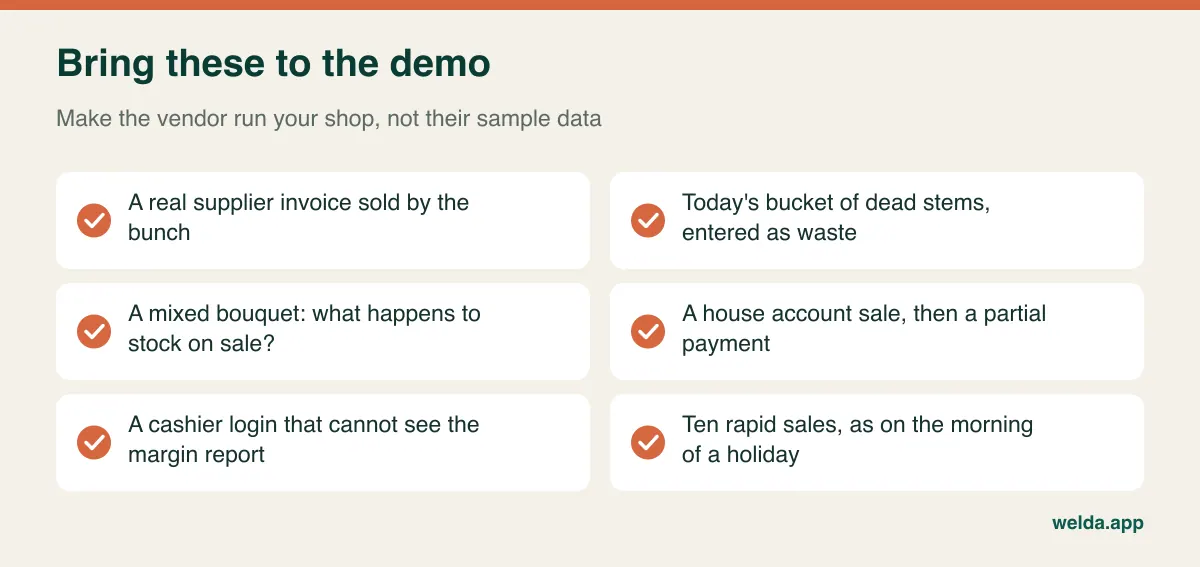
Have the person who actually works the counter sit in. Owners tend to fall for reports, while the person on the register will notice the extra three taps that get skipped on a busy day. Finish with a monthly question: "Which screen tells me what each flower group earned me last month, after waste?" Then ask them to show it, not describe it.
A changeover that respects the floral calendar
Never change systems shortly before a big holiday. Pick a slower stretch and begin with the easy stock: load vases, plants, gifts and consumables from a spreadsheet, and get scanning right. Add your main flower groups in stems next. Clean the list as you go, because there is no reason to migrate every variety you have ever bought. Our guide to moving from Excel to inventory software shows how to prepare the file.
In the first two weeks, focus only on sales and waste entries, and leave recipes and reports for later. After a month, count everything and compare it with the system. Differences are normal with flowers; what counts is being able to explain them. By the end of the second month, make your first real decision from the data: which of your three worst-performing flowers are you going to buy less of?
Frequently asked questions
Can a florist manage with a spreadsheet?
For a narrow range and a single user, yes. A spreadsheet can hold counts and a waste log. It just does not update when you make a sale, so it drifts quickly once two people are working and the shop gets busy.
How often should a flower shop count stock?
Cut flowers need far more frequent counts than most retail goods. A short weekly count, or a quick bucket check before each delivery, is a reasonable place to start. Vases and gifts can be counted less often. Keep the count tied to your waste records so that differences have an explanation.
Does marking down aging flowers really reduce waste?
Usually it turns some waste into revenue, but you only learn whether it worked if it is recorded. Ring markdowns under a separate item or category so you can compare them with what you would have thrown out. Be open with customers about the shorter vase life, too.
Do I need a POS built only for florists?
Not automatically. Florist-specific systems may cover recipes, delivery and relay orders better, while general retail systems may be stronger on stock, accounts and barcoded goods. Choose according to where your revenue sits and which problem your waste log revealed.
Is Welda Stock a good fit for a flower shop?
It is worth a look if your priorities are waste records, counts, barcode sales, customer accounts, supplier payables and per-product margin. If bouquet recipes or delivery planning are must-haves, raise them first, because we make no promise about them here.
How much does flower shop POS software cost?
That depends on users, locations, data import, hardware and support, plus any payment or fiscal services around the system. For Welda Stock, we work through your scope and settle the price in a free conversation. Bring your waste log and a recent supplier invoice, and we can talk through your own shop instead of a sample one.